Please REGISTER or RENEW your account on RAPiDGATOR.net and support us by doing through all RAPiDGATOR working download links on main posts...
Mar 10

AltTab 10.4.0

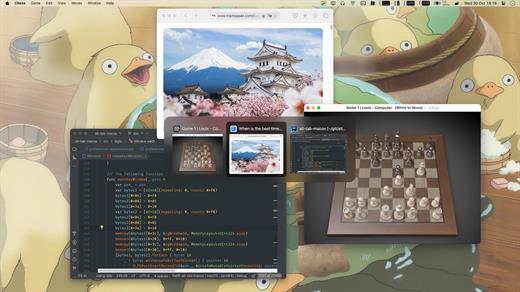
AltTab brings the power of Windows’ “alt-tab” window switcher to macOS.

Usage


  • Press ⌥ option + ⇥ tab to shows the thumbnails.
  • Hold ⌥ option and press ⇥ tab to select the next thumbnail.
  • Hold ⌥ option and press ⇧ shift + ⇥ tab to select the previous thumbnail.
  • Release ⌥ option to switch focus to the window.
The app is available in: Bahasa Indonesia, Deutsch, English, Español, Français, Italiano, Lëtzebuergesch, Magyar, Nederlands, Português (Brasil), العربية, Suomi, Türkçe, Русский язык, 中文 (简体), 中文 (繁体), 日本語, 한국어

What’s New

Version 10.4.0:


  • Release notes were unavailable when this listing was updated.
Compatibility

macOS 10.12 or later, 64-bit processor


Release Name: AltTab 10.4.0
Size: 11.5 MB
Links: HOMEPAGE – NFO – Torrent Search

Download: RAPiDGATOR

7 Comments
Mar 10

Mitti 2.8.17

Mitti is a modern, feature-packed but easy-to-use pro video cue playback solution for theatre, audiovisual shows, performances, and exhibitions.
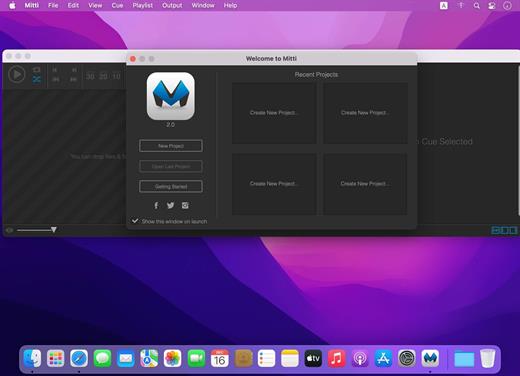
Nice, easy and powerful

Mitti has a clear, intuitive, uncluttered user interface with an easy to learn and use workflow, on top of the modern, 64bit, low-latency audio and a really powerful GPU-accelerated video playback engine driven by it’s robust, SMPTE-time-speaking internal clock.

Various Cue Types & Cue-level Preferences

You can create Cues in Mitti from video and still image files of course, as well as a rich-set of inputs, including Cameras, Syphon and NDI sources. Cues have their individual color, video effect, audio output and transition settings.

Works the way you want

In Mitti’s Playlist Preferences you can define default times for Fade-In/Outs and Transitions, as well as the default SMPTE format and SMPTE offset.

Besides of that, Mitti also allows you to define default states for Cues that match your workflow. Always want to apply Transitions or Fade-Ins? Need to always stop playback once a Cue has been finished? Not a problem, you can set that for your Cues globally and – of course – also individually.

Timecode Input

Mitti’s playback engine can be easily slaved to an external MTC (MIDI Timecode) or LTC (Linear Timecode) SMPTE timecode source to make tight sync with any software or hardware timecode generators, show control solutions or even DAWs.

Multi-screen Video Output

Mitti supports fullscreen output on multiple displays, with individual 4-corner warping on each output and edge blending settings. Managing double- or triple-wide outputs never been so easy before!

Remote controllable by MIDI / OSC / DMX

Mitti is remote controllable by MMC (MIDI Machine Control) and MSC (MIDI Show Control) commands as well as hardware and software MIDI controllers, has an extensive OSC API and also remote controllable by Art-Net (DMX over Ethernet).

What’s New

Version 2.8.17:


  • Release notes were unavailable when this listing was updated.
Compatibility

macOS 10.14.0 or later


Release Name: Mitti 2.8.17
Size: 13.1 MB
Links: HOMEPAGE – NFO – Torrent Search

Download: RAPiDGATOR

9 Comments
Mar 10

EdgeView 5.7.8

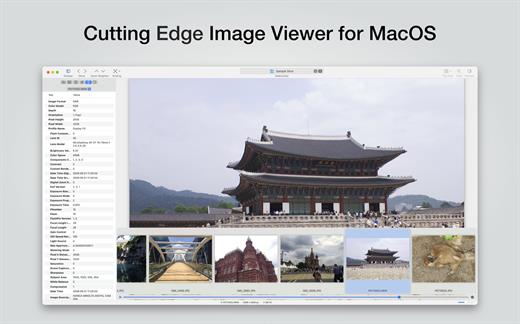
EdgeView 5 is fast image viewer has elegant user interface. EdgeView 5 is developed and designed for modern MacOS. It can open various image files such as JPEG, PNG, TIFF, BMP, and RAW file of DSLR, EPS and PDF, AI(Adobe Illustrator). Can open image files in archive directly without extraction.

User can open files, rename files, delete files from EdgeView’s file browser. Also can access to SMB/AFP/FTP network volume.

User can navigate images quickly by using keyboard shorcut, mouse wheel, trackpad gesture. EdgeVew show EXIF information, play animation GIF/PNG/WebP smoothly. Save last status to history, and restore when reopen file.

EdgeView 5 will be the best choice when viewing and managing image files.

What’s New

Version 5.7.8:


  • Release notes were unavailable when this listing was updated.
Compatibility

macOS 11.1 or later
Apple Silicon or Intel Core processor


Release Name: EdgeView 5.7.8
Size: 142.5 MB
Links: HOMEPAGE – NFO – Torrent Search

Download: RAPiDGATOR

6 Comments
Mar 10

Cookie 8.4.5

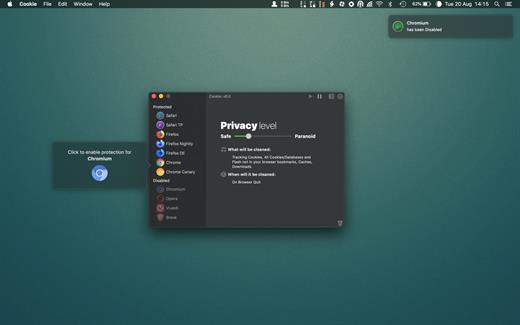
Cookie prevents third parties from hijacking your browsing experience. The sites you visit store “cookies” in your browser without your knowledge or consent. Some are helpful, but others are frustrating and invasive. Cookie can help.

Features:


  • Consolidate all your browser privacy settings
  • Simplified View that takes care of all the technical details for you
  • Advanced View which puts you in total control of all your privacy settings
  • Combined cookie view displaying all cookie/flash/localStorage data in one easy to manage view
  • Cookie’s can be favorited on a per domain, or per cookie basis. You decide
  • Individual Browser settings. It is possible to configure different automatic removal options for each browser. In the case of Chrome/Chromium/Canary/Brave you can even configure settings per user!
  • A number of removal schedules are possible: When quitting Cookie, when a Browser is Quit, on computer login, On computer waking from sleep, on a customizable time schedule, or entirely manually
  • Hotkey support, so you can remove all unwanted data quickly and easily
  • Customizable tracking cookie definitions
  • Whitelist individual tracking cookies
  • Clean, modern and Intuitive User Interface
  • Helpful setup window
  • Browser extension protection
  • Full Screen support
  • iCloud support
  • Dark/Regular theme
What’s New

Version 8.4.5:


  • Release notes were unavailable when this listing was updated.
Compatibility

macOS 10.14 or later, 64-bit processor


Release Name: Cookie 8.4.5
Size: 9.7 MB
Links: HOMEPAGE – NFO – Torrent Search

Download: RAPiDGATOR

6 Comments
Mar 10

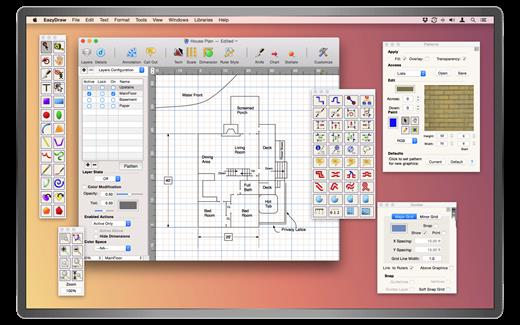
EazyDraw 12.4.5

EazyDraw is a vector drawing application. For the full journey from Jaguar to El Capitan, EazyDraw has been the trail-blazing app for the new vector-drawing paradigm on the Mac.

EazyDraw provides a balanced feature set that includes tools needed for technical drawing, Web and app graphic design, print publishing, logos, page — text layout and more. Easy enough for everyone, but with the depth your project will need.

Includes comprehensive support for bitmap and vector graphic formats. Import and ungroup for editing PDF and EPS. Import and export SVG and now DXF. Preview and publish to EPS and TIFF with RGB or CMYK process colors. Exchange scaled CAD drawings with DXF. Publish Web graphics. Create Mac, iPhone, and iPad app-development graphics and icons.

What’s New

Version 12.4.5:


  • Release notes were unavailable when this listing was updated.
Compatibility

macOS 10.13 or later
Apple Silicon or Intel Core processor


Release Name: EazyDraw 12.4.5
Size: 159.6 MB
Links: HOMEPAGE – NFO – Torrent Search

Download: RAPiDGATOR
7 Comments
Mar 10

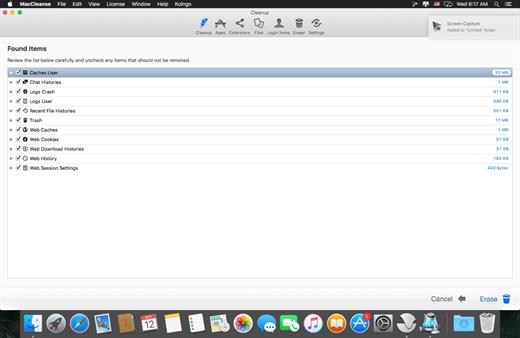
MacCleanse 14.5

MacCleanse is the product of thousands of hours of intense research and development. It meticulously scans all of the nooks and crannies of a computer for unnecessary junk that can take up huge amounts of disk space! Because of this, Apps in MacCleanse are also uninstalled correctly, catching the numerous logs, caches, plugins, and other resources left behind versus simply dragging them to the Trash. Your privacy is protected and computer performance enhanced by MacCleanse as it wipes your web and app histories, and can toggle resource-hungry extensions!

What’s New

Version 14.5:


  • Release notes were unavailable when this listing was updated.
Compatibility

macOS 10.15 or later, 64-bit processor


Release Name: MacCleanse 14.5
Size: 102.9 MB
Links: HOMEPAGE – NFO – Torrent Search

Download: RAPiDGATOR

7 Comments
Mar 10

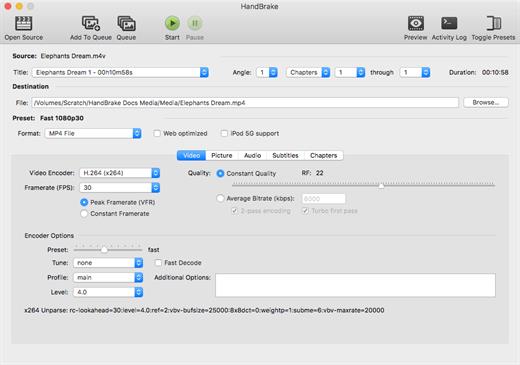
HandBrake 1.11.0

HandBrake is a tool for converting video from nearly any format to a selection of modern, widely supported codecs.

Features


  • Supported Sources

    • VIDEO_TS folder, DVD image or real DVD (unencrypted — CSS is not supported internally and must be handled externally with third-party software and libraries), BDMV folder (unencrypted), and some .VOB and .TS files
    • Any multimedia file it can get libavformat to read and libavcodec to decode.
  • Outputs

    • File format: MP4 and MKV
    • Video: MPEG-2, MPEG-4, H.264 or Theora (1 or 2 passes or constant quantizer/rate encoding)
    • Audio: AAC, HE-AAC, AC3, MP3, Vorbis, FLAC (16-bit, 24-bit) or AAC, MP3, AC3, DTS and DTS-HD pass-through (supports encoding of several audio tracks)
  • Miscellaneous features

    • Chapter selection
    • Soft subtitle support (DVD/VobSub in DVD/MKV/MP4, Blu-ray/PGS in BD/MKV, SRT files, SRT/UTF-8 in MKV, ASS/SSA in MKV, TX3G/3GPP in MP4 – DVD/VobSub, Blu-ray/PGS and ASS/SSA subtitles can also be burned-in the picture)
    • Picture deinterlacing, cropping and scaling
    • Grayscale encoding
What’s New

Version 1.11.0:


  • Allowed muxing NVENC AV1 and VCN AV1 in WebM container.
  • Fixed a crash that could happen when a source contains chapters with no titles.
Compatibility

macOS 10.13 or later
Apple Silicon or Intel Core processor


Release Name: HandBrake 1.11.0
Size: 46.9 MB
Links: HOMEPAGE – NFO – Torrent Search

Download: RAPiDGATOR
9 Comments
Mar 9

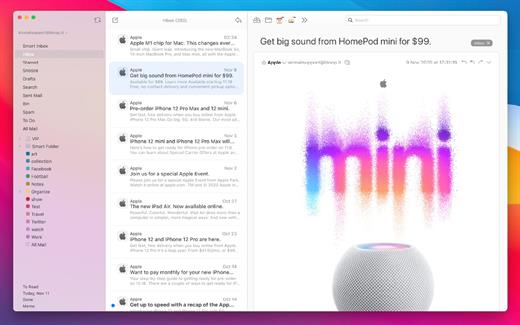
AirMail Pro 26.0.19

Airmail 4 is a new mail client designed with performance and intuitive interaction in mind optimized for macOS High Sierra! Support for iCloud™, MS Exchange, Gmail™, Google™ Apps, IMAP, POP3, Yahoo!™, AOL™, Outlook.com™, Live.com™

Airmail was designed from the ground UP to retain the same experience with a single or multiple accounts and provide a quick, modern and easy-to-use user experience. Airmail is clean and allows you to get to your emails without interruption – it’s the mail client for the 21st century.

We have taken usability and function to the next level with Airmail and bring a striking-design with support for all major email services. Switch between accounts like a breeze and quick reply to incoming messages within seconds – email has never been so easy and productive.


  • iCloud Account sync
  • iCloud attachment upload and share the link.
  • Handoff support, Composing Draft and folder selection are mirrored on different devices
  • Today Extension, quick access to your inbox.
  • Action Extension, Airmail Compose, Inline create and send messages directly form other apps
  • Action Extension, Airmail Share to quick send messages and attachments.
Accounting:

  • Unified Inbox
  • Alias with custom SMTP
  • Exchange, iCloud™, Gmail™, IMAP, POP3, Google™ Apps, Yahoo!™, AOL™, Outlook.com™, Live.com™
  • Local Accounts
  • Import from Apple Mail, MBOX archive, EML, EMLX, Airmail 1.x
Interactions:

  • Quick Reply
  • Undo History
  • Offline operations
  • Move messages on Different mailboxes
  • Interaction sounds
  • Multi Touch gestures
  • Exchange Meeting Invite
Shortcuts:

  • Gmail Shortcuts
  • Custom global shortcuts
  • Quick Label, Move, Label and Archive
  • Quick folder selection
Attachment:

  • Drag and drop
  • Quick Look preview
  • Google Drive, Dropbox, CloudApp, Box, Onedrive, Droplr, FTP
  • Inline image attachments
  • Winmail.dat preview
  • VCalendar
Conversations:

  • Group by id
  • Group by subject
  • Chronological Reverse
  • Muted CC’d conversation
Visual:

  • Multiple visual themes
  • Minimal and extended Mode
  • Plain Text Rendering
Notifications:

  • Per account notifications
  • Notification center support
  • Notification alerts with custom actions
Address:

  • Gmail, Exchange and OS X contacts
  • Contacts Group
  • Filter by address
  • Open Directory search
Composer:

  • Google App Directory
  • Exchange Global Address List
  • LDAP directory
  • Markdown, Html(Html Source for templates), and text only.
  • Custom settings per single account
  • Bullet and numbered list.
Sending:

  • Auto CC, BCC.
  • Pending operations
  • Send Delay
  • Redirect
  • Send again
  • Bounce
Advanced:

  • Split Screen Support
  • Time Machine friendly
  • Deckles mode
  • EML Import/Export
  • Disable GPU to save battery life
  • Applescript
  • Activity monitor
  • Data Detectors
Signatures:

  • Multiple Account Signatures
  • Markdown, Rich text, Html Source, and text only.
  • Signature above or below the quote
Search & Filtering:

  • Global search for multiple accounts
  • Realtime powerful filters
  • Sort messages, Date, Attachments, Conversations ….
  • Show messages of the same user
  • Flags and filters
Folders, Labels:

  • Nested folders
  • Create, Delete and edit folders
  • Custom colors synced by iCloud
  • Custom folder mappings
  • ToDo, Done, Memo
Send to:

  • Omnifocus
  • Fantastical
  • Evernote
  • Apple Reminder
  • Calendar
  • BusyCal
  • Things
  • 2To
  • Wunderlist
  • Todoist
Privacy:

  • Per user Autoload Remote Images,
  • Disable icon detection
What’s New

Version 26.0.19:


  • Release notes were unavailable when this listing was updated.
Compatibility

macOS 10.12 or later.
Apple Silicon or Intel Core processor


Release Name: AirMail Pro 26.0.19
Size: 42.6 MB
Links: HOMEPAGE – NFO – Torrent Search

Download: RAPiDGATOR

8 Comments
Mar 9

VidHub 2.1.8

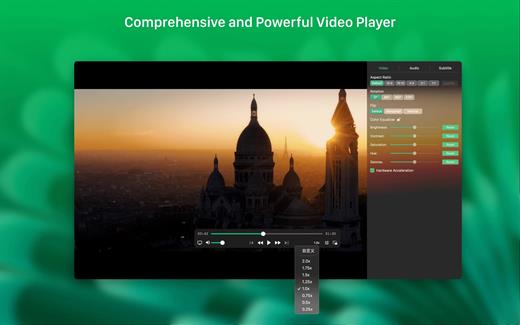
VidHub supports adding local video files, as well as Samba (smb)/WebDAV protocols, network storage(NAS) such as Synology DiskStation, and cloud drive such as Google Drive/Dropbox/One Drive. It automatically scrapes movie and TV show covers, cast information, and other details. It supporting almost all video formats. it also supports adjusting playback speed, subtitles, screenshots, HDR, etc.

What’s New

Version 2.1.8:


  • Fixed partial Ul compatibility issues on macOS 26.
Compatibility

macOS 10.15 or later.


Release Name: VidHub 2.1.8
Size: 81 MB
Links: HOMEPAGE – NFO – Torrent Search

Download: RAPiDGATOR
7 Comments
Mar 9

EtreCheck Pro 6.8.14

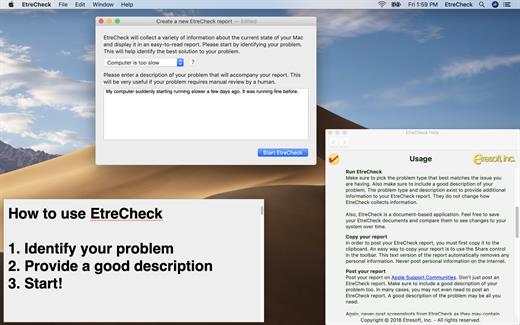
EtreCheck is an app that displays the important details of your system configuration and allow you to copy that information to the Clipboard. It is meant to be used with Apple Support Communities to help people help you with your Mac. EtreCheck automatically removes any personally identifiable information from the output.

EtreCheck will automatically alert you to serious problems like adware, insufficient RAM, or a failing hard drive.

EtreCheck is free and available in the Mac App Store with in-app purchases available. EtreCheck can now automatically generate solutions for any problems that it finds.

What’s New

Version 6.8.14:


  • Release notes were unavailable when this listing was updated.
Compatibility

macOS 10.13 or later
Apple Silicon or Intel Core processor


Release Name: EtreCheck Pro 6.8.14
Size: 11.6 MB
Links: HOMEPAGE – NFO – Torrent Search

Download: RAPiDGATOR

8 Comments