Please REGISTER or RENEW your account on RAPiDGATOR.net and support us by doing through all RAPiDGATOR working download links on main posts...
Feb 24

Rocket Typist Pro 3.3.1

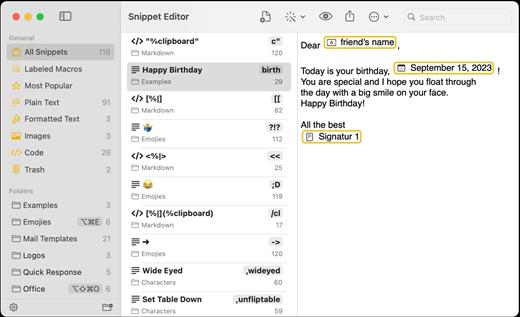
Rocket Typist is a modern Mac application, created with simplicity in mind. During a regular day, most of us type the same text over and over again, wasting an enormous amount of time in the process. Why not let your computer do some of that work for you? Once you have collected your snippets, you will never have to type them again. Here are just a few examples:


  • Commonly repeated phrases such as “How are you?”
  • Signatures with or without images
  • Current date and time
  • Names, addresses and other contact details
  • Hard to remember technical terms
  • Support replies to your customers
  • Code snippets for developers

Features:


  • Type an abbreviation and expend it into a snippet
  • Sync your snippets and category across all your devices using iCloud
  • Use macros to make your snippets more dynamic
  • Snippets can either be plain or rich text
  • Select snippets from your Mac’s Touch Bar
  • Export and import snippets
What’s New

Version 3.3.1:


  • Release notes were unavailable when this listing was updated.
Compatibility

macOS 13 or later
Apple Silicon or Intel Core processor


Release Name: Rocket Typist Pro 3.3.1
Size: 22.9 MB
Links: HOMEPAGE – NFO – Torrent Search

Download: RAPiDGATOR

11 Comments
Feb 24

Find Any File (FAF) Pro 2.6.0

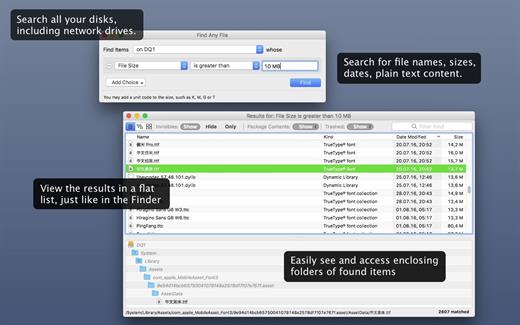
Find Any File searches your local disks for files by name, creation or modification date, size, or type and creator code (not by content, though).

As there are other tools with a similar search operation, here are the special features unique to Find Any File:


  • Has a new hierarchical view of the found items, making it much easier to browse 100s of items (see the screenshot).
  • Can run as root user, finding really any file on your disk, even those that are hidden from normal users.
  • Can save queries and run them again later.
Unlike Spotlight (i.e., the Finder’s Find command), it does not access a pre-built database but searches the chosen volume directly. This allows you to find any file, even those inside packages and others excluded from Spotlight search. Hence it is great for finding system files, for example.

On the other hand, it may take a little longer than Spotlight, and it is only fast on HFS(+) volumes. But even on mounted network volumes of a Mac OS X server it can still be surprisingly fast.

Hence, this is not an entire replacement for Spotlight but it can come handy in certain, if not many, situations.

What’s New

Version 2.6.0:


  • Release notes were unavailable when this listing was updated.
Compatibility

macOS 10.12 or later, 64-bit processor


Release Name: Find Any File (FAF) Pro 2.6.0
Size: 15.8 MB
Links: HOMEPAGE – NFO – Torrent Search

Download: RAPiDGATOR
10 Comments
Feb 24

EdgeView 5.7.5

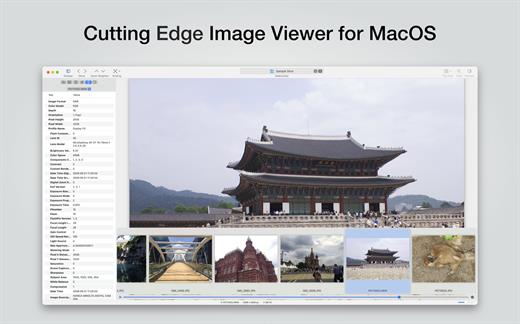
EdgeView 5 is fast image viewer has elegant user interface. EdgeView 5 is developed and designed for modern MacOS. It can open various image files such as JPEG, PNG, TIFF, BMP, and RAW file of DSLR, EPS and PDF, AI(Adobe Illustrator). Can open image files in archive directly without extraction.

User can open files, rename files, delete files from EdgeView’s file browser. Also can access to SMB/AFP/FTP network volume.

User can navigate images quickly by using keyboard shorcut, mouse wheel, trackpad gesture. EdgeVew show EXIF information, play animation GIF/PNG/WebP smoothly. Save last status to history, and restore when reopen file.

EdgeView 5 will be the best choice when viewing and managing image files.

What’s New

Version 5.7.5:


  • Release notes were unavailable when this listing was updated.
Compatibility

macOS 11.1 or later
Apple Silicon or Intel Core processor


Release Name: EdgeView 5.7.5
Size: 142.5 MB
Links: HOMEPAGE – NFO – Torrent Search

Download: RAPiDGATOR

10 Comments
Feb 23

Multitrack Editor 1.0.9

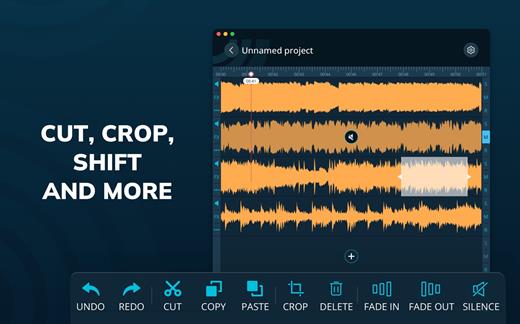
Features
– Multitrack editing
– Various audio file formats
– File sharing

Change the duration, crop and cut the selected areas with only a few taps. Save your files or entire projects on your device. Even if you don’t save, the app will back up any unsaved progress (can be activated/deactivated in the settings).

What’s New

Version 1.0.9:


  • Release notes were unavailable when this listing was updated.
Compatibility

macOS 10.15 or later


Release Name: Multitrack Editor 1.0.9
Size: 30.3 MB
Links: HOMEPAGE – NFO – Torrent Search

Download: RAPiDGATOR
10 Comments
Feb 23

Iconize 1.8.3

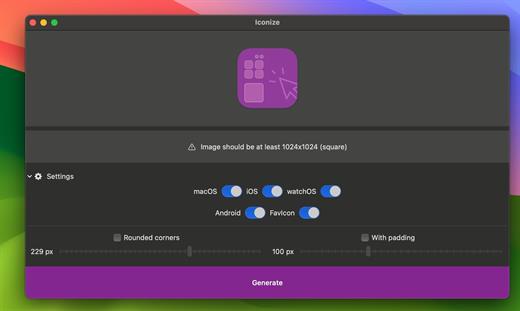
All your app icons. With one click. Customizeable icons? Mac? iOS? Android? Perhaps, a “favicon” for your website? Iconize has got you covered.

Easy-to-use

Just drag’n’drop your icon image and Iconize will take care of the rest. You may use any image format your Mac recognizes!

Configurable

Your icon is not yet “ready” and decided you want to add rounded corners and/or padding to conform to the guidelines? Awesome!

Fast

All the speed of the Mac at your fingertips. The whole process will be complete before you even begin to notice!

What’s New

Version 1.8.3:


  • Release notes were unavailable when this listing was updated.
Compatibility

macOS 11.0 or later.
Apple Silicon or Intel Core processor


Release Name: Iconize 1.8.3
Size: 4.8 MB
Links: HOMEPAGE – NFO – Torrent Search

Download: RAPiDGATOR
9 Comments
Feb 23

Tagr 5.13.0

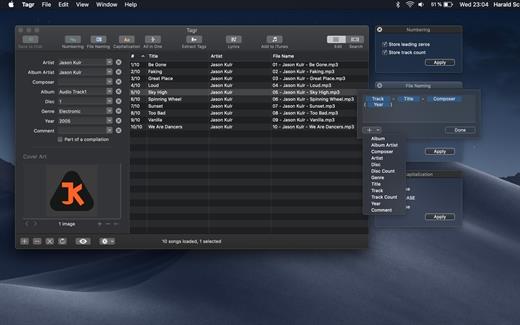
Tagr is an application that helps you organize your music collection.

With Tagr you can easily edit information such as a song’s artist, title, or album cover. Tagr also allows you to control the way your files are named, numbered, and capitalized. There is no more need for having other tools dictate that for you!

Features:


  • Edit meta data of individual MP3, M4A/M4B, FLAC, and AIFF files, or
  • Edit a list of files in bulk
  • Supported tags: track number/count, title, artist, album artist, composer, album, disc number/count, genre, year, comment, compilation, lyrics
  • MP3 ID3 versions: v1, v2.3, and v2.4
  • Embed cover art into your songs
  • Apply uppercase, lowercase, and title case capitalization schemes
  • Automatically generate track numbers
  • Choose from predefined file naming schemes or define your own
  • Extract tags from the file name or title using predefined or custom patterns
  • Search discogs.com for album information and copy it to your songs
  • Listen to songs through QuickLook
  • Customize Tagr to your needs
What’s New

Version 5.13.0:


  • Release notes were unavailable when this listing was updated.
Compatibility

macOS 10.10 or later


Release Name: Tagr 5.13.0
Size: 10.4 MB
Links: HOMEPAGE – NFO – Torrent Search

Download: RAPiDGATOR
10 Comments
Feb 22

Hand Mirror 4.0.3

Hand Mirror is a super simple app that lives in your Menu Bar (little cozy top right corner of your Mac) and gives you a one-click access camera check!

‣ Need to jump on a video call? Quick camera check.
‣ Need to quickly check your surroundings? Quick camera check.
‣ Need a view of your camera for when you’re streaming or recording your screen? Quick camera check and drag the window around.
‣ Need to check your face because you’re gorgeous? Quick camera check.

Want more? Good thing for Hand Mirror Plus:
It’s a one-time purchase that will unlock all past, present, and future features added to the app, like:
‣ Snaps: Save the moment with a cute Polaroid-style picture, complete with a marker for drawing over it.
‣ Mic Check: You already know you look good, but can people hear you? Check your microphone levels directly from Hand Mirror
‣ Reactions Playground: Custom triggers for all of the new macOS Sonoma Reactions for some fun screenshots
‣ Smart Window: Fully customizable, resizable, positioned window
‣ Window Masks: Zoom, crop, tweak border radius, make your camera view just like you like it
‣ Custom position: Want to trigger the window right below your camera, pick where the window appears
‣ Notch Trigger: If you’re on a compatible device, you can click right on the camera housing area to trigger Hand Mirror
‣ Custom App Icons and Menu Bar Icons: Make the Menu Bar icon match your camera and or your taste

What’s New

Version 4.0.3:


  • Fixed an issue where the Smart Window could appear on the wrong display after restarting the app
  • Fixed an issue where the Snaps setting would turn itself back on after restarting the app
  • Fixed an issue where the annotation tools and color picker could be hidden or appear empty when taking a snap
  • Stability and performance improvements
Compatibility

macOS 14.4 or later.


Release Name: Hand Mirror 4.0.3
Size: 28.4 MB
Links: HOMEPAGE – NFO – Torrent Search

Download: RAPiDGATOR

13 Comments
Feb 22

App Cleaner & Uninstaller Pro 9.1

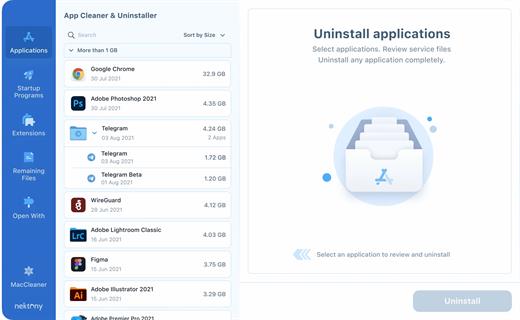
App Cleaner & Uninstaller (was App Cleaner) can remove applications and their service files on macOS. Make sure they aren’t eating up precious space on your drive with this helpful app that does the legwork for you.

Features


  • Scan the system and preview installed applications
  • Remove all types of service files
  • Remove remains of previously uninstalled apps
  • Reset application to a first-launch state
  • Easy-to-use shortcuts
  • Any file or app quick preview
  • Specific app-associated file formats preview
  • In-app help assistance
  • Show unused applications
  • Skip list option
What’s New

Version 9.1:


  • Release notes were unavailable when this listing was updated.
Compatibility

macOS 10.13 or later


Release Name: App Cleaner & Uninstaller Pro 9.1
Size: 35.9 MB
Links: HOMEPAGE – NFO – Torrent Search

Download: RAPiDGATOR
14 Comments
Feb 22

Dropshare 6.10

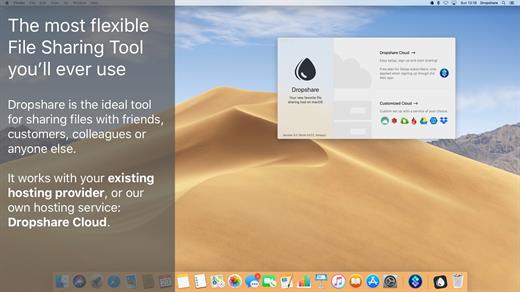
Dropshare is a menu bar application for drag & drop upload files, screenshots and even directories to your own server, Amazon S3, Backblaze B2 Cloud Files, Rackspace Cloud Files, Microsoft Azure Blob Storage, Google Drive or Dropbox. Additionally, Dropshare offers a file sharing provider called Dropshare Cloud, which is perfectly suitable to start uploading in just minutes. Sharing files with friends, customers, colleagues or anyone else has never been so easy an professional! Dropshare supports Multiple Connections: You can set up different upload destinations at the same time and switch between them using user-defined keyboard shortcuts, or by holding ⌘ while dragging & dropping a file No matter if files, folders, text or screenshots – Dropshare uploads every file and data to your selected destination – also from clipboard or other applications like Safari. Share Extension included Set up your own keyboard shortcuts for fullscreen or selection-based screenshots that’ll be uploaded automatically with Dropshare. Set up a custom keyboard shortcut for taking a screenshot and annotating it afterwards with Dropshare itself, or an app you already like: Preview.app, Skitch.app, Napkin.app or Annotate.app Take & upload Screen Recordings directly with Dropshare, both fullscreen and selection-based recordings are available, as well as GIF conversion Choose from a number of free designs or craft an individual design on your own using HTML, CSS and JavaScript, including upload previews Synchronize your upload history across all your devices, supports both iOS and macOS. Your upload history will automatically be synchronized across all your Apple devices with iCloud Dropshare supports URL shorteners as well, e.g. dsh.re or Rebrandly, or configure your very own URL shortener service like bit.ly or YOURLS.

Technical requirements:


  • A working SSH user account is required on the server. A password or SSH key pair is also required. To have the uploaded file displayed in a web browser, a web server needs to be installed and configured on the server
  • Dropshare supports services like OpenStack Swift. Check User Guide for more information
  • A regular Google account is required in order to use Google Drive
  • A regular Dropbox account is required in order to use Dropbox
  • Microsoft Azure Blob Storage, Backblaze B2 Cloud Files, Amazon Simple Storage Service (S3), Rackspace Cloud Files. A subscription may be neccessary in order to use Dropshare with one of these providers. Please check out the terms of use and payment information at the website of the selected provider
What’s New

Version 6.10:


  • Release notes were unavailable when this listing was updated.
Compatibility

macOS 12.3 or newer
Apple Silicon or Intel Core processor


Release Name: Dropshare 6.10
Size: 45.3 MB
Links: HOMEPAGE – NFO – Torrent Search

Download: RAPiDGATOR

12 Comments