Please REGISTER or RENEW your account on RAPiDGATOR.net and support us by doing through all RAPiDGATOR working download links on main posts...
May 28

NanoClip 1.1.3

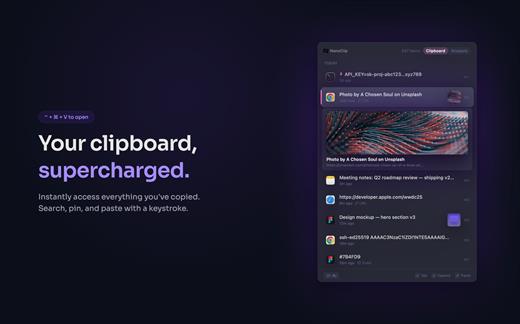
NanoClip is a lightweight macOS menu bar clipboard manager that saves every copy and keeps snippets instantly accessible with a global shortcut. It supports clipboard history, smart text snippets, iCloud sync across Macs, inline previews for images, GIFs, files, colors, and code, plus multiple themes in a fast, privacy-focused design.

What’s New

Version 1.1.3:


  • Release notes were unavailable when this listing was updated.
Compatibility

macOS 15 or later


Release Name: NanoClip 1.1.3
Size: 10.3 MB
Links: HOMEPAGE – NFO – Torrent Search

Download: RAPiDGATOR

3 Comments
May 28

Yate 9.2.1

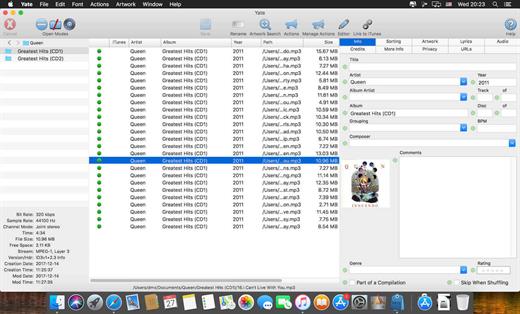
Yate was developed for people who want complete control over their tagging experience. Supports audio in AIFF, APE, DFF, DSF, FLAC, OGG OPUS, OGG VORBIS, M4A, M4B, MP3, MP2, MP4, STEM.MP4, WAV and WV files. Supports video in M4V and MP4.

Yate has a long list of features; most importantly, an innovative scripting system called actions. Actions can be used to update all of an album’s tags with a single operation. Yate also supports integration with AcouticBrainz, AcoustID, Beatport, Discogs, iTunes, MusicBrainz and TMDb. All changes can be easily reverted and individual changes can be undone in any order. Whether you want to automatically or manually tag your files, Yate can do it all!

What’s New

Version 9.2.1:


  • Release notes were unavailable when this listing was updated.
Compatibility

macOS 10.10 or later


Release Name: Yate 9.2.1
Size: 17.3 MB
Links: HOMEPAGE – NFO – Torrent Search

Download: RAPiDGATOR

3 Comments
May 28

Radiccio 1.4

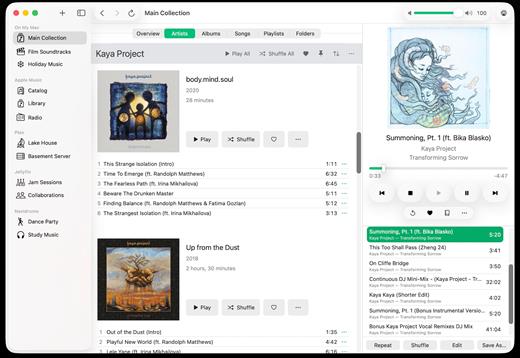
Radiccio is a beautifully crafted Mac music player that unifies your entire library in one place. Play local files, Apple Music, Navidrome, Plex, Jellyfin, and more, with thoughtful features like pinned albums, favorites, auto-skip, and a personal Journal for logging your feelings about songs over time.

What’s New

Version 1.4:


  • Release notes were unavailable when this listing was updated.
Compatibility

macOS 15.0 or later.


Release Name: Radiccio 1.4
Size: 18.7 MB
Links: HOMEPAGE – NFO – Torrent Search

Download: RAPiDGATOR

3 Comments
May 27

Downie 4.12.5

A simple download manager that offers you the possibility to quickly save videos from different websites to your own disk drive.

If you are using a poor internet connection, trying to visualize videos streamlined online might not work properly since the content is loaded too slowly. Downie is a simple Mac app that can help you download those videos to your computer, and then watch them by using your default media player.

User friendly video downloader featuring support for drag and drop actions

Working with Downie is extremely straightforward: simply drop the video URL on top of the app’s main window or on the Dock icon. Downie adds the video to your downloads list, so all you have to do next is start the process by pressing the appropriate button. Of course, you can also remove items from the list.

By default, Downie downloads MP4 files and places them in your default Downloads folder, but you can easily change this via the Preferences window. The same area allows you to setup notifications, or post processing actions (convert to MP4 if necessary, or extract audio only).

Effortlessly download videos from a wide collection of hosting websites

Downie provides support for more than 400 different websites that host video content, among which there are the most popular choices, such as YouTube, Apple, LiveLeak, Vimeo, BBC, and so on. If a certain website is not included, within the app you can send a request email to the Downie developers.
Moreover, Downie also provides matching extensions for various popular web browsers, such as Firefox, Safari, Google Chrome or Chromium. The add-ons are not installed by default: open the Preferences window and install only the ones you plan to use.

Straightforward solution for downloading video content hosted online

Downie is a great tool for saving videos posted on various websites to your Mac for offline playback. The application is extremely useful especially if you have a slow internet connection.

What’s New

Downie 4.12.5:


  • New: You can now schedule start of recording for live streams.
  • New: You can now specify a custom title when using the automation URL.
  • Improved: bbc.co.uk, instagram.com, orf.at, radiofrance.fr, sbs.com.au, soundcloud.com, today.com, youtube.com.
Compatibility

macOS 10.12 or later
Apple Silicon or Intel Core processor


Release Name: Downie 4.12.5
Size: 42.3 MB
Links: HOMEPAGE – NFO – Torrent Search

Download: RAPiDGATOR

6 Comments
May 27

Looq 1.5.0

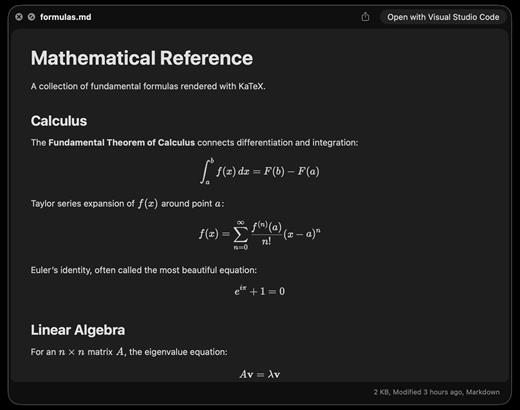
A better look at your files. Preview Markdown with KaTeX and Mermaid, highlight 190+ languages, view CSV and SQLite tables, browse archives and folders. All from Quick Look.
macOS 14 (Sonoma) or later

Markdown
Full GFM rendering with rich formatting support.


  • Live rendering on file save
  • KaTeX math (inline and block)
  • BeautifulMermaid diagrams
  • Syntax-highlighted code blocks
  • GitHub Alerts and emoji shortcodes
  • Auto table of contents sidebar
  • Remote image caching
  • Scroll position memory

Source Code
Syntax highlighting for 190+ languages.


  • Progressive rendering
  • Auto-format JSON, CSS, XML, SVG, plist
  • Configurable line numbers
  • Custom fonts, size, and weight
  • Tab width and word wrap
  • Independent light and dark themes
  • Shebang detection

Data Files
Native table views for structured data.


  • Resizable CSV and TSV columns
  • Alternating row colors
  • SQLite multi-table preview
  • Column type and constraint tooltips
  • Color-coded diff/patch
  • Multi-file tab switching
  • Large file truncation

Archives and Folders
Browse compressed files and directories.


  • ZIP and TAR directory tree
  • Pure Swift binary parsing
  • File size, date, and type columns
  • Sortable column headers
  • Folder preview with Spotlight metadata
  • Configurable display columns
  • Finder tag support
What’s New

Version 1.5.0:


  • Release notes were unavailable when this listing was updated.
Compatibility

macOS 14 (Sonoma) or later


Release Name: Looq 1.5.0
Size: 17.4 MB
Links: HOMEPAGE – NFO – Torrent Search

Download: RAPiDGATOR

5 Comments
May 27

dBpoweramp Music Converter 2026.05.25

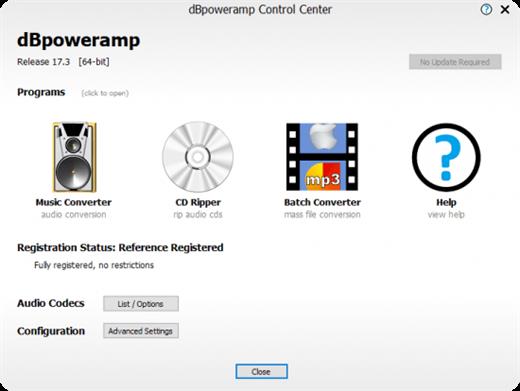
dBpoweramp Music Converter is audio conversion perfected, effortlessly converting your file to MP3, FLAC, Apple Lossless, and more. It has become the standard tool for audio conversions, with over 30 million users worldwide trusting their conversions to dBpoweramp.

Features


  • MP3 Converter – Convert MP3, M4A (iTunes & iPod), WMA, WAV, AIFF, AAC, FLAC, Apple Lossless (ALAC) to name a few.
  • Batch Convert – Convert large numbers of files with 1 click, filter on MP3 or other file type.
  • High-Speed Conversions – Look for an MP3 converter which encodes using all CPU cores simultaneously, getting the job done in double-quick time.
  • DSP Effects – Process the audio with volume normalization or sample / bitrate conversion. dBpoweramp is a full-featured MP3 converter.
  • No Malware – Free converters come with a little extra (a spying toolbar, Trojan, malware, or virus). dBpoweramp has never bundled in 15 years; those wanting an MP3 converter get that and only that. No Trojans, no malware, no viruses.
What’s New

Version 2026.05.25:


  • Release notes were unavailable when this listing was updated.
Compatibility

macOS 10.12 or later
Apple Silicon or Intel Core processor


Release Name: dBpoweramp Music Converter 2026.05.25
Size: 38.3 MB
Links: HOMEPAGE – NFO – Torrent Search

Download: RAPiDGATOR

4 Comments
May 27

Glow 1.2.7

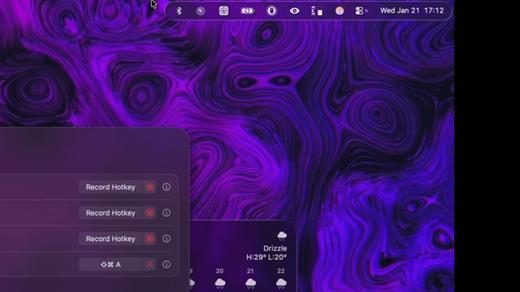
Glow is a beautifully crafted macOS utility designed to transform your static, native menu bar into a dynamic, engaging, and personalized workspace.

Key Features


  • Buttery Smooth Animations: Features fluid motions and delightful micro-interactions that make hiding, showing, and interacting with your menu bar an absolute joy.
  • Modern Aesthetic: A sleek, minimalist design that seamlessly integrates with the modern macOS language, giving your desktop a premium, elevated look.
  • Smart & Fast: Built for speed and exclusivity, offering snappy responsiveness and personalized control over your menu bar’s behavior.
What’s New

Version 1.2.7:


  • Release notes were unavailable when this listing was updated.
Compatibility

macOS 26 or later


Release Name: Glow 1.2.7
Size: 7.9 MB
Links: HOMEPAGE – NFO – Torrent Search

Download: RAPiDGATOR
5 Comments
May 27

Bartender 6.5.2

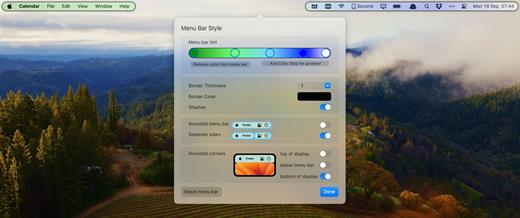
Bartender lets you organize your menu bar apps.

Features


  • Take control of your menu bar – With Bartender you can choose which apps stay in the menu bar, are displayed in the Bartender Bar or are hidden completely.
  • The Bartender Bar – The Bartender Bar can be displayed and hidden as you want, by clicking on the Bartender Icon or via a hot key.
  • Menu bar apps still work the same – Apps still work the same when they are in the Bartender Bar allowing you quick access to them when needed, but keeping them out of sight when not.
  • Show an app in the menu bar when it updates – Set up your apps to be displayed in the menu bar for a period of time when they update.
  • Order your menu bar items – With Bartender you can set the order of the menu bar items, both in the menu bar and in the Bartender Bar, simply by ⌘+dragging the items. The order you set is maintained after restarts. So your menu bar items are always in the order you want.
  • Minimalism – If you want a really clean look and privacy, Bartender can also be hidden.
  • The Bartender Bar can be placed where you want – The Bartender Bar can be moved at any time to any horizontal position immediately under the menu bar. Or it can open under the Bartender icon.
  • Keyboard Navigate your menu bar items – Keyboard navigate all menu items both in the menu bar and the Bartender Bar; simply arrow through them and press return to select.
  • Search menu bar items – You can search the Bartender Bar for menu items, allowing you quick access to a menu item without looking for it. Simply display the Bartender Bar and start typing, then press enter to select the menu item.

Bartender lets you organize your menu bar apps by hiding them, rearranging them, or moving them to Bartender’s Bar. You can display the full menu bar, set options to have menu bar items show in the menu bar when they have updated, or have them always visible in Bartender’s Bar.

What’s New

Version 6.5.2:


  • Release notes were unavailable when this listing was updated.
Compatibility

macOS 14.0 or later


Release Name: Bartender 6.5.2
Size: 55.1 MB
Links: HOMEPAGE – NFO – Torrent Search

Download: RAPiDGATOR

6 Comments
May 27

Compresto 1.28

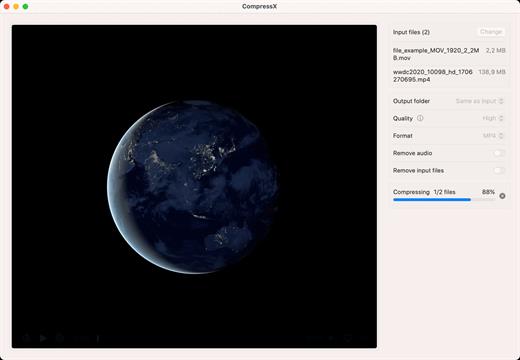
Compress your videos and images with up to 90% file size reduction without significant loss of quality.

Features:


  • Automatically compress new files in monitored folders
  • Gif conversion. Just drop a video, select quality, FPS, and voilà.
  • CompressX is designed to be compatible with video files that have a transparent background.
  • Raycast extension. Speed up your workflow by sending your file to Raycast.
  • and many more

Note:
– You must allow app through firewall initially, then enter any license to activate
– App may work on newer versions (with firewall)

What’s New

Version 1.28:


  • Release notes were unavailable when this listing was updated.
Compatibility

macOS 13.0 or later

Apple Silicon or Intel Core processor


Release Name: Compresto 1.28
Size: 9.8 MB
Links: HOMEPAGE – NFO – Torrent Search

Download: RAPiDGATOR
4 Comments
May 27

djay Pro AI 5.6.5

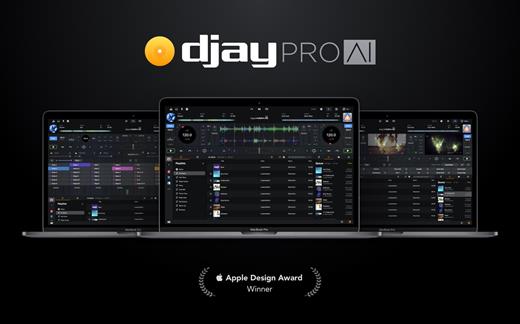
Welcome to djay Pro AI! Algoriddim’s acclaimed DJ software and winner of multiple Apple Design Awards has been rebuilt from the ground up using groundbreaking AI technology – NEURAL MIX™.

NEURAL MIX™ allows you to isolate instrumentals and acappellas of your favorite tracks in real-time and redefines the boundaries of creative mixing. You can crossfade drums, bass lines, and melodies of two songs independently, apply audio effects to individual components of music, and even loop the beat while the melody of the same track continues playing.

djay Pro’s all-new, modern interface is built around a sophisticated integration with your music library, giving you instant access to millions of tracks. Pristine sound quality and a powerful set of features including live production tools, four decks, high-definition waveforms, video mixing and hardware integration give you endless creative flexibility to reinvent your DJ sets.

NEURAL MIX™

  • Isolate vocals, drums, bass lines, and instrumentals in real-time
  • FX routing: apply audio effects to individual components of music (Vocal Echo, Harmonic Filter, Drum Reverb, and more)
  • Loop routing: Loop the beat while the melody of the same song continues playing, and vice versa
  • AI crossfades: seamlessly blend and swap drums, bass lines, or vocals of two tracks
  • AI waveforms: see vocals, drums, and harmonic waveforms per track side by side
MUSIC PRODUCTION TOOLS

  • Sequencer: create instant beats on top of music
  • Looper: remix music with up to 48 loops per track
  • Beat-matched sequencing of drums and samples
  • Extensive content library with 1000+ loops and samples
STREAMING INTEGRATIONS

  • TIDAL: Millions of tracks, music videos, high quality sound /TIDAL Premium or HiFi)
  • SoundCloud: Millions of underground and premium tracks SoundCloud Go+)
  • Beatport: Millions of electronic music tracks (Beatport LINK)
  • Beatsource: Millions of open-format music tracks (Beatport LINK)
AWARD-WINNING USER INTERFACE

  • 2- and 4-Deck views
  • Single Deck preparation view
  • Video and Automix views
ADVANCED LIBRARY MANAGEMENT

  • Create your own custom and smart playlists
  • Powerful track filtering
  • Finder Integration
AUTOMIX

  • Automatic, beat-matched mixes based on artificial intelligence
  • Queue and Playlist automation
VIDEOS, VISUALS, and PHOTOS

  • Mix videos, visuals, and photos
  • Music video streaming through TIDAL
  • Beat-matched photo slideshows
POWERFUL AUDIO ENGINE

  • Revolutionary AI audio engine
  • Real-time music source separation
  • High-quality mixer, filter, EQ, isolator, and limiter
  • Advanced time-stretching and pitch shifting
  • Over 40 built-in audio effects
  • Master output effects through Audio Unit plug-ins
  • Live recording
  • Ableton Link integration
ADVANCED AUDIO ANALYSIS

  • BPM and beat detection
  • Key detection
  • Multi color waveformsBPM
  • Auto-Gain
HARDWARE INTEGRATION

  • Native support for over 100 MIDI controllers
  • Pioneer DJ CDJ Integration
  • RANE Twelve integration
  • Advanced MIDI Learn
  • External Mixer Mode
  • Support for multi-channel USB audio interfaces
  • Support for external audio input and microphones

*** You need to disable the System Integrity Protection (SIP) to perform the selected Application.

What’s New

Version 5.6.5:


  • Release notes were unavailable when this listing was updated.
Compatibility

macOS 10.14 or later, 64-bit processor


Release Name: djay Pro AI 5.6.5
Size: 290.4 MB
Links: HOMEPAGE – NFO – Torrent Search

Download: RAPiDGATOR

8 Comments