Please REGISTER or RENEW your account on RAPiDGATOR.net and support us by doing through all RAPiDGATOR working download links on main posts...
Feb 16

PDFify 4.3

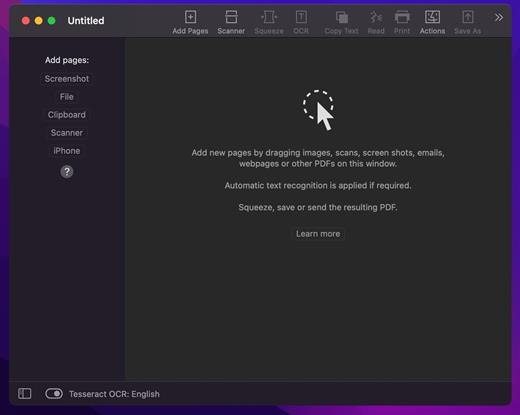
PDFify creates searchable PDF for more than 100 languages! Reduce file size at the same time! Not only existing PDF can be processed, but also images, scans, screenshots, emails, web pages and more. Just drag your files to PDFify and the rest happens automatically.

In addition to Apple’s integrated text recognition, the proven alternative “Tesseract” is also supported. Find your personal favorite. Finder Quick Actions allow you to quickly edit multiple files in one go.

Powerful functions make it easy to add new pages to the PDF

• Take screenshots directly from the app.
• Use your iPhone camera as a scanner.
• The app offers its own great scanner dialog.
• Choose PDFify as the destination for your ScanSnap scans.
• Paste pages directly from the clipboard.

Other useful features make PDF handling better

• Have the computer read content aloud.
• Reduce the size of the PDF file.
• Copy all text content with one click.
• Share, save or print the finished PDF.
And if you make a mistake, UNDO has you covered.

What’s New

Version 4.3:


  • Release notes were unavailable when this listing was updated.
Compatibility

macOS 10.13.2 or later


Release Name: PDFify 4.3
Size: 31.6 MB
Links: HOMEPAGE – NFO – Torrent Search

Download: RAPiDGATOR

11 Comments
Feb 16

Final Cut Pro 12.0 fix

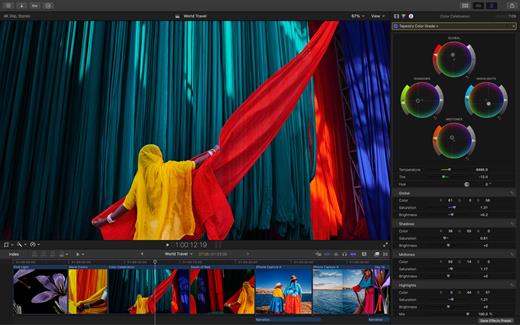
Redesigned from the ground up, Final Cut Pro combines revolutionary video editing with a powerful media organization and incredible performance to let you create at the speed of thought.

Revolutionary Video Editing


  • The Magnetic Timeline uses advanced metadata for faster, easier editing
  • Enhanced Timeline Index lets you drag and drop audio roles to rearrange the layout of your timeline
  • Use Clip Connections to attach B-roll, sound effects, and music to the timeline
  • Reduce clutter by grouping clips into a Compound Clip
  • Edit multicamera projects with automatic syncing and support for up to 64 camera angles
  • Automatically transform projects for square or vertical delivery with Smart Conform
  • Import and edit 360° equirectangular video in a wide range of formats and frame sizes
  • Create, edit, and deliver closed captions from within Final Cut Pro
  • Extend the capabilities of Final Cut Pro with third-party workflow extensions
Powerful Media Organization

  • Organize your work within libraries for efficient media management and collaboration
  • Create proxy copies of your media for portability and performance
  • Content Auto-Analysis captures camera metadata and analyzes shots in the background
  • Create and apply custom keywords or favorites on the fly as you select clip ranges
  • Smart Collections dynamically organize content for you to quickly find any shot in a few clicks
Incredible Performance

  • Improved performance and efficiency on Mac computers with Apple silicon
  • Harness the power of the Mac Pro and Afterburner for realtime 8K editing
  • Modern Metal engine improves playback, rendering, and compositing on all Macs
  • Final Cut Pro uses all the GPUs in your Mac for superior real-time playback performance and fast background rendering
  • Work with a broad range of formats including ProRes, RED, XAVC, AVCHD, Avid DNxHR®, Avid DNxHD®, H.264, HEVC, and more
Compelling, Customizable Effects

  • Beautifully animated, easily customizable 2D and 3D titles
  • Change the look of titles, transitions, and effects using intuitive controls
  • Choose from an ecosystem of third-party FxPlug plug-ins with custom interfaces
Integrated Audio Editing

  • Assign roles – including dialogue, music, effects, and custom choices – during import to easily track and organize your project
  • Expand and edit multichannel audio files directly in the timeline
  • Sync video with separate audio in a single step with instant audio waveform matching
Intuitive Color Grading

  • Import, edit, and deliver video in standard color spaces, or in wide Rec. 2020 color space
  • Use Pro Display XDR to accurately view HDR video
  • Powerful color wheels and curves for precise adjustments with keying and masks
One-Step, Optimized Output

  • Incredibly fast export for playback on Apple devices and upload to websites such as Vimeo and YouTube
  • Export audio stems and multiple versions of a finished video using roles metadata
  • Import and export XML for third-party workflows like color grading and sound mixing
What’s New

Version 12.0:


  • Powerful Intelligence
  • Use Transcript Search to quickly find spoken words or phrases in your footage by searching for exact matches or using natural language descriptions*
  • Discover Visual Search, a fast and easy way to locate moments in your footage, including objects and actions, using natural language*
  • Let Beat Detection analyze any song to reveal its bars and beats, enabling you to easily align your video edits to the music’s rhythm
  • Get Started Fast
  • Dive into editing with a special demo project featuring the talented singer-songwriter Allie Sherlock, and explore the exciting new features of Final Cut Pro firsthand
  • Accelerate your next edit with in-app guides on how to create a new library, import media, and add clips to a new timeline
  • Requires a Mac with Apple silicon
Compatibility

macOS 15.6 or later.


Release Name: Final Cut Pro 12.0 fix
Size: 5.4 GB
Links: HOMEPAGE – NFO – Torrent Search

Download: RAPiDGATOR

2 Comments
Feb 16

KCNcrew Pack 1.8 (02-15-26)

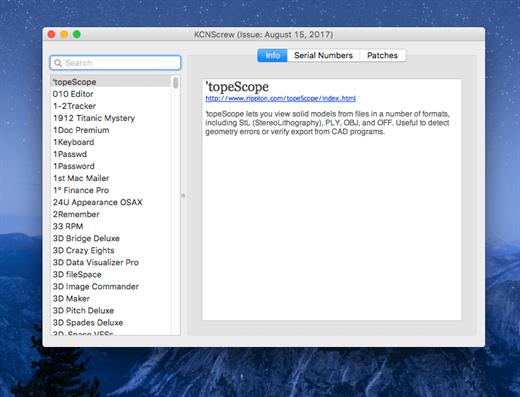
It’s like Serial Box, which has SN’s but KCN also has cracks and patches. It would be best to have both of these collections, as this often has serials you cannot find in Serial Box.

Unlike Serial Box, no readers are required. Just open the dmg file, drag and drop the application to where you like.

However, there is no way to view what serials, cracks and patches are new in this issue as compared to the previous like Serial Box.

Thanks to all contributors and supporters!

What’s New

Version 1.8 (02-15-26):


  • Release notes were unavailable when this listing was updated.
Compatibility

OS X 10.7 or later, 64-bit processor


Release Name: KCNcrew Pack 1.8 (02-15-26)
Size: 4.1 MB
Links: HOMEPAGE – NFO – Torrent Search

Download: RAPiDGATOR

9 Comments
Feb 16

Disk Doctor 4.6 fix

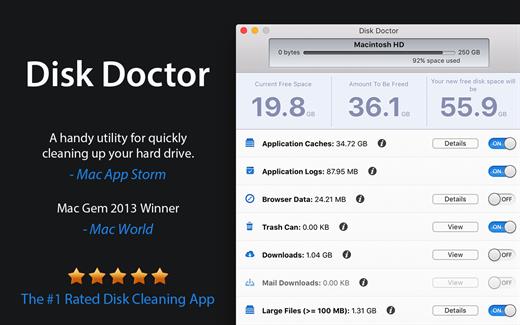
Disk Doctor will free up disk space by removing cached and unneeded files from your hard drive.

With one press of a button, Disk Doctor can empty the following:


  • Applications caches
  • Application logs
  • Language packs
  • Mail downloads folder
  • Downloads folder
  • Trash can
What’s New

Version 4.6:


  • Release notes were unavailable when this listing was updated.
Compatibility

macOS 10.13 or later.


Release Name: Disk Doctor 4.6 fix
Size: 12.4 MB
Links: HOMEPAGE – NFO – Torrent Search

Download: RAPiDGATOR

11 Comments
Feb 16

Transfer 2.4.2

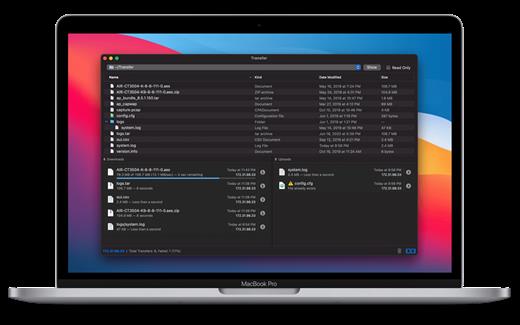
Transfer is a reliable and fully RFC-compliant TFTP server application. The perfect alternative to the built-in TFTP server on your Mac. It’s got everything you expect: real-time updates of current transfers in progress, support for broadcast requests, transfer history and basic root directory access control and file management. A feature rich TFTP server with a simple and modern user interface.

Written from the ground up, Transfer offers total control of your file transfers while playing nicely with existing TFTP clients.

Features


  • Real time updates of current transfers in progress
  • Basic file management of the root TFTP directory
  • Support for broadcast transfer requests
  • Support for common TFTP extensions and options
  • Transfer history
What’s New

Version 2.4.2:


  • Minor fixes and improvements.
Compatibility

macOS 10.14 or later, 64-bit processor


Release Name: Transfer 2.4.2
Size: 10.2 MB
Links: HOMEPAGE – NFO – Torrent Search

Download: RAPiDGATOR

8 Comments
Feb 16

ScreenFlow 10.5.2

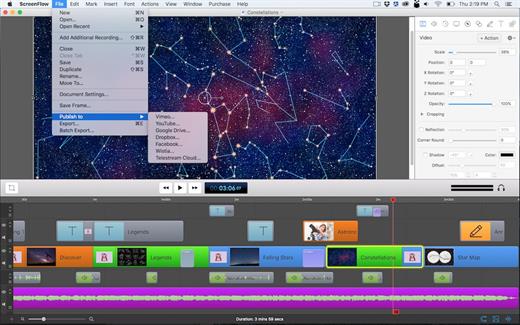
ScreenFlow is powerful, easy-to-use screencasting software for the Mac. With ScreenFlow you can record the contents of your entire monitor while also capturing your video camera, microphone and your computer audio. The easy-to-use editing interface lets you creatively edit your video, and add additional images, text, music and transitions for a truly professional-looking video. The finished result is a QuickTime or Windows Media movie, ready for publishing to your Web site or blog or directly to YouTube or Vimeo. Use ScreenFlow to create high-quality software demos, tutorials, app previews, training, presentations and more.

What’s New

Version 10.5.2:

Improvements


  • New Screen Recording capabilities

    • Add ability to exclude ScreenFlow from recordings (can exclude Recording Monitor)
    • Add ability to exclude specific applications from recordings
    • Add ability to include only specific applications in recordings
  • Recording Monitor improvements

    • Display desktop preview from recorder
    • Display audio levels from microphones
    • Display audio levels received from recorder
  • Add native system audio recording using 'Basic Computer Audio' : No driver installation necessary
  • Add AI Virtual Assistant
  • Add Line Spacing
  • Add a feature to duplicate clips on the Timeline when dragging with Option key
Fixes

  • SF-274: Fixed SRT files with malformed timecode separators show blank captions when imported.
  • SF-270: Fixed some transitions apply to the entire canvas instead of the selected clip
  • SF-262: Fixed some help links throughout the app
  • SF-253: Fixed audio from disabled channel 1 plays back after reopening project
  • SF-246: Fixed recording fails when Continuity Camera is selected
  • SF-244: Fixed ScreenFlow records at doubled resolution when display is set to non-native size
  • SF-243: Fix export file size warning visible when it shouldn't be
  • SF-242: Fixed ScreenFlow doesn’t record the first few seconds of audio from AirPods
  • SF-237: Fixed canvas resize tool does not update document settings
  • SF-230: Fixed the waveform is not visible for channel 1 in multichannel audio clips when opening a document
  • SF-219: Show a warning when the user saves or opens a ScreenFlow document in Cloud storage
  • SF-205: Fixed the Stock Media Library does not populate until the user searches
  • SF-197: Fixed runtime error when editing a document
  • SF-195: Fixed runtime error when dragging video from Stock Media Library
  • SF-191: Fixed adding a proxy to a video clip breaks media rotation
  • SF-186: Fixed crash when dragging an unsupported media file into timeline
  • SF-178: Filter out audio devices that do not provide audio to external applications
  • SF-175: Fixed can’t scroll audio input window after it overflows
  • SF-174: Fixed system audio capture driver does not work until a system reboot
  • SF-172: Fixed offline activation fails
  • SF-162: Fixed ScreenFlow hangs when a recording is stopped
  • SF-160: Fixed ScreenFlow export window default preset does not load correctly
  • SF-155: Fix the recording overlay shown before recording sometimes gets stuck
  • SF-151: Fixed Desktop icons are not recorded when the user’s profile is set to automatically hide the Dock
  • SF-146: Fix disposing and recreating audio filter objects when generating waveforms
  • SF-138: Prevent repeatedly reopening a project which crashes ScreenFlow
  • SF-133: Fix audio plugins crashing when they are disposed on non-main thread
  • SF-125: Show caption track after importing captions
  • SF-124: Improve performance when certain video effects are combined
  • SF-122: Fix crash when generating waveforms for nested clips
  • SF-104: Fix font list text is dark in dark mode
  • SF-103: Fix various bugs when creating and editing clips with multiple application audio
  • SF-94: Fix thumbnail generation in Single mode leaks resources for Nested clips
  • SF-62: Fix speech clip modal sheet doesn't dismiss fully
  • SF-34: Fix Text Properties panel is showing incorrect properties in various scenarios
  • SF-32: Fix various text editing Text Clips
  • SF-17: Fix and restore Bullet Points
  • SF-31: Make text caret blink again
  • FLOW-11744: Fix keyboard shortcuts apply style from before style update
Compatibility

macOS 10.15.0 or later


Release Name: ScreenFlow 10.5.2
Size: 94.7 MB
Links: HOMEPAGE – NFO – Torrent Search

Download: RAPiDGATOR

11 Comments
Feb 15

Wondershare PDFelement Pro 12.1.8 (OCR)

Wondershare PDFelement is a self-explanatory OS X application that makes it easier for your to preview, edit, join, split and convert PDF documents using a Mac.

The Wondershare PDFelement also features a simple, clean and intuitive interface that provide instantaneous access to all the tools and features you might need to complete your daily tasks.

Powerful and user-friendly PDF editor for everyday use

Moreover, with Wondershare PDFelement’s help, you can effortlessly edit PDF documents created using text files, web pages or scanned documents.

Consequently, you can add, remove or edit text, move and rearrange pages, insert or remove images and more.

Wondershare PDFelement’s top toolbar helps you hide, show and customize the sidebar in order to display the items and information you are interested in. In addition, you can browse through the loaded document, zoom in or out, print it or email it with just a couple of mouse clicks.

Advanced OCR capabilities make text editing a breeze

Furthermore, you can choose between the “Hand”, “Select” and “Edit” tool, use the advanced OCR feature and convert your source file into plain text or RTF document, ePUB, HTML, as well as file formats compatible with Microsoft Word, Excel, and PowerPoint.

The context menu also helps you switch between the “Move”, “Select” and “Touchup” tool, change the display mode and open the Inspector window to view detailed information about the loaded document.

As an added bonus, by accessing the Document menu, you have the option to add, update or remove an watermark, extract, insert and delete pages, split, merge or convert your document and crop or rotate a page with ease.

Full-featured tool designed to help you stamp, watermark, encrypt and decrypt PDF documents on a Mac

The complete list of all available editing tools, bookmark features, annotation tools and stamp options can be found under the Tools menu.

From here you can easily insert text boxes, add sticky notes, highlight, strike-through and underline text, insert various shapes and use the handy pencil or erase.

On the whole, Wondershare PDFelement comes with the right set of features to help you edit and annotate PDF documents using a Mac, as well as effortlessly add password protect and convert them other formats for easier sharing with your friends and colleagues.

What’s New

Version 12.1.8:


  • Release notes were unavailable when this listing was updated.
Compatibility

macOS 11.0 or later
Apple Silicon or Intel Core processor


Release Name: Wondershare PDFelement Pro 12.1.8 (OCR)
Size: 827.2 MB
Links: HOMEPAGE – NFO – Torrent Search

Download: RAPiDGATOR

13 Comments
Feb 15

SoundSource 6.0.4

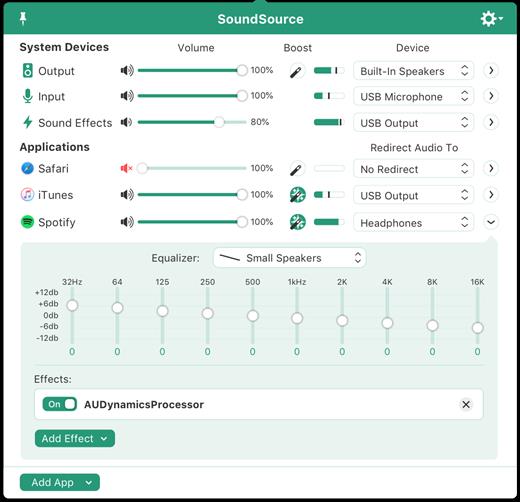
SounceSource lets you adjust your input, output, and sound-effects devices and volume settings in mere moments, right from the menu bar. Enable soft play-thru of input devices to your desired output, so you can hear sound coming in through any microphone or other source. With SoundSource, you get fast access to your Mac’s most important audio settings.


  • Instant Audio-Device Switching – With just two clicks, you can switch the audio devices your Mac is using for input, output, and even sound effects.
  • Fast Volume Control – SoundSource provides easy access to the volume controls for your audio devices as well.
  • Audio Play-Thru, Too – SoundSource’s Play-Thru window makes it easy to monitor the audio coming from any input device.
  • Comprehensive – SoundSource gives you one place to go for all Mac’s most important audio controls.
  • At Your Fingertips – With SoundSource running in your menu bar, your audio controls are always available.
  • Lightweight – When you don’t need SoundSource, it stays out of your way.
What’s New

Version 6.0.4:


  • Release notes were unavailable when this listing was updated.
Compatibility

macOS 10.14.0 or later
Apple Silicon or Intel Core processor


Release Name: SoundSource 6.0.4
Size: 54 MB
Links: HOMEPAGE – NFO – Torrent Search

Download: RAPiDGATOR

10 Comments
Feb 15

iZotope RX 11 Audio Editor Advanced 11.4.0

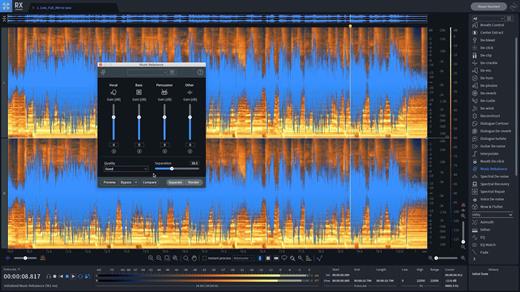
iZotope RX has long been the go-to audio repair and polishing suite for film, television, music, podcasts, video Welcome to RX 9! This version features new processing that makes generating complex ambiences, removing tricky hum and interference, and separating dialogue from background noise easier and faster than ever. We’ve delivered new modes to Ambience Match, Dialogue Isolate, and De-hum. And the History list is now expandable with the ability to restore a selection to previous processing steps.

What’s New

Version 11.4.0:


  • Release notes were unavailable when this listing was updated.
Compatibility

macOS 11.7 or later
Apple Silicon or Intel Core processor


Release Name: iZotope RX 11 Audio Editor Advanced 11.4.0
Size: 4.3 GB
Links: HOMEPAGE – NFO – Torrent Search

Download: RAPiDGATOR

6 Comments
Feb 15

EdgeView 5.7.3

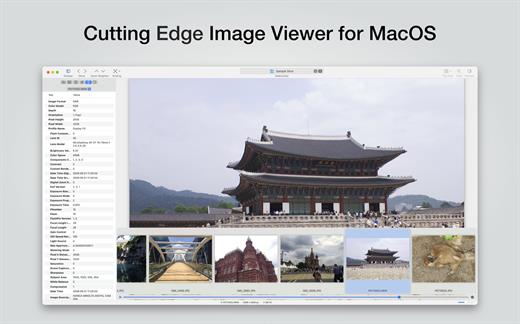
EdgeView 5 is fast image viewer has elegant user interface. EdgeView 5 is developed and designed for modern MacOS. It can open various image files such as JPEG, PNG, TIFF, BMP, and RAW file of DSLR, EPS and PDF, AI(Adobe Illustrator). Can open image files in archive directly without extraction.

User can open files, rename files, delete files from EdgeView’s file browser. Also can access to SMB/AFP/FTP network volume.

User can navigate images quickly by using keyboard shorcut, mouse wheel, trackpad gesture. EdgeVew show EXIF information, play animation GIF/PNG/WebP smoothly. Save last status to history, and restore when reopen file.

EdgeView 5 will be the best choice when viewing and managing image files.

What’s New

Version 5.7.3:


  • Release notes were unavailable when this listing was updated.
Compatibility

macOS 11.1 or later
Apple Silicon or Intel Core processor


Release Name: EdgeView 5.7.3
Size: 142.2 MB
Links: HOMEPAGE – NFO – Torrent Search

Download: RAPiDGATOR
10 Comments