Please REGISTER or RENEW your account on RAPiDGATOR.net and support us by doing through all RAPiDGATOR working download links on main posts...
Feb 15

2Do 2.9.74

2Do lets you take a completely different approach to managing your tasks. With its extremely simple-to-use interface and a comprehensive and flexible set of powerful features, it lets you focus on what’s most important to you: your life. There is no wrong way of using 2Do, and unlike other to-do apps, it won’t force you to use a particular task management methodology. 2Do will simply amaze you, from start to finish.
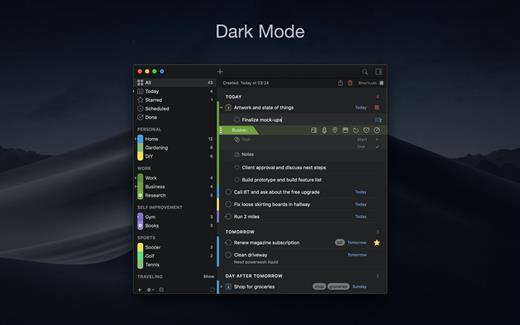
Features:


  • Simple tasks, checklists, and projects
  • Lists and smart lists
  • Tags
  • Sync
  • Quick Look
  • Quick entry
  • Alarms and notifications
  • Password protection
  • Themes
  • Automatic backups
What’s New

Version 2.9.74:


  • Release notes were unavailable when this listing was updated.
Compatibility

macOS 10.12 or later.
Apple Silicon or Intel Core processor


Release Name: 2Do 2.9.74
Size: 61.7 MB
Links: HOMEPAGE – NFO – Torrent Search

Download: RAPiDGATOR

11 Comments
Feb 15

Video Converter X2 1.3.5

Video Converter X2 is a full-featured format conversion software that supports converting almost all multimedia file formats, including video MP4, AVI, 3GP, WMV, MKV, VOB, MOV, FLV; audio MP3, AC3, FLAC, AAC, M4A, AIFF, WAV, etc.

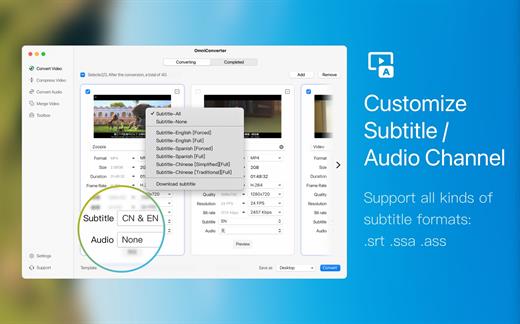
Video Converter X2 has built-in format templates optimized for different devices, such as Mac, iPhone, iPod, Android, Windows, TV, etc., so you don’t need to worry about what formats correspond to different devices, but just select the device type you need from the template list of Video Converter X2, and start converting easily.

Features


  • Support almost all types of multimedia formats and easily convert them to the format you want.
  • Support choose built-in subtitle or load from external SRT, SSA file.
  • Support choose from multiple audio tracks.
  • Video File Compression helps you to reduce your video file size, It saves space on your hard drive.
  • Support templates for Mac, iPhone, iPod, Android, Windows, TV and other devices in specified formats.
  • Support common website and application formats Built-in video format templates optimized for WeChat, Bilibili, Facebook, Instagram, Youtube, so the conversion operation can be done in one click.
  • Fast video merging support merging multiple video files. Even if the original formats are different, they can be perfectly combined into a new file.
What’s New

Version 1.3.5:


  • Release notes were unavailable when this listing was updated.
Compatibility

macOS 10.15 or later
Apple Silicon or Intel Core processor


Release Name: Video Converter X2 1.3.5
Size: 52.8 MB
Links: HOMEPAGE – NFO – Torrent Search

Download: RAPiDGATOR
11 Comments
Feb 15

Fig Player 1.3.31

Fig Player, is a media player for Mac that supports a wide variety of media files and allows you to listen to music, watch videos and movies.

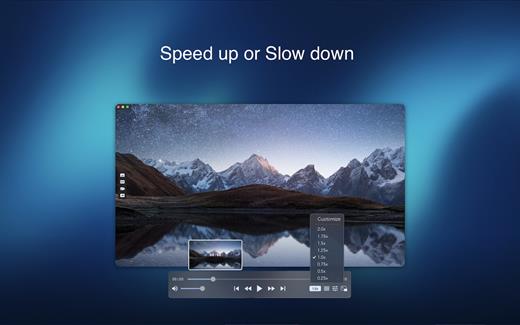
If you have an extensive media library but don’t have a good media player for Mac, here’s a good solution. Fig Player. It’s free to use and comes with a friendly interface. On the screen, you’ll be able to see all of the buttons that give you control over your experience, such as the play and stop button, playback options, volume slider, preview section, screenshot, and recording.

More Advanced Features


  • Smooth, seamless video play, support 4K.
  • Auto deinterlacing.
  • H/W-acceleration.
  • A-B loop.
  • Frame by Frame playback.
  • PIP mode.
  • Support various Subtitle formats(Text subtitles(SRT), Vobsub
    and ASS/SSA, etc.).
  • Choose which one when you have multiple sound output devices.
  • Create the scene poster with snapshots.
  • Playlist with upper-level folder name.
  • Support multiple windows and play multiple videos at the same time.
  • Support Wireless display to DLNA, Chromecast, Roku devices.
  • OCR Text Recognition(macOS 12+)
Supported Formats

Videos: mkv, rmvb, rm, avi, mov, wmv, flv, f4v, f4p, f4a, f4b, swf, mpg, mpeg, mpeg1, mpeg2, m1v, m2v, mpv, mp4, mpeg4, m4v, 3gp, 3gpp, 3g2, 3gp2, m2p, ps, ts, m2ts, mts, mt2s, ogm, ogv, divx, dv, asf, wtv, webm, etc.

Audios: flac, ape, m2a, mp1, mp2, mpa, mp3, mpg3, m4a, m4b, wma, wav, wv, xm, aiff, aif, ac3, a52, aac, opus, ogg, oga, mid, midi, mka, etc.

Subtitles: ASS, SSA, SRT, IDX&SUB

What’s New

Version 1.3.31:


  • Release notes were unavailable when this listing was updated.
Compatibility

macOS 10.13 or later


Release Name: Fig Player 1.3.31
Size: 74.9 MB
Links: HOMEPAGE – NFO – Torrent Search

Download: RAPiDGATOR

11 Comments
Feb 15

Money Pro – Personal Finance 2.11.23

Money Pro is the next generation of Money app (over 2 million downloads worldwide).

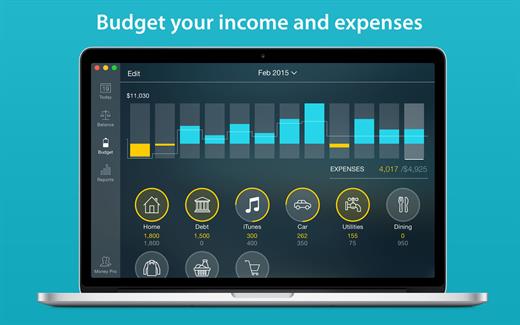
Money Pro is the one place for bill planning, budgeting and keeping track of your accounts. Easy sync with iPhone/iPad versions. Money Pro works great for home budgeting and even for business use.

Features:


  • Calendar
  • Today view
  • Bills due notifications
  • Budgets
  • Budget rollover
  • Checkbook register
  • Account reconciliation
  • Import of bank statements
  • Split transactions
  • Calculator and currency converter
  • Search
  • Detailed reports
  • Lots of options for customization
  • iCloud
  • Multiple profiles
  • Data export
  • Notification Center widget
What’s New

Version 2.11.23:


  • Bug fixes and performance improvements
Compatibility

macOS 10.12.0 or later
Apple Silicon or Intel Core processor


Release Name: Money Pro – Personal Finance 2.11.23
Size: 47.9 MB
Links: HOMEPAGE – NFO – Torrent Search

Download: RAPiDGATOR
12 Comments
Feb 15

Hides 7.3.0

Hides allows you to effortlessly clear your desktop in one quick keystroke to quickly hide sensitive information. Enable Focus Mode, to focus on the task at hand. What is Focus Mode? Focus Mode will hide all open applications automatically except the one you’re currently working in! You have no excuse to procrastinate. Once enabled, Focus Mode work’s like so: whenever you click on an app’s dock icon (or window), all other apps will instantly be hidden from view. This create’s a distraction-free, and ultimately more productive workspace. Focus mode can be configured only for specific apps or globally for all apps and it is easily configured in Preferences.

Features:


  • Focus Mode (only one app is active on screen at a time – completely configurable in Preferences)
  • Hide all open Apps
  • Hide all open Apps except the current active App
  • Global Hotkey support for all features
What’s New

Version 7.3.0:


  • Release notes were unavailable when this listing was updated.
Compatibility

macOS 10.11 or later


Release Name: Hides 7.3.0
Size: 5.8 MB
Links: HOMEPAGE – NFO – Torrent Search

Download: RAPiDGATOR

10 Comments
Feb 15

Steinberg VST Live Pro 3.0.20

Make your live easier with VST Live, the ultimate live performance system. A unique, stable software solution, it is designed for musicians who want to put on a great show, including sound, lights and video, wherever you are. VST Live comes with a vast array of virtual instruments, sync features for your music, text and chord symbol displaying on other devices, video, Cubase import, MIDI tracks for direct DMX light control and much more.

From practicing at home to rehearsing with your band; from solo shows in bars, clubs and at small parties to full band shows and big stage productions, the wide-ranging facilities of VST Live make it the right choice for everyone.

The challenge

When it comes to live performances, today’s audiences have very high expectations. It’s a competitive world out there, so you need to capture the attention of a crowd by delivering a show that everyone will remember. But, unless you have a technical crew, delivering a great live show (sound, lights and video) as well as a great performance can be difficult. This is where VST Live comes in. It not only takes care of the technical production to impress your audience, it supports the onstage musicians as well.

What is VST Live?

VST Live is the core of your live production. Available for both Windows and macOS computers, it lets you set up every aspect of your performance to make the biggest impact. As well as helping you to deliver a great audio production, you can include tracks for instruments, chords, lyrics, stage lighting and videos, staying in complete control of every part of your production. And with its rock-solid reliability, it won’t let you down in front of your fans.

What does VST Live offer?

VST Live has all the functions needed to get your songs ready for the stage. For your sound it includes a vast array of virtual instruments and an integrated sequencer, with synchronization features to keep every beat and bar tightly in time. You can also display song text and chord symbols on other devices, so everybody is literally “singing from the same sheet.” Of course, your lights and video need to be very tightly integrated with the music, so VST Live allows synchronization of lights and offers as many video tracks as you need, ensuring that everything happens at the precise moment it should.

A solution for all situations

Whatever the size of your show, even if you don’t need to synchronize video, lighting or give your drummer a click track, VST Live has such a comprehensive feature set that everyone will find something that makes their life — and their live — easier.

What’s New

Version 3.0.20:


  • Release notes were unavailable when this listing was updated.
Compatibility

macOS 10.10 or later


Release Name: Steinberg VST Live Pro 3.0.20
Size: 482.4 MB
Links: HOMEPAGE – NFO – Torrent Search

Download: RAPiDGATOR
12 Comments
Feb 13

EndNote 2025.3

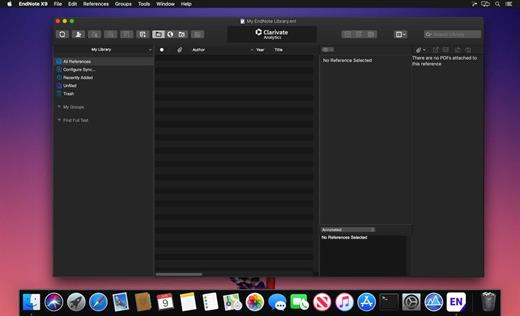
EndNote is used by millions of researchers, scholarly writers, students, and librarians to search online bibliographic databases, organize their references, images and PDFs in any language, and create bibliographies and figure lists instantly. Instead of spending hours typing bibliographies, or using index cards to organize their references, they do it the easy way-by using EndNote!

What’s New

Version 2025.3:


  • Simplified Chinese localization of EndNote desktop.
  • Various bug fixes.
Compatibility

macOS 10.14 or later


Release Name: EndNote 2025.3
Size: 116.8 MB
Links: HOMEPAGE – NFO – Torrent Search

Download: RAPiDGATOR

12 Comments
Feb 13

attn LED 1.0

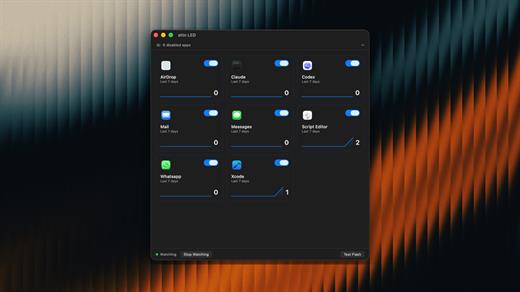
Notification lights, reimagined for Mac. Your camera LED blinks until you open the app with pending notifications, no intrusive banners or sounds to break your flow. A minimal, elegant solution that keeps you informed without demanding immediate attention. Finally, visual notification alerts that respect your focus and workflow, designed specifically for macOS users who want awareness without distraction.

What’s New

Version 1.0:


  • Release notes were unavailable when this listing was updated.
Compatibility

macOS 12.0 or later


Release Name: attn LED 1.0
Size: 4.3 MB
Links: HOMEPAGE – NFO – Torrent Search

Download: RAPiDGATOR
8 Comments
Feb 13

Transmit 5.11.5

Transmit is a powerful and versatile Mac OS X application that makes it easy for you to manage and organize large files on various servers on clouds.

User-oriented interface with support for multiple tabs

With Transmit’s help you can quickly and effortlessly transfer files to SFTP or FTP server, as well as Amazon S3 or WevDAV from within a user-oriented interface.

Transmit comes a simple and reliable solution for users that need to maintain websites, upload numerous photos or perform backups.

Transmit comes with a “Twin-Turbo Engine”, multi-connection transfer and FXP support fact that makes it a fast, smooth-running and dependable client for most Mac users.

On top of that, Transmit enables you to limit the bandwidth, synchronize or compare files with ease.

Choose between a single or dual pane window

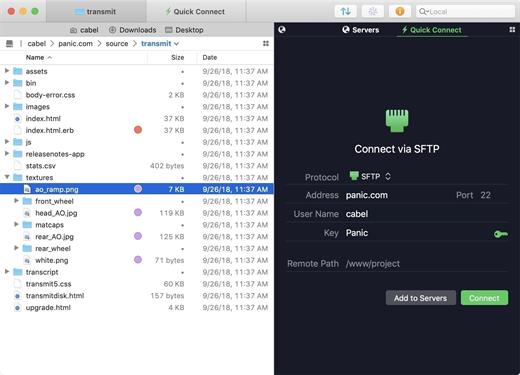
From Transmit’s two-panel window you can view the files stored locally and the ones saved on the server. At the same time, Transmit helps you create a list with favorite servers add a new FTP, SFTP, Amazon S3 or WebDAV server.

The top toolbar allows you to switch between the thumbnail, list, column and Cover Flow view mode and change from the a dual pane to a single pane window. In addition, Transmit seamlessly integrates Mac OS X’s Quick Look feature, a fact that helps you preview files before transferring them.

Handy synchronization features

By accessing the Action drop-down menu, you can open the Info window, copy the file path or URL address, move items to Trash or the desired location, create duplicates, compress or label files. On top of that, you have the option to create new folders or files, refresh the list and open a folder in a new tab or new window.

Thanks to the built-in search form, you can quickly and effortlessly filter the displayed items as soon as you start typing. The Preferences window enables you to change the default FTP client and configure Transmit to synchronize your favorite items via iCloud or Dropbox.

What’s New

Version 5.11.5:


  • Release notes were unavailable when this listing was updated.
Compatibility

macOS 12.0 or later
Apple Silicon or Intel Core processor


Release Name: Transmit 5.11.5
Size: 32.5 MB
Links: HOMEPAGE – NFO – Torrent Search

Download: RAPiDGATOR
10 Comments
Feb 13

Bartender 6.4.2

Bartender lets you organize your menu bar apps.

Features


  • Take control of your menu bar – With Bartender you can choose which apps stay in the menu bar, are displayed in the Bartender Bar or are hidden completely.
  • The Bartender Bar – The Bartender Bar can be displayed and hidden as you want, by clicking on the Bartender Icon or via a hot key.
  • Menu bar apps still work the same – Apps still work the same when they are in the Bartender Bar allowing you quick access to them when needed, but keeping them out of sight when not.
  • Show an app in the menu bar when it updates – Set up your apps to be displayed in the menu bar for a period of time when they update.
  • Order your menu bar items – With Bartender you can set the order of the menu bar items, both in the menu bar and in the Bartender Bar, simply by ⌘+dragging the items. The order you set is maintained after restarts. So your menu bar items are always in the order you want.
  • Minimalism – If you want a really clean look and privacy, Bartender can also be hidden.
  • The Bartender Bar can be placed where you want – The Bartender Bar can be moved at any time to any horizontal position immediately under the menu bar. Or it can open under the Bartender icon.
  • Keyboard Navigate your menu bar items – Keyboard navigate all menu items both in the menu bar and the Bartender Bar; simply arrow through them and press return to select.
  • Search menu bar items – You can search the Bartender Bar for menu items, allowing you quick access to a menu item without looking for it. Simply display the Bartender Bar and start typing, then press enter to select the menu item.
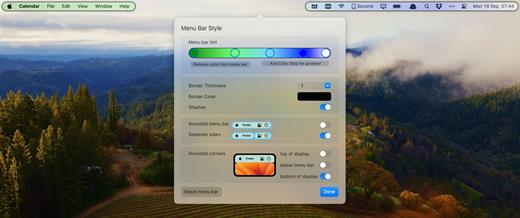
Bartender lets you organize your menu bar apps by hiding them, rearranging them, or moving them to Bartender’s Bar. You can display the full menu bar, set options to have menu bar items show in the menu bar when they have updated, or have them always visible in Bartender’s Bar.

What’s New

Version 6.4.2:


  • Release notes were unavailable when this listing was updated.
Compatibility

macOS 14.0 or later


Release Name: Bartender 6.4.2
Size: 25.6 MB
Links: HOMEPAGE – NFO – Torrent Search

Download: RAPiDGATOR
9 Comments