Please REGISTER or RENEW your account on RAPiDGATOR.net and support us by doing through all RAPiDGATOR working download links on main posts...
Feb 13

Motion 6.0 fix

Motion is now part of Apple Creator Studio, an amazing collection of Apple’s most powerful creative apps designed to help you bring your ideas to life. The suite includes Final Cut Pro, Logic Pro, Pixelmator Pro, Motion, Compressor, and MainStage — plus premium content and intelligence features in Keynote, Pages, Numbers, and Freeform*, all in one simple plan.
New Features
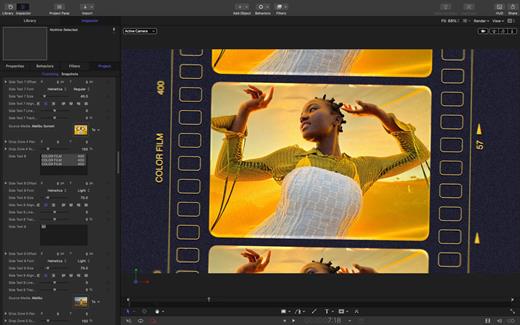
AI-powered Magnetic Mask automatically tracks and isolates people, objects, and shapes in any footage
3D text is now dramatically faster on Apple silicon, with Metal-powered improvements to playback and rendering

Overview

Designed for video editors, Motion is a powerful motion graphics tool that makes it easy to create cinematic 2D and 3D titles, fluid transitions, and realistic effects in real time.

2D and 3D Titles


  • Import 360° media and design 360° titles, generators, and effects
  • Build 3D titles from scratch, design them with easy-to-use templates, or instantly convert any existing 2D title to 3D
  • Easily create beautiful titles that you can animate using more than 100 drag-and-drop behaviors and intuitive text animation tools
  • Customize 3D titles to create endless looks with over 90 Apple-designed 3D materials including metal, wood, and stone surfaces
Motion Graphics for Final Cut Pro

  • Save any title, effect, transition, or generator and access it directly in Final Cut Pro
  • Customize Final Cut Pro titles, effects, and transitions by opening them in Motion
  • Create Motion Templates with any combination of single parameters and rigs that let you control a group of parameters with a slider, pop-up menu, or checkbox in Final Cut Pro
  • Use Display Aspect Ratio snapshots to create templates that support multiple aspect ratios
Stunning Effects

  • Choose from more than 230 behaviors for natural animation without keyframes
  • Change focus points or the depth effect for video shot in Cinematic mode on iPhone
  • Design your own particle emitters or choose from 200 presets for real-world effects like smoke and sparkles
  • Use professional masking tools to quickly draw and adjust control points for rotoscoping
  • Automatically detect, track, and match the movement of faces or objects using machine learning
  • Choose between different tracking analysis types
  • Add the Neon filter to easily add a neon glow to text, shapes, video, stills, and more
  • Harness an ecosystem of third-party FxPlug plug-ins for tasks like advanced tracking, advanced motion graphics, and more
Effortless 3D

  • Transition from 2D to 3D space by adding cameras
  • Create 3D scenes within a 360° project for ultra-realistic 360° environments
  • Set up realistic shadows that animate dynamically with the movement of cameras and lights
  • Turn any shape, video plane, or paint stroke into a reflective surface in 3D space
  • Import third-party USDZ objects or use one of 60 premade objects in the Motion Library
Breakthrough Speed, Quality, and Output

  • Import wide color HDR images, view them on supported Mac computers, and export in standard Rec. 709 or wide Rec. 2020 color space
  • Unrivaled speed and efficiency with optimizations for the latest generation of Apple silicon
System Requirements: macOS 15.6 or later, 8 GB of memory (16 GB recommended), Metal-capable graphics card (Intel-based Mac computers only), 4.7 GB of available disk space. Some features require internet access; fees may apply.

  • Premium content and features in Freeform are not currently available and are expected to be included in the Apple Creator Studio subscription later this year.
What’s New

Version 6.0:


  • Motion is now part of Apple Creator Studio.
Compatibility

macOS 15.6 or later.


Release Name: Motion 6.0 fix
Size: 2.5 GB
Links: HOMEPAGE – NFO – Torrent Search

Download: RAPiDGATOR

8 Comments
Feb 13

Geekbench 6.6.0

Geekbench provides a comprehensive set of benchmarks engineered to quickly and accurately measure processor and memory performance. Designed to make benchmarks easy to run and easy to understand, Geekbench takes the guesswork out of producing robust and reliable benchmark results.

What’s New

Version 6.6.0:


  • Release notes were unavailable when this listing was updated.
Compatibility

macOS 11.0 or later


Release Name: Geekbench 6.6.0
Size: 280.7 MB
Links: HOMEPAGE – NFO – Torrent Search

Download: RAPiDGATOR

11 Comments
Feb 13

Mimestream 1.9.11

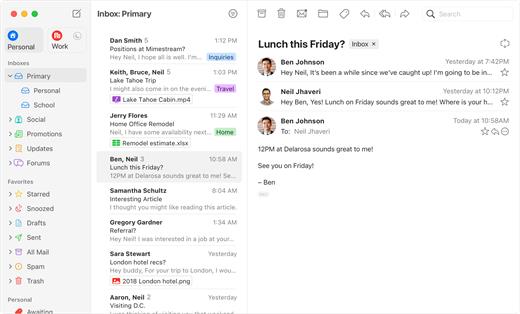
Mimestream combines your favorite Gmail features with the power of a native macOS app so you can move through your email effortlessly

Made for Mac, optimized for Gmail

As a native app written in Swift, Mimestream leverages the full power of macOS to deliver a lightning-fast and instantly familiar experience. Instead of using the IMAP protocol, Mimestream utilizes the Gmail API to enable an enhanced set of features that let you work with ease.

Work smarter, email faster

  • Rise above the noise and focus on the work that matters most. Mimestream makes it easy to keep your inbox organized with confidence.

  • Categorized Inbox – with support for Gmail’s categories, focus on what matters most and triage the rest at your leisure.
  • Multiple Accounts
  • Label Management
Committed to Privacy

Your data and credentials are stored only on your device, and the app only makes direct connections to Gmail. There are no intermediary servers, and Mimestream does not collect or sell your email.

Key Features

  • Lightweight and Fast – Mimestream is built for speed, and only uses a minimal amount of disk space to cache recent messages
  • Offline Access – Fully functional when offline and on the slowest connections-perfect for business travelers and whenever you’re on the go
  • System Notifications – Receive macOS system notifications when you receive new messages, so you never fall behind on important threads
  • Aliases – Your email aliases are automatically synced from Gmail without any setup and are used for replies when appropriate
  • Signatures – Signatures set up in Gmail are automatically synced with Mimestream
  • Robust Search – Enter any Gmail search query into Mimestream and get consistent results. Search while offline, too
  • Swipe Gestures – Use familiar macOS swipe gestures to quickly triage and archive your email
  • Tracking Prevention – Read your email privately – Mimestream blocks tracking pixels from 50+ of the most common tracking services
  • Keyboard Shortcuts – Triage your email quickly using keyboard shortcuts, including the option to use familiar Gmail or Apple Mail shortcut sets
What’s New

version 1.9.11:
? Fixed


  • Crash in background during periodic service sync
  • Crash during background cache maintenance tasks
  • Text in the Start Trial view can be clipped at narrow widths
  • The numeric keypad's Enter key doesn't work for opening in a standalone window
? Cleanup

  • Improved the "Test Push" button to check more conditions
Compatibility

macOS 10.15.0 or later


Release Name: Mimestream 1.9.11
Size: 9 MB
Links: HOMEPAGE – NFO – Torrent Search

Download: RAPiDGATOR

8 Comments
Feb 13

ChatGPT for macOS 1.2026.027

This is the official OpenAI ChatGPT app for macOS.

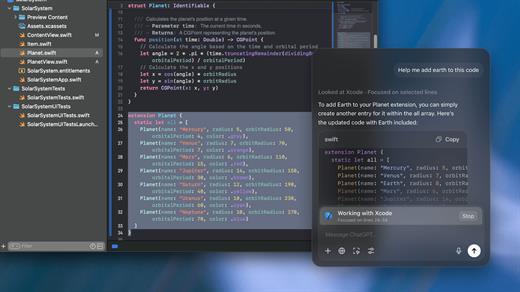
Whether you’re writing emails, exploring ideas, learning something new, or just curious about the world, ChatGPT is here to help. Designed with a clean, native experience for Mac users, the app makes it easier than ever to start a conversation with advanced AI.

Get answers. Find inspiration. Be more productive.

Free to use. Easy to try. Just ask and ChatGPT can assist with writing, learning, brainstorming, coding, and more. It’s like having an intelligent assistant, tutor, or creative partner always within reach—right from your menu bar.

Includes access to GPT-o3 (for pro users), memory features, and voice input. Works seamlessly on macOS, optimized for speed and simplicity.

Key Features:


  • Instant AI-powered responses on your desktop
  • Natural language understanding and generation
  • Voice conversations with the built-in Whisper model
  • Synced across devices with your OpenAI account
  • Support for both GPT-4o (free) and GPT-o3 (with Plus subscription)
Get started in seconds—no complex setup required. Just launch the app, log in, and start chatting.

What’s New

Version 1.2026.027:


  • Release notes were unavailable when this listing was updated.
Compatibility

macOS 14.0 and Apple Silicon (M1 or better)


Release Name: ChatGPT for macOS 1.2026.027
Size: 59.7 MB
Links: HOMEPAGE – NFO – Torrent Search

Download: RAPiDGATOR
13 Comments
Feb 13

KONTAKT 8.8.1

KONTAKT 8 The virtual instrument platform reinvented.
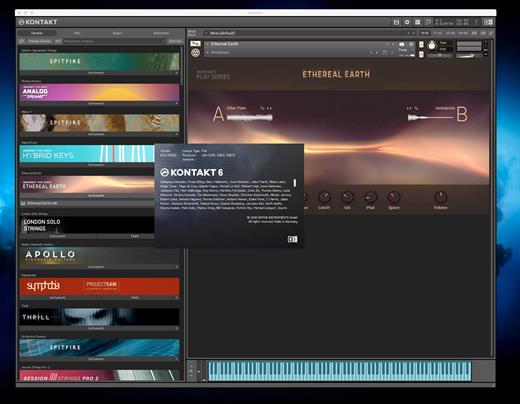
Imagine any sound – Kontakt lets you find it, create it, and transform it. The latest edition of our revolutionary sampling platform combines a brand-new set of intelligent tools with countless sound design options, redefining how you generate ideas and make music. A huge choice of sound. Kontakt hosts the world’s largest range of virtual instruments. With thousands of libraries, it’s the gateway to quality sound from Native Instruments, our official partners, and scores of indie developers. Plus, everything is completely tweakable, so you can make any sound your own.

A huge choice of sound

Kontakt hosts the world’s largest range of virtual instruments. With thousands of libraries, it’s the gateway to quality sound from Native Instruments, our official partners, and scores of indie developers. Plus, everything is completely tweakable, so you can make any sound your own.

What’s new in Kontakt 8?

Our most feature-packed release yet is here to transform the way you generate, modulate, and playback sound. Plus, it’s packed with performance updates so you can work faster than ever.

Smash writer’s block

Tools add a completely new layer of creative features to get the ideas flowing. And they work with any Kontakt instrument, old and new. For our first drop, we’re launching MIDI content and randomization features with Chords and Phrases, designed to spark new ideas and get you in the zone fast.

Fast and fun loop control

Leap is an ultra-fast and playful way to play and manipulate loops. Spark fresh ideas, sprinkle in expressive performance effects, or just jam. Breathe new life into your sample collection or try something totally fresh with our new Leap Expansions series, starting with 12 curated packs for specific genres and styles.

Get going with hundreds of included instruments

Kontakt’s Factory Library comes packed with over hundreds of meticulously sampled instruments. Get started with a huge playable and tweakable selection of acoustic and electronic options, including the renowned collection from Orchestral Tools, plus Hybrid Keys.

Dream it, build it

All your favorite Kontakt instruments are built right here. The powerful feature set makes Kontakt the first choice for instrument developers worldwide, and it just got even bigger with enhanced synth capabilities, including real-time wavetable, frequency modulation, and ring modulation oscillators.

What’s New

Version 8.8.1:


  • Release notes were unavailable when this listing was updated.
Compatibility

macOS 13.0 or later


Release Name: KONTAKT 8.8.1
Size: 1.6 GB
Links: HOMEPAGE – NFO – Torrent Search

Download: RAPiDGATOR

7 Comments
Feb 13

Davinci Resolve Studio 20.3.2

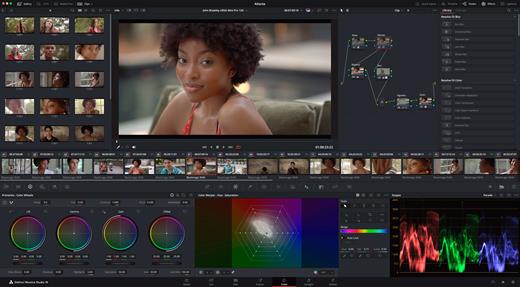
DaVinci Resolve Studio is the world’s only solution that combines professional 8K editing, color correction, visual effects and audio post production all in one software tool! You can instantly move between editing, color, effects, and audio with a single click. DaVinci Resolve Studio is also the only solution designed for multi user collaboration so editors, assistants, colorists, VFX artists and sound designers can all work live on the same project at the same time! Whether you’re an individual artist, or part of a large collaborative team, it’s easy to see why DaVinci Resolve is the standard for high end post production and finishing on more Hollywood feature films, television shows and commercials than any other software.

DaVinci Resolve 20 features powerful new DaVinci Neural Engine AI tools and over 100 feature upgrades! New AI tools include text based timeline editing, music remixing, dialogue separation and UltraNR noise reduction. IntelliTrack AI lets you use video to track the Fairlight audio panner. ColorSlice vector grading and film look creator offer richer grading vibrance and color density. Plus there are new features for live TV production and broadcast. DaVinci Resolve now supports realtime selection of live camera recordings for instant replay to air with slow motion and stingers. Multi Source is the fastest way to see your cameras and edit to the timeline while the cameras are still recording!

What’s New

Version 20.3.2:


  • Release notes were unavailable when this listing was updated.
Compatibility

macOS 10.15 or later,
Apple Silicon or Intel Core processor


Release Name: Davinci Resolve Studio 20.3.2
Size: 7 GB
Links: HOMEPAGE – NFO – Torrent Search

Download: RAPiDGATOR
3 Comments
Feb 13

Geekbench AI 1.7.0

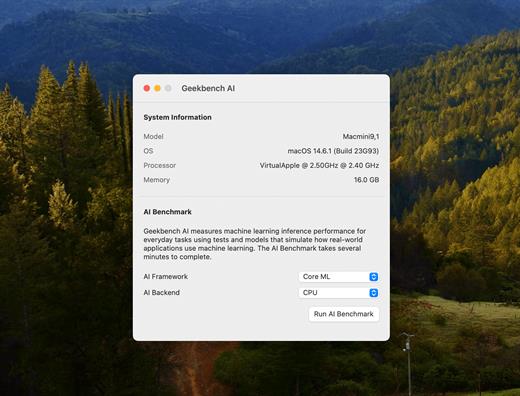
Geekbench AI is a cross-platform AI benchmark that uses real-world machine learning tasks to evaluate AI workload performance. Geekbench AI measures your CPU, GPU, and NPU to determine whether your device is ready for today’s and tomorrow’s cutting-edge machine learning applications.

Real-World AI Performance

Geekbench AI runs ten AI workloads, each with three different data types, giving you a multidimensional picture of on-device AI performance. Using large datasets that mimic real-world AI use cases, both developers and consumers can measure on-device AI performance in just a few minutes with Single Precision, Half Precision, and Quantized scores.

Measure AI on CPU, GPU, or NPU

Geekbench AI breaks down AI performance across the hardware stack – select the GPU, CPU, or your device’s dedicated NPU for testing. You can also choose from available AI frameworks on your device, like Core ML or QNN. Developers can determine the best combination of frameworks and models for particular workloads, and consumers can easily quantify the impact of dedicated AI hardware.

Compare AI Performance Across Platforms

Geekbench AI runs identical workloads on Android, iOS, Windows, macOS, and Linux. Our benchmark is built for hardware across the capability spectrum, whether you’re testing a smartphone with an ultra-low-power NPU or a dedicated workstation with a kilowatt-plus of dedicated AI compute. Instantly compare results using our Geekbench AI results browser.

What’s New

Version 1.7.0:


  • Release notes were unavailable when this listing was updated.
Compatibility

macOS 13.0 or later


Release Name: Geekbench AI 1.7.0
Size: 458.1 MB
Links: HOMEPAGE – NFO – Torrent Search

Download: RAPiDGATOR

11 Comments
Feb 13

Compressor 5.0 fix

Compressor is now part of Apple Creator Studio, an amazing collection of Apple’s most powerful creative apps designed to help you bring your ideas to life. The suite includes Final Cut Pro, Logic Pro, Pixelmator Pro, Motion, Compressor, and MainStage — plus premium content and intelligence features in Keynote, Pages, Numbers, and Freeform*, all in one simple plan.

New Feature


  • Create files for an Apple Immersive Video package for playback, and HTTP live streaming on Apple Vision Pro
Overview

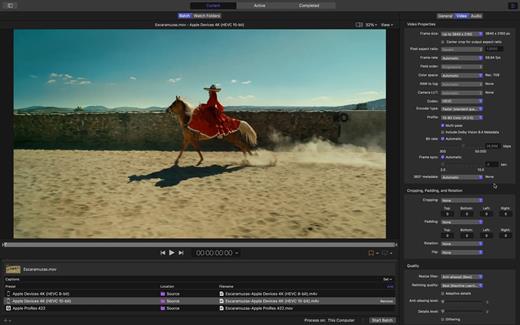
Compressor integrates tightly with Final Cut Pro and Motion to add power and flexibility to your video conversions. Quickly customize output settings, enhance images, and package your movie for sale on the iTunes Store.

Advanced Encoding for Final Cut Pro


  • Customize encoding settings for use in Final Cut Pro and Motion
  • Set up batch processes to streamline the encoding of large numbers of files
  • Create self-contained Droplets to encode on the desktop with drag-and-drop ease
  • Automatically encode videos that are added to selected folders in the file system
  • Encode stereoscopic spatial video and deliver directly to Apple Vision Pro
  • Unrivaled performance with optimizations for the latest generation of Apple silicon
iTunes Store Package Creation

  • Import and organize your movie, trailer, closed captions, audio descriptions, and subtitles into an iTunes Store-compliant package for submission to an Apple-certified iTunes delivery partner
  • Audition video with any audio, caption, or subtitle to verify sync
  • Built-in error detection helps you identify issues with your iTunes Store Package
  • Deliver HDR video as P3 D65 PQ, Rec. 2020 HLG, and Rec. 2020 PQ for HDR10
  • Support in the iTunes Store Package to link a Dolby Vision graded video file to a Dolby Vision XML
Support for Industry Standards

  • Encode to a broad range of industry standard formats including HEVC, MV-HEVC, H.264, MXF, and ProRes
  • Import Targa, DPX, TIFF, PSD, PNG, or OpenEXR image sequences and encode them using any setting
  • Create, view, adjust, and deliver closed captions in CEA-608, SRT, and iTT formats
Pristine Format Conversions

  • Convert any file between formats — such as SD to HD, or progressive to interlaced video
  • Import and manipulate wide color video, then deliver in standard Rec. 601 and Rec. 709 color spaces or in wide Rec. 2020 color space
  • Deliver High Dynamic Range (HDR) video with controls for color space conversions and HDR metadata
  • Deliver HDR video as P3 D65 PQ, Rec. 2020 HLG, and Rec. 2020 PQ
  • Add effects to your content like custom LUTs, a timecode overlay, and watermarks
  • Speed up video, slow it down, or adjust the frame rate to make the duration match a runtime
  • Convert log-encoded video to SDR and HDR color spaces using built-in camera LUTs for Panasonic, Sony, Canon, Blackmagic, Nikon and ARRI or add a custom camera LUT
  • Convert ProRes RAW and ProRes RAW HQ media to other professional file formats
System Requirements: macOS 15.6 or later, 8 GB of memory, 1.2 GB of available disk space. Apple Immersive Video processing requires macOS 15.0 or later, 32 GB memory (64 GB recommended). Storage read speed of 2000 MB/s or faster is recommended. Some features require a Mac with Apple silicon.

  • Premium content and features in Freeform are not currently available and are expected to be included in the Apple Creator Studio subscription later this year.
What’s New

Version 5.0:


  • Release notes were unavailable when this listing was updated.
Compatibility

macOS 15.6 or later.


Release Name: Compressor 5.0 fix
Size: 114 MB
Links: HOMEPAGE – NFO – Torrent Search

Download: RAPiDGATOR
11 Comments
Feb 13

Logic Pro 12.0.1 fix

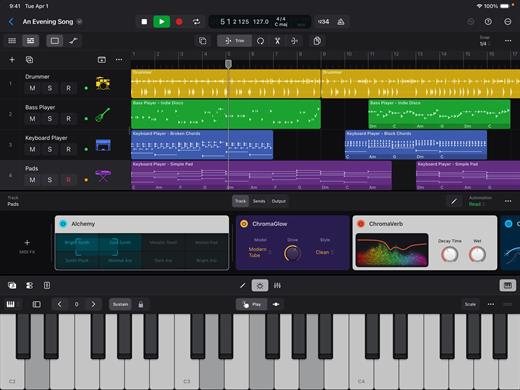
Logic Pro for Mac is a complete collection of sophisticated creative tools for songwriting, beat making, editing, and mixing, built around a modern interface that’s designed to get results quickly and also deliver more power whenever it’s needed. Logic Pro includes a massive collection of instruments, effects, loops, and samples, providing a complete toolkit to create amazing-sounding music.

Music Production


  • Use Stem Splitter to separate nearly any mixed audio recording into six distinct parts: Drums, Bass, Vocals, Guitar, Piano, and Other instruments
  • Smart Tempo instantly conforms imported or recorded audio to your project’s tempo
  • Record and edit MIDI or audio using a comprehensive set of editors and tools
  • Use Live Loops to capture inspiration and quickly build arrangements by mixing and matching loops, samples, and your recordings
  • Manipulate the pitch and timing of any recording with Flex Time and Flex Pitch
  • Keep takes organized with take folders and build comps quickly with Quick Swipe Comping
  • Track Alternatives let you create, duplicate, and then switch between different versions of tracks
  • Deliver a release-ready mix using Mastering Assistant
AI Session Players

  • Discover six virtual musicians designed to create nuanced performances that respond to your direction
  • Synth Player, Bass Player, Keyboard Player, Acoustic Drummer, Electronic Drummer, and Percussionist offer a wide range of genres and distinct playing styles
Beat Production

  • Reshuffle audio with Beat Breaker, a creative time and pitch effect
  • Build custom drum kits using your favorite samples
  • Create drum beats, bass lines, and melodic parts, and reshape sounds over time using Step Sequencer
Sampling

  • Use Sampler to quickly create and edit sophisticated multi-sampled instruments
  • Use Sample Alchemy to transform audio into entirely new malleable sounds
  • Chop and manipulate samples using Quick Sampler
Professional Instrument and Effects Plug-ins

  • Create music with a massive collection of powerful software instruments
  • Shape your sound using a wide variety of high-quality effects
Compatibility

  • Roundtrip capabilities let you open projects back-and-forth between Logic Pro for Mac or Logic Pro for iPad
  • Import and export XML to support Final Cut Pro workflows
System Requirements: 6GB available storage space for minimum install / 44GB or more storage space for full Sound Library installation

What’s New

Version 12.0.1:


  • Release notes were unavailable when this listing was updated.
Compatibility

macOS 15.6 or later and a Mac with Apple M1 chip or later.


Release Name: Logic Pro 12.0.1 fix
Size: 1.3 GB
Links: HOMEPAGE – NFO – Torrent Search

Download: RAPiDGATOR
9 Comments
Feb 13

Pixelmator Pro 4.0 fix

Pixelmator Pro is now part of Apple Creator Studio, an amazing collection of Apple’s most powerful creative apps designed to help you bring your ideas to life. The suite includes Final Cut Pro, Logic Pro, Pixelmator Pro, Motion, Compressor, and MainStage — plus premium content and intelligence features in Keynote, Pages, Numbers, and Freeform*, all in one simple plan.

New Features

Pixelmator Pro for iPad


  • Enjoy a completely reimagined editing experience, with Pixelmator Pro tools for design, photography, painting, and illustration now fully optimized for touch
  • Design and paint with pixel-perfect precision using Apple Pencil, with full support for hover, squeeze, double-tap, and palm rejection
  • Insert photos to your compositions directly from your iPad camera as new layers
  • Easily roundtrip between Pixelmator Pro for iPad and Mac, syncing edits through iCloud, and pick up projects wherever you left off
Warp Tool and Mockups

  • Use the all-new Warp tool to twist and bend images, shapes, text, and even video layers by pushing and pulling individual points on a warp grid
  • Automatically warp layers into common shapes like cylinder, arc, flag, and more with 12 smart warp presets, or quickly split layers into 3×3, 4×4, or 5×5 warp grids
  • Explore 2 new collections of premium product and apparel mockups that make the most of the new warp functionality to quickly showcase your designs on t-shirts, mugs, and more
Overview
Pixelmator Pro has everything you need to create designs, edit photos, draw illustrations, paint digital art, and be creative in just about any way you can imagine.

Edit and Enhance


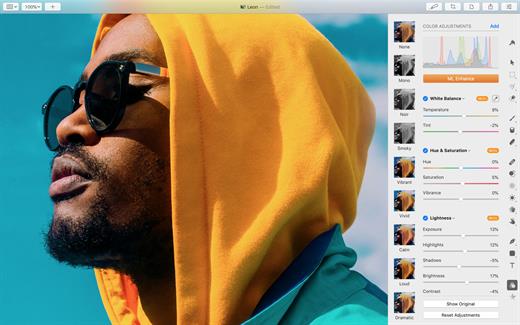
  • Adjust the colors in your photos and even videos in any way you want using a powerful collection of pro-grade color adjustments
  • Use machine learning-powered tools to automatically remove image background, enhance colors, increase resolution, and more
  • Quickly make good-looking shots spectacular with over 40 color adjustment presets and combine any of over 70 versatile effects to develop any artistic or special looks you can imagine
  • Enjoy full support for RAW photos from over 750 of the most popular digital cameras
Create Stunning Designs

  • Harness the full power of layer-based editing with support for vector shapes, typography features, and even video to design posters, webpages, or apps from scratch
  • Customize the look of layers using layer styles, such as Fill, Stroke, Drop Shadow, and Inner Shadow
  • Create beautiful designs in moments with a vast collection of beautiful templates and premium, fully customizable mockups
Draw and Illustrate

  • Design vector graphics using a full set of vector tools, including Pen and Freeform Pen tools
  • Speed up creating illustrations with stunning shapes including categories like arches, plants, and organic shapes
  • Add customizable Smart Shapes to quickly create your custom shapes
Sketch and Paint

  • Paint naturally with a collection of beautiful, handcrafted dual-texture brushes
  • Take advantage of full support for Apple Pencil on iPad and graphics tablets on Mac to paint with pressure and tilt sensitivity
  • Enjoy incredibly fast and responsive painting thanks to a cutting-edge painting engine powered by Metal graphics technology
Compatibility

  • Open files in popular image and video formats, including JPEG, TIFF, PNG, PSD, HEIF, SVG, AI, Illustrator EPS, PDF, GIF, BMP, TGA, WebP, JPEG-2000, AVIF, MP4, MOV, HDR images, videos, and more
  • Share your images or videos to Photos, Mail, AirDrop, and other locations
  • Premium content and features in Freeform are not currently available and are expected to be included in the Apple Creator Studio subscription later this year.
What’s New

Version 4.0:


  • Pixelmator Pro is now part of Apple Creator Studio
Compatibility

macOS 26.0 or later.


Release Name: Pixelmator Pro 4.0 fix
Size: 594.3 MB
Links: HOMEPAGE – NFO – Torrent Search

Download: RAPiDGATOR
12 Comments