Please REGISTER or RENEW your account on RAPiDGATOR.net and support us by doing through all RAPiDGATOR working download links on main posts...
Feb 3

USBclean 4.5.2

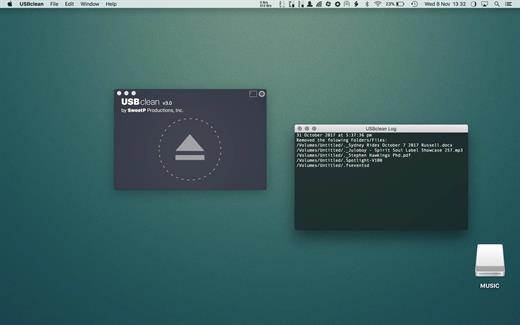
USBclean quickly and easily removes all those pesky junk and ghost files from your external Windows formatted USB drives. .DS_Store, Thumbs.db, .Spotlight, and trashes files take up precious space, and can cause issues on some devices. Remove them all quickly and easily with USBclean. Configure USBclean the way you want! Remove files by dragging your drive into the handy drop zone, from the system menubar, or by dropping straight onto the dock icon. You can easily configure USBclean to run only from the system menubar and open at login. It’s a snap to auto quit after dropping your drive onto the dock icon. USBclean always ejects your drive after cleaning for your convenience.

What’s New

Version 4.5.2:


  • Release notes were unavailable when this listing was updated.
Compatibility

macOS 10.11 or later


Release Name: USBclean 4.5.2
Size: 5.6 MB
Links: HOMEPAGE – NFO – Torrent Search

Download: RAPiDGATOR

8 Comments
Feb 3

PullTube 1.8.6.22

Sharing videos via online hosting services, such as YouTube or Vimeo is a common practice, yet streaming the content might not work as expected if you have a slow internet connection.
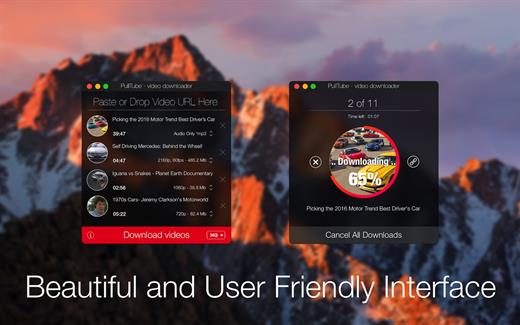
PullTube offers you the possibility to download videos from both sources (YouTube and Vimeo), while other platforms might be added at a later time. The app can handle playlists, allows you to select the output quality, and can even extract only the audio.

Video downloader that can import links with drag and drop and can detect playlists

The PullTube user interface is represented by a small window where you get to quickly paste the video URL. Note that you can also add a video by dropping the link on top of the PullTube window.

Worth mentioning is that, if PullTube detects that the video is part of a playlist, will offer to download the entire collection: will fetch the data for each entry and handle the downloads consecutively.

Download videos hosted on YouTube or Vimeo to different output sizes and formats

PullTube will start fetching the video data right away so you can see the video name, duration, and a small thumbnail. When configuring a download, you get to select the output quality (highest, 4K, HD or regular with different resolutions) or choose to export only the audio to an M4A or MP3 file.

Via the PullTube Settings panel, you can change the default download location and the default MP3 bitrate (320Kbps, 256Kbps, 128Kbps, 64Kbps). You can also add the quality info to the video’s name and choose to quit the app when all downloads are completed.

Get offline access to videos hosted online in just a few steps

PullTube proposes a streamlined workflow for quickly downloading videos from YouTube or Vimeo, provides control over the output quality, and enables you to extract the audio to MP3 or M4A files.

However, during our tests, we have noticed that PullTube has trouble completing the download when handling videos that are longer that 2 minutes. The process stops without any explanation, and you can eventually complete the task, but you need to add the link to download tool multiple times.

What’s New

Version 1.8.6.22:


  • Release notes were unavailable when this listing was updated.
Compatibility

macOS 10.12 or later


Release Name: PullTube 1.8.6.22
Size: 232.1 MB
Links: HOMEPAGE – NFO – Torrent Search

Download: RAPiDGATOR

9 Comments
Feb 3

MacMagic 1.9.4

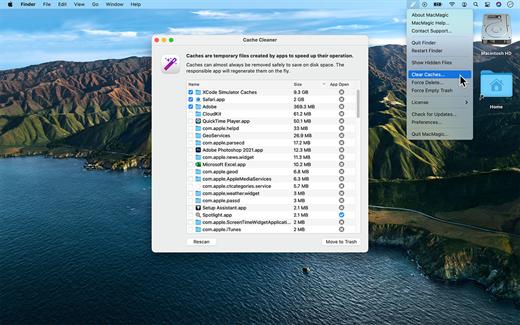
MacMagic can help clear up gigabytes of lost storage space crowded up by the caches of poorly optimized apps, hide and show hidden files in the Finder, help force-delete the contents of the Trash or stubborn files, and perform various other tasks to help automate or simplify your daily workflow!

What’s New

Version 1.9.4:


  • Release notes were unavailable when this listing was updated.
Compatibility

macOS 10.14 or later.


Release Name: MacMagic 1.9.4
Size: 76.1 MB
Links: HOMEPAGE – NFO – Torrent Search

Download: RAPiDGATOR

6 Comments
Feb 3

Adobe Acrobat Pro DC 25.001.20997

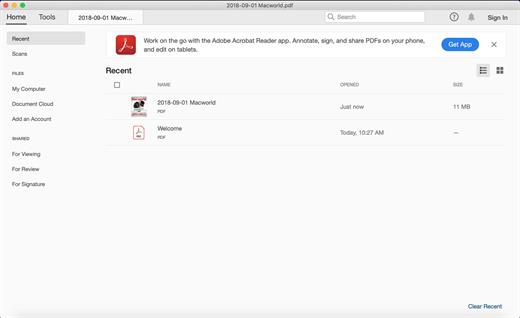
Protect PDF files
• Adobe Acrobat Pro DC makes it simple to keep your work more secure, no matter what application you’re in.
• Apply PDF passwords and permissions. Get expert protection without being an expert. Add copy and edit protection to any PDF – even right from Microsoft Office applications in Windows.
• Remove and redact information. Don’t just black out confidential data. Find and get rid of it for good, even when hidden in metadata.
• Automate document security tasks. Apply document security measures the same way every time. Use a guided Action to help secure your PDF before publishing it.

What’s New

Version 25.001.20997:


  • Release notes were unavailable when this listing was updated.
Compatibility

macOS 10.14.0 or later


Release Name: Adobe Acrobat Pro DC 25.001.20997
Size: 1.7 GB
Links: HOMEPAGE – NFO – Torrent Search

Download: RAPiDGATOR

8 Comments
Feb 3

FSNotes 7.1.0

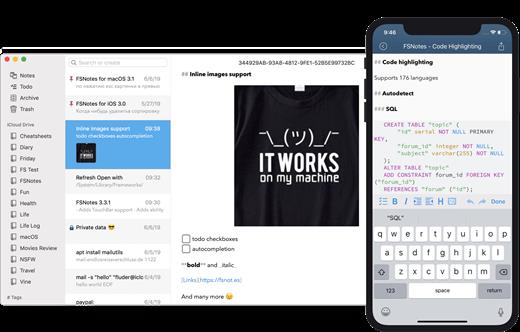
FSNotes is a plain-text note manager for macOS, and is modern reinvention of notational velocity (nvALT) on steroids. Our application respects the following open formats: plain/text, Markdown, and RTF, and stores data in the file system. You can view, edit, and copy data in your favourite external editor, and see live results in FSNotes.

Features:


  • ICloud synchronization
  • Keyboard centric
  • Global shortcuts (clipboard save / search field)
  • Markdown and RTF markup (files stored on disk as plain/text and rich text)
  • Markdown preview mode
  • Elastic two pane view (vertical and horizontal layout)
  • Blazing fast and lightweight
  • Open files in finder / works with external editors (changes seamless live sync with UI)
  • Pin/unpin important notes in top
  • Multi folder storage
  • Markdown live highlighting with over 170 languages in code blocks
What’s New

Version 7.1.0:


  • Release notes were unavailable when this listing was updated.
Compatibility

macOS 10.14 or later


Release Name: FSNotes 7.1.0
Size: 19.7 MB
Links: HOMEPAGE – NFO – Torrent Search

Download: RAPiDGATOR
8 Comments
Feb 3

ColorWell 8.1.4

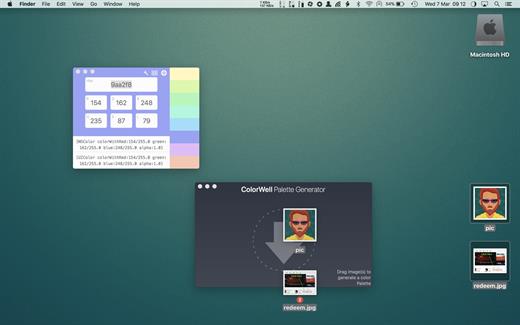
ColorWell is a professional color theme generator with full history support, and macOS palette synchronization


  •  System wide color palettes – ColorWell synchronize’s palettes with the macOS System color picker. So, all your carefully created color schemes are available for use in Pages, Affinity Photo, Final Cut Pro or any other first class macOS app! All the system palettes are also available to view and create custom palettes from
  •  Professional file support – ColorWell supports import and export to Adobe .ase, and Apple .clr file formats. This makes it easier than ever to share your color schemes. And with ColorWell’s universal palette database, any imported scheme’s will naturally be imported directly into the macOS color picker, ready for sytem wide use
  •  Full History support – Every color change you make is saved to History. So even if you can’t remember what color you were inspecting 3 days ago – ColorWell can! History support is not limited to single colors, the entire color state is saved on each change. So the current active color along with any saved swatches are right there when you need them
  •  Advanced palette generation – Use stored palettes as a starting point, fine-tune individual colors. Grab complementary, analagous, triadic, tetradic, or monochromatic colors from the palette generator. Rip colors from images, and finetune the color selection. You can create palette’s with unlimited number’s of swatches
What’s New

Version 8.1.4:


  • interim release to migrate update manifest
Compatibility

macOS 10.14 or later
Apple Silicon or Intel Core processor


Release Name: ColorWell 8.1.4
Size: 6.4 MB
Links: HOMEPAGE – NFO – Torrent Search

Download: RAPiDGATOR

7 Comments
Feb 3

Aspect Ratio Pro 3.4

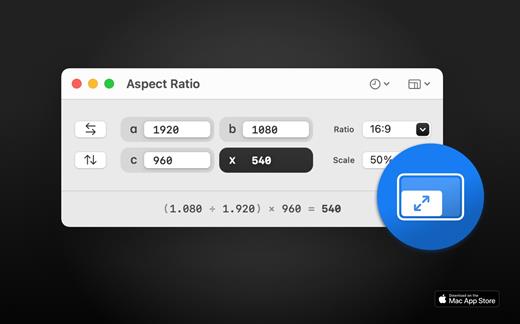
Aspect Ratio X is a rule-of-three calculator.

Features:

• Calculate aspect ratios (rule of three)
• Swap values horizontally and vertically
• Select scales and ratios
• Browse common resolutions
• Browse recent ratios
• Formula preview
• Uses imperial or metric system automatically based on your system settings
• Multi-window support
• Optimized for macOS 11+
• Optimized for Mac with M1 (Apple Silicon)

What’s New

Version 3.4:


  • Release notes were unavailable when this listing was updated.
Compatibility

macOS 11.0 or later


Release Name: Aspect Ratio Pro 3.4
Size: 11.2 MB
Links: HOMEPAGE – NFO – Torrent Search

Download: RAPiDGATOR
6 Comments
Feb 3

Transfer 2.4.1

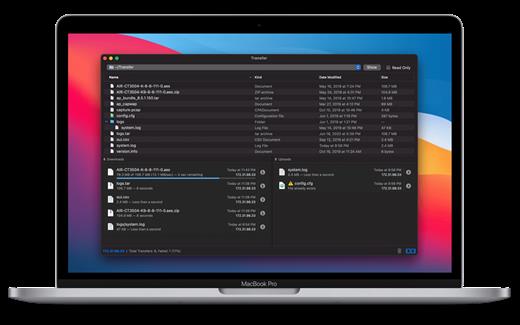
Transfer is a reliable and fully RFC-compliant TFTP server application. The perfect alternative to the built-in TFTP server on your Mac. It’s got everything you expect: real-time updates of current transfers in progress, support for broadcast requests, transfer history and basic root directory access control and file management. A feature rich TFTP server with a simple and modern user interface.

Written from the ground up, Transfer offers total control of your file transfers while playing nicely with existing TFTP clients.

Features


  • Real time updates of current transfers in progress
  • Basic file management of the root TFTP directory
  • Support for broadcast transfer requests
  • Support for common TFTP extensions and options
  • Transfer history
What’s New

Version 2.4.1:


  • Minor fixes and improvements.
Compatibility

macOS 10.14 or later, 64-bit processor


Release Name: Transfer 2.4.1
Size: 10.2 MB
Links: HOMEPAGE – NFO – Torrent Search

Download: RAPiDGATOR

7 Comments
Feb 3

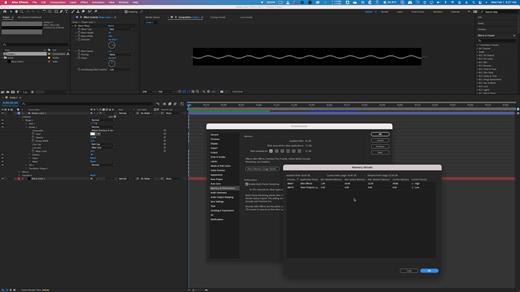
Adobe After Effects 2026 v26.0.0

The new, more connected Adobe After Effects can make the impossible possible. Get powerful new features like a Live 3D Pipeline that brings CINEMA 4D scenes in as layers – without intermediate rendering. Share work directly from within the application and get access to new features the moment they’re released. Your entire creative world, together in one place.

Adobe After Effects is part of Creative Cloud. That means you have access to all the latest updates and future releases the moment they’re available. Sharpen your skills and master new tools with a rich library of training videos. And Creative Cloud is integrated with Behance, so you can share your projects and get immediate feedback from creatives around the world.

What’s New

Version 26.0.0:


  • After Effects no longer crashes when selecting the October India Compressed Hairline font.
  • Line breaks are now preserved when scripting marker comments that include carriage return characters.
  • Scale, rotation, and orientation values now update live in the properties panel as you adjust layers in the composition viewer.
  • Undoing a change to a light’s falloff type now correctly updates the visibility of the falloff controls.
  • Using expressions to create variable font animations no longer slows performance or creates extra font-style menu entries.
  • Playback no longer drops frames when using cache before playback with cached frames.
  • The info panel now updates correctly when navigating the layer stack using Cmd/Ctrl + arrow keys.
  • Times in the project panel’s date column now display correctly without future offsets.
  • The number effect now correctly displays date and time formats when After Effects runs in a language different from the OS.
  • After Effects no longer crashes when creating shapes from text layers with special characters.
  • The info panel now shows the number of timeline layers selected with edit > select all.
  • Still footage duration settings no longer affect new non-still footage layers.
  • Japanese characters are preserved when exporting files from the render queue.
  • After Effects no longer exhibits rendering issues with fonts when using 3D text extrusion, including cutouts, overlaps, and missing fills.
  • After Effects now has improved stability during playback when using disk cache, preventing potential crashes.
Compatibility

macOS 11.0 or later.
Apple Silicon or Intel Core processor


Release Name: Adobe After Effects 2026 v26.0.0
Size: 6.8 GB
Links: HOMEPAGE – NFO – Torrent Search

Download: RAPiDGATOR
3 Comments