Please REGISTER or RENEW your account on RAPiDGATOR.net and support us by doing through all RAPiDGATOR working download links on main posts...
Feb 3

Pixelmator Pro 4.0

Pixelmator Pro is now part of Apple Creator Studio, an amazing collection of Apple’s most powerful creative apps designed to help you bring your ideas to life. The suite includes Final Cut Pro, Logic Pro, Pixelmator Pro, Motion, Compressor, and MainStage — plus premium content and intelligence features in Keynote, Pages, Numbers, and Freeform*, all in one simple plan.

New Features

Pixelmator Pro for iPad


  • Enjoy a completely reimagined editing experience, with Pixelmator Pro tools for design, photography, painting, and illustration now fully optimized for touch
  • Design and paint with pixel-perfect precision using Apple Pencil, with full support for hover, squeeze, double-tap, and palm rejection
  • Insert photos to your compositions directly from your iPad camera as new layers
  • Easily roundtrip between Pixelmator Pro for iPad and Mac, syncing edits through iCloud, and pick up projects wherever you left off
Warp Tool and Mockups

  • Use the all-new Warp tool to twist and bend images, shapes, text, and even video layers by pushing and pulling individual points on a warp grid
  • Automatically warp layers into common shapes like cylinder, arc, flag, and more with 12 smart warp presets, or quickly split layers into 3×3, 4×4, or 5×5 warp grids
  • Explore 2 new collections of premium product and apparel mockups that make the most of the new warp functionality to quickly showcase your designs on t-shirts, mugs, and more
Overview
Pixelmator Pro has everything you need to create designs, edit photos, draw illustrations, paint digital art, and be creative in just about any way you can imagine.

Edit and Enhance


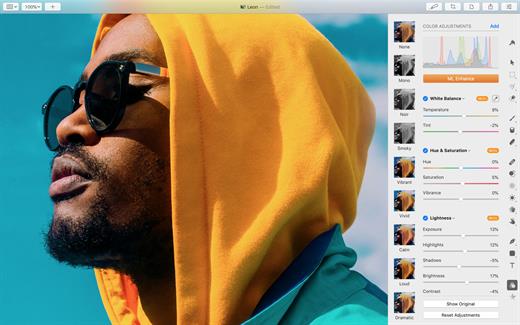
  • Adjust the colors in your photos and even videos in any way you want using a powerful collection of pro-grade color adjustments
  • Use machine learning-powered tools to automatically remove image background, enhance colors, increase resolution, and more
  • Quickly make good-looking shots spectacular with over 40 color adjustment presets and combine any of over 70 versatile effects to develop any artistic or special looks you can imagine
  • Enjoy full support for RAW photos from over 750 of the most popular digital cameras
Create Stunning Designs

  • Harness the full power of layer-based editing with support for vector shapes, typography features, and even video to design posters, webpages, or apps from scratch
  • Customize the look of layers using layer styles, such as Fill, Stroke, Drop Shadow, and Inner Shadow
  • Create beautiful designs in moments with a vast collection of beautiful templates and premium, fully customizable mockups
Draw and Illustrate

  • Design vector graphics using a full set of vector tools, including Pen and Freeform Pen tools
  • Speed up creating illustrations with stunning shapes including categories like arches, plants, and organic shapes
  • Add customizable Smart Shapes to quickly create your custom shapes
Sketch and Paint

  • Paint naturally with a collection of beautiful, handcrafted dual-texture brushes
  • Take advantage of full support for Apple Pencil on iPad and graphics tablets on Mac to paint with pressure and tilt sensitivity
  • Enjoy incredibly fast and responsive painting thanks to a cutting-edge painting engine powered by Metal graphics technology
Compatibility

  • Open files in popular image and video formats, including JPEG, TIFF, PNG, PSD, HEIF, SVG, AI, Illustrator EPS, PDF, GIF, BMP, TGA, WebP, JPEG-2000, AVIF, MP4, MOV, HDR images, videos, and more
  • Share your images or videos to Photos, Mail, AirDrop, and other locations
  • Premium content and features in Freeform are not currently available and are expected to be included in the Apple Creator Studio subscription later this year.
What’s New

Version 4.0:


  • Pixelmator Pro is now part of Apple Creator Studio
Compatibility

macOS 26.0 or later.


Release Name: Pixelmator Pro 4.0
Size: 606.4 MB
Links: HOMEPAGE – NFO – Torrent Search

Download: RAPiDGATOR

10 Comments
Feb 3

PhotoMill X 3.3.0

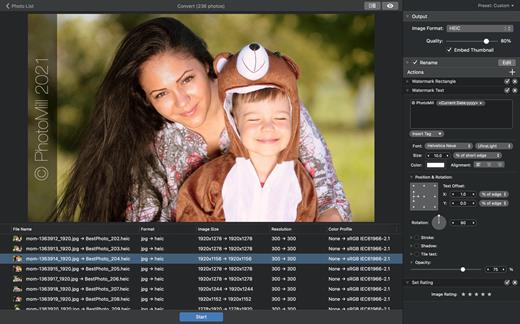
PhotoMill helps you convert a bulk of images into the most popular image formats, give your files meaningful names, watermark with text and image, adjust photos (brightness/saturation/exposure/grayscale/etc.), fit geometry (scale/crop/trim/etc.), remove private metadata, add your own copyrights etc. Also, PhotoMill is a great batch metadata editor, renamer and photo browser.

Features


  • Convert

    • Conversion to: BMP, GIF, JPEG, JPEG 2000, PDF, PNG, TIFF
  • Color models: RGB, Gray, CMYK Color depth: 8/16/32 bits; with or without alpha channel
  • Metadata editor

    • Correct EXIF/IPTC metadata tags in your photos: place GPS coordinates, remove private information from your photos, correct or set capture dates, add your own copyright, keywords or rating.
  • Photo browser

    • The app has a bunch of features for comfortable browsing and multi-criteria search of photos in the Browser. The Browser has 3 panels: Image Info – displays detailed information about a selected photo; Groups – splits photos into groups/subgroups based on a chosen criteria, for instance, by capture dates; Search – gives you an opportunity to search photos by different criteria.
  • Rename

    • You can give meaningful names to converted photos constructing file names in the “pro” way – using text and tags: index, capture date, original name, image width, “find & replace” etc. Also, you can rename photos without any conversion.
  • Resize

    • Fit image size with a bunch of geometry actions: scale, crop, add border, trim, trim color, rotate & flip, auto rotate (by EXIF orientation), change resolution.
  • Watermark

    • Text – you can use photo metadata information – tags: capture date, keywords, camera maker etc., as well as entered text. Font size can be either fixed or relative to an image width, height, long or short edge. Multiline text, stroke, shadow, rotation, tiling and other features.
    • Image – image size can be either fixed or relative to main image size. Image tiling is also available.
    • Rectangle – background for text; square or rounded. Fill and stroke color can be half-transparent.
  • Adjust colors

    • Available filters: auto contrast, auto white balance, gamma, contrast, exposure, sharpness, grayscale, sepia, colorize, temperature, HSL channels (Hue/Saturation/Lightness), HSV channels (Hue/Saturation/Value,Brightness), RGB channels, curves.
  • Working with transparency: alpha mask, color to alpha, alpha to color. Color matching: assign profile, convert to profile, proof with profile.
What’s New

Version 3.3.0:


  • Release notes were unavailable when this listing was updated.
Compatibility

macOS 10.12.2 or later
Apple Silicon or Intel Core processor


Release Name: PhotoMill X 3.3.0
Size: 87.1 MB
Links: HOMEPAGE – NFO – Torrent Search

Download: RAPiDGATOR

4 Comments
Feb 3

Apple Creator Studio 2026.01

Apple Creator Studio is an amazing collection of Apple’s most powerful creative apps for Mac, iPad, and iPhone, designed to help you bring your ideas to life. The suite includes apps for video creation, music production, and creative imaging — plus premium content and intelligence features for visual productivity and storytelling, all in one simple plan.
Whether you’re a new creator or an experienced artist, student, or small business owner, Apple Creator Studio has you covered for videos, music, social campaigns, or anything else you can imagine.

What’s Included

Final Cut Pro, Motion, and Compressor
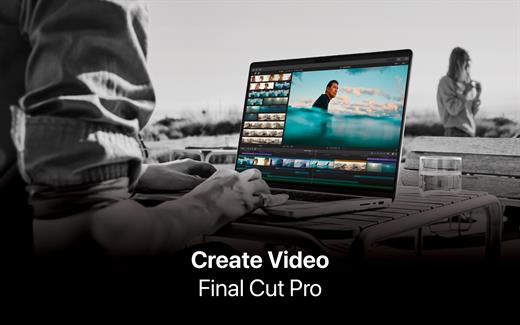
Edit, organize, and share stunning videos with Final Cut Pro for Mac and iPad. Create beautiful motion graphics in real time with Motion. Then use Compressor to deliver video for any platform.

Logic Pro and MainStage
Make beats, play instruments, record, edit, and mix with Logic Pro for Mac and iPad and its ever-growing sound library. Use MainStage to bring together your favorite MIDI hardware and plug-ins, transforming your Mac into the ultimate live rig.

Pixelmator Pro
Use powerful editing tools in Pixelmator Pro for Mac and iPad to create designs, edit photos, draw illustrations, paint digital art, and be creative in just about any way you can imagine.

Next-Level Design and Productivity
Unlock premium content and features in Keynote, Pages, Numbers, and Freeform*. Get access to beautiful new templates, stunning images and graphics, and powerful intelligence**.

Creating, viewing, and editing documents in Keynote, Pages, Numbers, and Freeform does not require a subscription.

* Premium content and features in Freeform are not currently available and are expected to be included in the Apple Creator Studio subscription later this year.
** Some features of Apple Creator Studio require an Apple Intelligence–capable device. For full system requirements and usage limits for Apple Creator Studio intelligence features, see Apple Support article 125029.

What’s New

Version 2026.01:


  • Release notes were unavailable when this listing was updated.
Compatibility

macOS 26.0 or later


Release Name: Apple Creator Studio 2026.01
Size: 12.4 GB
Links: HOMEPAGE – NFO – Torrent Search

Download: RAPiDGATOR

1 Comments
Feb 3

Adobe Photoshop 2026 v27.3.0

Adobe Photoshop 2026, the industry standard for digital image processing and editing, delivers a comprehensive package of professional retouching tools, and is packed with powerful editing features designed to inspire.

Combine, retouch, and remix your pics. Add new color to your old black-and-whites. Make unwanted stuff disappear. Or turn a boring background into an exotic paradise. With Photoshop, everyone can.

Make creativity your business.

Chinzalée Sonami is a ceramic artist who sells her colorful pottery at her studio, through an online shop, and at small outlets around the country. She designs posters, flyers, brochures, ads, and more with Photoshop to promote her business.

Retouch and remix your pics.

Forrest Aguar and Michelle Norris, the duo behind Tropico Photo studio, use Photoshop techniques, inventive color combinations, and dimensions to bring their bright version of paradise to any location.

Your go-to for Instagram-gorgeous graphics.

Nice Day Chinese Takeout uses Photoshop to create mouthwatering social posts and scroll-stopping graphics for their popular New York takeout restaurant.

Build a following and a brand.

Meg Lewis designs virtual backgrounds and graphics with Photoshop to showcase her colorful style on social and build her personal brand.

Discover your own artistic style.

Designer and illustrator Aries Moross draws and paints with Photoshop brushes to transform letters into personal artistic expressions.

What’s New

Version 27.3.0:


  • Release notes were unavailable when this listing was updated.
Compatibility

macOS 11 or later
Apple Silicon or Intel Core processor


Release Name: Adobe Photoshop 2026 v27.3.0
Size: 5.5 GB
Links: HOMEPAGE – NFO – Torrent Search

Download: RAPiDGATOR

2 Comments
Feb 1

Magic Battery 9.4.0

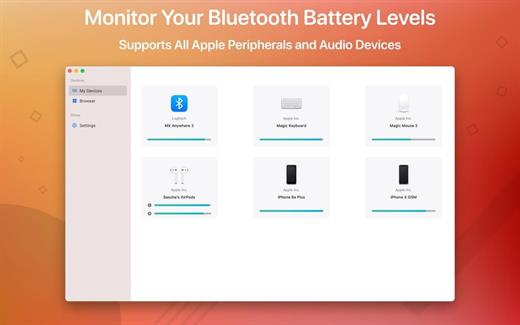
The App Magic Battery shows the battery level of supported input devices and headphones that are connected via Bluetooth in the menu bar. Internal batteries are also supported.

The following devices are supported:

Input devices:

• Apple Magic Mouse

• Apple Magic Mouse 2

• Apple Magic Trackpad 2

• Apple Wireless Keyboard

• Apple Wireless Trackpad

• Logitech mice like the MX3 Anywhere and Logitech Pebble

• Logitech keyboards (K series)

The app features:

• Modern GUI for displaying connected devices and their battery levels.

• You can choose between a detailed, a compact or an icon-only view. In the detailed view, the battery level is shown next to the device icon. In the icon-only view, the battery levels are shown once the menu of the app is opened. The compact view shows all the information in a way that very little space is used.

• Apple Silicon support.

• Connected or disconnected devices are detected automatically. The view is then adjusted accordingly.

• Support for auto-start: The app is started as soon as the user is logged in (optional).

What’s New

Version 9.4.0:


  • Release notes were unavailable when this listing was updated.
Compatibility

macOS 11.0 or later.


Release Name: Magic Battery 9.4.0
Size: 6.8 MB
Links: HOMEPAGE – NFO – Torrent Search

Download: RAPiDGATOR

7 Comments
Feb 1

Tagr 5.11.2

Tagr is an application that helps you organize your music collection.

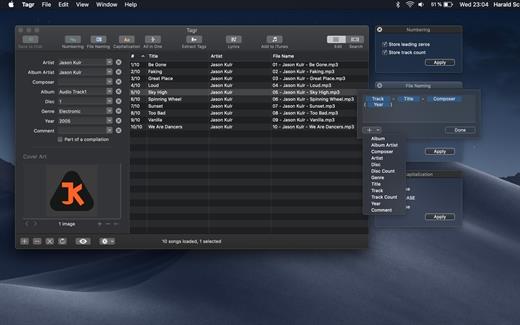
With Tagr you can easily edit information such as a song’s artist, title, or album cover. Tagr also allows you to control the way your files are named, numbered, and capitalized. There is no more need for having other tools dictate that for you!

Features:


  • Edit meta data of individual MP3, M4A/M4B, FLAC, and AIFF files, or
  • Edit a list of files in bulk
  • Supported tags: track number/count, title, artist, album artist, composer, album, disc number/count, genre, year, comment, compilation, lyrics
  • MP3 ID3 versions: v1, v2.3, and v2.4
  • Embed cover art into your songs
  • Apply uppercase, lowercase, and title case capitalization schemes
  • Automatically generate track numbers
  • Choose from predefined file naming schemes or define your own
  • Extract tags from the file name or title using predefined or custom patterns
  • Search discogs.com for album information and copy it to your songs
  • Listen to songs through QuickLook
  • Customize Tagr to your needs
What’s New

Version 5.11.2:


  • Release notes were unavailable when this listing was updated.
Compatibility

macOS 10.10 or later


Release Name: Tagr 5.11.2
Size: 10.3 MB
Links: HOMEPAGE – NFO – Torrent Search

Download: RAPiDGATOR

6 Comments
Feb 1

PhotoMill X 3.3.0

PhotoMill helps you convert a bulk of images into the most popular image formats, give your files meaningful names, watermark with text and image, adjust photos (brightness/saturation/exposure/grayscale/etc.), fit geometry (scale/crop/trim/etc.), remove private metadata, add your own copyrights etc. Also, PhotoMill is a great batch metadata editor, renamer and photo browser.

Features


  • Convert

    • Conversion to: BMP, GIF, JPEG, JPEG 2000, PDF, PNG, TIFF
  • Color models: RGB, Gray, CMYK Color depth: 8/16/32 bits; with or without alpha channel
  • Metadata editor

    • Correct EXIF/IPTC metadata tags in your photos: place GPS coordinates, remove private information from your photos, correct or set capture dates, add your own copyright, keywords or rating.
  • Photo browser

    • The app has a bunch of features for comfortable browsing and multi-criteria search of photos in the Browser. The Browser has 3 panels: Image Info – displays detailed information about a selected photo; Groups – splits photos into groups/subgroups based on a chosen criteria, for instance, by capture dates; Search – gives you an opportunity to search photos by different criteria.
  • Rename

    • You can give meaningful names to converted photos constructing file names in the “pro” way – using text and tags: index, capture date, original name, image width, “find & replace” etc. Also, you can rename photos without any conversion.
  • Resize

    • Fit image size with a bunch of geometry actions: scale, crop, add border, trim, trim color, rotate & flip, auto rotate (by EXIF orientation), change resolution.
  • Watermark

    • Text – you can use photo metadata information – tags: capture date, keywords, camera maker etc., as well as entered text. Font size can be either fixed or relative to an image width, height, long or short edge. Multiline text, stroke, shadow, rotation, tiling and other features.
    • Image – image size can be either fixed or relative to main image size. Image tiling is also available.
    • Rectangle – background for text; square or rounded. Fill and stroke color can be half-transparent.
  • Adjust colors

    • Available filters: auto contrast, auto white balance, gamma, contrast, exposure, sharpness, grayscale, sepia, colorize, temperature, HSL channels (Hue/Saturation/Lightness), HSV channels (Hue/Saturation/Value,Brightness), RGB channels, curves.
  • Working with transparency: alpha mask, color to alpha, alpha to color. Color matching: assign profile, convert to profile, proof with profile.
What’s New

Version 3.3.0:


  • Release notes were unavailable when this listing was updated.
Compatibility

macOS 10.12.2 or later
Apple Silicon or Intel Core processor


Release Name: PhotoMill X 3.3.0
Size: 87.1 MB
Links: HOMEPAGE – NFO – Torrent Search

Download: RAPiDGATOR

7 Comments
Feb 1

WiFiRadar Pro 5.4

WiFi Radar Pro lets you monitor your area networks; identify and troubleshoot issues with your home, small office, or enterprise network; and gather useful information about your network performance. Are you simply in search of an elegant replacement of the default OS X wireless utility? You’ve just found your ideal tool!


  • Easy-to-use, intuitive UI
  • Suitable for home, small office, or enterprise networks
  • Live monitoring for all networks
  • Graphical charts for better visualization
  • Automatic signal/noise tracking
  • Status-item tool to replace the default OS X wireless tool
  • Option to export current networks report to CSV
  • Easily connect to any network (Open, WEP, or WPA/WPA2)
  • Ultra-secure password storage
  • Works with 802.11a/b/g/n/ac networks
  • Lots of useful information at your fingertips: SSID, BSSID, RSSI, noise, channel, AP mode, security, rates, channel flags, country
What’s New

Version 5.4:


  • Release notes were unavailable when this listing was updated.
Compatibility

macOS 10.10 or later


Release Name: WiFiRadar Pro 5.4
Size: 5.4 MB
Links: HOMEPAGE – NFO – Torrent Search

Download: RAPiDGATOR
8 Comments
Feb 1

RAR Extractor – Unzip 14.3

Zip,rar,7z,tar files opener. RAR Extractor can extract compressed files in all most formats(over 50 formats).

「Support RAR, ZIP, 7z, pak, pkg, apk, tbz, sti, tar, xar, lha, lzh, hqx, bin, bz2, bzip2, bz, xz, iso, cid, nrg, mdf, taz,l zma, xip, ace, arj, lbr, lqr, cab, rpm, cpt, sea, exe, msi, cpio, lzx, jar, swf, pdf, nsa, dcs, spk… 」
「Compress files to password-protected ZIP & 7Z archives 」
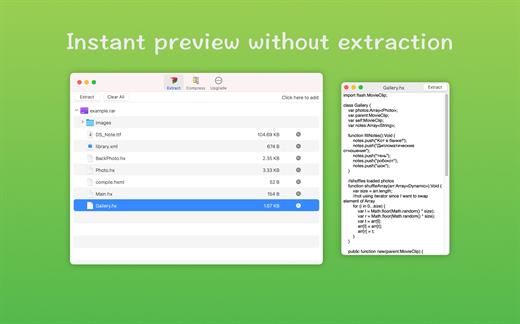
「Quicklook files in archive before extraction」
「Features」


  • Extract extract compressed files in all most formats(over 50 formats).
  • Unzip, unrar encrypted archives.
  • Easy view an archive’s file list.
  • Quicklook files in archive without extracting.
  • Unarchive & unrar the selected individual file or folder in the archive.
  • Double click to display or extract directly after setting this APP as default archiver.
  • Drag archives to the dock icon to extract or display directly.
  • Batch decompress many archives
  • Create password-protected ZIP & 7Z archives.
  • AES256 encryption algorithm to create ZIP & 7Z archives.
What’s New

Version 14.3:


  • Release notes were unavailable when this listing was updated.
Compatibility

macOS 10.13 or later


Release Name: RAR Extractor – Unzip 14.3
Size: 17.3 MB
Links: HOMEPAGE – NFO – Torrent Search

Download: RAPiDGATOR

5 Comments