Please REGISTER or RENEW your account on RAPiDGATOR.net and support us by doing through all RAPiDGATOR working download links on main posts...
Jan 30

Steinberg WaveLab Pro 13.0.0

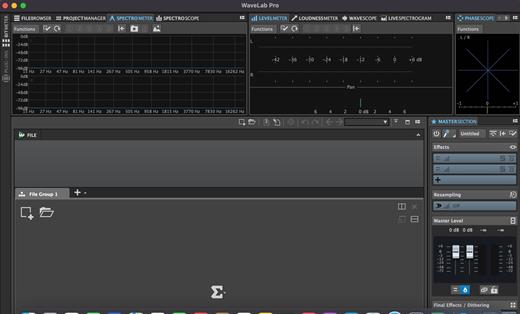
With significant new features for stem mastering, multitrack editing, plug-in parameter automation and podcast production, WaveLab 11 has the concept of “multi” running throughout it. With improved multi-channel file handling, multiple track sub-lanes and analysis meters, multi-core processing and more, WaveLab further enhances its status as the true art of mastering.
Multi-channel interleaved support

WaveLab 11 introduces extended support for multi-channel interleaved files and, for the first time, multi-channel interleaved editing in the Audio Editor. Supporting up to 22.2 surround layouts of WAV files (including Ambisonics files for pre-authoring purposes), a multi-channel file can be opened, edited and saved like any other set of mono/stereo files. Featuring comprehensive controls to make precise editing easier, it’s also possible for external editors to work on selected channels only. The detailed new selection options include highly flexible frequency-domain selection in the Spectrum Editor. In the Audio Montage, automatic splitting of multi-channel audio files into mono or stereo clusters makes it fast to import a large multi-channel file. This also allows plug-ins to process channel clusters independently of one another.

Track Groups for multitrack/stems workflows

Track Groups comprise audio tracks which are routed to a group bus, before the signal continues through the Montage output and then Master sections. This provides an additional summing stage with effects plug-ins, gain and pan controls. Track Groups are especially useful for stem mastering and, alongside Track Lanes, another way to apply a common track group effect chain to stem mastering projects.

Track Groups can be created by selecting tracks from a corresponding Group Channel. Using the Track Group Editor, tracks and track groups can be named/renamed, have colors assigned and moved per drag and drop.

Track Lanes for multitrack/stems workflows

Track Lanes is a flexible new feature that can divide an audio track into eight sub lanes, each lane hosting audio clips, a facility especially useful when working with mix stems inside the Montage. As well as clip effects, track effects can be applied to all clips, providing a final processing chain for all stems on the track. Track Lanes can also be used for sound design tasks like assembling, editing and processing sound effects from layered clips. Each Track Lane features comprehensive controls for selection, solo/mute, fold/unfold, lanes can be converted to tracks, selected tracks can be merged as lanes and more.

Parameter automation with clip envelopes

You can now use clip envelopes to automate the parameters of VST 3 plug-ins. Along with the volume, pan and effect wet/dry parameters, clip envelopes are managed from the new Automation Envelope panel in the Inspector window. Envelopes can be assigned to parameters by right-clicking on the parameter, single envelope points can be text edited, envelopes can be turned on/off and their visibility is easily managed, individually or globally.

What’s New

Version 13.0.0:


  • Release notes were unavailable when this listing was updated.
Compatibility

macOS 10.14 or later


Release Name: Steinberg WaveLab Pro 13.0.0
Size: 544.1 MB
Links: HOMEPAGE – NFO – Torrent Search

Download: RAPiDGATOR

8 Comments
Jan 30

Motion: Animate Effects 6.0

Motion is now part of Apple Creator Studio, an amazing collection of Apple’s most powerful creative apps designed to help you bring your ideas to life. The suite includes Final Cut Pro, Logic Pro, Pixelmator Pro, Motion, Compressor, and MainStage — plus premium content and intelligence features in Keynote, Pages, Numbers, and Freeform*, all in one simple plan.

New Features
AI-powered Magnetic Mask automatically tracks and isolates people, objects, and shapes in any footage
3D text is now dramatically faster on Apple silicon, with Metal-powered improvements to playback and rendering

Overview

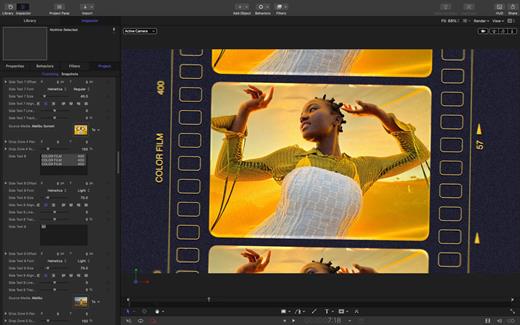
Designed for video editors, Motion is a powerful motion graphics tool that makes it easy to create cinematic 2D and 3D titles, fluid transitions, and realistic effects in real time.

2D and 3D Titles


  • Import 360° media and design 360° titles, generators, and effects
  • Build 3D titles from scratch, design them with easy-to-use templates, or instantly convert any existing 2D title to 3D
  • Easily create beautiful titles that you can animate using more than 100 drag-and-drop behaviors and intuitive text animation tools
  • Customize 3D titles to create endless looks with over 90 Apple-designed 3D materials including metal, wood, and stone surfaces
Motion Graphics for Final Cut Pro

  • Save any title, effect, transition, or generator and access it directly in Final Cut Pro
  • Customize Final Cut Pro titles, effects, and transitions by opening them in Motion
  • Create Motion Templates with any combination of single parameters and rigs that let you control a group of parameters with a slider, pop-up menu, or checkbox in Final Cut Pro
  • Use Display Aspect Ratio snapshots to create templates that support multiple aspect ratios
Stunning Effects

  • Choose from more than 230 behaviors for natural animation without keyframes
  • Change focus points or the depth effect for video shot in Cinematic mode on iPhone
  • Design your own particle emitters or choose from 200 presets for real-world effects like smoke and sparkles
  • Use professional masking tools to quickly draw and adjust control points for rotoscoping
  • Automatically detect, track, and match the movement of faces or objects using machine learning
  • Choose between different tracking analysis types
  • Add the Neon filter to easily add a neon glow to text, shapes, video, stills, and more
  • Harness an ecosystem of third-party FxPlug plug-ins for tasks like advanced tracking, advanced motion graphics, and more
Effortless 3D

  • Transition from 2D to 3D space by adding cameras
  • Create 3D scenes within a 360° project for ultra-realistic 360° environments
  • Set up realistic shadows that animate dynamically with the movement of cameras and lights
  • Turn any shape, video plane, or paint stroke into a reflective surface in 3D space
  • Import third-party USDZ objects or use one of 60 premade objects in the Motion Library
Breakthrough Speed, Quality, and Output

  • Import wide color HDR images, view them on supported Mac computers, and export in standard Rec. 709 or wide Rec. 2020 color space
  • Unrivaled speed and efficiency with optimizations for the latest generation of Apple silicon
System Requirements: macOS 15.6 or later, 8 GB of memory (16 GB recommended), Metal-capable graphics card (Intel-based Mac computers only), 4.7 GB of available disk space. Some features require internet access; fees may apply.

  • Premium content and features in Freeform are not currently available and are expected to be included in the Apple Creator Studio subscription later this year.
What’s New

Version 6.0:


  • Motion is now part of Apple Creator Studio.
Compatibility

macOS 15.6 or later.


Release Name: Motion: Animate Effects 6.0
Size: 2.6 GB
Links: HOMEPAGE – NFO – Torrent Search

Download: RAPiDGATOR
8 Comments
Jan 30

System Toolkit 6.2.0

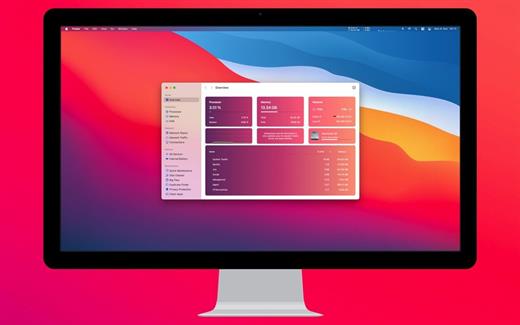
The System Toolkit is an all-in-one information and maintenance app designed for macOS.

Information:


  • System Information
  • Menu Bar Extra
  • Info Panel
  • Overlay Window
  • Hardware Sensors
  • Bluetooth Device Battery Levels
  • Battery Information
Besides the information pages, the System Toolkit also offers the following maintenance features:

  • Fast Maintenance: Clean your Mac System with a single click!
  • Disk Cleaner
  • Duplicate Finder
  • Big Files Finder
  • Privacy Protector
  • Memory Cleaner
  • App Cleaner
What’s New

Version 6.2.0:


  • Release notes were unavailable when this listing was updated.
Compatibility

macOS 11.5 or later
Apple Silicon or Intel Core processor


Release Name: System Toolkit 6.2.0
Size: 11 MB
Links: HOMEPAGE – NFO – Torrent Search

Download: RAPiDGATOR

11 Comments
Jan 30

Final Cut Pro: Create Video 12.0

Redesigned from the ground up, Final Cut Pro combines revolutionary video editing with a powerful media organization and incredible performance to let you create at the speed of thought.

Revolutionary Video Editing


  • The Magnetic Timeline uses advanced metadata for faster, easier editing
  • Enhanced Timeline Index lets you drag and drop audio roles to rearrange the layout of your timeline
  • Use Clip Connections to attach B-roll, sound effects, and music to the timeline
  • Reduce clutter by grouping clips into a Compound Clip
  • Edit multicamera projects with automatic syncing and support for up to 64 camera angles
  • Automatically transform projects for square or vertical delivery with Smart Conform
  • Import and edit 360° equirectangular video in a wide range of formats and frame sizes
  • Create, edit, and deliver closed captions from within Final Cut Pro
  • Extend the capabilities of Final Cut Pro with third-party workflow extensions
Powerful Media Organization

  • Organize your work within libraries for efficient media management and collaboration
  • Create proxy copies of your media for portability and performance
  • Content Auto-Analysis captures camera metadata and analyzes shots in the background
  • Create and apply custom keywords or favorites on the fly as you select clip ranges
  • Smart Collections dynamically organize content for you to quickly find any shot in a few clicks
Incredible Performance

  • Improved performance and efficiency on Mac computers with Apple silicon
  • Harness the power of the Mac Pro and Afterburner for realtime 8K editing
  • Modern Metal engine improves playback, rendering, and compositing on all Macs
  • Final Cut Pro uses all the GPUs in your Mac for superior real-time playback performance and fast background rendering
  • Work with a broad range of formats including ProRes, RED, XAVC, AVCHD, Avid DNxHR®, Avid DNxHD®, H.264, HEVC, and more
Compelling, Customizable Effects

  • Beautifully animated, easily customizable 2D and 3D titles
  • Change the look of titles, transitions, and effects using intuitive controls
  • Choose from an ecosystem of third-party FxPlug plug-ins with custom interfaces
Integrated Audio Editing

  • Assign roles – including dialogue, music, effects, and custom choices – during import to easily track and organize your project
  • Expand and edit multichannel audio files directly in the timeline
  • Sync video with separate audio in a single step with instant audio waveform matching
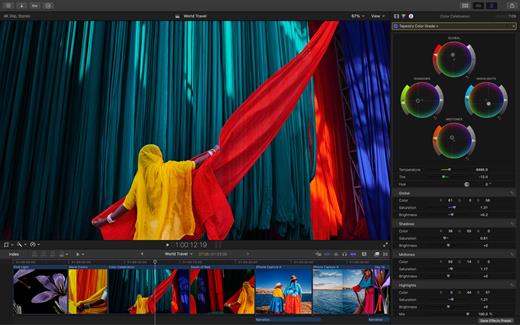
Intuitive Color Grading

  • Import, edit, and deliver video in standard color spaces, or in wide Rec. 2020 color space
  • Use Pro Display XDR to accurately view HDR video
  • Powerful color wheels and curves for precise adjustments with keying and masks
One-Step, Optimized Output

  • Incredibly fast export for playback on Apple devices and upload to websites such as Vimeo and YouTube
  • Export audio stems and multiple versions of a finished video using roles metadata
  • Import and export XML for third-party workflows like color grading and sound mixing
What’s New

Version 12.0:


  • Powerful Intelligence
  • Use Transcript Search to quickly find spoken words or phrases in your footage by searching for exact matches or using natural language descriptions*
  • Discover Visual Search, a fast and easy way to locate moments in your footage, including objects and actions, using natural language*
  • Let Beat Detection analyze any song to reveal its bars and beats, enabling you to easily align your video edits to the music’s rhythm
  • Get Started Fast
  • Dive into editing with a special demo project featuring the talented singer-songwriter Allie Sherlock, and explore the exciting new features of Final Cut Pro firsthand
  • Accelerate your next edit with in-app guides on how to create a new library, import media, and add clips to a new timeline
  • Requires a Mac with Apple silicon
Compatibility

macOS 15.6 or later.


Release Name: Final Cut Pro: Create Video 12.0
Size: 5.8 GB
Links: HOMEPAGE – NFO – Torrent Search

Download: RAPiDGATOR
2 Comments
Jan 30

NetShred X 6.0.8

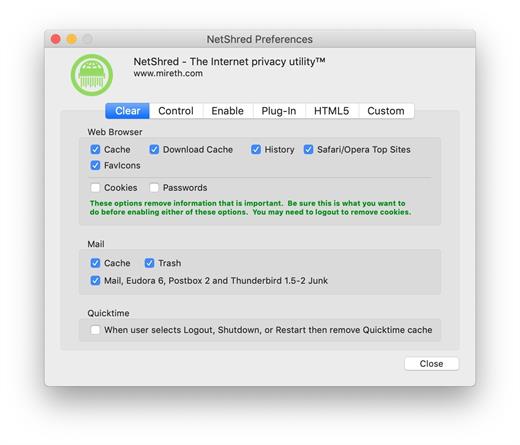
NetShred X is the easy-to-use Internet cache eraser for Mac that securely erases cache files your browser and email programs leave behind. NetShred X is the Internet privacy software that is easy, fast, and cleaner. Easy because it runs automatically – you don’t have to remember to use it. Fast because it runs in the background – you don’t have to wait for it. Cleaner because it will erase, not just delete all Internet tracks for almost every browser and email program on Mac.

Your Web browser stores copies of the images and text that you see when on the internet. This information can be recovered by anyone with access to your computer. These Internet tracks – browser cache, history, download cache, quicktime cache, favicons, cookies and email cache, trash, spam and junk mail – not only potentially compromise your privacy, they also take up a lot of disk space. Clearing your cache, throwing these files in the trash, or deleting them will not remove the file contents from the hard drive – it just removes the file name from the directory, leaving the data intact and recoverable. To dispose of these Internet tracks, you need an Internet eraser to erase them so they can’t be recovered.

What’s New

Version 6.0.8:


  • Release notes were unavailable when this listing was updated.
Compatibility

macOS 10.14 or later, 64-bit processor


Release Name: NetShred X 6.0.8
Size: 5.4 MB
Links: HOMEPAGE – NFO – Torrent Search

Download: RAPiDGATOR

13 Comments
Jan 30

PullTube 1.8.6.21

Sharing videos via online hosting services, such as YouTube or Vimeo is a common practice, yet streaming the content might not work as expected if you have a slow internet connection.

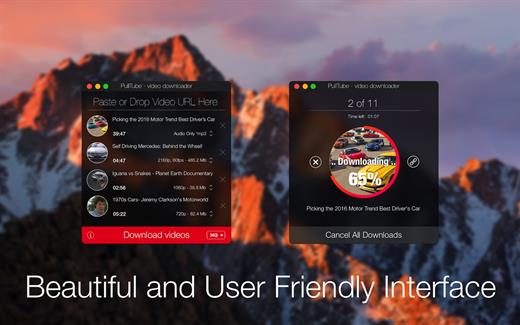
PullTube offers you the possibility to download videos from both sources (YouTube and Vimeo), while other platforms might be added at a later time. The app can handle playlists, allows you to select the output quality, and can even extract only the audio.

Video downloader that can import links with drag and drop and can detect playlists

The PullTube user interface is represented by a small window where you get to quickly paste the video URL. Note that you can also add a video by dropping the link on top of the PullTube window.

Worth mentioning is that, if PullTube detects that the video is part of a playlist, will offer to download the entire collection: will fetch the data for each entry and handle the downloads consecutively.

Download videos hosted on YouTube or Vimeo to different output sizes and formats

PullTube will start fetching the video data right away so you can see the video name, duration, and a small thumbnail. When configuring a download, you get to select the output quality (highest, 4K, HD or regular with different resolutions) or choose to export only the audio to an M4A or MP3 file.

Via the PullTube Settings panel, you can change the default download location and the default MP3 bitrate (320Kbps, 256Kbps, 128Kbps, 64Kbps). You can also add the quality info to the video’s name and choose to quit the app when all downloads are completed.

Get offline access to videos hosted online in just a few steps

PullTube proposes a streamlined workflow for quickly downloading videos from YouTube or Vimeo, provides control over the output quality, and enables you to extract the audio to MP3 or M4A files.

However, during our tests, we have noticed that PullTube has trouble completing the download when handling videos that are longer that 2 minutes. The process stops without any explanation, and you can eventually complete the task, but you need to add the link to download tool multiple times.

What’s New

Version 1.8.6.21:


  • Release notes were unavailable when this listing was updated.
Compatibility

macOS 10.12 or later


Release Name: PullTube 1.8.6.21
Size: 240.6 MB
Links: HOMEPAGE – NFO – Torrent Search

Download: RAPiDGATOR
12 Comments
Jan 30

Logic Pro 12.0

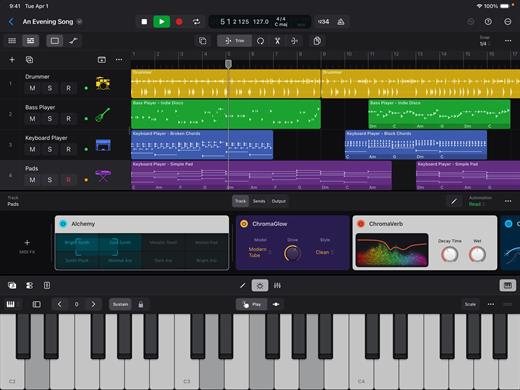
Logic Pro for Mac is a complete collection of sophisticated creative tools for songwriting, beat making, editing, and mixing, built around a modern interface that’s designed to get results quickly and also deliver more power whenever it’s needed. Logic Pro includes a massive collection of instruments, effects, loops, and samples, providing a complete toolkit to create amazing-sounding music.

Music Production


  • Use Stem Splitter to separate nearly any mixed audio recording into six distinct parts: Drums, Bass, Vocals, Guitar, Piano, and Other instruments
  • Smart Tempo instantly conforms imported or recorded audio to your project’s tempo
  • Record and edit MIDI or audio using a comprehensive set of editors and tools
  • Use Live Loops to capture inspiration and quickly build arrangements by mixing and matching loops, samples, and your recordings
  • Manipulate the pitch and timing of any recording with Flex Time and Flex Pitch
  • Keep takes organized with take folders and build comps quickly with Quick Swipe Comping
  • Track Alternatives let you create, duplicate, and then switch between different versions of tracks
  • Deliver a release-ready mix using Mastering Assistant
AI Session Players

  • Discover six virtual musicians designed to create nuanced performances that respond to your direction
  • Synth Player, Bass Player, Keyboard Player, Acoustic Drummer, Electronic Drummer, and Percussionist offer a wide range of genres and distinct playing styles
Beat Production

  • Reshuffle audio with Beat Breaker, a creative time and pitch effect
  • Build custom drum kits using your favorite samples
  • Create drum beats, bass lines, and melodic parts, and reshape sounds over time using Step Sequencer
Sampling

  • Use Sampler to quickly create and edit sophisticated multi-sampled instruments
  • Use Sample Alchemy to transform audio into entirely new malleable sounds
  • Chop and manipulate samples using Quick Sampler
Professional Instrument and Effects Plug-ins

  • Create music with a massive collection of powerful software instruments
  • Shape your sound using a wide variety of high-quality effects
Compatibility

  • Roundtrip capabilities let you open projects back-and-forth between Logic Pro for Mac or Logic Pro for iPad
  • Import and export XML to support Final Cut Pro workflows
System Requirements: 6GB available storage space for minimum install / 44GB or more storage space for full Sound Library installation

What’s New

Version 12.0:


  • Release notes were unavailable when this listing was updated.
Compatibility

macOS 15.6 or later and a Mac with Apple M1 chip or later.


Release Name: Logic Pro 12.0
Size: 1.4 GB
Links: HOMEPAGE – NFO – Torrent Search

Download: RAPiDGATOR

6 Comments
Jan 30

4K YouTube to MP3 Pro 26.0.1

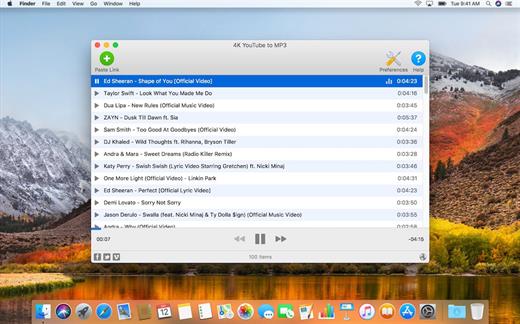
4K YouTube to MP3 was specifically created to extract audio from YouTube, Vimeo or Facebook and save it in MP3, M4A, OGG. No annoying and complicated settings to deal with, just a clean, friendly and functional interface. Downloading is simple and straightforward: just copy the link from your browser and click ‘Paste Url’. Done!

Features


  • Extract audio from YouTube videos and save it in MP3, M4A or OGG in high quality.
  • Download full YouTube playlists or channels and generate m3u files.
  • Transfer downloaded tracks automatically into iTunes and upload them on your iPhone or iPod.
  • Listen music via native built-in music player.
  • Download and extract audio tracks from SoundCloud, Vimeo, Flickr and DailyMotion videos.
  • Download audio books from YouTube.
  • Extract audio tracks even from embedded in HTML page videos.
  • Use 4K YouTube to MP3 on your PC, Mac or Linux, doesn’t matter what OS you prefer.
What’s New

Version 26.0.1:


  • Release notes were unavailable when this listing was updated.
Compatibility

macOS 10.10 or later


Release Name: 4K YouTube to MP3 Pro 26.0.1
Size: 404.8 MB
Links: HOMEPAGE – NFO – Torrent Search

Download: RAPiDGATOR
12 Comments
Jan 30

Ghost Buster Pro 4.1.2

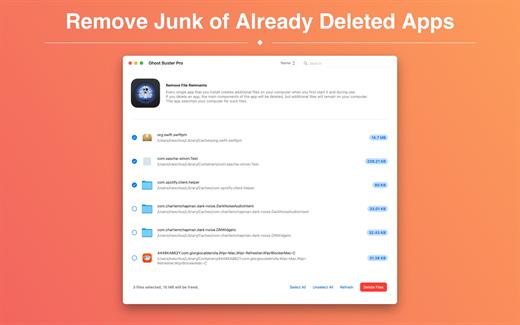
Ghost Buster Pro finds and deletes files from apps you’ve already uninstalled. The app is lightning fast and frees memory in no time.

Many apps are installed on a computer, but they usually only stay on your computer for a short time. Each app creates files, but deleting the app does not remove them.
This leads to a large number of files accumulating over time, which take up valuable storage space.
Ghost Buster Pro searches your computer for exactly such files and can also delete them directly if you wish.

Ghost Buster Pro offers the following features:

Fast Search

Ghost Buster Pro quickly scans your computer for data from previously deleted apps. You can have them deleted with one click.

Extremely easy handling

Ghost Buster Pro couldn’t be simpler. The search is started immediately after the app is started. You can now delete files with just one click.

No automatic deletion

Ghost Buster Pro does not delete any data without your consent. Choose for yourself which data is deleted and which you want to keep.

What’s New

Version 4.1.2:


  • Release notes were unavailable when this listing was updated.
Compatibility

macOS 11.5 or later
Apple Silicon or Intel Core processor


Release Name: Ghost Buster Pro 4.1.2
Size: 9.9 MB
Links: HOMEPAGE – NFO – Torrent Search

Download: RAPiDGATOR

12 Comments
Jan 30

Aspect Ratio Pro 3.3

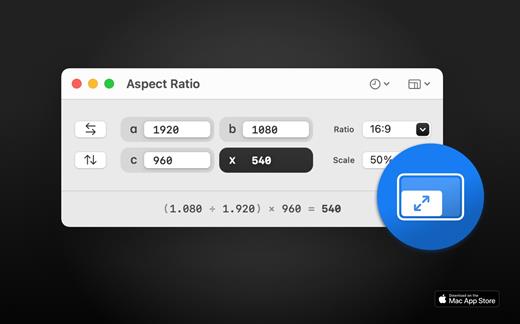
Aspect Ratio X is a rule-of-three calculator.

Features:

• Calculate aspect ratios (rule of three)
• Swap values horizontally and vertically
• Select scales and ratios
• Browse common resolutions
• Browse recent ratios
• Formula preview
• Uses imperial or metric system automatically based on your system settings
• Multi-window support
• Optimized for macOS 11+
• Optimized for Mac with M1 (Apple Silicon)

What’s New

Version 3.3:


  • Release notes were unavailable when this listing was updated.
Compatibility

macOS 11.0 or later


Release Name: Aspect Ratio Pro 3.3
Size: 11 MB
Links: HOMEPAGE – NFO – Torrent Search

Download: RAPiDGATOR
11 Comments