Please REGISTER or RENEW your account on RAPiDGATOR.net and support us by doing through all RAPiDGATOR working download links on main posts...
Jan 30

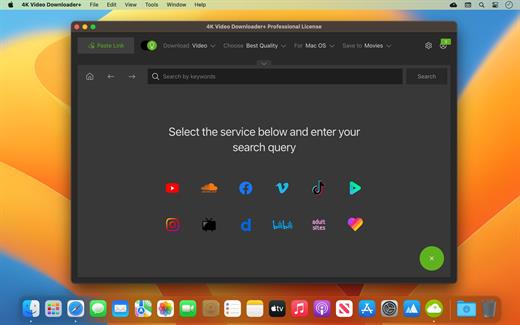
4K Video Downloader Plus Pro 26.0.1

Easy Downloads Management


  • Sort and filter downloads by type, name and date. Import and export all files as a single JSON file. Easily track and control the progress of both individual downloads and entire groups of downloading files.

What’s New

Version 26.0.1:


  • Release notes were unavailable when this listing was updated.
Compatibility

macOS 10.13 or later


Release Name: 4K Video Downloader Plus Pro 26.0.1
Size: 434 MB
Links: HOMEPAGE – NFO – Torrent Search

Download: RAPiDGATOR

10 Comments
Jan 30

JixiPix Artista Impresso Pro 1.8.29

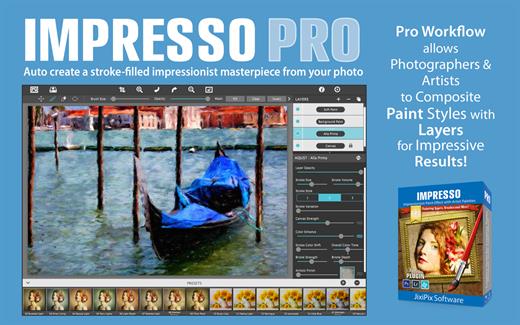
Standalone Product that transform photos into paintings then combines paint effects with layers and brushes for gorgeous print-worthy artwork. Also includes plugin for Photoshop, Elements, Lightroom and PaintShop Pro.

For professionals who like creative control we give you Smart Layers and brushes for blending multiple paint styles, a library of Edges that blend beautifully with canvas, a Background Paint effect to create distances, a Soft Paint effect for enhancing foreground subjects, an Aged Paint effect for adding craquelure to paintings, and an ultra-impressionism effect called Tache to cover paintings with broken brush strokes. Impresso Pro has everything an Artist or Photographer will need to create gallery-style paintings with enough detail even for the largest print.

Features

A pro workflow adds impressionism styles per layer. With Layers, users can blend styles using brushes to paint on or off areas in the painting! Also, included is the powerful Ellipse Detail tool to add finely painted details to faces, flowers or to create focal points in landscapes. Once completed , resize then hit the ‘Apply’ button to render small brushstrokes inside the Ellipse. With layers photographers and artists now have the power to composite multiple impressionism styles for impressive results.

IMPRESSIONISM STYLES


  • Alla Prima (‘wet-on-wet’ or ‘all-at-once’)—is great for portraits! This beautiful paint style starts by filling the painting with an abundance of brushstrokes. A library of artistic finishes compliments this style by adding light, color and movement with controls over strength.
  • En Plein Air (in open air) is perfect for landscapes. This stroke-filled effect consists of eight artists’ palettes created by famous impressionists. Use them as they are or edit the paint colors to make your own palette. The Save Preset feature keeps the palette and all the layers intact for future projects.
  • Tache (‘spot’ or ‘blot’) applies broken brushstrokes throughout the image. This technique of laying thick patches, flecks and dabs of color is great for making paint look as if it stands out from the surface. Apply a light spackling of strokes or fill the painting with dabs of color—the choice is up to you!
  • Canvas layer is added to each painting created. By creating a canvas layer, it can now be turned on or off for viewing strokes created on previous layers. As with traditional methods, the canvas is an integral part of the painting, so we have locked the layer to keep it from being accidentally deleted.
INCLUDES

  • Three stroke styles: #1 is a series of straighter strokes, #2 combines the first style with curved ones, and #3 is an abstract set. Then the Tache effect has its own custom set of brushes designed for depth.
  • Three Impressionism styles: Alla Prima, En Plein Air and Tache (pronounced tash)
  • Pro Layers with built-in Impressionism styles for multi-layer types and options to duplicate, reorder, and delete them
  • Control over detail ellipse tool, stroke size, stroke volume, bristle strength & depth, artistic finishes and the painted edge
  • Save Preset to save customized paint palettes and keep all strokes & layers intact for future projects
  • Smart brushes to remove or add impressionism effect—the brushes are smart because they remove the effect by stroke
  • Mask with fill, invert and clear to support brushes and layers
  • Canvas and linen texture
  • 8 Impressionist palette styles
  • One-touch paint styles
  • 70 Artistic finishes
  • One-of-a-kind ellipse detail tool renders small brush strokes inside the placed area
  • Plugin for Photoshop CS3+, Lightroom and Elements for Mac and Windows
What’s New

Version 1.8.29:


  • Release notes were unavailable when this listing was updated.
Compatibility

macOS 10.9 or later


Release Name: JixiPix Artista Impresso Pro 1.8.29
Size: 120.3 MB
Links: HOMEPAGE – NFO – Torrent Search

Download: RAPiDGATOR

12 Comments
Jan 30

Wondershare PDFelement Pro 12.1.6 (OCR)

Wondershare PDFelement is a self-explanatory OS X application that makes it easier for your to preview, edit, join, split and convert PDF documents using a Mac.
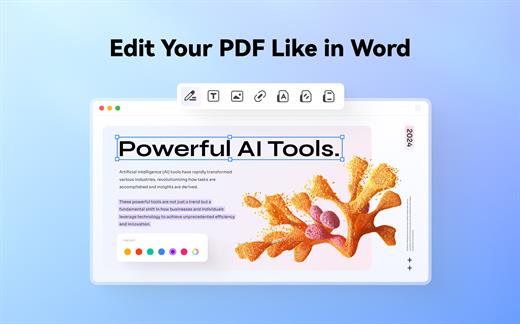
The Wondershare PDFelement also features a simple, clean and intuitive interface that provide instantaneous access to all the tools and features you might need to complete your daily tasks.

Powerful and user-friendly PDF editor for everyday use

Moreover, with Wondershare PDFelement’s help, you can effortlessly edit PDF documents created using text files, web pages or scanned documents.

Consequently, you can add, remove or edit text, move and rearrange pages, insert or remove images and more.

Wondershare PDFelement’s top toolbar helps you hide, show and customize the sidebar in order to display the items and information you are interested in. In addition, you can browse through the loaded document, zoom in or out, print it or email it with just a couple of mouse clicks.

Advanced OCR capabilities make text editing a breeze

Furthermore, you can choose between the “Hand”, “Select” and “Edit” tool, use the advanced OCR feature and convert your source file into plain text or RTF document, ePUB, HTML, as well as file formats compatible with Microsoft Word, Excel, and PowerPoint.

The context menu also helps you switch between the “Move”, “Select” and “Touchup” tool, change the display mode and open the Inspector window to view detailed information about the loaded document.

As an added bonus, by accessing the Document menu, you have the option to add, update or remove an watermark, extract, insert and delete pages, split, merge or convert your document and crop or rotate a page with ease.

Full-featured tool designed to help you stamp, watermark, encrypt and decrypt PDF documents on a Mac

The complete list of all available editing tools, bookmark features, annotation tools and stamp options can be found under the Tools menu.

From here you can easily insert text boxes, add sticky notes, highlight, strike-through and underline text, insert various shapes and use the handy pencil or erase.

On the whole, Wondershare PDFelement comes with the right set of features to help you edit and annotate PDF documents using a Mac, as well as effortlessly add password protect and convert them other formats for easier sharing with your friends and colleagues.

What’s New

Version 12.1.6:


  • Release notes were unavailable when this listing was updated.
Compatibility

macOS 11.0 or later
Apple Silicon or Intel Core processor


Release Name: Wondershare PDFelement Pro 12.1.6 (OCR)
Size: 811.8 MB
Links: HOMEPAGE – NFO – Torrent Search

Download: RAPiDGATOR

10 Comments
Jan 30

MacMagic 1.9.2

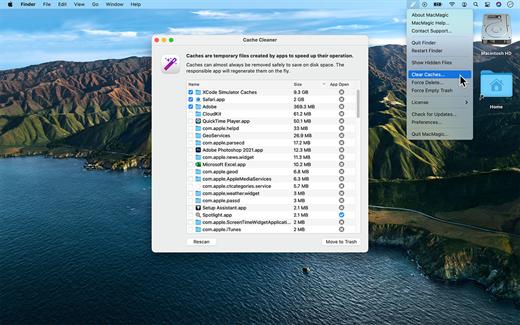
MacMagic can help clear up gigabytes of lost storage space crowded up by the caches of poorly optimized apps, hide and show hidden files in the Finder, help force-delete the contents of the Trash or stubborn files, and perform various other tasks to help automate or simplify your daily workflow!

What’s New

Version 1.9.2:


  • Release notes were unavailable when this listing was updated.
Compatibility

macOS 10.14 or later.


Release Name: MacMagic 1.9.2
Size: 74.9 MB
Links: HOMEPAGE – NFO – Torrent Search

Download: RAPiDGATOR

7 Comments
Jan 30

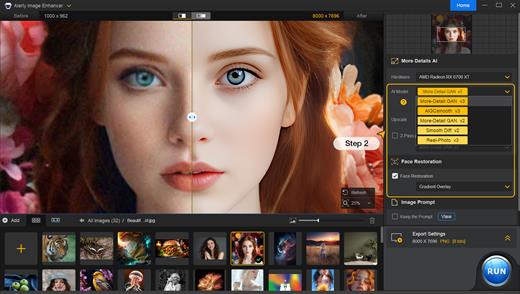
Aiarty Image Enhancer 3.9

Supported Input & Output Formats
Supported Input Formats
.jpg, .jpeg .jp2, .j2k, .jpf, .jpm, .jpg2, .j2c, .jpc, .jpx, .mj2, .png, .tif, .tiff, .webp, .bmp, .avif, and RAW formats (.dng, .cr3, .cr2, .crw, .nef, .nrw, .arq, .arw, .sr2, .srf, .raf, .rw2, .orf, .ori, .pef, .ptx, .3fr, .fff, .iiq, .cap, .eip, .rwl, .srw, .erf, .mos, .mef, .mrw, .mdc, .dcr, .kdc, .dcs, .drf, .k25, .bay, .pxn, .r3d, and .rwz)

Supported Output Formats
.jpg, .png (8-bit, 16-bit)

Supported Output DPIs

What’s New

Version 3.9:


  • Release notes were unavailable when this listing was updated.
Compatibility

macOS 10.15 or later


Release Name: Aiarty Image Enhancer 3.9
Size: 129.1 MB
Links: HOMEPAGE – NFO – Torrent Search

Download: RAPiDGATOR

7 Comments
Jan 30

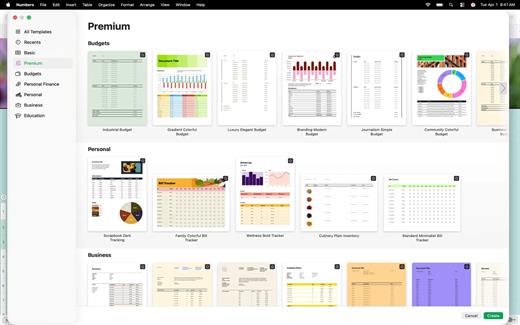
Numbers: Make Spreadsheets 15.1

Create gorgeous spreadsheets with Numbers on iPhone, iPad and Mac. Get started with Apple-designed templates for everything from a home budget to an invoice. Add tables, charts, text, and images anywhere on the flexible canvas. Animate your data with interactive charts, find patterns with pivot tables, and use hundreds of powerful functions.

Get Started Quickly


  • Work from iPhone, iPad, Mac, or even a PC with iCloud.com
  • Select from a wide variety of Apple-designed templates
  • Add from a library of shapes, tables, and charts with pre-defined styles
  • Import and edit Microsoft Excel and CSV files
Create Beautiful Spreadsheets

  • Place tables, charts, text, and images anywhere on the flexible canvas
  • Create a form on iPhone or iPad to quickly enter data on the go
  • Draw or write with Apple Pencil on iPad
Formulas for Everyone

  • Choose from hundreds of powerful functions, including XLOOKUP and RegEx
  • Search the integrated function browser for built-in help and sample formulas
  • Easily add stock information to spreadsheets
  • See results from a single formula across multiple cells using spilling arrays
Everything Adds Up Beautifully

  • Use pivot tables and categories to see your data in a whole new way
  • Quickly organize and summarize tables to gain new insights
  • Insert gorgeous 2D and 3D charts, including bar, column, line, area, pie, donut, and radar charts
  • Animate data with interactive column, bar, scatter, and bubble charts
  • Easily filter through large tables for specific values, text, or duplicate entries
  • Change values in cells using sliders, steppers, checkboxes, pop-ups, and star ratings
Share with Anyone

  • Share your spreadsheet publicly or collaborate with specific people using iCloud or Box
  • Make changes from any device and see a list of changes from others in real-time
  • Export your spreadsheet in CSV, TSV, PDF, and Microsoft Excel
Apple Intelligence

  • Use Writing Tools to proofread, rewrite, summarize, and compose text
  • Create your own fun images with Image Playground based on a description
What’s New

Version 15.1:


  • Release notes were unavailable when this listing was updated.
Compatibility

macOS 15.6 or later.


Release Name: Numbers: Make Spreadsheets 15.1
Size: 251.9 MB
Links: HOMEPAGE – NFO – Torrent Search

Download: RAPiDGATOR
7 Comments
Jan 30

Abelssoft SendMe 2026 v2.1

for Windows/macOS

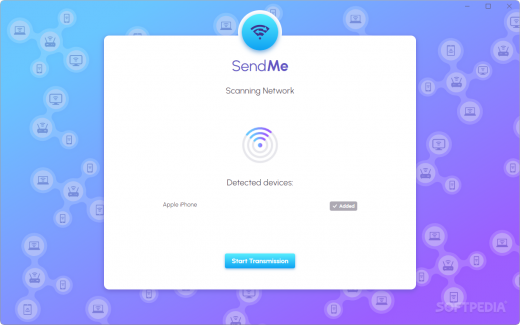
Description: Easily Share Files Between Multiple PCs and Smartphones. SendMe seamlessly connects Windows and Apple computers with iPhones and Android devices.

Overview of all functions

Seamless integration across platforms
SendMe connects Windows, Mac, Android, and iOS effortlessly. (Files can be transferred securely and quickly, regardless of the operating system.)

Drag-and-drop operation
The intuitive interface lets you easily move files using a chat-like view. (No technical knowledge is required – it's simple and straightforward.)

Optimized network speeds
SendMe utilizes your local network’s full capacity for exceptionally fast transfers. (Say goodbye to long wait times!)

Local storage security
Your data remains safe as it’s not uploaded to external servers or sent abroad. (Transfers happen exclusively within your local network, ensuring privacy.)

Direct transfers without the cloud
Files are exchanged directly through your Wi-Fi or network, bypassing cloud servers. (This guarantees maximum speed and full control over your data.)

Support for large files
No file size limitations with SendMe. (Even 4K videos or entire photo albums can be transferred effortlessly.)

Support for all major file formats
Whether it's photos, videos, documents, or music, SendMe supports all common formats, (so you can share whatever files you need.)

Release Name: Abelssoft SendMe 2026 v2.1
Size: 295.1 MB
Links: HOMEPAGE – NFO – Torrent Search

Download: RAPiDGATOR

8 Comments
Jan 29

Final Draft 13.3.0

Final Draft allows you to use your creative energy to focus on the content; let Final Draft take care of the style. Final Draft is the number-one selling application specifically designed for writing movie scripts, television episodics, and stage plays. It combines powerful word processing with professional script formatting in one self-contained, easy-to-use package. There is no need to learn about script formatting rules – Final Draft automatically paginates and formats your script to industry standards as you write.

What’s New

Version 13.3.0:


  • Release notes were unavailable when this listing was updated.
Compatibility

macOS 10.14.0 or later


Release Name: Final Draft 13.3.0
Size: 114.1 MB
Links: HOMEPAGE – NFO – Torrent Search

Download: RAPiDGATOR
12 Comments
Jan 29

Wondershare PDFelement Pro 12.1.5 (OCR)

Wondershare PDFelement is a self-explanatory OS X application that makes it easier for your to preview, edit, join, split and convert PDF documents using a Mac.

The Wondershare PDFelement also features a simple, clean and intuitive interface that provide instantaneous access to all the tools and features you might need to complete your daily tasks.

Powerful and user-friendly PDF editor for everyday use

Moreover, with Wondershare PDFelement’s help, you can effortlessly edit PDF documents created using text files, web pages or scanned documents.

Consequently, you can add, remove or edit text, move and rearrange pages, insert or remove images and more.

Wondershare PDFelement’s top toolbar helps you hide, show and customize the sidebar in order to display the items and information you are interested in. In addition, you can browse through the loaded document, zoom in or out, print it or email it with just a couple of mouse clicks.

Advanced OCR capabilities make text editing a breeze

Furthermore, you can choose between the “Hand”, “Select” and “Edit” tool, use the advanced OCR feature and convert your source file into plain text or RTF document, ePUB, HTML, as well as file formats compatible with Microsoft Word, Excel, and PowerPoint.

The context menu also helps you switch between the “Move”, “Select” and “Touchup” tool, change the display mode and open the Inspector window to view detailed information about the loaded document.

As an added bonus, by accessing the Document menu, you have the option to add, update or remove an watermark, extract, insert and delete pages, split, merge or convert your document and crop or rotate a page with ease.

Full-featured tool designed to help you stamp, watermark, encrypt and decrypt PDF documents on a Mac

The complete list of all available editing tools, bookmark features, annotation tools and stamp options can be found under the Tools menu.

From here you can easily insert text boxes, add sticky notes, highlight, strike-through and underline text, insert various shapes and use the handy pencil or erase.

On the whole, Wondershare PDFelement comes with the right set of features to help you edit and annotate PDF documents using a Mac, as well as effortlessly add password protect and convert them other formats for easier sharing with your friends and colleagues.

What’s New

Version 12.1.5:


  • Release notes were unavailable when this listing was updated.
Compatibility

macOS 11.0 or later
Apple Silicon or Intel Core processor


Release Name: Wondershare PDFelement Pro 12.1.5 (OCR)
Size: 811.8 MB
Links: HOMEPAGE – NFO – Torrent Search

Download: RAPiDGATOR
10 Comments
Jan 29

Mimestream 1.9.8

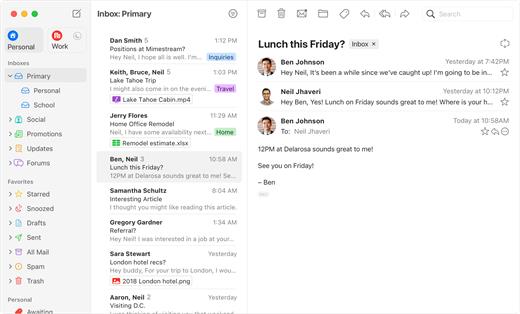
Mimestream combines your favorite Gmail features with the power of a native macOS app so you can move through your email effortlessly

Made for Mac, optimized for Gmail

As a native app written in Swift, Mimestream leverages the full power of macOS to deliver a lightning-fast and instantly familiar experience. Instead of using the IMAP protocol, Mimestream utilizes the Gmail API to enable an enhanced set of features that let you work with ease.

Work smarter, email faster

  • Rise above the noise and focus on the work that matters most. Mimestream makes it easy to keep your inbox organized with confidence.

  • Categorized Inbox – with support for Gmail’s categories, focus on what matters most and triage the rest at your leisure.
  • Multiple Accounts
  • Label Management
Committed to Privacy

Your data and credentials are stored only on your device, and the app only makes direct connections to Gmail. There are no intermediary servers, and Mimestream does not collect or sell your email.

Key Features

  • Lightweight and Fast – Mimestream is built for speed, and only uses a minimal amount of disk space to cache recent messages
  • Offline Access – Fully functional when offline and on the slowest connections-perfect for business travelers and whenever you’re on the go
  • System Notifications – Receive macOS system notifications when you receive new messages, so you never fall behind on important threads
  • Aliases – Your email aliases are automatically synced from Gmail without any setup and are used for replies when appropriate
  • Signatures – Signatures set up in Gmail are automatically synced with Mimestream
  • Robust Search – Enter any Gmail search query into Mimestream and get consistent results. Search while offline, too
  • Swipe Gestures – Use familiar macOS swipe gestures to quickly triage and archive your email
  • Tracking Prevention – Read your email privately – Mimestream blocks tracking pixels from 50+ of the most common tracking services
  • Keyboard Shortcuts – Triage your email quickly using keyboard shortcuts, including the option to use familiar Gmail or Apple Mail shortcut sets
What’s New

version 1.9.8:

Fixed


  • Private Push doesn't work for some device configurations
  • Older messages don't stay synced when inbox size is small
  • (macOS 26) Enable swiping message list rows underneath the sidebar
  • Swipe action settings show Snooze as an option even when the feature isn't enabled
Cleanup

  • Added a "Test Push" diagnostic to Advanced Settings
Compatibility

macOS 10.15.0 or later


Release Name: Mimestream 1.9.8
Size: 9 MB
Links: HOMEPAGE – NFO – Torrent Search

Download: RAPiDGATOR
8 Comments