Please REGISTER or RENEW your account on RAPiDGATOR.net and support us by doing through all RAPiDGATOR working download links on main posts...
Jan 29

BusyCal 2026.1.1

BusyCal is an award-winning desktop calendar that combines personal productivity features for individuals with powerful calendar sharing capabilities for families and workgroups. Its unique features include a non-modal Info Panel for easier data entry; To Dos that display in the calendar and auto-forward until completed; repeating To Dos; customizable calendar views including a List view and scrolling Month and Week views; adjustable font styles and sizes, live weather feeds, moon phases, graphics, sticky notes and more. And when you first launch BusyCal, all of your iCal data is instantly imported. BusyCal automatically syncs with iCal, iPhone, iPad, iPod Touch, and other apps and devices that sync with MobileMe or Sync Services. If you later decide to switch back to iCal, all of your calendar data will be current.
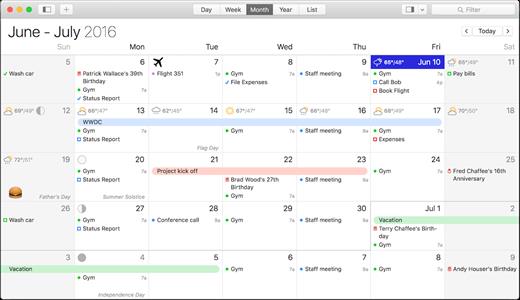
BusyCal allows families and workgroups to share calendars with MobileMe, Google Calendar, iCal Server, and other CalDAV Servers. You can even share calendars with other BusyCal users on a local area network without the need of a server. And BusyCal syncs with iCal, iPhone, iPad, iPod Touch, and other apps and devices that sync with MobileMe or Sync Services.

Features


  • View and edit event details in a non-modal info panel.
  • Create repeating To Dos that display in the calendar and carry-forward until completed.
  • Scrolling Month and Week Views.
  • Customizable list view lets you filter and sort events by date, calendar, and more.
  • View live weather forecasts, sunrise/sunset times, and moon phases right in your calendar.
  • Customizable event fonts, sizes, styles and colors.
  • Add graphics to your calendar.
  • Add virtual sticky notes to your calendar.
  • Sync with the iPad, iPhone, and iPod Touch via MobileMe, Google Calendar, or iTunes.
  • Sync with MobileMe Calendar and other computers/devices that sync with MobileMe.
  • Sync with Google Calendar and other computers/devices that sync with Google Calendar.
  • Sync with other BusyCal users on a local area network or over the internet.
  • Share calendars with others, with password-protection and SSL encryption.
  • iCal compatible
What’s New

Version 2026.1.1:


  • Release notes were unavailable when this listing was updated.
Compatibility

macOS 11.0 or later


Release Name: BusyCal 2026.1.1
Size: 60.9 MB
Links: HOMEPAGE – NFO – Torrent Search

Download: RAPiDGATOR
10 Comments
Jan 29

Flyingbee PDF to PowerPoint 10.0.6

Offline Convert PDF to PowerPoint(.pptx), No Internet Required, Confidential Document Security. Compatible with Microsoft Word 2022. PDF to PowerPoint by Flyingbee is a powerful & productive PPT Converter designed for Mac users.

PDF to PowerPoint Converter exports PDF files to editable and modifiable Office PowerPoint documents quickly and efficiently. It convert PDF file back to PowerPoint Presentation with well-preserved original texts, images, layouts, hyperlinks, tables, and bezier graphics.

> Upgrade to Pro?
You could instantly convert some pages PDF documents to word for free. If you feel good, you can upgrade it to our pro version to convert documents with more pages directly without ads. That may satisfy you without bringing you expense risks.

Main Features
+ Incredibly easy-to-use.
+ Professional PDF Converter.
+ Import multiple PDF files at one time.
+ Convert PDF files to PowerPoint documents directly.
+ Conversion 100% processed locally.
+ Export PDF to PowerPoint (.pptx) files.
+ Superior accuracy and format retention.

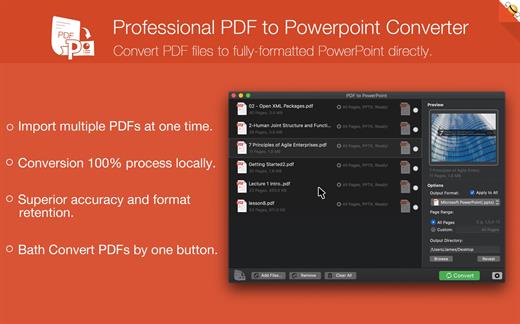
> Professional PDF to Powerpoint Converter
Convert PDF files to fully-formatted PowerPoint directly.
– Import multiple PDFs at one time.
– Conversion 100% process locally.
– Superior accuracy and format retention.
– Bath Convert PDFs by one button.

> Incredibly Easy to Use
Simple workflow with an extremely neat and clear interface.
– User-friendly & simple interface.
– Conveniently import PDFs with drag & drop operation.
– Preview a batch of PDF files within the app.
– Easily edit or reuse the PDF content.

> High Efficiency and Productivity
Import many PDFs as you like for converting any particular pages flexibly.
– Easily manage PDFs by build-in insert, rearrange, delete and open feature.
– Configure any particular pages (e.g. 1, 2-10, 35 or all pages) to meet your needs.
– Process files fast and save the files locally.

What’s New

Version 10.0.6:


  • Release notes were unavailable when this listing was updated.
Compatibility

macOS 10.10 or later


Release Name: Flyingbee PDF to PowerPoint 10.0.6
Size: 17.2 MB
Links: HOMEPAGE – NFO – Torrent Search

Download: RAPiDGATOR
10 Comments
Jan 29

BusyContacts 2026.1.1

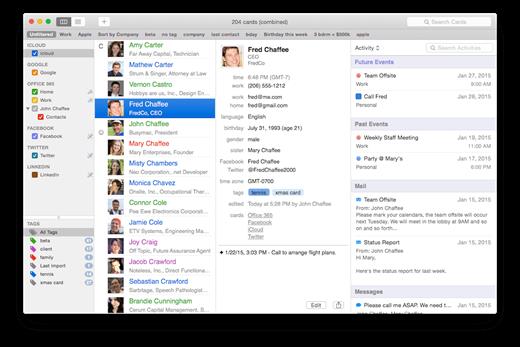
BusyContacts is a contact manager for OS X that makes creating, finding, and managing contacts faster and more efficient. It brings to contact management the same power, flexibility, and sharing capabilities that BusyCal users have enjoyed with their calendars. What’s more, BusyContacts integrates seamlessly with BusyCal, forming a flexible, easy-to-use CRM solution that works the way you do.

BusyContacts syncs with the built-in Contacts app on OS X and iOS, and supports all leading cloud services, including iCloud, Google, Exchange, Facebook, Twitter, and LinkedIn.

Key Features


  • Customizable Views — View contacts in a single-column Card View or multi-column List View.
  • Tags — Tags can be used for grouping, filtering and coloring contacts.
  • Smart Filters — Smart Filters are a powerful tool for filtering contacts, creating saved searches, and even applying custom view settings in the List View.
  • BusyCal integration — BusyContacts integrates with BusyCal by linking contacts to events in your calendar, providing flexible CRM capabilities for tracking past and future activities.
  • Activity List — The Activity List displays activities associated with the selected contact including calendar events, emails, messages, and recent social network posts.
  • Social-network integration — BusyContacts syncs with Facebook, Twitter and LinkedIn, combining contact information from each of these sources into a unified contact card.
  • Syncing — BusyContacts syncs with the built-in Contacts app on OS X and iOS through all leading cloud services including iCloud, Google, Exchange, and other CardDAV servers.
  • Sharing — BusyContacts allows you to share address books with read-only or read/write privileges through Exchange, Fruux, LAN, and other CardDAV servers.
What’s New

Version 2026.1.1:


  • Release notes were unavailable when this listing was updated.
Compatibility

macOS 11.0 or later


Release Name: BusyContacts 2026.1.1
Size: 25.7 MB
Links: HOMEPAGE – NFO – Torrent Search

Download: RAPiDGATOR

11 Comments
Jan 29

Flyingbee PDF to Word 10.0.6

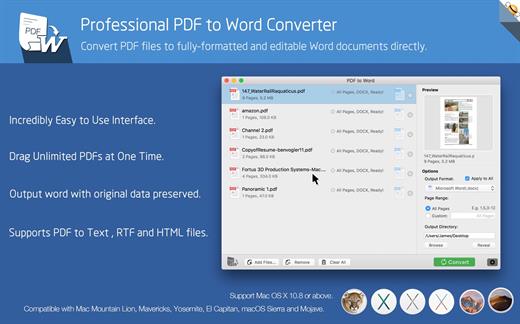
Offline conversion, No Internet Required, No need to Upload, Confidential Document Security.

Compatible with Microsoft Office Word 2022 & macOS Monterey & Apple M2 Mac.

Converting PDF into MS Office formats is recognized as notoriously challenging, it offers unparalleled accuracy in terms of formatting and content preservation!

Offline conversion, No Internet Required, No need to Upload, No Boring Waiting, Privacy-safe, Process 100% on your Mac.

PDF to Word exports PDF files to fully-formatted and editable office word documents with exactly preserved original texts, images, layouts, hyperlinks, tables, and bezier graphics.

> Upgrade to Pro?

You could instantly convert 2-page PDF documents to word for free. If you feel good, you can upgrade it to our pro version to convert documents with more pages directly without ads. That may satisfy you without bringing you expense risks.

Main Features:


  • Incredibly easy-to-use.
  • Professional PDF Converter.
  • Add unlimited PDFs at one time.
  • Convert PDF files to fully-formatted and editable Word (.docx) documents directly.
  • Conversion 100% process locally.
  • Export PDF to Word (.docx), Text (.txt), RTF (.rtf) and HTML (.html) files.
  • Superior accuracy and layout, formatting retention.
Incredibly easy to use

Simple workflow with an extremely neat and clear interface.


  • User-friendly & convenient interface.
  • Convenient import PDFs With drag & drop operation.
  • Preview a batch of PDF files within the app.
  • Batch convert PDFs by one button.
  • Easily edit or reuse the PDF content.
High efficiency and productivity

Import as many PDFs as you like for converting any particular pages flexibly.


  • 3 Ways to add PDFs by browse, drag & drop, and open in.
  • Easily manage PDFs by build-in insert, rearrange, delete and open feature.
  • Configure any particular pages (e.g. 1,2-16,35 or all pages) to meet your needs.
  • 100% fast speed to process PDF file locally.
Perfect accuracy and layout, formatting retention

All the elements including text, image, format and more will be preserved in Word documents.


  • Preserve original texts, images, layouts, hyperlinks, tables, and graphics exactly.
  • Preserve stroking or filing vector graphics, including lines, arrows, rectangles, and pen bezier paths.
  • Convert encrypted PDFs with copying and printing restrictions.
  • Convert Adobe PDF in Multi-languages and Version from 1.0-1.7
  • Output PDF files to Office 2007 Version (.docx), which can be opened by 2007 and the latest Office apps.
What’s New

Version 10.0.6:


  • Release notes were unavailable when this listing was updated.
Compatibility

macOS 10.10 or later
Apple Silicon or Intel Core processor


Release Name: Flyingbee PDF to Word 10.0.6
Size: 16.7 MB
Links: HOMEPAGE – NFO – Torrent Search

Download: RAPiDGATOR
10 Comments
Jan 29

SyncMate Expert 8.10.575

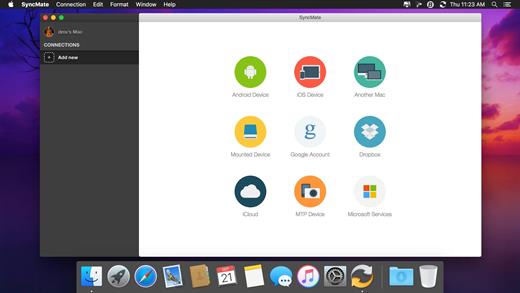
SyncMate allows syncing your Mac data with Android, iOS, and other Mac, MTP, or mounted devices, as well as with Google, Dropbox, and iCloud accounts.

SyncMate is offered in Free and Expert editions.


  • Free SyncMate lets you sync Contact and Calendar entries between Mac and supported devices. Sync with Google and Dropbox accounts is also available. SyncMate allows reading messages from Android and iOS right on Mac.
  • Expert Edition will sync iTunes, iPhoto and Photos.app, Safari Bookmarks, Reminders and separate folders (sync options depend on the device you are syncing). It offers AutoSync option which lets you set various parameters of automatic sync for any of supported device. You can sync Folders between Mac and mounted storage devices and other Macs in real time, i.e., once you have changed any data on your Mac or connected device, it will be synced immediately.
  • With Expert Edition you can create, send, delete, search and export text messages from Android and iOS on your Mac. It also allows the conversion of videos to AVI, MPG, MP4, WMV, ASF, 3GP and audio files to MP3 and WAV prior to syncing them to device (Pictures, Videos and Music plugin).
Sync can be performed via USB, Wi-Fi, Bluetooth and Ethernet (depends on synced device). SyncMate is compatible with OS X 10.10 and higher. Device compatibility: iOS 5.x-8.x devices; Android 3.x, 4.x, 5.x, 6.x, 7.x.

What’s New

Version 8.10.575:


  • Improved: calendars synchronization speed.
  • Fixed: synchronization of files with Microsoft OneDrive.
  • Fixed: synchronization of calendars with Microsoft Outlook.
  • Fixed: synchronization of contacts with Microsoft Outlook.
Compatibility

macOS 10.13 or later
Apple Silicon or Intel Core processor


Release Name: SyncMate Expert 8.10.575
Size: 75.1 MB
Links: HOMEPAGE – NFO – Torrent Search

Download: RAPiDGATOR
10 Comments
Jan 29

CleanMyMac X 4.15.14

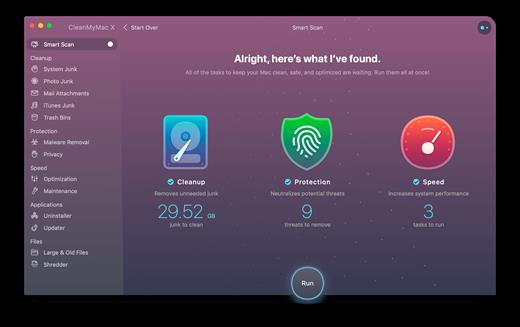
CleanMyMac X makes space for the things you love. Sporting a range of ingenious new features, CleanMyMac lets you safely and intelligently scan and clean your entire system, delete large, unused files, reduce the size of your iPhoto library, uninstall unneeded apps or fix the ones that started to work improperly, manage all your extensions from one place and do much more – all from one newly designed and beautifully simple interface.

Features


  • Easy to use, user-friendly interface
  • Drag and drop nature
  • Slims universal binaries
  • Removes useless language translations
  • Most accurate application uninstallation
  • Quick and Secure file eraser
  • Manages widgets, plugins and preference panes
  • Erases garbage left from previously removed applications and widgets
  • Monitors your Trash helping you to uninstall trashed applications correctly
  • Keeps an eye on your removable devices to clean them up from junk service files
What’s New

Version 4.15.14:


  • Release notes were unavailable when this listing was updated.
Compatibility

macOS 10.13 or later
Apple Silicon or Intel Core processor


Release Name: CleanMyMac X 4.15.14
Size: 120 MB
Links: HOMEPAGE – NFO – Torrent Search

Download: RAPiDGATOR
11 Comments
Jan 29

Transfer 2.4.0

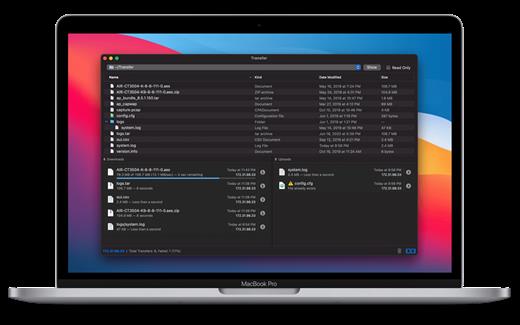
Transfer is a reliable and fully RFC-compliant TFTP server application. The perfect alternative to the built-in TFTP server on your Mac. It’s got everything you expect: real-time updates of current transfers in progress, support for broadcast requests, transfer history and basic root directory access control and file management. A feature rich TFTP server with a simple and modern user interface.

Written from the ground up, Transfer offers total control of your file transfers while playing nicely with existing TFTP clients.

Features


  • Real time updates of current transfers in progress
  • Basic file management of the root TFTP directory
  • Support for broadcast transfer requests
  • Support for common TFTP extensions and options
  • Transfer history
What’s New

Version 2.4.0:


  • Minor fixes and improvements.
Compatibility

macOS 10.14 or later, 64-bit processor


Release Name: Transfer 2.4.0
Size: 10.2 MB
Links: HOMEPAGE – NFO – Torrent Search

Download: RAPiDGATOR

10 Comments
Jan 29

Logic Pro 12.0

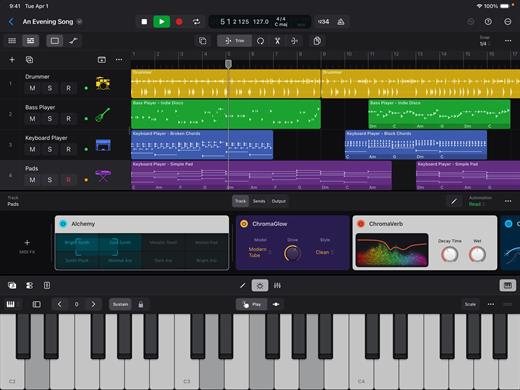
Logic Pro for Mac is a complete collection of sophisticated creative tools for songwriting, beat making, editing, and mixing, built around a modern interface that’s designed to get results quickly and also deliver more power whenever it’s needed. Logic Pro includes a massive collection of instruments, effects, loops, and samples, providing a complete toolkit to create amazing-sounding music.

Music Production


  • Use Stem Splitter to separate nearly any mixed audio recording into six distinct parts: Drums, Bass, Vocals, Guitar, Piano, and Other instruments
  • Smart Tempo instantly conforms imported or recorded audio to your project’s tempo
  • Record and edit MIDI or audio using a comprehensive set of editors and tools
  • Use Live Loops to capture inspiration and quickly build arrangements by mixing and matching loops, samples, and your recordings
  • Manipulate the pitch and timing of any recording with Flex Time and Flex Pitch
  • Keep takes organized with take folders and build comps quickly with Quick Swipe Comping
  • Track Alternatives let you create, duplicate, and then switch between different versions of tracks
  • Deliver a release-ready mix using Mastering Assistant
AI Session Players

  • Discover six virtual musicians designed to create nuanced performances that respond to your direction
  • Synth Player, Bass Player, Keyboard Player, Acoustic Drummer, Electronic Drummer, and Percussionist offer a wide range of genres and distinct playing styles
Beat Production

  • Reshuffle audio with Beat Breaker, a creative time and pitch effect
  • Build custom drum kits using your favorite samples
  • Create drum beats, bass lines, and melodic parts, and reshape sounds over time using Step Sequencer
Sampling

  • Use Sampler to quickly create and edit sophisticated multi-sampled instruments
  • Use Sample Alchemy to transform audio into entirely new malleable sounds
  • Chop and manipulate samples using Quick Sampler
Professional Instrument and Effects Plug-ins

  • Create music with a massive collection of powerful software instruments
  • Shape your sound using a wide variety of high-quality effects
Compatibility

  • Roundtrip capabilities let you open projects back-and-forth between Logic Pro for Mac or Logic Pro for iPad
  • Import and export XML to support Final Cut Pro workflows
System Requirements: 6GB available storage space for minimum install / 44GB or more storage space for full Sound Library installation

What’s New

Version 12.0:


  • Release notes were unavailable when this listing was updated.
Compatibility

macOS 15.6 or later and a Mac with Apple M1 chip or later.


Release Name: Logic Pro 12.0
Size: 1.4 GB
Links: HOMEPAGE – NFO – Torrent Search

Download: RAPiDGATOR
12 Comments
Jan 29

Permute 3.14.6

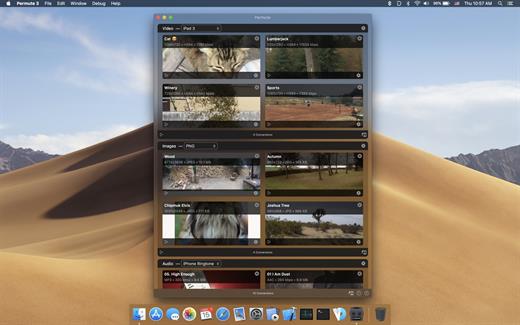
Permute offers easy-to-use drag-and-drop video conversion.

Features:


  • Easy to Use – built from the ground up, Permute is a perfect example of what a Mac app should be. With a gorgeous interface and drag & drop simplicity no need for complicated options.
  • Insanely Fast – Permute was engineered to be incredibly fast. Let us take care of the hard stuff. Just select the video format you want and it’ll be done faster than you can say “hardware acceleration” – MP4 and HEVC presets now take advantage of your machine’s hardware acceleration capabitlities, speeding up HEVC conversions more than 3 times over previous versions of Permute!
  • PDF Support – Permute 3 now includes support for stitching multiple images into a single PDF.
  • Everything Included – It doesn’t matter if you’re converting home movies or processing images. Permute can do it all. We support nearly every format and have plenty of device presets to choose from.
  • Looks Amazing – Whether you use dark mode or not, Permute will look amazing. Taking advantage of the modern technologies, Permute will even change its icon in dark mode.
  • Keep the Schedule – Video re-encoding is quite demanding on computer resources. This is why you can now schedule Permute to convert videos e.g. at night when you’re not using your computer.
  • And so much more! – There are so many other great features in Permute – adjust volume of an audio file or an audio track in a video. Batch-resize, rotate and flip images and videos. And more!
What’s New

Version 3.14.6:


  • Release notes were unavailable when this listing was updated.
Compatibility

macOS 10.12.0 or later


Release Name: Permute 3.14.6
Size: 79.5 MB
Links: HOMEPAGE – NFO – Torrent Search

Download: RAPiDGATOR

9 Comments