Please REGISTER or RENEW your account on RAPiDGATOR.net and support us by doing through all RAPiDGATOR working download links on main posts...
Jan 25

Mia for Gmail 2.8.1

Mia for Gmail (was Notifier Pro for Gmail) is a desktop Gmail client which sits politely in your menu bar.


  • Multiple Gmail accounts – Add as many as Gmail accounts as you want. A pleasant notification sound will let you know if you’ve got a new email. It’s up to you to choose any notification sound (from the system sound list).
  • Check, read, compose* – Quickly read and compose your emails. You can also mark as spam, archive, or delete an email. Mia for Gmail can be your default email handler. It can manage your attachment files as well. (* The native compose window works for OS X 10.10 Yosemite or later.)
  • 100% Secure – We rely on Gmail’s Auth 2.0 user authentication, passwords are not stored on your Mac. All connections use IMAP/SSL. This application is available in English, French, German, and Russian.
What’s New

Version 2.8.1:


  • Release notes were unavailable when this listing was updated.
Compatibility

macOS 10.13 or later


Release Name: Mia for Gmail 2.8.1
Size: 6.9 MB
Links: HOMEPAGE – NFO – Torrent Search

Download: RAPiDGATOR

9 Comments
Jan 25

Meta 2.3.2

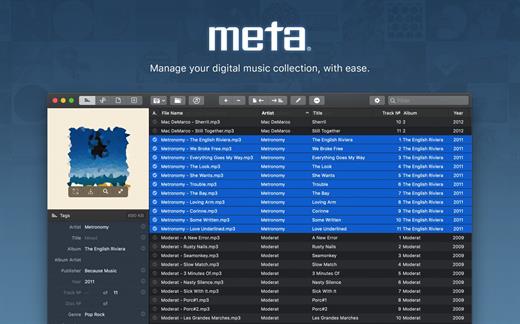
Meta helps you manage your ever-growing digital music collection. Use it to easily edit information such as a song’s artist, title, album, album cover, etc. It supports editing of most audio formats such as MP3, MP4, M4A, FLAC, Ogg, OGA, SPX, WAV, AIFF, and a variety of metadata formats including ID3v1, ID3v2.3, ID3v2.4, iTunes MP4, Vorbis comments, and APE tags.

Features


  • A polished, intuitive user interface that adopts OS X’s standards
  • Write metadata to multiple files at once (Batch Tag Editing)
  • Remove all metadata from files (Strip Tags)
  • Change typecase (capitalise, upper/lowercase, titlecase), strip underscores
  • Rename files based on their metadata or instead, convert filenames to metadata
  • Find and Replace characters, words, or strings in metadata, with support for regular expressions (patterns)
  • Add selected tracks to iTunes, or refresh their metadata using a simple keyboard shortcut
  • Automatically generate track numbers
  • Benefit from built in file management operations (Move, Delete, Reveal in Finder)
  • Interface is compatible with Retina displays
Album covers can easily be set or exported via drag-and-drop, and it is possible to configure Meta so that it scales, crops, and compresses images each time a new image is set, so as to keep your audio files’ size to a minimum.

What’s New

Version 2.3.2:


  • Release notes were unavailable when this listing was updated.
Compatibility

macOS 10.11 or later.


Release Name: Meta 2.3.2
Size: 10.6 MB
Links: HOMEPAGE – NFO – Torrent Search

Download: RAPiDGATOR

6 Comments
Jan 25

Tidier 1.6.2

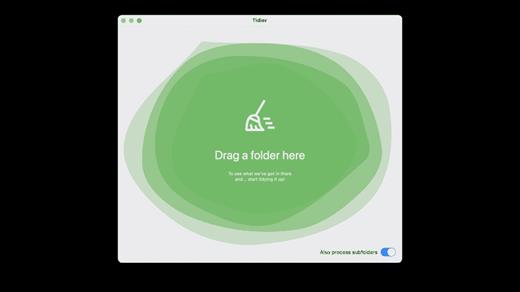
Type-aware file management .That makes sense. Browse through your files an intuitive way, or export them back to disk: all neatly-organized!

Features

Easy to use: Elegant, simple and practical: Just drag’n’drop a folder and everything will be taken care of! Everything in order: Tired of having to look for specific types of files, only to realize they were hidden somewhere in vast tree folders? Problem solved! Lightning fast: Tidier is optimized for speed and top-notch performance, so that you don’t have to worry about anything!

What’s New

Version 1.6.2:


  • Release notes were unavailable when this listing was updated.
Compatibility

macOS 12.0 or later


Release Name: Tidier 1.6.2
Size: 5.4 MB
Links: HOMEPAGE – NFO – Torrent Search

Download: RAPiDGATOR

7 Comments
Jan 25

Native SQLite Manager 1.31.1

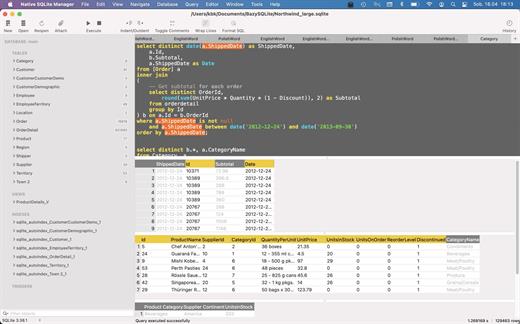
Native SQLite Manager is an minimalist SQLite database manager.

Application features


  • Support for many versions of SQLite
  • Support for SQLCipher
  • SQLite extensions support
  • Autocompletion and syntax highlighting
  • Customizable themes
  • SQL formatter
  • Export data to CSV, JSON, XML
  • Import data from CSV
  • Minimalist interface without unnecessary additions
What’s New

Version 1.31.1:


  • Release notes were unavailable when this listing was updated.
Compatibility

macOS 10.15 or later
Apple Silicon or Intel Core processor


Release Name: Native SQLite Manager 1.31.1
Size: 58.6 MB
Links: HOMEPAGE – NFO – Torrent Search

Download: RAPiDGATOR

6 Comments
Jan 25

Memory Booster 2.0

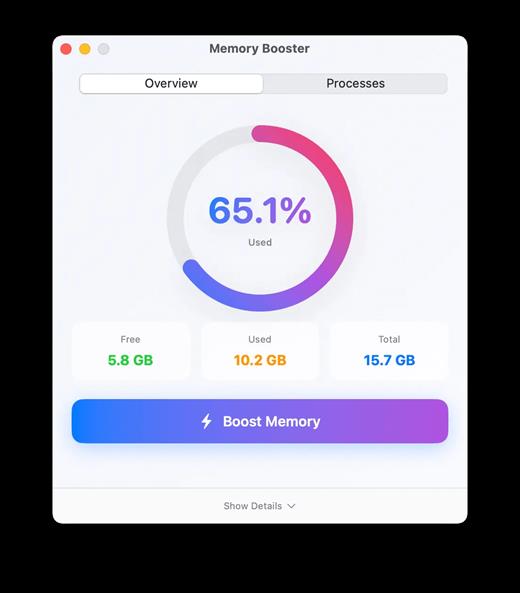
Boost Your Mac’s Memory. Effortlessly. Monitor, optimize, and track memory usage with intelligent insights.
Keep your Mac running at peak performance.

What’s New

Version 2.0:


  • Release notes were unavailable when this listing was updated.
Compatibility

macOS 13.5 or later


Release Name: Memory Booster 2.0
Size: 5.4 MB
Links: HOMEPAGE – NFO – Torrent Search

Download: RAPiDGATOR

8 Comments
Jan 25

AI Transcription 2.15

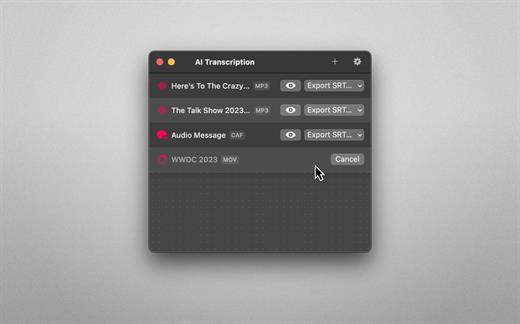
Audio-to-Text Converter. Turn audio into text! AI Transcription uses advanced Speech Recognition to transcribe your audio and video files in a blink, fully automatically, all offline, and with highly accurate results.

Features


  • AI-powered Audio-to-Text generator
  • Supercharged by Speech Recognition
  • User-friendly, lightweight yet powerful
  • Just drag and drop your files and transcription starts automatically
  • Privacy by Design: Computes offline, directly on your Mac
  • Export transcriptions as plain text, CSV, SRT and VTT files
  • Timing Segmentation Levels: Words, Sentences, Paragraphs
  • Looks brilliant in dark and light
  • Optimised for Macs with Apple silicon (M1, M2)
  • Works great on macOS 13 Ventura
Limitations

  • The apps’ supported languages depend on the Languages selected in macOS System Settings → Keyboard → Dictation.
  • Only selected languages with on-device support are available in AI Transcription. Some of them are: English, German, Italian, Spanish, Portuguese, Russian, Turkish, Simplified Chinese.
What’s New

Version 2.15:


  • Release notes were unavailable when this listing was updated.
Compatibility

macOS 13.1 or later.


Release Name: AI Transcription 2.15
Size: 5.1 GB
Links: HOMEPAGE – NFO – Torrent Search

Download: RAPiDGATOR

2 Comments
Jan 25

Downie 4.11.10

A simple download manager that offers you the possibility to quickly save videos from different websites to your own disk drive.

If you are using a poor internet connection, trying to visualize videos streamlined online might not work properly since the content is loaded too slowly. Downie is a simple Mac app that can help you download those videos to your computer, and then watch them by using your default media player.

User friendly video downloader featuring support for drag and drop actions

Working with Downie is extremely straightforward: simply drop the video URL on top of the app’s main window or on the Dock icon. Downie adds the video to your downloads list, so all you have to do next is start the process by pressing the appropriate button. Of course, you can also remove items from the list.

By default, Downie downloads MP4 files and places them in your default Downloads folder, but you can easily change this via the Preferences window. The same area allows you to setup notifications, or post processing actions (convert to MP4 if necessary, or extract audio only).

Effortlessly download videos from a wide collection of hosting websites

Downie provides support for more than 400 different websites that host video content, among which there are the most popular choices, such as YouTube, Apple, LiveLeak, Vimeo, BBC, and so on. If a certain website is not included, within the app you can send a request email to the Downie developers.
Moreover, Downie also provides matching extensions for various popular web browsers, such as Firefox, Safari, Google Chrome or Chromium. The add-ons are not installed by default: open the Preferences window and install only the ones you plan to use.

Straightforward solution for downloading video content hosted online

Downie is a great tool for saving videos posted on various websites to your Mac for offline playback. The application is extremely useful especially if you have a slow internet connection.

What’s New

Downie 4.11.10:


  • Improved: 3cat.cat, instagram.com, reddit.com, tiktok.com, xiaohongshu.com, youtube.com.
Compatibility

macOS 10.12 or later
Apple Silicon or Intel Core processor


Release Name: Downie 4.11.10
Size: 51.8 MB
Links: HOMEPAGE – NFO – Torrent Search

Download: RAPiDGATOR

7 Comments
Jan 25

Topaz Gigapixel 1.1.0

Topaz Gigapixel knocks traditional upscaling tools off their pedestals.

Enlarging your image without losing detail has always been impossible… until now. Upscale your photos by up to 600% while perfectly preserving image quality.

Breathtakingly sharp prints. High-resolution cropping in post-production. iPhone photos that look like they came out of a DSLR.

No matter why you’re enlarging your photos, you always want the best possible quality for your results. Gigapixel AI is currently the only photo enlargement product available that can actually add detail back to your upscaled photo.

What’s New

Version 1.1.0:


  • Release notes were unavailable when this listing was updated.
Compatibility

macOS 12 Monterrey,ARM only.


Release Name: Topaz Gigapixel 1.1.0
Size: 369.5 MB
Links: HOMEPAGE – NFO – Torrent Search

Download: RAPiDGATOR

7 Comments
Jan 25

Parallels Desktop 26.2.1-57371

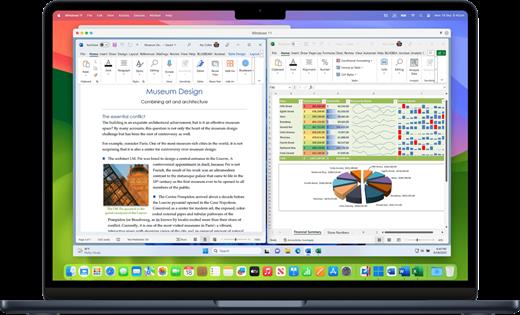
Parallels Desktop allows you to run Windows and Mac applications side by side. Choose your view to make Windows invisible while still using its applications, or keep the familiar Windows background and controls on your Mac.

Works with Boot Camp®


  • Reuse your existing Boot Camp installation. Converting a virtual machine from Boot Camp is now much easier and more intuitive than ever.
Not just for Windows

  • Run a wide array of operating systems including OS X, Windows 10, 8.1 & 7, Linux, and Google ChromeTM. You can run just about anything on your Mac!
One-click tuning

  • Select productivity, games, design, or development, and Parallels Desktop 11 for Mac will optimize your virtual machine settings and performance for you.
Robust Performance

  • Parallels Desktop Pro Edition gives your virtual machines more processing power. Up to 64 GB vRAM and 16 vCPUs per virtual machine lets you run even the most demanding applications with ease.
Business Class Software

  • Keep IT in control of end user licenses and Windows virtual machines with a Unified Volume License Key, centralized license management, and advanced security features available in Parallels Desktop Business Edition.
What’s New

Version 26.2.1:


  • Release notes were unavailable when this listing was updated.
Compatibility

macOS 12 or later


Release Name: Parallels Desktop 26.2.1-57371
Size: 238.7 MB
Links: HOMEPAGE – NFO – Torrent Search

Download: RAPiDGATOR

9 Comments
Jan 25

Bloom 1.5.24

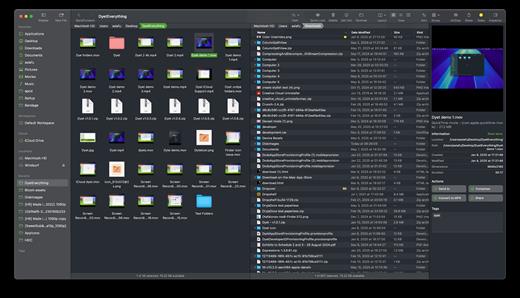
Bloom is a refined file management tool designed to enhance your search and navigation experience on macOS, offering a more intuitive and feature-rich alternative to Finder. With Bloom, you can instantly navigate to any location system-wide using the shortcut ⌘⇧⏎, making file access seamless and efficient .

Key Features


  • Enhanced Search Capabilities: Bloom allows you to search files by keyword within predefined locations, scanning tens of thousands of files in seconds for lightning-fast results. You can also search directly in any folder with ⌘F and refresh results with ⌘R .
  • Portal Mode: A compact window without sidebar or preview, Portal retains core functionalities and can be pinned on top of other windows or collapsed into the screen edge for convenience .
  • Archive Viewing: Browse contents of compressed files without extraction and preview text, images, or PDFs under 10MB by pressing Space or double-clicking .
  • Advanced File Management: Features like auto-resizing columns, advanced rename with regex support, workspace customization, iCloud Drive integration, and tag management elevate your file-browsing experience .
  • Media and Productivity Tools: Convert and optimize images, create various file types easily, paste images from the web, and organize files by kind or date. Additionally, Bloom records every operation for easy reversion and supports starting a terminal directly from a folder .
  • Disk Analysis and Task Management: Use Folder Scan to visualize disk usage through a treemap and manage file operations with a Task Scheduler to track progress .
What’s New

Version 1.5.24:


  • Release notes were unavailable when this listing was updated.
Compatibility

macOS 14.0 or later
Apple Silicon or Intel Core processor


Release Name: Bloom 1.5.24
Size: 18.3 MB
Links: HOMEPAGE – NFO – Torrent Search

Download: RAPiDGATOR

7 Comments