Please REGISTER or RENEW your account on RAPiDGATOR.net and support us by doing through all RAPiDGATOR working download links on main posts...
Jan 24

Native SQLite Manager 1.31.1

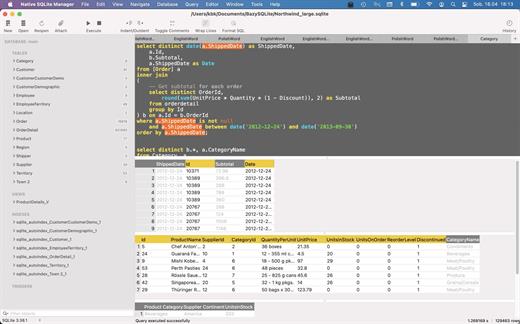
Native SQLite Manager is an minimalist SQLite database manager.

Application features


  • Support for many versions of SQLite
  • Support for SQLCipher
  • SQLite extensions support
  • Autocompletion and syntax highlighting
  • Customizable themes
  • SQL formatter
  • Export data to CSV, JSON, XML
  • Import data from CSV
  • Minimalist interface without unnecessary additions
What’s New

Version 1.31.1:


  • Release notes were unavailable when this listing was updated.
Compatibility

macOS 10.15 or later
Apple Silicon or Intel Core processor


Release Name: Native SQLite Manager 1.31.1
Size: 58.6 MB
Links: HOMEPAGE – NFO – Torrent Search

Download: RAPiDGATOR

6 Comments
Jan 24

AppKiller 4.2.3

AppKiller lets you close all your open apps, with the fuss of going through them one-by-one. Do you want to be able to do with a single click? Or – even better – with a single… keyboard shortcut? Look no further!

Features


  • Easy-to-use: App Killer sleeps unobtrusively in your status bar and waiting for… orders
  • Ultra-fast: Killing all your open application will take no more than… milliseconds
  • Cmd+Shift+K: And that’s all it takes to instantaneously kill all your open apps–really!
What’s New

Version 4.2.3:


  • Release notes were unavailable when this listing was updated.
Compatibility

macOS 10.7 or later, 64-bit processor


Release Name: AppKiller 4.2.3
Size: 6.5 MB
Links: HOMEPAGE – NFO – Torrent Search

Download: RAPiDGATOR

6 Comments
Jan 24

Iconize 1.6.3

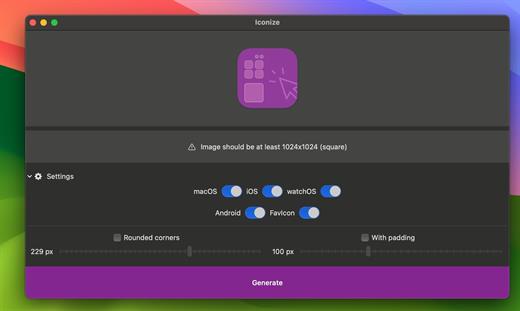
All your app icons. With one click. Customizeable icons? Mac? iOS? Android? Perhaps, a “favicon” for your website? Iconize has got you covered.

Easy-to-use

Just drag’n’drop your icon image and Iconize will take care of the rest. You may use any image format your Mac recognizes!

Configurable

Your icon is not yet “ready” and decided you want to add rounded corners and/or padding to conform to the guidelines? Awesome!

Fast

All the speed of the Mac at your fingertips. The whole process will be complete before you even begin to notice!

What’s New

Version 1.6.3:


  • Release notes were unavailable when this listing was updated.
Compatibility

macOS 11.0 or later.
Apple Silicon or Intel Core processor


Release Name: Iconize 1.6.3
Size: 4.8 MB
Links: HOMEPAGE – NFO – Torrent Search

Download: RAPiDGATOR

5 Comments
Jan 24

Markdown+ 4.3.2

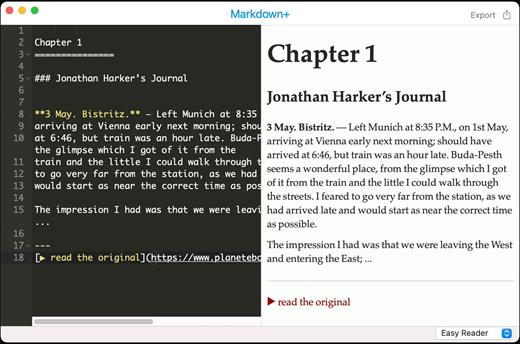
Markdown+ was designed for simplicity of use, allowing you to create beautiful Web documents without having to write a lot of code.

Features


  • Works in macOS High Sierra
  • Ultra-intuitive, easy-to-use interface
  • Live Preview (Preview as-you-type)
  • 12 different styles from which to choose
  • Export option, to save your document directly as HTML
  • Full-blown Markdown editing, with advanced capabilities
What’s New

Version 4.3.2:


  • Release notes were unavailable when this listing was updated.
Compatibility

macOS 10.13 or later


Release Name: Markdown+ 4.3.2
Size: 6.8 MB
Links: HOMEPAGE – NFO – Torrent Search

Download: RAPiDGATOR

6 Comments
Jan 24

Meta 2.3.2

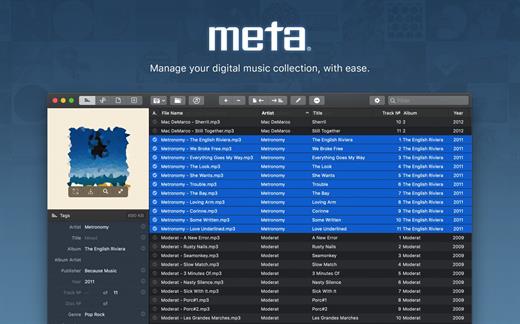
Meta helps you manage your ever-growing digital music collection. Use it to easily edit information such as a song’s artist, title, album, album cover, etc. It supports editing of most audio formats such as MP3, MP4, M4A, FLAC, Ogg, OGA, SPX, WAV, AIFF, and a variety of metadata formats including ID3v1, ID3v2.3, ID3v2.4, iTunes MP4, Vorbis comments, and APE tags.

Features


  • A polished, intuitive user interface that adopts OS X’s standards
  • Write metadata to multiple files at once (Batch Tag Editing)
  • Remove all metadata from files (Strip Tags)
  • Change typecase (capitalise, upper/lowercase, titlecase), strip underscores
  • Rename files based on their metadata or instead, convert filenames to metadata
  • Find and Replace characters, words, or strings in metadata, with support for regular expressions (patterns)
  • Add selected tracks to iTunes, or refresh their metadata using a simple keyboard shortcut
  • Automatically generate track numbers
  • Benefit from built in file management operations (Move, Delete, Reveal in Finder)
  • Interface is compatible with Retina displays
Album covers can easily be set or exported via drag-and-drop, and it is possible to configure Meta so that it scales, crops, and compresses images each time a new image is set, so as to keep your audio files’ size to a minimum.

What’s New

Version 2.3.2:


  • Release notes were unavailable when this listing was updated.
Compatibility

macOS 10.11 or later.


Release Name: Meta 2.3.2
Size: 10.6 MB
Links: HOMEPAGE – NFO – Torrent Search

Download: RAPiDGATOR

5 Comments
Jan 24

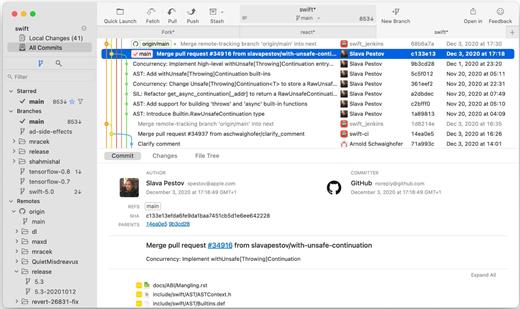
Fork 2.62

More features: Browse the repository file tree at any commit | Intuitive merge conflict resolving | See your stashes right in the commit list

What’s New

Version 2.62:


  • Release notes were unavailable when this listing was updated.
Compatibility

macOS 10.13 or later


Release Name: Fork 2.62
Size: 44.4 MB
Links: HOMEPAGE – NFO – Torrent Search

Download: RAPiDGATOR

10 Comments
Jan 24

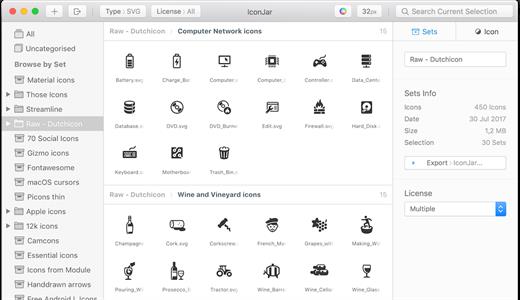
IconJar 2.11.4

IconJar leaves digging through your design asset folders behind and lets you access your icons without the hassle. Your icon organizer is always just one click away. It features incredible support for SVGs and icon fonts that you can drag-and-drop into any app. It’s no rocket science, we pinky promise.

Features:


  • Designed for the Mac IconJar is designed to fit in with the apps you already use on your Mac.
  • Quicklook Preview your icons in a usecase driven take on the Quicklook feature.
  • Quickdrag Drag &drop icons in any color, size and file type you want with Quickdrag.
  • Widely adopted file type Import tens of thousands of icon sets with just one click with our .iconjar files.
  • Custom SVG renderer IconJar is powered by a custom built SVG renderer that has been open-source since day one.
  • Import from Sketch Use our Sketch plugin to easily import icons into IconJar.
What’s New

Version 2.11.4:


  • Release notes were unavailable when this listing was updated.
Compatibility

macOS 10.14.0 or later


Release Name: IconJar 2.11.4
Size: 10.4 MB
Links: HOMEPAGE – NFO – Torrent Search

Download: RAPiDGATOR

10 Comments
Jan 24

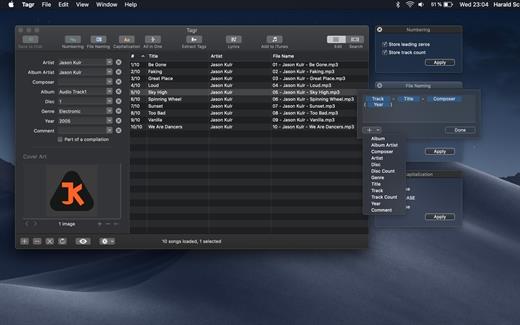
Tagr 5.11.1

Tagr is an application that helps you organize your music collection.

With Tagr you can easily edit information such as a song’s artist, title, or album cover. Tagr also allows you to control the way your files are named, numbered, and capitalized. There is no more need for having other tools dictate that for you!

Features:


  • Edit meta data of individual MP3, M4A/M4B, FLAC, and AIFF files, or
  • Edit a list of files in bulk
  • Supported tags: track number/count, title, artist, album artist, composer, album, disc number/count, genre, year, comment, compilation, lyrics
  • MP3 ID3 versions: v1, v2.3, and v2.4
  • Embed cover art into your songs
  • Apply uppercase, lowercase, and title case capitalization schemes
  • Automatically generate track numbers
  • Choose from predefined file naming schemes or define your own
  • Extract tags from the file name or title using predefined or custom patterns
  • Search discogs.com for album information and copy it to your songs
  • Listen to songs through QuickLook
  • Customize Tagr to your needs
What’s New

Version 5.11.1:


  • Release notes were unavailable when this listing was updated.
Compatibility

macOS 10.10 or later


Release Name: Tagr 5.11.1
Size: 10.4 MB
Links: HOMEPAGE – NFO – Torrent Search

Download: RAPiDGATOR

9 Comments
Jan 24

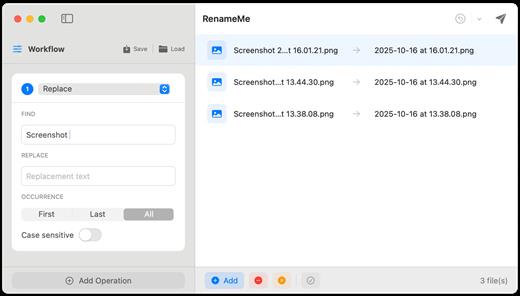
RenameMe 2.1

RenameMe is a lightweight Mac app designed to help you rename dozens or even hundreds of files at once—quickly, safely, and without the usual hassle. It lets you stack multiple renaming actions into a single workflow, preview results live before applying changes, and save your favorite workflows for repeat use—making bulk renaming feel effortless.

Key features


  • Stackable operations: Chain multiple actions (e.g., replace text → change case → add prefix/suffix → trim characters) in one run.
  • Live preview: View original and new names side-by-side and spot conflicts or issues before committing.
  • Saved workflows: Save custom workflows for repetitive tasks, and use built-in presets such as Photo Organization and Web‑Safe Names.
  • Smart sequencing: Add sequential numbering with custom padding and positioning—ideal for organizing photos, documents, and collections.
  • Powerful operations (incl. regex): Perform text replacement, case changes, trimming, regex-based patterns, and more across multiple operation types.
  • Full undo support: Instantly undo renames and restore previous states using the app’s undo history.
What’s New

Version 2.1:


  • Release notes were unavailable when this listing was updated.
Compatibility

macOS 13.0 or later


Release Name: RenameMe 2.1
Size: 5.2 MB
Links: HOMEPAGE – NFO – Torrent Search

Download: RAPiDGATOR

6 Comments
Jan 23

PPTube Pro 10.12.0

Unlimited Download 1080p/4K Videos from 10,000+ Video/Music Streaming Websites. PPTube Video Downloader allows you to download HD videos with ease, ranging from 720p, 1080p, 2K, 4K and 8K.
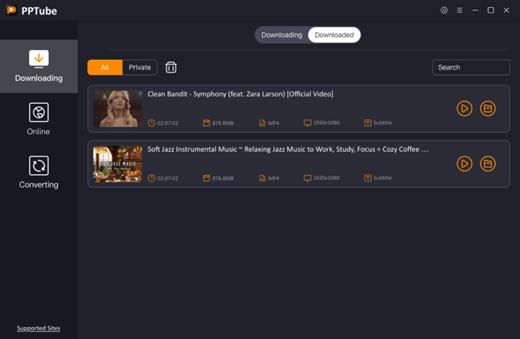
Save Videos in Bulk
You can save multiple videos in one go. Just copy multiple video URLs from various sites, and paste them to PPTube Downloader, then you can download multiple videos in few seconds.

Support 10,000+ Sites
You can download HD videos from Instagram, TikTok, Facebook, Apple Music, Vimeo, adult sites, etc. and convert them into MP4, MP3, MOV, AAC, and other 20+ output formats.

Keep the Video Private
PPTube provides a private video mode so you can save your downloaded videos in a password-protected folder. Your videos are hidden with a private lock to keep safe from any prying eyes or miswatching by children.

More Features
You’ll find more powerful features in the PPTube Toolbox to enjoy more convenience for your video download
Video Websites YouTube, Facebook, Instagram, Dailymotion (Playlist), Vimeo, Twitch, TikTok (without watermark), Einthusan, NicoNico, Ok.ru, VK, Twitter, Fox, Lynda, YouKu, Yahoo Video, Bilibili, Coub, Vlive.TV, Liveleak, Reddit, Mgoon, Sportstadio, Media collections and various adults sites.
Audio Websites Spotify, SoundCloud, MixCloud, FreeSound, Bandcamp, VEVO, Last.fm, Hungama, 8tracks and more music-share sites

SUPPORTED INPUT FORMATS
Video MP4, M4V, 3GP, MPEG, DAT, AVI, ASF, WMV, VOB, MKV, FLV, 3GS, 3G2, F4V, WEBM, TS, RMVB, MOV
Audio MP3, AAC, AC3, FLAC, M4A, WAV, WMA, AMR, MKA, MP2, AIF, AU, AIFF, CAF, OGG, RAM, RA, M4B, M4R, APE, OPUS, WEBM

What’s New

Version 10.12.0:


  • Release notes were unavailable when this listing was updated.
Compatibility

macOS 10.10 or later


Release Name: PPTube Pro 10.12.0
Size: 118.8 MB
Links: HOMEPAGE – NFO – Torrent Search

Download: RAPiDGATOR

4 Comments