Please REGISTER or RENEW your account on RAPiDGATOR.net and support us by doing through all RAPiDGATOR working download links on main posts...
Jan 22

Swift Publisher 5.7.5

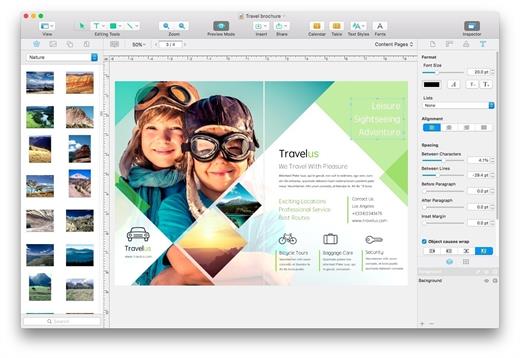
Swift Publisher takes the headache out of desktop publishing: print colorful flyers, newsletters, brochures, letterheads, and more.
Features


  • An easy-to-learn alternative. Ditch those massive, daunting design apps aimed at professional publishers — with its accommodating interface, Desktop Publisher is a digital drawing board for the rest of us.
  • Text toolkit. Customize text styles, link text boxes, and create visually pleasing wrap-around effects. With Swift Publisher, manipulating your content is never a chore.
  • Inspiring options. Spark your creativity. Swift Publisher includes images, designs, and unique masks, giving you the templates and resources you need to jump-start the design process.
  • Perfect personalization. When your publication has to be personalized, turn to Swift Publisher. Whether you need to tint, tile, group, rotate, or adjust the opacity of an object, you’ll find the tool you need.
What’s New

Version 5.7.5:


  • Release notes were unavailable when this listing was updated.
Compatibility

macOS 10.12.0 or later
Apple Silicon or Intel Core processor


Release Name: Swift Publisher 5.7.5
Size: 458.4 MB
Links: HOMEPAGE – NFO – Torrent Search

Download: RAPiDGATOR

8 Comments
Jan 22

DockDoor 1.31.1

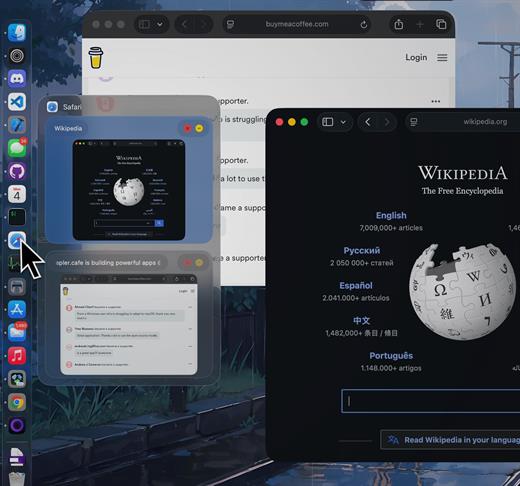
DockDoor enhances window management and interaction — it allows users to seamlessly switch between application windows, providing features such as window previews, easy navigation, and improved multitasking capabilities.

What’s New

Version 1.31.1:


  • Release notes were unavailable when this listing was updated.
Compatibility

macOS 13 or later


Release Name: DockDoor 1.31.1
Size: 20.7 MB
Links: HOMEPAGE – NFO – Torrent Search

Download: RAPiDGATOR
7 Comments
Jan 22

RAR Unarchiver – Unzip RAR ZIP 3.4.2

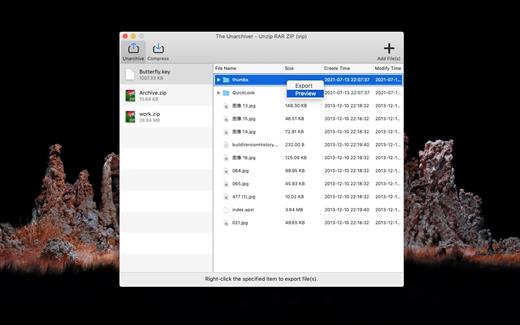
The Unarchiver – Unzip RAR ZIP is a very easy-to-use app that allows you to decompress dozens of archive formats. such as: Rar, Zip, 7z, Tar, Xz, Iso, Lha, bz2, Lzh, cab, cpio, jar, exe, pkg, dms, tbz, swf, Gzip, Bzip2… and it can also compress and encrypt any files to make private files more secure.

Key Features


  • Support preview and decompress dozens of archive formats.
  • archive files quickly.
  • Encrypt the archive file.
What’s New

Version 3.4.2:


  • Release notes were unavailable when this listing was updated.
Compatibility

macOS 10.12 or later


Release Name: RAR Unarchiver – Unzip RAR ZIP 3.4.2
Size: 9.8 MB
Links: HOMEPAGE – NFO – Torrent Search

Download: RAPiDGATOR

6 Comments
Jan 22

Bloom 1.5.23

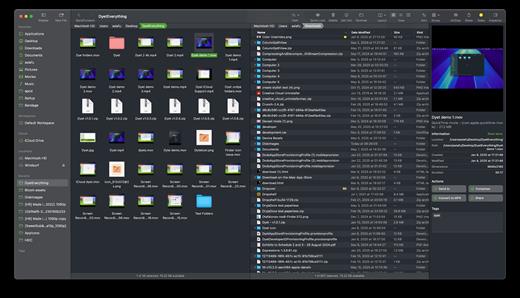
Bloom is a refined file management tool designed to enhance your search and navigation experience on macOS, offering a more intuitive and feature-rich alternative to Finder. With Bloom, you can instantly navigate to any location system-wide using the shortcut ⌘⇧⏎, making file access seamless and efficient .

Key Features


  • Enhanced Search Capabilities: Bloom allows you to search files by keyword within predefined locations, scanning tens of thousands of files in seconds for lightning-fast results. You can also search directly in any folder with ⌘F and refresh results with ⌘R .
  • Portal Mode: A compact window without sidebar or preview, Portal retains core functionalities and can be pinned on top of other windows or collapsed into the screen edge for convenience .
  • Archive Viewing: Browse contents of compressed files without extraction and preview text, images, or PDFs under 10MB by pressing Space or double-clicking .
  • Advanced File Management: Features like auto-resizing columns, advanced rename with regex support, workspace customization, iCloud Drive integration, and tag management elevate your file-browsing experience .
  • Media and Productivity Tools: Convert and optimize images, create various file types easily, paste images from the web, and organize files by kind or date. Additionally, Bloom records every operation for easy reversion and supports starting a terminal directly from a folder .
  • Disk Analysis and Task Management: Use Folder Scan to visualize disk usage through a treemap and manage file operations with a Task Scheduler to track progress .
What’s New

Version 1.5.23:


  • Release notes were unavailable when this listing was updated.
Compatibility

macOS 14.0 or later
Apple Silicon or Intel Core processor


Release Name: Bloom 1.5.23
Size: 18.2 MB
Links: HOMEPAGE – NFO – Torrent Search

Download: RAPiDGATOR
5 Comments
Jan 22

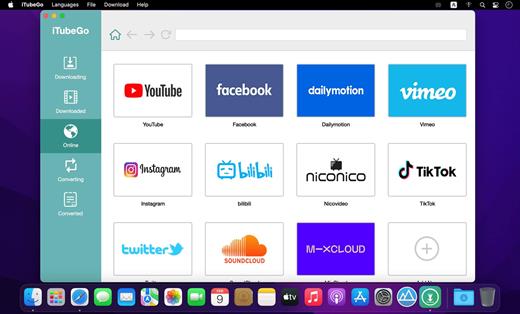
iTubeGo YouTube Downloader 10.12.0

Download full HD/4K/8K videos from YouTube and more than 10,000+ websites at high speed

As a powerful HD video downloader for YouTube, Dailymotion, Facebook, and other streaming sites, iTubeGo HD Video Downloader provides 10X faster speed to download high-quality videos in bulk. Moreover, it provides a built-in browser to download video and music easily and cut Youtube to MP4, MP3, and more.

iTubeGo YouTube Downloader allows you to download videos from YouTube, Facebook, Instagram, Dailymotion, Vimeo, TikTok, Pornhub, Xvideos, SpankBang, xHamster and other websites. iTubeGo provides various SD and UHD video quality options, including 480p, 720, 1080p, 2K, 4K, 8K etc.
Besides downloading videos, iTubeGo can also extract audio from video and save it as high quality 320kbps MP3 format. It supports mp3 download from most music sites.

What’s New

Version 10.12.0:


  • Release notes were unavailable when this listing was updated.
Compatibility

macOS 10.10 or later
Apple Silicon or Intel Core processor


Release Name: iTubeGo YouTube Downloader 10.12.0
Size: 115 MB
Links: HOMEPAGE – NFO – Torrent Search

Download: RAPiDGATOR

8 Comments
Jan 22

FineTune 1.0.0

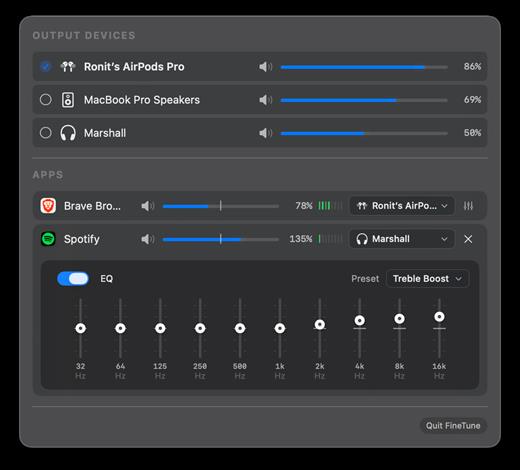
Per-application audio control for macOS. Set individual volume levels, route apps to different output devices, and apply EQ from your menu bar.

Features


  • Per-app volume control with mute
  • Per-device volume control with mute
  • Route apps to different output devices
  • 10-band equalizer with 20 presets across 5 categories
  • Real-time VU meters
  • Volume boost up to 200%
  • Quick device switching
  • Click app icon to bring app to front
  • Settings persist across restarts
FineTune uses macOS Core Audio process taps to intercept and modify audio streams before they reach your output devices. This allows precise control without affecting the source applications.

What’s New

Version 1.0.0:


  • Release notes were unavailable when this listing was updated.
Compatibility

macOS 14.0 (Sonoma) or later


Release Name: FineTune 1.0.0
Size: 3 MB
Links: HOMEPAGE – NFO – Torrent Search

Download: RAPiDGATOR
6 Comments
Jan 22

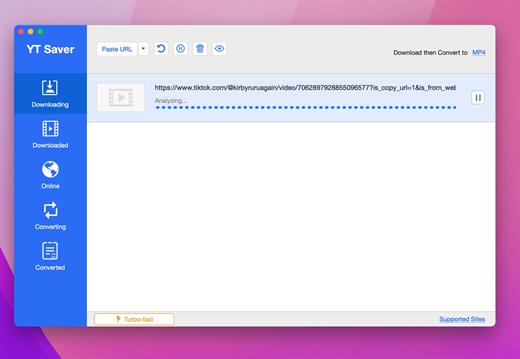
YT Saver Video Downloader & Converter 10.12.0

Download Video, Audio, Playlists from 10,000+ websites, Convert Video to MP4, MOV, AAC, WAV and more.

Download Videos with Built-in Browser

YT Saver comes with a built-in web browser, which allows you to browse video/audio sharing sites easily and download videos direclty within the websites.

Unlimited Download with YT Saver Downloader


With YT Saver PRO you can download unlimited videos and playlists from streaming sites and access your videos when offline, and you can download multiple videos in bulk at the same time.

Download Videos at Ultra Fast Speed


YT Saver Video Downloader gives you 10X faster video download speed, which allows you to downlaod videos at ultra fast speed and get the fastest conversion speed.

Protect Your Downloaded Videos Privacy

To protect your video and audio from prying eyes and miswatching by children, YT Saver provides a Private Mode to keep your downloaded contents in a password-protected folder.

Supported Input Formats
Video

MP4, M4V, 3GP, MPEG, DAT, AVI, ASF, WMV, VOB, MKV, FLV, 3GS, 3G2, F4V, WEBM, TS, RMVB, MOVAudio: AAC, AC3, FLAC, M4A, WAV, WMA, AMR, MKA, MP2, AIF, AU, AIFF, CAF, OGG, RAM, RA, M4B, M4R, APE, OPUS, WEBM

Supported Output Formats
Video

MP4, MOV, WMV, AVI, FLV, MKV, HEVC MP4, HEVC MKV, 3GP, iPhone/iPod, iPad, Android Phone, Android TabletsAudio: M4A, MKA, WAV, AAC, FLAC, AIFF, OGG

What’s New

Version 10.12.0:


  • Release notes were unavailable when this listing was updated.
Compatibility

macOS 10.10 or later


Release Name: YT Saver Video Downloader & Converter 10.12.0
Size: 114.7 MB
Links: HOMEPAGE – NFO – Torrent Search

Download: RAPiDGATOR

8 Comments
Jan 22

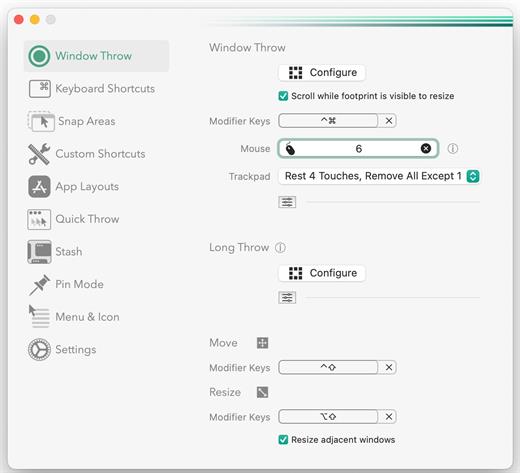
Rectangle Pro 3.67

Additional Efficiency and Speed
• Each window action can be configured with a quick, simple cursor movement and modifier key combination
• Just press and release modifier keys while you move your cursor over the window you want to snap

What’s New

Version 3.67:


  • Release notes were unavailable when this listing was updated.
Compatibility

macOS 10.12 or later
Apple Silicon or Intel Core processor


Release Name: Rectangle Pro 3.67
Size: 9.5 MB
Links: HOMEPAGE – NFO – Torrent Search

Download: RAPiDGATOR
8 Comments
Jan 22

PhotoMill X 3.2.0

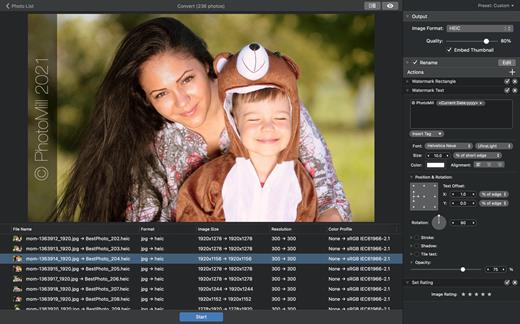
PhotoMill helps you convert a bulk of images into the most popular image formats, give your files meaningful names, watermark with text and image, adjust photos (brightness/saturation/exposure/grayscale/etc.), fit geometry (scale/crop/trim/etc.), remove private metadata, add your own copyrights etc. Also, PhotoMill is a great batch metadata editor, renamer and photo browser.

Features


  • Convert

    • Conversion to: BMP, GIF, JPEG, JPEG 2000, PDF, PNG, TIFF
  • Color models: RGB, Gray, CMYK Color depth: 8/16/32 bits; with or without alpha channel
  • Metadata editor

    • Correct EXIF/IPTC metadata tags in your photos: place GPS coordinates, remove private information from your photos, correct or set capture dates, add your own copyright, keywords or rating.
  • Photo browser

    • The app has a bunch of features for comfortable browsing and multi-criteria search of photos in the Browser. The Browser has 3 panels: Image Info – displays detailed information about a selected photo; Groups – splits photos into groups/subgroups based on a chosen criteria, for instance, by capture dates; Search – gives you an opportunity to search photos by different criteria.
  • Rename

    • You can give meaningful names to converted photos constructing file names in the “pro” way – using text and tags: index, capture date, original name, image width, “find & replace” etc. Also, you can rename photos without any conversion.
  • Resize

    • Fit image size with a bunch of geometry actions: scale, crop, add border, trim, trim color, rotate & flip, auto rotate (by EXIF orientation), change resolution.
  • Watermark

    • Text – you can use photo metadata information – tags: capture date, keywords, camera maker etc., as well as entered text. Font size can be either fixed or relative to an image width, height, long or short edge. Multiline text, stroke, shadow, rotation, tiling and other features.
    • Image – image size can be either fixed or relative to main image size. Image tiling is also available.
    • Rectangle – background for text; square or rounded. Fill and stroke color can be half-transparent.
  • Adjust colors

    • Available filters: auto contrast, auto white balance, gamma, contrast, exposure, sharpness, grayscale, sepia, colorize, temperature, HSL channels (Hue/Saturation/Lightness), HSV channels (Hue/Saturation/Value,Brightness), RGB channels, curves.
  • Working with transparency: alpha mask, color to alpha, alpha to color. Color matching: assign profile, convert to profile, proof with profile.
What’s New

Version 3.2.0:


  • Release notes were unavailable when this listing was updated.
Compatibility

macOS 10.12.2 or later
Apple Silicon or Intel Core processor


Release Name: PhotoMill X 3.2.0
Size: 82.4 MB
Links: HOMEPAGE – NFO – Torrent Search

Download: RAPiDGATOR

7 Comments
Jan 22

File Cabinet Pro 8.8.0

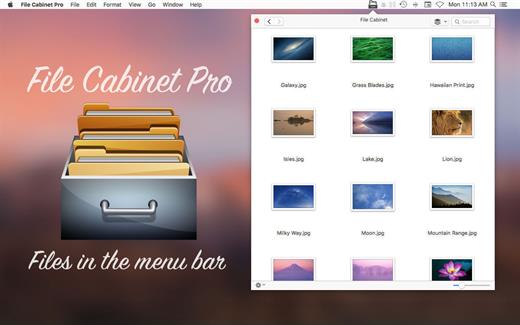
File Cabinet Pro is the file manager for the macOS menu bar. Quickly navigate to files without cluttering your desktop. Open, move, rename, compress, tag, trash, copy and paste files, all from the menu bar. You can open many file types natively in File Cabinet Pro or open files by launching other applications. It’s easy to click into directories in icon view, drill through directories in list view, or navigate the file tree in column view.

File Cabinet Pro is also a document-based application that ships with a built-in text editor, image viewer, pdf viewer, and media player. Some of the file types File Cabinet Pro can open for editing/viewing include::


  • Text documents: Plain text files (.txt), Rich Text Format (.rtf), Rich Text Format Directory (.rtfd), Portable Document Format (.pdf), Markdown (.md)
  • Image documents: Portable Network Graphics (.png), Joint Photographic Experts Group (.jpeg), Tagged Image File Format (.tiff, .tif), Bitmap image file (.bmp), Photoshop File Format (.psd) Import only., Scalable Vector Graphics (.svg) Import only
  • Video and audio documents: MOV, MP4, M4A, M4V, AVI, MP3, WAV, CAF, AIF
Features

  • Create subdirectories
  • Click into subdirectories and open documents
  • Set a “Primary” and “Secondary” directory button for the bottom bar to get an innovative drag and drop experience; drag files to these buttons in the bottom bar to bring up a popover window
  • Tag files easily. Select files in File Cabinet Pro, right click, and then simply add or remove file tags from the control in the context menu
  • Show selected files in Finder
  • Rename files
  • Copy and paste files
  • Compress files
  • Trash files
  • View items as icons, in a list, in columns, or in cover flow view
  • Launch the application at login. You can have File Cabinet Pro automatically launch when you login to your Mac (optional feature, disabled by default)
  • Create a list of all your favorite directories in the sidebar
  • Create and edit txt, rtf, and rtfd files using the built in lightweight text editor
  • Rotate images, crop images, and apply filters to images using the built in lightweight image editor
  • Watch video and play audio files using the built in media player
  • View PDF files using the built in PDF viewer
  • Revert document versions for supported editable document types
  • Set a Global Hotkey for showing and closing the File Cabinet Pro window (optional feature, disabled by default)
  • Preview selected files in Quicklook by pressing the spacebar
  • Share files in apps that support Sharing extensions like Mail and Messages
  • Create text documents from Finder using File Cabinet Pro’s Document Creator Finder extension (Note: To use this feature, you have to enable the Finder extension in System Preferences under the “Extensions” tab)
What’s New

Version 8.8.0:


  • Release notes were unavailable when this listing was updated.
Compatibility

macOS 10.13 or later


Release Name: File Cabinet Pro 8.8.0
Size: 20 MB
Links: HOMEPAGE – NFO – Torrent Search

Download: RAPiDGATOR
7 Comments