Please REGISTER or RENEW your account on RAPiDGATOR.net and support us by doing through all RAPiDGATOR working download links on main posts...
Jan 22

Cookie 8.3.5

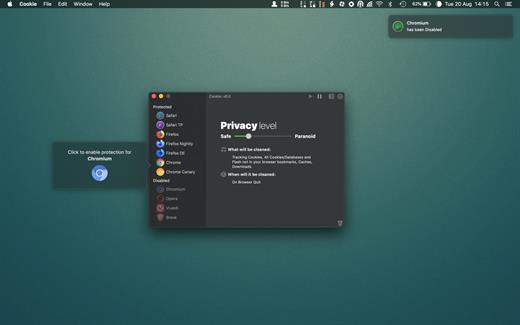
Cookie prevents third parties from hijacking your browsing experience. The sites you visit store “cookies” in your browser without your knowledge or consent. Some are helpful, but others are frustrating and invasive. Cookie can help.
Features:


  • Consolidate all your browser privacy settings
  • Simplified View that takes care of all the technical details for you
  • Advanced View which puts you in total control of all your privacy settings
  • Combined cookie view displaying all cookie/flash/localStorage data in one easy to manage view
  • Cookie’s can be favorited on a per domain, or per cookie basis. You decide
  • Individual Browser settings. It is possible to configure different automatic removal options for each browser. In the case of Chrome/Chromium/Canary/Brave you can even configure settings per user!
  • A number of removal schedules are possible: When quitting Cookie, when a Browser is Quit, on computer login, On computer waking from sleep, on a customizable time schedule, or entirely manually
  • Hotkey support, so you can remove all unwanted data quickly and easily
  • Customizable tracking cookie definitions
  • Whitelist individual tracking cookies
  • Clean, modern and Intuitive User Interface
  • Helpful setup window
  • Browser extension protection
  • Full Screen support
  • iCloud support
  • Dark/Regular theme
What’s New

Version 8.3.5:


  • Release notes were unavailable when this listing was updated.
Compatibility

macOS 10.14 or later, 64-bit processor


Release Name: Cookie 8.3.5
Size: 9.7 MB
Links: HOMEPAGE – NFO – Torrent Search

Download: RAPiDGATOR

7 Comments
Jan 22

Infuse Pro 8.3.6

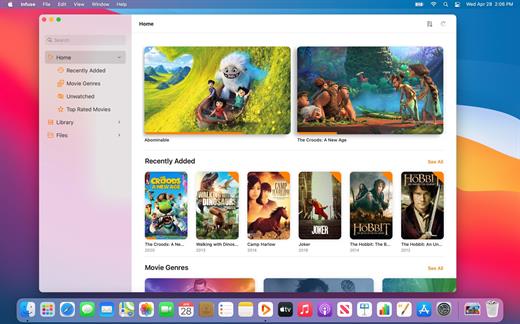
Ignite your video content with Infuse – the beautiful way to watch almost any video format on your iPhone, iPad, Apple TV, and Mac. No need to convert files! Infuse is optimized for macOS 12, with powerful streaming options, Trakt sync, and unmatched AirPlay & subtitle support. Gorgeous interface. Precise controls. And silky-smooth playback.

Play more video types

A powerful video player that plays just about anything, including the standard MP4, M4V and MOV – plus MKV, AVI, WMV, MTS, ISO, VIDEO_TS, FLV, OGM, OGV, ASF, 3GP, DVR-MS, WebM, and WTV. Includes fully certified Dolby® Digital Plus (AC3/E-AC3), DTS® and DTS-HD® audio.

Stream from other devices

Browse and play videos stored on your Mac, PC, NAS, Wi-Fi hard drive, apps like Plex, Emby, and Jellyfin, or from cloud services like Dropbox, Google Drive, OneDrive, Box, pCloud, Yandex.Disk, and Mega.nz – no syncing required!

Trakt 2-way sync

Connect with Trakt to sync watched history, submit ratings and post comments.

Optimized subtitles powered by opensubtitles

Bring your own subtitles, or download them on the fly (for free) in virtually any language.

The basics:

  • Silky-smooth video player (plays full 4K w/ HDR & Dolby Vision)
  • Stream from a Mac, PC, NAS or Wi-Fi enabled hard drive
  • Connect with Plex, Emby, Jellyfin, Kodi (XBMC), WMC and other media servers
  • Beautiful layout with quick access to video info
  • Artwork and metadata added automatically
  • Picture-in-Picture
  • Spatial audio
Supported formats:

  • Video: 3GP, AVI, ASF, BDMV, DIVX, DVDMEDIA, DVR-MS, FLV, ISO, M4V, MKV, MOV, MP4, M2TS, MTS, OGM, OGV, TP, TS, VIDEO_TS, WEBM, WMV, WTV
  • Audio: AAC, AC3/E-AC3, DOLBY TRUEHD, DTS, DTS-HD MA, FLAC, MP3, OGG, PCM, WMA
  • Subtitles: DVB, DVDSUB, MICRODVD, MPL2, PGS, SMI, SSA/ASS, SRT, SUB, TIMED TEXT, TMP, TXT, VOBSUB, VTT, XSUB
Player features:

  • Multiple audio tracks
  • Chapters
  • Gesture controls
  • 8 video zoom options
  • Continuous playback
  • Deinterlacing
Extras:

  • Library organization
  • Folders
  • One-click subtitle downloads from OpenSubtitles
  • Scrobble plays to Trakt
  • Download videos from networked devices
  • Drag and drop uploads via web browser
  • Get extra onboard storage by adding USB drives
Get more with infuse pro!

  • Play even more video formats
  • Enjoy Dolby® Digital Plus (AC3/E-AC3), DTS® and DTS-HD® mobile surround sound
  • Stream a wide variety of video types over AirPlay and Google Cast
  • Access videos stored in cloud services like Dropbox, Google Drive, Box, OneDrive, pCloud, Yandex.Disk, and Mega.nz
  • Sync libraries, settings, watched history, and playback progress between devices
Note:

What’s New

Version 8.3.6:


  • Release notes were unavailable when this listing was updated.
Compatibility

macOS 11.0 or later.
Apple Silicon or Intel Core processor


Release Name: Infuse Pro 8.3.6
Size: 96.9 MB
Links: HOMEPAGE – NFO – Torrent Search

Download: RAPiDGATOR
6 Comments
Jan 21

Dropshare 6.9.1

Dropshare is a menu bar application for drag & drop upload files, screenshots and even directories to your own server, Amazon S3, Backblaze B2 Cloud Files, Rackspace Cloud Files, Microsoft Azure Blob Storage, Google Drive or Dropbox. Additionally, Dropshare offers a file sharing provider called Dropshare Cloud, which is perfectly suitable to start uploading in just minutes. Sharing files with friends, customers, colleagues or anyone else has never been so easy an professional! Dropshare supports Multiple Connections: You can set up different upload destinations at the same time and switch between them using user-defined keyboard shortcuts, or by holding ⌘ while dragging & dropping a file No matter if files, folders, text or screenshots – Dropshare uploads every file and data to your selected destination – also from clipboard or other applications like Safari. Share Extension included Set up your own keyboard shortcuts for fullscreen or selection-based screenshots that’ll be uploaded automatically with Dropshare. Set up a custom keyboard shortcut for taking a screenshot and annotating it afterwards with Dropshare itself, or an app you already like: Preview.app, Skitch.app, Napkin.app or Annotate.app Take & upload Screen Recordings directly with Dropshare, both fullscreen and selection-based recordings are available, as well as GIF conversion Choose from a number of free designs or craft an individual design on your own using HTML, CSS and JavaScript, including upload previews Synchronize your upload history across all your devices, supports both iOS and macOS. Your upload history will automatically be synchronized across all your Apple devices with iCloud Dropshare supports URL shorteners as well, e.g. dsh.re or Rebrandly, or configure your very own URL shortener service like bit.ly or YOURLS.

Technical requirements:


  • A working SSH user account is required on the server. A password or SSH key pair is also required. To have the uploaded file displayed in a web browser, a web server needs to be installed and configured on the server
  • Dropshare supports services like OpenStack Swift. Check User Guide for more information
  • A regular Google account is required in order to use Google Drive
  • A regular Dropbox account is required in order to use Dropbox
  • Microsoft Azure Blob Storage, Backblaze B2 Cloud Files, Amazon Simple Storage Service (S3), Rackspace Cloud Files. A subscription may be neccessary in order to use Dropshare with one of these providers. Please check out the terms of use and payment information at the website of the selected provider
What’s New

Version 6.9:


  • Release notes were unavailable when this listing was updated.
Compatibility

macOS 12.3 or newer
Apple Silicon or Intel Core processor


Release Name: Dropshare 6.9.1
Size: 46 MB
Links: HOMEPAGE – NFO – Torrent Search

Download: RAPiDGATOR

5 Comments
Jan 21

PhotoMarks 4.1

PhotoMarks is a full-featured solution for visually watermarking your copyrighted images in batch mode. Why use a complicated, general-use photo editor when you can use a lightweight, specially built tool to perform the same task?

Here is what PhotoMarks can do for you:


  • Batch photo processing with support for multi-core processors;
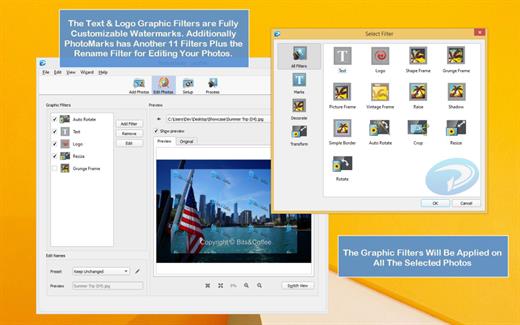
  • Completely customizable text watermarks with pixel-perfect positioning, tile mode, rotation, multiline text, custom and textured fonts, shadow, stroke, bounding box, and more;
  • Completely customizable logo watermarks with pixel-perfect positioning, tile mode, rotation, scaling, stroke, shadow, and more;
  • Smart-resize filter that makes the difference between landscape and portrait photos, for automatically reducing image size in pixels;
  • Auto-rotate filter for automatically rotating photos to the right orientation, or just use a predefined rotation;
  • Graphically decorate photos with beautifully designed grunge, vintage, picture, and shape frames, add a shadow effect or a simple border;
  • Completely customizable rename filter with keywords and search-and-replace in filenames;
  • Upload directly to FTP or send via email;
  • Upload your watermarked photos directly to Flickr;
  • Easy-to-use interface with previews for every step of the process;
  • Support for 50 image formats, including RAW formats from DSLR digital cameras;
  • Save settings as profiles and easily reuse them.
What’s New

Version 4.1:


  • Release notes were unavailable when this listing was updated.
Compatibility

macOS 12 or later


Release Name: PhotoMarks 4.1
Size: 100.9 MB
Links: HOMEPAGE – NFO – Torrent Search

Download: RAPiDGATOR
5 Comments
Jan 21

Path Finder 2211 fix

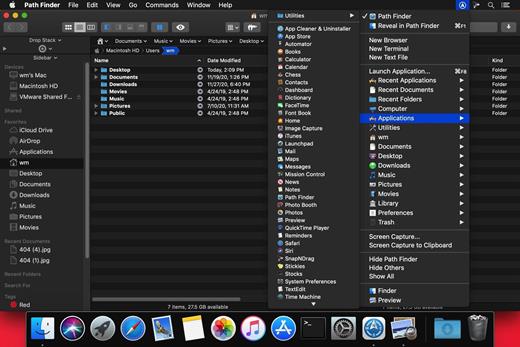
Path Finder makes you a master of file management. Take full control over your file system. Save your time: compare and synchronize folders, view hidden files, use Dual Pane and full keyboard navigation to browse your file system. Work how you want: extreme customization allows you to access most tools in many different ways to suit your workflow. Work seamlessly with other platforms: don’t leave any hidden .DS_Store files on non-Mac volumes, delete files securely and completely with the powerful delete feature from any volume type, search any network volume.

Features


  • View and manipulate hidden files
  • Dual Pane View
  • Full keyboard navigation
  • Folder comparison and synchronization
  • Folder merging
  • Batch renaming
  • Powerful file filtering
  • One-click dual-pane copy
  • Bookmarks and Tab Presets
  • ACL editor
  • File tagging
  • Editable Path Navigator
  • Powerful low-level search
  • Smart sorting
  • Advanced selection
  • Integrated terminal
  • Integrated text and image editors
What’s New

Version 2211:


  • Release notes were unavailable when this listing was updated.
Compatibility

macOS 10.12 or later
Apple Silicon or Intel Core processor


Release Name: Path Finder 2211 fix
Size: 25.4 MB
Links: HOMEPAGE – NFO – Torrent Search

Download: RAPiDGATOR

6 Comments
Jan 21

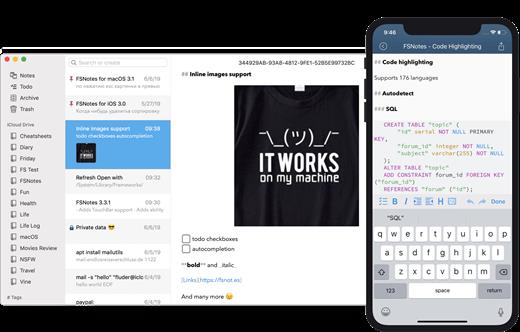
FSNotes 7.0.0

FSNotes is a plain-text note manager for macOS, and is modern reinvention of notational velocity (nvALT) on steroids. Our application respects the following open formats: plain/text, Markdown, and RTF, and stores data in the file system. You can view, edit, and copy data in your favourite external editor, and see live results in FSNotes.

Features:


  • ICloud synchronization
  • Keyboard centric
  • Global shortcuts (clipboard save / search field)
  • Markdown and RTF markup (files stored on disk as plain/text and rich text)
  • Markdown preview mode
  • Elastic two pane view (vertical and horizontal layout)
  • Blazing fast and lightweight
  • Open files in finder / works with external editors (changes seamless live sync with UI)
  • Pin/unpin important notes in top
  • Multi folder storage
  • Markdown live highlighting with over 170 languages in code blocks
What’s New

Version 7.0.0:


  • Release notes were unavailable when this listing was updated.
Compatibility

macOS 10.14 or later


Release Name: FSNotes 7.0.0
Size: 19.7 MB
Links: HOMEPAGE – NFO – Torrent Search

Download: RAPiDGATOR
4 Comments
Jan 21

Downie 4.11.9

A simple download manager that offers you the possibility to quickly save videos from different websites to your own disk drive.

If you are using a poor internet connection, trying to visualize videos streamlined online might not work properly since the content is loaded too slowly. Downie is a simple Mac app that can help you download those videos to your computer, and then watch them by using your default media player.

User friendly video downloader featuring support for drag and drop actions

Working with Downie is extremely straightforward: simply drop the video URL on top of the app’s main window or on the Dock icon. Downie adds the video to your downloads list, so all you have to do next is start the process by pressing the appropriate button. Of course, you can also remove items from the list.

By default, Downie downloads MP4 files and places them in your default Downloads folder, but you can easily change this via the Preferences window. The same area allows you to setup notifications, or post processing actions (convert to MP4 if necessary, or extract audio only).

Effortlessly download videos from a wide collection of hosting websites

Downie provides support for more than 400 different websites that host video content, among which there are the most popular choices, such as YouTube, Apple, LiveLeak, Vimeo, BBC, and so on. If a certain website is not included, within the app you can send a request email to the Downie developers.
Moreover, Downie also provides matching extensions for various popular web browsers, such as Firefox, Safari, Google Chrome or Chromium. The add-ons are not installed by default: open the Preferences window and install only the ones you plan to use.

Straightforward solution for downloading video content hosted online

Downie is a great tool for saving videos posted on various websites to your Mac for offline playback. The application is extremely useful especially if you have a slow internet connection.

What’s New

Downie 4.11.9:


  • Improved: macOS 26 compatibility and UI updates.
  • Improved: facebook.com, nbc.com, novinky.cz, radiko.jp, youtubte.com.
Compatibility

macOS 10.12 or later
Apple Silicon or Intel Core processor


Release Name: Downie 4.11.9
Size: 51.8 MB
Links: HOMEPAGE – NFO – Torrent Search

Download: RAPiDGATOR

4 Comments
Jan 21

Mosh-Pro 1.3.4

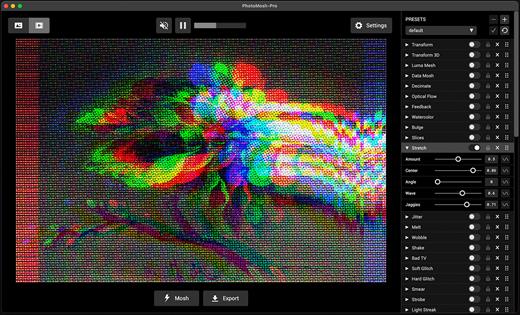
Mosh-Pro is a powerful desktop application designed to give you unlimited creative control over images, videos, and GIFs with real-time visual effects. Whether you’re creating digital art, motion loops, glitch visuals, music visuals, or high-resolution exports, Mosh-Pro provides an intuitive yet deep effects workflow that adapts to both beginners and advanced creators.

Endless Visual Possibilities

With 60+ real-time effects that can be stacked, reordered, and combined, Mosh-Pro delivers virtually infinite variations of visual experimentation. From classic glitch and VHS looks to advanced transformations and audio-reactive animations, the effect library empowers you to push your creativity further than ever before.

Professional-Grade Exports

Create finished visuals with high-resolution exports up to 4K and no time limits. Output your work in MP4, WEBM, GIF, PNG, or JPG formats — including transparent exports for GIF and WEBM — and tailor frame rate, file size, and duration to your project needs.

Dynamic Modulation & Audio Reactivity

Mosh-Pro lets you animate effects over time using modulators — including linear, sine, noise, random, and keyframed variations. Audio-reactive modulators allow effect parameters to respond to music or microphone input, making it ideal for music visuals, live shows, and performance visuals.

What’s New

Version 1.3.4:


  • Release notes were unavailable when this listing was updated.
Compatibility

macOS 12.0 or later


Release Name: Mosh-Pro 1.3.4
Size: 274.5 MB
Links: HOMEPAGE – NFO – Torrent Search

Download: RAPiDGATOR
4 Comments
Jan 21

Exhibeo 2.0.14

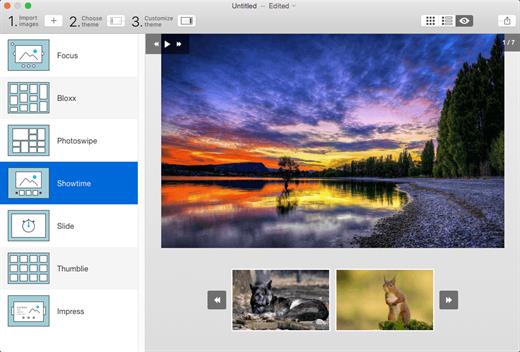
Exhibeo puts your images front and center, doing it with flair and style. Make your site stand out – and do it beautifully. With seven themes included, there’s a gallery for almost anything: displaying artwork, showcasing products, or keeping your group updated.

What’s New


  • We’ve added a brand new theme, Photoswipe, and updated our existing themes with new customization options, animations, and much more.
  • We reworked our interface to make Exhibeo even easier to use: it’s cleaner, clearer, and crisper.
  • Simpler output, passthrough images, better image editing, archives, metadata import, metadata view, image replacement, and so much more.
What’s New

Version 2.0.14:


  • Release notes were unavailable when this listing was updated.
Compatibility

macOS 10.10 or later


Release Name: Exhibeo 2.0.14
Size: 13.9 MB
Links: HOMEPAGE – NFO – Torrent Search

Download: RAPiDGATOR

6 Comments
Jan 21

Deckset 2.0.46

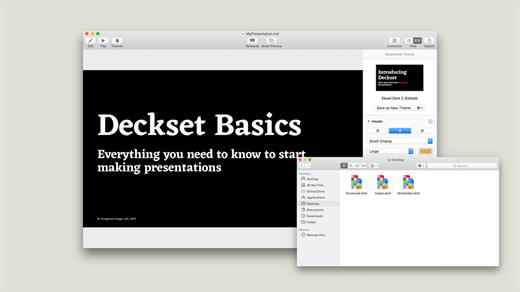
Deckset is a new, simple way to create presentations. Open your favorite text editor, write down your thoughts, and Deckset will turn them into beautiful presentations. Focus on your ideas, not on designing slides.

Deckset comes with ten amazing-looking themes that are designed to work for any audience, whether it’s a business meeting or a tech conference.

Features


  • 10 themes for every occasion, ranging from playful to serious
  • Automatic layout and advanced typographic features
  • Present code samples with syntax highlighting and “scale to fit”
  • Easily include images and videos
  • Stunning image filters
  • Speaker notes and rehearsal mode
  • Everything’s Markdown: edit your presentation using your favorite text editor
  • Floating preview window
  • Easily change aspect ratio to suit any projector
  • Export to PDF
  • Formula support as in-app purchase
What’s New

Version 2.0.46:


  • Release notes were unavailable when this listing was updated.
Compatibility

macOS 10.13 or later


Release Name: Deckset 2.0.46
Size: 117.1 MB
Links: HOMEPAGE – NFO – Torrent Search

Download: RAPiDGATOR
6 Comments