Please REGISTER or RENEW your account on RAPiDGATOR.net and support us by doing through all RAPiDGATOR working download links on main posts...
Dec 28

Splunk Enterprise 10.0.2

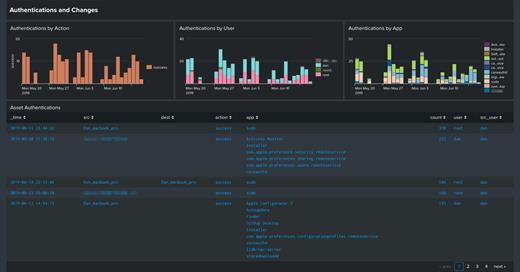
Splunk Enterprise makes it simple to collect, analyze and act upon the untapped value of the big data generated by your technology infrastructure, security systems and business applications—giving you the insights to drive operational performance and business results.
The Platform for Operational Intelligence

By monitoring and analyzing everything from customer clickstreams and transactions to security events and network activity, Splunk Enterprise helps you gain valuable Operational Intelligence from your machine-generated data. And with a full range of powerful search, visualization and pre-packaged content for use-cases, any user can quickly discover and share insights. Just point your raw data at Splunk Enterprise and start analyzing your world.

Collects and indexes log and machine data from any source

Powerful search, analysis and visualization capabilities empower users of all types
Apps provide solutions for security, IT ops, business analysis and more
Enables visibility across on premise, cloud and hybrid environments
Delivers the scale, security and availability to suit any organization
Available as a software or SaaS solution

What’s New

Version 10.0.2:


  • Release notes were unavailable when this listing was updated.
Compatibility

macOS 10.10 or later


Release Name: Splunk Enterprise 10.0.2
Size: 783.8 MB
Links: HOMEPAGE – NFO – Torrent Search

Download: RAPiDGATOR

13 Comments
Dec 28

Screenflick 3.3.2

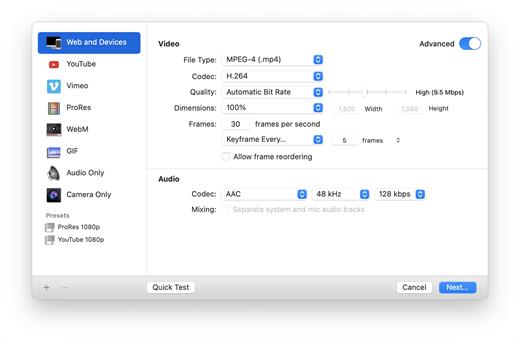
Screenflick features high-performance screen capturing for smooth, fluid motion up to 60 fps. Screenflick can record any portion of the screen, simultaneously recording audio from internal or external microphones and the system audio.
An excellent utility for software screencasters and software trainers, Screenflick offers the ability to display keyboard commands, and highlights mouse clicks to better communicate which actions are being performed during screen recording.

Unlike other solutions, Screenflick allows you to record a movie once and compress it as many times as you want at different resolutions, qualities, and with or without audio, offering you the maximum amount of flexibility when choosing which presentation options to offer to movie viewers.

What’s New

Version 3.3.2:


  • Release notes were unavailable when this listing was updated.
Compatibility

macOS 10.14 or later


Release Name: Screenflick 3.3.2
Size: 30.1 MB
Links: HOMEPAGE – NFO – Torrent Search

Download: RAPiDGATOR
9 Comments
Dec 28

Macxvideo AI 3.11.0

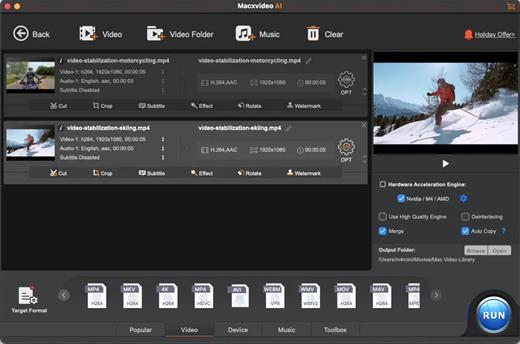
Macxvideo AI is an ultimate AI-powered video suite for Mac, combining next-gen video/image enhancement with advanced tools for conversion, compression, screen recording, and editing. With full GPU acceleration, it offers a smooth, efficient workflow for both casual creators and professionals.

AI Super Resolution technology significantly enhances video quality by intelligently upscaling footage up to 4X its original size, with support for resolutions as high as 4K. Its advanced AI models preserve fine details while eliminating noise and blur, resulting in clearer, sharper visuals for a truly immersive viewing experience.

Supporting 370+ inputs & 420+ outputs, Macxvideo AI converts MP4, HEVC, AV1, MOV, multi-track MKV, or AAC, making it playable on any device. It utilizes full GPU-acceleration to swiftly convert 4K/8K/3D videos in bulk, delivering 47X faster speed and keeping CPU ussage under 2%. You can adjust codec, resolution, VBR, etc.

From iPhone, GoPro, DJI, Cannon, and DVD/blu-ray rips, Macxvideo AI adeptly converts videos like 4K MOV, MP4 with ease. It downscales 4K/8k, transcodes legacy or modern codecs, and preps your footage for smooth playback across all devices and players.

What’s New

Version 3.11.0:


  • Release notes were unavailable when this listing was updated.
Compatibility

macOS 10.15 or later


Release Name: Macxvideo AI 3.11.0
Size: 247.7 MB
Links: HOMEPAGE – NFO – Torrent Search

Download: RAPiDGATOR

11 Comments
Dec 28

iMediaCut 8.5.22

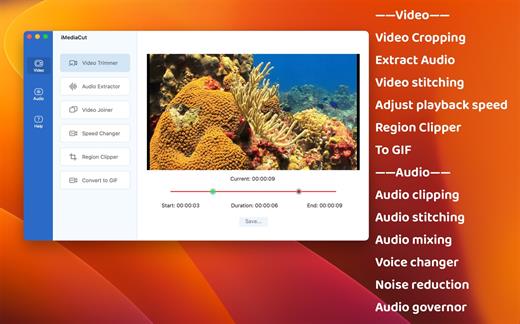
Audio & Video editing. Functions such as Voice Changer, Noise Reduction, Audio Governor, Speed Changer, Region Clipper, Convert video to GIF.

**** Video ****
1. Video Trimmer – Crop video.
2. Audio Extractor – Extract audio from video.
3. Video Joiner – Merge multiple videos into one.
4. Speed Changer – Speed up or slow down the video.
5. Region Clipper – Export a region of the video as a video.
6. Convert to GIF – Convert video to gif.

**** Audio ****
7. Audio Trimmer – Trim audio.
8. Audio Joiner – Merge multiple audios.
9. Audio Mixer – Mix multiple audios.
10. Voice Changer – Adjust audio tempo and pitch.
11. Noise Reduction – Audio noise reduction.
12. Audio Governor – Adjust audio playback speed.

What’s New

Version 8.5.22:


  • Release notes were unavailable when this listing was updated.
Compatibility

macOS 10.15 or later


Release Name: iMediaCut 8.5.22
Size: 15.6 MB
Links: HOMEPAGE – NFO – Torrent Search

Download: RAPiDGATOR
11 Comments
Dec 28

SiteSucker 6.1.1

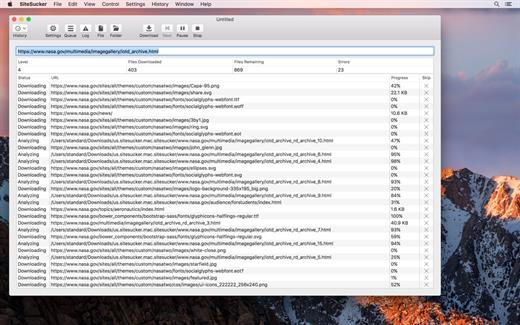
SiteSucker is an application that automatically downloads Web sites from the Internet. It does this by copying the site’s HTML documents, images, backgrounds, movies, and other files to your local hard drive. Just enter a URL and click a button and SiteSucker can download the entire site.

SiteSucker can be used to make local copies of your Web sites for easy maintenance. SiteSucker can download files unmodified, or it can “localize” the files it downloads, allowing you to browse a site off-line.

What’s New

Version 6.1.1:


  • Release notes were unavailable when this listing was updated.
Compatibility

macOS 11.0 or later


Release Name: SiteSucker 6.1.1
Size: 6.9 MB
Links: HOMEPAGE – NFO – Torrent Search

Download: RAPiDGATOR

6 Comments
Dec 25

Flyingbee PDF Converter 10.0.4

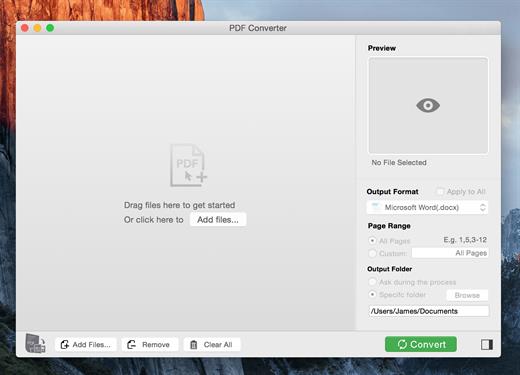
PDF Converter for Mac exports PDF files to Microsoft Office (Word, Excel, PowerPoint), Plain text, Rich Text Formats, CSV and other file formats.

Save yourself some time reentering data into word or spreadsheet, manual data entry is tedious, you may spend hundreds of hours, not to mention the risk of error caused by manual typing. With Flyingbee PDF Converter, you can extract data from PDF to Any Microsoft Office (Word, Excel, PowerPoint) with a high-level of accuracy automatically. Tabular data in PDF will be accessible and well formatted with original column structure in an Excel spreadsheet after conversion.

What’s New

Version 10.0.4:


  • Release notes were unavailable when this listing was updated.
Compatibility

macOS 10.13 or later
Apple Silicon or Intel Core processor


Release Name: Flyingbee PDF Converter 10.0.4
Size: 16.7 MB
Links: HOMEPAGE – NFO – Torrent Search

Download: RAPiDGATOR
11 Comments
Dec 25

CleanShot X 4.8.7

CleanShot is the ultimate screen recording app made for macOS. With its rich toolkit, CleanShot actually feels like 6 apps in one. You can use it to swiftly capture Mac’s screen without desktop icons, record and trim video, annotate, save screenshots to dedicated cloud, and more.

Features:

CleanShot Cloud

You can instantly save your screen captures to CleanShot Cloud, dedicated screenshots hosting integrated with the app. Right from the quick menu, upload your screenshot to the cloud, and get a link to it in a click.

Hide desktop icons

CleanShot hides desktop icons, so that you can capture your Mac’s screen on the spot, without wasting time on a cleanup. If you need a quick capture, toggle the icons and bring them back once you’re finished. You can even set a custom wallpaper like an image or plain color for your screenshots.

Record screen

CleanShots lets you choose between recording a video or a GIF, whether you capture a specific window, part of the screen, or fullscreen. Even set your custom dimensions before hitting the Record button. You can also disable desktop notifications for when you’re recording.

Quick Access Overlay

Right after taking a screenshot, you’ll see a small pop-up window appear on the screen. It’s the shortcut to viewing, annotating, or sharing whatever you’ve just captured. Essentially, Quick Access Overlay gives you an instant editing toolkit, plus saves you from searching and reopening screenshots.

Simple yet powerful

CleanShot teaches you to use simple actions while capturing the screen — yet provides tons of options to do it. You can grab the area, fullscreen, window, or even a scrolling window. Set a timer if you need a few seconds to capture the right moment. In your hands, it caters for your needs.

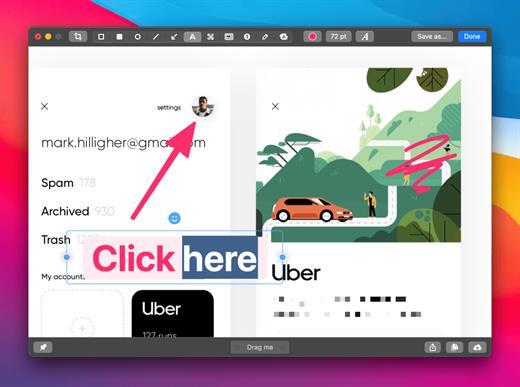
Annotate, highlight or blur

No screenshot is perfect. Using CleanShot’s built-in editor, you can highlight or hide specific parts of your screenshots as well as add annotations flexibly. Just click on the pencil icon in the Quick Access Overlay to edit screen captures in a flash.

What’s New

Version 4.8.7:


  • Fixed an issue that caused CleanShot to crash during screen recording
Compatibility

macOS 10.14.4 or later
Apple Silicon or Intel Core processor


Release Name: CleanShot X 4.8.7
Size: 47.1 MB
Links: HOMEPAGE – NFO – Torrent Search

Download: RAPiDGATOR

9 Comments
Dec 25

SketchUp Pro 2026 v26.1.188

SketchUp is an easy-to-learn 3D modeling program that enables you to explore the world in 3D. With just a few simple tools, you can create 3D models of houses, sheds, decks, home additions, woodworking projects – even space ships.

Programming, diagramming, design development, detailing, documentation, RFIs—wherever you need drawings, you need SketchUp Pro. A great mix of our classic desktop software, our shiny new SketchUp for Web modeler, and all sorts of things you’ve been asking for over the years — including the ability to publish, share, and store projects in the cloud with Trimble Connect.

Tools for your 3D modeling toolbox:

SketchUp Pro for Desktop

Fast, easy 3D modeling for anything you can imagine.

SketchUp for Web

Our powerful web modeler, with all the features you need to turn your designs into real things.

Unlimited cloud storage

Share, collaborate, and store your projects in the cloud. Gain flexibility and peace of mind.

2D design documentation

Create scaled drawing sets in 2D with LayOut.

VR model viewing

Wow your clients with a walkthrough of their project on Microsoft HoloLens, HTC Vive, or Oculus, on your phone or tablet.

Features that make your projects yours

Make your project look like only you can with custom Styles, Materials, and Outliner. And, make that work smooth and easy with Dynamic Components.

What’s New

Version 26.1.188:


  • Release notes were unavailable when this listing was updated.
Compatibility

macOS 10.13 or later


Release Name: SketchUp Pro 2026 v26.1.188
Size: 1.5 GB
Links: HOMEPAGE – NFO – Torrent Search

Download: RAPiDGATOR
13 Comments
Dec 25

RAW Power 3.5.4

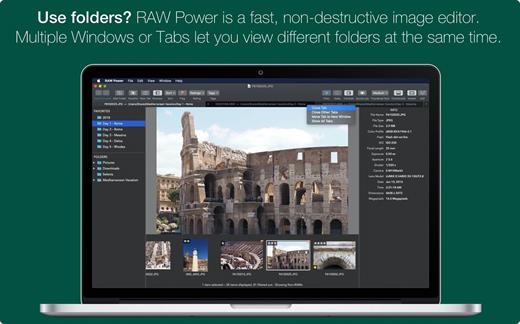
RAW Power unlocks the power of Apple’s RAW engine with simple, easy-to-use controls. Use it as an editing extension inside Apple Photos, or as a standalone, non-destructive RAW photo editor. If you loved Aperture’s advanced RAW processing adjustments, you’ll feel right at home with RAW Power. Using adjustments like Boost, previously only available in Aperture, you can improve your images in ways that simply can’t be done in any other application. RAW Power takes advantage of RAW processing improvements in macOS Sierra.

Features


  • Extends Apple’s Photos app for macOS Sierra
  • Control over Apple’s Boost filter to achieve unparalleled highlight recovery
  • Real-time control of all of Apple’s RAW engine, including noise reduction, and black point, RAW sharpen, and more
  • Hot-pixels overlay with clipping indicators
  • Advanced curves adjustment with auto curves, linear, and Lab modes
  • Recovery slider for targeted control over highlights
  • White-balance sampling
  • Luminance-oriented sharpen
  • All sliders are real-time and GPU accelerated
  • Highlights, shadows, vibrancy, and more
  • Support for hundreds of RAW cameras
  • Images are displayed the same way as in Photos, Aperture, or iPhoto
  • Also works with JPEGs, TIFFs, and other image formats
What’s New

Version 3.5.4:


  • Release notes were unavailable when this listing was updated.
Compatibility

macOS 10.14 or later, 64-bit processor


Release Name: RAW Power 3.5.4
Size: 63.4 MB
Links: HOMEPAGE – NFO – Torrent Search

Download: RAPiDGATOR

7 Comments
Dec 25

Farrago 2.1.4

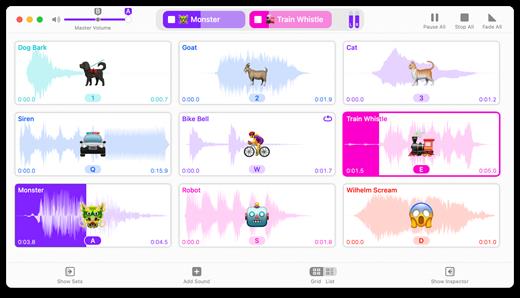
Farrago provides the best way to quickly play sound bites, audio effects, and music clips on your Mac. Podcasters can use Farrago to include musical accompaniment and sound effects during recording sessions, while theater techs can run the audio for live shows. Whether it’s providing quick access to a large library of sounds or running through a defined list of audio, Farrago is ready to assist!


  • Powerful Tile Interface: Farrago’s tile grid lets you lay out your audio exactly how you want it. Put your sounds at your fingertips and work the way you want.
  • Customize With the Inspector: Use the inspector to tailor each sound’s settings to your needs. Set the tile name and color, tweak in/out points, alter fade settings and more.
  • Organize With Sets: Create distinct groups of audio based on mood, show, or any other critera you like. Using sets makes managing audio a breeze.
  • Sound Sets: Farrago’s default sound set is useful, but you can create your own sets based on show, mood, or anything else you like.
  • A Thoughtful Interface: Farrago’s tile-based layout provides an easily understood way to play your audio via the keyboard or mouse.
  • Global Access via Hotkeys: With Farrago’s user-definable Global Hotkey, you can pull the app forward, then use the in-app shortcuts to instantly trigger your desired audio.
What’s New

Version 2.1.4:


  • Release notes were unavailable when this listing was updated.
Compatibility

macOS 10.14 or later


Release Name: Farrago 2.1.4
Size: 46.3 MB
Links: HOMEPAGE – NFO – Torrent Search

Download: RAPiDGATOR
10 Comments