Please REGISTER or RENEW your account on RAPiDGATOR.net and support us by doing through all RAPiDGATOR working download links on main posts...
Dec 28

Bloom 1.5.18

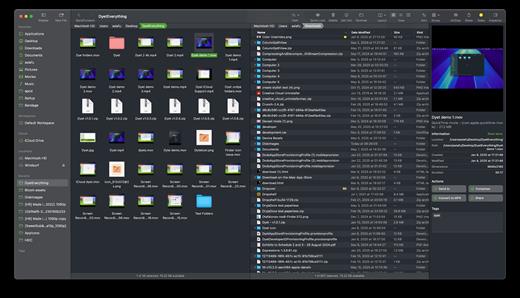
Bloom is a refined file management tool designed to enhance your search and navigation experience on macOS, offering a more intuitive and feature-rich alternative to Finder. With Bloom, you can instantly navigate to any location system-wide using the shortcut ⌘⇧⏎, making file access seamless and efficient .
Key Features


  • Enhanced Search Capabilities: Bloom allows you to search files by keyword within predefined locations, scanning tens of thousands of files in seconds for lightning-fast results. You can also search directly in any folder with ⌘F and refresh results with ⌘R .
  • Portal Mode: A compact window without sidebar or preview, Portal retains core functionalities and can be pinned on top of other windows or collapsed into the screen edge for convenience .
  • Archive Viewing: Browse contents of compressed files without extraction and preview text, images, or PDFs under 10MB by pressing Space or double-clicking .
  • Advanced File Management: Features like auto-resizing columns, advanced rename with regex support, workspace customization, iCloud Drive integration, and tag management elevate your file-browsing experience .
  • Media and Productivity Tools: Convert and optimize images, create various file types easily, paste images from the web, and organize files by kind or date. Additionally, Bloom records every operation for easy reversion and supports starting a terminal directly from a folder .
  • Disk Analysis and Task Management: Use Folder Scan to visualize disk usage through a treemap and manage file operations with a Task Scheduler to track progress .
What’s New

Version 1.5.18:


  • Release notes were unavailable when this listing was updated.
Compatibility

macOS 14.0 or later
Apple Silicon or Intel Core processor


Release Name: Bloom 1.5.18
Size: 18 MB
Links: HOMEPAGE – NFO – Torrent Search

Download: RAPiDGATOR

11 Comments
Dec 28

Fig Player – play mp4 mkv mp3 1.3.28

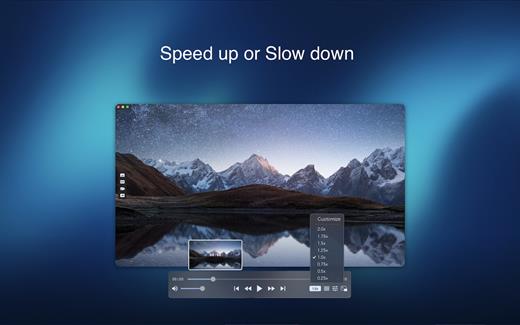
Fig Player, is a media player for Mac that supports a wide variety of media files and allows you to listen to music, watch videos and movies.

If you have an extensive media library but don’t have a good media player for Mac, here’s a good solution. Fig Player. It’s free to use and comes with a friendly interface. On the screen, you’ll be able to see all of the buttons that give you control over your experience, such as the play and stop button, playback options, volume slider, preview section, screenshot, and recording.

More Advanced Features


  • Smooth, seamless video play, support 4K.
  • Auto deinterlacing.
  • H/W-acceleration.
  • A-B loop.
  • Frame by Frame playback.
  • PIP mode.
  • Support various Subtitle formats(Text subtitles(SRT), Vobsub
    and ASS/SSA, etc.).
  • Choose which one when you have multiple sound output devices.
  • Create the scene poster with snapshots.
  • Playlist with upper-level folder name.
  • Support multiple windows and play multiple videos at the same time.
  • Support Wireless display to DLNA, Chromecast, Roku devices.
  • OCR Text Recognition(macOS 12+)
Supported Formats

Videos: mkv, rmvb, rm, avi, mov, wmv, flv, f4v, f4p, f4a, f4b, swf, mpg, mpeg, mpeg1, mpeg2, m1v, m2v, mpv, mp4, mpeg4, m4v, 3gp, 3gpp, 3g2, 3gp2, m2p, ps, ts, m2ts, mts, mt2s, ogm, ogv, divx, dv, asf, wtv, webm, etc.

Audios: flac, ape, m2a, mp1, mp2, mpa, mp3, mpg3, m4a, m4b, wma, wav, wv, xm, aiff, aif, ac3, a52, aac, opus, ogg, oga, mid, midi, mka, etc.

Subtitles: ASS, SSA, SRT, IDX&SUB

What’s New

Version 1.3.28:


  • Release notes were unavailable when this listing was updated.
Compatibility

macOS 10.13 or later


Release Name: Fig Player – play mp4 mkv mp3 1.3.28
Size: 74.9 MB
Links: HOMEPAGE – NFO – Torrent Search

Download: RAPiDGATOR
10 Comments
Dec 28

Screen Recorder by Omi 1.3.23

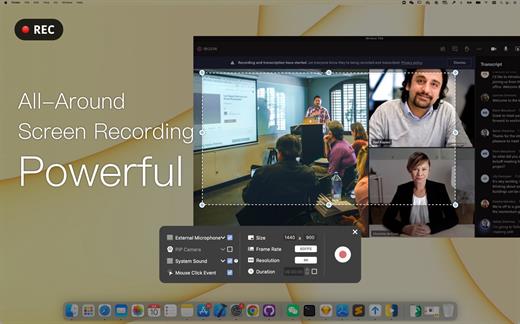
Screen Recorder for Mac is a powerful tool that allows you to quickly and easily capture your computer screen in high-quality video format. With just one click, you can record the full screen, a designated area, or footage from your camera. Your recordings will be saved in MP4 format, making it easy to share with others.

Key Features


  • Full Screen Recording
  • Area Recording
  • Camera Recording
  • Window Recording
  • Voice Recording
  • Camera Picture-in-Picture
  • Camera Virtual Background (for macOS 12.0 and above)
  • System Sound Recording (with separate sound driver plugin download and installation required)
  • Mouse Click Event Recording
  • Customizable Recording Screen Size
  • Selectable Frame Rate
  • Adjustable Recording Resolution
  • Specified Recording Duration
  • Built-In Video Editor
  • Customizable Shortcut Keys
What’s New

Version 1.3.23:


  • Release notes were unavailable when this listing was updated.
Compatibility

macOS 10.13 or later


Release Name: Screen Recorder by Omi 1.3.23
Size: 22.1 MB
Links: HOMEPAGE – NFO – Torrent Search

Download: RAPiDGATOR

11 Comments
Dec 28

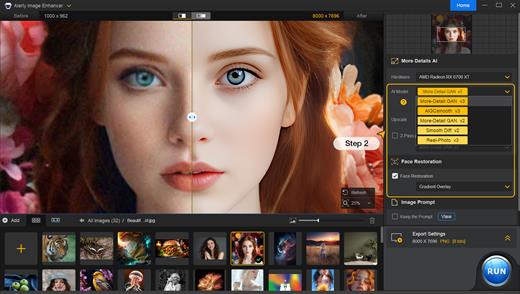
Aiarty Image Enhancer 3.7

Supported Input & Output Formats
Supported Input Formats
.jpg, .jpeg .jp2, .j2k, .jpf, .jpm, .jpg2, .j2c, .jpc, .jpx, .mj2, .png, .tif, .tiff, .webp, .bmp, .avif, and RAW formats (.dng, .cr3, .cr2, .crw, .nef, .nrw, .arq, .arw, .sr2, .srf, .raf, .rw2, .orf, .ori, .pef, .ptx, .3fr, .fff, .iiq, .cap, .eip, .rwl, .srw, .erf, .mos, .mef, .mrw, .mdc, .dcr, .kdc, .dcs, .drf, .k25, .bay, .pxn, .r3d, and .rwz)

Supported Output Formats
.jpg, .png (8-bit, 16-bit)

Supported Output DPIs

What’s New

Version 3.7:


  • Release notes were unavailable when this listing was updated.
Compatibility

macOS 10.15 or later


Release Name: Aiarty Image Enhancer 3.7
Size: 93.4 MB
Links: HOMEPAGE – NFO – Torrent Search

Download: RAPiDGATOR
10 Comments
Dec 28

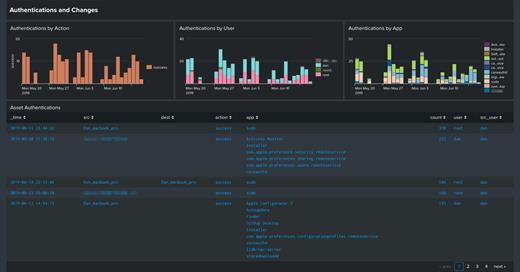
Splunk Enterprise 10.0.2

Splunk Enterprise makes it simple to collect, analyze and act upon the untapped value of the big data generated by your technology infrastructure, security systems and business applications—giving you the insights to drive operational performance and business results.

The Platform for Operational Intelligence

By monitoring and analyzing everything from customer clickstreams and transactions to security events and network activity, Splunk Enterprise helps you gain valuable Operational Intelligence from your machine-generated data. And with a full range of powerful search, visualization and pre-packaged content for use-cases, any user can quickly discover and share insights. Just point your raw data at Splunk Enterprise and start analyzing your world.

Collects and indexes log and machine data from any source

Powerful search, analysis and visualization capabilities empower users of all types
Apps provide solutions for security, IT ops, business analysis and more
Enables visibility across on premise, cloud and hybrid environments
Delivers the scale, security and availability to suit any organization
Available as a software or SaaS solution

What’s New

Version 10.0.2:


  • Release notes were unavailable when this listing was updated.
Compatibility

macOS 10.10 or later


Release Name: Splunk Enterprise 10.0.2
Size: 783.8 MB
Links: HOMEPAGE – NFO – Torrent Search

Download: RAPiDGATOR

13 Comments
Dec 28

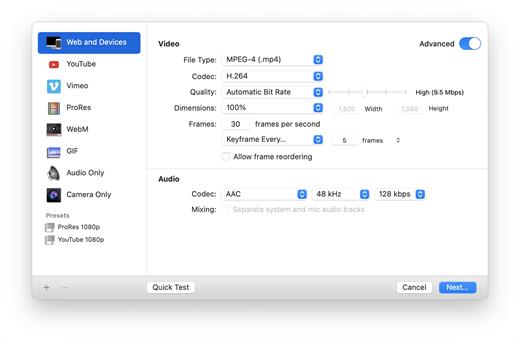
Screenflick 3.3.2

Screenflick features high-performance screen capturing for smooth, fluid motion up to 60 fps. Screenflick can record any portion of the screen, simultaneously recording audio from internal or external microphones and the system audio.
An excellent utility for software screencasters and software trainers, Screenflick offers the ability to display keyboard commands, and highlights mouse clicks to better communicate which actions are being performed during screen recording.

Unlike other solutions, Screenflick allows you to record a movie once and compress it as many times as you want at different resolutions, qualities, and with or without audio, offering you the maximum amount of flexibility when choosing which presentation options to offer to movie viewers.

What’s New

Version 3.3.2:


  • Release notes were unavailable when this listing was updated.
Compatibility

macOS 10.14 or later


Release Name: Screenflick 3.3.2
Size: 30.1 MB
Links: HOMEPAGE – NFO – Torrent Search

Download: RAPiDGATOR
9 Comments
Dec 28

Macxvideo AI 3.11.0

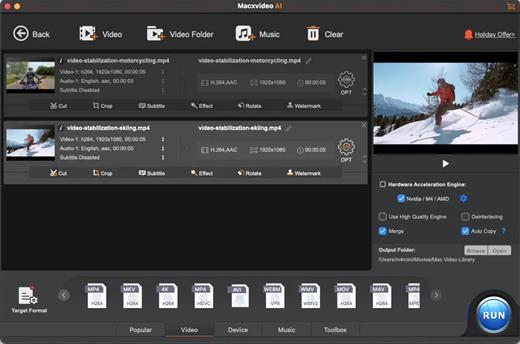
Macxvideo AI is an ultimate AI-powered video suite for Mac, combining next-gen video/image enhancement with advanced tools for conversion, compression, screen recording, and editing. With full GPU acceleration, it offers a smooth, efficient workflow for both casual creators and professionals.

AI Super Resolution technology significantly enhances video quality by intelligently upscaling footage up to 4X its original size, with support for resolutions as high as 4K. Its advanced AI models preserve fine details while eliminating noise and blur, resulting in clearer, sharper visuals for a truly immersive viewing experience.

Supporting 370+ inputs & 420+ outputs, Macxvideo AI converts MP4, HEVC, AV1, MOV, multi-track MKV, or AAC, making it playable on any device. It utilizes full GPU-acceleration to swiftly convert 4K/8K/3D videos in bulk, delivering 47X faster speed and keeping CPU ussage under 2%. You can adjust codec, resolution, VBR, etc.

From iPhone, GoPro, DJI, Cannon, and DVD/blu-ray rips, Macxvideo AI adeptly converts videos like 4K MOV, MP4 with ease. It downscales 4K/8k, transcodes legacy or modern codecs, and preps your footage for smooth playback across all devices and players.

What’s New

Version 3.11.0:


  • Release notes were unavailable when this listing was updated.
Compatibility

macOS 10.15 or later


Release Name: Macxvideo AI 3.11.0
Size: 247.7 MB
Links: HOMEPAGE – NFO – Torrent Search

Download: RAPiDGATOR

11 Comments
Dec 28

iMediaCut 8.5.22

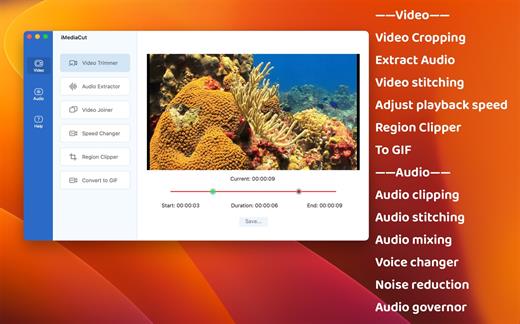
Audio & Video editing. Functions such as Voice Changer, Noise Reduction, Audio Governor, Speed Changer, Region Clipper, Convert video to GIF.

**** Video ****
1. Video Trimmer – Crop video.
2. Audio Extractor – Extract audio from video.
3. Video Joiner – Merge multiple videos into one.
4. Speed Changer – Speed up or slow down the video.
5. Region Clipper – Export a region of the video as a video.
6. Convert to GIF – Convert video to gif.

**** Audio ****
7. Audio Trimmer – Trim audio.
8. Audio Joiner – Merge multiple audios.
9. Audio Mixer – Mix multiple audios.
10. Voice Changer – Adjust audio tempo and pitch.
11. Noise Reduction – Audio noise reduction.
12. Audio Governor – Adjust audio playback speed.

What’s New

Version 8.5.22:


  • Release notes were unavailable when this listing was updated.
Compatibility

macOS 10.15 or later


Release Name: iMediaCut 8.5.22
Size: 15.6 MB
Links: HOMEPAGE – NFO – Torrent Search

Download: RAPiDGATOR
11 Comments
Dec 28

SiteSucker 6.1.1

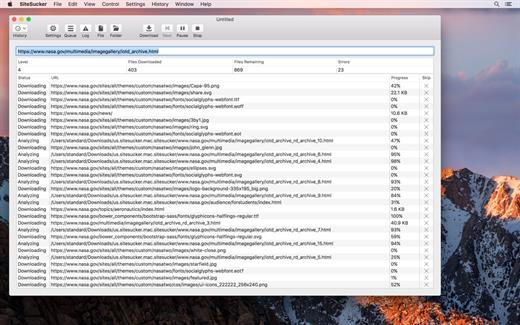
SiteSucker is an application that automatically downloads Web sites from the Internet. It does this by copying the site’s HTML documents, images, backgrounds, movies, and other files to your local hard drive. Just enter a URL and click a button and SiteSucker can download the entire site.

SiteSucker can be used to make local copies of your Web sites for easy maintenance. SiteSucker can download files unmodified, or it can “localize” the files it downloads, allowing you to browse a site off-line.

What’s New

Version 6.1.1:


  • Release notes were unavailable when this listing was updated.
Compatibility

macOS 11.0 or later


Release Name: SiteSucker 6.1.1
Size: 6.9 MB
Links: HOMEPAGE – NFO – Torrent Search

Download: RAPiDGATOR

6 Comments
Dec 25

Flyingbee PDF Converter 10.0.4

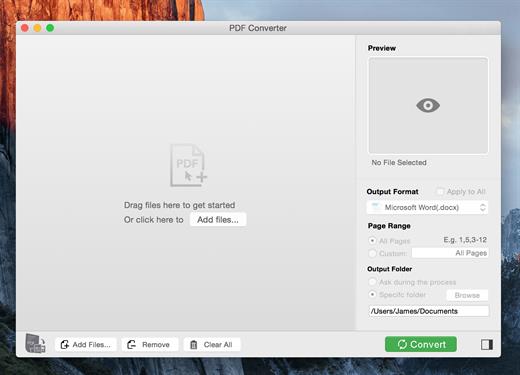
PDF Converter for Mac exports PDF files to Microsoft Office (Word, Excel, PowerPoint), Plain text, Rich Text Formats, CSV and other file formats.

Save yourself some time reentering data into word or spreadsheet, manual data entry is tedious, you may spend hundreds of hours, not to mention the risk of error caused by manual typing. With Flyingbee PDF Converter, you can extract data from PDF to Any Microsoft Office (Word, Excel, PowerPoint) with a high-level of accuracy automatically. Tabular data in PDF will be accessible and well formatted with original column structure in an Excel spreadsheet after conversion.

What’s New

Version 10.0.4:


  • Release notes were unavailable when this listing was updated.
Compatibility

macOS 10.13 or later
Apple Silicon or Intel Core processor


Release Name: Flyingbee PDF Converter 10.0.4
Size: 16.7 MB
Links: HOMEPAGE – NFO – Torrent Search

Download: RAPiDGATOR
11 Comments