Please REGISTER or RENEW your account on RAPiDGATOR.net and support us by doing through all RAPiDGATOR working download links on main posts...
Dec 25

Topaz Photo 1.1.1

AI-powered photo editing tool that improves photos pixel by pixel.
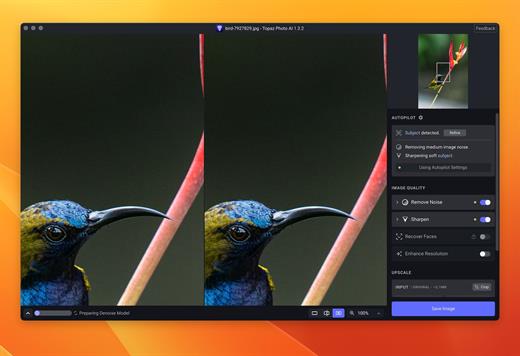
What is Topaz Photo AI? It is a new-generation photo editing tool that uses AI technology to perfect and denoise pictures pixel by pixel. Topaz Photo AI simplifies the editing process for photographers and designers. Its groundbreaking suite offers multiple tools to satisfy both amateurs and confident pros.

Topaz Photo AI allows editors to denoise, sharpen, upscale, preserve text, recover faces, remove objects, correct lighting, and balance color. Professional photo editors will be amazed at how much power Topaz Photo AI gives, and beginners will appreciate how easy and intuitive this tool is.

Topaz Photo AI helps you Sharpen, remove noise, and increase the resolution of your photos with tomorrow’s technology.

Maximize the potential of your photos.

Magically enhance image quality and resolution based on a deep understanding of the contents of your photo.

Enhance Quality

Maximize the visual quality of your images with best-in-the-world noise and blur reduction. Particularly useful in difficult settings with fast-moving subjects, low light, or atypical environments.

Crisp, clear, and noise-free.

It’s a magical feeling to see noise evaporate while sharp detail remains. Topaz Photo AI understands the contents of your image and accurately determines the difference between image detail and noise.

Tack-sharp subjects.

Unlike traditional sharpening, Topaz Photo AI’s Sharpen module naturally reverses root causes of blurriness (camera shake, motion blur, missed focus) to create more natural results. In the absence of blur, sharpness remains – crisp, clear detail that’s free of edge haloes or other artifacts.

Increase Resolution

Join hundreds of thousands of photographers and designers who use Topaz technology to generate real image detail for better printing, cropping, restoration, and more.

Magically add real detail.

Topaz Photo AI “remembers” real detail from millions of similar images, then fills in missing pixels based on that understanding. (It’s like how you can picture a friend’s face without being physically in front of them.) Add real image resolution to your photos for tighter crops or better prints.

Recover faces naturally.

Introduced in 2023, the breakthrough Face Recovery AI offers remarkable detail enhancement for low-resolution or blurry faces.

Intelligently improve lighting.

It’s a magical feeling to see noise evaporate while sharp detail remains. Topaz Photo AI understands the contents of your image and accurately determines the difference between image detail and noise.

Improve efficiency with Autopilot

Specify adjustments based on detected image attributes like subject, faces, noise, and blur levels. Autopilot allows you to mold Photo AI to your workflow and unique photographic style.

Easy workflow

Topaz Photo AI works directly on your Mac or PC. Use the standalone to batch process thousands of images in sequence, or use it as a Photoshop plugin for tight workflow integration. We’ve also partnered with major hardware manufacturers like Nvidia, AMD, and Intel to make Photo AI run as fast as possible for your computer.

What’s New

Version 1.1.1:


  • Release notes were unavailable when this listing was updated.
Compatibility

macOS 10.12 or later


Release Name: Topaz Photo 1.1.1
Size: 1.3 GB
Links: HOMEPAGE – NFO – Torrent Search

Download: RAPiDGATOR

8 Comments
Dec 25

Dropover 5.2.0

If the App does not open, enter in the terminal:

What’s New

Version 5.2.0:
New


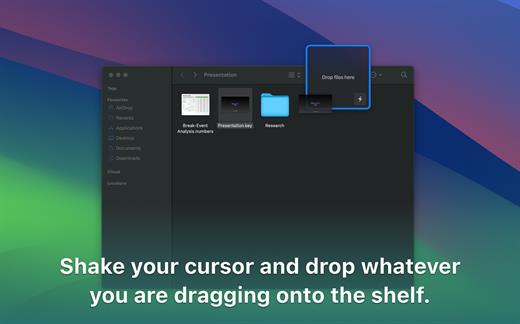
  • Control Center widgets for common shelf actions, including creating a shelf, opening the Clipboard Shelf, reopening the last shelf, closing all shelves, and docking shelves.
  • Redesigned Instant Actions for a faster, more fluid experience.
  • Updated app icon for macOS Tahoe, with dark mode and clear/tinted variants.
Improvements

  • Dropover Cloud uploads now support up to 100 files as individual uploads; larger uploads are automatically zipped first. File size limits still apply.
  • Added a global shortcut to select a shelf, with numbered selection when multiple shelves are visible.
  • Shelf keyboard shortcuts now have fewer restrictions during assignment.
  • Added "Dock to Nearest Edge" and "Open Detail View" shelf keyboard shortcuts.
  • Updated Quick Start guide.
  • New option for where newly added files from shortcuts, integrations, or automations are added (new shelf or previous shelf).
  • Improved the Instant Actions settings screen.
  • The active shelf now shows a pulsing grabber when it’s ready to receive local keyboard shortcuts.
  • Smoother animations when a shelf appears or when files are dropped onto it.
  • Improved handling when dropping asynchronous files onto a shelf.
  • More responsive animations when dragging files out of a shelf.
  • Refreshed Settings sidebar icons, including automatic appearance matching.
  • Two additional menu bar icon options.
  • Improved animations when opening the shelf detail view.
  • Improved the legibility and appearance of shelf buttons.
  • Refined the Recent Windows widget with minor UI updates.
  • Updated the "Drop files here" state.
  • Directory picker buttons are now correctly aligned in forms.
Fixes

  • Fixed a crash when deleting files in Detail View.
  • Fixed several rare stability issues.
  • Fixed issues that could cause shelves to stop responding to local keyboard shortcuts in certain cases.
  • Fixed a crash that could occur when showing the context menu in shelf detail view.
  • Fixed an issue where presented modals might not be focused when they appear.
  • Fixed an issue where starting a drag from a shelf could sometimes fail, depending on the initial cursor position.
  • Fixed an issue where double-click actions could fail when using tap-to-click on a trackpad.
  • Fixed an issue where dragging files out of a shelf could be unavailable when a shelf contained an alias.
  • Fixed an issue where some modals wouldn't close when clicking outside of them.
  • Fixed an issue where asynchronous drags for Instant Actions could fail.
  • Fixed an issue where asynchronous drops didn't show a loading indicator on the dropped item.
  • Fixed an issue where the Dropover Cloud shortcut could fail when uploading folders.
  • Fixed an issue where the Dropover Cloud configuration dialog could trigger autocomplete immediately on appearance.
  • Global shortcuts that open a new shelf now use the default shelf location set in Settings.
  • Fixed incorrect window padding when using the bottom screen position.
  • Fixed an issue where the Recent Windows widget might not load correctly.
  • Fixed an issue where some labels wouldn’t update correctly when switching appearance.
  • Fixed an issue where certain keyboard shortcuts could accidentally run, or stop working, while you were using another app and the mouse was intersecting with a Dropover shelf.
Compatibility

macOS 13.0 or later.


Release Name: Dropover 5.2.0
Size: 47.6 MB
Links: HOMEPAGE – NFO – Torrent Search

Download: RAPiDGATOR
8 Comments
Dec 25

Flyingbee PDF to PowerPoint 10.0.4

Offline Convert PDF to PowerPoint(.pptx), No Internet Required, Confidential Document Security. Compatible with Microsoft Word 2022. PDF to PowerPoint by Flyingbee is a powerful & productive PPT Converter designed for Mac users.

PDF to PowerPoint Converter exports PDF files to editable and modifiable Office PowerPoint documents quickly and efficiently. It convert PDF file back to PowerPoint Presentation with well-preserved original texts, images, layouts, hyperlinks, tables, and bezier graphics.

> Upgrade to Pro?
You could instantly convert some pages PDF documents to word for free. If you feel good, you can upgrade it to our pro version to convert documents with more pages directly without ads. That may satisfy you without bringing you expense risks.

Main Features
+ Incredibly easy-to-use.
+ Professional PDF Converter.
+ Import multiple PDF files at one time.
+ Convert PDF files to PowerPoint documents directly.
+ Conversion 100% processed locally.
+ Export PDF to PowerPoint (.pptx) files.
+ Superior accuracy and format retention.

> Professional PDF to Powerpoint Converter
Convert PDF files to fully-formatted PowerPoint directly.
– Import multiple PDFs at one time.
– Conversion 100% process locally.
– Superior accuracy and format retention.
– Bath Convert PDFs by one button.

> Incredibly Easy to Use
Simple workflow with an extremely neat and clear interface.
– User-friendly & simple interface.
– Conveniently import PDFs with drag & drop operation.
– Preview a batch of PDF files within the app.
– Easily edit or reuse the PDF content.

> High Efficiency and Productivity
Import many PDFs as you like for converting any particular pages flexibly.
– Easily manage PDFs by build-in insert, rearrange, delete and open feature.
– Configure any particular pages (e.g. 1, 2-10, 35 or all pages) to meet your needs.
– Process files fast and save the files locally.

What’s New

Version 10.0.4:


  • Release notes were unavailable when this listing was updated.
Compatibility

macOS 10.10 or later


Release Name: Flyingbee PDF to PowerPoint 10.0.4
Size: 17.3 MB
Links: HOMEPAGE – NFO – Torrent Search

Download: RAPiDGATOR

9 Comments
Dec 25

MacCleanse 14.2

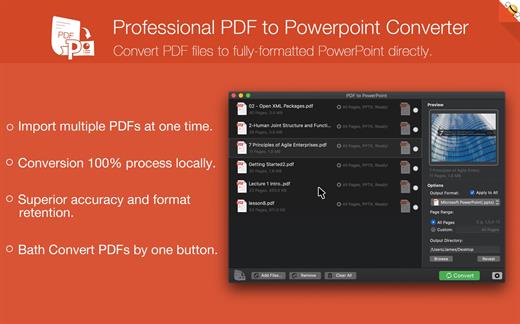
MacCleanse is the product of thousands of hours of intense research and development. It meticulously scans all of the nooks and crannies of a computer for unnecessary junk that can take up huge amounts of disk space! Because of this, Apps in MacCleanse are also uninstalled correctly, catching the numerous logs, caches, plugins, and other resources left behind versus simply dragging them to the Trash. Your privacy is protected and computer performance enhanced by MacCleanse as it wipes your web and app histories, and can toggle resource-hungry extensions!

What’s New

Version 14.2:


  • Release notes were unavailable when this listing was updated.
Compatibility

macOS 10.15 or later, 64-bit processor


Release Name: MacCleanse 14.2
Size: 102.2 MB
Links: HOMEPAGE – NFO – Torrent Search

Download: RAPiDGATOR
9 Comments
Dec 25

Dato 5.6.10

Dato is a replacement for the system menu bar clock.

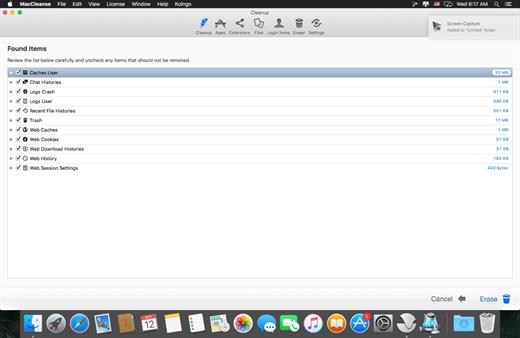
By default, it looks exactly the same, but when you click it, you get a small calendar, calendar events for the next week, the current time in various time zones (even with custom names), week number, and more. You can customize what to show in the menu and the menu bar.

Dato supports all the locales and languages that macOS supports for dates, times, and the calendar, but the menus are English-only.

Features


  • Calendar, optionally with week numbers. Your upcoming events for the next week at a glance (customizable).Time zones, optionally with custom names.Search time zones by city (15K cities included).Customizable.Double-click a day in the calendar to open that day in the default calendar app.
  • (Supports: Calendar, Fantastical 2, BusyCal).Fully offline with no network entitlements, for your privacy benefit.Supports calendar events with HTML formatted notes.Lots of keyboard shortcuts for power users.”Join Zoom Meeting” button on Zoom meeting calendar invites.
What’s New

Version 5.6.10:


  • Release notes were unavailable when this listing was updated.
Compatibility

macOS 10.14.4 or later, 64-bit processor


Release Name: Dato 5.6.10
Size: 20.5 MB
Links: HOMEPAGE – NFO – Torrent Search

Download: RAPiDGATOR

9 Comments
Dec 25

System Dashboard Pro 3.1.0

System Dashboard Pro offers the following features

• General System Information
Get an overview of the most important parameters of your system. This includes, for example, the macOS version used or details about your computer.

• Processor Usage
The processor panel shows important details about processor usage. The current load is displayed as well as that of the last few seconds. A list of processes that have the highest processor utilization is also displayed.

• Memory Usage
The Memory panel shows data related to memory. The current load is displayed as well as that of the last few seconds. A list of processes using the most memory is also displayed.

• Network Information
Basic network information such as the local and external IP address or the transfer rate of the WLAN connection is displayed on this panel.

• Network Usage
The network category shows the current download and upload speed and the number of open connections.

• Internal Battery
This panel is available if the app is running on a MacBook and displays basic battery parameters. Among others information, it displays the number of charging cycles and the health of the battery.

• Hard Disk
The computer’s hard drive can be kept under control with this panel. It shows how much space is used and how much is free. The current speed is also displayed.

• External Drives
SD cards and USB sticks are displayed here. The devices can also be ejected – either individually or all at once.

What’s New

Version 3.1.0:


  • Release notes were unavailable when this listing was updated.
Compatibility

macOS 13.0 or later


Release Name: System Dashboard Pro 3.1.0
Size: 7.7 MB
Links: HOMEPAGE – NFO – Torrent Search

Download: RAPiDGATOR
9 Comments
Dec 23

Alarm Clock Pro 15.9.3

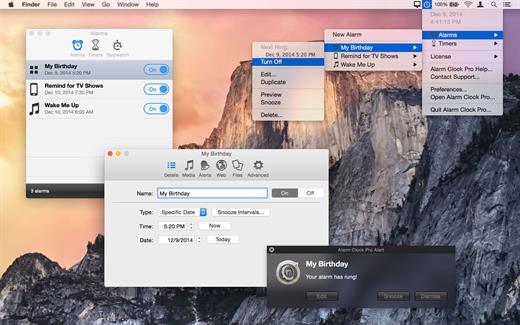
Alarm Clock Pro isn’t just an ordinary alarm clock. Use it to wake you up in the morning, send and compose e-mails, remind you of appointments, randomize the iTunes selection, control an internet radio station, and even time your baking!

Wake up to the serenity of your musical selection. Put to rest the goofy retro beeps and buzzing of a bedside alarm clock or cell phone. Use Alarm Clock Pro when waking up, as a reminder to take medications, or keep social appointments. At work, schedule follow up appointments with clients, set break reminders, run the office radio, set project timers, or discreetly monitor employee workspaces.

Features


  • iTunes Enhanced – Connect directly with iTunes to play a specific playlist or the entire library! Shuffle or play songs in sequence.
  • On-Screen Notifications – Display passive onscreen notifications that serve as great reminders!
  • Built-in Jingles – Select from one of numerous professionally designed custom ringtones, or import an alternative!
  • Stopwatches and Timers – Kitchen-style timers as well as an unlimited number of stop watches.
  • Web Radio Ready – Stream music live from a favourite web radio station for the freshest music selection every day!
  • Wake from Sleep – Never have to leave your computer on! Automatically wakes your Mac from sleep or turns it on as needed.
What’s New

Alarm Clock Pro 15.9.3:


  • Release notes were unavailable when this listing was updated.
Compatibility

macOS 10.14 or later


Release Name: Alarm Clock Pro 15.9.3
Size: 59.7 MB
Links: HOMEPAGE – NFO – Torrent Search

Download: RAPiDGATOR

11 Comments
Dec 23

VideoProc Converter AI 8.7

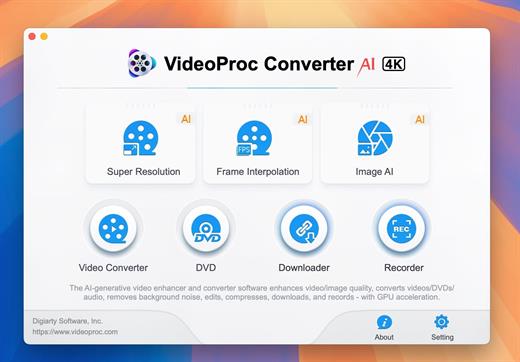
Built with AI tools for video/image/audio enhancement. Remaster, upscale, restore, colorize, convert, edit, compress, download, and record with GPU acceleration. The best video converter works with videos shot with GoPro, DJI, iPhone, Android, DSLR, mirrorless, camcorders, or other 4K cameras.

VideoProc peaks Level-3 Hardware Acceleration fully powered by Intel®, AMD®, NVIDIA® GPUs, and Apple M1/M2/M3/M4 (Pro/Max/Ultra), delivering buttery smooth (4K/8K) video processing and transcoding without compromising quality.

What’s New

Version 8.7:


  • Release notes were unavailable when this listing was updated.
Compatibility

macOS 10.15 or later


Release Name: VideoProc Converter AI 8.7
Size: 255.4 MB
Links: HOMEPAGE – NFO – Torrent Search

Download: RAPiDGATOR
9 Comments
Dec 23

SSH Config Editor Pro 2.6.11

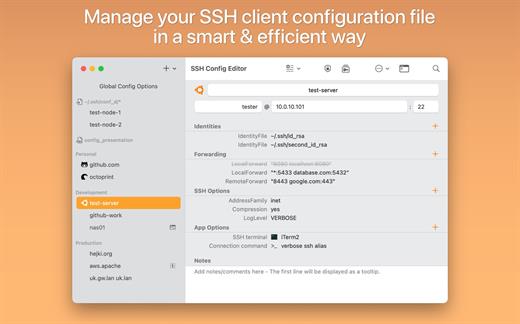
SSH Config Editor is a handy tool for manage your OpenSSH client-configuration file. You can add or edit identity files, port forwardings (with handy graphical preview), and any other SSH config option.

Features


  • Add/change identity files by choosing them in file dialog
  • Add/edit port-forwarding options with graphical help
  • Add/edit any supported SSH option with help
  • RSA key-pair generation
  • Separators for grouping host configurations
  • Ability to disable each single config option
  • Action to generate command for SSH copy ID
  • Open connection to server
What’s New

Version 2.6.11:


  • Some minor bug fixes.
Compatibility

macOS 10.15 or later, 64-bit processor


Release Name: SSH Config Editor Pro 2.6.11
Size: 9.9 MB
Links: HOMEPAGE – NFO – Torrent Search

Download: RAPiDGATOR
12 Comments
Dec 23

ON1 Photo RAW 2026.2 v20.2.1.17865

ON1 Photo RAW (was ON1 Photo) is the lightning fast raw processor, photo editor, and plug-in collection all in one app photographers have been asking for. Unlike the current class of raw-based photo editors requiring catalogs, bouncing between apps for editing, and a subscription ecosystem, ON1 Photo RAW features a new, modern raw processing engine, tuned for today’s sensors and graphics chips. Combined with our current set of tools, the next generation of ON1 Photo 10, will continue to work where you want, as a standalone app, a plug-in for Adobe Photoshop and Lightroom, or a host app for other editing apps.

Photo RAW is a must have plug-in for Lightroom and Photoshop. At the heart lies Develop and Effects which include everything you could possibly need for creating any look you want. The hundreds of filters and presets are stackable, allowing for endless creativity. You don’t need 10 different plug-ins when you can do it all with one. It’s one of the best collections of filters for stacking and creating your own signature looks along with the perfect tools for selectively applying effects, local adjustments, adjustable gradients, adjustment brushes, masking, and retouching.


  • Adjustable Gradient
  • Adjustment Brush
  • Antique
  • Black and White
  • Bleach Bypass
  • Blur
  • Borders
  • Color Enhancer
  • Cross Process
  • Dynamic Contrast
  • Glow
  • Grunge
  • HDR Look
  • Lens Blur
  • Lens Flare
  • Noise Reduction
  • Photo Filter
  • Portrait Enhancer
  • Sharpening
  • Split Tone
  • Sunshine
  • Texturizer
  • Tone Enhancer
  • Vignette
  • Vintage
What’s New

Version 20.2.1:


  • Release notes were unavailable when this listing was updated.
Compatibility

macOS 10.15 or later


Release Name: ON1 Photo RAW 2026.2 v20.2.1.17865
Size: 688.1 MB
Links: HOMEPAGE – NFO – Torrent Search

Download: RAPiDGATOR
11 Comments