Please REGISTER or RENEW your account on RAPiDGATOR.net and support us by doing through all RAPiDGATOR working download links on main posts...
Dec 23

Davinci Resolve Studio 20.3.1

DaVinci Resolve Studio is the world’s only solution that combines professional 8K editing, color correction, visual effects and audio post production all in one software tool! You can instantly move between editing, color, effects, and audio with a single click. DaVinci Resolve Studio is also the only solution designed for multi user collaboration so editors, assistants, colorists, VFX artists and sound designers can all work live on the same project at the same time! Whether you’re an individual artist, or part of a large collaborative team, it’s easy to see why DaVinci Resolve is the standard for high end post production and finishing on more Hollywood feature films, television shows and commercials than any other software.
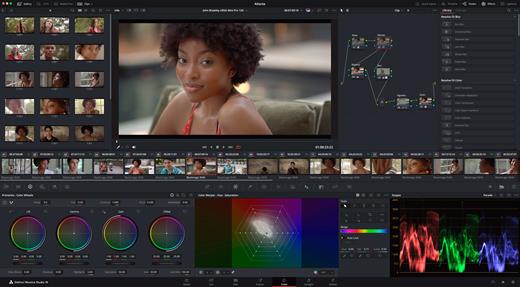
DaVinci Resolve 20 features powerful new DaVinci Neural Engine AI tools and over 100 feature upgrades! New AI tools include text based timeline editing, music remixing, dialogue separation and UltraNR noise reduction. IntelliTrack AI lets you use video to track the Fairlight audio panner. ColorSlice vector grading and film look creator offer richer grading vibrance and color density. Plus there are new features for live TV production and broadcast. DaVinci Resolve now supports realtime selection of live camera recordings for instant replay to air with slow motion and stingers. Multi Source is the fastest way to see your cameras and edit to the timeline while the cameras are still recording!

What’s New

Version 20.3.1:


  • Release notes were unavailable when this listing was updated.
Compatibility

macOS 10.15 or later,
Apple Silicon or Intel Core processor


Release Name: Davinci Resolve Studio 20.3.1
Size: 7 GB
Links: HOMEPAGE – NFO – Torrent Search

Download: RAPiDGATOR

2 Comments
Dec 23

TextSoap 9.6

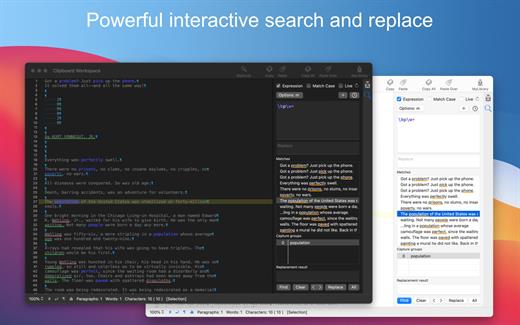
TextSoap can automatically remove unwanted characters, fix up messed up carriage returns, and do pretty much anything else that we can think of to text. Save time and effort. Be more productive.

Stop manually fixing text documents and emails. Let TextSoap help you automate away all that tediousness. And do it all from within your favorite app using TextSoap Menu. Enable it in preferences and access TextSoap in most apps that support standard copy and paste.

Easy to learn for casual users, TextSoap offers the flexibility that expert users need.

What’s New

Version 9.6:


  • Release notes were unavailable when this listing was updated.
Compatibility

macOS 11.0 or later


Release Name: TextSoap 9.6
Size: 25.3 MB
Links: HOMEPAGE – NFO – Torrent Search

Download: RAPiDGATOR
11 Comments
Dec 23

Folder Colorizer 4.11.8

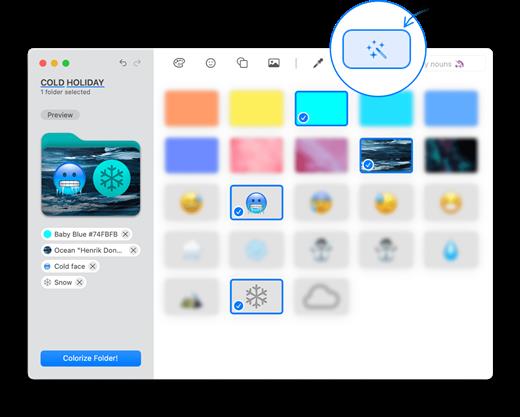
Folder Colorizer makes significant folders stand out on a cluttered desktop. It’s built for Mac users whose life depends on color to navigate successfully between folders. You can change folder color, add emojis or a special image background. Change Folder Color on Mac. In 1-Click.

What’s New

Version 4.11.8:


  • Release notes were unavailable when this listing was updated.
Compatibility

macOS 11.0 or later.
Apple Silicon or Intel Core processor


Release Name: Folder Colorizer 4.11.8
Size: 30.2 MB
Links: HOMEPAGE – NFO – Torrent Search

Download: RAPiDGATOR
10 Comments
Dec 23

Word Counter Pro 3.3.2

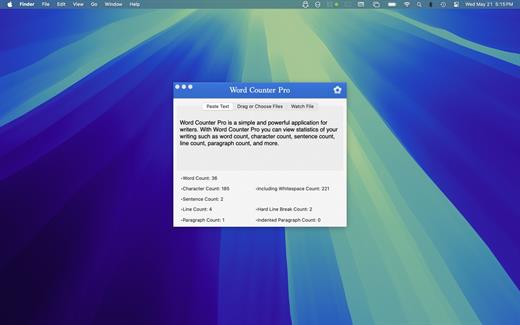
Word Counter Pro is a simple and powerful application for writers. With Word Counter Pro you can view statistics of your writing such as Word count, Character count, Sentence count, Line count, Paragraph count, and more.

Word Counter Pro allows you to view stats in four different ways:


  1. You can type or paste text in the window.
  2. You can drag and drop a supported text file to the window.
  3. You can have Word Counter Pro watch a supported text file as you edit it in another application. When Word Counter Pro is watching a text file, a popover will appear in the menubar displaying stats that will be updated as you write.
  4. Use the Word Counter Pro Action Extension. You can use the Word Counter Pro Action Extension to get stats of selected text in any text editing app that supports Action Extensions (like TextEdit).

Word Counter Pro also allows you to apply custom settings. Some of the custom settings you can specify include:

  • Setting a custom page size for measuring Line count. For accuracy, Word Counter Pro calculates the Line count by measuring against a particular page size.
  • Changing the left and right margin of the custom page size, which also will impact the Line count.
  • Enforcing a minimum number of sentences required for Paragraph count. Most word processing software will incorrectly count titles and lines of text in headers as paragraphs, even though they are not part of the body of your document. Requiring a certain number of sentences per paragraph can result in a more accurate paragraph count, since dangling words are not counted as para
Word Counter Pro supports the following file types:

  • rtfd
  • rtf
  • txt
  • docx
What’s New

Version 3.3.2:


  • Release notes were unavailable when this listing was updated.
Compatibility

macOS 10.10 or later.


Release Name: Word Counter Pro 3.3.2
Size: 14.7 MB
Links: HOMEPAGE – NFO – Torrent Search

Download: RAPiDGATOR
10 Comments
Dec 23

ON1 Photo RAW MAX 2026.2 v20.2.1.17865

ON1 Photo RAW is a standalone macOS application designed to help you enhance your photos collection by quickly applying various effects, image layers, or masks, by employing the included retouching tools, or by resizing the original file.

Complex photo editing suite featuring a stylish yet organized user interface

Right off the bat, in the main window, you can easily browse your images collection and add new source image folders. The built-in image browser allows you to preview your photos and enables you to send them to other workspaces.

Even if ON1 Photo RAW does not take up too many resources, the switch between various workspaces, and applying different effects, comes with a slight delay.

Moreover, if you don’t interact with ON1 Photo RAW in fullscreen mode, the buttons associated with the various working spaces (develop, layers, resize, and so on), do not seem to work properly.

Enhance your photos quality and apply effects and masks to improve the final result

The capabilities are organized into multiple workspaces that can be accessed via different toolbars. This way, the currently selected image can be sent to any layer, enhanced, masked and/or resized very easily.

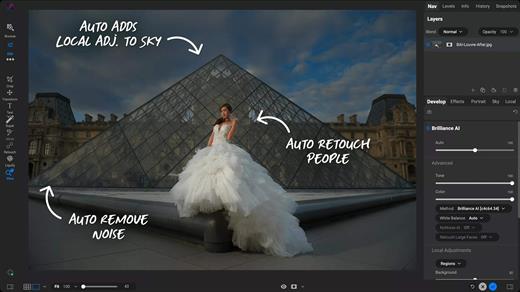
Finding your way around the application is quite easy since the workspace names are quite self-explanatory. Noteworthy is that ON1 Photo RAW can automate portrait retouching tasks, such as removing blemishes or cleaning up teeth.

Streamlined software solution designed to help you process and intensify certain image characteristics

ON1 Photo RAW provides a collection of powerful tools designed to help you deal with common photo editing problems: enhancing the image quality by adjusting the color, the tone, by cleaning certain unwanted elements, or by applying different effects, including black and white styles.

Moreover, it can automate face retouching tasks, enables you to resize the images, and offers you the possibility to work with multiple layers and masks.

What’s New

Version 20.2.1:


  • Release notes were unavailable when this listing was updated.
Compatibility

macOS 10.15 or later


Release Name: ON1 Photo RAW MAX 2026.2 v20.2.1.17865
Size: 742.3 MB
Links: HOMEPAGE – NFO – Torrent Search

Download: RAPiDGATOR

11 Comments
Dec 23

MacMagic 1.6.0

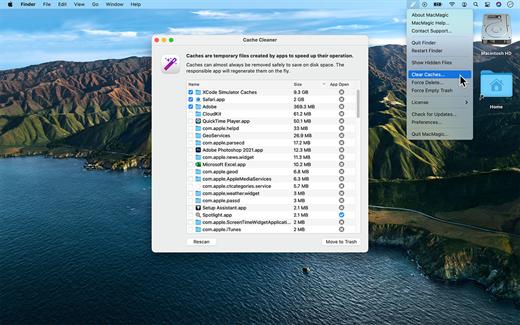
MacMagic can help clear up gigabytes of lost storage space crowded up by the caches of poorly optimized apps, hide and show hidden files in the Finder, help force-delete the contents of the Trash or stubborn files, and perform various other tasks to help automate or simplify your daily workflow!

What’s New

Version 1.6.0:


  • Release notes were unavailable when this listing was updated.
Compatibility

macOS 10.14 or later.


Release Name: MacMagic 1.6.0
Size: 58.4 MB
Links: HOMEPAGE – NFO – Torrent Search

Download: RAPiDGATOR
11 Comments
Dec 23

ON1 Resize AI 2026.2 v20.2.1.17865

ON1 Resize (was Perfect Resize) is the industry standard for photo enlargements. Use Genuine Fractals powered algorithms for optimizing clarity and detail for different image types. Get the best quality enlargements for your photos, whether taken with a DSLR or your mobile device.

Features


  • Easily enlarge and create a high quality print of a great shot you captured on your phone or tablet.
  • Increase image size over 1000% without the loss of sharpness or detail that you would normally expect.
  • Built-in presets and manual controls make it easy to create high quality enlargements tailored to your photos, including print size, type of material, and type of output–including gallery wraps.
  • The gallery wrap feature creates extended margins for wrapping your photo around wooden stretcher bars when printing to canvas. You have the option to either stretch or reflect the areas near the edge of your photo. Create a perfect gallery wrap and not lose any part of the photo.
  • Using the Sharpening controls can save you the workflow step of adding additional Sharpening before printing and can help compensate for loss of sharpness due to dot gain from your printer.
  • The tiling feature in Perfect Resize will divide an enlargement into smaller pieces that can be printed on a smaller printer.
  • Print. Select the printer settings and paper size as well as control how the image will fit on the paper along with color management options.
What’s New

Version 20.2.1:


  • Release notes were unavailable when this listing was updated.
Compatibility

macOS 10.15 or later
Apple Silicon or Intel Core processor


Release Name: ON1 Resize AI 2026.2 v20.2.1.17865
Size: 560.3 MB
Links: HOMEPAGE – NFO – Torrent Search

Download: RAPiDGATOR

13 Comments
Dec 23

RAR Extractor – Unzip 14.1

Zip,rar,7z,tar files opener. RAR Extractor can extract compressed files in all most formats(over 50 formats).

「Support RAR, ZIP, 7z, pak, pkg, apk, tbz, sti, tar, xar, lha, lzh, hqx, bin, bz2, bzip2, bz, xz, iso, cid, nrg, mdf, taz,l zma, xip, ace, arj, lbr, lqr, cab, rpm, cpt, sea, exe, msi, cpio, lzx, jar, swf, pdf, nsa, dcs, spk… 」
「Compress files to password-protected ZIP & 7Z archives 」
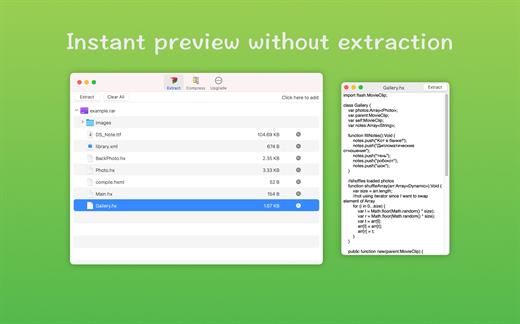
「Quicklook files in archive before extraction」
「Features」


  • Extract extract compressed files in all most formats(over 50 formats).
  • Unzip, unrar encrypted archives.
  • Easy view an archive’s file list.
  • Quicklook files in archive without extracting.
  • Unarchive & unrar the selected individual file or folder in the archive.
  • Double click to display or extract directly after setting this APP as default archiver.
  • Drag archives to the dock icon to extract or display directly.
  • Batch decompress many archives
  • Create password-protected ZIP & 7Z archives.
  • AES256 encryption algorithm to create ZIP & 7Z archives.
What’s New

Version 14.1:


  • Release notes were unavailable when this listing was updated.
Compatibility

macOS 10.13 or later


Release Name: RAR Extractor – Unzip 14.1
Size: 20.2 MB
Links: HOMEPAGE – NFO – Torrent Search

Download: RAPiDGATOR
11 Comments
Dec 23

Querious 4.2.3

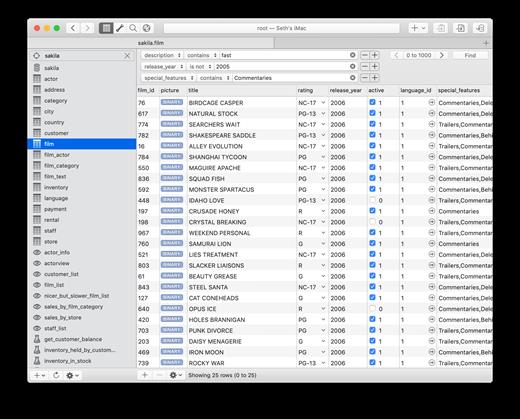
Querious allows you to view, search, edit, import, export, build, configure, and monitor your MySQL and MariaDB databases easier than ever before. With Querious, you can even open up raw CSV or tab-delimited files and easily split, join, reorder, add, remove, and process columns and rows, and then convert the whole file to another format in a snap.

Querious 3 is massive upgrade, throughly enhancing appearance, usability, features, performance, and everything in between. So far we’ve added over 170 new features and improvements.

Here’s just a small sample…


  • Full support for views, triggers, functions, procedures, and events
  • Blazing fast import and export (even faster than mysqldump!)
  • Duplication of databases (including data!), even between servers
  • Monitor server status and running processes
  • Access the server Error Log and Slow Query log
  • Rich and powerful editor for CSV/Tab files
  • Table relationship mapping
  • Significant table data editor improvements
  • Upgraded custom query auto-complete and table reference
  • More convenient little goodies than you can shake a stick at
  • And much more!
What’s New

Version 4.2.3:


  • Release notes were unavailable when this listing was updated.
Compatibility

macOS 11 or later


Release Name: Querious 4.2.3
Size: 54.2 MB
Links: HOMEPAGE – NFO – Torrent Search

Download: RAPiDGATOR

10 Comments
Dec 23

Mp3tag 1.10.0

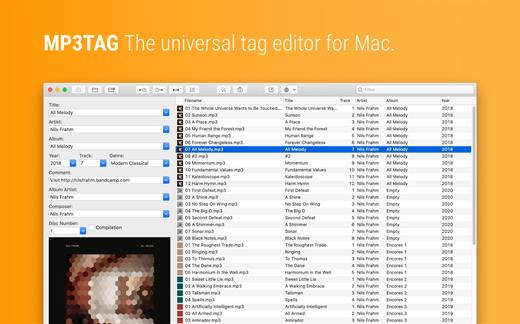
Mp3tag is a powerful and easy-to-use tool to edit metadata of audio files. Musicians, DJs, podcasters, and audio-enthusiasts use it for many different aspects of handling audio files.

It supports batch tag-editing for multiple files at once, covering many audio formats from MP3, over MP4, and M4V (yes, that’s video!) to FLAC, OGG, OPUS, AIF, DSF, MPC, and WAV.

Furthermore, it supports online database lookups from Discogs and MusicBrainz, allowing to gather proper tags and download cover art for music libraries.

It offers renaming files based on the tag information, replacing characters or words in tags and filenames, importing tag information, and adjusting the size and image format of embedded cover art.

Since some of the tasks in managing a digital library are repetitive, Mp3tag allows for combining tasks into action groups, which serve as workflows for keeping consistency and order. Examples are formatting tag fields, performing case conversion, removing unwanted fields, or adjusting embedded cover art to match required sizes.

Key Features


  • Bulk-Editing of Tags for multiple files at once.
  • Editing of cover-art.
  • Renaming files based on tags.
  • Importing metadata from filenames.
  • Assign track and disc numbers via the auto-numbering wizard.
  • Importing metadata from online Tag Sources.
  • Support for Flexible Tagging, allowing for user-defined tag fields in a standardized way.
  • Applying action groups with many tasks combined into reusable workflows.
  • Support for many file types under a universal user interface.
Supported File Formats

  • MP3 (ID3v1, ID3v2.3, ID3v2.4 with UTF-8)
  • MP4/M4A/M4B/M4V (iTunes and Nero)
  • FLAC (Vorbis Comments)
  • OGG (Vorbis Comments)
  • OPUS (Vorbis Comments)
  • AIF (RIFF INFO and RIFF ID3)
  • DSF (ID3v2)
  • MPC (APEv2)
  • WAV (RIFF INFO and RIFF ID3
What’s New

Version 1.10.0:


  • Release notes were unavailable when this listing was updated.
Compatibility

macOS 10.14 or later.


Release Name: Mp3tag 1.10.0
Size: 13.2 MB
Links: HOMEPAGE – NFO – Torrent Search

Download: RAPiDGATOR
12 Comments