Please REGISTER or RENEW your account on RAPiDGATOR.net and support us by doing through all RAPiDGATOR working download links on main posts...
Nov 21

ON1 Resize AI 2026.1 v20.1.0.17740

ON1 Resize (was Perfect Resize) is the industry standard for photo enlargements. Use Genuine Fractals powered algorithms for optimizing clarity and detail for different image types. Get the best quality enlargements for your photos, whether taken with a DSLR or your mobile device.

Features


  • Easily enlarge and create a high quality print of a great shot you captured on your phone or tablet.
  • Increase image size over 1000% without the loss of sharpness or detail that you would normally expect.
  • Built-in presets and manual controls make it easy to create high quality enlargements tailored to your photos, including print size, type of material, and type of output–including gallery wraps.
  • The gallery wrap feature creates extended margins for wrapping your photo around wooden stretcher bars when printing to canvas. You have the option to either stretch or reflect the areas near the edge of your photo. Create a perfect gallery wrap and not lose any part of the photo.
  • Using the Sharpening controls can save you the workflow step of adding additional Sharpening before printing and can help compensate for loss of sharpness due to dot gain from your printer.
  • The tiling feature in Perfect Resize will divide an enlargement into smaller pieces that can be printed on a smaller printer.
  • Print. Select the printer settings and paper size as well as control how the image will fit on the paper along with color management options.
What’s New

Version 20.1.0:


  • Release notes were unavailable when this listing was updated.
Compatibility

macOS 10.15 or later
Apple Silicon or Intel Core processor


Release Name: ON1 Resize AI 2026.1 v20.1.0.17740
Size: 563.3 MB
Links: HOMEPAGE – NFO – Torrent Search

Download: RAPiDGATOR

11 Comments
Nov 21

Disk Drill Enterprise 6.1.2111

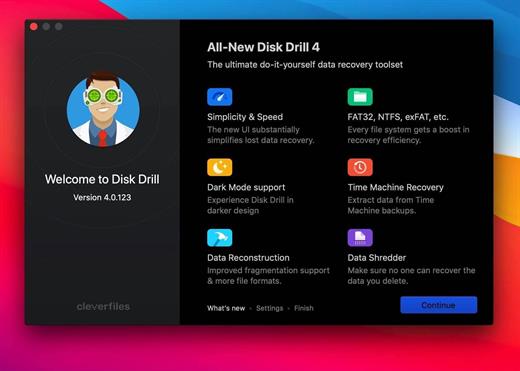
Disk Drill is a Mac data recovery software designed natively for Mac OS: easily protect your files from accidental deletion with Recovery Vault and recover lost data from Mac disks. Most storage devices, file types, and file systems are supported. You can recover deleted files from iPhone and Android devices! Disk Drill offers helpful and free tools for disk management like duplicate file finder, byte-to-byte backups, disk cleanup, and space visualization, bootable data recovery drive, disk health monitoring, etc.

When something is deleted Recovery Vault makes it possible to recover not only the file itself but also its properties, such as original file name, location, etc. So you will always be able to recover data from the Mac files system (HFS/HFS+) and FAT32 partitions. Disk Drill also includes powerful S.M.A.R.T. disk monitoring right out of the box; you can monitor your disks’ hardware status and get automatic notifications of potential failures or other issues. If a disk or partition is failing, you can easily backup it into a disk image (DMG) which can later be mounted for recovery.

Disk Drill PRO also features a number of advanced scanning modes for data recovery of FAT, NTFS, HFS/HFS+, other file systems, and formatted (initialized) drives. Using Quick Scan you can locate deleted items on FAT and NTFS disks, this scanning method is fast and accurate but is unlikely to find data deleted long ago. With Deep Scan you can try to recover data from any disk or memory card regardless of their file system. This recovery method is long and thorough, it scans your disk in a binary mode and is capable of finding deleted files even after formatting.

You need to disable the System Integrity Protection (SIP) to perform the selected Application.

What’s New

Version 6.1.2111:


  • Release notes were unavailable when this listing was updated.
Compatibility

macOS 10.15 or later
Apple Silicon or Intel Core processor


Release Name: Disk Drill Enterprise 6.1.2111
Size: 76.3 MB
Links: HOMEPAGE – NFO – Torrent Search

Download: RAPiDGATOR
10 Comments
Nov 21

SiteSucker Pro 6.0.2

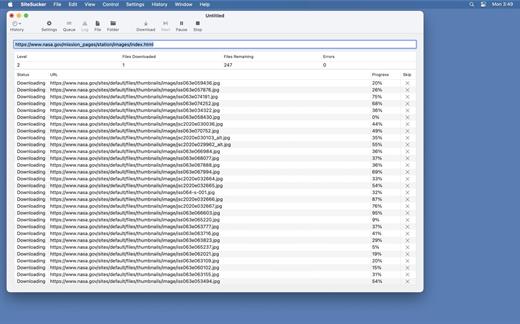
SiteSucker Pro is an application that automatically downloads Web sites from the Internet. It does this by copying the site’s HTML documents, images, backgrounds, movies, and other files to your local hard drive. Just enter a URL and click a button and SiteSucker can download the entire site.

SiteSucker can be used to make local copies of your Web sites for easy maintenance. SiteSucker can download files unmodified, or it can “localize” the files it downloads, allowing you to browse a site off-line.

What’s New

Version 6.0.2:


  • Release notes were unavailable when this listing was updated.
Compatibility

macOS 11.0 or later.


Release Name: SiteSucker Pro 6.0.2
Size: 7.6 MB
Links: HOMEPAGE – NFO – Torrent Search

Download: RAPiDGATOR

8 Comments
Nov 21

Camtasia 2026.0

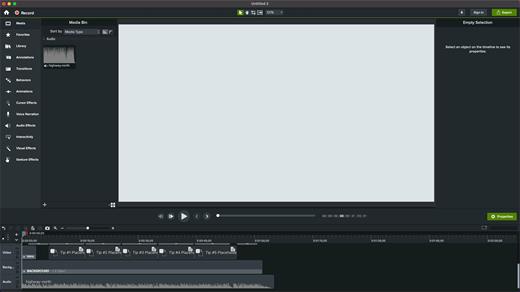
Camtasia for remarkable screencasts made easy. Create eye-catching training, presentation, and demo videos…the easy way. Camtasia screen-recording software is streamlined, intuitive, and makes you look like a pro.

Easily record onscreen activity, Keynote slides, camera video, microphone, or system audio – all with sparkling clarity. Record in front of a live audience or at your desk. Edit to perfection. Turn it into a stunning, HD-quality video at the perfect size to share on popular video sites, Apple devices, your website, blog, or anywhere you like. Make them wonder how you did it.

What’s New

Version 2026.0:


  • Release notes were unavailable when this listing was updated.
Compatibility

macOS 13.0 or later
Apple Silicon or Intel Core processor


Release Name: Camtasia 2026.0
Size: 421.4 MB
Links: HOMEPAGE – NFO – Torrent Search

Download: RAPiDGATOR
9 Comments
Nov 21

SQLPro Studio 2025.78

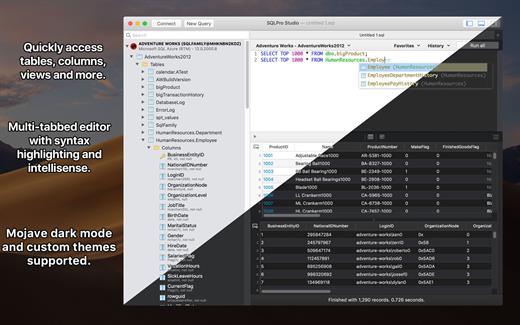
SQLPro Studio is the premium database management tool for Postgres, MySQL, Microsoft Management Studio and Oracle databases.

Features


  • Intellisense/SQL auto-completion
  • Syntax highlighting with customizable themes (including dark)
  • Tab-based interface for an optimal user experience
  • Context aware database tree navigation, including quick access to tables, views, columns, indices, and much more
  • SQL beautifier/formatter
  • Database-wide searching
  • NTLMv2 supported (but not required)
  • Netbios support
  • Master password support for additional security. SQLPro Studio supports the following database servers:

    • MySQL and MariaDB
    • PostgreSQL
    • Microsoft SQL Server (2005 and above)
    • Oracle (8i and above)
What’s New

Version 2025.78:


  • Release notes were unavailable when this listing was updated.
Compatibility

macOS 10.12 or later
Apple Silicon or Intel Core processor


Release Name: SQLPro Studio 2025.78
Size: 53.1 MB
Links: HOMEPAGE – NFO – Torrent Search

Download: RAPiDGATOR

11 Comments
Nov 21

Piezo 1.9.8

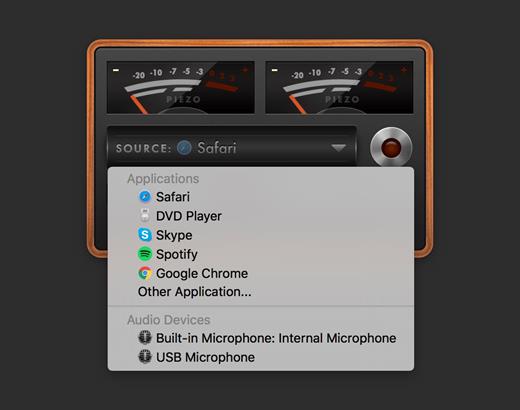
Piezo makes it a snap to record audio on your Mac. In seconds, you’ll be recording audio from any application or from audio inputs like microphones. Piezo requires almost no configuration, and it’s a blast to use! Simple and inexpensive – that’s a winning combination.

What’s New

Version 1.9.7:


  • Release notes were unavailable when this listing was updated.
Compatibility

macOS 10.14.0 or later
Apple Silicon or Intel Core processor


Release Name: Piezo 1.9.8
Size: 14.7 MB
Links: HOMEPAGE – NFO – Torrent Search

Download: RAPiDGATOR
11 Comments
Nov 21

Color Folder Pro 4.3

Color Folder can help you to change the icon of folder quickly, and to manage folders more efficiently

「Main Features」


  • quickly change folder icon color
  • Select any picture to set as folder icon
  • support changing multiple folder icons at the same time
  • save as Icon
  • provide a variety of icon templates (over 700+)
  • support any color to modify folder icons
What’s New

Version 4.3:


  • Release notes were unavailable when this listing was updated.
Compatibility

macOS 10.10 or later


Release Name: Color Folder Pro 4.3
Size: 32.8 MB
Links: HOMEPAGE – NFO – Torrent Search

Download: RAPiDGATOR

10 Comments
Nov 21

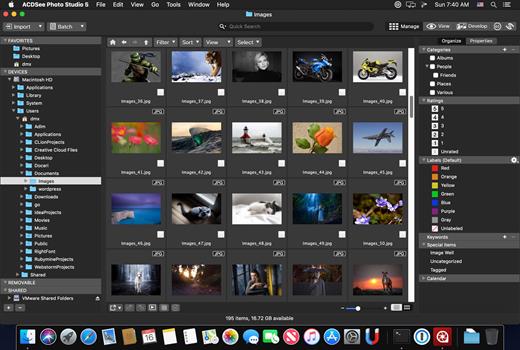
ACDSee Photo Studio 26.0.0

Known for best-in-class digital asset management and RAW processing power, ACDSee Photo Studio for Mac 5 gives you instant, import-free access to your photos. Flexible organizational tools to satisfy any workflow, lightning fast non-destructive adjustments, drag and drop searching, sleek customizable batch presets, and RAW support for over 450 camera models are just a few of the elements that make ACDSee Photo Studio for Mac 5 the must-have image editing software on the macOS.

Image Basket

Gather and hold images from different locations or folders in the Image Basket. Once you have your desired assortment, you can use any of the tools or features in ACDSee to view or edit these files.

Filter By

Quickly single out and display files by their metadata, such as ratings, color labels, tags, and categories. This essential component of digital asset management will also identify images by the metadata they don’t have, such as “no keywords”, “untagged”, and “uncategorized”.

Compare Images

Highlight the similarities and the differences in up to four images at once with the Compare Images tool. Use zooming and panning to identify which images to keep.

Auto Advance

Manage entire folders without ever moving your hands from the keyboard. With Auto Advance, adding metadata will move the focus to the next image in the File List pane, allowing you to seamlessly organize.

External Editors

Easily configure ACDSee to work with a variety of other image editors. Specify a default editor, and then promptly open images in other applications right from inside Manage or View mode.

Multiple Databases

Create as many ACDSee databases as you like, and swiftly and smoothly switch between them.

Batch Add Watermark

Claim your work by adding watermarks to your images. Adjust size, position, and opacity for the perfect signature, and save your settings as a preset. Apply it to one, many, or all.

Batch Add Border

Frame your favorite photos in batches with the Batch Add Border tool. Customize the color, texture, and thickness of your border, and choose from nearly 100 unique edges to complement your shots.

Import Database

Don’t lose hours of cataloging just because you want the latest software. Import your database from version 3 or 4 of ACDSee Photo Studio Mac and keep right on working.

What’s New

Version 26.0.0:


  • Release notes were unavailable when this listing was updated.
Compatibility

macOS 11.0 or later


Release Name: ACDSee Photo Studio 26.0.0
Size: 441.2 MB
Links: HOMEPAGE – NFO – Torrent Search

Download: RAPiDGATOR
10 Comments
Nov 21

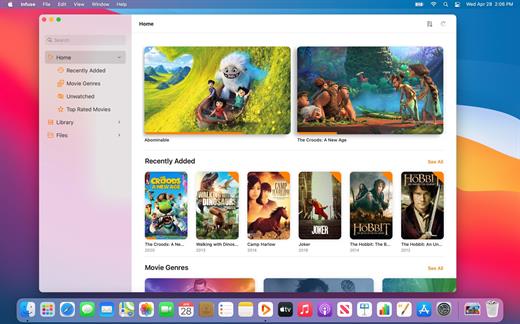
Infuse Pro 8.3.2

Ignite your video content with Infuse – the beautiful way to watch almost any video format on your iPhone, iPad, Apple TV, and Mac. No need to convert files! Infuse is optimized for macOS 12, with powerful streaming options, Trakt sync, and unmatched AirPlay & subtitle support. Gorgeous interface. Precise controls. And silky-smooth playback.

Play more video types

A powerful video player that plays just about anything, including the standard MP4, M4V and MOV – plus MKV, AVI, WMV, MTS, ISO, VIDEO_TS, FLV, OGM, OGV, ASF, 3GP, DVR-MS, WebM, and WTV. Includes fully certified Dolby® Digital Plus (AC3/E-AC3), DTS® and DTS-HD® audio.

Stream from other devices

Browse and play videos stored on your Mac, PC, NAS, Wi-Fi hard drive, apps like Plex, Emby, and Jellyfin, or from cloud services like Dropbox, Google Drive, OneDrive, Box, pCloud, Yandex.Disk, and Mega.nz – no syncing required!

Trakt 2-way sync

Connect with Trakt to sync watched history, submit ratings and post comments.

Optimized subtitles powered by opensubtitles

Bring your own subtitles, or download them on the fly (for free) in virtually any language.

The basics:


  • Silky-smooth video player (plays full 4K w/ HDR & Dolby Vision)
  • Stream from a Mac, PC, NAS or Wi-Fi enabled hard drive
  • Connect with Plex, Emby, Jellyfin, Kodi (XBMC), WMC and other media servers
  • Beautiful layout with quick access to video info
  • Artwork and metadata added automatically
  • Picture-in-Picture
  • Spatial audio
Supported formats:

  • Video: 3GP, AVI, ASF, BDMV, DIVX, DVDMEDIA, DVR-MS, FLV, ISO, M4V, MKV, MOV, MP4, M2TS, MTS, OGM, OGV, TP, TS, VIDEO_TS, WEBM, WMV, WTV
  • Audio: AAC, AC3/E-AC3, DOLBY TRUEHD, DTS, DTS-HD MA, FLAC, MP3, OGG, PCM, WMA
  • Subtitles: DVB, DVDSUB, MICRODVD, MPL2, PGS, SMI, SSA/ASS, SRT, SUB, TIMED TEXT, TMP, TXT, VOBSUB, VTT, XSUB
Player features:

  • Multiple audio tracks
  • Chapters
  • Gesture controls
  • 8 video zoom options
  • Continuous playback
  • Deinterlacing
Extras:

  • Library organization
  • Folders
  • One-click subtitle downloads from OpenSubtitles
  • Scrobble plays to Trakt
  • Download videos from networked devices
  • Drag and drop uploads via web browser
  • Get extra onboard storage by adding USB drives
Get more with infuse pro!

  • Play even more video formats
  • Enjoy Dolby® Digital Plus (AC3/E-AC3), DTS® and DTS-HD® mobile surround sound
  • Stream a wide variety of video types over AirPlay and Google Cast
  • Access videos stored in cloud services like Dropbox, Google Drive, Box, OneDrive, pCloud, Yandex.Disk, and Mega.nz
  • Sync libraries, settings, watched history, and playback progress between devices
What’s New

Version 8.3.2:


  • Release notes were unavailable when this listing was updated.
Compatibility

macOS 11.0 or later.
Apple Silicon or Intel Core processor


Release Name: Infuse Pro 8.3.2
Size: 91.9 MB
Links: HOMEPAGE – NFO – Torrent Search

Download: RAPiDGATOR

9 Comments
Nov 21

Typora 1.12.4

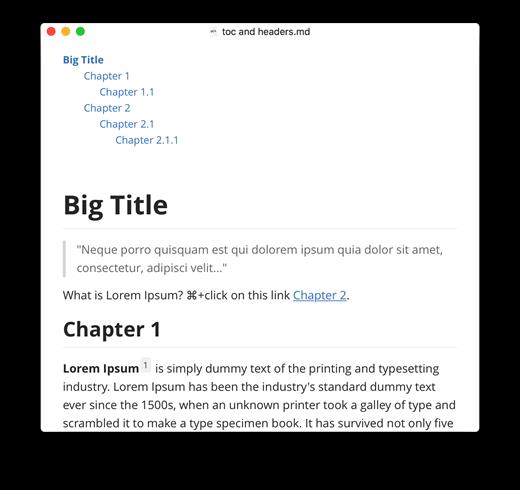
Typora gives you a seamless experience as both a reader and a writer. It removes the preview window, mode switcher, syntax symbols of markdown source code, and all other unnecessary distractions, replacing them with a real-time preview to help you concentrate on the content itself.

Features:


  • Markdown support including tables, code fences with syntax highlight, LaTeX, table of contents
  • Cross-platform
  • The real-time preview and WYSIWYG features
  • Beautiful interface and custom CSS theme support
  • Easy export
What’s New

Version 1.12.4:


  • Release notes were unavailable when this listing was updated.
Compatibility

macOS 10.13.0 or later, 64-bit processor


Release Name: Typora 1.12.4
Size: 18.8 MB
Links: HOMEPAGE – NFO – Torrent Search

Download: RAPiDGATOR
9 Comments