Please REGISTER or RENEW your account on RAPiDGATOR.net and support us by doing through all RAPiDGATOR working download links on main posts...
Nov 21

Ulysses 39.82399

Ulysses lets you focus when you need to concentrate. It keeps all your texts neatly stuffed in its intuitive library. With a few clicks, Ulysses can create beautiful documents from your manuscripts: PDFs, web pages, even iBooks-ready ePubs. With its simple, clutter-free interface, it will turn work hours into fun time. And mere thoughts into powerful stories. If you love to write, and write a lot, Ulysses is made for you.

What’s New

Version 39.82399:


  • Release notes were unavailable when this listing was updated.
Compatibility

macOS 11.0 or later
Apple Silicon or Intel Core processor


Release Name: Ulysses 39.82399
Size: 64.9 MB
Links: HOMEPAGE – NFO – Torrent Search

Download: RAPiDGATOR

10 Comments
Nov 21

Audio Hijack 4.5.6

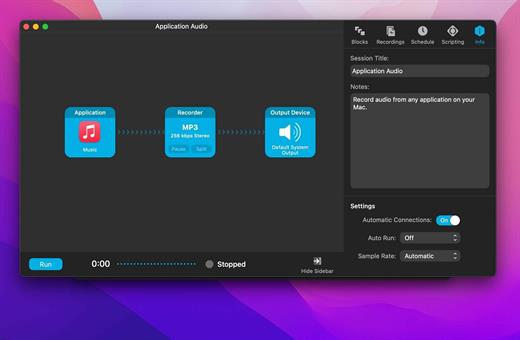
Audio Hijack (was Audio Hijack Pro) drastically changes the way you use audio on your computer, giving you the freedom to listen to audio when you want and how you want. Record and enhance any audio with Audio Hijack – it’s the cornerstone of your digital audio experience.

Audio Hijack will allow you to record any application’s audio, from Internet streams to DVD audio and everywhere in between. If your machine can play it, Audio Hijack can record it. And that’s not all – Audio Hijack will also enhance any audio, unsing industry-standard VST and AudioUnit audio effects to make your music sound incredible. Record. Enhance. Enjoy!

More Great Features

Record to All Major Formats
Record to the world’s most popular audio formats, including MP3 and AAC, or save in perfect-fidelity AIFF, WAV, ALAC or FLAC.

Reusable Sessions
Once you’ve configured a Session to your liking, you can re-use it over and over. With one click, you’ll be recording exactly as desired.

Easy File Organization
Find all of your recordings sorted by Session in the Recordings tab, where you can quickly pass files to an audio editor, add them to iTunes, or share them.

Timed Recordings
Use the Schedule tab to set up timed recordings for when you’re not around. Your audio will be waiting for you when you return.

Silence Monitoring
When silence is detected, Audio Hijack can automatically stop recording, split to a new file, or remove audio.

Bulletproof Recording
Bulletproof recording means that even if the power goes out or your computer crashes, you’ll never lose a recording.

A Thoughtful Interface
Audio Hijack’s intuitive audio grid provides a terrific pipeline-style view of exactly how your audio flows, so you can easily understand it.

Gorgeous Audio Effects
The included audio effects are easy to use and easy on the eyes. Their functionality is now accessible to all.

Time Shift Your Audio
Now you can pause, delay, and rewind live audio on your Mac. It’s perfect for transcribing audio and more!

What’s New

Version 4.5.6:


  • Release notes were unavailable when this listing was updated.
Compatibility

macOS 14.6 or later.


Release Name: Audio Hijack 4.5.6
Size: 28.5 MB
Links: HOMEPAGE – NFO – Torrent Search

Download: RAPiDGATOR

11 Comments
Nov 21

Permute 3.14.3

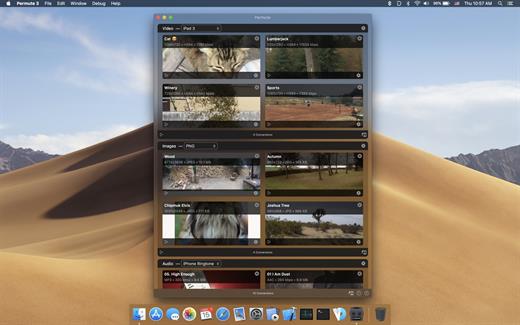
Permute offers easy-to-use drag-and-drop video conversion.

Features:


  • Easy to Use – built from the ground up, Permute is a perfect example of what a Mac app should be. With a gorgeous interface and drag & drop simplicity no need for complicated options.
  • Insanely Fast – Permute was engineered to be incredibly fast. Let us take care of the hard stuff. Just select the video format you want and it’ll be done faster than you can say “hardware acceleration” – MP4 and HEVC presets now take advantage of your machine’s hardware acceleration capabitlities, speeding up HEVC conversions more than 3 times over previous versions of Permute!
  • PDF Support – Permute 3 now includes support for stitching multiple images into a single PDF.
  • Everything Included – It doesn’t matter if you’re converting home movies or processing images. Permute can do it all. We support nearly every format and have plenty of device presets to choose from.
  • Looks Amazing – Whether you use dark mode or not, Permute will look amazing. Taking advantage of the modern technologies, Permute will even change its icon in dark mode.
  • Keep the Schedule – Video re-encoding is quite demanding on computer resources. This is why you can now schedule Permute to convert videos e.g. at night when you’re not using your computer.
  • And so much more! – There are so many other great features in Permute – adjust volume of an audio file or an audio track in a video. Batch-resize, rotate and flip images and videos. And more!
What’s New

Version 3.14.3:


  • Release notes were unavailable when this listing was updated.
Compatibility

macOS 10.12.0 or later


Release Name: Permute 3.14.3
Size: 84.1 MB
Links: HOMEPAGE – NFO – Torrent Search

Download: RAPiDGATOR

10 Comments
Nov 18

Lunar 6.9.5

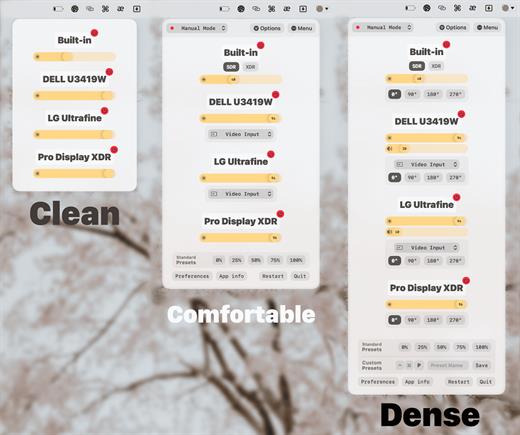
Lunar controls the same brightness that you can change by using the monitor’s physical buttons.


  • Sensor-based Adaptive Brightness (and contrast) based on an external light sensor
  • Sync-based Adaptive Brightness (and contrast) based on the built-in light sensor of the Macbook or iMac
  • Location-based Adaptive Brightness (and contrast) based on the sunrise/sunset times in your location
  • App Exception list if you need more brightness for specific activities (watching movies, design work)
  • Individual settings per display
  • Manual controls and hotkeys for setting brightness and contrast that respect the min/max values per monitor
It doesn’t interfere at all with the native adaptive brightness that macOS implements for the built-in display

It works well along Night Shift and True Tone (and f.lux if Gamma/Software controls are not used)

What’s New

Version 6.9.5:


  • Work around macOS issue where the license code text field is not visible until clicked
  • Allow pausing/unpausing adaptive brightness via a new
Compatibility

macOS 11 or later


Release Name: Lunar 6.9.5
Size: 16.5 MB
Links: HOMEPAGE – NFO – Torrent Search

Download: RAPiDGATOR

6 Comments
Nov 18

ChatGPT for macOS 1.2025.308

This is the official OpenAI ChatGPT app for macOS.

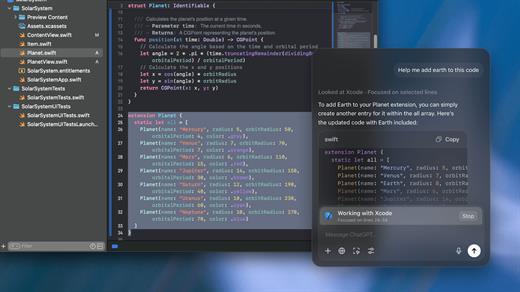
Whether you’re writing emails, exploring ideas, learning something new, or just curious about the world, ChatGPT is here to help. Designed with a clean, native experience for Mac users, the app makes it easier than ever to start a conversation with advanced AI.

Get answers. Find inspiration. Be more productive.

Free to use. Easy to try. Just ask and ChatGPT can assist with writing, learning, brainstorming, coding, and more. It’s like having an intelligent assistant, tutor, or creative partner always within reach—right from your menu bar.

Includes access to GPT-o3 (for pro users), memory features, and voice input. Works seamlessly on macOS, optimized for speed and simplicity.

Key Features:


  • Instant AI-powered responses on your desktop
  • Natural language understanding and generation
  • Voice conversations with the built-in Whisper model
  • Synced across devices with your OpenAI account
  • Support for both GPT-4o (free) and GPT-o3 (with Plus subscription)
Get started in seconds—no complex setup required. Just launch the app, log in, and start chatting.

What’s New

Version 1.2025.308:


  • Release notes were unavailable when this listing was updated.
Compatibility

macOS 14.0 and Apple Silicon (M1 or better)


Release Name: ChatGPT for macOS 1.2025.308
Size: 51.7 MB
Links: HOMEPAGE – NFO – Torrent Search

Download: RAPiDGATOR

9 Comments
Nov 18

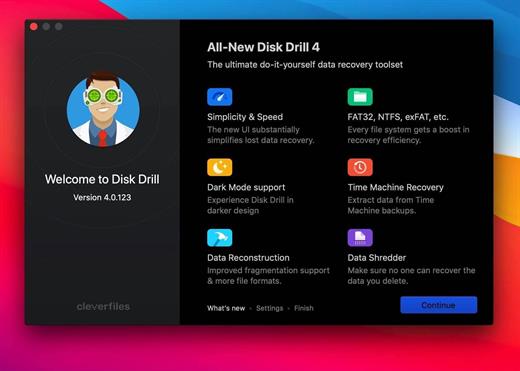
Disk Drill Enterprise 6.1.2109

Disk Drill is a Mac data recovery software designed natively for Mac OS: easily protect your files from accidental deletion with Recovery Vault and recover lost data from Mac disks. Most storage devices, file types, and file systems are supported. You can recover deleted files from iPhone and Android devices! Disk Drill offers helpful and free tools for disk management like duplicate file finder, byte-to-byte backups, disk cleanup, and space visualization, bootable data recovery drive, disk health monitoring, etc.

When something is deleted Recovery Vault makes it possible to recover not only the file itself but also its properties, such as original file name, location, etc. So you will always be able to recover data from the Mac files system (HFS/HFS+) and FAT32 partitions. Disk Drill also includes powerful S.M.A.R.T. disk monitoring right out of the box; you can monitor your disks’ hardware status and get automatic notifications of potential failures or other issues. If a disk or partition is failing, you can easily backup it into a disk image (DMG) which can later be mounted for recovery.

Disk Drill PRO also features a number of advanced scanning modes for data recovery of FAT, NTFS, HFS/HFS+, other file systems, and formatted (initialized) drives. Using Quick Scan you can locate deleted items on FAT and NTFS disks, this scanning method is fast and accurate but is unlikely to find data deleted long ago. With Deep Scan you can try to recover data from any disk or memory card regardless of their file system. This recovery method is long and thorough, it scans your disk in a binary mode and is capable of finding deleted files even after formatting.

You need to disable the System Integrity Protection (SIP) to perform the selected Application.

What’s New

Version 6.1.2109:


  • Release notes were unavailable when this listing was updated.
Compatibility

macOS 10.15 or later
Apple Silicon or Intel Core processor


Release Name: Disk Drill Enterprise 6.1.2109
Size: 90.4 MB
Links: HOMEPAGE – NFO – Torrent Search

Download: RAPiDGATOR

7 Comments
Nov 18

UnlockGo 6.3.0

All-in-One iPhone Lock Removal Tool. Remove Various Locks on iPhone/iPad in Minutes.
Instantly unlock your iPhone/iPad’s passcode
iToolab UnlockGo allows you to easily bypass iPhone passcode and gain full access to the device. It works on the following scenarios, and all kinds of passcodes are fully supported.

All types of passcodes are fully supported
UnlockGo supports to remove all types of passcodes easily including the 4-digit code, the 6-digit code, custom numeric code, alphanumeric code, Touch ID or Face ID.
Note: The removal of passwords for business purposes is illegal and prohibited.

• Forgot iPhone password
• iPhone is disabled
• Face/Touch ID is not available
• Passcode expired
• Second-hand iPhone
• Broken screen

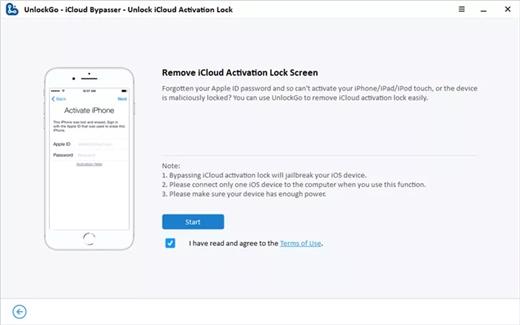
Bypass iCloud activation lock without password
UnlockGo enables you to turn off the iCloud Activation Lock without password easily, if your device is stuck in the “Activation Lock” screen.

• Remove activation lock after restore
• Remove activation lock of lost iPhone
• Could not activate iPhone
• Unable to activate

Get access to the device after iCloud Activation Lock removal
Once Activation Lock is disabled, you can enjoy the following
• Gain access to your device.
• Use a new Apple ID for iTunes Store & App Store.
• The device won’t be tracked by the previous Apple ID.
• The device won’t be remotely erased by the previous Apple ID.
• The Activation Lock won’t appear again even if you restart the device.

Remove Apple ID without password
Forgot Apple ID password or it has been disabled? iToolab UnlockGo helps you delete Apple ID account with no restrictions. By creating a new account, you can then obtain access to all iCloud services and Apple ID features once more.

Get complete control over your iPhone after Apple ID removal
No specialist knowledge is required to remove Apple ID from locked iOS devices, so you’ll be able to take advantage of all of the following features on iPhone/iPad in no time.

• Switch to another Apple ID or set up a new one.
• Take advantage of all iCloud and Apple ID functionality.
• Easily switch off Find My iPhone/iPad.
• Remove the previous Apple ID’s tracking.

No password required to disable Find My iPhone. UnlockGo is the best choice on how to turn off Find My iPhone.
You can access to your iPhone/iPad/iPod touch, but you don’t know your Apple ID account password? Simply switch off FMI with UnlockGo.

• Find My iPhone can be disabled with no Apple ID or password necessary.
• Delete the previous Apple ID completely and avoid being tracked by the device’s previous owner.
• Your iOS device can be used as a brand new one!
• Take advantage of all the iOS features and iCloud services with no limitations.
• Even if you restart or factory reset your iOS device, the activation lock will no longer be displayed after you disable Find My iPhone.

Supported devices & iOS versions
Remove Screen Passcode
• All iPhone, iPad, iPod touch
• iOS 7.0 and later

Bypass iCloud Activation Lock
• iPhone 5s – iPhone X
• iOS 12.0 and later

Remove Apple ID
• All iPhone, iPad, iPod touch
• iOS 11.4 and later

Turn Off FMI
• iPhone 6s – iPhone 12 Pro Max
• iOS 13.0 – 14

What’s New

Version 6.3.0:


  • Release notes were unavailable when this listing was updated.
Compatibility

macOS 10.10 or later


Release Name: UnlockGo 6.3.0
Size: 162 MB
Links: HOMEPAGE – NFO – Torrent Search

Download: RAPiDGATOR

6 Comments
Nov 18

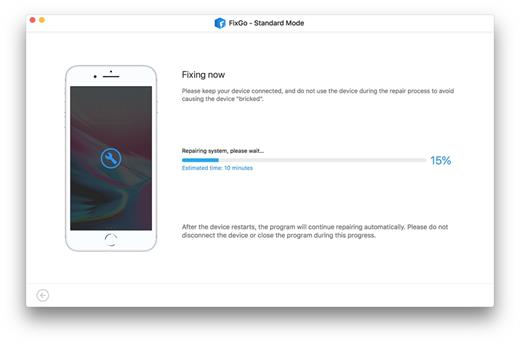
iToolab FixGo 3.6.0

Fix All iOS Problems at Home With iToolab FixGo you don’t need a technical specialist to fix various iOS system errors including:


  • An iPhone that is stuck in recovery mode
  • An iPhone stuck on the Spinning Circle
  • An iPhone stuck on the Apple Logo
  • An iPhone that won’t turn on
  • The While screen of Death
  • The Black Screen of Death
  • A frozen iPhone
  • An iPhone stuck on a Boot Loop
  • An iPhone that won’t update
  • An iPhone that will not Update Enter or Exit Recovery Mode – Free Enter or exit recovery mode in a single click, without any of the buttons on your device or affecting the data on it.
Avoid iTunes Errors FixGo is the best alternative to use when iTunes is unable to update or restore the device or when an iTunes error affects the device’s functionality. You can fix the device using the Standard Mode or the Advanced Mode.

The Standard Mode is ideal for all common iOS system issues and the Advanced mode is ideal for more serious problems. Standard Mode The Standard Mode can fix the most common problems like an iPhone that is stuck or frozen without causing data loss.

Advanced Mode The Advanced Mode is perfect for those stubborn problems the Standard Mode could not fix.

It often causes data loss. What Can I do with my Free Trial? The free trial version of FixGo allows you to enter or exit recovery mode in a single click for free, without needing to press any buttons on the device. The free trial version will also

Allow to go through the whole process of fixing the device either using Standard Mode or Advanced Mode, but with a limitation on the final step. You can therefore use the free trial version to determine if the program is compatible with the device and the computer before purchasing the full version.

What’s New

Version 3.6.0:


  • Release notes were unavailable when this listing was updated.
Compatibility

OS X 10.10 or later, 64-bit processor


Release Name: iToolab FixGo 3.6.0
Size: 11.1 MB
Links: HOMEPAGE – NFO – Torrent Search

Download: RAPiDGATOR

7 Comments
Nov 13

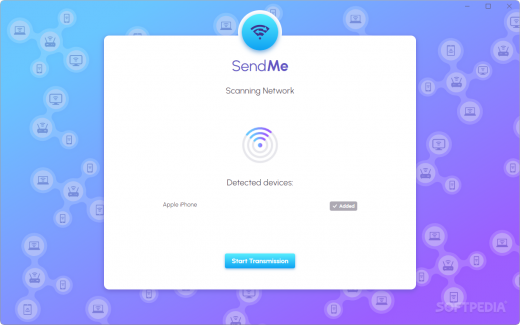
Abelssoft SendMe 2025 v1.3

for Windows/macOS

Description: Easily Share Files Between Multiple PCs and Smartphones. SendMe seamlessly connects Windows and Apple computers with iPhones and Android devices.

Overview of all functions

Seamless integration across platforms
SendMe connects Windows, Mac, Android, and iOS effortlessly. (Files can be transferred securely and quickly, regardless of the operating system.)

Drag-and-drop operation
The intuitive interface lets you easily move files using a chat-like view. (No technical knowledge is required – it's simple and straightforward.)

Optimized network speeds
SendMe utilizes your local network’s full capacity for exceptionally fast transfers. (Say goodbye to long wait times!)

Local storage security
Your data remains safe as it’s not uploaded to external servers or sent abroad. (Transfers happen exclusively within your local network, ensuring privacy.)

Direct transfers without the cloud
Files are exchanged directly through your Wi-Fi or network, bypassing cloud servers. (This guarantees maximum speed and full control over your data.)

Support for large files
No file size limitations with SendMe. (Even 4K videos or entire photo albums can be transferred effortlessly.)

Support for all major file formats
Whether it's photos, videos, documents, or music, SendMe supports all common formats, (so you can share whatever files you need.)

Release Name: Abelssoft SendMe 2025 v1.3
Size: 133.3 MB
Links: HOMEPAGE – NFO – Torrent Search

Download: RAPiDGATOR

7 Comments
Nov 12

Lungo 2.7.2

Lungo prevents your Mac from falling asleep and your screen from dimming.

Lungo can be useful when:


  • Doing a presentation at work
  • Watching YouTube videos in non-fullscreen mode
  • Reading a long article without scrolling
  • Cooking and having the recipe open on your computer
  • Using the screen to view live stats
  • Monitoring progress on a long running task
What’s New

Version 2.7.2:


  • Release notes were unavailable when this listing was updated.
Compatibility

macOS 10.12 or later, 64-bit processor


Release Name: Lungo 2.7.2
Size: 10.4 MB
Links: HOMEPAGE – NFO – Torrent Search

Download: RAPiDGATOR
5 Comments