Please REGISTER or RENEW your account on RAPiDGATOR.net and support us by doing through all RAPiDGATOR working download links on main posts...
May 20

Infuse Pro 8.4.5

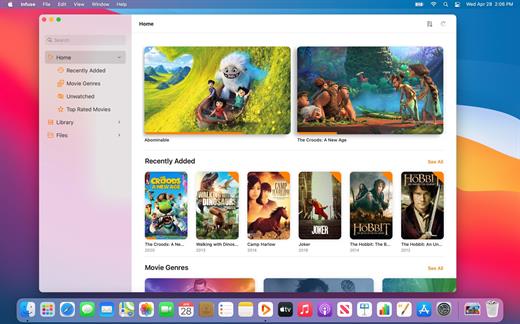
Ignite your video content with Infuse – the beautiful way to watch almost any video format on your iPhone, iPad, Apple TV, and Mac. No need to convert files! Infuse is optimized for macOS 12, with powerful streaming options, Trakt sync, and unmatched AirPlay & subtitle support. Gorgeous interface. Precise controls. And silky-smooth playback.
Play more video types

A powerful video player that plays just about anything, including the standard MP4, M4V and MOV – plus MKV, AVI, WMV, MTS, ISO, VIDEO_TS, FLV, OGM, OGV, ASF, 3GP, DVR-MS, WebM, and WTV. Includes fully certified Dolby® Digital Plus (AC3/E-AC3), DTS® and DTS-HD® audio.

Stream from other devices

Browse and play videos stored on your Mac, PC, NAS, Wi-Fi hard drive, apps like Plex, Emby, and Jellyfin, or from cloud services like Dropbox, Google Drive, OneDrive, Box, pCloud, Yandex.Disk, and Mega.nz – no syncing required!

Trakt 2-way sync

Connect with Trakt to sync watched history, submit ratings and post comments.

Optimized subtitles powered by opensubtitles

Bring your own subtitles, or download them on the fly (for free) in virtually any language.

The basics:


  • Silky-smooth video player (plays full 4K w/ HDR & Dolby Vision)
  • Stream from a Mac, PC, NAS or Wi-Fi enabled hard drive
  • Connect with Plex, Emby, Jellyfin, Kodi (XBMC), WMC and other media servers
  • Beautiful layout with quick access to video info
  • Artwork and metadata added automatically
  • Picture-in-Picture
  • Spatial audio
Supported formats:

  • Video: 3GP, AVI, ASF, BDMV, DIVX, DVDMEDIA, DVR-MS, FLV, ISO, M4V, MKV, MOV, MP4, M2TS, MTS, OGM, OGV, TP, TS, VIDEO_TS, WEBM, WMV, WTV
  • Audio: AAC, AC3/E-AC3, DOLBY TRUEHD, DTS, DTS-HD MA, FLAC, MP3, OGG, PCM, WMA
  • Subtitles: DVB, DVDSUB, MICRODVD, MPL2, PGS, SMI, SSA/ASS, SRT, SUB, TIMED TEXT, TMP, TXT, VOBSUB, VTT, XSUB
Player features:

  • Multiple audio tracks
  • Chapters
  • Gesture controls
  • 8 video zoom options
  • Continuous playback
  • Deinterlacing
Extras:

  • Library organization
  • Folders
  • One-click subtitle downloads from OpenSubtitles
  • Scrobble plays to Trakt
  • Download videos from networked devices
  • Drag and drop uploads via web browser
  • Get extra onboard storage by adding USB drives
Get more with infuse pro!

  • Play even more video formats
  • Enjoy Dolby® Digital Plus (AC3/E-AC3), DTS® and DTS-HD® mobile surround sound
  • Stream a wide variety of video types over AirPlay and Google Cast
  • Access videos stored in cloud services like Dropbox, Google Drive, Box, OneDrive, pCloud, Yandex.Disk, and Mega.nz
  • Sync libraries, settings, watched history, and playback progress between devices
What’s New

Version 8.4.5:


  • Release notes were unavailable when this listing was updated.
Compatibility

macOS 11.0 or later.
Apple Silicon or Intel Core processor


Release Name: Infuse Pro 8.4.5
Size: 107.4 MB
Links: HOMEPAGE – NFO – Torrent Search

Download: RAPiDGATOR

6 Comments
May 20

Looq 1.4.1

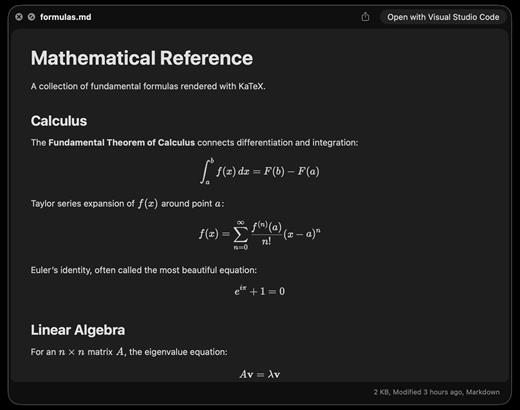
A better look at your files. Preview Markdown with KaTeX and Mermaid, highlight 190+ languages, view CSV and SQLite tables, browse archives and folders. All from Quick Look.
macOS 14 (Sonoma) or later

Markdown
Full GFM rendering with rich formatting support.


  • Live rendering on file save
  • KaTeX math (inline and block)
  • BeautifulMermaid diagrams
  • Syntax-highlighted code blocks
  • GitHub Alerts and emoji shortcodes
  • Auto table of contents sidebar
  • Remote image caching
  • Scroll position memory
Source Code
Syntax highlighting for 190+ languages.

  • Progressive rendering
  • Auto-format JSON, CSS, XML, SVG, plist
  • Configurable line numbers
  • Custom fonts, size, and weight
  • Tab width and word wrap
  • Independent light and dark themes
  • Shebang detection
Data Files
Native table views for structured data.

  • Resizable CSV and TSV columns
  • Alternating row colors
  • SQLite multi-table preview
  • Column type and constraint tooltips
  • Color-coded diff/patch
  • Multi-file tab switching
  • Large file truncation
Archives and Folders
Browse compressed files and directories.

  • ZIP and TAR directory tree
  • Pure Swift binary parsing
  • File size, date, and type columns
  • Sortable column headers
  • Folder preview with Spotlight metadata
  • Configurable display columns
  • Finder tag support
What’s New

Version 1.4.1:


  • Release notes were unavailable when this listing was updated.
Compatibility

macOS 14 (Sonoma) or later


Release Name: Looq 1.4.1
Size: 17.3 MB
Links: HOMEPAGE – NFO – Torrent Search

Download: RAPiDGATOR
6 Comments
May 20

Folder Preview Pro 2.10.1

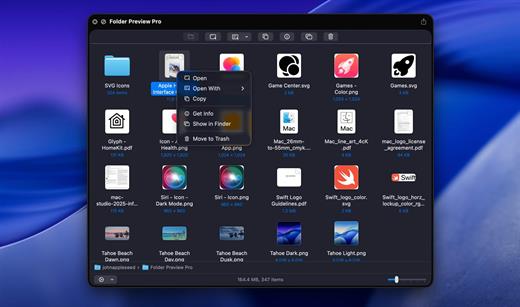
Folder Preview is a macOS Quick Look extension that enables users to preview the contents of folders directly in Finder without opening them. By selecting a folder and invoking Quick Look (e.g., pressing the spacebar), it displays a visual representation of the files and subfolders inside, leveraging the native Quick Look framework for seamless integration.

What’s New

Version 2.10.1:


  • Release notes were unavailable when this listing was updated.
Compatibility

macOS 13 or later


Release Name: Folder Preview Pro 2.10.1
Size: 8.8 MB
Links: HOMEPAGE – NFO – Torrent Search

Download: RAPiDGATOR

6 Comments
May 20

UPDF 2.5.2

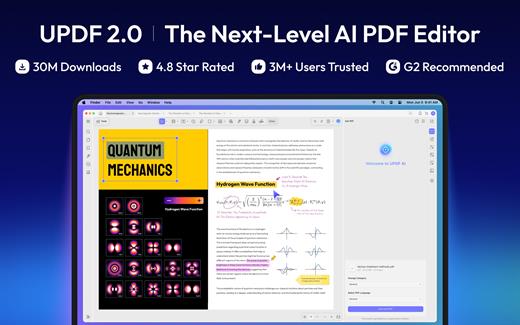
UPDF is an all-in-one AI-integrated PDF editor software that you can use to AI chat with PDF, edit, annotate, convert PDFs, and more. One UPDF license allows you to use it across all platforms, including macOS/iOS/iPadOS (universal purchase).

FEATURES

AI Assistant


  • Powered by GPT-5 and Full DeepSeek (R1).
  • AI chat with your PDF to summarize, translate full PDFs without losing format, and get answers related to the PDFs.
  • Convert PDFs to mind maps.
  • Chat with images and ask any questions about the images.
  • Ask any prompts and get answers from AI.
Edit PDFs

  • Edit text in PDF to change the properties of the text, such as the color, font, size, etc.
  • Edit images in PDF to change the size, crop, rotate, extract, replace, delete, etc.
  • Add or remove links to the web or a page.
Annotate PDFs

  • Highlight, underline, strikethrough, or squiggly the text in PDFs.
  • Add sticky notes, text boxes, text comments, text callouts, or shapes to PDFs.
  • Free-hand drawing within a PDF.
  • Add stamps, stickers, and signatures to PDFs.
  • Measure PDF.
UPDF Cloud

  • Sync files across different devices and platforms.
OCR (This feature is NOT AVAILABLE on the Mac App Store. To use OCR, you can download from https://updf.com.)

  • Convert scanned PDFs or images into searchable and editable PDFs or vice versa.
  • Can recognize text in 38 languages.
Convert PDFs

  • Convert PDFs to: DOCX, XLSX, and PPTX.
  • Convert PDFs to image: PNG, JPEG, BMP, TIFF, and GIF.
  • Convert PDFs to TXT, RTF, CSV, HTML, and XML.
Organize PDF Pages

  • Insert, replace, extract, split, rotate, remove, and reorder the pages in PDFs
  • Crop or extend page margins.
  • Split a long single page into multiple pages.
Protect PDFs

  • Add an open or permission password to protect PDFs from opening, copying, editing, and printing.
Prepare Form

  • Create fillable PDF forms by adding interactive form fields.
  • Fill PDF forms and add an e-signature.
  • Add digital signatures to prove the sender’s identity.
Batch Process PDFs

  • Support batch process to convert, merge, OCR, compress, print, create, insert, and encrypt PDFS
  • Support batch process to add or remove backgrounds, watermarks, header & footer, and Bates numbering in multiple PDFs
  • Batch Remove text markup, measurements, stamps, form fields, and signatures.
Read and Print PDFs

  • View PDF single page or two-page view/scrolling.
  • Text-to-speech.
  • Search and find text.
  • Slideshow PDF.
  • Support light and dark mode.
  • Add and manage bookmarks.
  • Print PDFs.
Create PDFs

  • Create a blank PDF with different backgrounds or from Word/Excel/PPT/image/CAJ/Paperwork/selection capture/window capture/screen capture/clipboard/scanner.
MORE

  • Share PDF via link, QR code, or email.
  • Compare PDFs.
  • Redact sensitive information in PDF.
  • Add, edit, or remove watermarks from PDFs.
  • Edit the background for PDFs.
  • Edit the header and footer from PDFs.
  • Save as PDF/A.
  • Flatten PDFs.
Note: AI features won’t work

What’s New

Version 2.5.2:


  • Release notes were unavailable when this listing was updated.
Compatibility

macOS 11.0 or later.


Release Name: UPDF 2.5.2
Size: 128.1 MB
Links: HOMEPAGE – NFO – Torrent Search

Download: RAPiDGATOR
6 Comments
May 20

DockPops 4.0

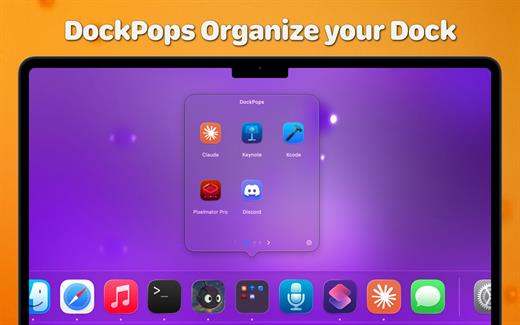
DockPops is a powerful productivity tool designed to streamline your macOS experience by bringing iPhone-style organization to your Dock. It allows you to declutter your workspace by grouping apps, files, and folders into “Pops”—interactive, customizable popover menus.

Key Features


  • iPhone-Style Folders: Organize your most-used items into clean folders that live directly in your Dock.
  • Launch with Speed: Click a Pop to instantly access a grid of apps or use the “Open All” feature to launch an entire project workflow with a single click.
  • File & Folder Support: Beyond just apps, you can add documents and directories, complete with QuickLook previews for easy identification.
  • SmartyPops (Premium): Leverage on-device AI to receive smart suggestions for items you might need based on your usage patterns.
  • MultiPops & Shortcuts: Create multiple independent Dock icons for different categories (e.g., “Work,” “Gaming,” or “Design”) and trigger them via Siri or Spotlight.
  • Private by Design: DockPops runs entirely locally. There is zero data collection, no tracking, and no network access required.
What’s New

Version 4.0:


  • Release notes were unavailable when this listing was updated.
Compatibility

macOS 14.0 or later.


Release Name: DockPops 4.0
Size: 14.4 MB
Links: HOMEPAGE – NFO – Torrent Search

Download: RAPiDGATOR

6 Comments
May 20

Ghost Buster Pro 5.0.3

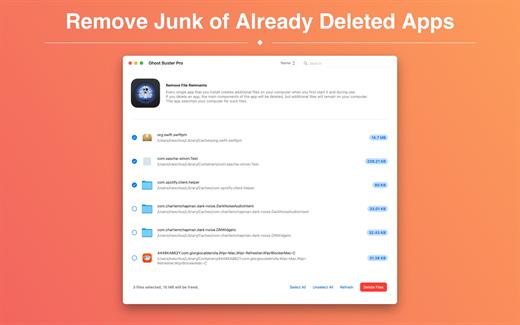
Ghost Buster Pro finds and deletes files from apps you’ve already uninstalled. The app is lightning fast and frees memory in no time.

Many apps are installed on a computer, but they usually only stay on your computer for a short time. Each app creates files, but deleting the app does not remove them.
This leads to a large number of files accumulating over time, which take up valuable storage space.
Ghost Buster Pro searches your computer for exactly such files and can also delete them directly if you wish.

Ghost Buster Pro offers the following features:

Fast Search

Ghost Buster Pro quickly scans your computer for data from previously deleted apps. You can have them deleted with one click.

Extremely easy handling

Ghost Buster Pro couldn’t be simpler. The search is started immediately after the app is started. You can now delete files with just one click.

No automatic deletion

Ghost Buster Pro does not delete any data without your consent. Choose for yourself which data is deleted and which you want to keep.

What’s New

Version 5.0.3:


  • Release notes were unavailable when this listing was updated.
Compatibility

macOS 11.5 or later
Apple Silicon or Intel Core processor


Release Name: Ghost Buster Pro 5.0.3
Size: 7.6 MB
Links: HOMEPAGE – NFO – Torrent Search

Download: RAPiDGATOR
6 Comments
May 20

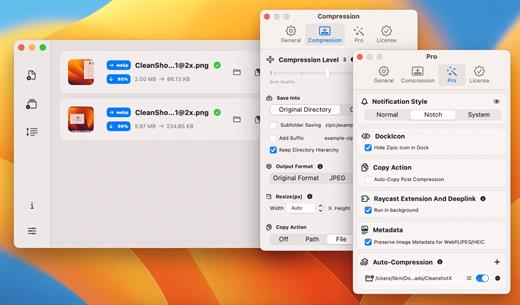
Zipic 1.9.6

Zipic is a native macOS application designed for efficient, high-quality image compression. It lets users shrink image files locally, with no uploads or dependency on the cloud. All processing happens on your own device—so your privacy and speed stay intact.

Key Features and Highlights:


  • High Compression, Near-Lossless Quality: Zipic utilizes powerful compression algorithms to achieve a high compression ratio with minimal perceived quality loss, making the compressed image virtually indistinguishable from the original.
  • Fast & Local Processing: Being a native macOS application, all image processing occurs locally on your device. This ensures lightning-fast performance, efficient handling of massive batches, and high data privacy with no cloud uploads or network dependence.
  • Comprehensive Format Support: The tool supports a wide range of formats, including basic ones like JPEG, PNG, WebP, HEIC, and GIF, and Pro formats like AVIF, JXL, TIFF, and ICNS.
  • Effortless Workflow: It offers multiple simple compression methods, including drag-and-drop, folder monitoring, and Finder integration (right-click).
  • Custom Control: Users can create custom presets for different quality levels and scenarios, allowing for precise control over the compression outcome.
  • Pro Features for Automation: Advanced features include Clipboard auto-compress, Folder Watch for automated compression in specific directories, and integration options like Raycast Extension and Apple Shortcuts.
Zipic aims to be the seamless solution for developers, designers, bloggers, and photographers who need to optimize and compress images efficiently.

What’s New

Version 1.9.6:


  • Release notes were unavailable when this listing was updated.
Compatibility

macOS 13.0 or later


Release Name: Zipic 1.9.6
Size: 20.8 MB
Links: HOMEPAGE – NFO – Torrent Search

Download: RAPiDGATOR

6 Comments
May 19

LookAway 2.1.2

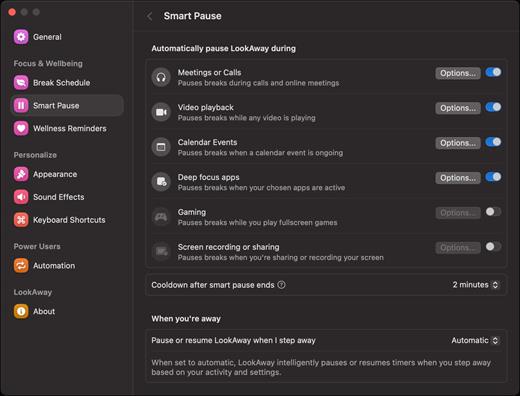
LookAway puts your mac in rest mode at regular intervals to help you rest your eyes. It’s gentle, smart, and fully customizable.

Features:


  • Regular eye breaks
  • Pre-Break Alert
  • At your fingertips
  • Fully customizable
  • Intelligent Pausing
  • Delightful Design
What’s New

Version 2.1.2:


  • Added a new compact design for break reminder notifications. The compact design shows the most essential information, and the rest of the information is visible on hover. You can switch it from the Break Schedule settings.
  • Added flexible scheduling options to office hours. This lets you customize the office hours for each day separately. Head over to Break Schedule → Office Hours to set it up!
Compatibility

macOS 12 or later


Release Name: LookAway 2.1.2
Size: 27.1 MB
Links: HOMEPAGE – NFO – Torrent Search

Download: RAPiDGATOR
4 Comments
May 19

Wirecast Pro 16.5.2

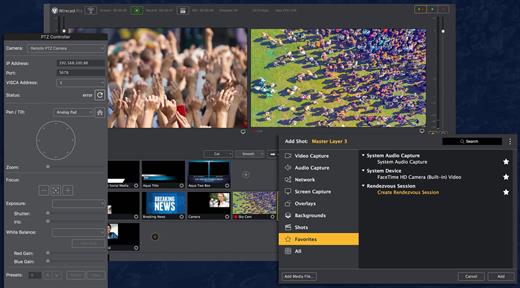
Wirecast is an all-in-one live streaming production application that provides the required tools to capture video, encode it and broadcast it to multiple servers and platforms at the same time.

Support for a wide variety of camera models

You can use Wirecast with an unlimited number of camera inputs ranging from web cams to DV/HDV, SDI cameras to IP and web-based sources and wireless devices. You just have to plugin your device and Wirecast will automatically recognize it as a live feed.

The supported input sources include USB, Web cams, SDI, composite, S-Video, DV/HDV, Component, HD-SDI, HDMI sources, IP Cameras, ONVIF, Web stream source and screen capture sources.

What is more, you can use Desktop Presenter to broadcast your own desktop if you need to display Keynote or PowerPoint presentations, product demonstrations, online interviews or game streams.

Layer-based editing system

Moreover, Wirecast features support for up to 35 layers of live compositing. Hence, you can effortlessly place watermarks, background music and other visual elements over your webcast.

As expected, you can also add titles and lower thirds, with more than 30 built-in professional looking broadcast title themes. You just have to select the one that fits your content, type in the text and apply it to your broadcast.

You can also use well-designed transitions to switch from different sources and generate effects and transitions in real time.

Live stream

By using Wirecast, you can easily stream to multiple destinations using different bitrates at the same time. Thus, you can stream in both SD and HD to a live streaming service and even your own internal streaming server.

You can stream and or save your production to your Mac’s hard disk if you intend to archive the video or distribute it on-demand. Wirecast’s External Display Output feature helps you display your live Wirecast stream on an external monitor for your in-house audience.

What’s New

Version 16.5.2:


  • Release notes were unavailable when this listing was updated.
Compatibility

macOS 11.0 or later


Release Name: Wirecast Pro 16.5.2
Size: 824 MB
Links: HOMEPAGE – NFO – Torrent Search

Download: RAPiDGATOR

5 Comments
May 19

Soulver 3.16.2

Soulver 3 is a smart notepad with a built-in calculator. It gives instant answers to any calculations it finds in your text. It’s a better way to work stuff out than with a traditional calculator, and a more lightweight tool for quick calculations than a spreadsheet.

Math Features


  • Instant calculations, no equals required
  • Use words alongside numbers, so calculations make sense
  • Quick totals of all your lines, and subtotals
  • Calendar calculations (June 9 + 3 weeks, 3:35 pm + 6 hours 27 minutes)
  • Easy percentages (“$300 – 10%”, “30 as a % of 200”)
  • Unit conversions (“10 kg in pounds, “25 meters in feet”)
  • 168 live real-world and cryptocurrency rates.
  • Line references to build little calculating documents
  • Variables & variable autocompleting
  • Global variables & custom units
App Features

  • Dark mode
  • Sidebar for organising your sheets and the ability to make folders
  • Headings (#), comments (//) & labels (:)
  • Customize your syntax coloring & font
  • Automatic number formatting, with spaces around operators and thousand separators
  • Number scrubbing (hold shift and hover over a number)
  • Deep macOS system integration: Touch Bar support, Quicklook, Calculate anywhere services
  • Automation tools: a command-line interface, Alfred workflow, Automator action
What’s New

Version 3.16.2:


  • Release notes were unavailable when this listing was updated.
Compatibility

macOS 10.14.4 or later, 64-bit processor


Release Name: Soulver 3.16.2
Size: 20.7 MB
Links: HOMEPAGE – NFO – Torrent Search

Download: RAPiDGATOR
4 Comments