Please REGISTER or RENEW your account on RAPiDGATOR.net and support us by doing through all RAPiDGATOR working download links on main posts...
May 19

AudiBar 2.2.0

Simple audio playback and live streaming from your menu bar. No library management, no complexity. Just drag, drop, and play files or tune into internet radio.

AudiBar: Menu Bar Audio Playback and Streaming Made Simple

Stop fighting with bloated music apps. AudiBar lives in your menu bar and does two things exceptionally well: plays your audio files instantly and streams internet radio effortlessly. No library management, no cloud sync, no subscriptions. Just drag a file onto the menu bar and it plays, or add radio stations for instant streaming.

Premium Features (One-Time Purchase)


  • Playlist management with visual track list and playback controls
  • Seek slider with previous/next track buttons
  • Current time display with elapsed and total duration
  • Playlist sorting by title or duration
  • Drag folders to create playlists instantly
  • Auto-play next track with seamless transitions
  • Shuffle mode for randomized playback
  • Unlimited tracks per playlist
  • Add currently playing track to playlist
  • Persistent playlists across restarts
  • Visual highlighting of currently playing track
  • Internet radio streaming with saved stations
  • Stream list panel with management options
  • Multiple streaming formats: M3U/M3U8, PLS, XSPF, ASX/WAX, RSS/XML, direct URLs
  • Smart track naming with metadata extraction or filename display
  • Configurable settings panel
  • Tooltips for all controls
Free Features

  • Instant playback from menu bar
  • Drag-and-drop file loading
  • Play/pause controls with real-time progress
  • Time display
  • File picker for browsing
  • All major audio formats supported
  • iCloud Drive support with smart loading
  • Scrolling display for long filenames
  • Clean, distraction-free interface
  • Context menu for quick actions
  • Remembers last played track or stream
  • Native macOS window controls
What’s New

Version 2.2.0:


  • Release notes were unavailable when this listing was updated.
Compatibility

macOS 13.5 or later.


Release Name: AudiBar 2.2.0
Size: 6.4 MB
Links: HOMEPAGE – NFO – Torrent Search

Download: RAPiDGATOR

4 Comments
May 19

Structured 4.4.9

A visual daily planner to organize tasks, routines, and habits. Stay focused, reduce overwhelm, and plan your day in one clear timeline.

Finally take control of your day.
Plan with a clear visual timeline that brings your calendar, to-dos, routines, and habits together.

Join over 1.5 million active planners who feel calmer, focus faster, and get more done — every single day.

Perfect for work, study, travel, and busy ADHD minds. Plan in minutes and stay focused all day.


  • Organize your day and week in an intuitive timeline
  • Capture ideas instantly in Inbox and sort them later
  • Sync across iPhone, iPad, Apple Watch and Mac
  • Break big projects down with notes & sub-tasks
  • Stay on track with a Pomodoro focus timer, Live Activities, and interactive widgets
  • Personalize your planner with color-coding and hundreds of icons
  • Benefit from accessibility features like VoiceOver, Voice Control, a dyslexia-friendly font, and multiple languages
  • Get a complete overview by connecting your calendars and Reminders
  • Build recurring tasks & routines that actually stick
  • Powered by AI, draft your day in seconds
  • Replan, automatically reschedules missed or forgotten tasks
  • Customize notifications to match your workflow
What’s New

Version 4.4.9:


  • Release notes were unavailable when this listing was updated.
Compatibility

macOS 14.0 or later.


Release Name: Structured 4.4.9
Size: 75.3 MB
Links: HOMEPAGE – NFO – Torrent Search

Download: RAPiDGATOR

6 Comments
May 19

MP3 Encoder 2.20.0

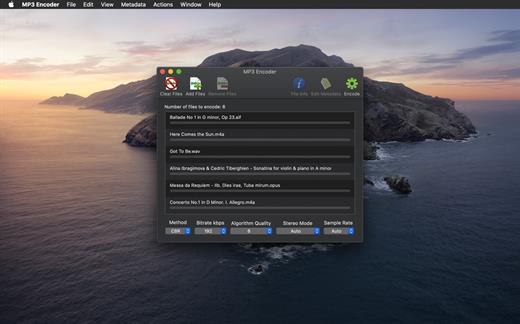
MP3 Encoder enables you to convert a variety of audio formats to MP3 using a simple front-end to the high-quality LAME encoder. MP3 Encoder can also be used as a simple MP3 tag editor!

Features


  • Supports Multi-Threading! Encode multiple MP3s at once, up to the number of processor cores your system has.
  • Reads and Writes Meta-data! Reads meta-data from the source file and writes it to the MP3 file. You can also enter your own meta-data via a pull-out drawer.
  • Converts songs bought on iTunes to MP3 and retains the metadata.
  • Edit metadata of existing MP3 files without re-encoding.
  • Also supports re-encoding exsting MP3 files.
  • MP3s are written to the same folder as the source file by default, but you can specify an alternate output folder in the preferences.
Currently supported source formats

  • AIF
  • WAV
  • FLAC
  • MP3
  • M4A – Apple Lossless
  • M4A – AAC
  • MP4 – AAC
  • WMA
  • RA – Real Audio
  • RM – Real Media
Note: WMA Lossless and DRM Protected files are not supported.

What’s New

Version 2.20.0:


  • Release notes were unavailable when this listing was updated.
Compatibility

macOS 10.14.6 or later


Release Name: MP3 Encoder 2.20.0
Size: 18.9 MB
Links: HOMEPAGE – NFO – Torrent Search

Download: RAPiDGATOR

4 Comments
May 19

Final Cut Pro 12.2 fix

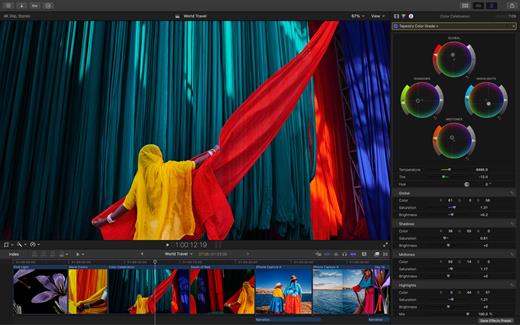
Redesigned from the ground up, Final Cut Pro combines revolutionary video editing with a powerful media organization and incredible performance to let you create at the speed of thought.

Revolutionary Video Editing


  • The Magnetic Timeline uses advanced metadata for faster, easier editing
  • Enhanced Timeline Index lets you drag and drop audio roles to rearrange the layout of your timeline
  • Use Clip Connections to attach B-roll, sound effects, and music to the timeline
  • Reduce clutter by grouping clips into a Compound Clip
  • Edit multicamera projects with automatic syncing and support for up to 64 camera angles
  • Automatically transform projects for square or vertical delivery with Smart Conform
  • Import and edit 360° equirectangular video in a wide range of formats and frame sizes
  • Create, edit, and deliver closed captions from within Final Cut Pro
  • Extend the capabilities of Final Cut Pro with third-party workflow extensions
Powerful Media Organization

  • Organize your work within libraries for efficient media management and collaboration
  • Create proxy copies of your media for portability and performance
  • Content Auto-Analysis captures camera metadata and analyzes shots in the background
  • Create and apply custom keywords or favorites on the fly as you select clip ranges
  • Smart Collections dynamically organize content for you to quickly find any shot in a few clicks
Incredible Performance

  • Improved performance and efficiency on Mac computers with Apple silicon
  • Harness the power of the Mac Pro and Afterburner for realtime 8K editing
  • Modern Metal engine improves playback, rendering, and compositing on all Macs
  • Final Cut Pro uses all the GPUs in your Mac for superior real-time playback performance and fast background rendering
  • Work with a broad range of formats including ProRes, RED, XAVC, AVCHD, Avid DNxHR®, Avid DNxHD®, H.264, HEVC, and more
Compelling, Customizable Effects

  • Beautifully animated, easily customizable 2D and 3D titles
  • Change the look of titles, transitions, and effects using intuitive controls
  • Choose from an ecosystem of third-party FxPlug plug-ins with custom interfaces
Integrated Audio Editing

  • Assign roles – including dialogue, music, effects, and custom choices – during import to easily track and organize your project
  • Expand and edit multichannel audio files directly in the timeline
  • Sync video with separate audio in a single step with instant audio waveform matching
Intuitive Color Grading

  • Import, edit, and deliver video in standard color spaces, or in wide Rec. 2020 color space
  • Use Pro Display XDR to accurately view HDR video
  • Powerful color wheels and curves for precise adjustments with keying and masks
One-Step, Optimized Output

  • Incredibly fast export for playback on Apple devices and upload to websites such as Vimeo and YouTube
  • Export audio stems and multiple versions of a finished video using roles metadata
  • Import and export XML for third-party workflows like color grading and sound mixing
What’s New

Version 12.2:


  • Powerful Intelligence
  • Use Transcript Search to quickly find spoken words or phrases in your footage by searching for exact matches or using natural language descriptions*
  • Discover Visual Search, a fast and easy way to locate moments in your footage, including objects and actions, using natural language*
  • Let Beat Detection analyze any song to reveal its bars and beats, enabling you to easily align your video edits to the music’s rhythm
  • Get Started Fast
  • Dive into editing with a special demo project featuring the talented singer-songwriter Allie Sherlock, and explore the exciting new features of Final Cut Pro firsthand
  • Accelerate your next edit with in-app guides on how to create a new library, import media, and add clips to a new timeline
  • Requires a Mac with Apple silicon
Compatibility

macOS 15.6 or later.


Release Name: Final Cut Pro 12.2 fix
Size: 5.5 GB
Links: HOMEPAGE – NFO – Torrent Search

Download: RAPiDGATOR
1 Comments
May 19

myTracks 4.4.8

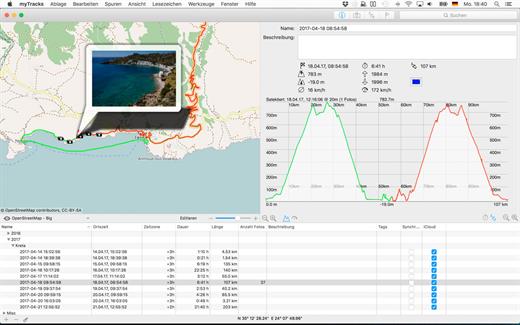
myTracks is the Swiss-Army knife for organizing your GPS tracks. They can be loaded from a broad range of devices and organized in a library comfortably.

Once imported you can drag-and-drop photo files to myTracks and they will be assigned to the GPS tracks automatically (Geotagging). If you organize your photos in iPhoto, Aperture or Lightroom myTracks automatically updates the location information. myTracks can handle both JPEG and RAW file formats.

myTracks comes with a free iPhone app which lets you use your iPhone as a GPS logger and easily synchronize these tracks with the desktop edition of myTracks.

What’s New

Version 4.4.8:


  • Release notes were unavailable when this listing was updated.
Compatibility

macOS 10.13.6 or later


Release Name: myTracks 4.4.8
Size: 52 MB
Links: HOMEPAGE – NFO – Torrent Search

Download: RAPiDGATOR

5 Comments
May 19

Default Folder X 6.2.8

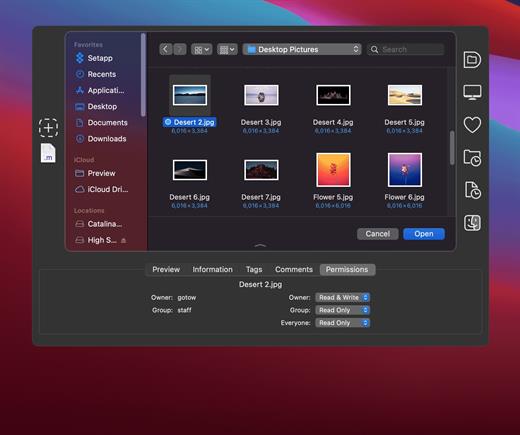
Default Folder X attaches a toolbar to the right side of the Open and Save dialogs in any OS X-native application. The toolbar gives you fast access to various folders and commands. You just click on the buttons to go to your favorite and recently used folders, manage the folders and files shown in the list, and make changes to your settings. It also fixes a number of problems in Open and Save dialogs, “rebounding” to the last selected file, putting the path listing back in the top menu, and correcting bugs in scrolling column views.

Features


  • Directory assistant: You can access the contents of your recent, favorite, and open folders right from Default Folder X’s toolbar.
  • Real time saving: If you’re constantly saving things inside the same folder, Default Folder X can remember that folder for you.
  • Finder management: Default Folder X lets you open up or save to any Finder window with a single click.
  • Instant Recall: To help you quickly return to folders you’ve recently used, Default Folder X remembers them for you.
  • Spotlight on the spot: Default Folder X lets you add Spotlight keywords, OpenMeta tags, and Finder labels on the spot, while you’re still in the Save dialog.
  • Information central: With Default Folder X you get previews below every Open dialog, expanded to fill the available space. Need to see more detail? Click on the image and it zooms up to full size.
  • Workflow without work: Rather than make you learn and set up a new application, Default Folder X blends into OS X.
What’s New

Version 6.2.8:


  • Release notes were unavailable when this listing was updated.
Compatibility

macOS 10.13 or later
Apple Silicon or Intel Core processor


Release Name: Default Folder X 6.2.8
Size: 31.9 MB
Links: HOMEPAGE – NFO – Torrent Search

Download: RAPiDGATOR
4 Comments
May 19

RAR Extractor Max – Unzip File 13.3

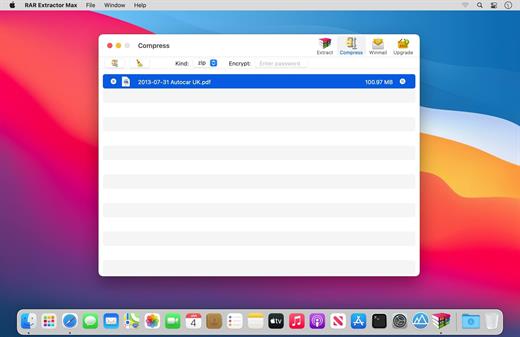
“RAR Extractor Max” inherited the advantages of “RAR Extractor Pro”, we redesigned the UI and added more powerful functionalities.


  • Support unarchive RAR, winmail.dat, ZIP, 7z, tbz, sti, tar, xar, lha, lzh, hqx, bin, bz2, bzip2, bz, xz, iso, cid, nrg, mdf, taz, lzma, exe, msi, cpio, lzx, jar, swf, xip, ace, arj, pak, pkg, apk, lbr, lqr, cab, rpm, cpt, sea, pdf, nsa, dcs, now, spk…
  • Support archive files and folder to encrypted zip&7z
  • Quicklook files in archive before extraction.
MAIN FEATURES

  • Extract extract compressed files in all most formats(over 50 formats).
  • Unzip, unrar encrypted archives.
  • Preview and open the file in winmail.dat sent from Microsoft Outlook
  • Easy view of an archive’s file list.
  • Quicklook files in archive before extraction.
  • Unarchive & unrar the selected individual file or folder in the archive.
  • Double click to display or extract directly after setting this APP as default archiver.
  • Drag archives to the dock icon to extract or display directly.
  • Batch decompress many archives
  • Create password-protected ZIP & 7Z archives.
  • AES256 encryption algorithm to create ZIP & 7Z archives.
  • Drag the file in archive to the desktop to extract directly
What’s New

Version 13.3:


  • Release notes were unavailable when this listing was updated.
Compatibility

OS X 10.10 or later, 64-bit processor


Release Name: RAR Extractor Max – Unzip File 13.3
Size: 12.9 MB
Links: HOMEPAGE – NFO – Torrent Search

Download: RAPiDGATOR

5 Comments
May 19

Noir – Dark Mode for Safari 2026.1.5

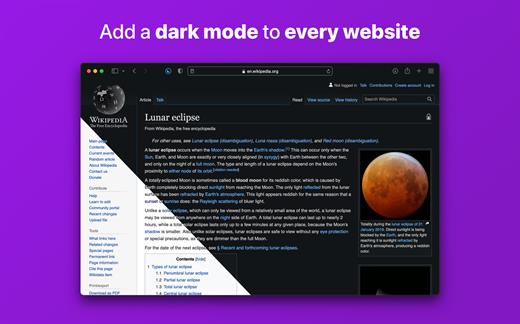
Noir is a Safari extension that automatically adds a dark mode to every website you visit.

It makes browsing the web at night so much better. With Noir, you won’t be blinded by bright websites ever again.

And the results look great too. Noir generates a custom dark style for each website you visit, based on the colors that are used on a page. You won’t even notice this happening in the background – that’s how fast it is – but you’ll certainly appreciate the end result: a beautiful dark mode tailored for each website, where contrast is preserved and highlights still pop.

Noir works with any website you visit in Safari, automatically. By default, Noir is linked to your device’s Dark Mode, so websites will only go dark when you want them to. But you can easily customize this to your liking, even per website. Only want to use Noir on just a few specific websites? Sure thing! Disable Noir on some websites? No problem!

The app feels right at home on your device. It is a Safari extension, which means there’s no need to manually activate it every time you load a new page. The app also tightly integrates with system features such as Shortcuts to fully integrate Noir in all your workflows. And your settings are automatically synced to all your devices using iCloud.

And just as importantly, Noir takes your privacy seriously: it doesn’t collect any of your browsing data. Period.

Noir is made by a solo developer. It does not include any subscriptions or ads. Buy Noir once, use it forever.

What’s New

Version 2026.1.5:


  • Release notes were unavailable when this listing was updated.
Compatibility

macOS 12.0 or later.


Release Name: Noir – Dark Mode for Safari 2026.1.5
Size: 12.6 MB
Links: HOMEPAGE – NFO – Torrent Search

Download: RAPiDGATOR
4 Comments
May 19

zFuse Pro – Player For Everything 1.7.58

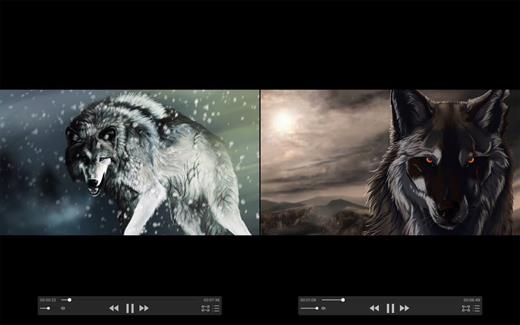
zFuse Pro macOS version, with iOS version of the same light, simple and powerful.

The following is a characteristic:


  • Simultaneously open multiple instances.
  • Video rotation, you can watch movies lying down.
  • Hardware acceleration.
  • Supports HDR Tone Mapping on non-HDR display.
  • Media preview in seeking.
  • Built-in audio enhancement.
  • Multi Soundtrack selection.
  • Embedded/External subtitle-track selection.
  • Subtitle synchronization.
  • Support for external subtitle font selection .
  • 0.5x-3.0x playback speed control.
  • 0.5x-5.0x zoom screen.
  • Can directly load Blu-ray ISO to play.
  • Support audio output format switching.
  • Support audio output sample rate switching.
  • Support audio output channels switching.
Function/Shortcut key

  • Double click: full screen/quit full screen.
  • Space: pause/play.
  • Shortcuts: See the items under the “Control” menu.

  • Supported video formats : MP4, MOV, MKV, AVI, WMV, FLV, RMVB, ASF,OGV and so on.
  • Supported audio formats : MP3, WAV, WMA, FLAC, APE and so on.
  • Support subtitle format : SRT, SSA, ASS.
  • Supported image formats : JPG, PNG, BMP,TIFF etc.
  • Supported playlist formats : M3U/M3U8/PLS/TXT/DPL.
What’s New

Version 1.7.58:


  • Release notes were unavailable when this listing was updated.
Compatibility

macOS 10.13 or later


Release Name: zFuse Pro – Player For Everything 1.7.58
Size: 60 MB
Links: HOMEPAGE – NFO – Torrent Search

Download: RAPiDGATOR

3 Comments
May 19

EdgeView 5.8.5

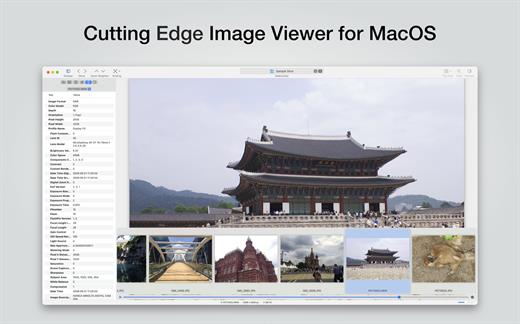
EdgeView 5 is fast image viewer has elegant user interface. EdgeView 5 is developed and designed for modern MacOS. It can open various image files such as JPEG, PNG, TIFF, BMP, and RAW file of DSLR, EPS and PDF, AI(Adobe Illustrator). Can open image files in archive directly without extraction.

User can open files, rename files, delete files from EdgeView’s file browser. Also can access to SMB/AFP/FTP network volume.

User can navigate images quickly by using keyboard shorcut, mouse wheel, trackpad gesture. EdgeVew show EXIF information, play animation GIF/PNG/WebP smoothly. Save last status to history, and restore when reopen file.

EdgeView 5 will be the best choice when viewing and managing image files.

What’s New

Version 5.8.5:


  • Release notes were unavailable when this listing was updated.
Compatibility

macOS 11.1 or later
Apple Silicon or Intel Core processor


Release Name: EdgeView 5.8.5
Size: 145.6 MB
Links: HOMEPAGE – NFO – Torrent Search

Download: RAPiDGATOR
3 Comments