Please REGISTER or RENEW your account on RAPiDGATOR.net and support us by doing through all RAPiDGATOR working download links on main posts...
Sept 16

Noir – Dark Mode for Safari 2025.2

Noir is a Safari extension that automatically adds a dark mode to every website you visit.
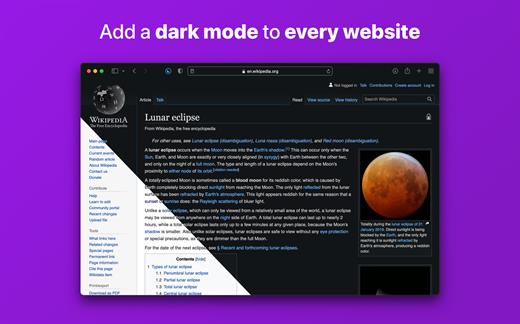
It makes browsing the web at night so much better. With Noir, you won’t be blinded by bright websites ever again.

And the results look great too. Noir generates a custom dark style for each website you visit, based on the colors that are used on a page. You won’t even notice this happening in the background – that’s how fast it is – but you’ll certainly appreciate the end result: a beautiful dark mode tailored for each website, where contrast is preserved and highlights still pop.

Noir works with any website you visit in Safari, automatically. By default, Noir is linked to your device’s Dark Mode, so websites will only go dark when you want them to. But you can easily customize this to your liking, even per website. Only want to use Noir on just a few specific websites? Sure thing! Disable Noir on some websites? No problem!

The app feels right at home on your device. It is a Safari extension, which means there’s no need to manually activate it every time you load a new page. The app also tightly integrates with system features such as Shortcuts to fully integrate Noir in all your workflows. And your settings are automatically synced to all your devices using iCloud.

And just as importantly, Noir takes your privacy seriously: it doesn’t collect any of your browsing data. Period.

Noir is made by a solo developer. It does not include any subscriptions or ads. Buy Noir once, use it forever.

What’s New

Version 2025.2:


  • Release notes were unavailable when this listing was updated.
Compatibility

macOS 12.0 or later.


Release Name: Noir – Dark Mode for Safari 2025.2
Size: 11.9 MB
Links: HOMEPAGE – NFO – Torrent Search

Download: RAPiDGATOR

7 Comments
Sept 16

A Better Finder Rename 12.15

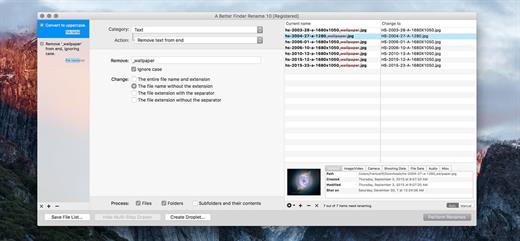
A Better Finder Rename is the most complete renaming solution available on the market today. That’s why, since 1996, tens of thousands of hobbyists, professionals and businesses depend on A Better Finder Rename to organize and maintain files.

The Instant Preview feature eliminates guesswork and costly errors and helps you find the right settings quickly and accurately by providing as-you-type feedback.

A Better Finder Rename offers a complete set of renaming options that are organized into 15 categories covering all the text, character, position, conversion and truncation features that you would expect from a file renamer, but it does not stop there. The multi-step renaming feature allows multiple renaming steps to be combined to deal with complex renaming jobs in a single operation. Unlike other tools, A Better Finder Rename allows any number of renaming actions to be combined, re-ordered, copied and deleted.

What’s New

Version 12.15:


  • Release notes were unavailable when this listing was updated.
Compatibility

macOS 10.13 or later
Apple Silicon or Intel Core processor


Release Name: A Better Finder Rename 12.15
Size: 15.6 MB
Links: HOMEPAGE – NFO – Torrent Search

Download: RAPiDGATOR
8 Comments
Sept 16

Kaleidoscope 6.3.0

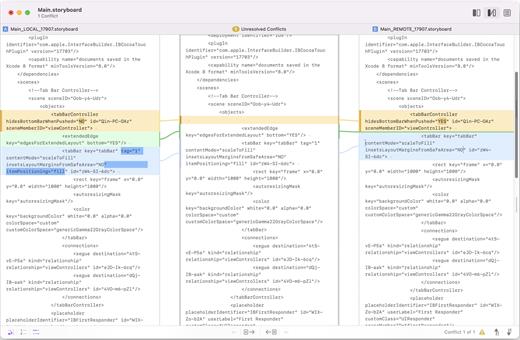
Kaleidoscope spots differences in text and image files.

Kaleidoscope Features


  • General

    • Single window workflow: One tab per comparison
    • Compare two+ files: Add any number of files per tab
    • Always up to date: Auto-refreshes when files change
    • File Shelf: Quickly go from file to file
    • Path Bar: See where your files are
    • Keyboard shortcuts: Every action has a shortcut
  • Text Scope

    • Supports any text file: Plain text, source code, HTML, etc.
    • Clear comparisons
    • Three layouts: Blocks, Fluid, and Unified
    • Compare documents: Imports text from .doc and .rtf files
    • Instant search
    • Change Stepper: Quickly jump from change to change
    • Highlights: Added, deleted and changed text
  • Image Scope

    • All popular image file formats: JPEG, TIFF, PNG, PSD and more.
    • Four connected layouts: Two-Up, One-Up, Split, and Difference
    • Comprehensive image support: RGB/CMYK/LAB, alpha, any size.
    • Multi-touch support: Smooth scrolling and pinch to zoom
    • Customizable environment: Change background color, difference mask and checkerboard settings
    • Two difference mask modes: Spot absolute or relative changes
  • Integration

    • Git, Mercurial, SVN, and Bazaar: Integrate with a couple of clicks
    • Versions
    • TextMate SVN
    • Cornerstone
    • ksdiff Command-line tool: Integrate with practically anything
What’s New

Version 6.3.0:


  • Release notes were unavailable when this listing was updated.
Compatibility

macOS 11.1.0 or later
Apple Silicon or Intel Core processor


Release Name: Kaleidoscope 6.3.0
Size: 46.9 MB
Links: HOMEPAGE – NFO – Torrent Search

Download: RAPiDGATOR

7 Comments
Sept 16

Pocket Yoga 18.0.0

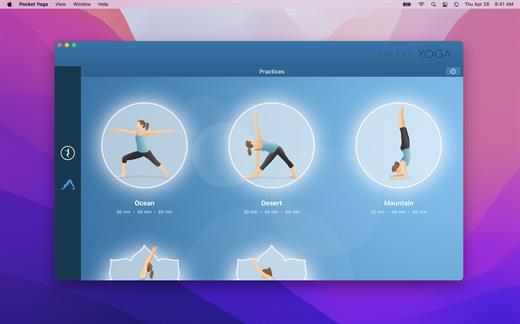
Pocket Yoga helps you can keep up with your Yoga practice at your own pace and schedule in the comforts of your own home. Simply set your Mac in front of your mat, start a practice, and Pocket Yoga will guide you through your entire session. Choose between 3 different practices, 3 different difficulty levels, and 3 different durations.

A total of 27 different sessions! Practices in Pocket Yoga are the unique and original creative design of the world-renowned school of Gaia Flow Yoga.

Features

• Soothing, detailed voice and visual instruction guides you through every pose.
• Expertly designed practices by experienced yoga instructors.
• Over 500 beautifully illustrated pose images show correct posture and alignment.
• Dictionary of poses containing the descriptions and benefits of each pose.
• Quickly preview a practice to see if it is right for you before you start.
• Maintains an ongoing log of all your yoga practices to track your progress.
• Practices designed by experienced yoga instructors.
• Built-in soothing music relaxes you while you practice.

What’s New

Version 18.0.0:


  • Release notes were unavailable when this listing was updated.
Compatibility

macOS 10.13 or later


Release Name: Pocket Yoga 18.0.0
Size: 158.8 MB
Links: HOMEPAGE – NFO – Torrent Search

Download: RAPiDGATOR
7 Comments
Sept 16

CrossOver 25.1.1

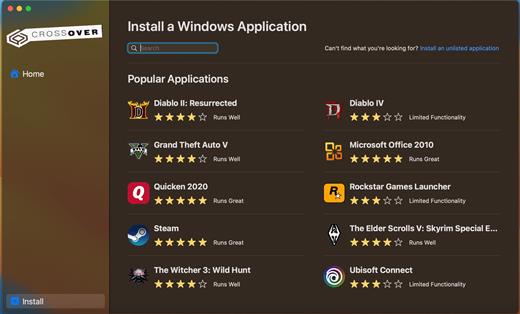
CrossOver allows you to install many popular Windows applications on your Mac. Your applications integrate seamlessly in OS X; just click and run. No rebooting, no switching to a virtual machine, and no Windows Operating System license required.

CrossOver is capable of running a wide range of Windows software. To see if your favorite application works with CrossOver, please check What Runs, or search for it using the search box at the top of this page.

Easy Installs! Many Windows titles can be installed using our CrossTie technology. If you have CrossOver installed, and have the installer for your Windows software, simply click the button in our Compatibility Database, and CrossOver will automatically install your application for you!

*** NOTE: Before installing the Crossover , it is necessary to read README.pdf from the Extra folder

What’s New

Version 25.1.1:


  • Release notes were unavailable when this listing was updated.
Compatibility

macOS 10.15 or later
Apple Silicon or Intel Core processor


Release Name: CrossOver 25.1.1
Size: 379.5 MB
Links: HOMEPAGE – NFO – Torrent Search

Download: RAPiDGATOR
7 Comments
Sept 16

Cardhop 2.4.0

Cardhop lets you search, add, edit, and interact with your contacts in a fun and interactive way. Just type what you want and Cardhop will figure it out.

Features


  • Search: Instantly find what you’re looking for by typing the name or details and let Cardhop handle the rest.
  • Add or edit: Add new contacts or edit existing contacts with unparalleled ease and simplicity. Just enter the name of the contact along with their details and then observe the smile on your face.
  • Act: The old way of interacting with your contacts takes multiple steps to accomplish the actions you want. This all changes with Cardhop. After you try Cardhop, you’ll wonder how you ever did it the old way.
What’s New

Version 2.4.0:


  • Release notes were unavailable when this listing was updated.
Compatibility

macOS 10.13 or later
Apple Silicon or Intel Core processor


Release Name: Cardhop 2.4.0
Size: 30.5 MB
Links: HOMEPAGE – NFO – Torrent Search

Download: RAPiDGATOR

6 Comments
Sept 16

PDF Expert 3.10.20

PDF Expert springs into action with smooth scrolling and fast search from the first document you select. PDFs open instantly, whether they are just small email attachments or 2000-page reports.


  • Professional Annotation Tool – From simple changes to marathon editing sessions, PDF Expert lives up to its name. Powerful yet easy-to-use tools are just a click away so you can leave your mark in record time.
  • Read – An award-winning, lightning-fast, tabbed document viewer will get you through multiple PDFs faster than ever.
  • Excellent for Form Filling – PDF Expert provides the best experience for filling out PDF forms. Text fields, checkboxes, radio buttons, and other form elements work as you expect, and all the information you enter is saved within the form. Even complex interactive forms with Javascript work impressively well.
  • An Easy Way to Sign Documents – Signing document on your Mac is as simple as it could be. Just type your name on a keyboard and PDF Expert will transform it into beautiful handwriting. Or use your Macbook’s trackpad and write with your finger. You can even use signatures already created in PDF Expert for iOS.
  • Wide Sharing Options – You don’t work alone, and neither does PDF Expert. When it’s time to send documents to clients, coworkers, and everyone in between, PDF Expert has top-notch support for your Mac’s system-wide share sheet and other apps. If an app accepts PDFs, PDF Expert can get them there.
  • Works across all your devices – Use PDF Expert on any Apple device – Mac, iPad, and iPhone. Use Apple’s Continuity and Handoff features to seamlessly transfer document from one device to another and continue editing where you left.
Note: If the error is reported, Run with terminal.

AI features aren’t activated, it’s a server side feature, can’t be K’ed..

What’s New

Version 3.10.20:


  • Release notes were unavailable when this listing was updated.
Compatibility

macOS 10.15 or later

Apple Silicon or Intel Core processor


Release Name: PDF Expert 3.10.20
Size: 125.7 MB
Links: HOMEPAGE – NFO – Torrent Search

Download: RAPiDGATOR
7 Comments
Sept 16

Soulver 3.15.0.1

Soulver 3 is a smart notepad with a built-in calculator. It gives instant answers to any calculations it finds in your text. It’s a better way to work stuff out than with a traditional calculator, and a more lightweight tool for quick calculations than a spreadsheet.

Math Features


  • Instant calculations, no equals required
  • Use words alongside numbers, so calculations make sense
  • Quick totals of all your lines, and subtotals
  • Calendar calculations (June 9 + 3 weeks, 3:35 pm + 6 hours 27 minutes)
  • Easy percentages (“$300 – 10%”, “30 as a % of 200”)
  • Unit conversions (“10 kg in pounds, “25 meters in feet”)
  • 168 live real-world and cryptocurrency rates.
  • Line references to build little calculating documents
  • Variables & variable autocompleting
  • Global variables & custom units
App Features

  • Dark mode
  • Sidebar for organising your sheets and the ability to make folders
  • Headings (#), comments (//) & labels (:)
  • Customize your syntax coloring & font
  • Automatic number formatting, with spaces around operators and thousand separators
  • Number scrubbing (hold shift and hover over a number)
  • Deep macOS system integration: Touch Bar support, Quicklook, Calculate anywhere services
  • Automation tools: a command-line interface, Alfred workflow, Automator action
What’s New

Version 3.15.0.1:


  • Release notes were unavailable when this listing was updated.
Compatibility

macOS 10.14.4 or later, 64-bit processor


Release Name: Soulver 3.15.0.1
Size: 19.9 MB
Links: HOMEPAGE – NFO – Torrent Search

Download: RAPiDGATOR

6 Comments
Sept 16

Alfred 5 Powerpack 5.7.0

Alfred is a productivity app for macOS that helps you get things done faster. It can be used to launch apps, find files, and control your Mac with hotkeys. Alfred also has a powerful workflow engine that can be used to automate tasks.

Features:


  • App Launcher: Alfred can be used to launch apps quickly and easily. You can type the name of the app you want to launch, or you can use a hotkey.
  • File Search: Alfred can be used to find files quickly and easily. You can type the name of the file you want to find, or you can use a hotkey.
  • System Control: Alfred can be used to control your Mac with hotkeys. You can use hotkeys to adjust the volume, put your Mac to sleep, and more.
  • Workflows: Alfred has a powerful workflow engine that can be used to automate tasks. You can use workflows to do things like send emails, create notes, and more.
What’s New

Version 5.7.0:


  • Release notes were unavailable when this listing was updated.
Compatibility

macOS 10.14 or later
Apple Silicon or Intel Core processor


Release Name: Alfred 5 Powerpack 5.7.0
Size: 8.5 MB
Links: HOMEPAGE – NFO – Torrent Search

Download: RAPiDGATOR
6 Comments
Sept 16

Things 3.22

Things is a task management solution that helps to organize your tasks in an elegant and intuitive way. Things combines powerful features with simplicity through the use of tags and its intelligent filter bar.

Features:


  • Collect Your Thoughts – Get things off your mind quickly: no matter what app you’re in, a keyboard shortcut instantly reveals Quick Entry. Type your thoughts and save them to the Inbox. Or just talk to Siri on any device (“Remind me to…”) and import from Reminders.
  • Get Organized – Create a project for each of your goals, then add the steps to reach them. For clarity, add structure with headings. Then group your projects by areas of responsibility, such as “Family”, “Work”, or “Health”. Review these regularly to stay on top of things.
  • Plan Your Time – See your calendar events alongside your to-dos and plan your time effectively. Create repeating to-dos for things you do every few days, weeks, or months – Things will remind you on the right day.
  • Make the Most of Your Day – Every morning, grab a coffee and prepare your list for “Today”: review previously planned to-dos and make quick decisions on what to tackle. Pick some more steps from your projects and then get going. The Today list is the only place you’ll need to look for the rest of the day.
  • Customize Your Workflow – Use tags to categorize your to-dos or add context. For example, tag places like “Office” or “Home”, or tag all your “Errands”, or everything you’re working on with “Kate”. You can easily find everything you’ve tagged via filtering or search.
What’s New

Version 3.22:


  • Release notes were unavailable when this listing was updated.
Compatibility

macOS 10.15 or later
Apple Silicon or Intel Core processor


Release Name: Things 3.22
Size: 37.2 MB
Links: HOMEPAGE – NFO – Torrent Search

Download: RAPiDGATOR

8 Comments