Please REGISTER or RENEW your account on RAPiDGATOR.net and support us by doing through all RAPiDGATOR working download links on main posts...
Sept 16

Pixea Plus 7.0

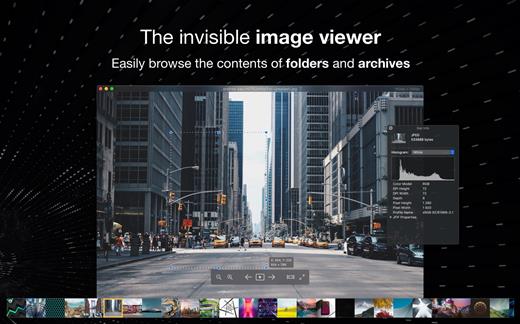
Pixea is an image viewer for macOS with a nice minimal modern user interface. Pixea works great with JPEG, HEIC, PSD, RAW, WEBP, PNG, GIF, and many other formats. Provides basic image processing, including flip and rotate, shows a color histogram, EXIF, and other information.

Supports keyboard shortcuts and trackpad gestures. Shows images inside archives, without extracting them.

Supported formats
JPEG, HEIC, GIF, PNG, TIFF, Photoshop (PSD), BMP, Fax images, macOS and Windows icons, Radiance images, Google’s WebP. RAW formats: Leica DNG and RAW, Sony ARW, Olympus ORF, Minolta MRW, Nikon NEF, Fuji RAF, Canon CR2 and CRW, Hasselblad 3FR. Sketch files (preview only). ZIP-archives.

Export formats
JPEG, JPEG-2000, PNG, TIFF, BMP.

What’s New

Version 7.0:


  • Release notes were unavailable when this listing was updated.
Compatibility

macOS 10.13 or later


Release Name: Pixea Plus 7.0
Size: 186.8 MB
Links: HOMEPAGE – NFO – Torrent Search

Download: RAPiDGATOR

6 Comments
Sept 16

Sketch 2025.2.2

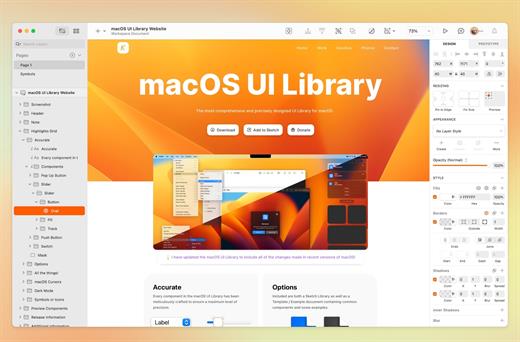
Sketch is a complete design toolkit. With a native Mac app for design and prototyping, and web-based tools to share, get feedback and handoff.

A native macOS app for design and prototyping


  • Powerful tools built for designers, by designers
  • Nestable frames and flexible stack layouts
  • Fast, immersive prototyping to bring your ideas to life
  • Shared Libraries, styles and components to scale your work
  • Full control over color profiles, including P3 support
  • Variable and OpenType font support
  • Offline and local file support
  • Ready for real-time collaboration, or working solo
A flexible web app for feedback, sharing and handoff

  • Store, sync and share documents
  • Document and project permissions
  • Easy Workspace admin
  • Annotate documents with feedback
  • File version history
  • Share Libraries, components and templates
  • Developer handoff tools
  • Test prototypes in any browser
  • View, comment and handoff for free
What’s New

Version 2025.2.2:


  • Release notes were unavailable when this listing was updated.
Compatibility

macOS 14.0 or later


Release Name: Sketch 2025.2.2
Size: 98 MB
Links: HOMEPAGE – NFO – Torrent Search

Download: RAPiDGATOR

16 Comments
Sept 16

Feeder 4.8.0

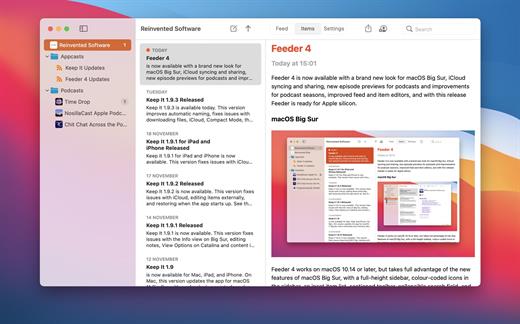
Self-publish podcasts, appcasts, and standard RSS feeds with Feeder.

FOR PODCASTERS:


  • Feeder makes it easy to create and update your podcast, and ensures everything meets the Apple Podcasts requirements
  • Preview podcast episodes as they’ll appear in the Podcasts app
  • See serials listed by season and episode, along with trailers and bonuses, as in the Podcasts app
  • Publish feeds and media files to different servers with a single click
  • Redirect media file URLs through your preferred analytics service
  • Download your existing feed to move to Feeder
  • No lock-in: if you control your feed, you can use the service providers that suit you, and always move to another without losing subscribers
FOR EVERYONE:

  • Edit your feeds on all your Macs with iCloud
  • Collaborate on feeds with other Feeder users with iCloud
  • Schedule items to be published
  • HTML editing and preview
  • Write descriptions using Markdown
  • Templates and auto-completion to save time
  • Feeder can publish using FTP, SFTP, Amazon S3, WebDAV and file export
  • Search the items in the feed, including by date
  • Cross-post items to a blog when publishing
  • Feeder 4 is completely updated for macOS Big Sur and built for Apple silicon
FOR APP DEVELOPERS AND ADVANCED USERS:

  • Create Sparkle appcasts that automatically generate DSA and edDSA signatures
  • Preview release notes as they’ll appear in the Sparkle update panel
  • Feeder is fully scriptable for creating, editing and publishing feeds, and can run a script or Automator workflow after a feed is published
What’s New

Version 4.8.0:


  • Release notes were unavailable when this listing was updated.
Compatibility

macOS 10.13 or later
Apple Silicon or Intel Core processor


Release Name: Feeder 4.8.0
Size: 15 MB
Links: HOMEPAGE – NFO – Torrent Search

Download: RAPiDGATOR

7 Comments
Sept 16

IINA 1.4.0

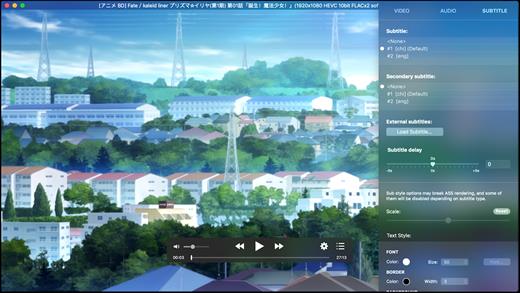
IINA is the modern video player for macOS.

Features


  • For and only for modern macOS – IINA is born to be a modern macOS application, from its framework to its user interface. It adopts the post-Yosemite design language, and keeps up the pace of new technologies such as Force Touch and Touch Bar.
  • Revolutionary user experience – IINA simplifies a lot of user interactions. In addition to traditional cascaded menus, it provides interactive UI components and gestures to give you intuitive, flexible, powerful control of the playback.
  • Powerful functionality – Based on MPV, one of the most powerful media player projects ever, IINA supports almost all common media types (even GIF) and stably outputs high-quality video that is optimized for Retina screen. MPV’s config file and script system are also integrated.
  • You are the target-user – IINA is made by a user like you, who (may be) also having been expected for a powerful and elegant media player on macOS for years. Whether you just got your first Mac or are already a professional MPV user, IINA will satisfy you for its customizability and expandability.
What’s New

Version 1.4.0:


  • Release notes were unavailable when this listing was updated.
Compatibility

macOS 10.15 or later
Apple Silicon or Intel Core processor


Release Name: IINA 1.4.0
Size: 103.3 MB
Links: HOMEPAGE – NFO – Torrent Search

Download: RAPiDGATOR

7 Comments
Sept 16

Adobe Photoshop 2025 v26.10.0

Adobe Photoshop 2025, the industry standard for digital image processing and editing, delivers a comprehensive package of professional retouching tools, and is packed with powerful editing features designed to inspire.

Combine, retouch, and remix your pics. Add new color to your old black-and-whites. Make unwanted stuff disappear. Or turn a boring background into an exotic paradise. With Photoshop, everyone can.

Make creativity your business.

Chinzalée Sonami is a ceramic artist who sells her colorful pottery at her studio, through an online shop, and at small outlets around the country. She designs posters, flyers, brochures, ads, and more with Photoshop to promote her business.

Retouch and remix your pics.

Forrest Aguar and Michelle Norris, the duo behind Tropico Photo studio, use Photoshop techniques, inventive color combinations, and dimensions to bring their bright version of paradise to any location.

Your go-to for Instagram-gorgeous graphics.

Nice Day Chinese Takeout uses Photoshop to create mouthwatering social posts and scroll-stopping graphics for their popular New York takeout restaurant.

Build a following and a brand.

Meg Lewis designs virtual backgrounds and graphics with Photoshop to showcase her colorful style on social and build her personal brand.

Discover your own artistic style.

Designer and illustrator Aries Moross draws and paints with Photoshop brushes to transform letters into personal artistic expressions.

What’s New

Version 26.10.0:


  • Release notes were unavailable when this listing was updated.
Compatibility

macOS 11 or later
Apple Silicon or Intel Core processor


Release Name: Adobe Photoshop 2025 v26.10.0
Size: 5.5 GB
Links: HOMEPAGE – NFO – Torrent Search

Download: RAPiDGATOR

4 Comments
Sept 16

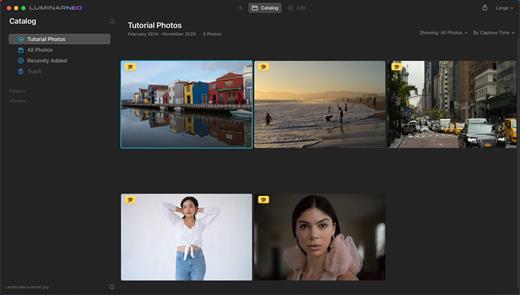
Luminar Neo 1.24.7

Luminar Neo is an AI-driven creative image editor. A creative image editor to bring your ideas to life. Have you ever wanted to achieve more with your images? Luminar Neo is an innovative image editor powered by AI technologies of the future that simplifies complex editing routines and enables creators to bring their boldest ideas to life. And enjoy it.

Control the light in 3D space with RelightAI
Relight backlit photos or darkened images in a click with the RelightAI feature. Luminar Neo calculates the depth of a photo and creates a 3D map, making it possible to spread light naturally in 3D space across a 2D image. You can also relight the background and foreground separately — meaning you can darken parts of the image as well. This opens up an opportunity for creative relighting in order to bring your artistic vision to life.

Remove messy powerlines with AI
Automatically remove distracting elements in your cityscapes, urban landscapes or travel photos. Get a clear sky with no cluttered phone or power lines.
Unleash your creativity with Layers and AI Masking
Use both MaskAI and Layers for limitless creativity. MaskAI automates the masking process by identifying objects in the image and creating precise masks.

You can always manually refine those masks with a brush if you choose to. Layers open up a whole new level of creative expression, with endless possibilities for adding objects, textures, watermarks, and any other graphics to your images.

Replace the sky in one click
Cutting-edge sky replacement technology with water reflections, sky positioning, and human-aware relighting to match the new sky.
Lightning-fast creative editing with an all-new image engine.
Designed as a module system its parts now can be optimized separately, for the best performance.

What’s New

Version 1.24.7:


  • Release notes were unavailable when this listing was updated.
Compatibility

macOS 11.0.0 or later
Apple Silicon or Intel Core processor


Release Name: Luminar Neo 1.24.7
Size: 4 GB
Links: HOMEPAGE – NFO – Torrent Search

Download: RAPiDGATOR

6 Comments
Sept 16

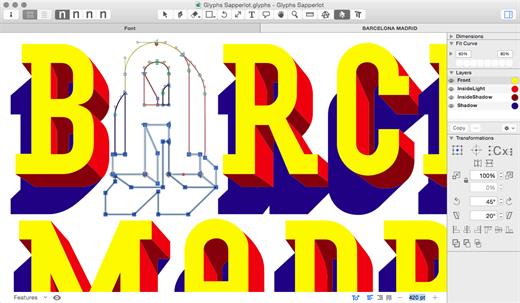
Glyphs 3.3.1

Glyphs is a simple to use Mac OS X app designed to allow anyone to create new fonts and modify letterforms with ease.

Glyphs’ main focus lays on streamlining the workflow.

Glyphs also comes with support for scripting. Scripts can help with a lot of repetitive tasks and will allow you to access all internal data and methods.

The font editor for everyone.

Glyphs’ smart and simple approach helps you draw new fonts, modify existing fonts, and sculpt your letterforms hassle-free.

What’s New

Version 3.3.1:


  • Release notes were unavailable when this listing was updated.
Compatibility

macOS 10.11 or later


Release Name: Glyphs 3.3.1
Size: 28.3 MB
Links: HOMEPAGE – NFO – Torrent Search

Download: RAPiDGATOR

7 Comments
Sept 16

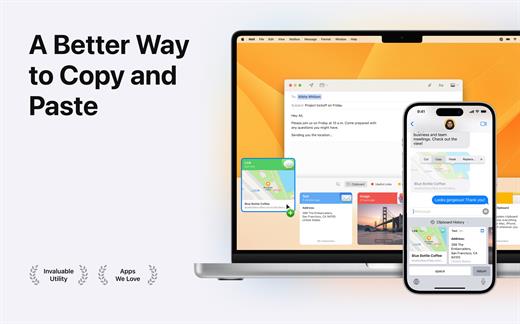
Paste 6.0.0

Paste is a new way to copy and paste. It keeps everything you’ve ever copied, and lets you use your clipboard history anytime you need it across all your devices. It recognizes and stores text, images, links, files, and any other type of content, and generates informative previews for easy browsing.

Paste works in the background and tightly integrates into your system and your workflow. An intuitive user interface and improved user experience allows you to focus on your core tasks and not on the application itself.

Features


  • Extends your clipboard history capacity up to unlimited
  • Pinboards and favorite snippets
  • iCloud sync across all your devices running Paste
  • History management, rules and exceptions
  • Intelligent search with flexible filters
  • Select and paste multiple items simultaneously
  • Drag-and-drop multiple items to any application
  • Paste plain or rich text
  • Send clipboard history to other devices via AirDrop or share with your friends
Note:

iCloud not available, It might ask for subscription on the first launch, just ignore and close the window.

What’s New

Version 6.0.0:


  • Paste is reimagined in Liquid Glass for macOS Tahoe. Smoother, sharper, and more fluid across your Mac, iPhone, and iPad.
Compatibility

macOS 13.0 or later.


Release Name: Paste 6.0.0
Size: 18.8 MB
Links: HOMEPAGE – NFO – Torrent Search

Download: RAPiDGATOR

7 Comments
Sept 16

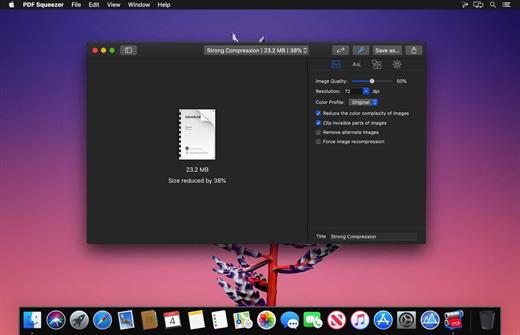
PDF Squeezer 4.6.0

PDF Squeezer is an easy-to-use PDF compression tool.

It reduces the size of large PDF documents by compressing images and removing irrelevant information. This will help you obtain important savings in bandwidth costs, digital storage costs and network transmission times.

Features


  • Simply drag and drop your file into the application window
  • Choose from predefined compression filters or create your own
  • Compress all files in a folder and its subfolders
  • Batch compress multiple files
  • Finder, Safari and Preview ad-on available via the share menu
  • Support for password protected PDFs
  • Automatic compression and save with ‘One-Click-Compression’
What’s New

Version 4.6.0:


  • Release notes were unavailable when this listing was updated.
Compatibility

macOS 10.13.0 or later


Release Name: PDF Squeezer 4.6.0
Size: 20.2 MB
Links: HOMEPAGE – NFO – Torrent Search

Download: RAPiDGATOR

6 Comments
Sept 11

Topaz Gigapixel AI 8.4.3

A.I.Gigapixel is the first and only desktop application to use the power of artificial intelligence to enlarge your images while adding natural details for an amazing result.
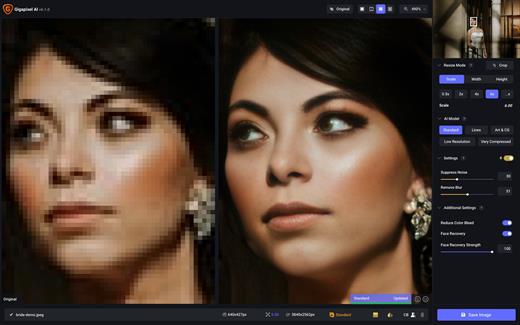
Enlarge Images by up to 600%

Create a beautiful 80 x 60 inch print from a simple iPhone photo. Or transform your DSLR photos into sharp and ultra-detailed 100MP images.

Use truly intelligent upscaling

After being trained with millions of sample images, Gigapixel can now enlarge your images with a surprising level of quality.

Get crisp and clear results.

Gigapixel performs around 2 million operations per pixel to get you results with as much detail and sharpness as possible.

No more fuzzy enlargements.

Breathtakingly sharp prints. High-resolution cropping in post-production. iPhone photos that look like they came out of a DSLR. No matter why you’re enlarging your photos, you always want the best possible quality for your results. AI Gigapixel is currently the only photo enlargement product available that can actually add detail back to your upscaled photo.

Recover real details for actual sharpness

Increasing edge contrast is the simplest way to make an image look “sharp”, and how most other upscaling software works. Gigapixel is different: it increases the actual sharpness of your upscaled photo by recovering real detail in your image. This is only possible through training and exposure to millions of test images.

Crisp photos that look like they were never upscaled

It’s hard to believe that the crisp output image above was enlarged 4x, but it was. Gigapixel AI successfully determines which image features are stars (detail) and what’s noise. Then, it naturally accentuates and recovers detail while suppressing noise in your upscaled photo.

The highest-quality image upscaling that you can get anywhere

Because of these exceptional results, Gigapixel AI is used by everyone from leading photographers, to video game modders, to major motion studios. If you ever need to upscale your photo while preserving beautiful detail, take advantage of the most modern technology in the space and give Gigapixel AI a try.

Image enlargement: interpolation vs machine learning

Interpolation-based photo enlargement software has been around for decades. Gigapixel’s new approach based on machine learning is a giant leap ahead: state-of-the-art “deep learning” methods allow it to enlarge images while actually adding new details.

Interpolation

Interpolation algorithms work by approximating new pixels from the colors of surrounding ones. This does not add any detail to the image, it just smoothes out the transition between pixels.

Neural Network (Gigapixel AI)

A neural network analyzes thousands of photo pairs to learn how details usually get lost. The algorithm learns to “fill in” information in new images based on what it has learned… effectively adding new detail to your photo.

What’s New

Version 8.4.3:


  • Release notes were unavailable when this listing was updated.
Compatibility

macOS 11.0 or later
Apple Silicon or Intel Core processor


Release Name: Topaz Gigapixel AI 8.4.3
Size: 380.8 MB
Links: HOMEPAGE – NFO – Torrent Search

Download: UPLOADGiGRAPiDGATOR

6 Comments