Please REGISTER or RENEW your account on RAPiDGATOR.net and support us by doing through all RAPiDGATOR working download links on main posts...
Sept 11

A Better Finder Rename 12.14

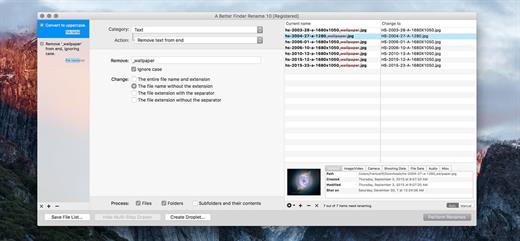
A Better Finder Rename is the most complete renaming solution available on the market today. That’s why, since 1996, tens of thousands of hobbyists, professionals and businesses depend on A Better Finder Rename to organize and maintain files.

The Instant Preview feature eliminates guesswork and costly errors and helps you find the right settings quickly and accurately by providing as-you-type feedback.

A Better Finder Rename offers a complete set of renaming options that are organized into 15 categories covering all the text, character, position, conversion and truncation features that you would expect from a file renamer, but it does not stop there. The multi-step renaming feature allows multiple renaming steps to be combined to deal with complex renaming jobs in a single operation. Unlike other tools, A Better Finder Rename allows any number of renaming actions to be combined, re-ordered, copied and deleted.

What’s New

Version 12.14:


  • Release notes were unavailable when this listing was updated.
Compatibility

macOS 10.13 or later
Apple Silicon or Intel Core processor


Release Name: A Better Finder Rename 12.14
Size: 14.6 MB
Links: HOMEPAGE – NFO – Torrent Search

Download: UPLOADGiGRAPiDGATOR

6 Comments
Sept 11

Slidepad 1.5.9

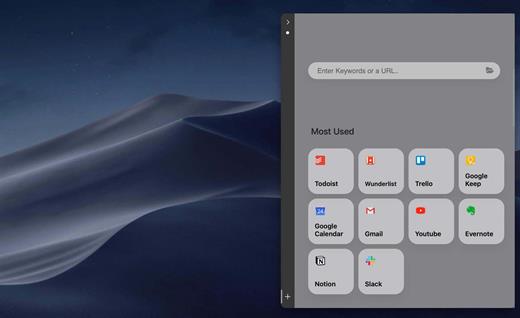
An iPad style slide over window for your web apps. No more hassle of window switching. Unlike other similar apps, there is no limit on what can be placed on Slidepad. You can type any keywords, URLs like what you do in common browsers!

An iPad slide over window

By slide in and slide out, Slidepad brings iPad style multitasking to your Mac. Using Slidepad is as easy as using your dock.

A simple sidebar to switch between apps

Slidepad borrowed the concept of sidebar from Franz and Station. It is much smoother than tabs, and it helps you quickly switch between different web apps.

An omnibox lets you open any websites, tutorials or PDFs

Unlike other similar apps, there is no limit on what can be placed on Slidepad. You can type any keywords, URLs like what you do in common browsers!

More Features


  • Minimal-style sidebar
  • Corner snapping
  • Developer tool enabled
  • Customizable sound setting
  • Mobile/Desktop user-agent switching
  • Display badge when receive new notifications
  • On/Off live notifications
  • Multi-screen support
  • Drag/drop support
  • Picture in Picture support
  • Quicklook icon support
  • Dark theme support (MacOS 10.14+)
  • Global keyboard shortcut support
What’s New

Version 1.5.9:


  • Minor bug fixes
Compatibility

macOS 10.13 or later
Apple Silicon or Intel Core processor


Release Name: Slidepad 1.5.9
Size: 10.2 MB
Links: HOMEPAGE – NFO – Torrent Search

Download: UPLOADGiGRAPiDGATOR

6 Comments
Sept 11

Dynamic Wallpaper Enginer 23.6

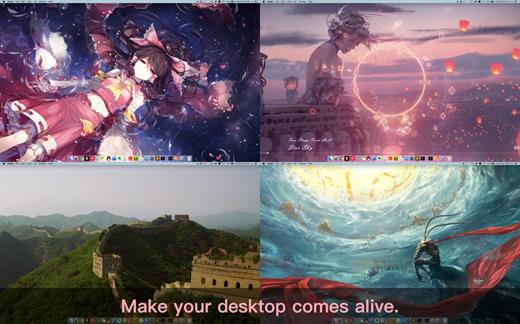
Dynamic Wallpaper Engine allows you to use live wallpapers on your desktop/screensaver. It provides thousands of live wallpapers in the Workshop while taking as little system resources as possible. It’s the Wallpaper Engine for Mac.

Features
• 2000+ hand-picked videos which are updated every day.
• Multiple types of 4K Ultra HD videos, anime, scenery, cute, game, creative, Beauty, Ancient, Movie, etc.
• Supports “keyword searching” in videos.
• Supports “Dynamic-ScreenSaver”, personalize your lock screen.
• Easy to import local video.
• Supports The playlist, list loop, shuffle loop.
• Supports multiple screen aspect ratios and video native resolutions.
• Supports global hotkeys to control wallpaper, hide desktop icons and show screensaver.
• Set different wallpapers on different displays.
• Manual control, video pause, resume and mute.
• Break reminders, with flexible customization if you want it.
• Auto mode, pause the video when other apps are active, not disturbed at work.
• Auto mode, pause the video when Power Disconnected.
• Support for hiding desktop icons.
• Dynamic Wallpaper Engine is designed to provide an interesting experience while consuming as little system resources as possible.

What’s New

Version 23.6:


  • Release notes were unavailable when this listing was updated.
Compatibility

macOS 10.12 or later
Apple Silicon or Intel Core processor


Release Name: Dynamic Wallpaper Enginer 23.6
Size: 25.8 MB
Links: HOMEPAGE – NFO – Torrent Search

Download: UPLOADGiGRAPiDGATOR

4 Comments
Sept 11

Noir – Dark Mode for Safari 2025.1.8

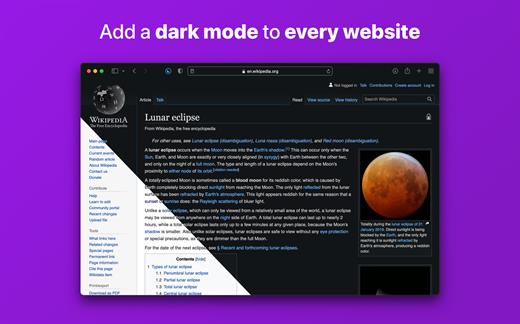
Noir is a Safari extension that automatically adds a dark mode to every website you visit.

It makes browsing the web at night so much better. With Noir, you won’t be blinded by bright websites ever again.

And the results look great too. Noir generates a custom dark style for each website you visit, based on the colors that are used on a page. You won’t even notice this happening in the background – that’s how fast it is – but you’ll certainly appreciate the end result: a beautiful dark mode tailored for each website, where contrast is preserved and highlights still pop.

Noir works with any website you visit in Safari, automatically. By default, Noir is linked to your device’s Dark Mode, so websites will only go dark when you want them to. But you can easily customize this to your liking, even per website. Only want to use Noir on just a few specific websites? Sure thing! Disable Noir on some websites? No problem!

The app feels right at home on your device. It is a Safari extension, which means there’s no need to manually activate it every time you load a new page. The app also tightly integrates with system features such as Shortcuts to fully integrate Noir in all your workflows. And your settings are automatically synced to all your devices using iCloud.

And just as importantly, Noir takes your privacy seriously: it doesn’t collect any of your browsing data. Period.

Noir is made by a solo developer. It does not include any subscriptions or ads. Buy Noir once, use it forever.

What’s New

Version 2025.1.8:


  • Release notes were unavailable when this listing was updated.
Compatibility

macOS 12.0 or later.


Release Name: Noir – Dark Mode for Safari 2025.1.8
Size: 11.8 MB
Links: HOMEPAGE – NFO – Torrent Search

Download: UPLOADGiGRAPiDGATOR

5 Comments
Sept 11

Blackmagic Fusion Studio 20.2

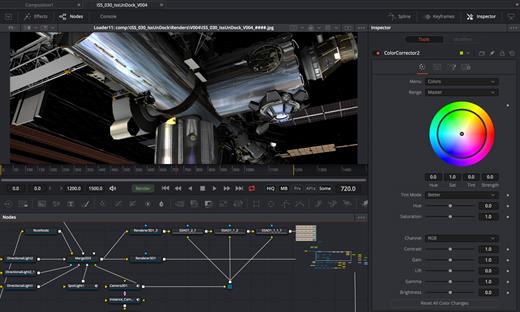
Fusion is the world’s most advanced compositing software for visual effects artists, broadcast and motion graphic designers, and 3D animators. Over the last 30 years, Fusion has been used on thousands of Hollywood blockbuster movies and television shows. Fusion features a powerful node based interface that lets you quickly and easily create sophisticated effects by connecting different types of image processing tools together! You get a massive range of tools, incredible VR and 3D support, GPU accelerated performance, unlimited network rendering and more! Fusion gives you everything you need to create exciting broadcast graphics, dramatic titles, and even major feature film visual effects!
Hollywood’s Biggest Blockbusters

Thousands of Hollywood’s biggest blockbusters and hit television shows use Fusion to create their groundbreaking visual effects. Fusion has been used on feature films like The Hunger Games, Dr Strange and Guardians of the Galaxy, as well as hit television shows like Empire, NCIS and American Horror Story. Fusion also plays a major role in the development of cinematics for major video games such as Dawn of War III, Halo 5 and more!

Nodes are a Much Faster Way to Work!

Nodes are incredibly easy to use, especially as scenes become more complex. Fusion’s nodes are small icons that represent effects, filters and other image processing operations. Nodes can be easily connected together to build larger and more complex visual effects. Tools, images, and objects can be combined in any order to create unlimited visual effects. Simply click on a node to quickly adjust any single part of your project. That’s much faster than a timeline based tool because you don’t need to hunt through nested stacks of confusing layers and filters!

Get the most Powerful VFX Software Available!

Whether you need to pull a key, track objects, retouch images, animate titles, or create amazing particle effects, Fusion has a massive toolset that lets you tackle the most demanding jobs. You get a true 3D workspace along with tools for compositing, keying, painting, animation, virtual reality, stereoscopic 3D and more. Fusion combines effects and motion graphics, along with 3D modeling and rendering into a single toolset. That means you can import and render 3D models and scenes with the rest of your composite in Fusion. You don’t have to pre‑render assets or transfer between multiple applications!

GPU Accelerated Workflow

Fusion is extremely fast and responsive enough to be used in high pressure, client driven sessions. With its Metal, CUDA and OpenCL GPU acceleration, you get instant feedback while you work so you can see exactly what you’re doing. Fusion 16 features more GPU optimisation than ever so whether you’re working alone or with a client, you get the real time control you need. That means you’ll be able to spend more time being creative and less time waiting! Fusion is so fast that you can even work in VR while wearing a headset and still get over 90 frames per second of interactivity!

Unlimited Render Power

Fusion has the world’s fastest production quality render engine! You can even distribute your render jobs across an unlimited number of networked computers for incredible performance, at no additional cost! There’s no “per node” render license fees. Simply install it on as many render nodes as you need! That means you can render complex scenes incredibly fast to meet the intense deadlines of production, without having to sacrifice creativity or quality.

Collaborate with Large Teams

When you’re working with a large creative team, Fusion Studio also includes the new Studio Player application. Studio Player features a single layer timeline with basic shot trimming, storyboard tools, versioning and annotation notes. Fusion Studio also features a bin server to let everyone share and see common assets that are needed for the job. That means you don’t have to copy and track multiple elements on different computers.

What’s New

Version 20.2:


  • Release notes were unavailable when this listing was updated.
Compatibility

macOS 11.0 or later.
Apple Silicon or Intel Core processor


Release Name: Blackmagic Fusion Studio 20.2
Size: 2.5 GB
Links: HOMEPAGE – NFO – Torrent Search

Download: UPLOADGiGRAPiDGATOR

4 Comments
Sept 11

Capture One Enterprise 16.6.6.9

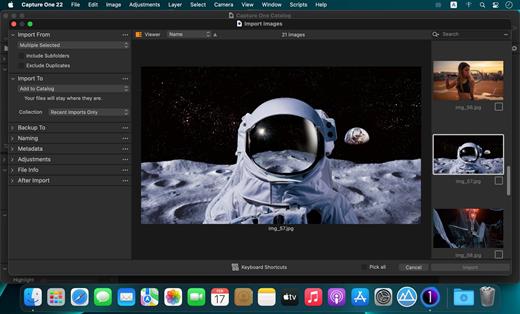
Capture One Enterprise – the photo editing solution for image production studios and e-commerce platforms. Its authentic true-to-life color processing, seamless editing experience, and fastest tethering in the industry gives you total creative control, making it a household name in studios across the world. Based in Copenhagen, Denmark, Capture One empowers photographers with cutting-edge features to keep your photography one step ahead

With an updated processing engine, market-leading performance, and powerful new features, Capture One is the professional choice in imaging software. You get the highly responsive precision tools you need to create stunning images from your camera’s RAW files in a time-saving workflow that can be customized to fit your needs.

What’s New

Version 16.6.6.9:


  • Release notes were unavailable when this listing was updated.
Compatibility

macOS 10.13 or later
Apple Silicon or Intel Core processor


Release Name: Capture One Enterprise 16.6.6.9
Size: 1.2 GB
Links: HOMEPAGE – NFO – Torrent Search

Download: UPLOADGiGRAPiDGATOR

6 Comments
Sept 11

Topaz Photo AI 4.0.4

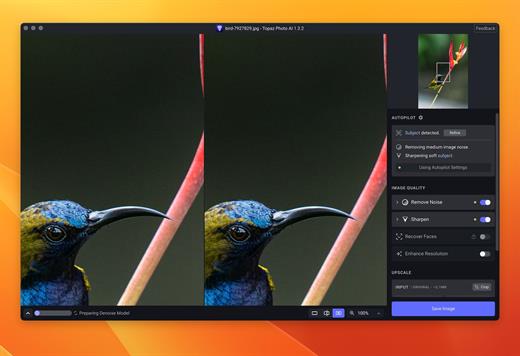
Sharpen, remove noise, and increase the resolution of your photos with tomorrow’s technology. Topaz Photo AI supercharges your image quality so you can focus on the creative part of photography.

Focus on your creativity rather than your tools.
AI is good at some things but bad at others. It can write sentences but can’t tell a story, and it can recommend songs but can’t compose music. But most importantly for us: AI is exceptionally good at improving image quality, but bad at knowing what to do with it.

We believe that stunning photography comes from artistic vision paired with world-class tools. AI will never replicate human creativity, so it’s still your job to provide the vision. But just like a sharper lens or better camera, Topaz Photo AI empowers you to create images that just aren’t possible with yesterday’s tools.

Your photos at their very sharpest.
You won’t always be able to retake a shot when your subject is blurry. Sometimes you won’t even know until you’re reviewing your photos on your computer.

In these cases, use Topaz Photo AI to ensure that your photos are the sharpest they can possibly be. Instead of artificially increasing edge contrast like traditional sharpening, the Sharpen AI module naturally reverses root causes of blurriness (camera shake, motion blur, misfocus) to create more natural results.

In the absence of blur, sharpness remains – crisp, clear detail that’s free of edge haloes or other artifacts.

What’s New

Version 4.0.4:


  • Release notes were unavailable when this listing was updated.
Compatibility

macOS 10.12 or later


Release Name: Topaz Photo AI 4.0.4
Size: 1.3 GB
Links: HOMEPAGE – NFO – Torrent Search

Download: UPLOADGiGRAPiDGATOR

5 Comments
Sept 11

Fission 2.9.0

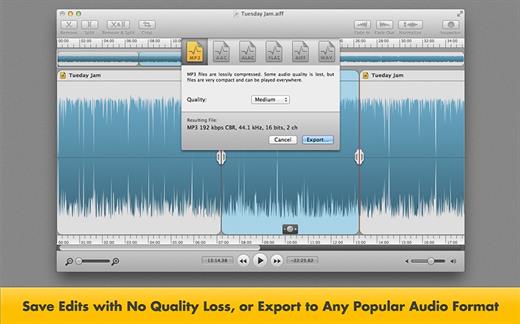
Fission can crop and trim audio, paste in or join files, or just rapidly split one long file into many. It’s streamlined for fast editing. Plus, it works without the quality loss caused by other editors, so you can get perfect quality audio even when editing MP3 and AAC files.

If you need to convert formats, Fission can do that too! You can rapidly export or batch convert files to the MP3, AAC, Apple Lossless, FLAC, AIFF, and WAV formats.

Key Features:


  • Edit MP3, AAC, Apple Lossless, and AIFF files with no quality loss
  • Quickly split a long audio file into smaller files
  • Remove unwanted content, such as commercials, from your audio file
  • Re-arrange audio in a single file, copy audio from one file to another, or merge with a quick drag and drop
  • Create great-sounding MP3 or AAC ringtones for your cell phone.
What’s New

Version 2.9.0:


  • Release notes were unavailable when this listing was updated.
Compatibility

macOS 10.14 or later


Release Name: Fission 2.9.0
Size: 15.7 MB
Links: HOMEPAGE – NFO – Torrent Search

Download: UPLOADGiGRAPiDGATOR

6 Comments
Sept 10

App Cleaner & Uninstaller Pro 8.7.2

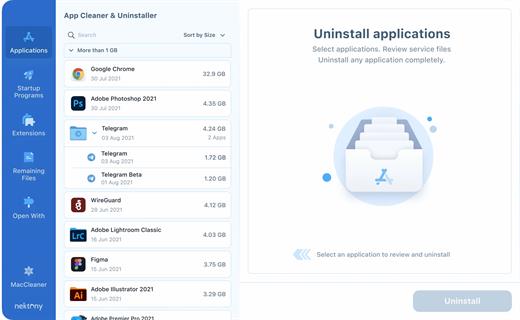
App Cleaner & Uninstaller (was App Cleaner) can remove applications and their service files on macOS. Make sure they aren’t eating up precious space on your drive with this helpful app that does the legwork for you.

Features


  • Scan the system and preview installed applications
  • Remove all types of service files
  • Remove remains of previously uninstalled apps
  • Reset application to a first-launch state
  • Easy-to-use shortcuts
  • Any file or app quick preview
  • Specific app-associated file formats preview
  • In-app help assistance
  • Show unused applications
  • Skip list option
* Some applications can not be removed beca

What’s New

Version 8.7.2:


  • Release notes were unavailable when this listing was updated.
Compatibility

macOS 10.13 or later


Release Name: App Cleaner & Uninstaller Pro 8.7.2
Size: 41.2 MB
Links: HOMEPAGE – NFO – Torrent Search

Download: UPLOADGiGRAPiDGATOR

6 Comments
Sept 10

Camtasia 2025.2.2

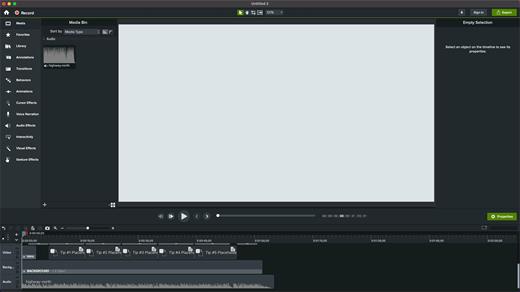
Camtasia for remarkable screencasts made easy. Create eye-catching training, presentation, and demo videos…the easy way. Camtasia screen-recording software is streamlined, intuitive, and makes you look like a pro.

Easily record onscreen activity, Keynote slides, camera video, microphone, or system audio – all with sparkling clarity. Record in front of a live audience or at your desk. Edit to perfection. Turn it into a stunning, HD-quality video at the perfect size to share on popular video sites, Apple devices, your website, blog, or anywhere you like. Make them wonder how you did it.

What’s New

Version 2025.2.2:


  • Release notes were unavailable when this listing was updated.
Compatibility

macOS 13.0 or later
Apple Silicon or Intel Core processor


Release Name: Camtasia 2025.2.2
Size: 442.8 MB
Links: HOMEPAGE – NFO – Torrent Search

Download: UPLOADGiGRAPiDGATOR

7 Comments