Please REGISTER or RENEW your account on RAPiDGATOR.net and support us by doing through all RAPiDGATOR working download links on main posts...
May 15

GrandTotal 9.3.1

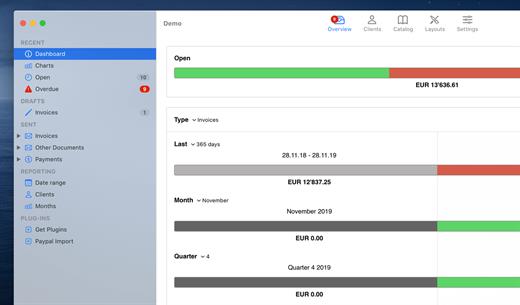
GrandTotal is an application to create invoices and estimates based on your own templates. The built-in template editor allows you to adjust your layout to fit your company’s corporate design. GrandTotal works great in conjunction with TimeLog.

What’s New

Version 9.3.1:


  • Release notes were unavailable when this listing was updated.
Compatibility

macOS 10.14 or later
Apple Silicon or Intel Core processor


Release Name: GrandTotal 9.3.1
Size: 29.2 MB
Links: HOMEPAGE – NFO – Torrent Search

Download: RAPiDGATOR

5 Comments
May 15

MacDroid Pro 2.9.1

MacDroid app is a very helpful solution for those who use Mac or MacBook, at the same time preferring an Android device to an iPhone. Android and macOS cannot natively work together, hence there is a vital need for an interface that would not only connect the two systems but also allow safe and smooth file transfer between them.
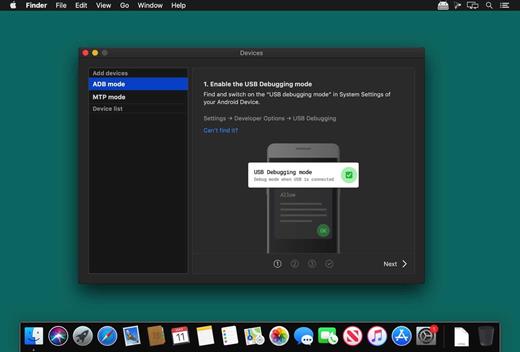
With MacDroid you get the convenience of connecting Mac and an Android phone or tablet and accessing the portable device’s content in the Finder. You will be able to transfer photos, music, videos as well as entire folders. You’ll only need a USB cable to connect your phone to computer, MacDroid will take care of everything else.

Transfer your photos

You can access your Android photos in the Finder app and easily drag them with your mouse cursor to any folder on your Mac.

Transfer music to your phone

You can add your favorite tracks to Android from your Mac or vice versa and enjoy the music on the go.

Watch videos when offline

Got some great new episodes that you want to watch, but not planning to take your computer with you? Not a problem! You can transfer them to your Android and watch on a plane, on a train, or while having an Uber ride.

Edit Android files directly from Mac

When you don’t really feel like moving files around, you can edit your Android files with your favorite Mac app without actually saving them to your computer.

What’s New

Version 2.9:


  • Added: displaying transfer speed in Activity Log.
  • Improved: canceling file uploads.
Compatibility

macOS 10.10 or later


Release Name: MacDroid Pro 2.9.1
Size: 29.8 MB
Links: HOMEPAGE – NFO – Torrent Search

Download: RAPiDGATOR

6 Comments
May 15

OmniPlayer Pro 2.1.21

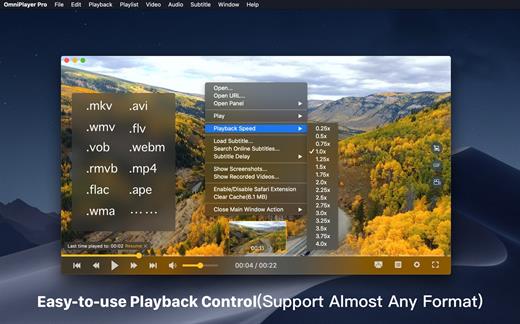
OmniPlayer is a comprehensive media player for almost any video and audio format on macOS. It has powerful features with modern and clean design. You can use it to play various 4K/1080P/720P HD videos and normal/lossless audios easily with hardware decoding. You can also control and adjust the playback/playlist/video image/audio track/subtitles/screenshot etc. conveniently with the rich features.

Features


  • Support Multiple Media Types Play almost any format of the local and remote server(samba/FTP protocol) videos and audios. Support online videos and audios with Http/https protocol. Play Youtube and Vimeo videos with webpage URL directly without online ads.
  • Playlist Control Record media files to playlist automatically, and support clear all when exiting player automatically. Play/Search/Delete/Change repeat mode of media items in the playlist.
  • Playback Control Pause/Resume/Fast forward/Rewind/Jump to specified progress time. Record last progress time of playback when stopping automatically. Show preview images on progress bar when playing a local video. Hide controls automatically to display pure video view without any occlusion. Adjustment playback speed from 0.25x-4x
  • Video Image Adjustment Adjust window size and video image aspect ratio quickly. Adjust video image rotation in all directions. Adjust video image equalizer including brightness, contrast, and saturation.
  • Audio Control Change audio delay time to make audio and video synchronization. Choose different audio tracks in the video. Choose audio mode such as Stereo, Dolby Surround, Headphones, etc. Customize audio equalizer or choosing predefined equalizer such as Classic, Rock, Pop, etc.
  • Subtitle Control Load different formats of local subtitles in real-time. Search and load subtitles online with video name or hash, support most languages. Change subtitle color, size in real-time. Change the encoding of subtitles in different languages to fix the garbled problem.
  • Screenshot Take a screenshot with different formats. Generating gif image up to 60s. One-click exporting movie thumbnail
  • Wireless display DLNA protocol Chromecast protocol Roku channel
What’s New

Version 2.1.21:


  • Release notes were unavailable when this listing was updated.
Compatibility

macOS 10.13 or later.


Release Name: OmniPlayer Pro 2.1.21
Size: 80.8 MB
Links: HOMEPAGE – NFO – Torrent Search

Download: RAPiDGATOR

5 Comments
May 12

Lungo 2.8.1

Lungo prevents your Mac from falling asleep and your screen from dimming.

Lungo can be useful when:


  • Doing a presentation at work
  • Watching YouTube videos in non-fullscreen mode
  • Reading a long article without scrolling
  • Cooking and having the recipe open on your computer
  • Using the screen to view live stats
  • Monitoring progress on a long running task
What’s New

Version 2.8.1:


  • Release notes were unavailable when this listing was updated.
Compatibility

macOS 10.12 or later, 64-bit processor


Release Name: Lungo 2.8.1
Size: 8.6 MB
Links: HOMEPAGE – NFO – Torrent Search

Download: RAPiDGATOR

6 Comments
May 12

Snagit 2026.1.0

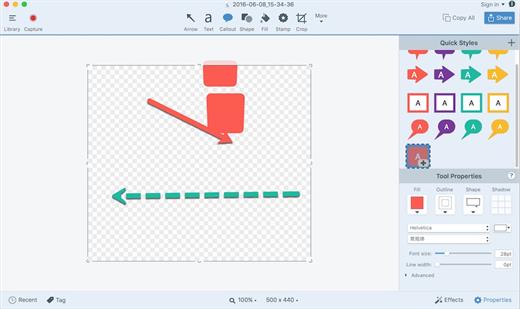
Snagit lets you create an image of what you see on your computer monitor.

Features

Flexible options that let you capture only what you want.

Annotation varieties like arrows, speech bubbles, and more make it easy to customize your capture.

Versatility in what you do with your capture. Send it to your favorite app, share it online, or save it for later.

What’s New

Version 2026.1.0:


  • Release notes were unavailable when this listing was updated.
Compatibility

macOS 10.14 or later
Apple Silicon or Intel Core processor

Release Name: Snagit 2026.1.0
Size: 194.9 MB
Links: HOMEPAGE – NFO – Torrent Search

Download: RAPiDGATOR
5 Comments
May 12

Refolder 1.0.9

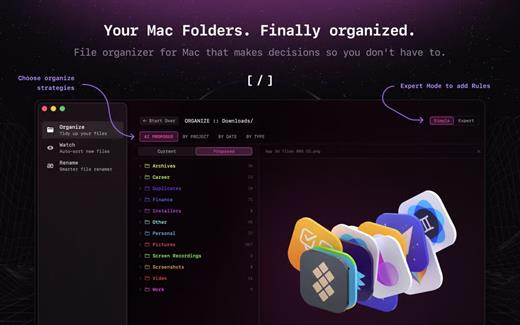
Refolder — file organizer for Mac. A calmer way to clean up busy folders without breaking your flow. It watches your folders, suggests where files belong, and keeps everything sorted in the background. Review changes when you want — or let it quietly do its thing.


  • Auto-sort any selected folder
  • Clean up folders without effort
  • Review moves before they happen
  • Batch rename files in seconds
What’s New

Version 1.0.9:


  • Release notes were unavailable when this listing was updated.
Compatibility

macOS 15 or later


Release Name: Refolder 1.0.9
Size: 10 MB
Links: HOMEPAGE – NFO – Torrent Search

Download: RAPiDGATOR

4 Comments
May 12

Yate 9.2.0

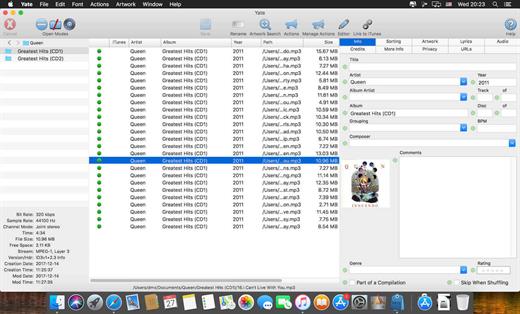
Yate was developed for people who want complete control over their tagging experience. Supports audio in AIFF, APE, DFF, DSF, FLAC, OGG OPUS, OGG VORBIS, M4A, M4B, MP3, MP2, MP4, STEM.MP4, WAV and WV files. Supports video in M4V and MP4.

Yate has a long list of features; most importantly, an innovative scripting system called actions. Actions can be used to update all of an album’s tags with a single operation. Yate also supports integration with AcouticBrainz, AcoustID, Beatport, Discogs, iTunes, MusicBrainz and TMDb. All changes can be easily reverted and individual changes can be undone in any order. Whether you want to automatically or manually tag your files, Yate can do it all!

What’s New

Version 9.2.0:


  • Release notes were unavailable when this listing was updated.
Compatibility

macOS 10.10 or later


Release Name: Yate 9.2.0
Size: 17.3 MB
Links: HOMEPAGE – NFO – Torrent Search

Download: RAPiDGATOR
5 Comments
May 12

Proxyman 6.10.0

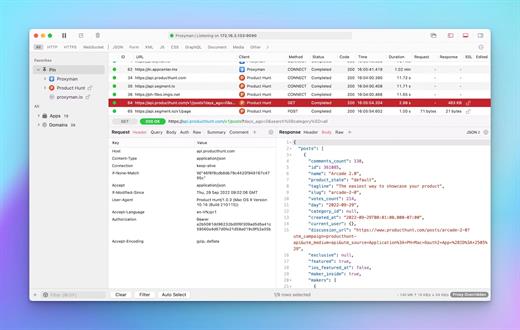
Proxyman is a high-performance macOS app, which enables developers to view HTTP/HTTPS requests from apps and domains.

Features


  • ? Native macOS app. Written by Swift, Objective-C. Powered by Apple SwiftNIO for the high-performance network application.
  • ? Fully support Apple Chip (e.g M1, M2, M1 Pro/Max).
  • ? Built for macOS Monterey & Ventura.
  • ✅ Hassle-free Intercept HTTP/HTTPS requests/response and WebSocket from Web Browsers, iOS, and Android devices.
  • ✅ Modern and intuitive UI
  • ? Multiple filters
  • Comprehensive Guideline to set up with iOS simulator and iOS and Android devices.
  • Basic debugging tools: Compose, Repeat, Wildcard/Regex Filter, Multiple Filters, Customize Columns, Toolbar…
  • Advanced Tools: Breakpoint, Map Local, Map Remote, Backlist, External Proxying, No Caching, Protobuf, Clear Cache, Custom Certificates, Scripting, Network Conditions, Reverse Proxy, Diff, Access Control etc
  • Automatic Setup for Backend Development: Auto capture HTTP(s) traffic from NodeJS, Ruby and Python.
  • macOS 10.15+
What’s New

Version 6.10.0:


  • Release notes were unavailable when this listing was updated.
Compatibility

macOS 10.15 or later


Release Name: Proxyman 6.10.0
Size: 36.3 MB
Links: HOMEPAGE – NFO – Torrent Search

Download: RAPiDGATOR

4 Comments
May 12

Dato 5.8.0

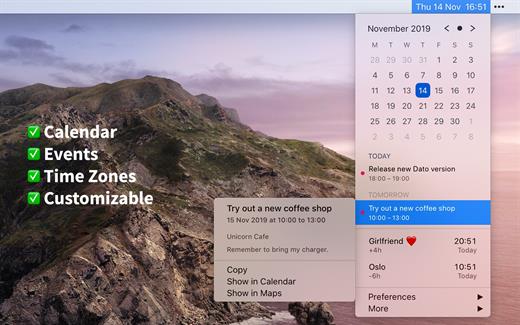
Dato is a replacement for the system menu bar clock.

By default, it looks exactly the same, but when you click it, you get a small calendar, calendar events for the next week, the current time in various time zones (even with custom names), week number, and more. You can customize what to show in the menu and the menu bar.

Dato supports all the locales and languages that macOS supports for dates, times, and the calendar, but the menus are English-only.

Features


  • Calendar, optionally with week numbers. Your upcoming events for the next week at a glance (customizable).Time zones, optionally with custom names.Search time zones by city (15K cities included).Customizable.Double-click a day in the calendar to open that day in the default calendar app.
  • (Supports: Calendar, Fantastical 2, BusyCal).Fully offline with no network entitlements, for your privacy benefit.Supports calendar events with HTML formatted notes.Lots of keyboard shortcuts for power users.”Join Zoom Meeting” button on Zoom meeting calendar invites.
What’s New

Version 5.8.0:


  • Release notes were unavailable when this listing was updated.
Compatibility

macOS 10.14.4 or later, 64-bit processor


Release Name: Dato 5.8.0
Size: 19.7 MB
Links: HOMEPAGE – NFO – Torrent Search

Download: RAPiDGATOR

6 Comments
May 12

Clop 2.11.6

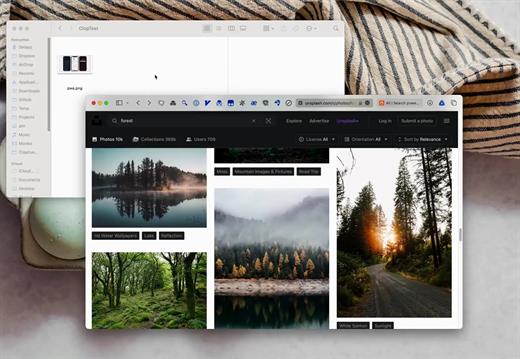
Clop is a powerful macOS utility designed to streamline your workflow by automatically optimizing images, videos, and PDFs. With its “copy large, paste small” philosophy, Clop ensures that every image you copy to your clipboard is instantly compressed to its smallest possible size without losing quality. Whether you are sending screen recordings or attaching heavy PDFs to an email, Clop makes file sharing faster and more efficient by handling the heavy lifting in the background.

What’s New

Version 2.11.6:


  • Release notes were unavailable when this listing was updated.
Compatibility

macOS 13.0 or later


Release Name: Clop 2.11.6
Size: 88.4 MB
Links: HOMEPAGE – NFO – Torrent Search

Download: RAPiDGATOR

6 Comments