Please REGISTER or RENEW your account on RAPiDGATOR.net and support us by doing through all RAPiDGATOR working download links on main posts...
May 12

TinkerTool System 9.89

TinkerTool System is a collection of system utility features helping you in performing advanced administration tasks on Apple Macintosh computers. The application makes use of a self-adapting user interface which automatically adjusts to the computer model and to the version of macOS you are running. All options available in the current situation are accessible via “panes”, very similar to the techniques you already know from the System Preferences application. The features are controlled via a single window which allows you to use the application as a general toolbox and First Aid assistant. This includes:
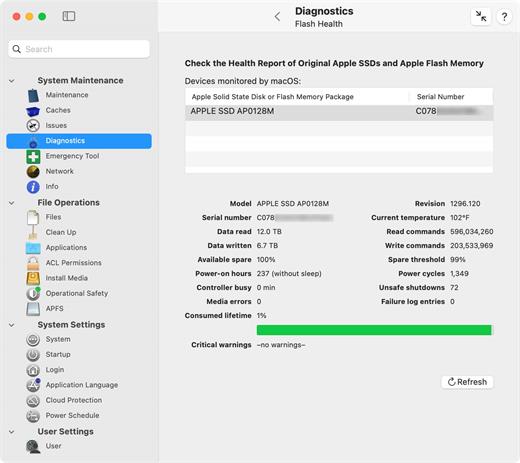

  • Built-in maintenance features of macOS, usually not visible on the graphical user interface;
  • Extended file operations, not available in the macOS Finder;
  • The possibility to access advanced system settings which are not visible in System Preferences;
  • Genuine and unique features of TinkerTool System, designed to resolve typical real-world problems of administrators and to fix the effects of certain defects (“bugs”) in the operating system;
  • An emergency tool to troubleshoot and repair macOS in cases where the graphical user interface is no longer starting correctly or the user account of the system administrator has been damaged;
  • Features to protect your privacy, e.g., by reviewing and editing the list of Internet cookies stored for your user account;
  • Functions to collect advanced information about the hardware, operating system, and applications.
What’s New

Version 9.89:


  • Release notes were unavailable when this listing was updated.
Compatibility

macOS 15.0 or later


Release Name: TinkerTool System 9.89
Size: 30.1 MB
Links: HOMEPAGE – NFO – Torrent Search

Download: RAPiDGATOR

5 Comments
May 12

Juicy 1.2.1

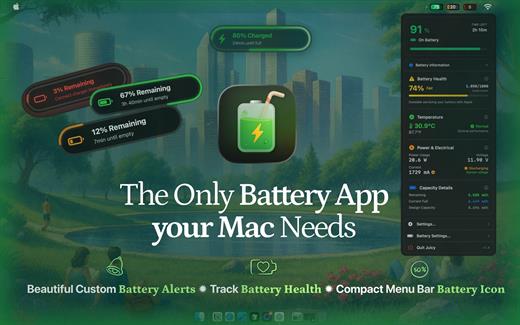
Juicy is a native macOS utility designed to give you total control over your MacBook’s battery life and health through highly customizable alerts and sleek monitoring tools.

Key Features


  • Custom Battery Alerts: Break free from the standard 10% notification. Set beautiful, native-style alerts at any percentage (e.g., 20%, 80%, or even 3%).
  • Health & Lifecycle Tracking: Monitor real-time health percentage, cycle counts, and temperature. Get notified when your battery hits 80% to help prolong its total lifespan.
  • All-in-One Dashboard: View battery levels for all connected devices—including AirPods, iPhones, iPads, and Magic Mice—in one organized list.
  • Sleek Menu Bar Icons: Replace the default battery icon with a compact, iPhone-style display that shows the percentage inside the icon to save space.
  • Smart Automation: Automatically dismisses annoying system battery pop-ups and provides “screen glow” effects to ensure you never miss a critical low-battery warning.
What’s New

Version 1.2.1:


  • Release notes were unavailable when this listing was updated.
Compatibility

macOS 15.6 or later.


Release Name: Juicy 1.2.1
Size: 19.2 MB
Links: HOMEPAGE – NFO – Torrent Search

Download: RAPiDGATOR
5 Comments
May 12

Magic Battery 9.5.2

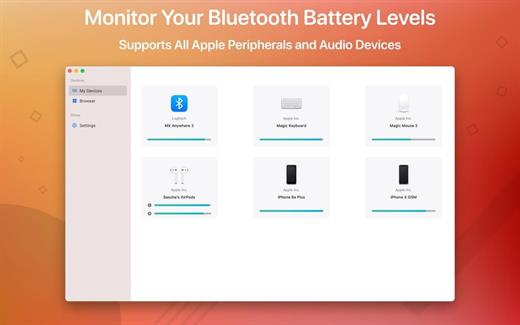
The App Magic Battery shows the battery level of supported input devices and headphones that are connected via Bluetooth in the menu bar. Internal batteries are also supported.

The following devices are supported:

Input devices:

• Apple Magic Mouse

• Apple Magic Mouse 2

• Apple Magic Trackpad 2

• Apple Wireless Keyboard

• Apple Wireless Trackpad

• Logitech mice like the MX3 Anywhere and Logitech Pebble

• Logitech keyboards (K series)

The app features:

• Modern GUI for displaying connected devices and their battery levels.

• You can choose between a detailed, a compact or an icon-only view. In the detailed view, the battery level is shown next to the device icon. In the icon-only view, the battery levels are shown once the menu of the app is opened. The compact view shows all the information in a way that very little space is used.

• Apple Silicon support.

• Connected or disconnected devices are detected automatically. The view is then adjusted accordingly.

• Support for auto-start: The app is started as soon as the user is logged in (optional).

What’s New

Version 9.5.2:


  • Release notes were unavailable when this listing was updated.
Compatibility

macOS 11.0 or later.


Release Name: Magic Battery 9.5.2
Size: 7 MB
Links: HOMEPAGE – NFO – Torrent Search

Download: RAPiDGATOR

4 Comments
May 12

Muse 3.5.2

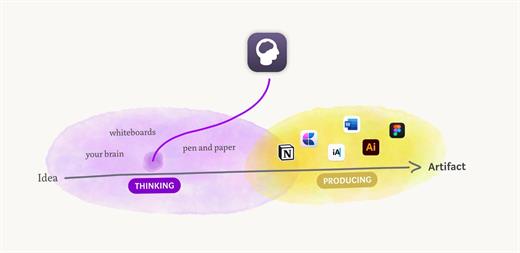
Muse is no longer just for your iPad. Muse for Mac brings your nested boards and open-ended research to the desktop, optimized for the precision of a mouse and keyboard while maintaining the “lost in thought” feel of the original.

The Vision: From Thinking to Producing

While the iPad is for relaxed, informal sketching and manual interaction, the Mac is built for focused productivity, heavy research, and bulk editing. Muse for Mac acts as the bridge, allowing you to move seamlessly from the “Thinking” phase to the “Artifact” phase of your workflow.

What’s New

Version 3.5.2:


  • Release notes were unavailable when this listing was updated.
Compatibility

macOS 13.0 or later


Release Name: Muse 3.5.2
Size: 60.9 MB
Links: HOMEPAGE – NFO – Torrent Search

Download: RAPiDGATOR
5 Comments
May 12

SideNotes 1.6.0

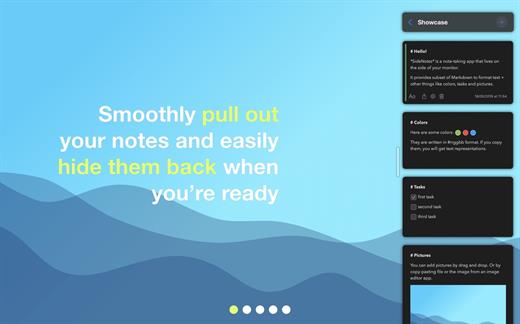
Have you ever had a thought that came to your mind and all you wanted was to write it down quickly? Meet SideNotes! It’s an app for note-taking where you put all your buzzing thoughts in a neat, quick and organized way. Enjoy its non-distractive workflow. With SideNotes you can save your ideas, pictures, task lists and many more.

SideNotes keeps you from juggling with windows when searching for notes. The app always appears on top of other windows – you can easily hide it or pull it out from the side of your monitor with one click or with a keyboard shortcut. You can even use just your keyboard to work with your notes. Everything is in its place and you still have place for everything.

With SideNotes you can:


  • Smoothly pull out your notes from outside your monitor and easily hide them back
  • Mark notes with colors and group them into folders
  • Drag and drop pictures directly from your web browser
  • Save links, code snippets or even colors
  • Create task lists and mark items done
  • Create notes directly from the pasteboard
  • Drop text files or folders
  • Use 3 text formatting modes: Markdown, Plain Text and Code.
*** You need to disable the System Integrity Protection (SIP) to perform the selected Application.

What’s New

Version 1.6.0:


  • Release notes were unavailable when this listing was updated.
Compatibility

macOS 10.14 or later, 64-bit processor


Release Name: SideNotes 1.6.0
Size: 22.1 MB
Links: HOMEPAGE – NFO – Torrent Search

Download: RAPiDGATOR

5 Comments
May 12

Magic Disk Cleaner 4.1.5

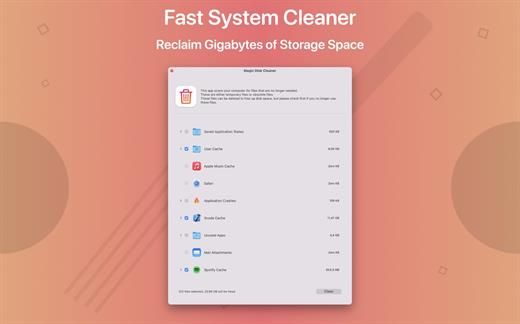
Magic Disk Cleaner finds and deletes files temporary files that waste lots of space. The app is lightning fast and frees disk space in no time.

Magic Disk Cleaner searches your computer for temporary files and can also delete them directly if you wish.

Magic Disk Cleaner offers the following features:

Fast Search

Magic Disk Cleaner quickly scans your computer for temporary data that can be removed. You can have them deleted with one click.

Extremely easy handling

Magic Disk Cleaner couldn’t be simpler. The search is started immediately after the app is started. You can now delete files with just one click.

No automatic deletion

Magic Disk Cleaner does not delete any data without your consent. Choose for yourself which data is deleted and which you want to keep.

What’s New

Version 4.1.5:


  • Release notes were unavailable when this listing was updated.
Compatibility

macOS 11.5 or later
Apple Silicon or Intel Core processor


Release Name: Magic Disk Cleaner 4.1.5
Size: 7 MB
Links: HOMEPAGE – NFO – Torrent Search

Download: RAPiDGATOR
6 Comments
May 12

Bluetail – Cut Designer 1.1.0

Create posts and prints using Bluetail – Cut Designer, Precisely crafted samples and shape library collections. Create eye-catching designs for your craft projects. You can use all in one vector editor to create T-Shirt designs, printable crafts, monograms, holiday and celebration decorations, mockups and social media posts.

Also can be used as elements for decorations, advertisements and flyers. Wedding events, birthday greetings, postcards or invitations can be more impressive. Designs can be simply exported to pdf and graphic files or printed using machines.

Designs are in vector format, so can be resized easily without losing the quality. Use the shapes on your social media posts, banners and covers. Use them on business cards, envelopes, letters, flyers.

Key features of the designs
– Add or change texts, styles of objects
– Add shadow, borders, patterns
– Use Style Collections to change style with one-click
– Copy Style. and Paste to other objects
– Change color, opacity, object order, rotate, flip, align
– Drag and Drop images from outside or import with “Image…” button
– Draw any shape using Huge Shape Library Collection
– Start with handcrafted collection of Templates
– Group and Layer management features
– Lock/Unlock objects
– Clean user interface (including Dark Mode)

What’s New

Version 1.1.0:


  • Release notes were unavailable when this listing was updated.
Compatibility

macOS 10.15 or later


Release Name: Bluetail – Cut Designer 1.1.0
Size: 187.3 MB
Links: HOMEPAGE – NFO – Torrent Search

Download: RAPiDGATOR

5 Comments
May 11

Topaz Gigapixel 1.2

Topaz Gigapixel knocks traditional upscaling tools off their pedestals.

Enlarging your image without losing detail has always been impossible… until now. Upscale your photos by up to 600% while perfectly preserving image quality.

Breathtakingly sharp prints. High-resolution cropping in post-production. iPhone photos that look like they came out of a DSLR.

No matter why you’re enlarging your photos, you always want the best possible quality for your results. Gigapixel AI is currently the only photo enlargement product available that can actually add detail back to your upscaled photo.

What’s New

Version 1.2:


  • Release notes were unavailable when this listing was updated.
Compatibility

macOS 12 Monterrey,ARM only.


Release Name: Topaz Gigapixel 1.2
Size: 752.1 MB
Links: HOMEPAGE – NFO – Torrent Search

Download: RAPiDGATOR
3 Comments
May 11

Tripsy 3.8.8

Plan, organize, and track your trips effortlessly right from your Mac. Tripsy keeps all your flights, accommodations, and activities perfectly organized in one beautiful, easy-to-use desktop workspace.

Key Features:


  • All-in-One Itinerary: Centralize your flights, hotels, restaurants, and tours in a clear timeline.
  • Smart Import: Automatically import reservations from over 700 providers, including major airlines and booking sites.
  • Real-Time Flight Alerts: Stay updated with instant notifications for gate changes, delays, and departures.
  • Seamless Ecosystem Sync: Your travel data syncs instantly across your Mac, iPhone, iPad, and Apple Watch.
  • Collaborative Planning: Share your itinerary and plan in real-time with family, friends, or colleagues.
  • Built-in Travel Tools: Access 10-day weather forecasts, track your travel expenses, and sync everything directly to your Apple Calendar.
  • Offline Access: View your entire itinerary even when you don’t have an internet connection.
What’s New

Version 3.8.8:


  • Release notes were unavailable when this listing was updated.
Compatibility

macOS 15 or later


Release Name: Tripsy 3.8.8
Size: 46.5 MB
Links: HOMEPAGE – NFO – Torrent Search

Download: RAPiDGATOR

3 Comments
May 11

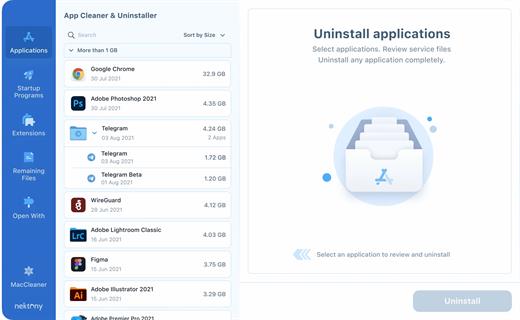
App Cleaner & Uninstaller Pro 9.1.1

App Cleaner & Uninstaller (was App Cleaner) can remove applications and their service files on macOS. Make sure they aren’t eating up precious space on your drive with this helpful app that does the legwork for you.

Features


  • Scan the system and preview installed applications
  • Remove all types of service files
  • Remove remains of previously uninstalled apps
  • Reset application to a first-launch state
  • Easy-to-use shortcuts
  • Any file or app quick preview
  • Specific app-associated file formats preview
  • In-app help assistance
  • Show unused applications
  • Skip list option
What’s New

Version 9.1.1:


  • Release notes were unavailable when this listing was updated.
Compatibility

macOS 10.13 or later


Release Name: App Cleaner & Uninstaller Pro 9.1.1
Size: 31.5 MB
Links: HOMEPAGE – NFO – Torrent Search

Download: RAPiDGATOR
5 Comments