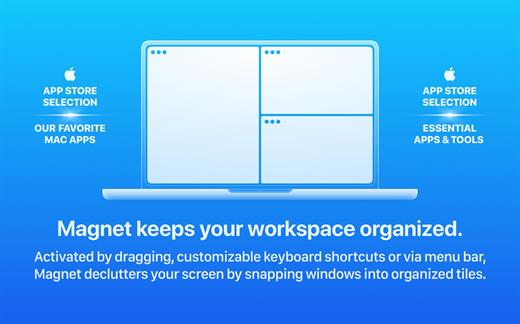
Window Magnet will change the way you work with your Mac! Easily snap windows into various sizes and positions by simply dragging them to the edges and corners of the screen. Maximize them, place them side by side or deploy them into all four quarters of your screen in the blink of an eye.
Features
Move and Resize. In just one drag you snap any window into left, right, top and bottom halves and into all four quarters of your screen.
Real Fullscreen. Go nice, full, edge-to-edge fullscreen by simply dragging any window to the top of the screen and don’t mess with that tiny green “zoom” button that almost never seems to do what you want it to.
Easy Restore. Return a window to its previous size by simply dragging it from its snapped position and it will pop back to the shape it had before.
Menu Bar Assistant. Access all features and preferences through menu bar icon sitting right at the top of your screen to be on hand any time you need it.
Keyboard Shortcuts. For all you keystroke lovers, use predefined keyboard shortcuts or create your very own ones that fit your needs.
External Display Support. Manage your bigger workspace at the speed of light, even on external display.
Switchers Friendly. If you’ve experimented with Windows 7, you may have used something very similar and will be pleased to have one of the greatest window management tools on your shiny new Mac.
What’s New
Version 3.0.4:
Runs smoothly on macOS 15 Sequoia
Rewritten from the ground up in Swift
Compatibility
macOS 10.13 or later. Apple Silicon or Intel Core processor
Soulver 3 is a smart notepad with a built-in calculator. It gives instant answers to any calculations it finds in your text. It’s a better way to work stuff out than with a traditional calculator, and a more lightweight tool for quick calculations than a spreadsheet.
Math Features
Instant calculations, no equals required
Use words alongside numbers, so calculations make sense
PhoneRescue is an ultimate iOS data recovery program designed for retrieving your lost photos, messages, contacts, notes and more on your iPhone, iPad and iPod touch. Also it can repair an iDevice from any iOS crash error.
Features
Focuses on analyzing and recovering the most important 25 types of iOS content
Recovers data & files directly back to iPhone for instant use, or to computer for future use
Pinpoints your lost contents in the first moment and conjure them back in an eye-blink
Retrieves your valued information via 3 safe and reliable ways: from device, iTunes backup, and iCloud
Extracts your needed information from iTunes backup – even it has been encrypted
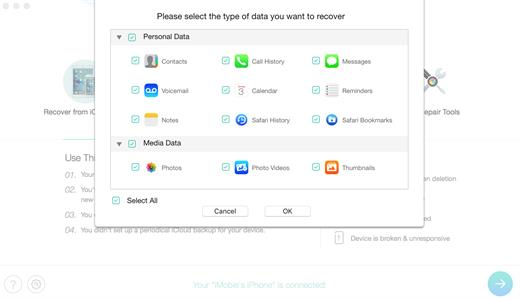
Offers options of file types that you intend to scan and recover, making the process more accurate and faster
Fixes any iOS error within a single click to revive your broken iPhone
Mistaken deletion of your photos, text messages, contacts or other vital info on your iPhone could be a disaster in your life. That’s why we introduced PhoneRescue, with the promise to get all your lost-but-valued media or text data back in your hands. Apart from supporting 3-way recovery (from device, iTunes backups, and iCloud) to ensure the maximum recovery rate, PhoneRescue can recover data directly back into iPhone for instant use.
What’s New
Version 4.3.0:
Release notes were unavailable when this listing was updated.
Yate was developed for people who want complete control over their tagging experience. Supports audio in AIFF, APE, DFF, DSF, FLAC, OGG OPUS, OGG VORBIS, M4A, M4B, MP3, MP2, MP4, STEM.MP4, WAV and WV files. Supports video in M4V and MP4.
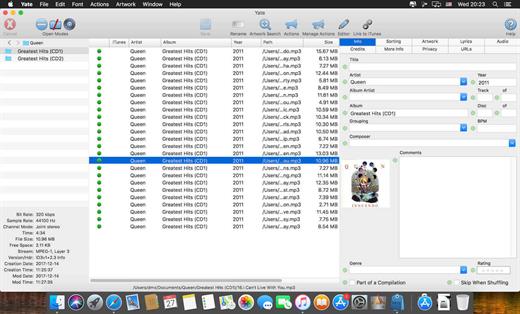
Yate has a long list of features; most importantly, an innovative scripting system called actions. Actions can be used to update all of an album’s tags with a single operation. Yate also supports integration with AcouticBrainz, AcoustID, Beatport, Discogs, iTunes, MusicBrainz and TMDb. All changes can be easily reverted and individual changes can be undone in any order. Whether you want to automatically or manually tag your files, Yate can do it all!
What’s New
Version 7.0.0.1:
Release notes were unavailable when this listing was updated.
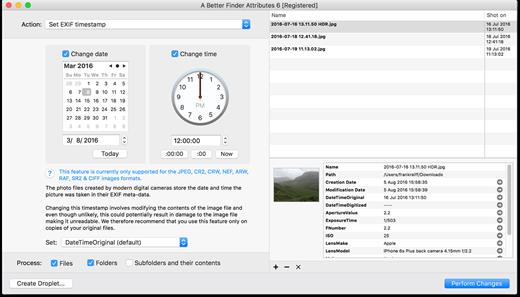
A Better Finder Attributes 7 allows you to change JPEG & RAW shooting dates, JPEG EXIF meta-data tags, file creation & modification dates, file flags and deal with invisible files.
Correct EXIF Digital Photo Shooting Timestamps
A Better Finder Attributes 7 allows you to manipulate JPEG, CR2, NEF, ARF, RAF, SR2, CRW & CIFF EXIF timestamps at will by setting them to specific times or batch adjusting them by adding and removing time (useful for correcting the timestamps of images taken with a digital camera with a incorrectly set clock and to compensate for timezone changes).
Correct Finder Sorting for Digital Photos
A Better Finder Attributes 7 also allows you to synchronize the file creation and modification dates with the shooting dates of JPEG EXIF as well as a wide variety of RAW formats, so that files sort properly in the Finder and other systems.
Change, Add & Remove JPEG EXIF Meta-Data
A Better Finder Attributes 7 allows the most commonly used JPEG EXIF meta-data tags, such as copyright & owner information, camera & lens specifactions, some exposure information and much else besides to be directly manipulated.
You can strip JPEG EXIF information from a file altogether, strip GPS and IPTC location data or edit individual tags.
Total File Creation & Modification Date Control
A Better Finder Attributes 7 gives you total control over file creation and modification dates, setting them to specific times and dates, adding or removing time or simply removing them altogether.
Setting Mac File Flags
A Better Finder Attributes 7 supports setting all common Mac file system flags. You can set whether or not file extensions appear in the Finder, batch lock or unlock files, set or remove legacy creation & type codes, remove invisible files, restart the Finder in a special mode that shows invisible files, batch set Finder labels and force Finder updates.
Showing & Deleting Invisible Files
A Better Finder Attributes 7 can delete invisible files, such as .DS_Store, that can lead to problems when delivering files to non-Mac systems and play havoc with Unix tools such as version control and archiving tools.
On top of this A Better Finder Attributes has a special “Show Invisible Files” feature hidden in the “Tools” menu that switches the Finder to a special mode in which invisible files become visible
Other Noteworthy Features
Batch operation
Create Droplets for automated processing
Drag-and-drop into the file list or onto the application icon
Select files in the Finder and activate A Better Finder Attributes 5 via the Finder context menu or via a hot key
Automatically deals with file date consistency rules
Separate processing for files and folders, batch processing of sub-folders
Additionally, A Better Finder Attributes 5 gives you control over:
Whether or not file extensions appear in the Finder
Batch locking or unlocking of files
Setting or removing legacy creator and type codes
Removing invisible files
Seeing invisible files in the Finder
Batch setting of Finder labels
Forcing the Finder to update its information about files and folders
What’s New
Version 7.36:
Release notes were unavailable when this listing was updated.
Compatibility
macOS 10.11 or later
Release Name: A Better Finder Attributes 7.36 Size: 12.6 MB Links: HOMEPAGE – NFO – Torrent Search
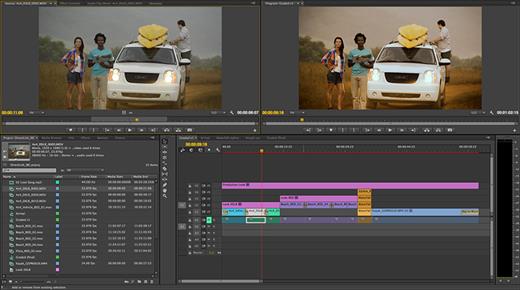
Adobe Media Encoder is an encoding program that allows you to encode audio and video files into various distribution formats for various applications and audiences. Such video and audio formats are characterized by a high degree of compression. Using this program, you can export videos to formats supported by various devices, from DVD players and websites to mobile phones, portable media players, and standard and high definition TVs.
Key Features
Support for 8K H.264 export
Export XAVC QFHD Long GOP 4:2:2 formats
Hardware-accelerated HEVC encoding on Windows 10 with 7th Generation (or later) Intel® Core™ processors and Intel Graphics enabled
Improved RED camera format decoding
Improved Sony RAW/X-OCN camera format decoding
Hardware-accelerated H.264 encoding on Windows 10 with 6th Generation (or later) Intel® Core™ processors and Intel Graphics enabled
Hardware-accelerated H.264 and HEVC encoding on Mac OS 10.13 systems with supported hardware
Support for importing Canon C200 camera formats
Support for importing Sony Venice camera formats
RED camera Image Processing Pipeline[IPP2] support
Destination Publishing support for new Twitter 280-character limit
Channel selection when publishing to YouTube and Vimeo
Playlist selection when publishing to YouTube
Page selection when publishing to Facebook
Add custom titles when publishing to YouTube, Facebook, or Vimeo
Add custom video thumbnails when publishing to YouTube
Notification for missing items in queue before encoding
H.264 adaptive bitrate presets automatically choose best output bitrate based on source frame size and frame rate
Animated GIF export on macOS and Windows
Time Tuner effect improvements
Newly optimized list of H.264 presets
Format support for RF64 WAV Decode/Encode, decode for Sony X-OCN, and QuickTime DNx Smart Rendering
Warning when importing non-native QuickTime sources
Timecode modification for 720p 59.94 media
Destination Publishing to Adobe Stock Contributor
Adobe Team Projects support
Support for Color Profiles from After Effects sources
Automatically relinked assets when importing a sequence
Option to maintain playback in Premiere Pro while rendering in Media Encoder
Streamlined bit depth and alpha channel settings (QuickTime only)
Export support for ambisonic audio (H.264 only)
Support for Hybrid LOG Gamma (HLG)
Support for HDR in HEVC (H.265) export Export support for Panasonic AVC-Long GOP Op1b
What’s New
Version 25.0:
Release notes were unavailable when this listing was updated.
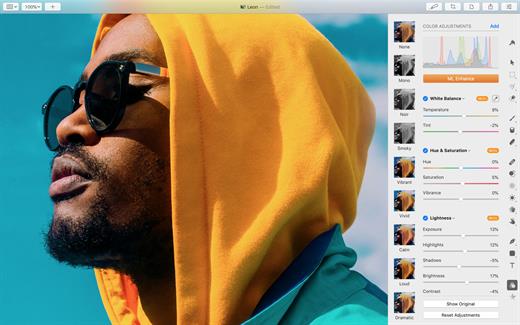
Pixelmator Pro is an incredibly powerful, beautiful, and easy to use image editor designed exclusively for Mac.
With a wide range of professional-grade, nondestructive image editing tools, Pixelmator Pro lets you bring out the best in your photos, create gorgeous compositions and designs, draw, paint, apply stunning effects, design beautiful text, and edit images in just about any way you can imagine. And thanks to its intuitive and accessible design, Pixelmator Pro is delightfully easy to use – whether you’re just starting out with image editing or you’re a seasoned pro.
The modern, single-window interface is designed exclusively for working with images on a Mac. An intuitive and accessible design makes it easy for anyone to edit images – from complete beginners to design professionals.
The new ML Super Resolution feature lets you increase the resolution of images without blurriness or reduced quality using state-of-the-art machine learning.
What’s New
Version 3.6.12: Pixelmator Pro 3.6.12 changes the in-app user guide links to open our all-new guide and includes a few minor fixes.
Compatibility
macOS 11.0 or later Apple Silicon or Intel Core processor
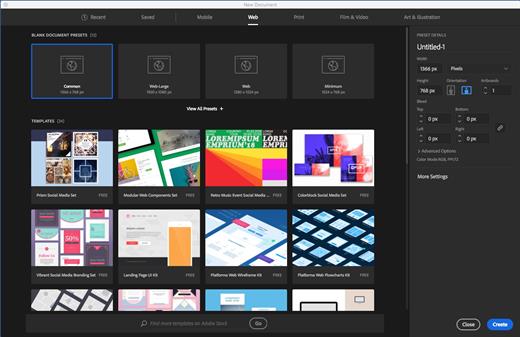
Adobe Illustrator is the industry standard vector-drawing environment for designing across media. Express your creative vision with shapes, color, effects, and typography. Work with speed and stability on large, complex files, and move designs efficiently among Adobe’s creative applications.
The state of the art of illustration.
The industry-standard vector graphics software lets you create logos, icons, drawings, typography, and illustrations for print, web, video, and mobile.
Illustrator is all around you.
Millions of designers and artists use Illustrator to create everything from web icons and product packaging to book illustrations and billboards.
Iconic work at any size.
Get all the drawing tools you need to turn simple shapes and colors into sophisticated logos, icons, and graphics. Illustrator artwork is vector-based software, so it can scale down for mobile screens and up to billboard size – and always look crisp and beautiful.
Gorgeous typography that says it all.
Incorporate a company name into a logo, create a flyer, or mock up a website design with the best type tools out there. Add effects, manage styles, and edit individual characters to create typographic designs that perfectly express your messages.
Draw attention everywhere.
Create freehand drawings, or trace and recolor imported photos to turn them into works of art. Use your illustrations anywhere, including printed pieces, presentations, websites, blogs, and social media.
Share access and edit cloud documents:
Invite your team members to seamlessly collaborate and edit your cloud documents. Cloud documents shared with you can be accessed directly in Illustrator.
Note:
If you would like to add a custom language
Local language in ‘Easy Installer’ First; many thanks for the effort being done! I’ve been loking for the local installation of InDesign 19 mainly because of spelling/proof reading made easier than with the en_US version available. Through some blind trial and error I’ve found out this, which BTW works with other Adobe apps than ID;
The install package folder consists of a folder ‘Build’ containing Installer and Uninstaller as two .pkg-files, an empty folder named ‘Exception’, a .txt document and a .ccp document Open the .ccp document with internal text editor and find and replace following lines; <PackageLanguage>en_US</PackageLanguage> with for example <PackageLanguage>sv_SE</PackageLanguage> <OSLangDetection suppress=”false”/> with <OSLangDetection suppress=”true”/> multiple lines of <installLang>en_US<installLang> with for example <installLang>sv_SE<installLang> Next right-click the installer file and choose ‘Show content’. In folder ‘Contents’ > ‘Resources’ open file optionXML.xml and find and replace following lines (same as in the .ccp file); <PackageLanguage>en_US</PackageLanguage> with for example <PackageLanguage>sv_SE</PackageLanguage> <OSLangDetection suppress=”false”/> with <OSLangDetection suppress=”true”/> multiple lines of <installLang>en_US<installLang> with for example <installLang>sv_SE<installLang> NB: The example here is for Swedish installation and by choose another code than ‘sv_SE’ you’ll get another language.
Alternative installers
For those of you having issues with any of the installers above, try these ones: rapidgator Link | nitroflare Link . You need Creative Cloud installed for these to work, but each installer will open Creative Cloud and install the app directly in there. Note that it always installs the latest version of the Adobe app this way so the patch may get out of sync with the version it installs over time unless it is updated. After install of course, you can remove Creative Cloud after if you like, but you need it for the install.
Creating an Adobe Account
prevent any popup that asks you for credit card details. Or, if you would like to use Generative features in the apps, you need a Teams Trial account instead.
To Create a Russian account do the following: In the Creative Cloud app, you simply click Create Account. And select Russia as the Region. Here is where you select region when creating a new account in the Creative Cloud app: What’s New
Version 29.0.1:
Release notes were unavailable when this listing was updated.
Compatibility
macOS 10.15.0 or later Apple Silicon or Intel Core processor
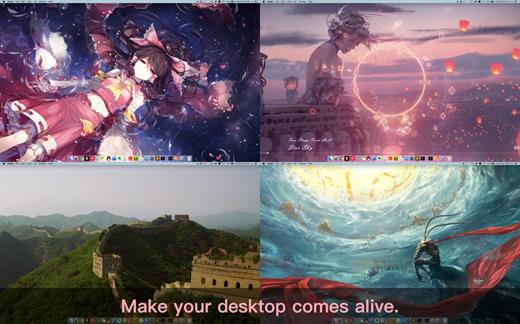
Dynamic Wallpaper Engine allows you to use live wallpapers on your desktop/screensaver. It provides thousands of live wallpapers in the Workshop while taking as little system resources as possible. It’s the Wallpaper Engine for Mac.
Features • 2000+ hand-picked videos which are updated every day. • Multiple types of 4K Ultra HD videos, anime, scenery, cute, game, creative, Beauty, Ancient, Movie, etc. • Supports “keyword searching” in videos. • Supports “Dynamic-ScreenSaver”, personalize your lock screen. • Easy to import local video. • Supports The playlist, list loop, shuffle loop. • Supports multiple screen aspect ratios and video native resolutions. • Supports global hotkeys to control wallpaper, hide desktop icons and show screensaver. • Set different wallpapers on different displays. • Manual control, video pause, resume and mute. • Break reminders, with flexible customization if you want it. • Auto mode, pause the video when other apps are active, not disturbed at work. • Auto mode, pause the video when Power Disconnected. • Support for hiding desktop icons. • Dynamic Wallpaper Engine is designed to provide an interesting experience while consuming as little system resources as possible.
What’s New
Version 20.1:
Release notes were unavailable when this listing was updated.
Compatibility
macOS 10.12 or later Apple Silicon or Intel Core processor