Please REGISTER or RENEW your account on RAPiDGATOR.net and support us by doing through all RAPiDGATOR working download links on main posts...
Nov 3

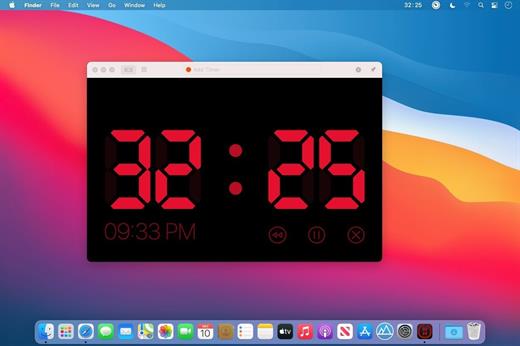
Timer RH Pro 3.1.1

Take Control of Your Time

Capabilities:


  • Set the timer to the specific time or to the exact time interval
  • Multiple timers
  • Repeating timers
  • Text and color labels
  • Combining timers into the scenaries
  • Create shortcuts and set hotkeys for its
  • One-touch timers addeding
  • Display on top over all windows when timer expiring
  • Ability to pin the window on top over all windows when working
  • Fullscreen mode
  • Flexible settings for sound and alerts
  • Count Down or Forward
  • Multiple timers in one window
  • History of timers
  • Timer in the staus bar and on the dock icon
And much more in this universal tool

What’s New

Version 3.1.1:


  • Release notes were unavailable when this listing was updated.
Compatibility

macOS 10.14 or later
Apple Silicon or Intel Core processor


Release Name: Timer RH Pro 3.1.1
Size: 27.7 MB
Links: HOMEPAGE – NFO – Torrent Search

Download: FiKPERNiTROFLARERAPiDGATOR

5 Comments
Nov 3

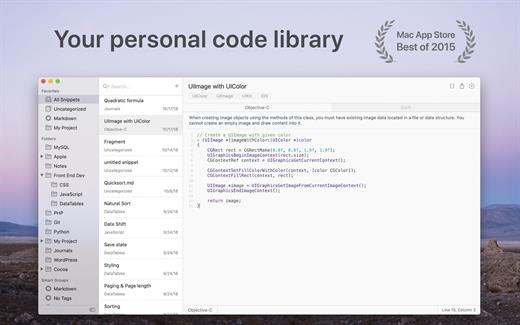
SnippetsLab 2.5.1

SnippetsLab is an easy-to-use snippets management tool. It helps you to collect and organize valuable code snippets, and makes sure that you have easy access to them whenever you want.

Features


  • Beautiful user interface, optimized for OS X 10.10 Yosemite
  • Create shortcuts for your most commonly used folders
  • Add multiple fragments in one snippet
  • Use full-text search to find your snippets instantly
  • Supports syntax highlighting for over 100 languages
  • Use iCloud to synchronize your database across multiple devices
  • Import from other services to your database
  • Use the SnippetsLab Assistant to search, browse and create snippets right from the menu bar
What’s New

Version 2.5.1:


  • Release notes were unavailable when this listing was updated.
Compatibility

macOS 10.12 or later, 64-bit processor


Release Name: SnippetsLab 2.5.1
Size: 57.6 MB
Links: HOMEPAGE – NFO – Torrent Search

Download: FiKPERNiTROFLARERAPiDGATOR

6 Comments
Nov 3

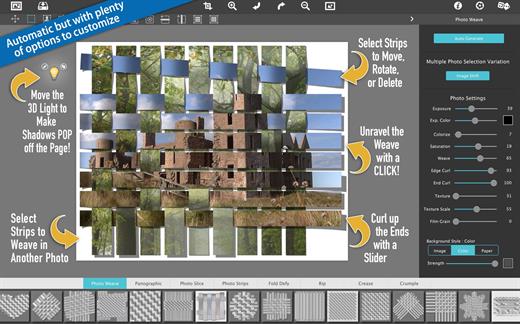
JixiPix Photo Formation Pro 1.0.25

Photo Formation is a photo effect automatically transforms images into formations super creative paper and then uses a 3D engine ultrasmall light to project shadows. Use it to break, join, weaving, cutting and bending photos into fascinating and eye – catching pieces, with all the subtle creases, curls and curves as if they had painstakingly assembled by hand.

Photo Formation comes with a library of preset one touch to get you started quick adjustments, and a button that automatically plays scrambling a variety of creations on paper again and again until you get something for you. Tools movement, rotation and scaling can be used to customize each composition: the sky is the limit of what can be done!

We make it easy to use without taking control you, the artist. If you are the practical type who likes to do things from scratch a Build button automatically takes you to creatively starting the effect of initial paper then presents a control panel so you can do it exactly the way you want. is not so much work as it sounds, only specifies how many strips, tiles or folds; how much curl, wrinkle or depth; and if you want exposure, opacity, texture and grain. An Apply button represents creation in the document that ends, moving around paper items (if desired) and adding optional configurations photography.

What differentiates Photo Formation from others is its powerful lighting system. Oriented in a 2D space, Photo Formation creates true 3D creases and folds along with all the distortions of perspective that cast realistic shadows for an incredible high – end result. Lighting is fully adjustable and simply moving around the document can change the direction of the shadows. You can also set multiple light sources doubled light to create shadows fantastic double and triple: how many depends on you!

Photo Formation is presented as a standard application or mixed into your workflow with a supplement included for Photoshop, Elements, Lightroom, PaintShop Photo Pro and Affinity.

What’s New

Version 1.0.25:


  • Release notes were unavailable when this listing was updated.
Compatibility

macOS 10.9 or later


Release Name: JixiPix Photo Formation Pro 1.0.25
Size: 133.8 MB
Links: HOMEPAGE – NFO – Torrent Search

Download: FiKPERNiTROFLARERAPiDGATOR

5 Comments
Nov 3

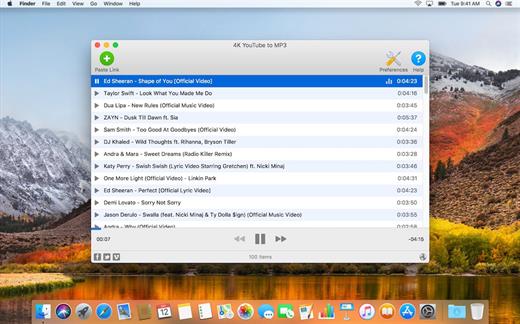
4K YouTube to MP3 Pro 5.6.3

4K YouTube to MP3 was specifically created to extract audio from YouTube, Vimeo or Facebook and save it in MP3, M4A, OGG. No annoying and complicated settings to deal with, just a clean, friendly and functional interface. Downloading is simple and straightforward: just copy the link from your browser and click ‘Paste Url’. Done!

Features


  • Extract audio from YouTube videos and save it in MP3, M4A or OGG in high quality.
  • Download full YouTube playlists or channels and generate m3u files.
  • Transfer downloaded tracks automatically into iTunes and upload them on your iPhone or iPod.
  • Listen music via native built-in music player.
  • Download and extract audio tracks from SoundCloud, Vimeo, Flickr and DailyMotion videos.
  • Download audio books from YouTube.
  • Extract audio tracks even from embedded in HTML page videos.
  • Use 4K YouTube to MP3 on your PC, Mac or Linux, doesn’t matter what OS you prefer.
What’s New

Version 5.6.3:


  • Release notes were unavailable when this listing was updated.
Compatibility

macOS 10.10 or later


Release Name: 4K YouTube to MP3 Pro 5.6.3
Size: 165.6 MB
Links: HOMEPAGE – NFO – Torrent Search

Download: FiKPERNiTROFLARERAPiDGATOR

6 Comments
Oct 24

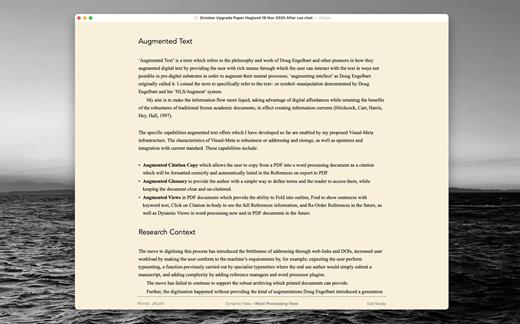
Author 10.2

Greater control of the authorship process with Augmented Citation Copy, Augmented Glossary, Augmented Views, Cuttings & more.

When you are ready to share your work as a PDF you get an automatically created Reference section. You can also post to WordPress.

Quick-Cite


  • Copy from PDF in the companion application Reader and paste as a full citation in Author
  • Paste the BibTex or DOI from an academic PDF to have it automatically turn into a full citation
  • Cite quickly and easily from Books, Web pages and YouTube videos (from specified time if desired)
  • Citations can easily be moved around from one document to another by clicking on the citation and choosing ‘Copy Citation’.
Advanced Automatic Export Options

  • Append References Section
  • Create Cover Page
  • Number Headings
  • Specify how citations should appear: Author Date or Author Number
  • Makes typed-out links live
  • Option to have Visual-Meta attached
  • Publish to WordPress: Supports multiple accounts and image attachments
Advanced Views

  • Dynamic View: Think freely without being constrained by the traditional columns of text. Mind map, concept map and jot down thoughts, right inside Author.
  • Instant Outline: Pinch on your trackpad to fold the text to see just the headings. Pinch further in or out to see more or less headings
  • Advanced Find: If you only want to see sentences with a specific keyword, select the keyword cmd-f to hide all the sentences which do not have the keyword will be hidden. Click on a sentence to jump to it, cmd-f again or ESC to return to the regular view.
  • Magic Margins: Double click in the margins (in full screen mode) to jot down any notes. If the notes are also in the document they will be bold and you can double-click to see all their occurrences. Note: These margins do not follow your document when you scroll, they are separate, to allow you to have an always-available space to jot notes–hence they are not like traditional margins
Cuttings

  • Everything you Cut (but not Copied) is remembered by Author. CMD-shift-v to see what you have Cut and choose what to paste
Modern & Minimalist

  • Makes Author fast and gives you auto saving and everything else you would expect from a modern, native macOS application including iCloud Drive (sync with Author iOS in the future)
  • cmd- / cmd+ to scale all the text, you cannot change the size, colour or font of specific text in Author, only make it bold and italic, since Author is a writing application, not a layout application so therefore gives you less things to unproductively fiddle with
  • Reduces eye strain and supports native macOS Dark Mode
  • Including complete citation information and internal links to them. Author is minimalist but not markdown.
  • ESC to go into and out of full screen. It seems like a detail but is very helpful when going between focused writing and interacting with many documents.
A Liquid Product

  • Integrated with Reader (PDF reader): Provides instant citations through simply copying and pasting text using the Visual-Meta method as described at http://www.liquid.info/scholarly-copy.html
  • Integrated with Liquid actions: Provides hundreds of commands in less than one second on any selected text.
What’s New

Version 10.2:


  • Release notes were unavailable when this listing was updated.
Compatibility

macOS 10.13 or later, 64-bit processor


Release Name: Author 10.2
Size: 23.1 MB
Links: HOMEPAGE – NFO – Torrent Search

Download: FiKPERNiTROFLARERAPiDGATOR

6 Comments
Oct 24

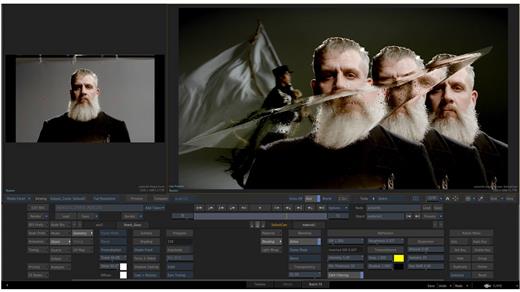
Autodesk Flame 2025.2

Advanced 3D visual effects software – Flame® software offers tools for fast, interactive 3D visual effects, finishing, compositing, advanced graphics, color grading, conform, editorial, and look development. 3D compositing (Action) Combines the interactive speed of traditional 2D compositing and powerful 3D visual effects. Includes WYSIWYG preview for artists in session.

Node-based compositing (Batch)
Batch, a node-based procedural compositing environment, integrates with the timeline and desktop to combine 2D and 3D elements.

Editorial timeline
Oversee projects, create consistent looks, and correctly match graded and 3D VFX shots. Includes scene detection.

Matchbox API
Lightbox, Matchbox, and PBR shaders let you use GPU-accelerated GLSL shaders to solve challenges in Action’s 3D compositing environment.

Action projection tracking
Turn a projection into a UV set for the geometry.

Connected Conform smart merge
Merge new editorial cuts dynamically with work-in-progress shots late in a project.

Python API
Drive the Batch environment via scriptable commands.

Pybox
Use a scriptable handler to process your images via external renderers.

What’s New

Version 2025.2:


  • Release notes were unavailable when this listing was updated.
Compatibility

macOS 11 or later


Release Name: Autodesk Flame 2025.2
Size: 7 GB
Links: HOMEPAGE – NFO – Torrent Search

Download: FiKPERNiTROFLARERAPiDGATOR

0 Comments
Oct 24

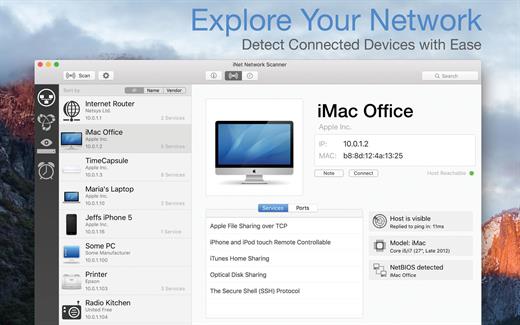
iNet Network Scanner 3.1.3

iNet Network Scanner provides you with information about networks your Mac is connected to. Its very easy and user friendly design allows even the unexperienced user to get a profound and understandable overview of a network and the running services. iNet is also available as iPhone and iPad app via the iTunes Store.

What’s New

Version 3.1.3:


  • [Added] Latest Apple devices
  • [Added] Enhanced Preferences display
  • [Updated] All databases
Compatibility

macOS 11.0 or later


Release Name: iNet Network Scanner 3.1.3
Size: 535.5 MB
Links: HOMEPAGE – NFO – Torrent Search

Download: FiKPERNiTROFLARERAPiDGATOR

7 Comments
Oct 24

MWeb Pro 4.6.6

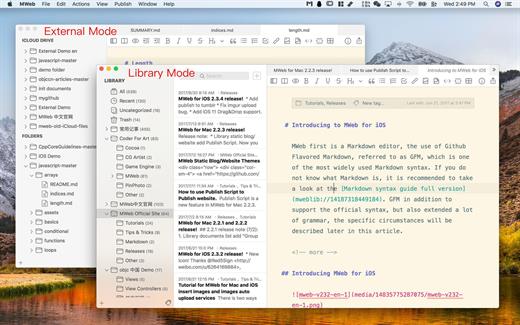
MWeb can handle professional-level markdown with support for markdown extensions. It provides publishing to various social networks and blogging formats, as well as various preview themes. It also has two work modes: external, which allows the addition of external folders; and library, designed for note-taking and static blogging.

Features


  • Full GFM (GitHub Flavored Markdown) supported
  • Publish/Update to WordPress, Metaweblog API services, WordPress.com, Evernote, Blogger, Tumblr.
  • Drag-and-drop or paste to insert pictrue and display immediately.
  • Live preview and export to PDF/HTML/RTF/DOCX
  • External folder, library, static blog/website generator
What’s New

Version 4.6.6:


  • Bug fixes and improvements.
Compatibility

macOS 10.13 or later
Apple Silicon or Intel Core processor


Release Name: MWeb Pro 4.6.6
Size: 111.7 MB
Links: HOMEPAGE – NFO – Torrent Search

Download: FiKPERNiTROFLARERAPiDGATOR

4 Comments
Oct 24

Fig Player – play mp4 mkv mp3 1.3.13

Fig Player, is a media player for Mac that supports a wide variety of media files and allows you to listen to music, watch videos and movies.
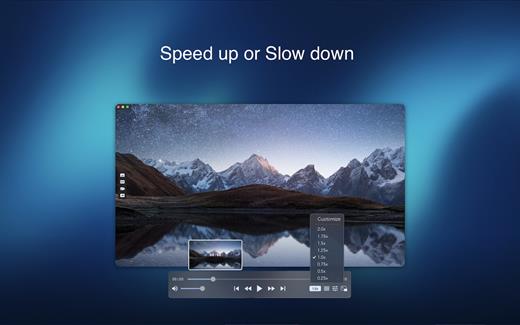
If you have an extensive media library but don’t have a good media player for Mac, here’s a good solution. Fig Player. It’s free to use and comes with a friendly interface. On the screen, you’ll be able to see all of the buttons that give you control over your experience, such as the play and stop button, playback options, volume slider, preview section, screenshot, and recording.

More Advanced Features


  • Smooth, seamless video play, support 4K.
  • Auto deinterlacing.
  • H/W-acceleration.
  • A-B loop.
  • Frame by Frame playback.
  • PIP mode.
  • Support various Subtitle formats(Text subtitles(SRT), Vobsub
    and ASS/SSA, etc.).
  • Choose which one when you have multiple sound output devices.
  • Create the scene poster with snapshots.
  • Playlist with upper-level folder name.
  • Support multiple windows and play multiple videos at the same time.
  • Support Wireless display to DLNA, Chromecast, Roku devices.
  • OCR Text Recognition(macOS 12+)
Supported Formats

Videos: mkv, rmvb, rm, avi, mov, wmv, flv, f4v, f4p, f4a, f4b, swf, mpg, mpeg, mpeg1, mpeg2, m1v, m2v, mpv, mp4, mpeg4, m4v, 3gp, 3gpp, 3g2, 3gp2, m2p, ps, ts, m2ts, mts, mt2s, ogm, ogv, divx, dv, asf, wtv, webm, etc.

Audios: flac, ape, m2a, mp1, mp2, mpa, mp3, mpg3, m4a, m4b, wma, wav, wv, xm, aiff, aif, ac3, a52, aac, opus, ogg, oga, mid, midi, mka, etc.

Subtitles: ASS, SSA, SRT, IDX&SUB

What’s New

Version 1.3.13:


  • Release notes were unavailable when this listing was updated.
Compatibility

macOS 10.13 or later


Release Name: Fig Player – play mp4 mkv mp3 1.3.13
Size: 145.7 MB
Links: HOMEPAGE – NFO – Torrent Search

Download: FiKPERNiTROFLARERAPiDGATOR

5 Comments
Oct 24

OmniReader Pro 3.0.1

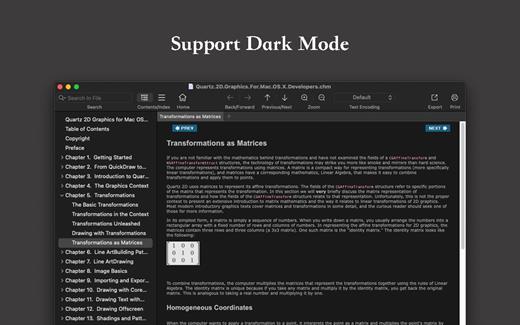
Read EPUB,CHM,MOBI… use it.. OmniReader is a fully functional book Reader with a simple and beautiful interface and a good reading experience.

Features


  • Supports reading EPUB, CHM and Kindle files.
  • Support single page search and full text search, and highlight search results.
  • Support the forward and backward browsing history.
  • Supports page turning, zooming, and sidebar shrinking.
  • Support page printing.
  • Support to view the basic information of the file.
  • Supports file export to EPUB, PDF.
  • Support to extract all images in the file.
  • Support file coding, deal with the problem of garbled code.
  • Support image adaptive, automatically adjust the size of the picture.
Bookrack

  • All the files you have read will be saved in the bookshelf for quick review next time.
  • Supports file drag and drop addition.
What’s New

Version 3.0.1:


  • Release notes were unavailable when this listing was updated.
Compatibility

macOS 10.13 or later


Release Name: OmniReader Pro 3.0.1
Size: 126.9 MB
Links: HOMEPAGE – NFO – Torrent Search

Download: FiKPERNiTROFLARERAPiDGATOR

5 Comments