Please REGISTER or RENEW your account on RAPiDGATOR.net and support us by doing through all RAPiDGATOR working download links on main posts...
May 9

Structured 4.4.8

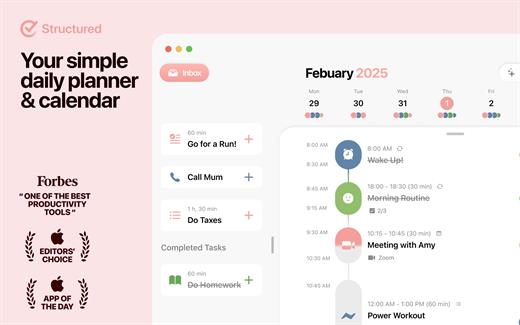
A visual daily planner to organize tasks, routines, and habits. Stay focused, reduce overwhelm, and plan your day in one clear timeline.
Finally take control of your day.
Plan with a clear visual timeline that brings your calendar, to-dos, routines, and habits together.

Join over 1.5 million active planners who feel calmer, focus faster, and get more done — every single day.

Perfect for work, study, travel, and busy ADHD minds. Plan in minutes and stay focused all day.


  • Organize your day and week in an intuitive timeline
  • Capture ideas instantly in Inbox and sort them later
  • Sync across iPhone, iPad, Apple Watch and Mac
  • Break big projects down with notes & sub-tasks
  • Stay on track with a Pomodoro focus timer, Live Activities, and interactive widgets
  • Personalize your planner with color-coding and hundreds of icons
  • Benefit from accessibility features like VoiceOver, Voice Control, a dyslexia-friendly font, and multiple languages
  • Get a complete overview by connecting your calendars and Reminders
  • Build recurring tasks & routines that actually stick
  • Powered by AI, draft your day in seconds
  • Replan, automatically reschedules missed or forgotten tasks
  • Customize notifications to match your workflow
What’s New

Version 4.4.8:


  • Release notes were unavailable when this listing was updated.
Compatibility

macOS 14.0 or later.


Release Name: Structured 4.4.8
Size: 75.1 MB
Links: HOMEPAGE – NFO – Torrent Search

Download: RAPiDGATOR

6 Comments
May 9

Color Hound 1.9.1

Image → Colors
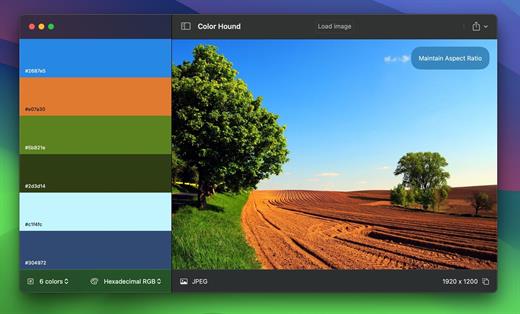
Palette generator. Detect + export color palettes
from your images – instantly!

FEATURES


  • Show me the image! Simple, practical and ultra-easy to use: Just drag’n’drop your photo you want to analyze!
  • Tons of options Lots of options (number of colors, format, etc) to get exactly the result you wish.
  • Export Want to export to CSS? Maybe LESS? Maybe export the whole palette to an image? Done! and wait for a couple of seconds. Your application disk image will be ready befre you even notice!
What’s New

Version 1.9.1:


  • Release notes were unavailable when this listing was updated.
Compatibility

macOS 12.0 or later


Release Name: Color Hound 1.9.1
Size: 5.3 MB
Links: HOMEPAGE – NFO – Torrent Search

Download: RAPiDGATOR
7 Comments
May 9

Color Folder Pro 5.2

Color Folder can help you to change the icon of folder quickly, and to manage folders more efficiently

「Main Features」


  • quickly change folder icon color
  • Select any picture to set as folder icon
  • support changing multiple folder icons at the same time
  • save as Icon
  • provide a variety of icon templates (over 700+)
  • support any color to modify folder icons
What’s New

Version 5.2:


  • Release notes were unavailable when this listing was updated.
Compatibility

macOS 10.10 or later


Release Name: Color Folder Pro 5.2
Size: 23.1 MB
Links: HOMEPAGE – NFO – Torrent Search

Download: RAPiDGATOR
6 Comments
May 9

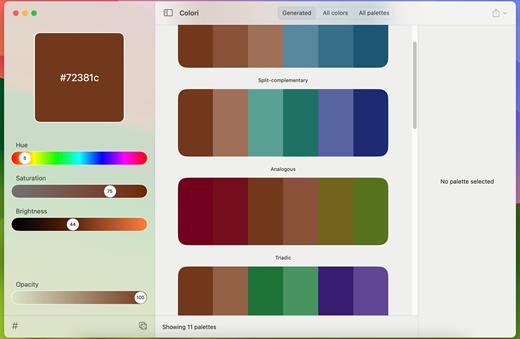
Colori 1.7.4

Generate a color palette from one color, organize your palettes, preview, and export

Beautiful color schemesright at your fingertips.

Features


  • Easy to use: Simple, practical and ultra-easy to use: Pick a color as a starting point and start experimenting: it had never been that easy!
  • Colors everywhere!: Lots and lots of colors + 100’s generated or ready-made palettes to choose from and make your next design project stand out!
  • Lots of options: Work elegantly and lightning-fast from your Mac. Do you want to export your palettes for use e.g. with web design and CSS/LESS/SASS? Done!
What’s New

Version 1.7.4:


  • Release notes were unavailable when this listing was updated.
Compatibility

macOS 12.0 or later


Release Name: Colori 1.7.4
Size: 5.6 MB
Links: HOMEPAGE – NFO – Torrent Search

Download: RAPiDGATOR

6 Comments
May 9

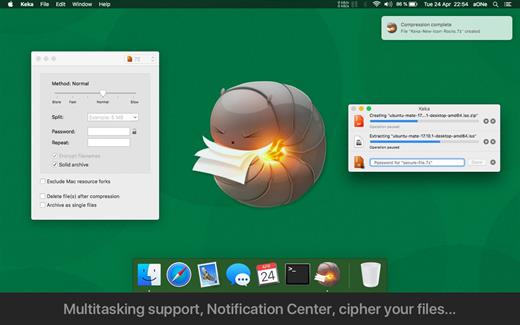
Keka 1.6.4

Keka is a file archiver for OS X. It is available for free, but donations are requested to further the project. Similar to making a donation, you can also purchase Keka on the Mac App Store for $1.99 USD.

Supported compression formats:


  • 7z
  • Zip
  • Tar
  • Gzip
  • Bzip2
Supported extraction formats:

  • RAR
  • 7z
  • Lzma
  • Zip
  • Tar
  • Gzip
  • Bzip2
  • ISO
  • EXE
  • CAB,
  • PAX
  • ACE
What’s New

Version 1.6.4:


  • Fixed possible crash when setting as the default uncompressor for macOS 26.4+
Compatibility

macOS 10.10 or later.
Apple Silicon or Intel Core processor


Release Name: Keka 1.6.4
Size: 35.6 MB
Links: HOMEPAGE – NFO – Torrent Search

Download: RAPiDGATOR

6 Comments
May 9

Loopback 2.4.10

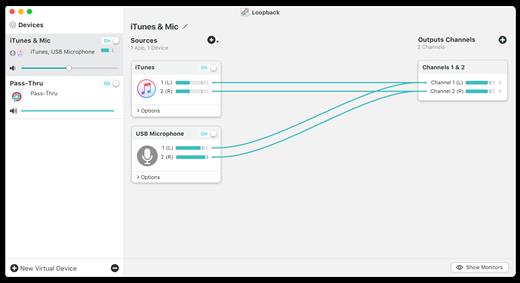
Loopback makes it easy to pass audio between applications on your Mac. Create virtual audio devices to take the sound from applications and audio input devices, then send it to audio processing applications. Loopback gives you the power of a high-end studio mixing board, right inside your computer!


  • Play Audio to All Your Podcast Guests – Combine your mic with audio sources like iTunes or QuickTime Player, then select your Loopback device as your source in Skype. Presto! Your guests all hear both your voice and your audio add-ons.
  • Record Gameplay Videos – Making gameplay videos with great audio can often be very difficult. If you’re using a device like Elgato’s Game Capture hardware and you want to record both your microphone and the game’s audio at once, Loopback can assist!
  • Combine Hardware Devices – Apps like GarageBand, Logic, and Ableton Live only record from a single audio device at once. Thankfully, they offer recording from many channels. With Loopback, you can combine multiple input devices into one virtual device for easy recording.
  • Create Top-Notch Screencasts – Screen recorders, including QuickTime Player, allow you to include your mic’s audio. Some allow recording of system audio instead, but neither option is ideal. Create a virtual device that grabs just the mic and the app’s audio to get exactly the audio you want.
  • Route Audio For Broadcasts – Set a simple (pass-thru) device as the output at the end of an Audio Hijack chain, and then as the input source in Nicecast. Now listeners can tune in to a live stream of your podcast as you record it!
Features

  • Combine Audio Sources – Configuring a virtual audio device from multiple sources is easy. Just add the applications and physical audio devices you want to include to the Audio Sources table to get started.
  • Available System-Wide – Your Mac will show Loopback’s virtual devices exactly like physical devices. Find them listed among other devices in System Preferences or select them as an input or output in any audio app.
  • Send Audio Between Apps – Loopback can also create pass-thru devices, which send audio from one app to another. Set the Loopback device as the output in one app and the input in another to make audio flow directly between the applications.
  • Works With Any Application – Make a virtual audio device with audio from the applications on your Mac, including production apps like Logic or Reason, as well as simple audio players, like iTunes or QuickTime.
  • Works With Any Input Device – Pull audio from the physical audio devices connected to your Mac. Whether you’ve got simple USB microphones, or high-end studio mixers, Loopback can access it all.
  • Combine Apps and Physical Devices – Of course, you can create a virtual audio device that includes audio from both apps and physical audio devices.
  • Multichannel Audio – Your virtual audio devices can be configured to have up to 32 channels, providing tremendous power.
  • Custom Channel Mapping – By default, Loopback sets up channel mapping automatically. If you want to manually configure things, though, you’ve got powerful options!
  • Nested Devices – You can now nest one Loopback device inside another, allowing for easier configuration, as well as even more power and control.
What’s New

Version 2.4.10:


  • Release notes were unavailable when this listing was updated.
Compatibility

macOS 10.13.0 or later
Support M1 Apple silicon.


Release Name: Loopback 2.4.10
Size: 34.6 MB
Links: HOMEPAGE – NFO – Torrent Search

Download: RAPiDGATOR
6 Comments
May 9

GitFox 4.1.5

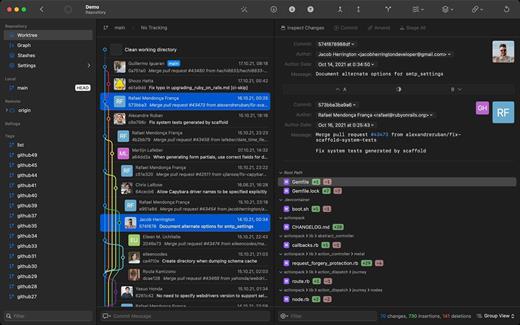
Gitfox is a light, fast and powerful Git client built exclusively for Mac. With its unique set of features like Image Diff, Multiple Identities, Automatic Project Linking, Quick Navigation and Advanced Search, it is perfect for web developers and teams that are involved in design work, while also not breaking the bank.

What’s New

Version 4.1.5:


  • Release notes were unavailable when this listing was updated.
Compatibility

macOS 26 or later


Release Name: GitFox 4.1.5
Size: 36.1 MB
Links: HOMEPAGE – NFO – Torrent Search

Download: RAPiDGATOR

6 Comments
May 7

Screens 5.8.6

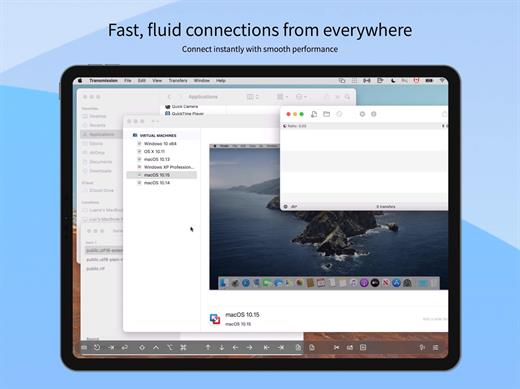
Streamlined and powerful VNC utility designed to provide you with all the tools you need to remotely connect to your devices from your Mac

Accessing your devices from anywhere in the world is surely great, especially if you need to perform some last minute modifications to a project or copy a certain file. This can be done from any computer that can access your device’s network using the VNC desktop sharing system.

Features


  • iCloud – Synchronize all your stored screens on all your iOS devices, including your Mac.
  • Use Screens in fullscreen mode to make it feel your remote computer is right there in front of you.
  • Easy to Use: Screens is an easy, user-friendly VNC client for Mac.
  • Secure: Screens can connect to your computer through an SSH tunnel so your session is encrypted and safe.
  • Multi-Touch: Screens supports many of the multi-touch features – such as pinch and navigation – you’re already used to on your trackpad.
  • Screens Connect: Make your computer available from anywhere with this optional helper app. Easy as flicking a switch. No messy router setup.
  • Works Anywhere: Through Wi-Fi or a 3G network.
What’s New

Version 5.8.6:


  • Release notes were unavailable when this listing was updated.
Compatibility

macOS 14.0 or later.


Release Name: Screens 5.8.6
Size: 39.2 MB
Links: HOMEPAGE – NFO – Torrent Search

Download: RAPiDGATOR
6 Comments
May 7

SimpleMind Pro 2.9.2

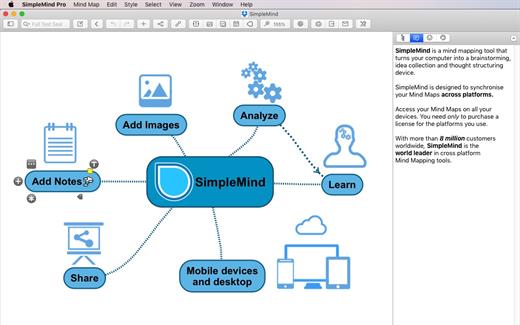
SimpleMind Desktop is a mind-mapping tool that turns your Mac into a brainstorming, idea-collecting, and thought-structuring device. It connects to the similar SimpleMind for iPhone/iPad app.

Features


  • Easy to use drag, arrange, and edit directly on the Mind Map page
  • Tap or drag Node Well to add new topics
  • Full Undo/Redo in the editor
  • Visual styles change colors, borders and lines for maximum presentation impact
  • Pick colors from style palette or custom colors
  • Cut/Copy/Paste – move or duplicate topics between mind maps
  • Create new mind map from selection or clipboard
  • Reconnect topics using drag-and-drop, aided by topic auto-layout
What’s New

Version 2.9.2:


  • Release notes were unavailable when this listing was updated.
Compatibility

macOS 10.12 or later
Apple Silicon or Intel Core processor


Release Name: SimpleMind Pro 2.9.2
Size: 19.5 MB
Links: HOMEPAGE – NFO – Torrent Search

Download: RAPiDGATOR
6 Comments
May 7

Litur 4.1.4

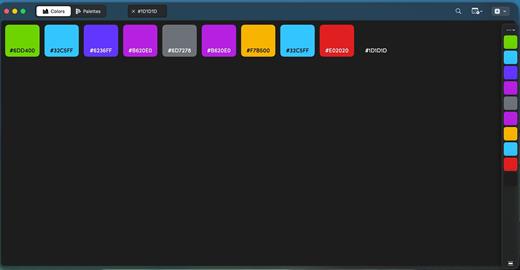
Litur is a cross-platform color picker and library app for macOS, iOS, and watchOS that captures real-world and on-screen colors into a personal, synced collection. It generates complementary, analogous, monochromatic, triadic, and tetradic palette combinations, outputs HEX, RGB, HSB, CMYK, NSColor, UIColor, and SwiftUI codes, and includes a WCAG contrast accessibility checker.

All new design
Litur sports an all-new design on macOS. How it looks, how it works, and how it feels.
Tabs or Windows, choose the best way to work with your colors and palettes, manage your workflow in the best way for you.

History
See every color you have collected and saved, synced across all your devices.

Color Anchor
Litur gives you a new docked window that allows you fast access to your color library or palettes. To help speed up your design or development workflow

Color Palette
Litur also generates a color palette for all colors you collect.

Color Combinations
See different color combinations for each color you collect: Complimentary, Analogous, Monochromatic, Triadic and Tetradic

Color Codes
Litur allows you get the color codes in hex, rgb, hsb, NSColor, UIColor and SwiftUI Color for use in your projects.

What’s New

Version 4.1.4:


  • Release notes were unavailable when this listing was updated.
Compatibility

macOS 13.0 or later


Release Name: Litur 4.1.4
Size: 5.6 MB
Links: HOMEPAGE – NFO – Torrent Search

Download: RAPiDGATOR
5 Comments