Please REGISTER or RENEW your account on RAPiDGATOR.net and support us by doing through all RAPiDGATOR working download links on main posts...
May 10

Lasso 1.8.2

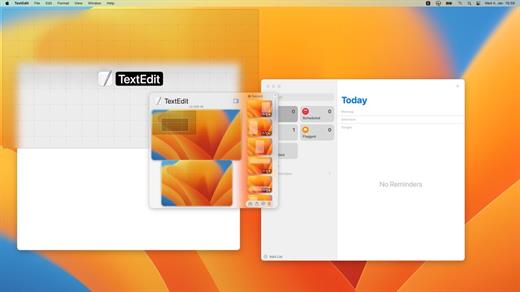
Lasso – Window Manager for macOS. Move and resize windows with your mouse. Posted on Reddit today. Looks really good. Click and drag – that’s all you need to move and resize windows Quickly arrange and resize your windows with custom layouts

Streamline your workflow and increase productivity with the ability to assign unique keyboard shortcuts to each of your individual layouts. The simplest answer would be – all. Really, no matter how many screens you have – Lasso will handle all of them. With many options available, you can change how you work by adjusting the space around windows, selecting grid sizes for Layouts, and more. Make your workspace fit your needs.

What’s New

Version 1.8.2:


  • Release notes were unavailable when this listing was updated.
Compatibility

macOS 12.0 or later
Apple Silicon or Intel Core processor


Release Name: Lasso 1.8.2
Size: 9.5 MB
Links: HOMEPAGE – NFO – Torrent Search

Download: RAPiDGATOR

4 Comments
May 10

Path Finder 26.0

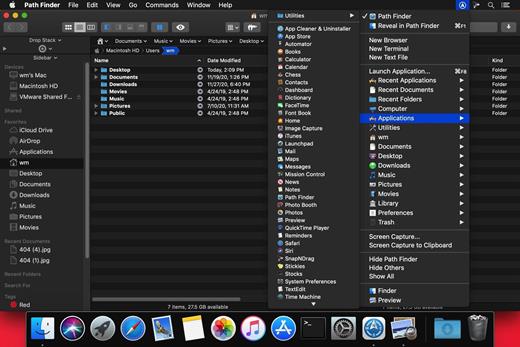
Path Finder makes you a master of file management. Take full control over your file system. Save your time: compare and synchronize folders, view hidden files, use Dual Pane and full keyboard navigation to browse your file system. Work how you want: extreme customization allows you to access most tools in many different ways to suit your workflow. Work seamlessly with other platforms: don’t leave any hidden .DS_Store files on non-Mac volumes, delete files securely and completely with the powerful delete feature from any volume type, search any network volume.

Features


  • View and manipulate hidden files
  • Dual Pane View
  • Full keyboard navigation
  • Folder comparison and synchronization
  • Folder merging
  • Batch renaming
  • Powerful file filtering
  • One-click dual-pane copy
  • Bookmarks and Tab Presets
  • ACL editor
  • File tagging
  • Editable Path Navigator
  • Powerful low-level search
  • Smart sorting
  • Advanced selection
  • Integrated terminal
  • Integrated text and image editors
What’s New

Version 26.0:


  • Release notes were unavailable when this listing was updated.
Compatibility

macOS 10.12 or later
Apple Silicon or Intel Core processor


Release Name: Path Finder 26.0
Size: 27.4 MB
Links: HOMEPAGE – NFO – Torrent Search

Download: RAPiDGATOR

4 Comments
May 9

Path Finder 26.0

Path Finder makes you a master of file management. Take full control over your file system. Save your time: compare and synchronize folders, view hidden files, use Dual Pane and full keyboard navigation to browse your file system. Work how you want: extreme customization allows you to access most tools in many different ways to suit your workflow. Work seamlessly with other platforms: don’t leave any hidden .DS_Store files on non-Mac volumes, delete files securely and completely with the powerful delete feature from any volume type, search any network volume.

Features


  • View and manipulate hidden files
  • Dual Pane View
  • Full keyboard navigation
  • Folder comparison and synchronization
  • Folder merging
  • Batch renaming
  • Powerful file filtering
  • One-click dual-pane copy
  • Bookmarks and Tab Presets
  • ACL editor
  • File tagging
  • Editable Path Navigator
  • Powerful low-level search
  • Smart sorting
  • Advanced selection
  • Integrated terminal
  • Integrated text and image editors
What’s New

Version 26.0:


  • Release notes were unavailable when this listing was updated.
Compatibility

macOS 10.12 or later
Apple Silicon or Intel Core processor


Release Name: Path Finder 26.0
Size: 27.4 MB
Links: HOMEPAGE – NFO – Torrent Search

Download: RAPiDGATOR

6 Comments
May 9

PhotoSweeper X 5.5.3

PhotoSweeper is a fast, precise & super efficient tool to eliminate similar or duplicate photos even in huge photo collections. It works with photos from iPhoto, Aperture and Adobe Lightroom libraries as well as photos from your hard drives and external storages.

PhotoSweeper will help you if:


  • You take a series of shots of the same scene trying to get the perfect one.
  • You edit photos with software like Photoshop, Pixelmator etc., and make backups just in case.
  • You have photos scattered on external hard drives and local disks, in iPhoto, Aperture or Lightroom libraries.
  • You have a mess in your photo collection or just want to free disk space by removing junk photos.
Features:

  • Easy search of photos – Just drag and drop folders from your Mac to allow PhotoSweeper to find all photos inside. Add more photos from your iPhoto, Aperture or Lightroom library via the Media Browser window.
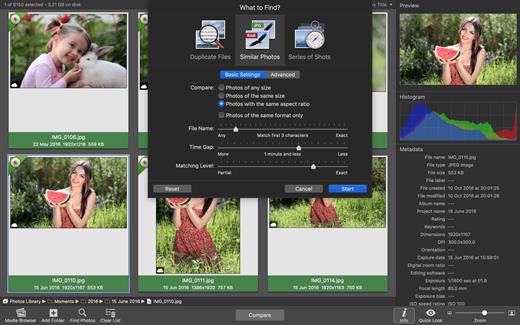
  • Flexible comparison settings – Powerful multi-settings to easily find duplicates, similar photos, series of shots. The app finds duplicate photos, even those edited in external programs such Photoshop, regardless of image size or format.
  • High speed and quality – PhotoSweeper was developed as a tool for extremely fast comparison of a huge number of photos. Cutting-edge technologies and unique algorithms make searching duplicates incredibly fast and gives excellent comparison results.
  • Efficiency – You can regroup the results without re-comparing photos by changing matching level with a slider. Using caches makes the next comparison much faster.
  • Marking duplicates automatically – Mark photos you want to get rid of manually, or use the “Auto Mark” feature to mark duplicates automatically based on the list of rules you can adjust to your needs in the Preferences.
  • Comfortable viewing results – PhotoSweeper provides 3 modes for reviewing results: “One by One”, “Face-to-Face” – one or two large photos with an opportunity to mark a photo with just a click, “All in One” – all groups of duplicates in one list.
  • Great photo browsing – PhotoSweeper also serves as an up-to-date photo browser with a built-in search of photos by metadata, Quick Look preview, the “Info” panel with a detailed photo description, including histogram and image metadata (EXIF, IPTC etc.)
What’s New

Version 5.5.3:


  • Release notes were unavailable when this listing was updated.
Compatibility

macOS 10.12.2 or later.


Release Name: PhotoSweeper X 5.5.3
Size: 56 MB
Links: HOMEPAGE – NFO – Torrent Search

Download: RAPiDGATOR

5 Comments
May 9

FotoMagico 6.9.0

FotoMagico lets you create professional slideshows from your photos and music with just a few, simple mouse clicks. It sports a very clean and intuitive yet powerful user interface. High image quality, fast performance, and user flexibility were some of the design goals for this application.

Features:


  • Create the most spectacular slideshows

    • Scale, move, rotate, zoom or pan around your images to highlight that part that matters the most.
    • Your slides fit together perfectly with the new, gorgeous transitions.
    • Provide more meaning with subtle titles here and there.
  • Present a breathtaking show

    • Your slideshow uses the best possible resolution of your presentation device.
    • Use large displays, HDTV screens and other high resolution devices.
    • Even on a VGA projector, your photos will look better with FotoMagico.
  • Your audience will want to take it home

    • Burn DVDs of your slideshow with iDVD or Roxio Toast.
    • Put your slideshow on the new iPod.
    • Export in almost any QuickTime format.
What’s New

Version 6.9.0:


  • Release notes were unavailable when this listing was updated.
Compatibility

macOS 10.15.2 or later


Release Name: FotoMagico 6.9.0
Size: 75.6 MB
Links: HOMEPAGE – NFO – Torrent Search

Download: RAPiDGATOR

6 Comments
May 9

GraphicConverter 12.5.2

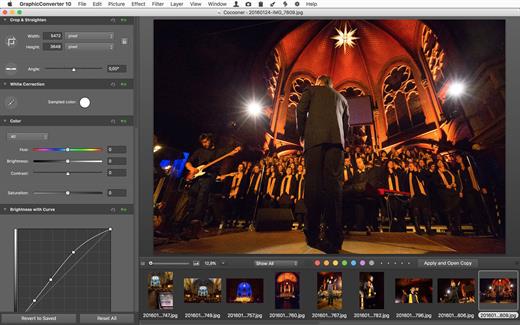
GraphicConverter is an all-purpose image-editing program that can import 200 different graphic-based formats, edit the image, and export it to any of 80 available file formats.

The high-end editing tools are perfect for graphic manipulation as well as the ability to use Photoshop-compatible plug-ins. It offers batch-conversion capabilities, a slide-show window, batch rename, batch and individual editing of metadata (EXIF, IPTC, XMP) and so much more.

What’s New

Version 12.5.2:


  • Release notes were unavailable when this listing was updated.
Compatibility

macOS 10.11 or later


Release Name: GraphicConverter 12.5.2
Size: 248.4 MB
Links: HOMEPAGE – NFO – Torrent Search

Download: RAPiDGATOR

6 Comments
May 9

Fakin’ The Funk? 6.0.164

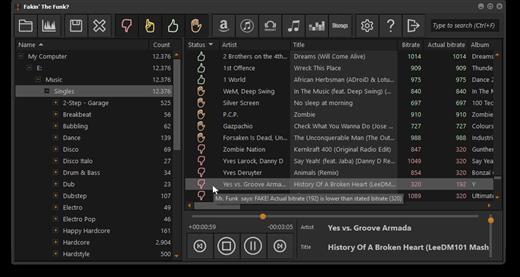
Fakin’ The Funk? is a tool that helps you to detect the true quality of your audio files in one batch.

Nowadays you can download tunes from anywhere.

But what is the real quality of these files?
What if you could check those tunes to see if they’re really that good, and not upscaled 128kbps to 320kbps MP3s?
You could batch-process them all without having to manually check them 1-by-1 using a spectrum analyzer?

Import your music files.

Fakin’ The Funk? will analyze the right bitrate and frequency.
If it finds a wrong bitrate or lower frequency-peak, it will show you the actual bitrate.
It’s up to you whether you want to rename those files, copy or move. Or just delete them.
Fakin’ The Funk? Keep it real.

What’s New

Version 6.0.164:


  • Release notes were unavailable when this listing was updated.
Compatibility

macOS 10.15 or later


Release Name: Fakin’ The Funk? 6.0.164
Size: 16.3 MB
Links: HOMEPAGE – NFO – Torrent Search

Download: RAPiDGATOR

7 Comments
May 9

ColorSnapper2 v1.7.0

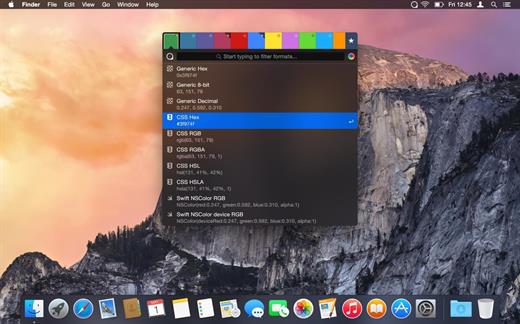
ColorSnapper2 is the OS X color picker app for designers and developers which makes it easy to collect, adjust, organize, and export colors of any pixel of the screen. It is activated via a system-wide hotkey, giving you a magnifying glass to easily pick any pixel you need, even from retina displays. The resulting color is copied to the clipboard in a format of your preference.

Features


  • New Magnifying Glass — the original ColorSnapper magnifying glass — introduced in 2010 and adopted by every modern color picker app since then — just got even better! It works perfectly with multiple displays, different resolutions and with different pixel density. You can switch between Spaces and Applications having the magnifying glass on the screen while controlling it with gestures and keyboard shortcuts.
  • New Hi-Precision Mode allows you to choose every physical pixel on a retina screen, but also works great on displays with normal pixel density by increasing mouse sensitivity and magnification level.
  • Export to Adobe® Photoshop® and Illustrator® — set foreground and background color in your favorite designer tool directly from ColorSnapper.
  • Capture loupe image — new magnifying glass can be used as a review tool. Pressing P will copy the zoomed image to clipboard.
  • Favorites and History — with ColorSnapper2 you can now organize, adjust and export colors without leaving the application. Add colors you regularly pick to the favorites or go back in time to hundreds of colors.
  • Adjust colors — new user interface seamlessly integrates with the Apple’s Color Panel so you can adjust colors before you export them.
  • Quick formats filter — just start typing to quickly search through more than 30 export formats.
  • Automatic color profile conversion — converts colors picked from native OS X applications, including Safari and Xcode from the monitor’s color profile to sRGB. This means you’ll get the same RGB values as those used in your code.
  • Code style — use flexible color values formatters to match your coding style. Along with all new supported formats, including CSS3, NSColor and UIColor, Swift, Android, Java, .NET and many more, this results in even faster developer workflow.
What’s New

Version 1.7.0:


  • Update for license activation on macOS Big Sur
  • Fixes crash when assigning new global shortcuts on macOS 10.15
Compatibility

macOS 14.6 or later


Release Name: ColorSnapper2 v1.7.0
Size: 7.7 MB
Links: HOMEPAGE – NFO – Torrent Search

Download: RAPiDGATOR

4 Comments
May 9

Peakto 2.7.3 – AI Media Organizer

Peakto gathers and organizes all your photos and videos with AI, freeing you to focus on what matters most: unleashing your creativity.
YOUR ASSETS IN ONE-PLACE, ORGANIZED LIKE MAGIC

Your photos and videos are spread across different devices, folders, and apps, making it hard to find the ones you want to see right away? That’s why Peakto unifies your thousands of files. By bringing everything together in one interface, Peakto offers unique centralized photo organization features, enhanced with AI, and unique perspectives on your work.

FIND YOUR BEST IMAGES AND VIDEOS INSTANTLY

AI-powered tagging, search by description, search by similar images, search for faces: Peakto is the perfect tool to help you find the right content for the right project, whether in your archives or your most recent shots. In this version 2, prompt-based search also applies to videos, enabling the retrieval of a specific scene in a film.

NEVER MISS THE BEST ASPECTS OF YOUR WORK AGAIN

Gain new views on your images to fuel creativity, guide edits, and stand out in the photography market. Peakto offers unique perspectives: automatically sorted views of all images by category; map views of all photos. Version 2.0 introduces a new Timeline view, allowing navigation through a chronological timeline and sorting images by dates.

CENTRALIZE YOUR PHOTOS AND VIDEOS FOR SUPER EASY ORGANIZATION!

Peakto’s centralized viewpoint makes it easy to choose photos to delete and free up memory. It allows you to identify individuals in images from multiple sources within the same interface. Peakto enables the creation of selections from content coming from multiple sources. It serves as the control tower from which you manage all your images and edit a photo in your favorite editing software with a single click. Always synchronized, Peakto reflects the latest changes made to your creation.

EFFICIENT SHARING AND EXPORT

Browse your images and videos with full-resolution previews and seamlessly craft albums from various sources such as different folders, catalogs, sessions, and libraries. Easily export images in batches at full resolution. Choose low-resolution for digital sharing. Manage your pictures without creating copies. Peakto provides you with powerful tools to manage and explore your digital assets.

CONFIGURATION
Optimized for Apple Silicon (M1, M2, M3…) but runs on Mac Intel with a powerful GPU too. Peakto requires macOS 12 (Monterey) and is fully compatible with macOS 15 (Sequoia).

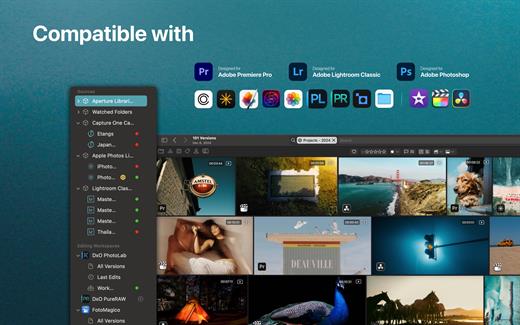
Peakto is compatible with:


  • Aperture catalogs from version 3.1
  • Lightroom Classic catalogs from version 5
  • Lightroom Creative Cloud (current version)
  • Luminar Neo catalogs from version 1.0
  • Capture One catalogs from version 20 (v13.x)
  • Apple Photos catalogs from version 6 (Big Sur)
  • iView Media Pro catalogs from version 3
  • Pixelmator Pro documents from version 3
  • DXO PhotoLab v5-8 & PureRAW 2-3
  • ON1 Photo RAW 2023 and 2022
  • TOPAZ Photo AI version 3
    All Video formats natively supported by MacOS (mov, mp4….)
What’s New

Version 2.7.3:


  • Release notes were unavailable when this listing was updated.
Compatibility

macOS 12.4 or later.


Release Name: Peakto 2.7.3 – AI Media Organizer
Size: 363.5 MB
Links: HOMEPAGE – NFO – Torrent Search

Download: RAPiDGATOR

5 Comments
May 9

Timemator 3.2.2

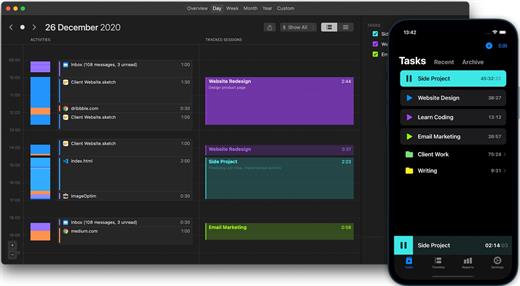
Timemator lets you fully automate your time-tracking based on your activities on the Mac. Just tell Timemator what files, applications or websites you use for your work and it will start the timer for you. Automatically!

Features:


  • Auto-tracking
  • Traditional timer
  • Flexible tasks structure
  • Quick access from the menu bar
  • Track billable hours and your revenue
  • Powerful reports
  • Works completely offline
  • Respects your privacy. No data is sent anywhere.
  • Native Mac-app
*** You need to disable the System Integrity Protection (SIP) to perform the selected Application.

What’s New

Version 3.2.2:


  • Release notes were unavailable when this listing was updated.
Compatibility

macOS 10.13.0 or later


Release Name: Timemator 3.2.2
Size: 29.3 MB
Links: HOMEPAGE – NFO – Torrent Search

Download: RAPiDGATOR

5 Comments