Please REGISTER or RENEW your account on RAPiDGATOR.net and support us by doing through all RAPiDGATOR working download links on main posts...
Apr 30

Laravel Herd 1.28.0

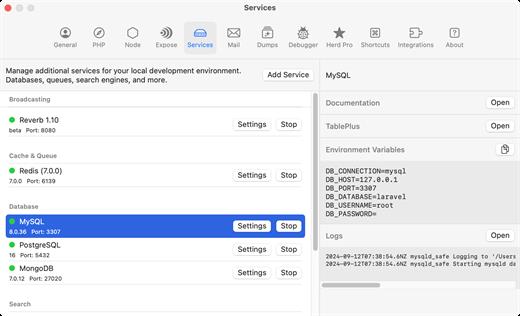
Herd is a blazing-fast, native macOS application designed to provide a complete local development environment for Laravel and PHP. It comes preconfigured with everything you need — including PHP, Nginx, DNS, and essential CLI tools — so you can start building applications immediately after installation.

Unlike traditional setups that rely on Homebrew, Docker, or virtual machines, Herd uses statically compiled binaries and a zero-dependency approach. This eliminates configuration complexity and significantly improves performance, allowing developers to focus on coding instead of environment management.

With built-in tooling, seamless PHP version switching, and automatic local domain handling, Herd delivers a streamlined development workflow tailored specifically for Laravel developers.

What’s New

Version 1.28.0:


  • Release notes were unavailable when this listing was updated.
Compatibility

macOS 13.0 or later


Release Name: Laravel Herd 1.28.0
Size: 99 MB
Links: HOMEPAGE – NFO – Torrent Search

Download: RAPiDGATOR

6 Comments
Apr 30

Downie 4.12.4

A simple download manager that offers you the possibility to quickly save videos from different websites to your own disk drive.

If you are using a poor internet connection, trying to visualize videos streamlined online might not work properly since the content is loaded too slowly. Downie is a simple Mac app that can help you download those videos to your computer, and then watch them by using your default media player.

User friendly video downloader featuring support for drag and drop actions

Working with Downie is extremely straightforward: simply drop the video URL on top of the app’s main window or on the Dock icon. Downie adds the video to your downloads list, so all you have to do next is start the process by pressing the appropriate button. Of course, you can also remove items from the list.

By default, Downie downloads MP4 files and places them in your default Downloads folder, but you can easily change this via the Preferences window. The same area allows you to setup notifications, or post processing actions (convert to MP4 if necessary, or extract audio only).

Effortlessly download videos from a wide collection of hosting websites

Downie provides support for more than 400 different websites that host video content, among which there are the most popular choices, such as YouTube, Apple, LiveLeak, Vimeo, BBC, and so on. If a certain website is not included, within the app you can send a request email to the Downie developers.
Moreover, Downie also provides matching extensions for various popular web browsers, such as Firefox, Safari, Google Chrome or Chromium. The add-ons are not installed by default: open the Preferences window and install only the ones you plan to use.

Straightforward solution for downloading video content hosted online

Downie is a great tool for saving videos posted on various websites to your Mac for offline playback. The application is extremely useful especially if you have a slow internet connection.

What’s New

Downie 4.12.4:


  • New: You can now schedule start of recording for live streams.
  • New: You can now specify a custom title when using the automation URL.
  • Improved: bbc.co.uk, instagram.com, orf.at, radiofrance.fr, sbs.com.au, soundcloud.com, today.com, youtube.com.
Compatibility

macOS 10.12 or later
Apple Silicon or Intel Core processor


Release Name: Downie 4.12.4
Size: 42.3 MB
Links: HOMEPAGE – NFO – Torrent Search

Download: RAPiDGATOR

5 Comments
Apr 30

Keep It 2.8.5

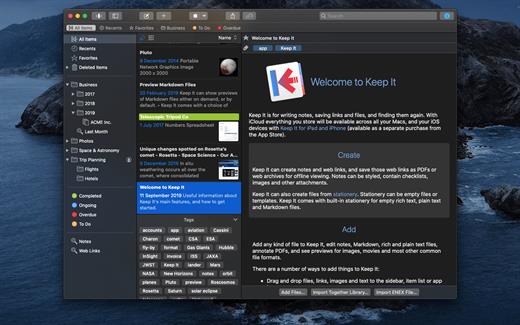
Keep It is for writing notes, saving web links, storing documents, and finding them again. Available on Mac, and as a separate app for iPhone and iPad, changes are automatically made available to all your devices with iCloud. Keep It is the destination for all those things you want to put somewhere, confident you will find them again later.

Features


  • Create, edit, view and save:

    • Notes with styles, checklists and attachments that look good and read well on all your devices
    • Web links with live previews, or saved as PDFs for offline viewing
    • Rich and plain text files, and Markdown documents
    • Add any other kind of file, and see previews for most images, documents, web pages, and more
    • See summaries and thumbnails in the list for most files
    • Use the Recents list to see things you’ve added or viewed lately
    • Share items with iCloud
  • Organize:

    • Folders let you organise things hierarchically – select a folder to see everything it and its subfolders contain
    • Use bundles to gather items into one place – items can be in more than one bundle at a time
    • Use labels to color-code items for quick visual recognition
    • Add searchable tags and comments
    • Make items favorites and drag lists to the Favorites Bar for quick access
  • Search and Filter:

    • Search everything in Keep It: names, tags, file contents, dates, kinds and more
    • Choose suggestions as you search to create complex searches with ease
    • Use keywords and natural language for dates while searching
    • Save searches for later reuse
    • Use the Tag Filter to see all items with a tag and any other relevant tags; choose another tag to drill down further
  • Use Keep It with other apps:

    • Compact Mode reduces the app to a single column, ideal for using alongside other apps
    • Drag pretty much anything to Keep It
    • Copy clickable links to items in Keep It
    • Share extension can add links, text, images and other files, and append text to notes from within other apps
    • Save files to Keep It’s folders to automatically add them to the library
    • Use a bookmarklet to add links from web browsers that don’t use Share extensions
*** You need to disable the System Integrity Protection (SIP) to perform the selected Application.

What’s New

Version 2.8.5:


  • Release notes were unavailable when this listing was updated.
Compatibility

macOS 11.3.0 or later


Release Name: Keep It 2.8.5
Size: 36.5 MB
Links: HOMEPAGE – NFO – Torrent Search

Download: RAPiDGATOR

6 Comments
Apr 30

Acorn 8.5.1

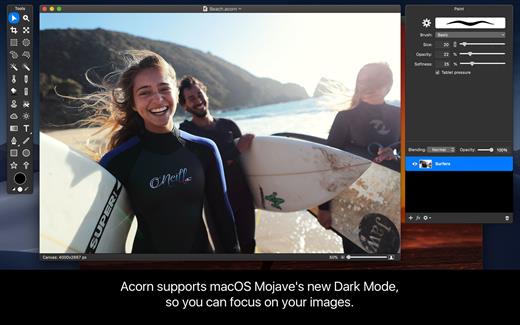
Acorn is a new image editor built with one goal in mind – simplicity. Fast, easy, and fluid, Acorn provides the options you’ll need without any overhead. Acorn feels right, and won’t drain your bank account.


  • Take screenshots using Acorn and edit them right away.
  • Chain together image filters to create stunning effects.
  • Layer based image editing, an industry standard.
  • Make new images and layers using your built-in iSight.
  • Easy image and canvas resizing, just by changing the size of your window.
  • Take advantage of every pixel of your monitor with full screen image editing.
  • Tablet sensitive for pressure strokes and using the tablet’s eraser.
  • Vector shape and text layers.
  • Freeform, elliptical, rectangular, and magic wand selections.
  • Gradients.
  • Create and apply custom text styles.
  • Control opacity and blending modes for each layer.
  • Write plugins using the Python scripting language, as well as in Objective-C.
  • GPU powered. The same graphics card that makes your gaming experience smooth, helps Acorn fly through the toughest of graphics operations.
What’s New

Version 8.5.1:


  • Release notes were unavailable when this listing was updated.
Compatibility

macOS 10.14.0 or later
Apple Silicon or Intel Core processor


Release Name: Acorn 8.5.1
Size: 76.7 MB
Links: HOMEPAGE – NFO – Torrent Search

Download: RAPiDGATOR

6 Comments
Apr 30

Rectangle Pro 3.78

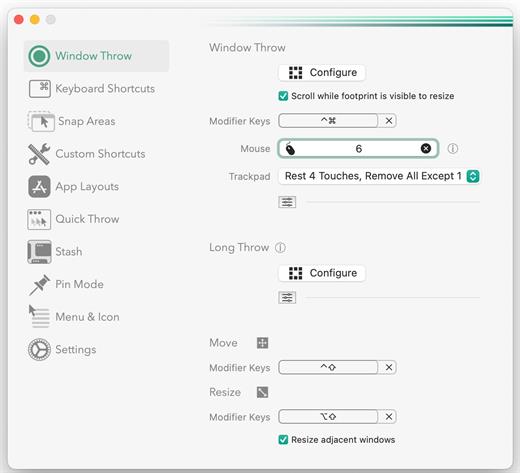
Snap windows faster in this featureful Rectangle superset. Toss windows in the right places with cursor movement, move multiple windows with one command, create custom shortcuts, and more.

One simple key combo
• 16 window sizes & positions
• No need to remember a ton of keyboard shortcuts, but those are all here, too

A Supercharged Rectangle Superset
• Keyboard shortcuts
• Drag windows to screen edges to snap

PRO
• Move and resize by holding a key and moving your cursor
• Snap windows under your cursor, even if not in focus
• Custom shortcuts for any size & position
• Sync your settings over iCloud

The Lightweight Gesture Champ
• Unlike touch gesture based window managers, Rectangle Pro only consumes CPU when configured modifier keys are pressed. Even then it’s minimal
• Rectangle Pro is a breeze to learn, and doesn’t conflict with any built-in macOS behavior
• Use it with any device that moves the cursor

Unmatched Customization and Actions
• Create keyboard shortcuts with any window size and location, and specify what happens on each repeated execution
• Fill left and right actions make it simple to maximize screen usage without overlap
• Match the keyboard shortcut window management of that other OS

Multiple Windows at Once
• Cascade windows
• Move all windows for an app to another display or screen half
• Tile top windows in a 2×2 or 2×3 grid

Additional Efficiency and Speed
• Each window action can be configured with a quick, simple cursor movement and modifier key combination
• Just press and release modifier keys while you move your cursor over the window you want to snap

What’s New

Version 3.78:


  • Release notes were unavailable when this listing was updated.
Compatibility

macOS 10.12 or later
Apple Silicon or Intel Core processor


Release Name: Rectangle Pro 3.78
Size: 8.3 MB
Links: HOMEPAGE – NFO – Torrent Search

Download: RAPiDGATOR
6 Comments
Apr 30

MacDroid Pro 2.9

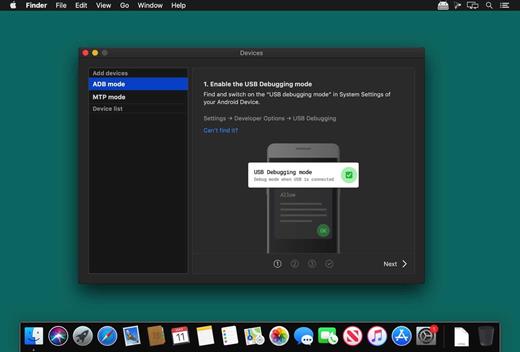
MacDroid app is a very helpful solution for those who use Mac or MacBook, at the same time preferring an Android device to an iPhone. Android and macOS cannot natively work together, hence there is a vital need for an interface that would not only connect the two systems but also allow safe and smooth file transfer between them.

With MacDroid you get the convenience of connecting Mac and an Android phone or tablet and accessing the portable device’s content in the Finder. You will be able to transfer photos, music, videos as well as entire folders. You’ll only need a USB cable to connect your phone to computer, MacDroid will take care of everything else.

Transfer your photos

You can access your Android photos in the Finder app and easily drag them with your mouse cursor to any folder on your Mac.

Transfer music to your phone

You can add your favorite tracks to Android from your Mac or vice versa and enjoy the music on the go.

Watch videos when offline

Got some great new episodes that you want to watch, but not planning to take your computer with you? Not a problem! You can transfer them to your Android and watch on a plane, on a train, or while having an Uber ride.

Edit Android files directly from Mac

When you don’t really feel like moving files around, you can edit your Android files with your favorite Mac app without actually saving them to your computer.

What’s New

Version 2.9:


  • Added: displaying transfer speed in Activity Log.
  • Improved: canceling file uploads.
Compatibility

macOS 10.10 or later

Release Name: MacDroid Pro 2.9
Size: 30.2 MB
Links: HOMEPAGE – NFO – Torrent Search

Download: RAPiDGATOR

6 Comments
Apr 30

HistoryHound 2.3.7

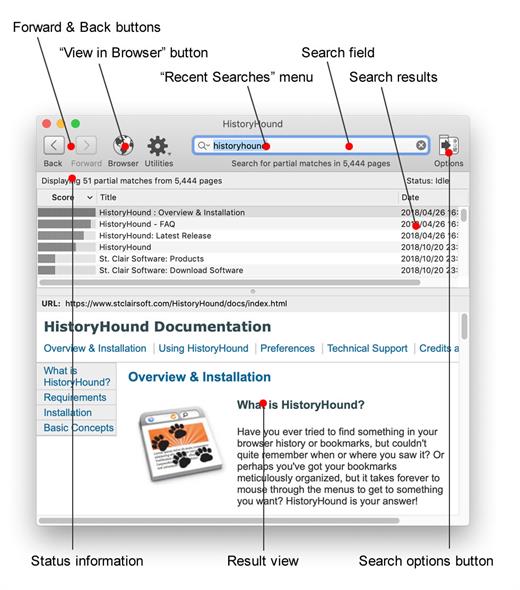
HistoryHound is for you if you ever tried to find something in your browser history or bookmarks, but couldn’t quite remember when or where you saw it. Or perhaps you’ve got your bookmarks meticulously organized, but it takes forever to mouse through the menus to get to something you want? HistoryHound will chase down the page for you – fast!

HistoryHound lets you quickly search for keywords in the entire content of all Web pages and RSS feeds you’ve visited recently, plus all those that you’ve bookmarked. It’s a “personal Web search.” Instead of hunting through endless lists of obscure URLs and page titles, just type in a few words that appear anywhere on the page, and even narrow it down to a specific range of dates if you remember when you saw it. HistoryHound will give you a list of matches, ranked by relevance.

HistoryHound currently supports Safari, Firefox, Google Chrome, Camino, OmniWeb, Opera, Shiira, Flock, iCab, NetNewsWire and URL Manager Pro.

What’s New

Version 2.3.7:


  • Updated for macOS 26 Tahoe.
  • Corrected various user interface issues.
  • Added support for Safari profiles and Floorp
  • Improved the extraction of text from web pages.
  • When a web page contains very little text, the page's keyword and description metadata will also be indexed.
  • The background color of HistoryHound's web preview pane matches the system Light or Dark mode.
  • Fixed an issue with the welcome splash screen when you run HistoryHound for the first time.
  • The contents of the web preview is cleared when a result is no longer selected.
  • Fixed a bug that could remove all filter entries in the Settings window.
Compatibility

macOS 10.14 or later


Release Name: HistoryHound 2.3.7
Size: 15.6 MB
Links: HOMEPAGE – NFO – Torrent Search

Download: RAPiDGATOR
7 Comments
Apr 30

LookAway 2.1.1

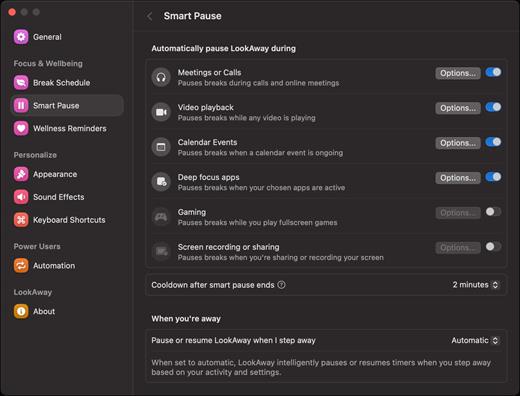
LookAway puts your mac in rest mode at regular intervals to help you rest your eyes. It’s gentle, smart, and fully customizable.

Features:


  • Regular eye breaks
  • Pre-Break Alert
  • At your fingertips
  • Fully customizable
  • Intelligent Pausing
  • Delightful Design
What’s New

Version 2.1.1:


  • Added a new compact design for break reminder notifications. The compact design shows the most essential information, and the rest of the information is visible on hover. You can switch it from the Break Schedule settings.
  • Added flexible scheduling options to office hours. This lets you customize the office hours for each day separately. Head over to Break Schedule → Office Hours to set it up!
Compatibility

macOS 12 or later

Release Name: LookAway 2.1.1
Size: 27 MB
Links: HOMEPAGE – NFO – Torrent Search

Download: RAPiDGATOR

5 Comments
Apr 30

SQLPro Studio 2026.87

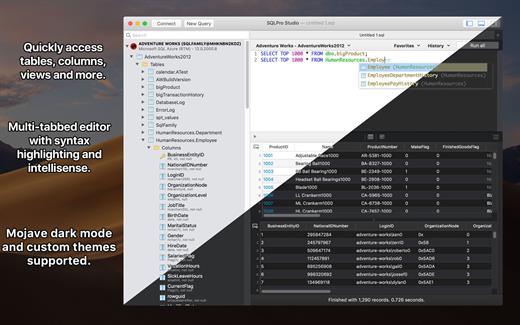
SQLPro Studio is the premium database management tool for Postgres, MySQL, Microsoft Management Studio and Oracle databases.

Features


  • Intellisense/SQL auto-completion
  • Syntax highlighting with customizable themes (including dark)
  • Tab-based interface for an optimal user experience
  • Context aware database tree navigation, including quick access to tables, views, columns, indices, and much more
  • SQL beautifier/formatter
  • Database-wide searching
  • NTLMv2 supported (but not required)
  • Netbios support
  • Master password support for additional security. SQLPro Studio supports the following database servers:

    • MySQL and MariaDB
    • PostgreSQL
    • Microsoft SQL Server (2005 and above)
    • Oracle (8i and above)
What’s New

Version 2026.87:


  • Release notes were unavailable when this listing was updated.
Compatibility

macOS 10.12 or later
Apple Silicon or Intel Core processor


Release Name: SQLPro Studio 2026.87
Size: 68.6 MB
Links: HOMEPAGE – NFO – Torrent Search

Download: RAPiDGATOR
5 Comments
Apr 30

Sketch 2026.1.2

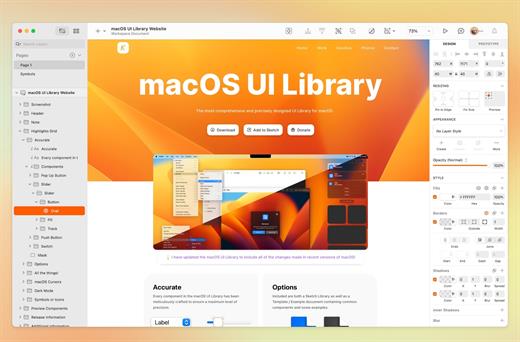
Sketch is a complete design toolkit. With a native Mac app for design and prototyping, and web-based tools to share, get feedback and handoff.

A native macOS app for design and prototyping


  • Powerful tools built for designers, by designers
  • Nestable frames and flexible stack layouts
  • Fast, immersive prototyping to bring your ideas to life
  • Shared Libraries, styles and components to scale your work
  • Full control over color profiles, including P3 support
  • Variable and OpenType font support
  • Offline and local file support
  • Ready for real-time collaboration, or working solo
A flexible web app for feedback, sharing and handoff

  • Store, sync and share documents
  • Document and project permissions
  • Easy Workspace admin
  • Annotate documents with feedback
  • File version history
  • Share Libraries, components and templates
  • Developer handoff tools
  • Test prototypes in any browser
  • View, comment and handoff for free
What’s New

Version 2026.1.2:


  • Release notes were unavailable when this listing was updated.
Compatibility

macOS 14.0 or later


Release Name: Sketch 2026.1.2
Size: 94.5 MB
Links: HOMEPAGE – NFO – Torrent Search

Download: RAPiDGATOR

5 Comments