Please REGISTER or RENEW your account on RAPiDGATOR.net and support us by doing through all RAPiDGATOR working download links on main posts...
Apr 30

Color Folder Pro 5.1

Color Folder can help you to change the icon of folder quickly, and to manage folders more efficiently

「Main Features」


  • quickly change folder icon color
  • Select any picture to set as folder icon
  • support changing multiple folder icons at the same time
  • save as Icon
  • provide a variety of icon templates (over 700+)
  • support any color to modify folder icons
What’s New

Version 5.1:


  • Release notes were unavailable when this listing was updated.
Compatibility

macOS 10.10 or later


Release Name: Color Folder Pro 5.1
Size: 23 MB
Links: HOMEPAGE – NFO – Torrent Search

Download: RAPiDGATOR

6 Comments
Apr 30

Notepad++ 1.0.5

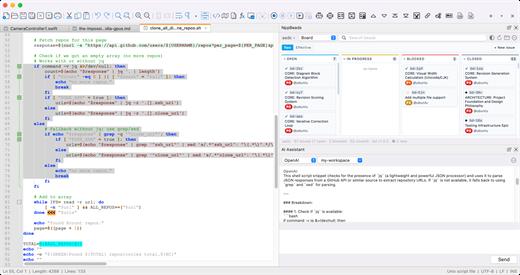
Notepad++ for Mac is a full native port of the world’s most popular text editor. Built from the ground up for macOS, it delivers a high-performance editing experience without the need for Wine or emulation.

Key Features


  • Native Performance: Built as a Universal Binary for Apple Silicon (M1-M5) and Intel.
  • Syntax Highlighting: Support for 80+ languages with customizable themes.
  • Powerful Editing: Split-view, multi-tab management, and macro recording.
  • Advanced Search: Full Regular Expression (PCRE) support and Find in Files.
  • Extensible: Built-in Plugin Admin to easily add new functionality.
What’s New

Version 1.0.5:


  • Release notes were unavailable when this listing was updated.
Compatibility

macOS 11.0 or later
Apple Silicon or Intel Core processor


Release Name: Notepad++ 1.0.5
Size: 12.8 MB
Links: HOMEPAGE – NFO – Torrent Search

Download: RAPiDGATOR

5 Comments
Apr 30

Folder Preview Pro 2.10.0

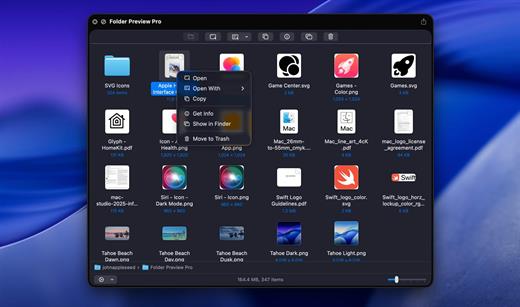
Folder Preview is a macOS Quick Look extension that enables users to preview the contents of folders directly in Finder without opening them. By selecting a folder and invoking Quick Look (e.g., pressing the spacebar), it displays a visual representation of the files and subfolders inside, leveraging the native Quick Look framework for seamless integration.

What’s New

Version 2.10.0:


  • Release notes were unavailable when this listing was updated.
Compatibility

macOS 13 or later


Release Name: Folder Preview Pro 2.10.0
Size: 8.8 MB
Links: HOMEPAGE – NFO – Torrent Search

Download: RAPiDGATOR

5 Comments
Apr 30

Cisdem DVD Burner 8.1.0

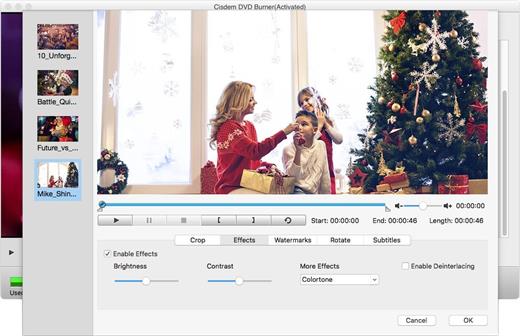
Cisdem DVD Burner is great DVD-burning software with more functionality but fewer steps to master than iDVD. It can burn any videos to DVD with subtitles/menu and background music and also provides an array of DVD menu templates to suite all your occasions. With its editing functions, you can crop, rotate, trim, remove letterboxing, and add special effects or watermarks, and then easily burn your high-quality personal DVD.

Features


  • Much Better than iDVD – Burn Virtually any Video to DVD

    • It burns all sorts of videos to DVD , be it internet downloaded, camcorder recorded or iPhone, iPad and many other devices created and also supports an array of formats, like MTS, AVI, HD MKV, MOV, MP4 and so on.
  • Powerful video Editor – Customize DVD

    • Provide different menu patterns for different occasions. Select one from to fit the subject of your DVD and customize it with your favorite thumbnails, buttons, frames, and text.
    • To drag and drop to add audio tracks or subtitles into it, You are easily to add background music and subtitles to better tell your story.
    • With the ability to crop, trim, deinterlace and add watermarks, and special effects to videos, you are easily to customize your DVD.
  • Real – time Preview and Burn DVD 16X Faster

    • With menu navigation and chapter switching over, you can play created DVD video in the Preview window just like on a DVD player.
    • With multi-threading, multi-core processing and multi-tasking DVD burning technology applied it is 10-20x faster than any competitor!
  • A High Quality DVD Experience Any Where

    • You can easily burn video into DVDs, ISO File, and DVD Folder and set to burn DVD based on disc volume (DVD5 or DVD9), TV system (NTSC or PAL), display ratio (16:9 or 4:3), etc. The output DVDs are playable on any DVD/BD player like Sony DVP serials and Panasonic DMP serials, etc.
What’s New

Version 8.1.0:


  • Release notes were unavailable when this listing was updated.
Compatibility

macOS 10.12 or later


Release Name: Cisdem DVD Burner 8.1.0
Size: 122.5 MB
Links: HOMEPAGE – NFO – Torrent Search

Download: RAPiDGATOR

7 Comments
Apr 30

Desktop Stickers 2.91

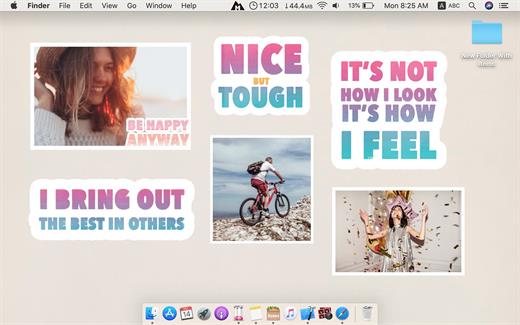
Your thoughts are the source of your emotions and mood. The conversations you have with yourself can be destructive or beneficial. Most people need to learn how to cultivate positive thoughts and dispel the negative ones.

Self-talk can enhance your performance and general well-being. For example, research shows self-talk can help athletes with performance.
Self-talk is a huge part of our self-esteem.

Examples
1- Negative: I’m overweight.
Positive: “I am strong,
I am capable,
I want to get fit for me.”

2- Negative: “I’m lost the project.
Positive: I can reach my goal
step by step.”

3- Negative: “I don’t like what’s happening around here.”
Positive: “I accept the things that I can’t change,
I will change the things I can.”

Desktop Stickers helps you to repeat positive self-talk everyday.

How Desktop Stickers work?
1- Select a sticker
2- Click Done to add it to your desktop (So you can review daily)
3- Repeat out loud the words everyday.
4- You can add custom photos to be stickers on desktop also. Example: Happy and good moments that you love.

What’s New

Version 2.91:


  • Release notes were unavailable when this listing was updated.
Compatibility

macOS 10.15 or later
Apple Silicon or Intel Core processor


Release Name: Desktop Stickers 2.91
Size: 141 MB
Links: HOMEPAGE – NFO – Torrent Search

Download: RAPiDGATOR

5 Comments
Apr 30

Transmit 5.11.6

Transmit is a powerful and versatile Mac OS X application that makes it easy for you to manage and organize large files on various servers on clouds.
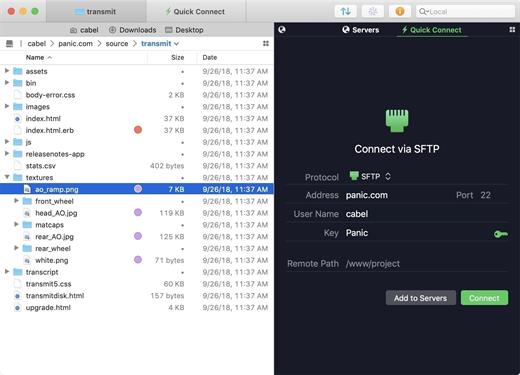
User-oriented interface with support for multiple tabs

With Transmit’s help you can quickly and effortlessly transfer files to SFTP or FTP server, as well as Amazon S3 or WevDAV from within a user-oriented interface.

Transmit comes a simple and reliable solution for users that need to maintain websites, upload numerous photos or perform backups.

Transmit comes with a “Twin-Turbo Engine”, multi-connection transfer and FXP support fact that makes it a fast, smooth-running and dependable client for most Mac users.

On top of that, Transmit enables you to limit the bandwidth, synchronize or compare files with ease.

Choose between a single or dual pane window

From Transmit’s two-panel window you can view the files stored locally and the ones saved on the server. At the same time, Transmit helps you create a list with favorite servers add a new FTP, SFTP, Amazon S3 or WebDAV server.

The top toolbar allows you to switch between the thumbnail, list, column and Cover Flow view mode and change from the a dual pane to a single pane window. In addition, Transmit seamlessly integrates Mac OS X’s Quick Look feature, a fact that helps you preview files before transferring them.

Handy synchronization features

By accessing the Action drop-down menu, you can open the Info window, copy the file path or URL address, move items to Trash or the desired location, create duplicates, compress or label files. On top of that, you have the option to create new folders or files, refresh the list and open a folder in a new tab or new window.

Thanks to the built-in search form, you can quickly and effortlessly filter the displayed items as soon as you start typing. The Preferences window enables you to change the default FTP client and configure Transmit to synchronize your favorite items via iCloud or Dropbox.

What’s New

Version 5.11.6:


  • Release notes were unavailable when this listing was updated.
Compatibility

macOS 12.0 or later
Apple Silicon or Intel Core processor


Release Name: Transmit 5.11.6
Size: 32.5 MB
Links: HOMEPAGE – NFO – Torrent Search

Download: RAPiDGATOR

7 Comments
Apr 30

OmniFocus Pro 4.8.10

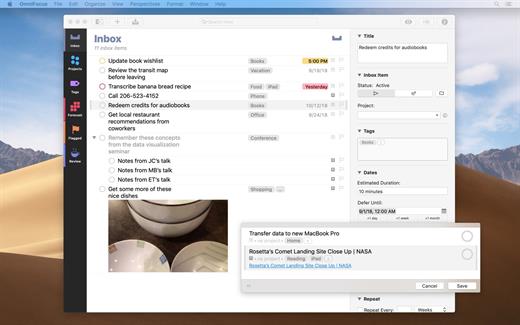
OmniFocus is an organizer app. It uses projects to organize tasks naturally, and then add tags to organize across projects. Easily enter tasks when you’re on the go, and process them when you have time. Tap the Forecast view – which shows both tasks and calendar events – to get a handle on your day. Use the Review perspective to keep your projects and tasks on track.

Use OmniFocus to accomplish more every day. Create projects and tasks, organize them with tags, focus on what you can do right now – and get stuff done. Then let our free syncing system make sure you data is the same on every Mac. (And on OmniFocus for iOS, available separately.) Because your data is encrypted, it’s safe in the cloud.

What’s New

Version 4.8.10:


  • Release notes were unavailable when this listing was updated.
Compatibility

macOS 11.0.0 or later
Apple Silicon or Intel Core processor


Release Name: OmniFocus Pro 4.8.10
Size: 49.6 MB
Links: HOMEPAGE – NFO – Torrent Search

Download: RAPiDGATOR

6 Comments
Apr 30

Audio Hijack 4.5.8

Audio Hijack (was Audio Hijack Pro) drastically changes the way you use audio on your computer, giving you the freedom to listen to audio when you want and how you want. Record and enhance any audio with Audio Hijack – it’s the cornerstone of your digital audio experience.

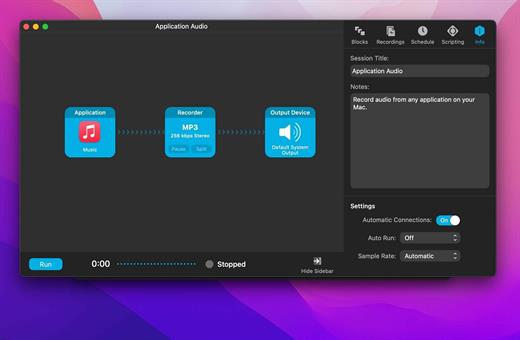
Audio Hijack will allow you to record any application’s audio, from Internet streams to DVD audio and everywhere in between. If your machine can play it, Audio Hijack can record it. And that’s not all – Audio Hijack will also enhance any audio, unsing industry-standard VST and AudioUnit audio effects to make your music sound incredible. Record. Enhance. Enjoy!

More Great Features

Record to All Major Formats
Record to the world’s most popular audio formats, including MP3 and AAC, or save in perfect-fidelity AIFF, WAV, ALAC or FLAC.

Reusable Sessions
Once you’ve configured a Session to your liking, you can re-use it over and over. With one click, you’ll be recording exactly as desired.

Easy File Organization
Find all of your recordings sorted by Session in the Recordings tab, where you can quickly pass files to an audio editor, add them to iTunes, or share them.

Timed Recordings
Use the Schedule tab to set up timed recordings for when you’re not around. Your audio will be waiting for you when you return.

Silence Monitoring
When silence is detected, Audio Hijack can automatically stop recording, split to a new file, or remove audio.

Bulletproof Recording
Bulletproof recording means that even if the power goes out or your computer crashes, you’ll never lose a recording.

A Thoughtful Interface
Audio Hijack’s intuitive audio grid provides a terrific pipeline-style view of exactly how your audio flows, so you can easily understand it.

Gorgeous Audio Effects
The included audio effects are easy to use and easy on the eyes. Their functionality is now accessible to all.

Time Shift Your Audio
Now you can pause, delay, and rewind live audio on your Mac. It’s perfect for transcribing audio and more!

What’s New

Version 4.5.8:


  • Release notes were unavailable when this listing was updated.
Compatibility

macOS 14.6 or later.


Release Name: Audio Hijack 4.5.8
Size: 28.9 MB
Links: HOMEPAGE – NFO – Torrent Search

Download: RAPiDGATOR
7 Comments
Apr 28

Unite Pro 1.3.0

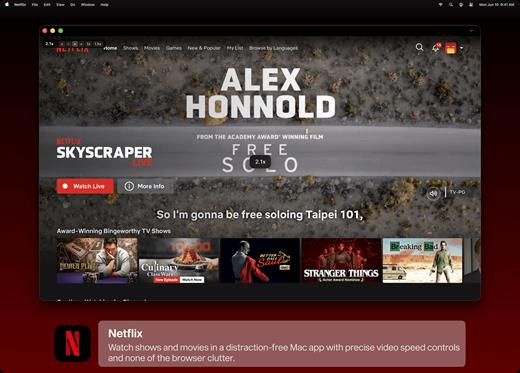
Unite for macOS lets you turn any website into a fully native Mac app with deep customization, fast performance, and macOS integration. Instead of opening sites in a browser with many tabs, Unite creates standalone apps that live in your Dock, support native window controls, and behave like real macOS software.

With Unite you can create an app in seconds by entering a URL, choosing an icon, and tailoring appearance and behavior to your preferences. Each app runs in its own isolated, lightweight WebKit‑based environment that feels more integrated and efficient than browser web apps or Electron alternatives. 

Unite apps offer extensive customization. You can hide or show title bars, adjust colors to match site branding, control window appearance, manage multiple tabs with advanced options like pinning and locking, and choose how links open within or outside the app. Notifications and macOS Focus Modes work per app, helping reduce distractions. 

Unite also includes flexible app modes, such as standard Mac windows, sidebar views, floating windows, compact views, and menu bar utilities. A built‑in ad blocker and customizable keyboard shortcuts streamline everyday use and navigation. 

What’s New

Version 1.3.0:


  • Release notes were unavailable when this listing was updated.
Compatibility

macOS 15 or later


Release Name: Unite Pro 1.3.0
Size: 29.1 MB
Links: HOMEPAGE – NFO – Torrent Search

Download: RAPiDGATOR

8 Comments
Apr 28

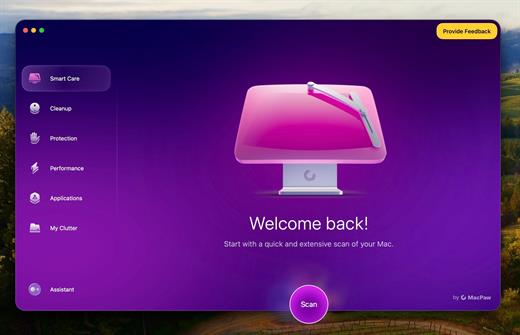
CleanMyMac 5.5.2

CleanMyMac is all-in-one package to awesomize your Mac. It cleans megatons of junk and makes your computer run faster. Just like it did on day one.

CleanMyMac makes space for the things you love. Sporting a range of ingenious new features, CleanMyMac lets you safely and intelligently scan and clean your entire system, delete large, unused files, reduce the size of your iPhoto library, uninstall unneeded apps or fix the ones that started to work improperly, manage all your extensions from one place and do much more – all from one newly designed and beautifully simple interface.

Note:

wait a second to let it activate itself

If prompted:”The application “CleanMyMac” can’t be opened.”

What’s New

Version 5.5.2:


  • Release notes were unavailable when this listing was updated.
Compatibility

macOS 14.0 or later


Release Name: CleanMyMac 5.5.2
Size: 152.7 MB
Links: HOMEPAGE – NFO – Torrent Search

Download: RAPiDGATOR

5 Comments