Please REGISTER or RENEW your account on RAPiDGATOR.net and support us by doing through all RAPiDGATOR working download links on main posts...
Apr 28

Manet Music 1.0.8

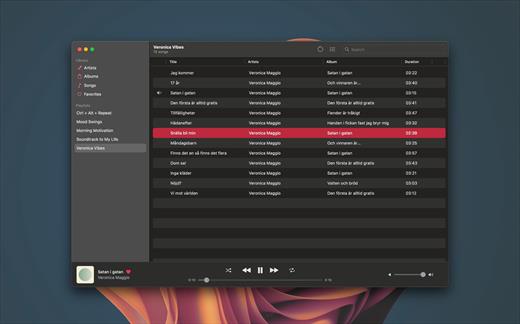
Experience seamless music streaming from Jellyfin for free with Manet, your go-to music app for iOS.

Offline Playback


  • Download your favorite music for offline listening, perfect for when you’re on the go or conserving data.
Siri Support

  • Command your music effortlessly using Siri. Simply ask Siri to play artists, playlists, albums, or tracks.
CarPlay Integration

  • Safely control playback while driving with our intuitive CarPlay interface, keeping your focus on the road.
Native iOS Experience

  • Built with native iOS technologies, Manet seamlessly integrates with your device for optimal performance.
Sleek Design

  • Purpose-built for iOS, Manet blends seamlessly with the platform’s aesthetics, offering a familiar and intuitive user experience.
Shortcuts Integration

  • Easily start playback as part of larger automations using Shortcuts.
What’s New

Version 1.0.8:


  • Release notes were unavailable when this listing was updated.
Compatibility

macOS 14.0 or later.


Release Name: Manet Music 1.0.8
Size: 10.4 MB
Links: HOMEPAGE – NFO – Torrent Search

Download: RAPiDGATOR

9 Comments
Apr 28

Trimma 2.2.2064

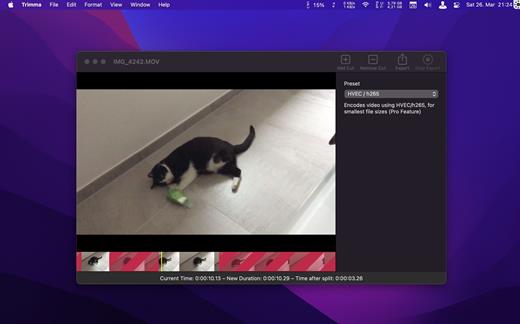
Trimma is the easiest way of quickly cutting videos without any hassle. No project creation like in iMovie, no strange export settings that change the video’s resolution.

Just follow these simple steps:


  1. Open the video
  2. Insert cuts to quickly remove unwanted parts

  • quickly scroll through your video or use the cursor keys for precision steps
  • use the toolbar buttons or the hotkeys A / S to quickly add / remove cuts.
  • insert a cut in the red area will end the red area at the current position

  1. Choose an export preset

  • Passthrough – keep the original encoding, small files stay small, export is blazing fast
  • HEVC – The High Efficiency Video Codec uses the power of h265 encoding to video to a tiny file. Great for sharing with other Mac / iOS users!
  • AVC – The Advanced Video Codec uses the power of h264 and also creates small video files. Files are not as small as with HEVC, but compatibility with older systems is better
  • Thumbnail – The only free preset. It generates a small video with low quality. Fast in export and gives an idea of what to expect from the export.

  1. Export – yeah, it’s really not more complicated

What’s New

Version 2.2.2064:


  • fix missing file extension when exporting multiple clips at once.
  • fix compatibility with macOS Mojave.
Compatibility

macOS 10.14.6 or later
Apple Silicon or Intel Core processor


Release Name: Trimma 2.2.2064
Size: 5.8 MB
Links: HOMEPAGE – NFO – Torrent Search

Download: RAPiDGATOR

6 Comments
Apr 28

Topaz Photo 1.5.0

AI-powered photo editing tool that improves photos pixel by pixel.
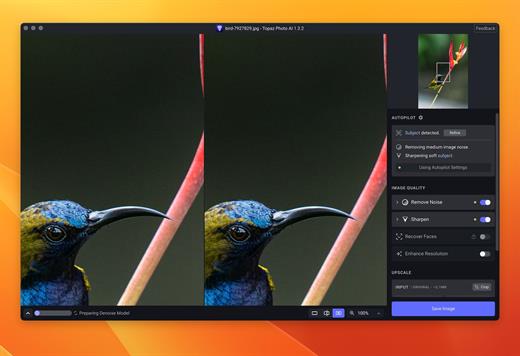
What is Topaz Photo AI? It is a new-generation photo editing tool that uses AI technology to perfect and denoise pictures pixel by pixel. Topaz Photo AI simplifies the editing process for photographers and designers. Its groundbreaking suite offers multiple tools to satisfy both amateurs and confident pros.

Topaz Photo AI allows editors to denoise, sharpen, upscale, preserve text, recover faces, remove objects, correct lighting, and balance color. Professional photo editors will be amazed at how much power Topaz Photo AI gives, and beginners will appreciate how easy and intuitive this tool is.

Topaz Photo AI helps you Sharpen, remove noise, and increase the resolution of your photos with tomorrow’s technology.

Maximize the potential of your photos.

Magically enhance image quality and resolution based on a deep understanding of the contents of your photo.

Enhance Quality

Maximize the visual quality of your images with best-in-the-world noise and blur reduction. Particularly useful in difficult settings with fast-moving subjects, low light, or atypical environments.

Crisp, clear, and noise-free.

It’s a magical feeling to see noise evaporate while sharp detail remains. Topaz Photo AI understands the contents of your image and accurately determines the difference between image detail and noise.

Tack-sharp subjects.

Unlike traditional sharpening, Topaz Photo AI’s Sharpen module naturally reverses root causes of blurriness (camera shake, motion blur, missed focus) to create more natural results. In the absence of blur, sharpness remains – crisp, clear detail that’s free of edge haloes or other artifacts.

Increase Resolution

Join hundreds of thousands of photographers and designers who use Topaz technology to generate real image detail for better printing, cropping, restoration, and more.

Magically add real detail.

Topaz Photo AI “remembers” real detail from millions of similar images, then fills in missing pixels based on that understanding. (It’s like how you can picture a friend’s face without being physically in front of them.) Add real image resolution to your photos for tighter crops or better prints.

Recover faces naturally.

Introduced in 2023, the breakthrough Face Recovery AI offers remarkable detail enhancement for low-resolution or blurry faces.

Intelligently improve lighting.

It’s a magical feeling to see noise evaporate while sharp detail remains. Topaz Photo AI understands the contents of your image and accurately determines the difference between image detail and noise.

Improve efficiency with Autopilot

Specify adjustments based on detected image attributes like subject, faces, noise, and blur levels. Autopilot allows you to mold Photo AI to your workflow and unique photographic style.

Easy workflow

Topaz Photo AI works directly on your Mac or PC. Use the standalone to batch process thousands of images in sequence, or use it as a Photoshop plugin for tight workflow integration. We’ve also partnered with major hardware manufacturers like Nvidia, AMD, and Intel to make Photo AI run as fast as possible for your computer.

What’s New

Version 1.5.0:


  • Release notes were unavailable when this listing was updated.
Compatibility

macOS 10.12 or later


Release Name: Topaz Photo 1.5.0
Size: 1.7 GB
Links: HOMEPAGE – NFO – Torrent Search

Download: RAPiDGATOR

6 Comments
Apr 28

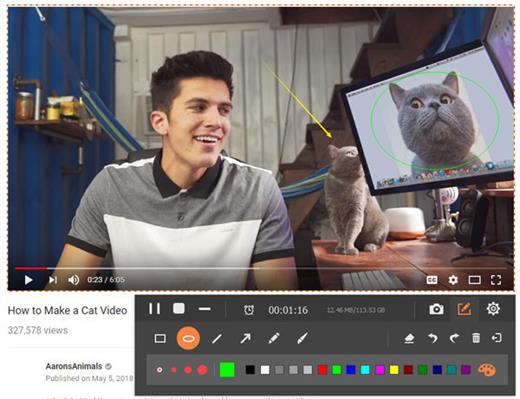
Mac FoneLab Screen Recorder 2.2.22

FoneLab allows you to capture video, audio, online tutorial, etc on Mac, and you can easily customize size, edit the video or audio, and more.

Area Selection

Choose recording or capture area and lock the recording area.

Choose Format

Select video or audio format.

Record Offline

No internet connection required during the recording process.

Edition Available

Add text, arrow, line and other drawing panels on the videos or snapshots.

Record History

Access record history easily.

Around Mouse

You can choose full screen or customized size.

Record Quality

High-quality video, audio and image.

Shortcut

Set hotkeys to start/stop/open or close webcam etc.

What’s New

Version 2.2.22:


  • Release notes were unavailable when this listing was updated.
Compatibility

macOS 10.8 or later


Release Name: Mac FoneLab Screen Recorder 2.2.22
Size: 46.3 MB
Links: HOMEPAGE – NFO – Torrent Search

Download: RAPiDGATOR

7 Comments
Apr 28

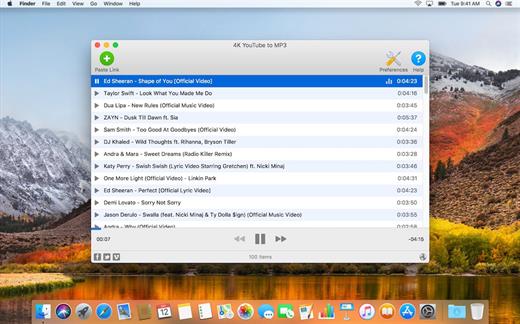
4K YouTube to MP3 Pro 26.1.1

4K YouTube to MP3 was specifically created to extract audio from YouTube, Vimeo or Facebook and save it in MP3, M4A, OGG. No annoying and complicated settings to deal with, just a clean, friendly and functional interface. Downloading is simple and straightforward: just copy the link from your browser and click ‘Paste Url’. Done!

Features


  • Extract audio from YouTube videos and save it in MP3, M4A or OGG in high quality.
  • Download full YouTube playlists or channels and generate m3u files.
  • Transfer downloaded tracks automatically into iTunes and upload them on your iPhone or iPod.
  • Listen music via native built-in music player.
  • Download and extract audio tracks from SoundCloud, Vimeo, Flickr and DailyMotion videos.
  • Download audio books from YouTube.
  • Extract audio tracks even from embedded in HTML page videos.
  • Use 4K YouTube to MP3 on your PC, Mac or Linux, doesn’t matter what OS you prefer.
What’s New

Version 26.1.1:


  • Release notes were unavailable when this listing was updated.
Compatibility

macOS 10.10 or later


Release Name: 4K YouTube to MP3 Pro 26.1.1
Size: 245.8 MB
Links: HOMEPAGE – NFO – Torrent Search

Download: RAPiDGATOR

7 Comments
Apr 28

Aiseesoft Mac Screen Recorder 2.2.72

Aiseesoft Screen Recorder makes it easy to record your videos and audio played on computer. The powerful video recording function allows you to save almost any video to your computer, such as online streaming videos you cannot download, video tutorials you want to capture and video meetings you want to save. You can choose to record system audio of your computer or microphone voice.

Record screen video

As a powerful screen recording software, Aiseesoft Screen Recorder enables you to record any screen video with ease. You can use it to capture online YouTube videos, games, podcasts, webinars, lectures, presentations, Skype calls, online conference, webcam videos, etc. in full screen or customized screen size.

While capturing screen, you can highlight the cursor movement to make it easier to track. Moreover, the “Blue-light” real-time HD video encoding technology can guarantee you excellent image and sound quality. Lock window capture feature allows you to keep recording activity on a certain window. So that the screen recording won’t bother other operations. The captured video will be saved in MP4, WMV, MOV, AVI, GIF, TS, etc. for easily playback and sharing.

Aiseesoft Screen Recorder has the capability to only capture audio on your computer. This function enables you to record various music, radio or online audio instead of downloading them. You can save the recorded audio in MP3/WMA/AAC/M4A for easy playback.

Record streaming audio: Record any streaming audio from system audio, so you can get exactly the original sound quality.

Capture online audio: This audio grabber can save any online audio, including audio track in MV, voice in teaching videos and more.

Record microphone voice: Choose microphone audio and turn off system audio to add oral explanation to your video presentation.

Easier way to take snapshots

Taking snapshots is an easy and useful way to quickly save some important information. You may use it every day. This screen recorder can also work as a powerful snapshot app to help you capture anything on your screen and save it as picture. You can freely adjust the snapshot area and add your personal labels like rectangle, arrow, line and text to the output image. You can save the snapshot as PNG, JPEG, BMP, GIF, TIFF, etc. according to your need. Surely it is equipped with other key editing functions to help you make snapshot.

What’s New

Version 2.2.72:


  • Release notes were unavailable when this listing was updated.
Compatibility

macOS 10.10 or later


Release Name: Aiseesoft Mac Screen Recorder 2.2.72
Size: 59 MB
Links: HOMEPAGE – NFO – Torrent Search

Download: RAPiDGATOR
7 Comments
Apr 28

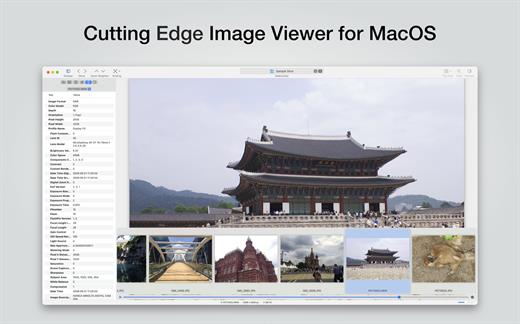
EdgeView 5.8.3

EdgeView 5 is fast image viewer has elegant user interface. EdgeView 5 is developed and designed for modern MacOS. It can open various image files such as JPEG, PNG, TIFF, BMP, and RAW file of DSLR, EPS and PDF, AI(Adobe Illustrator). Can open image files in archive directly without extraction.

User can open files, rename files, delete files from EdgeView’s file browser. Also can access to SMB/AFP/FTP network volume.

User can navigate images quickly by using keyboard shorcut, mouse wheel, trackpad gesture. EdgeVew show EXIF information, play animation GIF/PNG/WebP smoothly. Save last status to history, and restore when reopen file.

EdgeView 5 will be the best choice when viewing and managing image files.

What’s New

Version 5.8.3:


  • Release notes were unavailable when this listing was updated.
Compatibility

macOS 11.1 or later
Apple Silicon or Intel Core processor


Release Name: EdgeView 5.8.3
Size: 146.4 MB
Links: HOMEPAGE – NFO – Torrent Search

Download: RAPiDGATOR

7 Comments
Apr 28

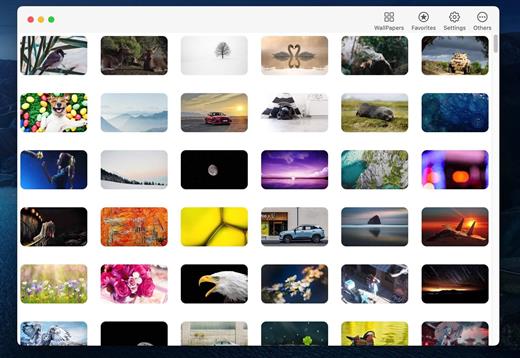
4K Wallpaper – HD Wallpapers 2.9

4k Wallpaper is a beautiful and easy-to-use app. It selects a large number of beautiful and 4k & HD wallpapers (600+) and adapts to the full screen.

MAIN FEATURES:


  • No Ads
  • Many beautiful and HD & 4K wallpapers
  • Drag local image to set up desktop wallpaper
  • Launch on system startup
  • Auto change the wallpaper(minute, day, year)
  • Auto collect the used wallpapers
  • Simple and easy-to-use
What’s New

Version 2.9:


  • Release notes were unavailable when this listing was updated.
Compatibility

macOS 11.1 or later.


Release Name: 4K Wallpaper – HD Wallpapers 2.9
Size: 203.1 MB
Links: HOMEPAGE – NFO – Torrent Search

Download: RAPiDGATOR
6 Comments
Apr 28

RAR Extractor – Unzip 14.6

Zip,rar,7z,tar files opener. RAR Extractor can extract compressed files in all most formats(over 50 formats).

「Support RAR, ZIP, 7z, pak, pkg, apk, tbz, sti, tar, xar, lha, lzh, hqx, bin, bz2, bzip2, bz, xz, iso, cid, nrg, mdf, taz,l zma, xip, ace, arj, lbr, lqr, cab, rpm, cpt, sea, exe, msi, cpio, lzx, jar, swf, pdf, nsa, dcs, spk… 」
「Compress files to password-protected ZIP & 7Z archives 」
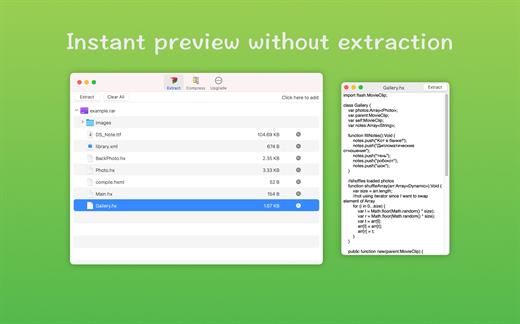
「Quicklook files in archive before extraction」

「Features」


  • Extract extract compressed files in all most formats(over 50 formats).
  • Unzip, unrar encrypted archives.
  • Easy view an archive’s file list.
  • Quicklook files in archive without extracting.
  • Unarchive & unrar the selected individual file or folder in the archive.
  • Double click to display or extract directly after setting this APP as default archiver.
  • Drag archives to the dock icon to extract or display directly.
  • Batch decompress many archives
  • Create password-protected ZIP & 7Z archives.
  • AES256 encryption algorithm to create ZIP & 7Z archives.
What’s New

Version 14.6:


  • Release notes were unavailable when this listing was updated.
Compatibility

macOS 10.13 or later

Release Name: RAR Extractor – Unzip 14.6
Size: 19.8 MB
Links: HOMEPAGE – NFO – Torrent Search

Download: RAPiDGATOR

6 Comments
Apr 28

Wins 3.3

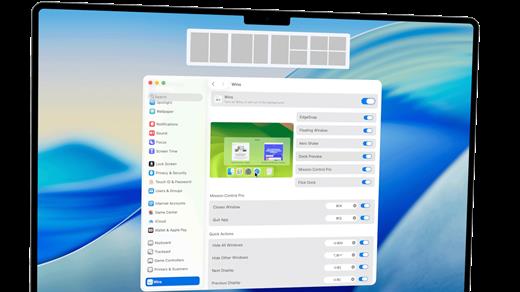
Wins is a system-level utility that brings high-performance, Windows-inspired window management to macOS. Unlike typical apps, Wins integrates directly into macOS System Settings, offering a native and fluid multitasking experience without the clutter.

Key Features


  • Dock Preview: Hover over Dock icons to see live previews of all open windows.
  • Mission Control Pro: Close windows with Cmd+W or quit apps with Cmd+Q directly inside Mission Control.
  • Quick Split: Drag windows to screen edges to snap them into perfect layouts instantly.
  • Upgraded Cmd-Tab: Navigate, switch, and close windows using only your keyboard.
  • Aero Shake: Shake a window to minimize everything else and find your focus.
  • Floating Window: Easily manage layouts with a dedicated floating split-screen UI.
What’s New

Version 3.3:


  • Release notes were unavailable when this listing was updated.
Compatibility

macOS 10.13 or later


Release Name: Wins 3.3
Size: 58.4 MB
Links: HOMEPAGE – NFO – Torrent Search

Download: RAPiDGATOR

6 Comments