Please REGISTER or RENEW your account on RAPiDGATOR.net and support us by doing through all RAPiDGATOR working download links on main posts...

Acorn is a new image editor built with one goal in mind – simplicity. Fast, easy, and fluid, Acorn provides the options you’ll need without any overhead. Acorn feels right, and won’t drain your bank account.
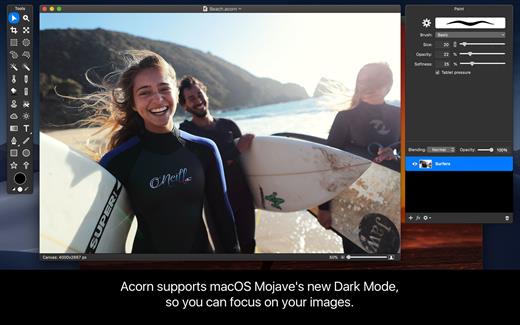
- Take screenshots using Acorn and edit them right away.
- Chain together image filters to create stunning effects.
- Layer based image editing, an industry standard.
- Make new images and layers using your built-in iSight.
- Easy image and canvas resizing, just by changing the size of your window.
- Take advantage of every pixel of your monitor with full screen image editing.
- Tablet sensitive for pressure strokes and using the tablet’s eraser.
- Vector shape and text layers.
- Freeform, elliptical, rectangular, and magic wand selections.
- Gradients.
- Create and apply custom text styles.
- Control opacity and blending modes for each layer.
- Write plugins using the Python scripting language, as well as in Objective-C.
- GPU powered. The same graphics card that makes your gaming experience smooth, helps Acorn fly through the toughest of graphics operations.
What’s New Version 8.5.0:
- Release notes were unavailable when this listing was updated.
Compatibility macOS 10.14.0 or later
Apple Silicon or Intel Core processor
Release Name: Acorn 8.5.0
Size: 84.1 MB
Links: HOMEPAGE – NFO – Torrent Search
Download: RAPiDGATOR
Acorn

Viscosity is an OpenVPN client for Mac, providing a rich Cocoa user interface for creating, editing, and controlling VPN connections. Viscosity provides a complete OpenVPN solution for OS X 10.5 Leopard, and does not require any additional downloads or software.
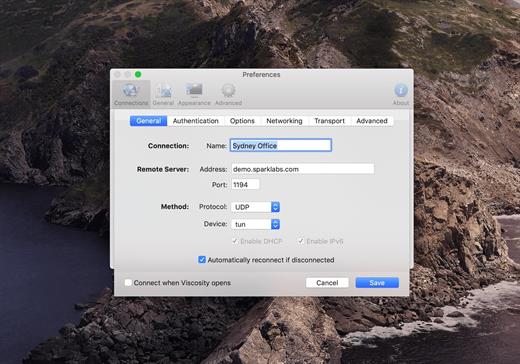
With Viscosity and OpenVPN you can securely connect to your home or company network from a remote location, protect your network traffic when using public or wireless networks, access websites with country restrictions, and tunnel through restrictive firewalls and proxy servers to give your computer full Internet access. Viscosity can connect to any VPN server running OpenVPN, including most popular free and commercial VPN providers. Viscosity allows connections to be completely configured through a GUI, without any need to know how to use the command-line or OpenVPN’s configuration-file syntax. Advanced users still have full manual control over configuration options if desired.
Features
- Cocoa GUI
- Connection and traffic statistics
- Multiple simultaneous connections
- Robust DNS Support
- Keychain integration
- System proxy integration
- Deployment features designed for enterprise
- Easy connection importing
- Growl integration
What’s New Version 1.12.1:
- Release notes were unavailable when this listing was updated.
Compatibility macOS 12.0 or later
Release Name: Viscosity 1.12.1
Size: 31.8 MB
Links: HOMEPAGE – NFO – Torrent Search
Download: RAPiDGATOR
Viscosity

FSNotes is a plain-text note manager for macOS, and is modern reinvention of notational velocity (nvALT) on steroids. Our application respects the following open formats: plain/text, Markdown, and RTF, and stores data in the file system. You can view, edit, and copy data in your favourite external editor, and see live results in FSNotes.

Features:
- ICloud synchronization
- Keyboard centric
- Global shortcuts (clipboard save / search field)
- Markdown and RTF markup (files stored on disk as plain/text and rich text)
- Markdown preview mode
- Elastic two pane view (vertical and horizontal layout)
- Blazing fast and lightweight
- Open files in finder / works with external editors (changes seamless live sync with UI)
- Pin/unpin important notes in top
- Multi folder storage
- Markdown live highlighting with over 170 languages in code blocks
What’s New Version 7.1.4:
- Release notes were unavailable when this listing was updated.
Compatibility macOS 10.14 or later
Release Name: FSNotes 7.1.4
Size: 19.7 MB
Links: HOMEPAGE – NFO – Torrent Search
Download: RAPiDGATOR
Fsnotes

Kaleidoscope spots differences in text and image files.
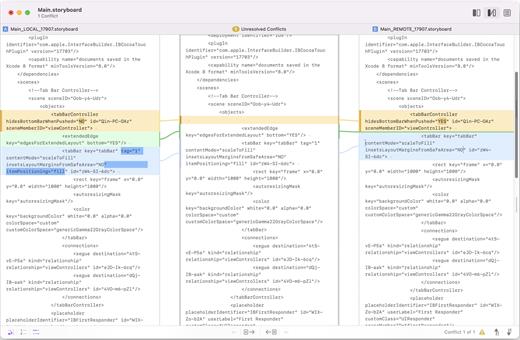
Kaleidoscope Features
- General
- Single window workflow: One tab per comparison
- Compare two+ files: Add any number of files per tab
- Always up to date: Auto-refreshes when files change
- File Shelf: Quickly go from file to file
- Path Bar: See where your files are
- Keyboard shortcuts: Every action has a shortcut
- Text Scope
- Supports any text file: Plain text, source code, HTML, etc.
- Clear comparisons
- Three layouts: Blocks, Fluid, and Unified
- Compare documents: Imports text from .doc and .rtf files
- Instant search
- Change Stepper: Quickly jump from change to change
- Highlights: Added, deleted and changed text
- Image Scope
- All popular image file formats: JPEG, TIFF, PNG, PSD and more.
- Four connected layouts: Two-Up, One-Up, Split, and Difference
- Comprehensive image support: RGB/CMYK/LAB, alpha, any size.
- Multi-touch support: Smooth scrolling and pinch to zoom
- Customizable environment: Change background color, difference mask and checkerboard settings
- Two difference mask modes: Spot absolute or relative changes
- Integration
- Git, Mercurial, SVN, and Bazaar: Integrate with a couple of clicks
- Versions
- TextMate SVN
- Cornerstone
- ksdiff Command-line tool: Integrate with practically anything
What’s New Version 6.7:
- Release notes were unavailable when this listing was updated.
Compatibility macOS 11.1.0 or later
Apple Silicon or Intel Core processor
Release Name: Kaleidoscope 6.7
Size: 46.7 MB
Links: HOMEPAGE – NFO – Torrent Search
Download: RAPiDGATOR
Kaleidoscope

Bloom is a refined file management tool designed to enhance your search and navigation experience on macOS, offering a more intuitive and feature-rich alternative to Finder. With Bloom, you can instantly navigate to any location system-wide using the shortcut ⌘⇧⏎, making file access seamless and efficient .
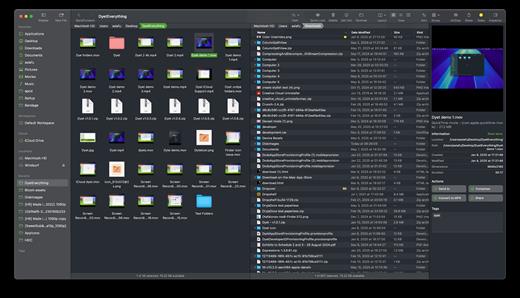
Key Features
- Enhanced Search Capabilities: Bloom allows you to search files by keyword within predefined locations, scanning tens of thousands of files in seconds for lightning-fast results. You can also search directly in any folder with ⌘F and refresh results with ⌘R .
- Portal Mode: A compact window without sidebar or preview, Portal retains core functionalities and can be pinned on top of other windows or collapsed into the screen edge for convenience .
- Archive Viewing: Browse contents of compressed files without extraction and preview text, images, or PDFs under 10MB by pressing Space or double-clicking .
- Advanced File Management: Features like auto-resizing columns, advanced rename with regex support, workspace customization, iCloud Drive integration, and tag management elevate your file-browsing experience .
- Media and Productivity Tools: Convert and optimize images, create various file types easily, paste images from the web, and organize files by kind or date. Additionally, Bloom records every operation for easy reversion and supports starting a terminal directly from a folder .
- Disk Analysis and Task Management: Use Folder Scan to visualize disk usage through a treemap and manage file operations with a Task Scheduler to track progress .
What’s New Version 1.5.33:
- Release notes were unavailable when this listing was updated.
Compatibility macOS 14.0 or later
Apple Silicon or Intel Core processor
Release Name: Bloom 1.5.33
Size: 15.3 MB
Links: HOMEPAGE – NFO – Torrent Search
Download: RAPiDGATOR
Bloom1

Proxyman is a high-performance macOS app, which enables developers to view HTTP/HTTPS requests from apps and domains.
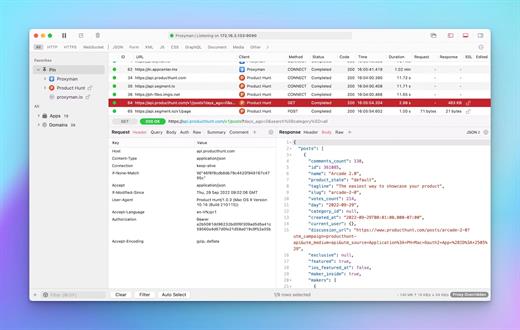
Features
- ? Native macOS app. Written by Swift, Objective-C. Powered by Apple SwiftNIO for the high-performance network application.
- ? Fully support Apple Chip (e.g M1, M2, M1 Pro/Max).
- ? Built for macOS Monterey & Ventura.
- ✅ Hassle-free Intercept HTTP/HTTPS requests/response and WebSocket from Web Browsers, iOS, and Android devices.
- ✅ Modern and intuitive UI
- ? Multiple filters
- Comprehensive Guideline to set up with iOS simulator and iOS and Android devices.
- Basic debugging tools: Compose, Repeat, Wildcard/Regex Filter, Multiple Filters, Customize Columns, Toolbar…
- Advanced Tools: Breakpoint, Map Local, Map Remote, Backlist, External Proxying, No Caching, Protobuf, Clear Cache, Custom Certificates, Scripting, Network Conditions, Reverse Proxy, Diff, Access Control etc
- Automatic Setup for Backend Development: Auto capture HTTP(s) traffic from NodeJS, Ruby and Python.
- macOS 10.15+
What’s New Version 6.9.0:
- Release notes were unavailable when this listing was updated.
Compatibility macOS 10.15 or later
Release Name: Proxyman 6.9.0
Size: 34.5 MB
Links: HOMEPAGE – NFO – Torrent Search
Download: RAPiDGATOR
Proxyman

n-Track Studio is an audio and MIDI multitrack recorder that turns your Mac into a full-fledged recording studio. You can record and playback a virtually unlimited number of tracks. The program supports simultaneous recording from multiple 16- and 24-bit soundcards, and real-time audio effects can be applied non-destructively to each track. Built-in effects include multiband compression, delay, graphic EQ, pitch shift and time stretch, parametric EQ and spectrum analyzer with guitar tuner.
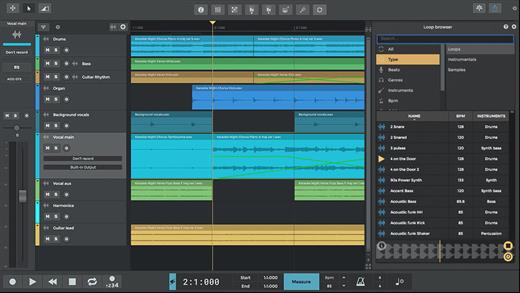
Studio edition features
- Unlimited audio and MIDI tracks
- Unlimited plugins (VST, VST3, DirectX, AU, Rewire)
- 32 bit and 64 bit version
- Free soundbacks
What’s New Version 10.3.0:
- Release notes were unavailable when this listing was updated.
Compatibility macOS 10.12 or later
Apple Silicon or Intel Core processor
Release Name: n-Track Studio Suite 10.3.0
Size: 537.5 MB
Links: HOMEPAGE – NFO – Torrent Search
Download: RAPiDGATOR
N Track Studio Suite

Mimestream combines your favorite Gmail features with the power of a native macOS app so you can move through your email effortlessly

Made for Mac, optimized for Gmail
As a native app written in Swift, Mimestream leverages the full power of macOS to deliver a lightning-fast and instantly familiar experience. Instead of using the IMAP protocol, Mimestream utilizes the Gmail API to enable an enhanced set of features that let you work with ease.
Work smarter, email faster
- Rise above the noise and focus on the work that matters most. Mimestream makes it easy to keep your inbox organized with confidence.
- Categorized Inbox – with support for Gmail’s categories, focus on what matters most and triage the rest at your leisure.
- Multiple Accounts
- Label Management
Committed to PrivacyYour data and credentials are stored only on your device, and the app only makes direct connections to Gmail. There are no intermediary servers, and Mimestream does not collect or sell your email.
Key Features
- Lightweight and Fast – Mimestream is built for speed, and only uses a minimal amount of disk space to cache recent messages
- Offline Access – Fully functional when offline and on the slowest connections-perfect for business travelers and whenever you’re on the go
- System Notifications – Receive macOS system notifications when you receive new messages, so you never fall behind on important threads
- Aliases – Your email aliases are automatically synced from Gmail without any setup and are used for replies when appropriate
- Signatures – Signatures set up in Gmail are automatically synced with Mimestream
- Robust Search – Enter any Gmail search query into Mimestream and get consistent results. Search while offline, too
- Swipe Gestures – Use familiar macOS swipe gestures to quickly triage and archive your email
- Tracking Prevention – Read your email privately – Mimestream blocks tracking pixels from 50+ of the most common tracking services
- Keyboard Shortcuts – Triage your email quickly using keyboard shortcuts, including the option to use familiar Gmail or Apple Mail shortcut sets
What’s New version 1.9.18:
? Fixed
- The "Open in Gmail" feature fails due to server-side Gmail changes
? Cleanup
- Improved the feedback window's diagnostic collection to better understand some issues
Compatibility macOS 10.15.0 or later
Release Name: Mimestream 1.9.18
Size: 9.1 MB
Links: HOMEPAGE – NFO – Torrent Search
Download: RAPiDGATOR
Mimestream1

WiFi Explorer Pro takes the code base of WiFi Explorer, and adds a set of features that makes it the right tool for WLAN and IT professionals. You can use WiFi Explorer Pro for preliminary assessments, to help design and validate wireless networks installations, as well as to identify channel conflicts, overlapping, poor signal quality and other issues that may be affecting the connectivity or performance of your home, office or enterprise wireless network.
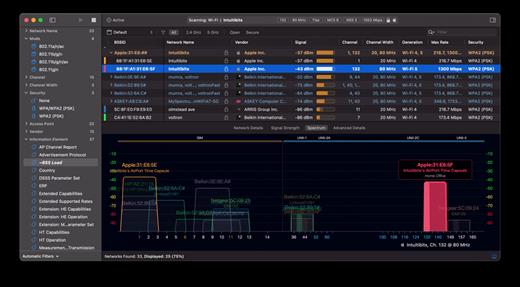
Features:
- Passive and directed scan modes
- Spectrum analysis integration
- Custom filters
- Support for remote sensors
- Support for networks with hidden SSIDs
- Additional columns with advanced information
- Additional organization options for scan results
- Dark and light themes
What’s New Version 3.9.6:
- Release notes were unavailable when this listing was updated.
Compatibility macOS 10.13.0 or later
Release Name: WiFi Explorer Pro 3.9.6
Size: 16.4 MB
Links: HOMEPAGE – NFO – Torrent Search
Download: RAPiDGATOR
Wifi Explorer Pro

Retrobatch is a flexible batch image processing tool.
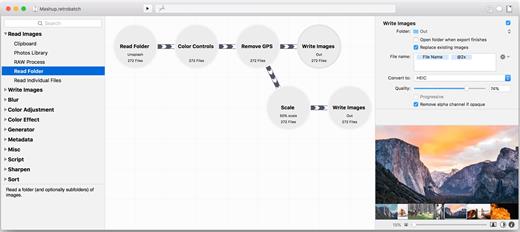
- Flexible: A node based batch image processor means you can mix, match, and combine different operations together to make the perfect workflow.
- Super Charged: A node for every operation, from changing DPI to rotation to Machine Learning to custom behaviors with AppleScript. Optimize your images for fast delivery over the Internet.
- Batch: Process one image or thousands of images, with support for reading and writing common file formats, creating multiple inputs and multiple outputs.
What’s New Version 2.3.1:
- Release notes were unavailable when this listing was updated.
Compatibility macOS 12 or later
Release Name: Retrobatch Pro 2.3.1
Size: 113.7 MB
Links: HOMEPAGE – NFO – Torrent Search
Download: RAPiDGATOR


