Please REGISTER or RENEW your account on RAPiDGATOR.net and support us by doing through all RAPiDGATOR working download links on main posts...
Apr 24

Noir – Dark Mode for Safari 2026.1.3

Noir is a Safari extension that automatically adds a dark mode to every website you visit.
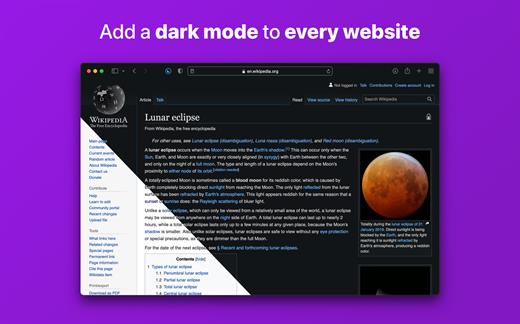
It makes browsing the web at night so much better. With Noir, you won’t be blinded by bright websites ever again.

And the results look great too. Noir generates a custom dark style for each website you visit, based on the colors that are used on a page. You won’t even notice this happening in the background – that’s how fast it is – but you’ll certainly appreciate the end result: a beautiful dark mode tailored for each website, where contrast is preserved and highlights still pop.

Noir works with any website you visit in Safari, automatically. By default, Noir is linked to your device’s Dark Mode, so websites will only go dark when you want them to. But you can easily customize this to your liking, even per website. Only want to use Noir on just a few specific websites? Sure thing! Disable Noir on some websites? No problem!

The app feels right at home on your device. It is a Safari extension, which means there’s no need to manually activate it every time you load a new page. The app also tightly integrates with system features such as Shortcuts to fully integrate Noir in all your workflows. And your settings are automatically synced to all your devices using iCloud.

And just as importantly, Noir takes your privacy seriously: it doesn’t collect any of your browsing data. Period.

Noir is made by a solo developer. It does not include any subscriptions or ads. Buy Noir once, use it forever.

What’s New

Version 2026.1.3:


  • Release notes were unavailable when this listing was updated.
Compatibility

macOS 12.0 or later.


Release Name: Noir – Dark Mode for Safari 2026.1.3
Size: 12.4 MB
Links: HOMEPAGE – NFO – Torrent Search

Download: RAPiDGATOR

3 Comments
Apr 24

Reunion 14.0

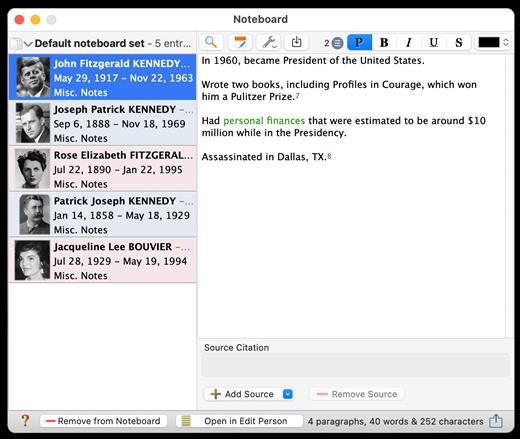
Reunion helps you to document, store, and display information about your family — your ancestors, descendants, cousins, etc. It records names, dates, places, facts, plenty of notes, sources of information, pictures, sounds, and videos. It shows family relationships in an elegant, graphic form — people and families are linked in an easy-to-understand fashion.

Reunion makes it easy to publish your family tree information — even if you want to share it on the Web. You can automatically create common genealogy reports, charts, and forms, as well as birthday calendars, mailing lists, questionnaires, indexes, books and other lists. Reunion even calculates relationships, ages, life expectancies, and statistics. Reunion also creates large, high-resolution, graphic charts allowing complete on-screen editing of boxes, lines, fonts, and colors. Wall charts are one of its specialties.

What’s New

Version 14.0:


  • Release notes were unavailable when this listing was updated.
Compatibility

macOS 10.12 or later


Release Name: Reunion 14.0
Size: 225.6 MB
Links: HOMEPAGE – NFO – Torrent Search

Download: RAPiDGATOR
4 Comments
Apr 24

OmniZip – Universal Extractor Pro 2.4.2

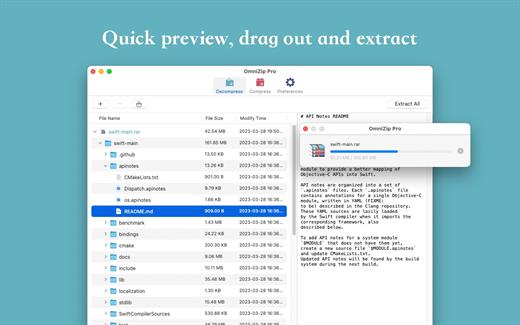
A super decompression tool, supports the decompression of RAR, 7Z, ZIP, TAR, GZIP and other more than 100 formats of files, as long as the compressed package, there is nothing OmniZip can not decompress.

Features


  • Double-click the compressed file to preview it or decompress it. You can customize the configuration.
  • Compressed package Select a file and then compress it.
  • Supports drag and unzip files directly.
  • Supports batch decompression.
  • Supports decompression of the decompressed volume package, ensuring that the compressed file of the volume is in the same directory.
  • Supports compression formats zip and 7z.
  • Supports encryption compression and volume separation compression.
  • Supports user-defined compression and decompression of filter files.
  • Supports recording previewed compressed files for next operation.
What’s New

Version 2.4.2:


  • Release notes were unavailable when this listing was updated.
Compatibility

macOS 10.13 or later


Release Name: OmniZip – Universal Extractor Pro 2.4.2
Size: 20.2 MB
Links: HOMEPAGE – NFO – Torrent Search

Download: RAPiDGATOR

3 Comments
Apr 24

Syncovery Premium 11.14.6

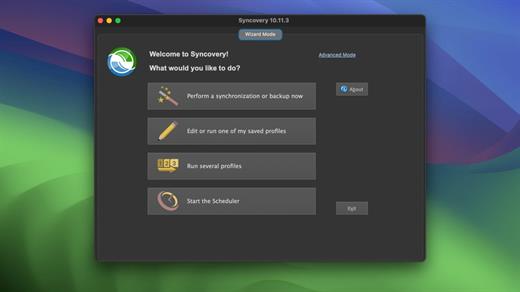
Syncovery is used to back-up your data and synchronize Macs, servers, notebooks, and online storage space.
You can set up as many different jobs as you need and run them manually or using the scheduler. The software comes with support for FTP, WebDAV, Amazon S3, and AES file encryption, as well as SSH and ZIP compression. There are powerful synchronization modes, including Standard Copying, Exact Mirror, and SmartTracking.

Numerous improvements to make an extremely versatile synchronizing and back-up tool. The wealth of features fulfills all requirements that users typically have, while still being easy to use.

What’s New

Version 11.14.6:


  • Release notes were unavailable when this listing was updated.
Compatibility

macOS 10.13.0 or later

Apple Silicon or Intel Core processor


Release Name: Syncovery Premium 11.14.6
Size: 126.8 MB
Links: HOMEPAGE – NFO – Torrent Search

Download: RAPiDGATOR
4 Comments
Apr 24

Package Builder 2.0.1

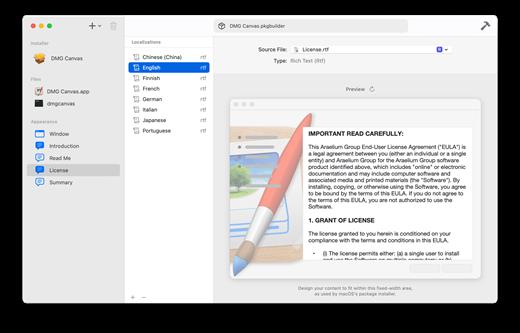
Build macOS installer packages in minutes.

The internet is full of posts from people trying to create a macOS installer package correctly, which is a testament to how confusing and time consuming it can be. Your time is worth more. — Package Builder makes it super easy to build installer packages by simplifying the process: Simply drag and drop your files, set a few settings, and click “Build”. Done.

What’s New

Version 2.0.1:


  • Release notes were unavailable when this listing was updated.
Compatibility

macOS 13.0 or later
Apple Silicon or Intel Core processor


Release Name: Package Builder 2.0.1
Size: 14.8 MB
Links: HOMEPAGE – NFO – Torrent Search

Download: RAPiDGATOR

3 Comments
Apr 24

Wondershare Recoverit 14.0.16.14

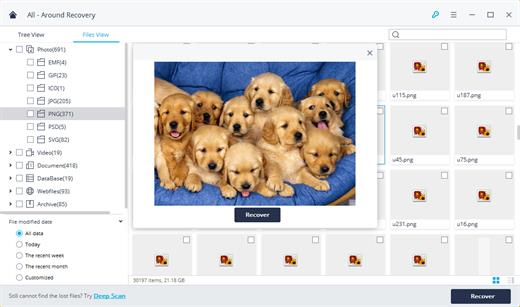
Wondershare Recoverit is a comprehensive data recovery suite to recover Mac data lost due to accidental deleting, formatting, virus infection, improper operation, unexpected power failure, and other unknown reasons.

It can recover Mac data from lost, deleted, logical corrupted and formatted Mac hard drive, iPod, USB drive, SD card, digital camera, mobile phone, MP3, and MP4 player. Compatible with HFS+, FAT16/32, and NTFS file system volumes, this non-destructive Mac file recovery software ensures safe Mac file recovery without modifying the original data saved on your Mac machine or any other storage media. Versatile preview lets you enjoy Mac data recovery in advance.

Features


  • Safety First:

    • Read-only and risk-free Mac data recovery program. No any writing operation to your original data.
  • Versatile Preview Ability:

    • For images, real-time and direct scan results is displayed during the scan process to let users stop scanning once the target images are found.
    • For other Mac files such as videos, audio files, archives and documents, they are displayed as a text in a Hex mode for preview to let users enjoy file recovery on Mac in advance.
  • Precise File Recovery for Mac:

    • Before data recovery on Mac, you can choose the target file types to scan, which saves you much time especially when there are tons of files on your Mac machine.
    • Restore deleted files for Mac with original file names, shooting date, and storage paths.
    • Support file names search for scanning results to provide you precise Mac file recovery.
  • Easy-to-use and Clean Interface:

    • Complete wizard and easy-to-use interface let you perform Mac data recovery in a breeze.
What’s New

Version 14.0.16.14:


  • Release notes were unavailable when this listing was updated.
Compatibility

macOS 10.10 or later


Release Name: Wondershare Recoverit 14.0.16.14
Size: 191.7 MB
Links: HOMEPAGE – NFO – Torrent Search

Download: RAPiDGATOR
4 Comments
Apr 24

A Better Finder Attributes 7.45

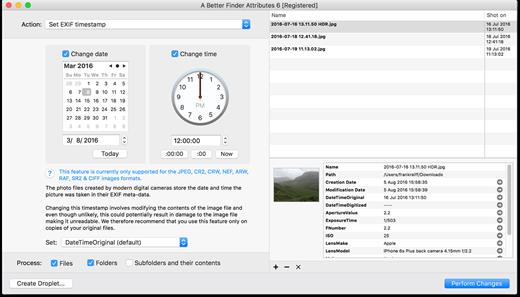
A Better Finder Attributes 7 allows you to change JPEG & RAW shooting dates, JPEG EXIF meta-data tags, file creation & modification dates, file flags and deal with invisible files.

Correct EXIF Digital Photo Shooting Timestamps

A Better Finder Attributes 7 allows you to manipulate JPEG, CR2, NEF, ARF, RAF, SR2, CRW & CIFF EXIF timestamps at will by setting them to specific times or batch adjusting them by adding and removing time (useful for correcting the timestamps of images taken with a digital camera with a incorrectly set clock and to compensate for timezone changes).

Correct Finder Sorting for Digital Photos

A Better Finder Attributes 7 also allows you to synchronize the file creation and modification dates with the shooting dates of JPEG EXIF as well as a wide variety of RAW formats, so that files sort properly in the Finder and other systems.

Change, Add & Remove JPEG EXIF Meta-Data

A Better Finder Attributes 7 allows the most commonly used JPEG EXIF meta-data tags, such as copyright & owner information, camera & lens specifactions, some exposure information and much else besides to be directly manipulated.

You can strip JPEG EXIF information from a file altogether, strip GPS and IPTC location data or edit individual tags.

Total File Creation & Modification Date Control

A Better Finder Attributes 7 gives you total control over file creation and modification dates, setting them to specific times and dates, adding or removing time or simply removing them altogether.

Setting Mac File Flags

A Better Finder Attributes 7 supports setting all common Mac file system flags. You can set whether or not file extensions appear in the Finder, batch lock or unlock files, set or remove legacy creation & type codes, remove invisible files, restart the Finder in a special mode that shows invisible files, batch set Finder labels and force Finder updates.

Showing & Deleting Invisible Files

A Better Finder Attributes 7 can delete invisible files, such as .DS_Store, that can lead to problems when delivering files to non-Mac systems and play havoc with Unix tools such as version control and archiving tools.

On top of this A Better Finder Attributes has a special “Show Invisible Files” feature hidden in the “Tools” menu that switches the Finder to a special mode in which invisible files become visible

Other Noteworthy Features


  • Batch operation
  • Create Droplets for automated processing
  • Drag-and-drop into the file list or onto the application icon
  • Select files in the Finder and activate A Better Finder Attributes 5 via the Finder context menu or via a hot key
  • Automatically deals with file date consistency rules
  • Separate processing for files and folders, batch processing of sub-folders
  • Additionally, A Better Finder Attributes 5 gives you control over:
  • Whether or not file extensions appear in the Finder
  • Batch locking or unlocking of files
  • Setting or removing legacy creator and type codes
  • Removing invisible files
  • Seeing invisible files in the Finder
  • Batch setting of Finder labels
  • Forcing the Finder to update its information about files and folders
What’s New

Version 7.45:


  • Release notes were unavailable when this listing was updated.
Compatibility

macOS 10.11 or later


Release Name: A Better Finder Attributes 7.45
Size: 15.1 MB
Links: HOMEPAGE – NFO – Torrent Search

Download: RAPiDGATOR
3 Comments
Apr 23

Dropshare 6.11.0 (6221)

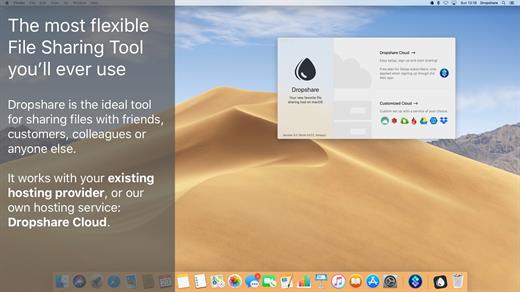
Dropshare is a menu bar application for drag & drop upload files, screenshots and even directories to your own server, Amazon S3, Backblaze B2 Cloud Files, Rackspace Cloud Files, Microsoft Azure Blob Storage, Google Drive or Dropbox. Additionally, Dropshare offers a file sharing provider called Dropshare Cloud, which is perfectly suitable to start uploading in just minutes. Sharing files with friends, customers, colleagues or anyone else has never been so easy an professional! Dropshare supports Multiple Connections: You can set up different upload destinations at the same time and switch between them using user-defined keyboard shortcuts, or by holding ⌘ while dragging & dropping a file No matter if files, folders, text or screenshots – Dropshare uploads every file and data to your selected destination – also from clipboard or other applications like Safari. Share Extension included Set up your own keyboard shortcuts for fullscreen or selection-based screenshots that’ll be uploaded automatically with Dropshare. Set up a custom keyboard shortcut for taking a screenshot and annotating it afterwards with Dropshare itself, or an app you already like: Preview.app, Skitch.app, Napkin.app or Annotate.app Take & upload Screen Recordings directly with Dropshare, both fullscreen and selection-based recordings are available, as well as GIF conversion Choose from a number of free designs or craft an individual design on your own using HTML, CSS and JavaScript, including upload previews Synchronize your upload history across all your devices, supports both iOS and macOS. Your upload history will automatically be synchronized across all your Apple devices with iCloud Dropshare supports URL shorteners as well, e.g. dsh.re or Rebrandly, or configure your very own URL shortener service like bit.ly or YOURLS.

Technical requirements:


  • A working SSH user account is required on the server. A password or SSH key pair is also required. To have the uploaded file displayed in a web browser, a web server needs to be installed and configured on the server
  • Dropshare supports services like OpenStack Swift. Check User Guide for more information
  • A regular Google account is required in order to use Google Drive
  • A regular Dropbox account is required in order to use Dropbox
  • Microsoft Azure Blob Storage, Backblaze B2 Cloud Files, Amazon Simple Storage Service (S3), Rackspace Cloud Files. A subscription may be neccessary in order to use Dropshare with one of these providers. Please check out the terms of use and payment information at the website of the selected provider
What’s New

Version 6.11.0:


  • Release notes were unavailable when this listing was updated.
Compatibility

macOS 12.3 or newer
Apple Silicon or Intel Core processor


Release Name: Dropshare 6.11.0 (6221)
Size: 46 MB
Links: HOMEPAGE – NFO – Torrent Search

Download: RAPiDGATOR
5 Comments
Apr 23

Final Draft 13.3.1

Final Draft allows you to use your creative energy to focus on the content; let Final Draft take care of the style. Final Draft is the number-one selling application specifically designed for writing movie scripts, television episodics, and stage plays. It combines powerful word processing with professional script formatting in one self-contained, easy-to-use package. There is no need to learn about script formatting rules – Final Draft automatically paginates and formats your script to industry standards as you write.

What’s New

Version 13.3.1:


  • Release notes were unavailable when this listing was updated.
Compatibility

macOS 10.14.0 or later


Release Name: Final Draft 13.3.1
Size: 113.5 MB
Links: HOMEPAGE – NFO – Torrent Search

Download: RAPiDGATOR

5 Comments
Apr 23

WiFi Explorer 3.6.6

WiFi Explorer will scan, find, and troubleshoot wireless networks.

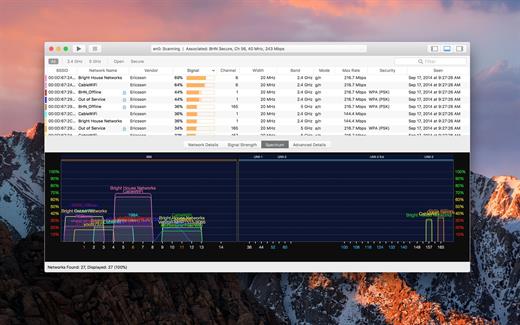
Quickly identify channel conflicts, signal overlapping, or configuration problems that may be affecting the connectivity and performance of your home or office wireless network.

Get an insight into the network details: name (SSID), MAC address (BSSID), device manufacturer, signal strength (RSSI), noise, channel, band, security configuration, supported data rates, and much more.


  • Suitable for home, small office, or enterprise networks
  • Easy-to-use, intuitive user interface
  • Graphical visualization of the Wi-Fi environment
  • Supports 2.4 GHz and 5 GHz frequency bands as well as 20, 40, 80 and 160 MHz channels
  • Works with IEEE 802.11a/b/g/n/ac networks
Also:

  • Comprehensive app’s help
  • Signal quality ratings based on signal-to-noise ratio (SNR)
  • Accurate conversion from dBm to percentage (%) for easier analysis and optimization
  • Detailed description of information elements (IE) advertised by the access point for advanced troubleshooting
  • Export metrics and network details to CSV file format
  • Save results for later review and analysis
  • Access point name discovery (if supported)
  • Editable column for labels or annotations
  • Selectable and sortable columns
  • Adjustable graph timescales
  • Quick filtering
  • Customizable colors for easily tracking particular networks
  • Full screen mode
What’s New

Version 3.6.6:


  • Release notes were unavailable when this listing was updated.
Compatibility

macOS 10.13.0 or later


Release Name: WiFi Explorer 3.6.6
Size: 11.1 MB
Links: HOMEPAGE – NFO – Torrent Search

Download: RAPiDGATOR
5 Comments