Please REGISTER or RENEW your account on RAPiDGATOR.net and support us by doing through all RAPiDGATOR working download links on main posts...
June 8

Sensei 2.1.1

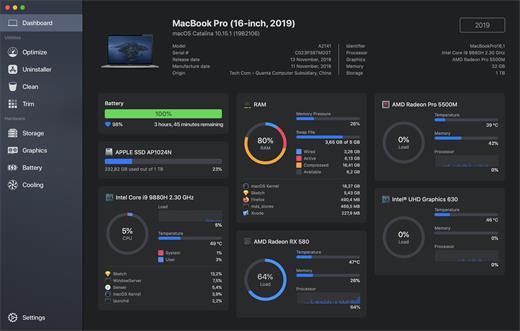
Sensei is an application for any Mac running macOS Catalina or later. Designed to help you optimize, monitor and clean your Mac in order to maximize its performance. Sensei offers several features related to Hardware and Software, such as a super-easy-to-use App Uninstaller, blazing fast Disk Cleaner, Health info for your battery and storage drives, and much more.

The Next Generation Mac performance tool


  • Performance Dashboard
  • Detailed Battery Reporter
  • Disk Cleaner
  • Thermal Dashboard
  • Theme Support
  • App Uninstaller
  • Detailed Hardware Information
  • Temperature Monitor
  • GPU Monitor
  • Performance Optimized
  • CPU Monitor
  • Bespoke Design
  • RAM Monitor
  • Detailed Display Reporter
  • HDD/SSD S.M.A.R.T Reporter
  • 100% Native Code
  • Fan Control
  • Detailed GPU/eGPU Reporter
  • SSD Trim Enabler
  • Accent Color Support
  • Disk Health Analyzer
  • Disk Benchmark
  • Battery Health Analyzer
  • Multiple Localizations
  • Disk Monitor
  • Dark Mode
  • Startup Speed Optimizer
  • Partition Map Explorer
What’s New

Version 2.1.1:


  • Release notes were unavailable when this listing was updated.
Compatibility

macOS 10.15.0 or later
Apple Silicon or Intel Core processor

Release Name: Sensei 2.1.1
Size: 41.6 MB
Links: HOMEPAGE – NFO – Torrent Search

Download: RAPiDGATOR

5 Comments
June 8

Expenses 4.0.9

Expenses is a clean, intuitive spending tracker designed for speed, clarity, and control. It allows you to effortlessly monitor your money across the entire Apple ecosystem, including Mac, iPhone, iPad, and Apple Vision.

Key Features


  • Quick Input: Easily log your transactions on the go with just a few taps.
  • Complete Privacy: No registration required. The app prioritizes your data privacy and does not collect personal information.
  • Multi-Currency Support: Track your spending in any major currency with customizable exchange rates for seamless international transactions.
  • Stats & Trends: Visualize your spending patterns with actionable insights to help you build better financial habits.
  • Apple Ecosystem Integration: Full support for system features like Widgets and Siri Shortcuts to streamline your tracking.
  • Accessibility Built-In: Features an accessible design crafted to accommodate users with special needs.
What’s New

Version 4.0.9:


  • Release notes were unavailable when this listing was updated.
Compatibility

macOS 13.0 or later

Release Name: Expenses 4.0.9
Size: 10 MB
Links: HOMEPAGE – NFO – Torrent Search

Download: RAPiDGATOR

6 Comments
June 8

WiFi Explorer Pro 3.9.7

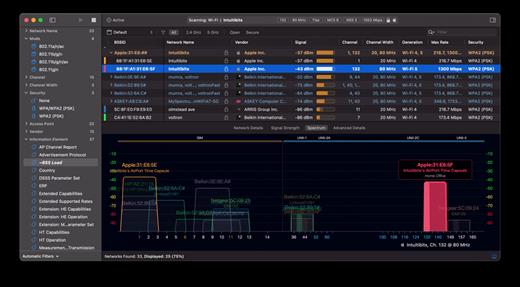
WiFi Explorer Pro takes the code base of WiFi Explorer, and adds a set of features that makes it the right tool for WLAN and IT professionals. You can use WiFi Explorer Pro for preliminary assessments, to help design and validate wireless networks installations, as well as to identify channel conflicts, overlapping, poor signal quality and other issues that may be affecting the connectivity or performance of your home, office or enterprise wireless network.

Features:


  • Passive and directed scan modes
  • Spectrum analysis integration
  • Custom filters
  • Support for remote sensors
  • Support for networks with hidden SSIDs
  • Additional columns with advanced information
  • Additional organization options for scan results
  • Dark and light themes
What’s New

Version 3.9.7:


  • Release notes were unavailable when this listing was updated.
Compatibility

macOS 10.13.0 or later


Release Name: WiFi Explorer Pro 3.9.7
Size: 17 MB
Links: HOMEPAGE – NFO – Torrent Search

Download: RAPiDGATOR

5 Comments
June 8

Dropover 5.2.4

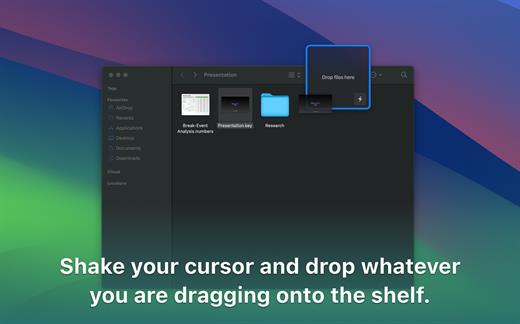
Dropover is a utility that makes it easier to manage and move content between folders, applications, windows and workspaces using Drag and Drop. Shake your cursor and drop whatever you are dragging into the shelf. This shelf floats on top of all your other windows so you can navigate stress-free to your destination folder or program. It works with any draggable content; files, folders, text snippets and even images from a website.

Here’s what you can do with Dropover:


  • Activate it using a shake gesture, menubar or global shortcut
  • Create multiple shelves or append files to an existing shelf. Then move all files at once to your destination
  • Upload dragged files to iCloud or Dropbox and directly get a shareable link copied to your clipboard. All in one click, right from Dropover’s shelf
  • Reveal dragged content in Finder or directly share it using Messages, Mail or Airdrop
  • Manage and list individual files along with information such as name and file size. Preview them using Quick Look, reveal them in Finder or quickly share them
  • Drag individual files to destination
  • Remove individual files if you’ve dragged them by accident
  • Clear and familiar user interface. Satisfying Drag and Drop experience
What’s New

Version 5.2.4:


  • Release notes were unavailable when this listing was updated.
Compatibility

macOS 13.0 or later.


Release Name: Dropover 5.2.4
Size: 45.4 MB
Links: HOMEPAGE – NFO – Torrent Search

Download: RAPiDGATOR

6 Comments
June 8

Infuse Pro 8.4.6

Ignite your video content with Infuse – the beautiful way to watch almost any video format on your iPhone, iPad, Apple TV, and Mac. No need to convert files! Infuse is optimized for macOS 12, with powerful streaming options, Trakt sync, and unmatched AirPlay & subtitle support. Gorgeous interface. Precise controls. And silky-smooth playback.
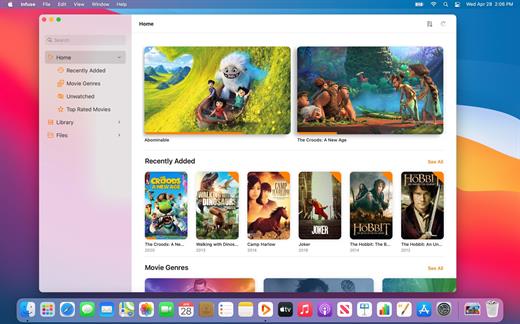
Play more video types

A powerful video player that plays just about anything, including the standard MP4, M4V and MOV – plus MKV, AVI, WMV, MTS, ISO, VIDEO_TS, FLV, OGM, OGV, ASF, 3GP, DVR-MS, WebM, and WTV. Includes fully certified Dolby® Digital Plus (AC3/E-AC3), DTS® and DTS-HD® audio.

Stream from other devices

Browse and play videos stored on your Mac, PC, NAS, Wi-Fi hard drive, apps like Plex, Emby, and Jellyfin, or from cloud services like Dropbox, Google Drive, OneDrive, Box, pCloud, Yandex.Disk, and Mega.nz – no syncing required!

Trakt 2-way sync

Connect with Trakt to sync watched history, submit ratings and post comments.

Optimized subtitles powered by opensubtitles

Bring your own subtitles, or download them on the fly (for free) in virtually any language.

The basics:

  • Silky-smooth video player (plays full 4K w/ HDR & Dolby Vision)
  • Stream from a Mac, PC, NAS or Wi-Fi enabled hard drive
  • Connect with Plex, Emby, Jellyfin, Kodi (XBMC), WMC and other media servers
  • Beautiful layout with quick access to video info
  • Artwork and metadata added automatically
  • Picture-in-Picture
  • Spatial audio
Supported formats:

  • Video: 3GP, AVI, ASF, BDMV, DIVX, DVDMEDIA, DVR-MS, FLV, ISO, M4V, MKV, MOV, MP4, M2TS, MTS, OGM, OGV, TP, TS, VIDEO_TS, WEBM, WMV, WTV
  • Audio: AAC, AC3/E-AC3, DOLBY TRUEHD, DTS, DTS-HD MA, FLAC, MP3, OGG, PCM, WMA
  • Subtitles: DVB, DVDSUB, MICRODVD, MPL2, PGS, SMI, SSA/ASS, SRT, SUB, TIMED TEXT, TMP, TXT, VOBSUB, VTT, XSUB
Player features:

  • Multiple audio tracks
  • Chapters
  • Gesture controls
  • 8 video zoom options
  • Continuous playback
  • Deinterlacing
Extras:

  • Library organization
  • Folders
  • One-click subtitle downloads from OpenSubtitles
  • Scrobble plays to Trakt
  • Download videos from networked devices
  • Drag and drop uploads via web browser
  • Get extra onboard storage by adding USB drives
Get more with infuse pro!

  • Play even more video formats
  • Enjoy Dolby® Digital Plus (AC3/E-AC3), DTS® and DTS-HD® mobile surround sound
  • Stream a wide variety of video types over AirPlay and Google Cast
  • Access videos stored in cloud services like Dropbox, Google Drive, Box, OneDrive, pCloud, Yandex.Disk, and Mega.nz
  • Sync libraries, settings, watched history, and playback progress between devices
What’s New

Version 8.4.6:


  • Release notes were unavailable when this listing was updated.
Compatibility

macOS 11.0 or later.
Apple Silicon or Intel Core processor


Release Name: Infuse Pro 8.4.6
Size: 117.5 MB
Links: HOMEPAGE – NFO – Torrent Search

Download: RAPiDGATOR

7 Comments
June 8

App Cleaner & Uninstaller Pro 9.2.2

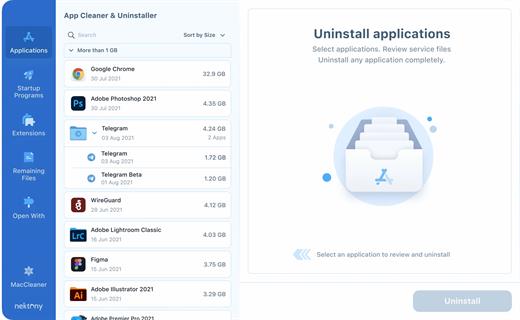
App Cleaner & Uninstaller (was App Cleaner) can remove applications and their service files on macOS. Make sure they aren’t eating up precious space on your drive with this helpful app that does the legwork for you.

Features


  • Scan the system and preview installed applications
  • Remove all types of service files
  • Remove remains of previously uninstalled apps
  • Reset application to a first-launch state
  • Easy-to-use shortcuts
  • Any file or app quick preview
  • Specific app-associated file formats preview
  • In-app help assistance
  • Show unused applications
  • Skip list option
What’s New

Version 9.2.2:


  • Release notes were unavailable when this listing was updated.
Compatibility

macOS 10.13 or later


Release Name: App Cleaner & Uninstaller Pro 9.2.2
Size: 30.9 MB
Links: HOMEPAGE – NFO – Torrent Search

Download: RAPiDGATOR

5 Comments
June 8

NanoClip 1.1.5

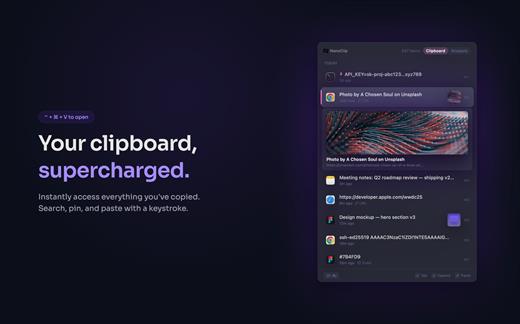
NanoClip is a lightweight macOS menu bar clipboard manager that saves every copy and keeps snippets instantly accessible with a global shortcut. It supports clipboard history, smart text snippets, iCloud sync across Macs, inline previews for images, GIFs, files, colors, and code, plus multiple themes in a fast, privacy-focused design.

What’s New

Version 1.1.5:


  • Release notes were unavailable when this listing was updated.
Compatibility

macOS 15 or later

Release Name: NanoClip 1.1.5
Size: 10.5 MB
Links: HOMEPAGE – NFO – Torrent Search

Download: RAPiDGATOR

5 Comments
June 8

URL Manager Pro 6.5.0

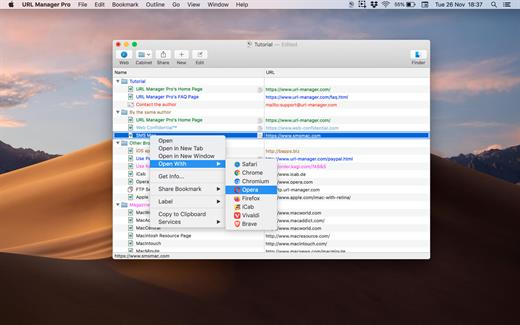
URL Manager Pro is the professional bookmark manager for Safari, Chrome, Chromium, Vivaldi, Opera, iCab, and Firefox browsers, making it easier to manage bookmarks.

This is a classic available since 1996, but now rewritten as a 64-bit application.

Features:

  • System-Wide Access: You can access your bookmarks in any application through a system menu.
  • Integration: You have access to your bookmarks from your browser’s menu bar and from the macOS Dock.
  • Document Storage: Your bookmarks are stored in URL Manager Pro bookmark documents, which you can store and manipulate in the normal Mac way. No need to hunt for your bookmarks in preferences folders of browsers. You can make automatic periodic saves and make copies of bookmark documents on backup devices on each save.
  • History: You can surf the Web using several different browsers while URL Manager Pro will keep recording the History of each.
  • Importing and exporting bookmarks: The File menu gives you a list of all of the browsers that URL Manager Pro can import from and export to. It lets you ‘harvest’ bookmarks by scanning HTML and text files for bookmarks and URLs.
  • It lets you edit and organize bookmarks fast: You can use inline editing, label and colour your bookmarks.
What’s New

Version 6.5.0:


  • Release notes were unavailable when this listing was updated.
Compatibility

macOS 10.13 or later, 64-bit processor


Release Name: URL Manager Pro 6.5.0
Size: 27.4 MB
Links: HOMEPAGE – NFO – Torrent Search

Download: RAPiDGATOR
5 Comments
June 8

Topaz Video 1.6.1

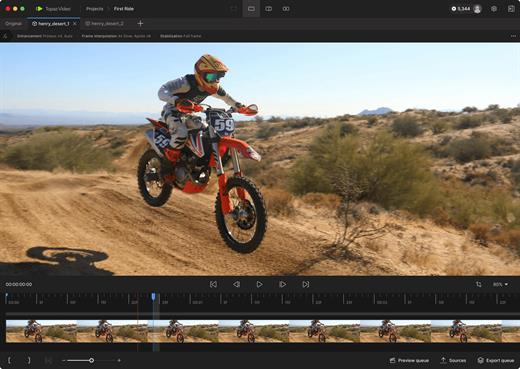
Topaz Video is a professional AI-powered video enhancement application that transforms noisy, low-resolution, or shaky footage into cinematic-quality video. It combines advanced upscaling, denoising, restoration, stabilization, and frame interpolation models in a single, easy-to-use desktop app designed for modern Mac systems.

Key Features


  • AI Upscaling: Intelligently upscale SD to HD, or HD to 4K/8K with crisp details and reduced artifacts.
  • Motion Interpolation: Convert frame rates (e.g., 24fps to 60fps) for smoother playback or generate silky slow-motion effects.
  • Stabilization: Reduce camera shake and correct motion blur caused by fast movement without the “warping” effects of traditional stabilizers.
  • Deinterlacing: Transform classic interlaced footage into modern progressive formats while preserving image integrity.
What’s New

Version 1.6.1:


  • Release notes were unavailable when this listing was updated.
Compatibility

macOS 10.15 or later


Release Name: Topaz Video 1.6.1
Size: 1.5 GB
Links: HOMEPAGE – NFO – Torrent Search

Download: RAPiDGATOR

4 Comments
June 8

WhatCable Pro 0.22.0

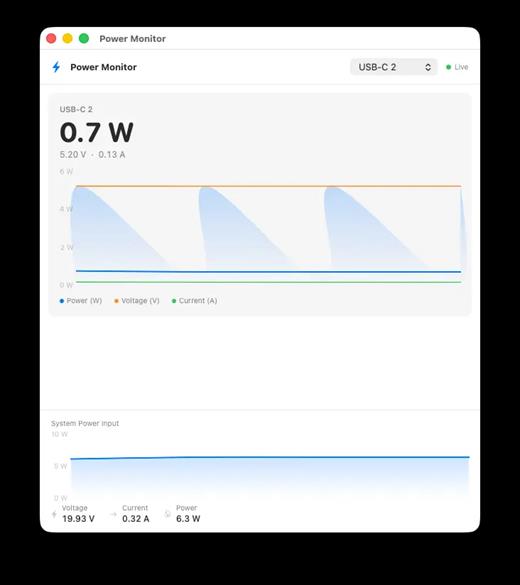
WhatCable Pro is a deep USB-C diagnostics tool designed specifically for Apple Silicon Macs running macOS 14+. While the free version identifies basic cable capabilities, the Pro tier offers advanced, real-time troubleshooting directly from IOKit data—requiring no extra software or root access.

Key Features


  • Negotiation Diagnostics: Easily spot bottlenecks by comparing what your Mac port, cable, and connected device support side-by-side.
  • Live Power Metering: Displays real-time wattage, voltage, and amperage per port, updating every 2 seconds.
  • Hardware & Port Health: Tracks lifetime port errors, resets, and monitors liquid detection (LDCM) sensors.
  • Advanced Insights: Offers Power Delivery (PD) contract inspection, cable resistance estimation, and DisplayPort Alt Mode lane mapping.
  • Developer Friendly: Includes a CLI monitor mode (whatcable –monitor) and desktop widgets for quick tracking.
What’s New

Version 0.22.0:


  • Release notes were unavailable when this listing was updated.
Compatibility

macOS 14.0 or later

Release Name: WhatCable Pro 0.22.0
Size: 9 MB
Links: HOMEPAGE – NFO – Torrent Search

Download: RAPiDGATOR

6 Comments