Please REGISTER or RENEW your account on RAPiDGATOR.net and support us by doing through all RAPiDGATOR working download links on main posts...
June 4

Cotypist 2026.1.1

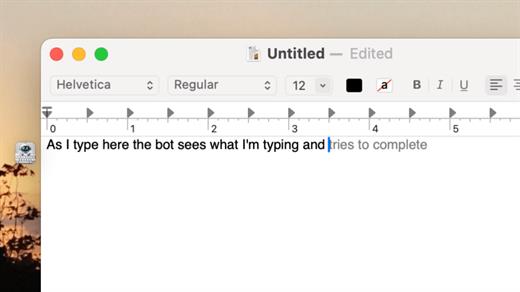
Cotypist is an innovative, AI-powered writing assistant designed to speed up your typing and enhance your writing flow across all your favorite macOS applications. Unlike traditional AI tools that force you to copy-paste prompts into a separate chatbot, Cotypist works seamlessly in the background, predicting your next words inline as fast as you can think them.
Key Features


  • Works Everywhere: It integrates perfectly into Apple Mail, Slack, Notion, Obsidian, Safari, Chrome, and most other Mac text fields with zero per-app configuration required.
  • Learns Your Voice: Rather than replacing your creativity with a robotic wall of text, Cotypist learns your unique vocabulary, phrasing style, and names over time.
  • Inline Typo & Emoji Fixes: It automatically spots typos as you write and offers instant corrections. You can also type a colon (:) to get smart emoji suggestions without opening a separate picker.
  • Highly Inclusive: It is an excellent accessibility tool for non-native English speakers, dyslexic typists, and anyone looking to reduce wrist strain or carpal tunnel risks.
What’s New

Version 2026.1.1:


  • Release notes were unavailable when this listing was updated.
Compatibility

macOS 14.0 or later


Release Name: Cotypist 2026.1.1
Size: 12.3 MB
Links: HOMEPAGE – NFO – Torrent Search

Download: RAPiDGATOR

5 Comments
June 4

Expenses 4.0.8

Expenses is a clean, intuitive spending tracker designed for speed, clarity, and control. It allows you to effortlessly monitor your money across the entire Apple ecosystem, including Mac, iPhone, iPad, and Apple Vision.

Key Features


  • Quick Input: Easily log your transactions on the go with just a few taps.
  • Complete Privacy: No registration required. The app prioritizes your data privacy and does not collect personal information.
  • Multi-Currency Support: Track your spending in any major currency with customizable exchange rates for seamless international transactions.
  • Stats & Trends: Visualize your spending patterns with actionable insights to help you build better financial habits.
  • Apple Ecosystem Integration: Full support for system features like Widgets and Siri Shortcuts to streamline your tracking.
  • Accessibility Built-In: Features an accessible design crafted to accommodate users with special needs.
What’s New

Version 4.0.8:


  • Release notes were unavailable when this listing was updated.
Compatibility

macOS 13.0 or later


Release Name: Expenses 4.0.8
Size: 10 MB
Links: HOMEPAGE – NFO – Torrent Search

Download: RAPiDGATOR

5 Comments
June 4

Multi-List Timer 11.3

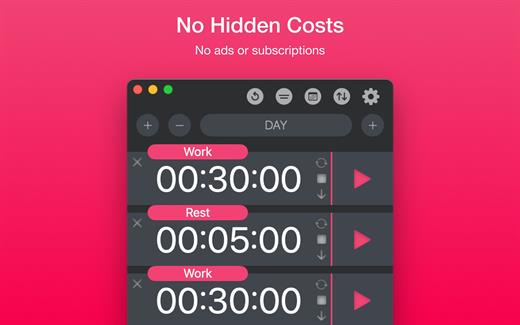
Study, Focus & Workout Timer. Create multiple timer lists for study, work, and workouts.


  • No Hidden Costs: No ads or subscriptions.
  • Private: No sign-ups or data collection.
  • Works Offline: No internet connection needed.
What’s New

Version 11.3:


  • Release notes were unavailable when this listing was updated.
Compatibility

macOS 11.0 or later


Release Name: Multi-List Timer 11.3
Size: 5.9 MB
Links: HOMEPAGE – NFO – Torrent Search

Download: RAPiDGATOR

5 Comments
June 4

Text Workflow 2.7.0

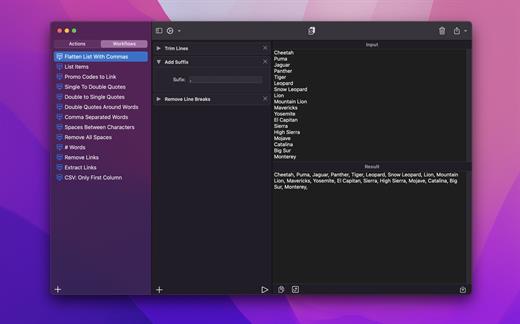
A powerful and easy to use tool that will help you transform your text. Text Workflow removes the need to perform repetitive tasks manually on your text.

Combine transformation actions to create powerful automations for your text. Save your transformation workflows to use them any time you want.

Available text transformation actions

• Add prefix
• Add suffix
• Replace text
• Sort lines


  • alphabetically
  • reverse
  • shuffle
  • by length
    • Trim Lines
    • Add line number
    • Break lines
  • after every word
  • after every sentence
  • after text
  • before text
    • Convert Case
  • uppercase
  • lowercase
  • title case
  • camel case
  • pascal case
    • Delete Characters
  • selected characters
  • non-alphanumeric
  • numeric characters
  • non numeric
  • tabs
  • spaces
  • characters after position
  • characters before position
  • last characters
  • emojis
  • characters after text
  • characters before text
    • Insert Text
  • at first line
  • at last line
  • every line (position)
  • before every word
  • after every word
  • before text
  • after text
  • after every character
    • Delete Lines
  • containing text
  • starting with text
  • not containing text
  • not starting with text
    • Remove line breaks
    • Remove multiple spaces
    • Remove duplicates lines
    • Remove duplicates words
    • Remove empty lines
    • Delete/Filter words
  • containing text
  • starting with text
  • not containing text
  • not starting with text
    • Spell out lines
    • Get Statistics
  • count characters
  • count words
  • count lines
    • Encode/Decode
  • Base64
  • URL
    • Encrypt/Decrypt Text with password
    • Beautify JSON
    • Beautify XML

You can combine all these actions to create your custom transformation workflows!
Export your workflows to file and share them easily with other users!

What’s New

Version 2.7.0:


  • Release notes were unavailable when this listing was updated.
Compatibility

macOS 11.2 or later

Release Name: Text Workflow 2.7.0
Size: 17.2 MB
Links: HOMEPAGE – NFO – Torrent Search

Download: RAPiDGATOR
4 Comments
June 4

AceMovi Video Editor 5.8.0

TunesKit AceMovi Video Editor can stand out from numerous similar video editor apps in the market is mainly because of its simple and intuitive interface, as well as a variety of powerful features. With this software, you can easily create high-quality videos on Mac and Windows, no matter you’re a pro or just about to video editing field.

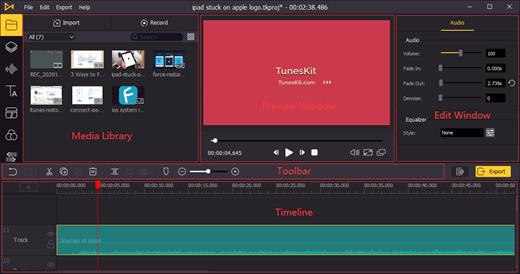
TunesKit AceMovi Video Editor can stand out from numerous similar video editor apps in the market is mainly because of its simple and intuitive interface, as well as a variety of powerful features. With this software, you can easily create high-quality videos on Mac and Windows, no matter you’re a pro or just about to video editing field. You can simply record your screen or import your media, drop and drop text, music, transitions, and more effects, and then export and share your video. Done!

After everything is well-tailored, you can now save your video to the local computer or share your story online like YouTube, Vimeo, Facebook, etc. It supports various popular video formats and devices including MP4, M4V, MOV, MKV, MPG, 3GP, 3GP-2, OGV, iPhone, iPad, Apple TV, Galaxy series, Huawei, Xbox, PSP, LG TV, etc.

What’s New

Version 5.8.0:


  • Release notes were unavailable when this listing was updated.
Compatibility

macOS 10.10 or later

Release Name: AceMovi Video Editor 5.8.0
Size: 197.9 MB
Links: HOMEPAGE – NFO – Torrent Search

Download: RAPiDGATOR

5 Comments
June 4

Color Folder Pro 5.4

Color Folder can help you to change the icon of folder quickly, and to manage folders more efficiently

「Main Features」


  • quickly change folder icon color
  • Select any picture to set as folder icon
  • support changing multiple folder icons at the same time
  • save as Icon
  • provide a variety of icon templates (over 700+)
  • support any color to modify folder icons
What’s New

Version 5.4:


  • Release notes were unavailable when this listing was updated.
Compatibility

macOS 10.10 or later


Release Name: Color Folder Pro 5.4
Size: 23.3 MB
Links: HOMEPAGE – NFO – Torrent Search

Download: RAPiDGATOR
3 Comments
June 4

A-Zippr 2.1

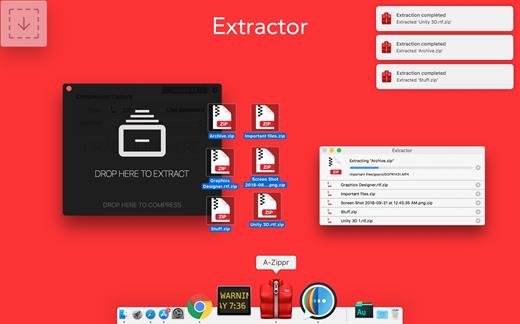
A-Zippr is a simple, fast and powerful utility to open the zip, RAR and other archives like 7z, SIT, TAR, and 70+ different file formats and compress in 8 commonly used archive formats. It is handcrafted to make it most customizable to archive and unarchive files on MAC.


  • Zip and Unzip files instantly
  • Preview file details before extracting.
  • Protect files with strong 256 bit AES encryption
  • Extract only files you choose without having to extract the entire archive.
  • Notifies once compression or extract completion.
Archive & Unarchive:(EASY)

  • Drag and drop the file to Zipping or unZip
  • Resize file size for faster sharing and to reduce storage.
  • Extract major file formats like Zip, RAR, TAR, LHA, 7Z, JAR and 70+ more formats
  • Automatically identify to zip or unzip the file when dropped to Floating drop window
  • Set floating drop window to any corner of the screen.
  • Compress files in the different method like fast, faster, normal, slow and slowest.
File encryption:(SECURE)

  • Password-protect confidential files and apply powerful AES encryption.
  • Prevent unauthorized access of email attachments
  • Encrypt individual files within a zipped folder.
Preview Files:(SAFE)

  • Quick look framework to preview files before unarchive (not even in temp file like other apps)
  • Unarchive individual files from an archived folder.
  • Get detailed file information individually before unarchive.
  • Native user experience to preview files.

Now all the archive files you have will automatically open with The Unarchiver and you’ll forget the “Unknown format” alerts and extraction errors forever. Having a RAR extractor for Mac saves you tons of time when dealing with archives.

If you have any problem or suggestion, please email to [email protected] without hesitation.

Supporting file formats: 

Archive: ZIP, TAR, 7Z, GZIP, BZIP2, ISO, XZ, LZIP

Unarchive: ZIP, Z01, RAR, 7Z, TAR, LHA, ZIPZ, SIT, SITX, HQX, BIN, MACBIN, AS, GZ, GZIP, TGZ, TAR,GZ, BZ2, BZIP2, BZ, TBZ2, TBZ, XZ, TXZ, ISO, CDI, NRG, MDF, GTAR, Z, TAZ, TAR.Z, LZMA, XAR, XIP, ACE, PAK, SPK, ZOO, LBR, LQR, LZR, PMA, CAB, RPM, DEB, ALZ, DD, CPT, PIT, NOW, SEA, EXE, MSI, CPIO, CPGZ, PAX, WARC, HA, ADF, ADZ, DMS, F, LZX, DCS, PKD, XMS, ZOM, PP, NSA, SAR, JAR, CBZ, CBR, NDS, PKG, A, SWF, LZ, TLZ

What’s New

Version 2.1:


  • Release notes were unavailable when this listing was updated.
Compatibility

macOS 10.11 or later

Release Name: A-Zippr 2.1
Size: 30.3 MB
Links: HOMEPAGE – NFO – Torrent Search

Download: RAPiDGATOR

5 Comments
June 4

Ethernet Status 5.9

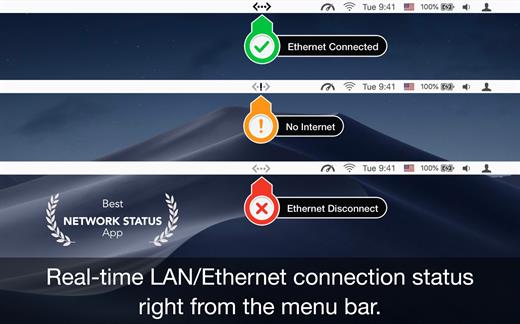
Ethernet Status lets you see the status of your LAN/Ethernet connection right from the menu bar. This utility adds a neat icon which lets you know the status of the connection and other stats like your IP address, MAC address, current upload and download speed, data usage, etc.

Features


  • See the status, IP address and speed of the Ethernet adaptors
  • Get the public IP address of your computer
  • Thunderbolt and Firewire support
  • Retina display enabled icons
  • Shows IPv4 and IPv6 addresses
  • Copy IP / MAC address from the menu
  • See status of all active interfaces based on the user priority
  • Option to see and copy IP / MAC of Wi-Fi adapter
  • Upload and download speed for each adapter. Note: Data usage counters are reset on reboot.
What’s New

Version 5.9:


  • Release notes were unavailable when this listing was updated.
Compatibility

macOS 10.9 or later, 64-bit processor

Release Name: Ethernet Status 5.9
Size: 7.4 MB
Links: HOMEPAGE – NFO – Torrent Search

Download: RAPiDGATOR
5 Comments
June 4

Davinci Resolve Studio 21.0

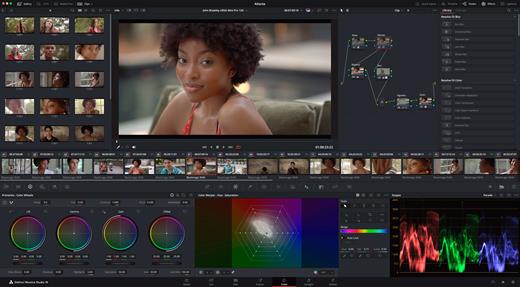
DaVinci Resolve Studio is the world’s only solution that combines professional 8K editing, color correction, visual effects and audio post production all in one software tool! You can instantly move between editing, color, effects, and audio with a single click. DaVinci Resolve Studio is also the only solution designed for multi user collaboration so editors, assistants, colorists, VFX artists and sound designers can all work live on the same project at the same time! Whether you’re an individual artist, or part of a large collaborative team, it’s easy to see why DaVinci Resolve is the standard for high end post production and finishing on more Hollywood feature films, television shows and commercials than any other software.

DaVinci Resolve 20 features powerful new DaVinci Neural Engine AI tools and over 100 feature upgrades! New AI tools include text based timeline editing, music remixing, dialogue separation and UltraNR noise reduction. IntelliTrack AI lets you use video to track the Fairlight audio panner. ColorSlice vector grading and film look creator offer richer grading vibrance and color density. Plus there are new features for live TV production and broadcast. DaVinci Resolve now supports realtime selection of live camera recordings for instant replay to air with slow motion and stingers. Multi Source is the fastest way to see your cameras and edit to the timeline while the cameras are still recording!

What’s New

Version 21.0:


  • Release notes were unavailable when this listing was updated.
Compatibility

macOS 13.0 or later

Release Name: Davinci Resolve Studio 21.0
Size: 8 GB
Links: HOMEPAGE – NFO – Torrent Search

Download: RAPiDGATOR

4 Comments
June 4

Permute 4.0.2

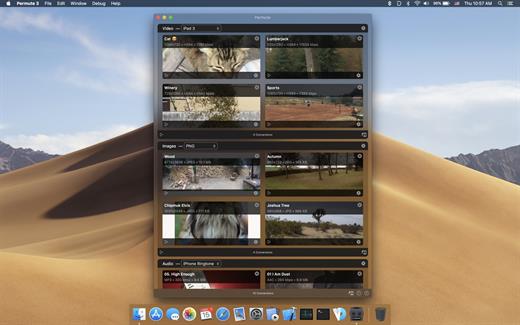
Permute offers easy-to-use drag-and-drop video conversion.

Features:


  • Easy to Use – built from the ground up, Permute is a perfect example of what a Mac app should be. With a gorgeous interface and drag & drop simplicity no need for complicated options.
  • Insanely Fast – Permute was engineered to be incredibly fast. Let us take care of the hard stuff. Just select the video format you want and it’ll be done faster than you can say “hardware acceleration” – MP4 and HEVC presets now take advantage of your machine’s hardware acceleration capabitlities, speeding up HEVC conversions more than 3 times over previous versions of Permute!
  • PDF Support – Permute 3 now includes support for stitching multiple images into a single PDF.
  • Everything Included – It doesn’t matter if you’re converting home movies or processing images. Permute can do it all. We support nearly every format and have plenty of device presets to choose from.
  • Looks Amazing – Whether you use dark mode or not, Permute will look amazing. Taking advantage of the modern technologies, Permute will even change its icon in dark mode.
  • Keep the Schedule – Video re-encoding is quite demanding on computer resources. This is why you can now schedule Permute to convert videos e.g. at night when you’re not using your computer.
  • And so much more! – There are so many other great features in Permute – adjust volume of an audio file or an audio track in a video. Batch-resize, rotate and flip images and videos. And more!
What’s New

Version 3.14.6 -
Rapidgator | Nitroflare

Version 3.14.1 -
Rapidgator | Nitroflare

Version 3.14.0 -
Rapidgator | Nitroflare

Version 3.13.6 -
Rapidgator | Nitroflare

Version 3.13.5 -
Rapidgator | Nitroflare

Version 3.13.4 -
Rapidgator | Nitroflare

Version 3.13.0 -
Rapidgator | Nitroflare

Version 3.12.6 -
Rapidgator | Nitroflare

Version 3.12.1 -
Rapidgator | Nitroflare

Version 3.12.0 -
Rapidgator | Nitroflare

Version 3.11.19 -
Rapidgator | Nitroflare

Version 3.11.17 -
Rapidgator | Nitroflare

Version 3.11.16 -
Rapidgator | Nitroflare

Version 3.11.15 -
Rapidgator | Nitroflare

Version 3.11.13 -
Rapidgator | Nitroflare

Version 3.11.12 -
Rapidgator | Nitroflare

Version 3.11.11 -
Rapidgator | Nitroflare

Version 3.11.10 -
rapidgator |nitroflare

Compatibility

macOS 10.12.0 or later

Release Name: Permute 4.0.2
Size: 51 MB
Links: HOMEPAGE – NFO – Torrent Search

Download: RAPiDGATOR

4 Comments