Please REGISTER or RENEW your account on RAPiDGATOR.net and support us by doing through all RAPiDGATOR working download links on main posts...
Apr 21

PowerPhotos 3.3.1

PowerPhotos allows you to break up your Photos.app images among multiple Photos libraries, rather than having to store all of them in one giant library. You can easily switch between libraries, or just browse the photos in your libraries directly from PowerPhotos, without having to open each library in Photos.
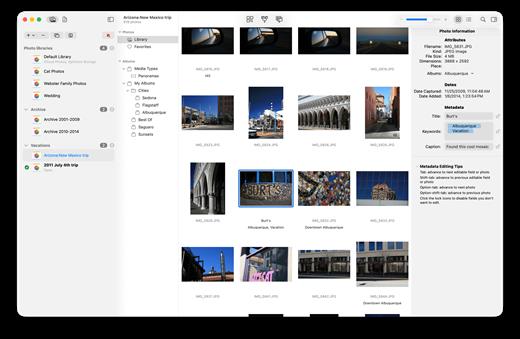
PowerPhotos also supports searching across all your libraries at once to help track down a particular photo. If you use iCloud Photo Library to sync photos with your other devices, splitting up your library can help save on iCloud storage costs. Use a single library to hold a smaller collection that you sync with iCloud, while keeping the bulk of your photos in separate libraries so they don’t take up space on iCloud. PowerPhotos can analyze your libraries for duplicate photos, showing them to you side-by-side and letting you get rid of extra copies of photos that you no longer need.

What’s New

Version 3.3.1:


  • Release notes were unavailable when this listing was updated.
Compatibility

macOS 11.0 or later


Release Name: PowerPhotos 3.3.1
Size: 39.7 MB
Links: HOMEPAGE – NFO – Torrent Search

Download: RAPiDGATOR

4 Comments
Apr 21

Integrity Pro 12.12.0

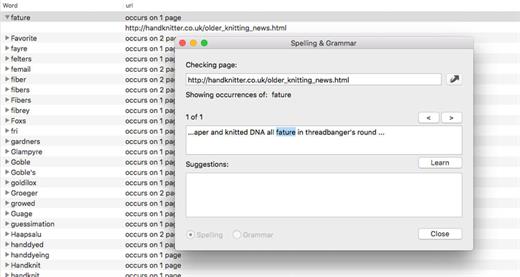
Integrity Pro builds on Integrity Plus. It has the new v12 crawling engine, it checks links and generates a sitemap with all the searching, filtering and exporting functionality of the Plus version. It adds SEO details and a sitewide spellcheck. It isn’t intended to replace Scrutiny, but to be pitched between Integrity Plus and Scrutiny, a more affordable step for Integrity Plus users. There will, of course, be an upgrade from Integrity Plus, but this early public beta is simply free until the stable version is released.

What’s New

Version 12.12.0:


  • Release notes were unavailable when this listing was updated.
Compatibility

macOS 10.10 or later


Release Name: Integrity Pro 12.12.0
Size: 5.9 MB
Links: HOMEPAGE – NFO – Torrent Search

Download: RAPiDGATOR
5 Comments
Apr 20

Fig Player 1.3.34

Fig Player, is a media player for Mac that supports a wide variety of media files and allows you to listen to music, watch videos and movies.

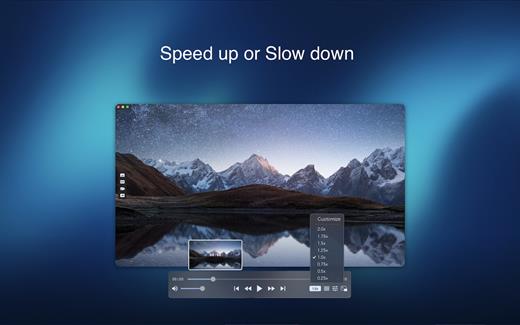
If you have an extensive media library but don’t have a good media player for Mac, here’s a good solution. Fig Player. It’s free to use and comes with a friendly interface. On the screen, you’ll be able to see all of the buttons that give you control over your experience, such as the play and stop button, playback options, volume slider, preview section, screenshot, and recording.

More Advanced Features


  • Smooth, seamless video play, support 4K.
  • Auto deinterlacing.
  • H/W-acceleration.
  • A-B loop.
  • Frame by Frame playback.
  • PIP mode.
  • Support various Subtitle formats(Text subtitles(SRT), Vobsub
    and ASS/SSA, etc.).
  • Choose which one when you have multiple sound output devices.
  • Create the scene poster with snapshots.
  • Playlist with upper-level folder name.
  • Support multiple windows and play multiple videos at the same time.
  • Support Wireless display to DLNA, Chromecast, Roku devices.
  • OCR Text Recognition(macOS 12+)
Supported Formats

Videos: mkv, rmvb, rm, avi, mov, wmv, flv, f4v, f4p, f4a, f4b, swf, mpg, mpeg, mpeg1, mpeg2, m1v, m2v, mpv, mp4, mpeg4, m4v, 3gp, 3gpp, 3g2, 3gp2, m2p, ps, ts, m2ts, mts, mt2s, ogm, ogv, divx, dv, asf, wtv, webm, etc.

Audios: flac, ape, m2a, mp1, mp2, mpa, mp3, mpg3, m4a, m4b, wma, wav, wv, xm, aiff, aif, ac3, a52, aac, opus, ogg, oga, mid, midi, mka, etc.

Subtitles: ASS, SSA, SRT, IDX&SUB

What’s New

Version 1.3.34:


  • Release notes were unavailable when this listing was updated.
Compatibility

macOS 10.13 or later


Release Name: Fig Player 1.3.34
Size: 74.2 MB
Links: HOMEPAGE – NFO – Torrent Search

Download: RAPiDGATOR

5 Comments
Apr 20

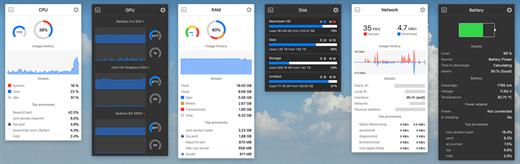
Stats 2.12.11

Stats is a application which allows you to monitor your macOS system.


  • CPU Usage
  • Memory Usage
  • Disk utilization
  • Sensors information (Temperature/Voltage/Power)
  • Battery level
  • Network usage
What’s New

Version 2.12.11:
Bug fixes


  • fix: fixed release version for v2.12.10
Compatibility

macOS 10.14 or later, 64-bit processor


Release Name: Stats 2.12.11
Size: 6.9 MB
Links: HOMEPAGE – NFO – Torrent Search

Download: RAPiDGATOR
6 Comments
Apr 20

FSNotes 7.1.3

FSNotes is a plain-text note manager for macOS, and is modern reinvention of notational velocity (nvALT) on steroids. Our application respects the following open formats: plain/text, Markdown, and RTF, and stores data in the file system. You can view, edit, and copy data in your favourite external editor, and see live results in FSNotes.

Features:


  • ICloud synchronization
  • Keyboard centric
  • Global shortcuts (clipboard save / search field)
  • Markdown and RTF markup (files stored on disk as plain/text and rich text)
  • Markdown preview mode
  • Elastic two pane view (vertical and horizontal layout)
  • Blazing fast and lightweight
  • Open files in finder / works with external editors (changes seamless live sync with UI)
  • Pin/unpin important notes in top
  • Multi folder storage
  • Markdown live highlighting with over 170 languages in code blocks
What’s New

Version 7.1.3:


  • Release notes were unavailable when this listing was updated.
Compatibility

macOS 10.14 or later


Release Name: FSNotes 7.1.3
Size: 19.7 MB
Links: HOMEPAGE – NFO – Torrent Search

Download: RAPiDGATOR

6 Comments
Apr 20

Aiseesoft Mac Blu-ray Player 6.6.66

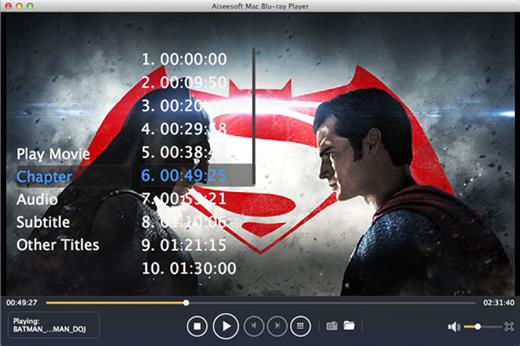
Aiseesoft Mac Blu-ray Player lets you enjoy any Blu-ray movie or video in disc/ISO file/folder on Mac with full HD 1080p and best sound quality.

Play Blu-ray disc/folder/ISO image file on Mac

This Blu-ray player for Mac users enables you to freely play any Blu-ray disc released in different regions on your Mac without limitation. Select specific title/chapter or the main movie of Blu-ray disc to experience the high-quality picture directly. Apart from playing Blu-ray movie disc, this strong Mac Blu-ray Player software can play or playback Blu-ray folder (BDMV folder) as well as Blu-ray ISO image files (with a virtual drive). Click Open File to load local Blu-ray folder or ISO file to start the Blu-ray experience of movie-watching on your Mac with the latest macOS High Sierra.

Play any video (4k/1080p/1080i included)

This Blu-ray player is powerful enough to ply 4K and 1080p/1080i/720p resolution video on your Mac. Only if your Mac is equipped with high definition to 4K/1080p/1080i/720p, you will play your 4K video easily with the upscaling visual effect directly, instead of taking a Samsung/Sony/Oppo 4k Blu- ray player to connect to your Mac. Besides HD video with superior picture and video quality, you will be allowed to play other Blu-ray videos with SD resolution (480p, 360p, 240p) with this powerful Blu-ray player on your iMac, Mac mini, Macbook Air, Macbook Pro, Macbook, Mac Pro, etc.

Play almost formats video with great audio effect

This Blu-ray player for Mac plays all popular Blu-ray videos including MP4, MKV, AVI, MOV, WMV, FLV, M4V, etc. Also it supports to play non-blu-ray videos, so that you get more pleasure, like ASF, VOB, DAT, MTS, M2TS encoded with AVCHD, etc. Moreover, it can be used to play audio files directly in FLAC, AAC, AC3, MP3, OGG, WAV, WMA and more. Compatible with AAC, Dolby Digital and DTS 5.1/7.1 channel audio, it brings you highest sound effect just like stay at the home theater, when you play video with the lossless audio with FLAC and APE format. Moreover, you could capture your favorite pictures during the process of previewing.

What’s New

Version 6.6.66:


  • Release notes were unavailable when this listing was updated.
Compatibility

macOS 10.10 or later


Release Name: Aiseesoft Mac Blu-ray Player 6.6.66
Size: 49.2 MB
Links: HOMEPAGE – NFO – Torrent Search

Download: RAPiDGATOR
5 Comments
Apr 20

NetWorker Pro 11.0.9

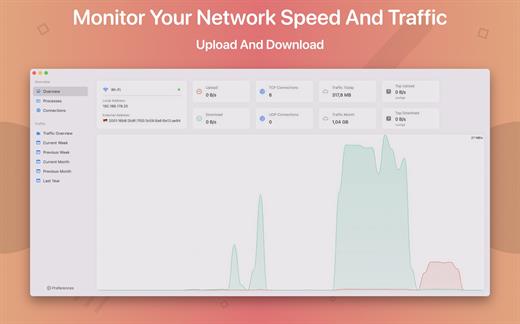
NetWorker is a lightweight and easy-to-use tool that shows either the current download and upload speed or the session traffic of your network adapter. The information is shown in a small view in your menu bar.

Features


  • You can switch between three modes: speed, traffic, or speed/traffic
  • You can choose the network adapter to observe, so both wired and wireless adapters are supported
  • Adjustable refresh interval
  • Support for auto-start
What’s New

Version 11.0.9:


  • Release notes were unavailable when this listing was updated.
Compatibility

macOS 11.0 or later


Release Name: NetWorker Pro 11.0.9
Size: 7.7 MB
Links: HOMEPAGE – NFO – Torrent Search

Download: RAPiDGATOR

6 Comments
Apr 20

DockDoor 1.35.1

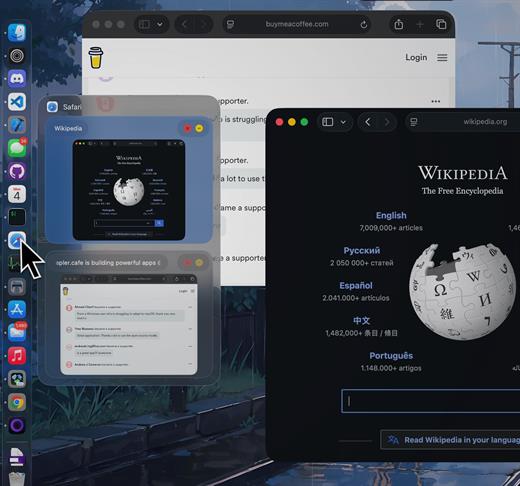
DockDoor enhances window management and interaction — it allows users to seamlessly switch between application windows, providing features such as window previews, easy navigation, and improved multitasking capabilities.

What’s New

Version 1.35.1:


  • Release notes were unavailable when this listing was updated.
Compatibility

macOS 13 or later


Release Name: DockDoor 1.35.1
Size: 20.5 MB
Links: HOMEPAGE – NFO – Torrent Search

Download: RAPiDGATOR

6 Comments
Apr 20

ACDSee Photo Studio 26.0.2

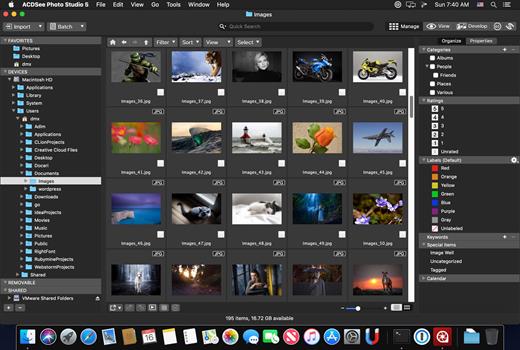
Known for best-in-class digital asset management and RAW processing power, ACDSee Photo Studio for Mac 5 gives you instant, import-free access to your photos. Flexible organizational tools to satisfy any workflow, lightning fast non-destructive adjustments, drag and drop searching, sleek customizable batch presets, and RAW support for over 450 camera models are just a few of the elements that make ACDSee Photo Studio for Mac 5 the must-have image editing software on the macOS.

Image Basket

Gather and hold images from different locations or folders in the Image Basket. Once you have your desired assortment, you can use any of the tools or features in ACDSee to view or edit these files.

Filter By

Quickly single out and display files by their metadata, such as ratings, color labels, tags, and categories. This essential component of digital asset management will also identify images by the metadata they don’t have, such as “no keywords”, “untagged”, and “uncategorized”.

Compare Images

Highlight the similarities and the differences in up to four images at once with the Compare Images tool. Use zooming and panning to identify which images to keep.

Auto Advance

Manage entire folders without ever moving your hands from the keyboard. With Auto Advance, adding metadata will move the focus to the next image in the File List pane, allowing you to seamlessly organize.

External Editors

Easily configure ACDSee to work with a variety of other image editors. Specify a default editor, and then promptly open images in other applications right from inside Manage or View mode.

Multiple Databases

Create as many ACDSee databases as you like, and swiftly and smoothly switch between them.

Batch Add Watermark

Claim your work by adding watermarks to your images. Adjust size, position, and opacity for the perfect signature, and save your settings as a preset. Apply it to one, many, or all.

Batch Add Border

Frame your favorite photos in batches with the Batch Add Border tool. Customize the color, texture, and thickness of your border, and choose from nearly 100 unique edges to complement your shots.

Import Database

Don’t lose hours of cataloging just because you want the latest software. Import your database from version 3 or 4 of ACDSee Photo Studio Mac and keep right on working.

What’s New

Version 26.0.2:


  • Release notes were unavailable when this listing was updated.
Compatibility

macOS 11.0 or later


Release Name: ACDSee Photo Studio 26.0.2
Size: 441.3 MB
Links: HOMEPAGE – NFO – Torrent Search

Download: RAPiDGATOR

6 Comments
Apr 20

IINA 1.4.2

IINA is the modern video player for macOS.

Features


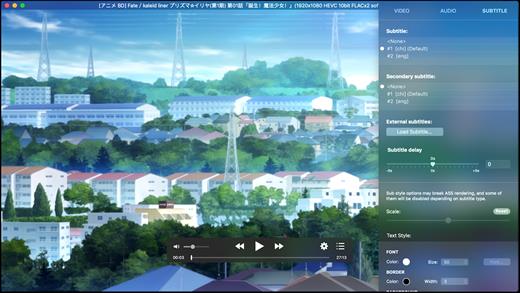
  • For and only for modern macOS – IINA is born to be a modern macOS application, from its framework to its user interface. It adopts the post-Yosemite design language, and keeps up the pace of new technologies such as Force Touch and Touch Bar.
  • Revolutionary user experience – IINA simplifies a lot of user interactions. In addition to traditional cascaded menus, it provides interactive UI components and gestures to give you intuitive, flexible, powerful control of the playback.
  • Powerful functionality – Based on MPV, one of the most powerful media player projects ever, IINA supports almost all common media types (even GIF) and stably outputs high-quality video that is optimized for Retina screen. MPV’s config file and script system are also integrated.
  • You are the target-user – IINA is made by a user like you, who (may be) also having been expected for a powerful and elegant media player on macOS for years. Whether you just got your first Mac or are already a professional MPV user, IINA will satisfy you for its customizability and expandability.
What’s New

Version 1.4.2:


  • Release notes were unavailable when this listing was updated.
Compatibility

macOS 10.15 or later
Apple Silicon or Intel Core processor


Release Name: IINA 1.4.2
Size: 104.2 MB
Links: HOMEPAGE – NFO – Torrent Search

Download: RAPiDGATOR
5 Comments