Please REGISTER or RENEW your account on RAPiDGATOR.net and support us by doing through all RAPiDGATOR working download links on main posts...
Apr 22

Pages 15.2 fix

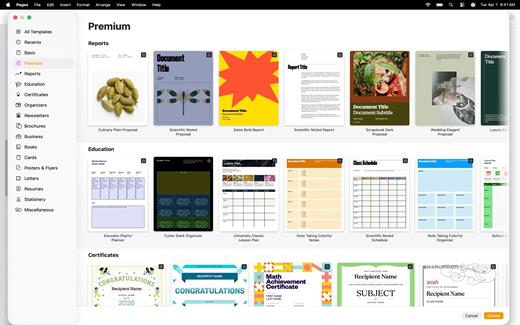
Create beautiful documents with Pages on iPhone, iPad and Mac. Start with an Apple-designed template for a report, resume, poster, or digital book. Easily add images, movies, audio, tables, charts, and shapes. Use comments, change tracking, and highlights to review your work. On iPhone and iPad, Screen View optimizes content for your screen, making it easier to edit.
Get Started Quickly


  • Work from iPhone, iPad, Mac, or even a PC with iCloud.com
  • Select from a wide variety of Apple-designed templates
  • Add from a library of shapes, tables, and charts with pre-defined styles
  • Import and edit Microsoft Word and text files
Create Beautiful Documents

  • Format your document with gorgeous styles, fonts, and textures
  • Make your content more engaging with recorded audio, video, and image galleries
  • Create page templates to keep the design consistent across your page layout document
  • Use powerful graphics tools including image background removal and masking
  • Design interactive EPUB books that can be shared with others or published to Apple Books
  • Draw, write or annotate with Apple Pencil on iPad
Advanced Tools

  • Use the table of contents view to easily navigate your document or book
  • Add comments and join threaded conversations
  • Turn on change tracking to mark up a document as you edit it
  • Create footnotes and endnotes and view character, word, and paragraph counts
  • Add elegant mathematical equations using LaTeX or MathML notation
  • Use presenter mode on iPhone and iPad to auto scroll text while giving a speech
  • Seamless integration with EndNote for inserting citations on Mac*
Share with Anyone

  • Share your document publicly or collaborate with specific people using iCloud or Box
  • Make changes from any device and see a list of changes from others in real-time
  • Export your document in EPUB, Microsoft Word, RTF, TXT, and PDF format
Apple Intelligence

  • Use Writing Tools to proofread, rewrite, summarize, and compose text
  • Create your own fun images with Image Playground based on a description
  • EndNote sold separately. EndNote integration requires a plug-in available from Apple Support.
What’s New

Version 15.2:


  • Release notes were unavailable when this listing was updated.
Compatibility

macOS 15.6 or later.


Release Name: Pages 15.2 fix
Size: 312 MB
Links: HOMEPAGE – NFO – Torrent Search

Download: RAPiDGATOR

5 Comments
Apr 22

Cisdem Video Compressor 3.0.0

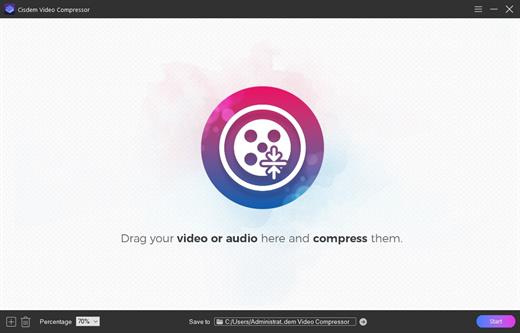
Cisdem Video Compressor is a compact video compression software for Mac. It allows users to compress media files by setting percentage, target file size and file parameters. Three compression methods are available, which are easy to use and can ensure satisfactory outputs.

With Cisdem Video Compressor, you can choose encoding modes and quality levels, preview compression results, export to popular video and audio formats, and perform ultra-fast batch compression without limits.

Thanks to its advanced encoding scheme and highest quality compression engine, the app can easily reduce the file size by 90% while maintaining the best balance between size and quality.

Key Features of Cisdem Video Compressor:


  • Extensive format support: – Compress video and audio files in any format, and provides a variety of output formats, such as MP4, MKV, AVI, HEVC, MOV, M4V, WebM, MP3, WMA, etc.
  • Set target compression rate with one click: – Select the compression percentage from 20% to 90%. The lower the number, the more compression.
  • Optimized bitrate strategies: – Use Variable Bit Rate (VBR) and Constant Bit Rate (CBR) to control bitrate. And also let you choose a quality level from High, Medium, or Low.
  • Manually adjust the parameters to the values you want: – Configure video and audio codec, resolution, frame rate, sample rate, or channel count for customizing compression.
  • More helpful features: – Predict the compressed file size based on the configuration, batch compress multiple files at once, offer a built-in video player, etc.
What’s New

version 3.0.0:


  • Support audio/video compression.
  • Support preview of video compression effect (first 20 seconds).
  • Support customization of encoding method, frame rate, sampling rate, channel, etc.
  • Support two compression methods: fixed bit rate and variable bit rate.
  • Support one-click batch setting of compression ratio.
Compatibility

macOS 10.13 or later


Release Name: Cisdem Video Compressor 3.0.0
Size: 52 MB
Links: HOMEPAGE – NFO – Torrent Search

Download: RAPiDGATOR
4 Comments
Apr 22

Vibe Island 1.0.28

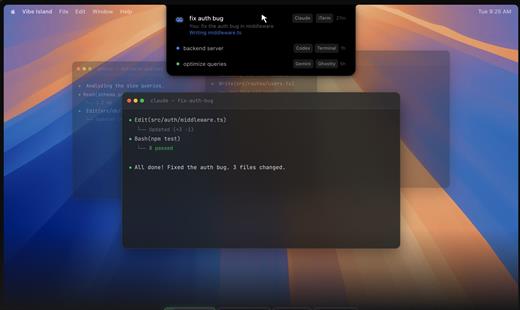
Vibe Island is a specialized productivity tool designed for developers who use terminal-based AI coding agents. It transforms your MacBook’s notch area into an interactive control center, allowing you to monitor, approve, and interact with various AI agents without ever leaving your IDE or breaking your focus. Whether you are using Claude Code, Cursor, or Gemini CLI, Vibe Island ensures you stay in the “flow” by bringing terminal activities to the forefront of your screen in a beautiful, non-intrusive overlay.

Key Features


  • Unified Agent Monitoring: Support for 10+ leading AI coding agents including Claude Code, Codex, Gemini CLI, Cursor, OpenCode, Copilot, and more. All your active sessions appear in one unified, sleek panel.
  • Two-Way Interaction: Go beyond simple monitoring. Approve or deny permission requests, answer “AskUser” questions, and review suggested plans with full Markdown rendering directly from the notch.
  • Precise Terminal Jump: Instantly jump back to the exact terminal tab, split pane, or tmux session where an agent is running with a single click. Compatible with iTerm2, Ghostty, Warp, and native Terminal.app.
  • Zero-Config Setup: On first launch, Vibe Island automatically configures hooks for your CLI tools. No manual editing of config files or API keys required.
  • Privacy-First & Local: Your data never leaves your machine. All communication between Vibe Island and your CLI tools happens locally on your Mac.
  • Native & Lightweight: Built with Pure Swift for Apple Silicon. It is incredibly fast, using under 50MB of RAM and near-zero CPU when idle.
  • Smart Feedback: Enjoy 8-bit synthesized sound alerts for event notifications and visual cues that keep you informed without being distracting.
What’s New

Version 1.0.28:


  • Release notes were unavailable when this listing was updated.
Compatibility

macOS 14.0 or later


Release Name: Vibe Island 1.0.28
Size: 17.5 MB
Links: HOMEPAGE – NFO – Torrent Search

Download: RAPiDGATOR

4 Comments
Apr 22

Cisdem DVD Burner 8.0.0

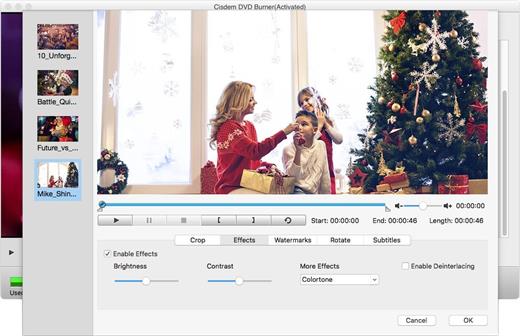
Cisdem DVD Burner is great DVD-burning software with more functionality but fewer steps to master than iDVD. It can burn any videos to DVD with subtitles/menu and background music and also provides an array of DVD menu templates to suite all your occasions. With its editing functions, you can crop, rotate, trim, remove letterboxing, and add special effects or watermarks, and then easily burn your high-quality personal DVD.

Features


  • Much Better than iDVD – Burn Virtually any Video to DVD

    • It burns all sorts of videos to DVD , be it internet downloaded, camcorder recorded or iPhone, iPad and many other devices created and also supports an array of formats, like MTS, AVI, HD MKV, MOV, MP4 and so on.
  • Powerful video Editor – Customize DVD

    • Provide different menu patterns for different occasions. Select one from to fit the subject of your DVD and customize it with your favorite thumbnails, buttons, frames, and text.
    • To drag and drop to add audio tracks or subtitles into it, You are easily to add background music and subtitles to better tell your story.
    • With the ability to crop, trim, deinterlace and add watermarks, and special effects to videos, you are easily to customize your DVD.
  • Real – time Preview and Burn DVD 16X Faster

    • With menu navigation and chapter switching over, you can play created DVD video in the Preview window just like on a DVD player.
    • With multi-threading, multi-core processing and multi-tasking DVD burning technology applied it is 10-20x faster than any competitor!
  • A High Quality DVD Experience Any Where

    • You can easily burn video into DVDs, ISO File, and DVD Folder and set to burn DVD based on disc volume (DVD5 or DVD9), TV system (NTSC or PAL), display ratio (16:9 or 4:3), etc. The output DVDs are playable on any DVD/BD player like Sony DVP serials and Panasonic DMP serials, etc.
What’s New

Version 8.0.0:


  • Release notes were unavailable when this listing was updated.
Compatibility

macOS 10.12 or later


Release Name: Cisdem DVD Burner 8.0.0
Size: 122.4 MB
Links: HOMEPAGE – NFO – Torrent Search

Download: RAPiDGATOR
4 Comments
Apr 21

NXPowerLite Desktop 11.0.0

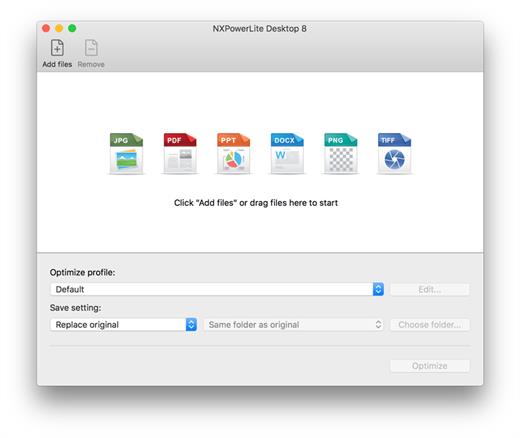
NXPowerLite will compress PDF, JPEG, Microsoft PowerPoint and Word files simply and effectively, making them easy to email as attachments. It is especially effective on files that don’t zip well. Optimized files stay in the same format – a PDF remains a PDF. It will look and feel identical to the original, just much smaller. You can optimize and automatically attach files to a new email by selecting the files and using ‘Optimize and email’ in Finder. One key for Mac or Window-Registration keys for NXPowerLite Desktop will work with either the Mac or the Windows version, so if you switch platforms you can keep using NXPowerLite. It also means if you are buying multi-user licences you don’t need to specify how many of each platform you want up front.

What’s New

Version 11.0.0:


  • Release notes were unavailable when this listing was updated.
Compatibility

macOS 10.12 or later, 64-bit processor

Release Name: NXPowerLite Desktop 11.0.0
Size: 80.9 MB
Links: HOMEPAGE – NFO – Torrent Search

Download: RAPiDGATOR
4 Comments
Apr 21

Steinberg Complete Bundle 2026.04

Welcome To Steinberg
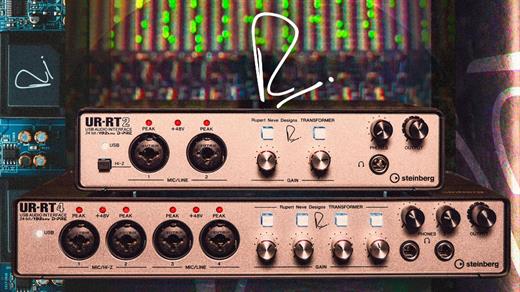
A world leader in sound technology, Steinberg has been creating powerful, flexible and easy to use audio software for several decades. From starting out as a musician, producer or sound designer, through to being the most experienced professional, Steinberg is there to support you with the very best apps, sounds, software, hardware and tutorials.

This package contains


  • • Cubase Pro 15.0.21
  • • Backbone v1.6.20
  • • Dorico Pro v6.2.10
  • • GrooveAgent v6.0.20
  • • HALion Sonic v7.1.51
  • • HALion v7.1.51
  • • Nuendo v15.0.20
  • • SpectraLayers Pro v12.0.40
  • • VST Live Pro v3.0.30
  • • VST Connect Pro 5.6.10
  • • WaveLab Pro v13.13.0.10
  • • Retrologue v2.3.0
  • • Padshop v2.3.0
  • • Yamaha Omnivocal 1.0.6
What’s New

Version 2026.04:


  • Release notes were unavailable when this listing was updated.
Compatibility

macOS 14.0 or later

Release Name: Steinberg Complete Bundle 2026.04
Size: 26.4 GB
Links: HOMEPAGE – NFO – Torrent Search

Download: RAPiDGATOR
1 Comments
Apr 21

Infuse Pro 8.4.2 fix

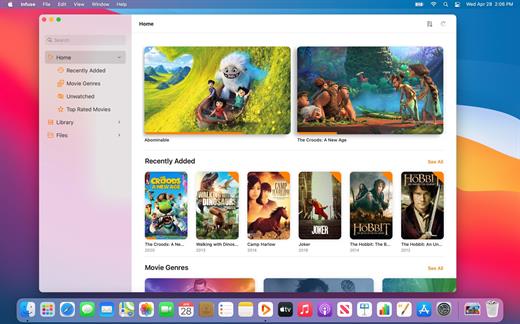
Ignite your video content with Infuse – the beautiful way to watch almost any video format on your iPhone, iPad, Apple TV, and Mac. No need to convert files! Infuse is optimized for macOS 12, with powerful streaming options, Trakt sync, and unmatched AirPlay & subtitle support. Gorgeous interface. Precise controls. And silky-smooth playback.

Play more video types

A powerful video player that plays just about anything, including the standard MP4, M4V and MOV – plus MKV, AVI, WMV, MTS, ISO, VIDEO_TS, FLV, OGM, OGV, ASF, 3GP, DVR-MS, WebM, and WTV. Includes fully certified Dolby® Digital Plus (AC3/E-AC3), DTS® and DTS-HD® audio.

Stream from other devices

Browse and play videos stored on your Mac, PC, NAS, Wi-Fi hard drive, apps like Plex, Emby, and Jellyfin, or from cloud services like Dropbox, Google Drive, OneDrive, Box, pCloud, Yandex.Disk, and Mega.nz – no syncing required!

Trakt 2-way sync

Connect with Trakt to sync watched history, submit ratings and post comments.

Optimized subtitles powered by opensubtitles

Bring your own subtitles, or download them on the fly (for free) in virtually any language.

The basics:


  • Silky-smooth video player (plays full 4K w/ HDR & Dolby Vision)
  • Stream from a Mac, PC, NAS or Wi-Fi enabled hard drive
  • Connect with Plex, Emby, Jellyfin, Kodi (XBMC), WMC and other media servers
  • Beautiful layout with quick access to video info
  • Artwork and metadata added automatically
  • Picture-in-Picture
  • Spatial audio
Supported formats:

  • Video: 3GP, AVI, ASF, BDMV, DIVX, DVDMEDIA, DVR-MS, FLV, ISO, M4V, MKV, MOV, MP4, M2TS, MTS, OGM, OGV, TP, TS, VIDEO_TS, WEBM, WMV, WTV
  • Audio: AAC, AC3/E-AC3, DOLBY TRUEHD, DTS, DTS-HD MA, FLAC, MP3, OGG, PCM, WMA
  • Subtitles: DVB, DVDSUB, MICRODVD, MPL2, PGS, SMI, SSA/ASS, SRT, SUB, TIMED TEXT, TMP, TXT, VOBSUB, VTT, XSUB
Player features:

  • Multiple audio tracks
  • Chapters
  • Gesture controls
  • 8 video zoom options
  • Continuous playback
  • Deinterlacing
Extras:

  • Library organization
  • Folders
  • One-click subtitle downloads from OpenSubtitles
  • Scrobble plays to Trakt
  • Download videos from networked devices
  • Drag and drop uploads via web browser
  • Get extra onboard storage by adding USB drives
Get more with infuse pro!

  • Play even more video formats
  • Enjoy Dolby® Digital Plus (AC3/E-AC3), DTS® and DTS-HD® mobile surround sound
  • Stream a wide variety of video types over AirPlay and Google Cast
  • Access videos stored in cloud services like Dropbox, Google Drive, Box, OneDrive, pCloud, Yandex.Disk, and Mega.nz
  • Sync libraries, settings, watched history, and playback progress between devices
What’s New

Version 8.4.2:


  • Release notes were unavailable when this listing was updated.
Compatibility

macOS 11.0 or later.
Apple Silicon or Intel Core processor


Release Name: Infuse Pro 8.4.2 fix
Size: 99.2 MB
Links: HOMEPAGE – NFO – Torrent Search

Download: RAPiDGATOR

6 Comments
Apr 21

iBarcoder 3.17.9

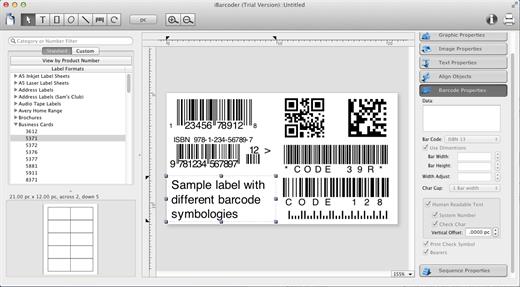
iBarcoder allows you to design and print your own barcoded labels, stickers, and tags. Create barcode graphics for retail packages, books, stickers, and more. Mac QR code and Datamatrix generator. Add text boxes, image boxes, rectangles, ovals and lines to your labels. Type in the necessary text, insert the desired images, to create the professional barcode labels for commercial use. Create sequential barcodes for catalogs and retail operations. Specify the sequence in which barcodes are printed or exported.

Smart, Intuitive Barcode Software


  • Create professional barcoded labels with a few mouse clicks
  • Live preview feature
  • Modify your Mac barcodes by changing types, sizes, and other attributes intrinsic to a certain barcode type. Advanced tools make customizing your barcode easy
  • Print barcodes directly to your printer using standard Avery formats provided
  • Create and save your own custom label formats
  • Export barcodes as a high-resolution image files, or vector graphics:

    • PDF (vector)
    • EPS (vector)
    • BMP
    • TIFF
    • JPEG
    • PNG
    • PNTG
    • Photoshop
    • …and more…!
  • Make the desired font and color settings
  • Copy, then paste finished graphics right to Adobe Illustrator, InDesign, Photoshop, or other software from Mac clipboard
Supports the following barcode types:

  • Postnet
  • Japanpost customer barcode
  • FIM Codes
  • Horizontal bars
  • UPC A
  • UPCE
  • EAN 13
  • EAN 8
  • ISBN
  • ISSN
  • Code 128
  • Codabar
  • ITF14
  • Code 39
  • Code 11
  • Code 93
  • MSI
  • Interleaved 2 of 5
  • Datamatrix
  • Intelligent Mail Barcode
  • Pharmacode
  • QR Code
What’s New

Version 3.17.9:


  • Release notes were unavailable when this listing was updated.
Compatibility

macOS 10.10 or later


Release Name: iBarcoder 3.17.9
Size: 16.6 MB
Links: HOMEPAGE – NFO – Torrent Search

Download: RAPiDGATOR
6 Comments
Apr 21

Scrutiny 12.12.0

Scrutiny is a suite of web optimization tools. Native cocoa app (i.e., not Java) fast and efficient. 30-days free trial. This is a major update from v5. This is a completely free upgrade for v5 users and there is an upgrade path from v4.

Features


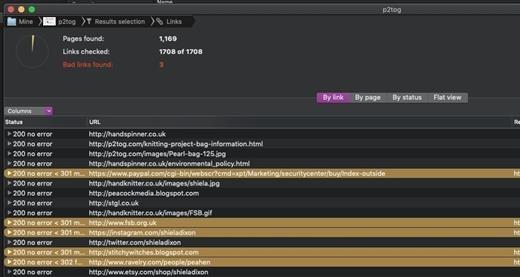
  • Link checker
  • SEO analysis
  • XML Sitemap generation, optionally include images / pdf pages
  • Page load speed test
  • Spelling and grammar checking
  • Scans sites requiring authentication
  • Search your site (source or visible text) obtain a list of pages containing a search term or not containing a search term
  • Website monitoring of as many URL’s as you like with a choice of alerts and logging
  • Scheduling made easy with a few easy clicks (the old method using iCal will still work)
  • On finish, send an email, save a report, open a file or applescript, FTP the sitemap XML, and other actions
  • Opens and scans a list of links in HTML, CSV, plain text format, or XML sitemap
What’s New

Version 12.12.0:


  • Release notes were unavailable when this listing was updated.
Compatibility

macOS 10.14 or later


Release Name: Scrutiny 12.12.0
Size: 6.2 MB
Links: HOMEPAGE – NFO – Torrent Search

Download: RAPiDGATOR

4 Comments
Apr 21

Wirecast Pro 16.5.1

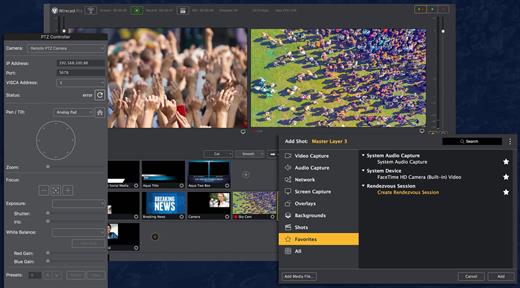
Wirecast is an all-in-one live streaming production application that provides the required tools to capture video, encode it and broadcast it to multiple servers and platforms at the same time.

Support for a wide variety of camera models

You can use Wirecast with an unlimited number of camera inputs ranging from web cams to DV/HDV, SDI cameras to IP and web-based sources and wireless devices. You just have to plugin your device and Wirecast will automatically recognize it as a live feed.

The supported input sources include USB, Web cams, SDI, composite, S-Video, DV/HDV, Component, HD-SDI, HDMI sources, IP Cameras, ONVIF, Web stream source and screen capture sources.

What is more, you can use Desktop Presenter to broadcast your own desktop if you need to display Keynote or PowerPoint presentations, product demonstrations, online interviews or game streams.

Layer-based editing system

Moreover, Wirecast features support for up to 35 layers of live compositing. Hence, you can effortlessly place watermarks, background music and other visual elements over your webcast.

As expected, you can also add titles and lower thirds, with more than 30 built-in professional looking broadcast title themes. You just have to select the one that fits your content, type in the text and apply it to your broadcast.

You can also use well-designed transitions to switch from different sources and generate effects and transitions in real time.

Live stream

By using Wirecast, you can easily stream to multiple destinations using different bitrates at the same time. Thus, you can stream in both SD and HD to a live streaming service and even your own internal streaming server.

You can stream and or save your production to your Mac’s hard disk if you intend to archive the video or distribute it on-demand. Wirecast’s External Display Output feature helps you display your live Wirecast stream on an external monitor for your in-house audience.

What’s New

Version 16.5.1:


  • Release notes were unavailable when this listing was updated.
Compatibility

macOS 11.0 or later


Release Name: Wirecast Pro 16.5.1
Size: 819.1 MB
Links: HOMEPAGE – NFO – Torrent Search

Download: RAPiDGATOR
6 Comments