Please REGISTER or RENEW your account on RAPiDGATOR.net and support us by doing through all RAPiDGATOR working download links on main posts...
Apr 16

Microsoft Office 2024 v16.108

Office LTSC 2024 offers a locked-in-time version of familiar productivity tools, updated with a subset of the features that have been added to Microsoft 365 Apps for enterprise over the last three years. New features for this release include Dynamic Charts and more than a dozen new text and array functions in Excel, enhanced search and meeting creation options in Outlook, and improvements to performance, security, and accessibility.
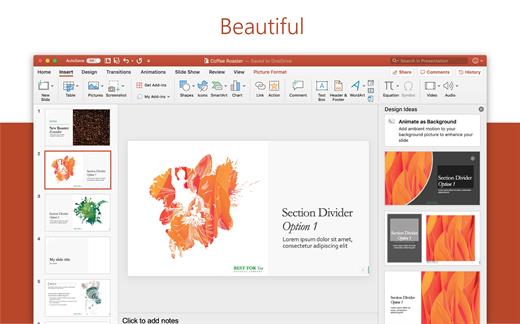
That same Office, especially for Mac

The new, modern versions of Word, Excel, PowerPoint, Outlook, OneNote, and OneDrive for Mac feature a familiar interface and the unique, beloved features of a Mac, so you can get started quickly.

Microsoft Word

Word is a robust application that lets you create, edit, view, and share text documents (even email attachments). It’s ideal for anyone who works with documents: bloggers, writers, journalists, reviewers, students, or project managers.

Microsoft Excel

The powerful Excel application makes it quick and easy to create, view, edit, and share spreadsheet files. New charts and Ideas provide visualization of data and trends. No matter where you are, you can confidently use this application to collaborate in accounting, auditing, or finance.

Microsoft PowerPoint

PowerPoint is the smart app you know and love that helps you communicate your ideas vividly and visually with beautiful layouts, animations, moving camera effects, 3D models, and icons. Save time and create engaging presentations that are up-to-date with the latest trends.

Microsoft Outlook

With Outlook, you have all your email accounts and calendars at your fingertips. Manage your messages and plan in detail—it has everything you need to organize your workflow efficiently.

Microsoft OneNote

Whether you need to streamline the tedious planning process or quickly jot down a brilliant idea, OneNote, your digital notebook, is your go-to. It’s indispensable when you need to prepare for a big event or when you need to make sure you don’t miss any important tasks that you can’t trust to someone else.

Microsoft OneDrive

OneDrive keeps all your Microsoft 365 files at your fingertips. Share and collaborate in real time across Word, Excel, and PowerPoint on your desktop, web, and mobile — all conveniently and securely

Note: If it doesn’t work, uninstall the old version of Office completely and reinstall it. For uninstallation method, please use Google search.

What’s New

Version 16.108:


  • Release notes were unavailable when this listing was updated.
Compatibility

macOS 12.0 or later


Release Name: Microsoft Office 2024 v16.108
Size: 3 GB
Links: HOMEPAGE – NFO – Torrent Search

Download: RAPiDGATOR

3 Comments
Apr 16

Zipic 1.9.3

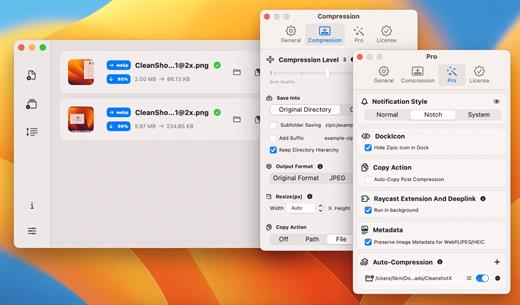
Zipic is a native macOS application designed for efficient, high-quality image compression. It lets users shrink image files locally, with no uploads or dependency on the cloud. All processing happens on your own device—so your privacy and speed stay intact.

Key Features and Highlights:


  • High Compression, Near-Lossless Quality: Zipic utilizes powerful compression algorithms to achieve a high compression ratio with minimal perceived quality loss, making the compressed image virtually indistinguishable from the original.
  • Fast & Local Processing: Being a native macOS application, all image processing occurs locally on your device. This ensures lightning-fast performance, efficient handling of massive batches, and high data privacy with no cloud uploads or network dependence.
  • Comprehensive Format Support: The tool supports a wide range of formats, including basic ones like JPEG, PNG, WebP, HEIC, and GIF, and Pro formats like AVIF, JXL, TIFF, and ICNS.
  • Effortless Workflow: It offers multiple simple compression methods, including drag-and-drop, folder monitoring, and Finder integration (right-click).
  • Custom Control: Users can create custom presets for different quality levels and scenarios, allowing for precise control over the compression outcome.
  • Pro Features for Automation: Advanced features include Clipboard auto-compress, Folder Watch for automated compression in specific directories, and integration options like Raycast Extension and Apple Shortcuts.
Zipic aims to be the seamless solution for developers, designers, bloggers, and photographers who need to optimize and compress images efficiently.

What’s New

Version 1.9.3:


  • Release notes were unavailable when this listing was updated.
Compatibility

macOS 13.0 or later


Release Name: Zipic 1.9.3
Size: 15.2 MB
Links: HOMEPAGE – NFO – Torrent Search

Download: RAPiDGATOR
6 Comments
Apr 16

Final Cut Pro 12.2 fix

Redesigned from the ground up, Final Cut Pro combines revolutionary video editing with a powerful media organization and incredible performance to let you create at the speed of thought.

Revolutionary Video Editing


  • The Magnetic Timeline uses advanced metadata for faster, easier editing
  • Enhanced Timeline Index lets you drag and drop audio roles to rearrange the layout of your timeline
  • Use Clip Connections to attach B-roll, sound effects, and music to the timeline
  • Reduce clutter by grouping clips into a Compound Clip
  • Edit multicamera projects with automatic syncing and support for up to 64 camera angles
  • Automatically transform projects for square or vertical delivery with Smart Conform
  • Import and edit 360° equirectangular video in a wide range of formats and frame sizes
  • Create, edit, and deliver closed captions from within Final Cut Pro
  • Extend the capabilities of Final Cut Pro with third-party workflow extensions
Powerful Media Organization

  • Organize your work within libraries for efficient media management and collaboration
  • Create proxy copies of your media for portability and performance
  • Content Auto-Analysis captures camera metadata and analyzes shots in the background
  • Create and apply custom keywords or favorites on the fly as you select clip ranges
  • Smart Collections dynamically organize content for you to quickly find any shot in a few clicks
Incredible Performance

  • Improved performance and efficiency on Mac computers with Apple silicon
  • Harness the power of the Mac Pro and Afterburner for realtime 8K editing
  • Modern Metal engine improves playback, rendering, and compositing on all Macs
  • Final Cut Pro uses all the GPUs in your Mac for superior real-time playback performance and fast background rendering
  • Work with a broad range of formats including ProRes, RED, XAVC, AVCHD, Avid DNxHR®, Avid DNxHD®, H.264, HEVC, and more
Compelling, Customizable Effects

  • Beautifully animated, easily customizable 2D and 3D titles
  • Change the look of titles, transitions, and effects using intuitive controls
  • Choose from an ecosystem of third-party FxPlug plug-ins with custom interfaces
Integrated Audio Editing

  • Assign roles – including dialogue, music, effects, and custom choices – during import to easily track and organize your project
  • Expand and edit multichannel audio files directly in the timeline
  • Sync video with separate audio in a single step with instant audio waveform matching
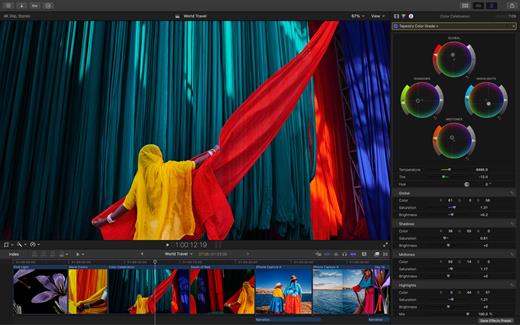
Intuitive Color Grading

  • Import, edit, and deliver video in standard color spaces, or in wide Rec. 2020 color space
  • Use Pro Display XDR to accurately view HDR video
  • Powerful color wheels and curves for precise adjustments with keying and masks
One-Step, Optimized Output

  • Incredibly fast export for playback on Apple devices and upload to websites such as Vimeo and YouTube
  • Export audio stems and multiple versions of a finished video using roles metadata
  • Import and export XML for third-party workflows like color grading and sound mixing
What’s New

Version 12.2:


  • Powerful Intelligence
  • Use Transcript Search to quickly find spoken words or phrases in your footage by searching for exact matches or using natural language descriptions*
  • Discover Visual Search, a fast and easy way to locate moments in your footage, including objects and actions, using natural language*
  • Let Beat Detection analyze any song to reveal its bars and beats, enabling you to easily align your video edits to the music’s rhythm
  • Get Started Fast
  • Dive into editing with a special demo project featuring the talented singer-songwriter Allie Sherlock, and explore the exciting new features of Final Cut Pro firsthand
  • Accelerate your next edit with in-app guides on how to create a new library, import media, and add clips to a new timeline
  • Requires a Mac with Apple silicon
Compatibility

macOS 15.6 or later.


Release Name: Final Cut Pro 12.2 fix
Size: 5.5 GB
Links: HOMEPAGE – NFO – Torrent Search

Download: RAPiDGATOR

2 Comments
Apr 14

Photomator 3.4.14

Photomator is a powerful yet easy-to-use photo editor with over 5,000 five-star ratings.

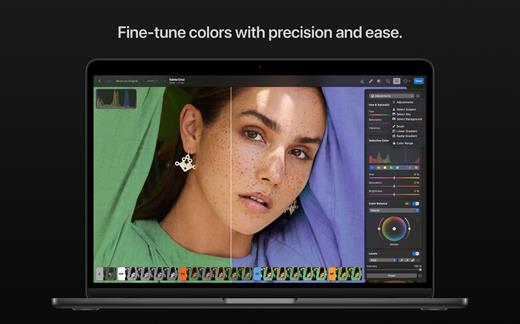
Photomator is a photo editing powerhouse, offering incredible tools for enhancing, retouching, and managing your photos. It includes an extensive collection of cutting-edge color adjustments, automatic selections powered by AI, powerful batch editing features, Clone and Repair tools for removing unwanted objects, and much more. Simply put, it has everything you need to make every shot your best.

The ultimate photo editing experience


  • Adjust colors and lighting using a collection of powerful, nondestructive color adjustments
  • Automatically make precise subject, sky, and background selections in photos using AI
  • Add gradient masks, make color range selections, or simply paint over the areas you want to adjust using a brush
  • Seamlessly clone or remove unwanted objects using state-of-the-art retouching tools
  • Easily copy and paste edits between photos or batch edit entire photoshoots at a time
  • Crop, straighten, and change the perspective of photos with a powerful and easy-to-use Crop tool
  • Quickly change the look of photos using an extensive collection of presets, designed for landscape, black and white, and other photography styles
Tools powered by AI

  • Automatically enhance shots using a machine learning algorithm trained on 20 million pro photos, or fine-tune individual adjustments, like White Balance, Selective Color, or Color Balance with a single click
  • Magically increase the resolution of photos while keeping them detailed and sharp
  • Remove camera noise and image compression artifacts with the Core ML-powered Denoise feature
  • Instantly improve the quality of photos by removing color banding and increasing color depth with AI-powered Smart Deband feature
  • Copy the look of any photo to another using the incredible color-matching feature
  • Intelligently crop photos using machine learning-powered auto-cropping
State-of-the-art color adjustments

  • Enjoy powerful tools for effortlessly adjusting the temperature, tint, exposure, contrast, brightness, hue, saturation, and vibrance in your photos
  • Recover incredible amounts of detail in the highlights and shadows of photos
  • Magically enhance fine details and structure in photos using powerful Clarity and Texture adjustments, or adjust textures in the highlights, midtones, and shadows separately
  • Selectively edit individual color ranges with Selective Color, or improve the balance of colors in the shadows, midtones, and highlights with Color Balance
  • Adjust lighting and colors with full precision using Levels and Curves adjustments
  • Mix the balance of the red, green, and blue color channels to create intense color effects in your images
  • Replace any color with any other using the Replace Color adjustment
  • Create beautiful black and whites even from your color photos
  • Use a range of additional adjustments, like Sharpen, Fade, Grain, Color Monochrome, Sepia, and Invert to make your photos stand out
  • Instantly change the look of photos with LUTs or export custom LUTs to use in other apps
RAW editing made simple

  • Open and edit over 650 RAW image formats, including Apple ProRAW and compressed Fujifilm RAWs
  • Edit RAW photos as easily as photos in other formats using all the nondestructive tools, including Repair and Clone tools
  • Easily batch-edit RAW photos together with photos in other formats
Compatibility

  • Automatically sync every change back to your Photos library
  • With the support for iCloud Drive, enjoy seamless edit syncing across Mac, iPhone, and iPad
Photomator is built from the ground up for Mac and integrates seamlessly with macOS Ventura. It uses powerful Apple technologies like Meta

What’s New

Version 3.4.14:


  • Release notes were unavailable when this listing was updated.
Compatibility

macOS 13.0 or later


Release Name: Photomator 3.4.14
Size: 632.3 MB
Links: HOMEPAGE – NFO – Torrent Search

Download: RAPiDGATOR
5 Comments
Apr 14

4K YouTube to MP3 Pro 26.1.0

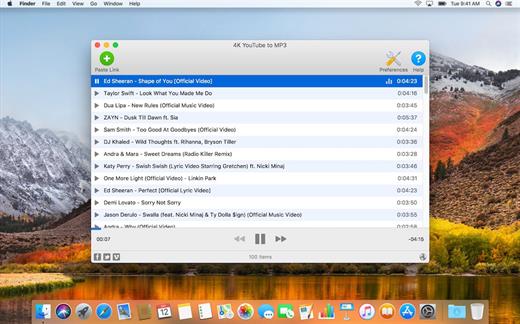
4K YouTube to MP3 was specifically created to extract audio from YouTube, Vimeo or Facebook and save it in MP3, M4A, OGG. No annoying and complicated settings to deal with, just a clean, friendly and functional interface. Downloading is simple and straightforward: just copy the link from your browser and click ‘Paste Url’. Done!

Features


  • Extract audio from YouTube videos and save it in MP3, M4A or OGG in high quality.
  • Download full YouTube playlists or channels and generate m3u files.
  • Transfer downloaded tracks automatically into iTunes and upload them on your iPhone or iPod.
  • Listen music via native built-in music player.
  • Download and extract audio tracks from SoundCloud, Vimeo, Flickr and DailyMotion videos.
  • Download audio books from YouTube.
  • Extract audio tracks even from embedded in HTML page videos.
  • Use 4K YouTube to MP3 on your PC, Mac or Linux, doesn’t matter what OS you prefer.
What’s New

Version 26.1.0:


  • Release notes were unavailable when this listing was updated.
Compatibility

macOS 10.10 or later


Release Name: 4K YouTube to MP3 Pro 26.1.0
Size: 245.8 MB
Links: HOMEPAGE – NFO – Torrent Search

Download: RAPiDGATOR
5 Comments
Apr 14

Bookends 15.3.2

Bookends is a full-featured bibliography/reference and information-management system for students and professionals.

Access the power of Bookends directly from Mellel, Nisus Writer Pro, or MS Word (including Word 2011): Bookends allows you to scan your existing word-processor files and automatically generate finished manuscripts with properly formatted bibliographies. You can also scan Apple Pages ’08, ’09, and 5, and OpenOffice 3 files, or RTF files saved from any word processor.

Bookends allows you to share your references over the Internet with anyone, on any platform. And with Bookends, you can directly search and import references from numerous sources:


  • EndNote
  • PubMed
  • Web of Science
  • JSTOR
  • Google Scholar
  • Amazon
  • Library of Congress
  • arXiv
  • and hundreds of other online sources.
Or use a built-in browser to download references with PDF’s and/or Web pages. Also, with automatic searches of PubMed, you can discover articles as soon as they’re published. Bookends allows for powerful group-based searches, with static, smart, and virtual groups.

Bookends also offers a robust assortment of file attachment features:


  • Attach any file (such as a PDF) to a reference and view or open it instantly.
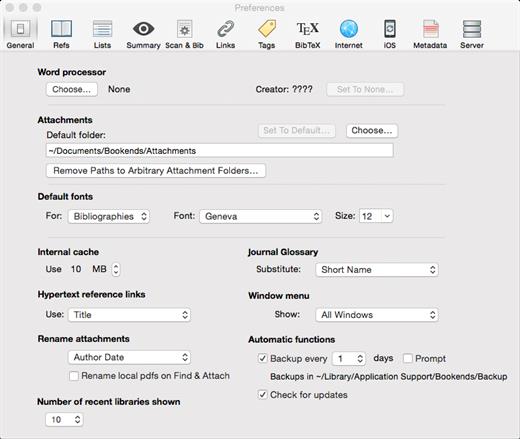
  • Automatically rename and organize PDF files on-the-fly.
  • Automatically download and attach the PDF of an article from the Internet if you have access permission.
  • Automatically locate and attach PDF’s on your hard drive.
Sync your library with Bookends On Tap on your iPad, iPhone, or iPod touch, so that you have your references and PDF’s with you, wherever you are.

What’s New

Version 15.3.2:


  • Release notes were unavailable when this listing was updated.
Compatibility

macOS 10.13.0 or later
Apple Silicon or Intel Core processor


Release Name: Bookends 15.3.2
Size: 122.9 MB
Links: HOMEPAGE – NFO – Torrent Search

Download: RAPiDGATOR
5 Comments
Apr 14

4K Video Downloader Plus Pro 26.1.0

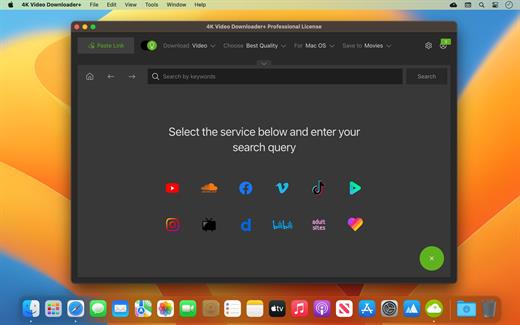
4K Video Downloader allows to download video, audio and subtitles from YouTube in high-quality and as fast as your computer and connection will allow. If you want that video on your iPad, iPhone or other device we’ve got you covered. Downloading is simple and straightforward: just copy the video link from your browser and click ‘Paste Url’. Done!

Proxy Connection for Unrestricted Access


  • Bypass restrictions set by your Internet service provider and get around your school or workplace firewall. Connect through an in-app proxy to access and download from YouTube and other sites.
All Popular Sites Support

  • Save video and audio from YouTube, Vimeo, TikTok, SoundCloud, Bilibili, Niconico, Flickr, Facebook, Instagram, DailyMotion, Naver TV, Likee and Tumblr. Download recorded streams from Twitch and YouTube Gaming.
New YouTube Video Auto-Download

  • Subscribe to the download of your favorite YouTube playlists and creators. Save whole channels and playlists in one go. Get new videos downloaded automatically as soon as they are uploaded to YouTube.
3D Video Download

  • Get a one of a kind experience by watching stereoscopic 3D videos on your computer or TV. Download 3D Youtube videos in MP4, MKV, FLV, 3GP and other formats
360° Video Download

  • Feel the action all around you with virtual reality videos. Download 360° videos to relive the mind-blowing VR experience as many times as you want.
Easy Downloads Management

  • Sort and filter downloads by type, name and date. Import and export all files as a single JSON file. Easily track and control the progress of both individual downloads and entire groups of downloading files.
What’s New

Version 26.1.0:


  • Release notes were unavailable when this listing was updated.
Compatibility

macOS 10.13 or later


Release Name: 4K Video Downloader Plus Pro 26.1.0
Size: 275.5 MB
Links: HOMEPAGE – NFO – Torrent Search

Download: RAPiDGATOR

8 Comments
Apr 14

CodeRunner 4.5

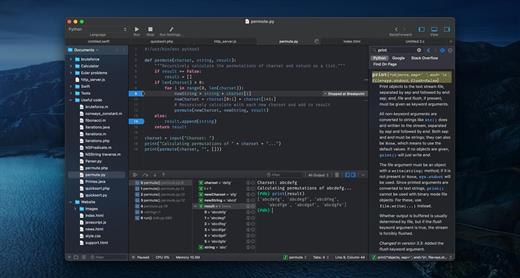
CodeRunner, an advanced, highly flexible, and easy-to-use programming editor, supports a large number of languages, and delivers big IDE features while remaining lightweight and clutter-free.

CodeRunner can run code in 23 languages out-of-the-box, and can be easily extended to run code in any other language. Notable features include debugging with breakpoints in lots of languages, IDE-level code completion, and lots of other high-end features making it easier than ever to write and work with code.

Note: When activating, you need to stop CodeRunner from networking, or disconnect from the Internet to register.

What’s New

Version 4.5:


  • Prevent macOS Writing Tools from appearing in the editor unless explicitly invoked.
  • Fixed an issue with code completion on Python 3.13.
  • Bug fixes and general improvements.
Compatibility

macOS 10.15 or later.


Release Name: CodeRunner 4.5
Size: 91.3 MB
Links: HOMEPAGE – NFO – Torrent Search

Download: RAPiDGATOR
7 Comments
Apr 14

Room Arranger 10.3.4

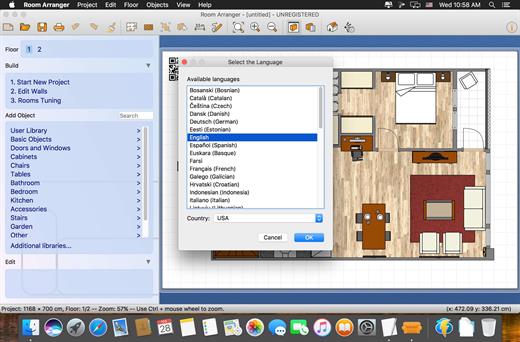
Room Arranger is 3D room / apartment / floor planner with simple user interface. Once you get the basics, you can draw whatever you imagine. While having wide library of objects, you can easily create your own piece of furniture. Room Arranger can show your project in 3D. It uses VRML standard for it. So you can put interactive 3D scene on your web.

Easy to Use
Room Arranger is small and compact piece of software. Still it lets you design nearly anything you imagine. Once you understand the basics it’s easy to bring it to next level. Nearly all functions have keyboard shortcuts, so you can learn to be pretty fast in Room Arranger.

What’s New

Version 10.3.4:


  • Release notes were unavailable when this listing was updated.
Compatibility

macOS 13 or later


Release Name: Room Arranger 10.3.4
Size: 44.5 MB
Links: HOMEPAGE – NFO – Torrent Search

Download: RAPiDGATOR

9 Comments
Apr 14

Topaz Video 1.3.1

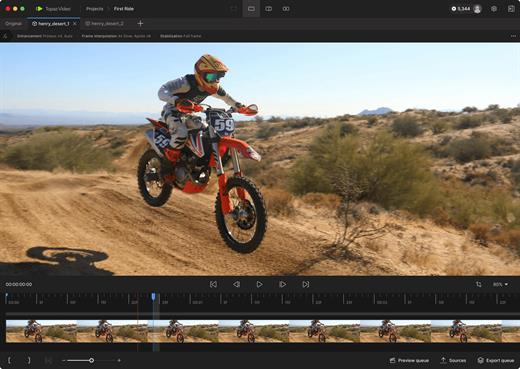
Topaz Video is a professional AI-powered video enhancement application that transforms noisy, low-resolution, or shaky footage into cinematic-quality video. It combines advanced upscaling, denoising, restoration, stabilization, and frame interpolation models in a single, easy-to-use desktop app designed for modern Mac systems.

Key Features


  • AI Upscaling: Intelligently upscale SD to HD, or HD to 4K/8K with crisp details and reduced artifacts.
  • Motion Interpolation: Convert frame rates (e.g., 24fps to 60fps) for smoother playback or generate silky slow-motion effects.
  • Stabilization: Reduce camera shake and correct motion blur caused by fast movement without the “warping” effects of traditional stabilizers.
  • Deinterlacing: Transform classic interlaced footage into modern progressive formats while preserving image integrity.
What’s New

Version 1.3.1:


  • Release notes were unavailable when this listing was updated.
Compatibility

macOS 10.15 or later


Release Name: Topaz Video 1.3.1
Size: 753.2 MB
Links: HOMEPAGE – NFO – Torrent Search

Download: RAPiDGATOR
9 Comments