Please REGISTER or RENEW your account on RAPiDGATOR.net and support us by doing through all RAPiDGATOR working download links on main posts...
Apr 14

Typora 1.13.4

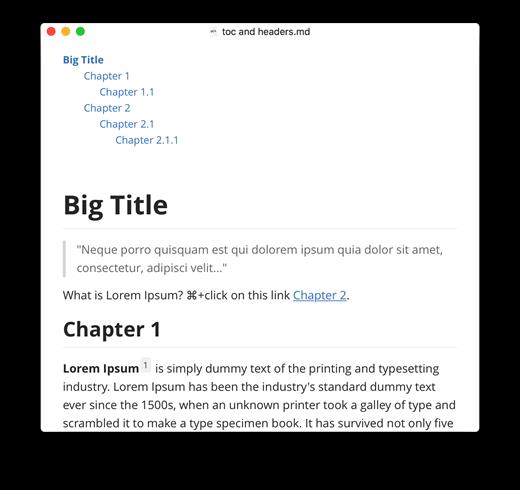
Typora gives you a seamless experience as both a reader and a writer. It removes the preview window, mode switcher, syntax symbols of markdown source code, and all other unnecessary distractions, replacing them with a real-time preview to help you concentrate on the content itself.

Features:


  • Markdown support including tables, code fences with syntax highlight, LaTeX, table of contents
  • Cross-platform
  • The real-time preview and WYSIWYG features
  • Beautiful interface and custom CSS theme support
  • Easy export
What’s New

Version 1.13.4:


  • Release notes were unavailable when this listing was updated.
Compatibility

macOS 10.13.0 or later, 64-bit processor


Release Name: Typora 1.13.4
Size: 19 MB
Links: HOMEPAGE – NFO – Torrent Search

Download: RAPiDGATOR

8 Comments
Apr 14

XnViewMP 1.10.5

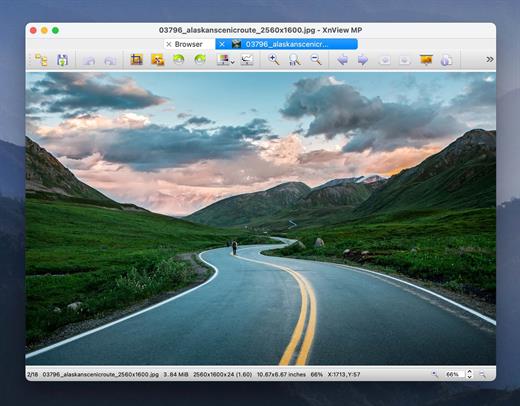
XnView MP is a versatile and powerful photo viewer, image management, image resizer. XnView is one of the most stable, easy-to-use, and comprehensive photo editors. All common picture and graphics formats are supported (JPEG, TIFF, PNG, GIF, WEBP, PSD, JPEG2000, OpenEXR, camera RAW, HEIC, PDF, DNG, CR2).

Photo Viewer

With XnView you can browse, organize, and view your images in numerous ways:
• Thumbnail View
• FullScreen View
• FilmStrip View
• SlideShow with FX
• Image Compare
• EXIF, IPTC, XMP metadata supported

Photo Editor

XnView allows you to process your images with an arsenal of editing tools:
• Resize, Rotate, Crop
• Lossless Rotate & Cr(jpeg)
• Adjust Brightness, Contrast, …
• Auto Levels, Auto Contrast
• Modify Colors depth & palette
• Apply filters & Effects

Unrivaled Compatibility

XnView MP supports more than 500 image formats (including Multipage and animated still formats APNG, TIFF, GIF, ICO, etc..) and export to about 70 different file formats.

Batch Conversion

XnView MP comes with an easy to use yet powerful batch conversion module. This same module also powers XnConvert

And Much More …

Virtually all of standard XnView’s much loved features have been preserved in XnView MP and many features have actually been tweaked and enhanced.

What’s New

Version 1.10.5:


  • Release notes were unavailable when this listing was updated.
Compatibility

macOS 10.13 or later


Release Name: XnViewMP 1.10.5
Size: 96.5 MB
Links: HOMEPAGE – NFO – Torrent Search

Download: RAPiDGATOR

8 Comments
Apr 13

Loopback 2.4.9

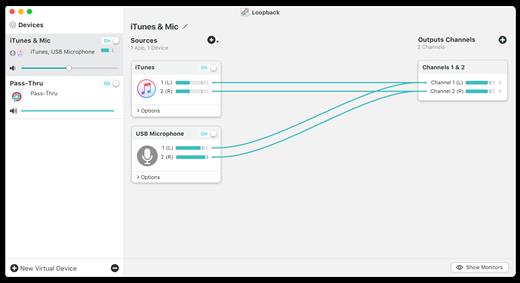
Loopback makes it easy to pass audio between applications on your Mac. Create virtual audio devices to take the sound from applications and audio input devices, then send it to audio processing applications. Loopback gives you the power of a high-end studio mixing board, right inside your computer!


  • Play Audio to All Your Podcast Guests – Combine your mic with audio sources like iTunes or QuickTime Player, then select your Loopback device as your source in Skype. Presto! Your guests all hear both your voice and your audio add-ons.
  • Record Gameplay Videos – Making gameplay videos with great audio can often be very difficult. If you’re using a device like Elgato’s Game Capture hardware and you want to record both your microphone and the game’s audio at once, Loopback can assist!
  • Combine Hardware Devices – Apps like GarageBand, Logic, and Ableton Live only record from a single audio device at once. Thankfully, they offer recording from many channels. With Loopback, you can combine multiple input devices into one virtual device for easy recording.
  • Create Top-Notch Screencasts – Screen recorders, including QuickTime Player, allow you to include your mic’s audio. Some allow recording of system audio instead, but neither option is ideal. Create a virtual device that grabs just the mic and the app’s audio to get exactly the audio you want.
  • Route Audio For Broadcasts – Set a simple (pass-thru) device as the output at the end of an Audio Hijack chain, and then as the input source in Nicecast. Now listeners can tune in to a live stream of your podcast as you record it!
Features

  • Combine Audio Sources – Configuring a virtual audio device from multiple sources is easy. Just add the applications and physical audio devices you want to include to the Audio Sources table to get started.
  • Available System-Wide – Your Mac will show Loopback’s virtual devices exactly like physical devices. Find them listed among other devices in System Preferences or select them as an input or output in any audio app.
  • Send Audio Between Apps – Loopback can also create pass-thru devices, which send audio from one app to another. Set the Loopback device as the output in one app and the input in another to make audio flow directly between the applications.
  • Works With Any Application – Make a virtual audio device with audio from the applications on your Mac, including production apps like Logic or Reason, as well as simple audio players, like iTunes or QuickTime.
  • Works With Any Input Device – Pull audio from the physical audio devices connected to your Mac. Whether you’ve got simple USB microphones, or high-end studio mixers, Loopback can access it all.
  • Combine Apps and Physical Devices – Of course, you can create a virtual audio device that includes audio from both apps and physical audio devices.
  • Multichannel Audio – Your virtual audio devices can be configured to have up to 32 channels, providing tremendous power.
  • Custom Channel Mapping – By default, Loopback sets up channel mapping automatically. If you want to manually configure things, though, you’ve got powerful options!
  • Nested Devices – You can now nest one Loopback device inside another, allowing for easier configuration, as well as even more power and control.
What’s New

Version 2.4.9:


  • Release notes were unavailable when this listing was updated.
Compatibility

macOS 10.13.0 or later
Support M1 Apple silicon.


Release Name: Loopback 2.4.9
Size: 34.5 MB
Links: HOMEPAGE – NFO – Torrent Search

Download: RAPiDGATOR

7 Comments
Apr 13

Syncovery Premium 11.14.0

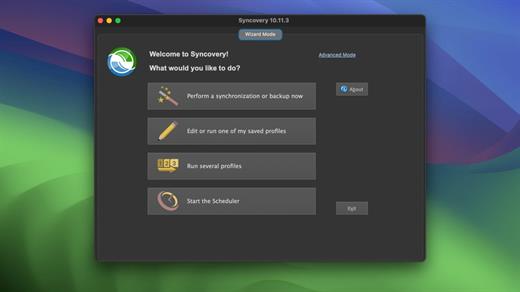
Syncovery is used to back-up your data and synchronize Macs, servers, notebooks, and online storage space.
You can set up as many different jobs as you need and run them manually or using the scheduler. The software comes with support for FTP, WebDAV, Amazon S3, and AES file encryption, as well as SSH and ZIP compression. There are powerful synchronization modes, including Standard Copying, Exact Mirror, and SmartTracking.

Numerous improvements to make an extremely versatile synchronizing and back-up tool. The wealth of features fulfills all requirements that users typically have, while still being easy to use.

What’s New

Version 11.14.0:


  • Release notes were unavailable when this listing was updated.
Compatibility

macOS 10.13.0 or later

Apple Silicon or Intel Core processor


Release Name: Syncovery Premium 11.14.0
Size: 70 MB
Links: HOMEPAGE – NFO – Torrent Search

Download: RAPiDGATOR

9 Comments
Apr 13

Soulver 3.16

Soulver 3 is a smart notepad with a built-in calculator. It gives instant answers to any calculations it finds in your text. It’s a better way to work stuff out than with a traditional calculator, and a more lightweight tool for quick calculations than a spreadsheet.

Math Features


  • Instant calculations, no equals required
  • Use words alongside numbers, so calculations make sense
  • Quick totals of all your lines, and subtotals
  • Calendar calculations (June 9 + 3 weeks, 3:35 pm + 6 hours 27 minutes)
  • Easy percentages (“$300 – 10%”, “30 as a % of 200”)
  • Unit conversions (“10 kg in pounds, “25 meters in feet”)
  • 168 live real-world and cryptocurrency rates.
  • Line references to build little calculating documents
  • Variables & variable autocompleting
  • Global variables & custom units
App Features

  • Dark mode
  • Sidebar for organising your sheets and the ability to make folders
  • Headings (#), comments (//) & labels (:)
  • Customize your syntax coloring & font
  • Automatic number formatting, with spaces around operators and thousand separators
  • Number scrubbing (hold shift and hover over a number)
  • Deep macOS system integration: Touch Bar support, Quicklook, Calculate anywhere services
  • Automation tools: a command-line interface, Alfred workflow, Automator action
What’s New

Version 3.16:


  • Release notes were unavailable when this listing was updated.
Compatibility

macOS 10.14.4 or later, 64-bit processor


Release Name: Soulver 3.16
Size: 20.8 MB
Links: HOMEPAGE – NFO – Torrent Search

Download: RAPiDGATOR

8 Comments
Apr 13

Logic Pro 12.2 fix

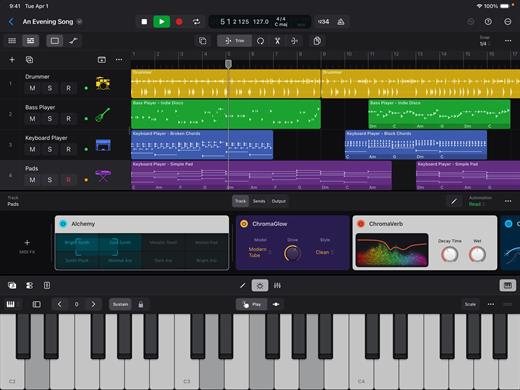
Logic Pro for Mac is a complete collection of sophisticated creative tools for songwriting, beat making, editing, and mixing, built around a modern interface that’s designed to get results quickly and also deliver more power whenever it’s needed. Logic Pro includes a massive collection of instruments, effects, loops, and samples, providing a complete toolkit to create amazing-sounding music.

Music Production


  • Use Stem Splitter to separate nearly any mixed audio recording into six distinct parts: Drums, Bass, Vocals, Guitar, Piano, and Other instruments
  • Smart Tempo instantly conforms imported or recorded audio to your project’s tempo
  • Record and edit MIDI or audio using a comprehensive set of editors and tools
  • Use Live Loops to capture inspiration and quickly build arrangements by mixing and matching loops, samples, and your recordings
  • Manipulate the pitch and timing of any recording with Flex Time and Flex Pitch
  • Keep takes organized with take folders and build comps quickly with Quick Swipe Comping
  • Track Alternatives let you create, duplicate, and then switch between different versions of tracks
  • Deliver a release-ready mix using Mastering Assistant
AI Session Players

  • Discover six virtual musicians designed to create nuanced performances that respond to your direction
  • Synth Player, Bass Player, Keyboard Player, Acoustic Drummer, Electronic Drummer, and Percussionist offer a wide range of genres and distinct playing styles
Beat Production

  • Reshuffle audio with Beat Breaker, a creative time and pitch effect
  • Build custom drum kits using your favorite samples
  • Create drum beats, bass lines, and melodic parts, and reshape sounds over time using Step Sequencer
Sampling

  • Use Sampler to quickly create and edit sophisticated multi-sampled instruments
  • Use Sample Alchemy to transform audio into entirely new malleable sounds
  • Chop and manipulate samples using Quick Sampler
Professional Instrument and Effects Plug-ins

  • Create music with a massive collection of powerful software instruments
  • Shape your sound using a wide variety of high-quality effects
Compatibility

  • Roundtrip capabilities let you open projects back-and-forth between Logic Pro for Mac or Logic Pro for iPad
  • Import and export XML to support Final Cut Pro workflows
System Requirements: 6GB available storage space for minimum install / 44GB or more storage space for full Sound Library installation

What’s New

Version 12.2:


  • Release notes were unavailable when this listing was updated.
Compatibility

macOS 15.6 or later and a Mac with Apple M1 chip or later.


Release Name: Logic Pro 12.2 fix
Size: 1.3 GB
Links: HOMEPAGE – NFO – Torrent Search

Download: RAPiDGATOR

7 Comments
Apr 13

Jouno – Preset Manager 2.8.4

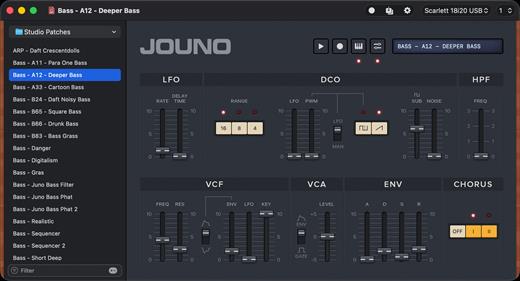
Record, recall, and organise presets, via MIDI. Manage your Roland Juno-106 & MKS7 synthesizer. Jouno lets you retrieve presets from your Juno-106 / MKS’s internal memory. Backing them up as files with meaningful names, and organizing them the way you want simply makes the whole experience clearer, smoother, and far more enjoyable…

Features


  • Presets as Files: Perfect for sharing or backup !
  • Keyboard Playback
  • Undo Support
  • Quick Search
  • Retina Display Ready Interface
  • MIDI Out and Channel are directly customizable in the main window
  • Compatible with the Roland
What’s New

Version 2.8.4:


  • Release notes were unavailable when this listing was updated.
Compatibility

macOS 11.00 or later


Release Name: Jouno – Preset Manager 2.8.4
Size: 9.3 MB
Links: HOMEPAGE – NFO – Torrent Search

Download: RAPiDGATOR

8 Comments
Apr 13

PullTube 1.8.6.28

Sharing videos via online hosting services, such as YouTube or Vimeo is a common practice, yet streaming the content might not work as expected if you have a slow internet connection.
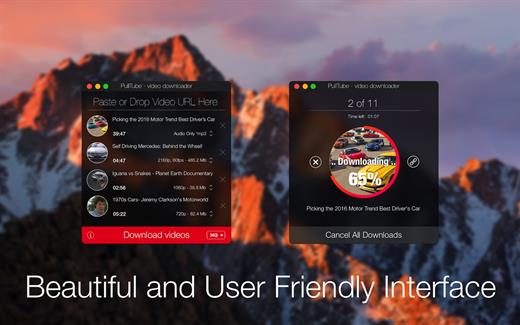
PullTube offers you the possibility to download videos from both sources (YouTube and Vimeo), while other platforms might be added at a later time. The app can handle playlists, allows you to select the output quality, and can even extract only the audio.

Video downloader that can import links with drag and drop and can detect playlists

The PullTube user interface is represented by a small window where you get to quickly paste the video URL. Note that you can also add a video by dropping the link on top of the PullTube window.

Worth mentioning is that, if PullTube detects that the video is part of a playlist, will offer to download the entire collection: will fetch the data for each entry and handle the downloads consecutively.

Download videos hosted on YouTube or Vimeo to different output sizes and formats

PullTube will start fetching the video data right away so you can see the video name, duration, and a small thumbnail. When configuring a download, you get to select the output quality (highest, 4K, HD or regular with different resolutions) or choose to export only the audio to an M4A or MP3 file.

Via the PullTube Settings panel, you can change the default download location and the default MP3 bitrate (320Kbps, 256Kbps, 128Kbps, 64Kbps). You can also add the quality info to the video’s name and choose to quit the app when all downloads are completed.

Get offline access to videos hosted online in just a few steps

PullTube proposes a streamlined workflow for quickly downloading videos from YouTube or Vimeo, provides control over the output quality, and enables you to extract the audio to MP3 or M4A files.

However, during our tests, we have noticed that PullTube has trouble completing the download when handling videos that are longer that 2 minutes. The process stops without any explanation, and you can eventually complete the task, but you need to add the link to download tool multiple times.

What’s New

Version 1.8.6.28:


  • Release notes were unavailable when this listing was updated.
Compatibility

macOS 10.12 or later


Release Name: PullTube 1.8.6.28
Size: 231.4 MB
Links: HOMEPAGE – NFO – Torrent Search

Download: RAPiDGATOR

9 Comments
Apr 13

AnyTrans for iOS 8.9.14.20260323

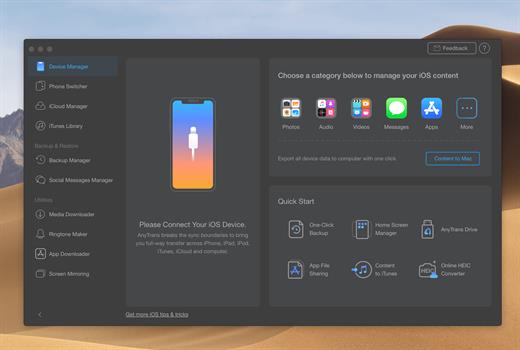
AnyTrans is the iPhone manager that breaks the sync boundary and consolidates every access to all your content in one place, including music, videos, photos, messages, books, Safari history, voice memo, etc.

Features


  • Flash-Sync Makes the fastest data transfer in market – By largely improving the data loading and transferring speed, AnyTrans gives you lightning-fast experience.
  • Two-way Transfer between iOS devices, iTunes, iCloud and computer – Whether you want to transfer contacts from iPhone to Mac, messages from old iPhone to new iPhone 7, music and playlists from iPhone back to iTunes library, or videos from PC to iPad, AnyTrans gets anything transferred freely between your iPhone, iPad, iPod touch, iTunes, iCloud and computer.
  • Easily manage all your contents on iPhone, iPad, and iPod touch – Browse, edit and export important contacts, messages, notes, and more personal data from iPhone; well organize your photos and music in iPhone and iPad by building up your own collections and playlists – you get full control over all your iOS data and files with ultra ease.
  • Migrate everything to your new iPhone 7 within one click clone – Upon just one simple click, everything from your old iPhone, even from iPad – will be cloned to your new iPhone 7. The game-level you just conquered, the photos you took yesterday, the note you plan for shopping and the music you favors will all be there waiting for you.
  • Navigate your iTunes and iCloud backup contents with even more ease – Instead of making a guess on whether your iTunes/iCloud backup contains the notes, messages, contacts, voice memos, or Safari bookmarks you need, AnyTrans lets you peek right into your backups, and grab any piece of data you need freely without a full restore.
What’s New

Version 8.9.14:


  • Release notes were unavailable when this listing was updated.
Compatibility

macOS 10.10 or later


Release Name: AnyTrans for iOS 8.9.14.20260323
Size: 398.5 MB
Links: HOMEPAGE – NFO – Torrent Search

Download: RAPiDGATOR

9 Comments
Apr 13

SlapMac 1.3.0

SlapMac is a gloriously unhinged macOS menu bar app that uses your MacBook’s accelerometer to detect physical slaps and screams back with volume proportional to your force. Choose from 9 voice packs with 150+ sound clips, dial in sensitivity and cooldown, and track your lifetime slap count. USB Moaner mode included.

What’s New

Version 1.3.0:


  • Release notes were unavailable when this listing was updated.
Compatibility

macOS 14.6 or later


Release Name: SlapMac 1.3.0
Size: 12.7 MB
Links: HOMEPAGE – NFO – Torrent Search

Download: RAPiDGATOR

9 Comments