Please REGISTER or RENEW your account on RAPiDGATOR.net and support us by doing through all RAPiDGATOR working download links on main posts...
Apr 10

Macxvideo AI 3.14

Macxvideo AI is an ultimate AI-powered video suite for Mac, combining next-gen video/image enhancement with advanced tools for conversion, compression, screen recording, and editing. With full GPU acceleration, it offers a smooth, efficient workflow for both casual creators and professionals.
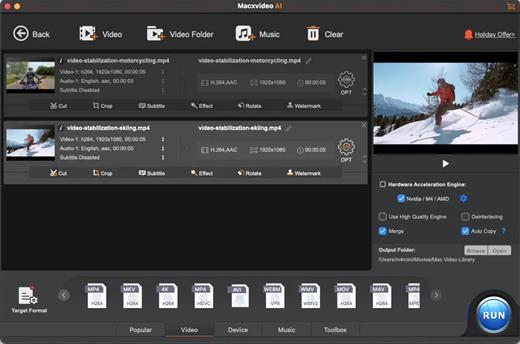
AI Super Resolution technology significantly enhances video quality by intelligently upscaling footage up to 4X its original size, with support for resolutions as high as 4K. Its advanced AI models preserve fine details while eliminating noise and blur, resulting in clearer, sharper visuals for a truly immersive viewing experience.

Supporting 370+ inputs & 420+ outputs, Macxvideo AI converts MP4, HEVC, AV1, MOV, multi-track MKV, or AAC, making it playable on any device. It utilizes full GPU-acceleration to swiftly convert 4K/8K/3D videos in bulk, delivering 47X faster speed and keeping CPU ussage under 2%. You can adjust codec, resolution, VBR, etc.

From iPhone, GoPro, DJI, Cannon, and DVD/blu-ray rips, Macxvideo AI adeptly converts videos like 4K MOV, MP4 with ease. It downscales 4K/8k, transcodes legacy or modern codecs, and preps your footage for smooth playback across all devices and players.

What’s New

Version 3.14:


  • Release notes were unavailable when this listing was updated.
Compatibility

macOS 10.15 or later


Release Name: Macxvideo AI 3.14
Size: 247.9 MB
Links: HOMEPAGE – NFO – Torrent Search

Download: RAPiDGATOR

5 Comments
Apr 10

Folder Designer: Custom Icons 1.93

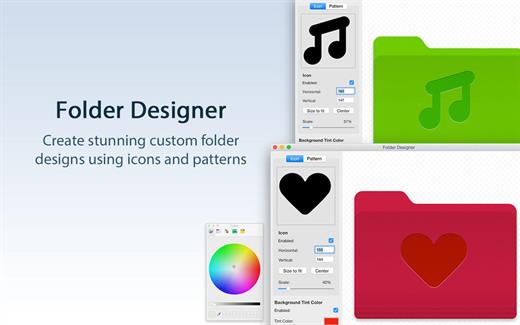
Folder Designer is the coolest and easiest way to customize Folders on your Mac. We’ve made this app perfectly simple to use so that anyone can give their Folders a totally unique appearance.

KEY FEATURES:


  • Customize your Mac’s folders with a unique new icon or pattern
  • Choose from a large selection of pre-installed icon images within the app
  • Ability to add any image/pattern of your choice to a Folder
  • Ability to edit the icon/pattern scale to allow a perfect fit according to your tastes
  • Auto center/auto fit an icon or pattern
  • Ability to position the icon using the mouse to exactly where you want
  • Change the background colour to one of your choice
BENEFITS OF FOLDER DESIGNER:

  • Instantly create Folders on your Mac that are entirely unique in appearance
  • Have Folders that feature either a unique icon, pattern or even a different background colour than the regular blue shade
  • Folders can be easily distinguishable and identifiable on your Mac directly by appearance
  • An extremely easy app to use offering infinite customization possibilities
  • Regular free updates
What’s New

Version 1.93:


  • Release notes were unavailable when this listing was updated.
Compatibility

macOS 11.5 or later.


Release Name: Folder Designer: Custom Icons 1.93
Size: 17.5 MB
Links: HOMEPAGE – NFO – Torrent Search

Download: RAPiDGATOR
5 Comments
Apr 10

PDF Squeezer 4.7.1

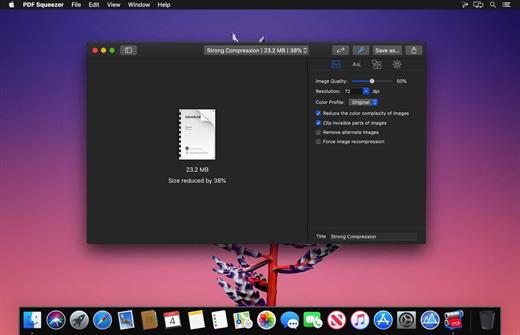
PDF Squeezer is an easy-to-use PDF compression tool.

It reduces the size of large PDF documents by compressing images and removing irrelevant information. This will help you obtain important savings in bandwidth costs, digital storage costs and network transmission times.

Features


  • Simply drag and drop your file into the application window
  • Choose from predefined compression filters or create your own
  • Compress all files in a folder and its subfolders
  • Batch compress multiple files
  • Finder, Safari and Preview ad-on available via the share menu
  • Support for password protected PDFs
  • Automatic compression and save with ‘One-Click-Compression’
What’s New

Version 4.7.1:


  • Release notes were unavailable when this listing was updated.
Compatibility

macOS 10.13.0 or later


Release Name: PDF Squeezer 4.7.1
Size: 48.6 MB
Links: HOMEPAGE – NFO – Torrent Search

Download: RAPiDGATOR

5 Comments
Apr 10

FineTune 1.5.0

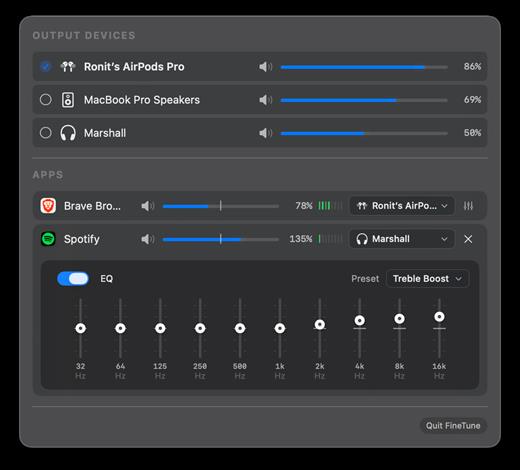
Per-application audio control for macOS. Set individual volume levels, route apps to different output devices, and apply EQ from your menu bar.

Features


  • Per-app volume control with mute
  • Per-device volume control with mute
  • Route apps to different output devices
  • 10-band equalizer with 20 presets across 5 categories
  • Real-time VU meters
  • Volume boost up to 200%
  • Quick device switching
  • Click app icon to bring app to front
  • Settings persist across restarts
FineTune uses macOS Core Audio process taps to intercept and modify audio streams before they reach your output devices. This allows precise control without affecting the source applications.

What’s New

Version 1.5.0:


  • Release notes were unavailable when this listing was updated.
Compatibility

macOS 14.0 (Sonoma) or later


Release Name: FineTune 1.5.0
Size: 4.4 MB
Links: HOMEPAGE – NFO – Torrent Search

Download: RAPiDGATOR
5 Comments
Apr 10

CleanMyMac 5.5.0

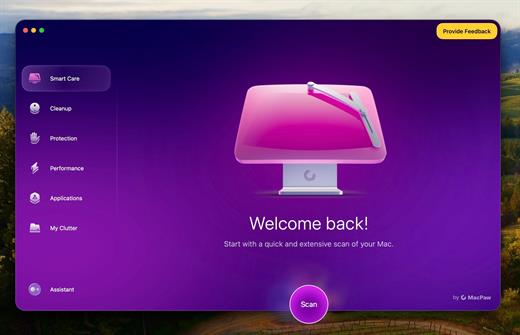
CleanMyMac is all-in-one package to awesomize your Mac. It cleans megatons of junk and makes your computer run faster. Just like it did on day one.

CleanMyMac makes space for the things you love. Sporting a range of ingenious new features, CleanMyMac lets you safely and intelligently scan and clean your entire system, delete large, unused files, reduce the size of your iPhoto library, uninstall unneeded apps or fix the ones that started to work improperly, manage all your extensions from one place and do much more – all from one newly designed and beautifully simple interface.

Note:

wait a second to let it activate itself

If prompted:”The application “CleanMyMac” can’t be opened.”

What’s New

Version 5.5.0:


  • Release notes were unavailable when this listing was updated.
Compatibility

macOS 14.0 or later


Release Name: CleanMyMac 5.5.0
Size: 152.9 MB
Links: HOMEPAGE – NFO – Torrent Search

Download: RAPiDGATOR

6 Comments
Apr 9

Mimestream 1.9.17

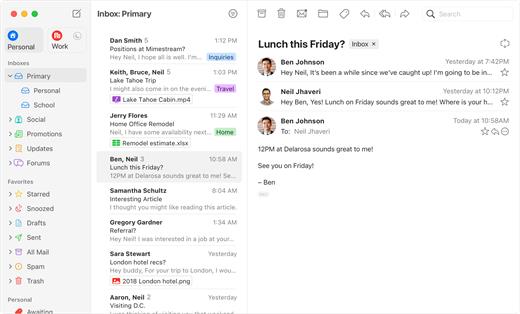
Mimestream combines your favorite Gmail features with the power of a native macOS app so you can move through your email effortlessly

Made for Mac, optimized for Gmail

As a native app written in Swift, Mimestream leverages the full power of macOS to deliver a lightning-fast and instantly familiar experience. Instead of using the IMAP protocol, Mimestream utilizes the Gmail API to enable an enhanced set of features that let you work with ease.

Work smarter, email faster

  • Rise above the noise and focus on the work that matters most. Mimestream makes it easy to keep your inbox organized with confidence.

  • Categorized Inbox – with support for Gmail’s categories, focus on what matters most and triage the rest at your leisure.
  • Multiple Accounts
  • Label Management
Committed to Privacy

Your data and credentials are stored only on your device, and the app only makes direct connections to Gmail. There are no intermediary servers, and Mimestream does not collect or sell your email.

Key Features

  • Lightweight and Fast – Mimestream is built for speed, and only uses a minimal amount of disk space to cache recent messages
  • Offline Access – Fully functional when offline and on the slowest connections-perfect for business travelers and whenever you’re on the go
  • System Notifications – Receive macOS system notifications when you receive new messages, so you never fall behind on important threads
  • Aliases – Your email aliases are automatically synced from Gmail without any setup and are used for replies when appropriate
  • Signatures – Signatures set up in Gmail are automatically synced with Mimestream
  • Robust Search – Enter any Gmail search query into Mimestream and get consistent results. Search while offline, too
  • Swipe Gestures – Use familiar macOS swipe gestures to quickly triage and archive your email
  • Tracking Prevention – Read your email privately – Mimestream blocks tracking pixels from 50+ of the most common tracking services
  • Keyboard Shortcuts – Triage your email quickly using keyboard shortcuts, including the option to use familiar Gmail or Apple Mail shortcut sets
What’s New

version 1.9.17:

? Fixed


  • Infinite sync loop when client-side snoozing is enabled
  • Occasional crash after wake-from-sleep when Private Push is enabled
  • Rare infinite connection loop when Private Push is enabled
Compatibility

macOS 10.15.0 or later


Release Name: Mimestream 1.9.17
Size: 9.1 MB
Links: HOMEPAGE – NFO – Torrent Search

Download: RAPiDGATOR
8 Comments
Apr 9

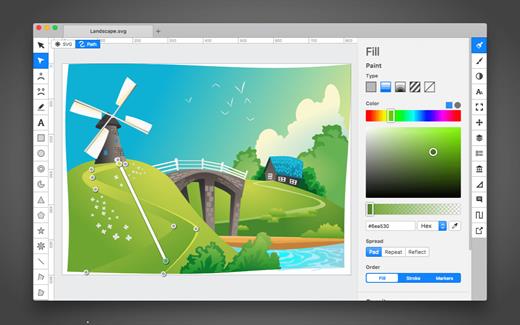
Boxy SVG 4.105.1

SVG is the standard format for storing vector graphics such as icons, banners, charts and illustrations.

Boxy SVG project goal is to create the best SVG editor for non-technical users as well as for professional designers and developers.

CORE FEATURES

• Clean and intuitive UI heavily inspired by Inkscape, Sketch and Adobe Illustrator
• Extensive support for on-canvas editing of object geometry, transform, paint and other properties
• Save to SVG and SVGZ formats, export to PNG, JPG, WebP, PDF and HTML5
• Open Clip Art Library integration with thousands of free stock vector arts
• Google Fonts integration with hundreds of free fonts
• Configurable keyboard shortcuts for over 100 commands
• Manual guides, smart guides and grid
• Path operations (unite, intersect, subtract, exclude, close, reverse, etc.)
• Arrangement operations (align to, rotate, flip, order, group, etc.)

FOR WEB DEVELOPERS

• Chromium-based rendering engine
• SVG and CSS code inspector similar to Chrome Dev Tools
• Clean SVG output that preserves IDs, classes, titles and other metadata
• SVG sprites editing support

What’s New

Version 4.105.1:


  • Release notes were unavailable when this listing was updated.
Compatibility

macOS 10.15 or later


Release Name: Boxy SVG 4.105.1
Size: 216.8 MB
Links: HOMEPAGE – NFO – Torrent Search

Download: RAPiDGATOR

8 Comments
Apr 9

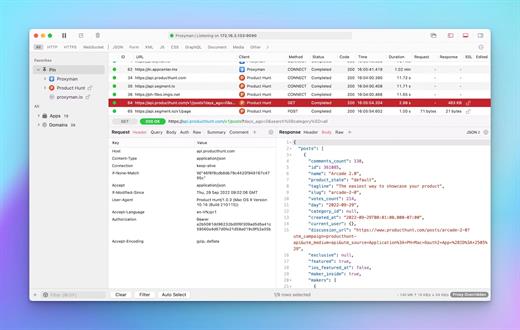
Proxyman 6.8.0

Proxyman is a high-performance macOS app, which enables developers to view HTTP/HTTPS requests from apps and domains.

Features


  • ? Native macOS app. Written by Swift, Objective-C. Powered by Apple SwiftNIO for the high-performance network application.
  • ? Fully support Apple Chip (e.g M1, M2, M1 Pro/Max).
  • ? Built for macOS Monterey & Ventura.
  • ✅ Hassle-free Intercept HTTP/HTTPS requests/response and WebSocket from Web Browsers, iOS, and Android devices.
  • ✅ Modern and intuitive UI
  • ? Multiple filters
  • Comprehensive Guideline to set up with iOS simulator and iOS and Android devices.
  • Basic debugging tools: Compose, Repeat, Wildcard/Regex Filter, Multiple Filters, Customize Columns, Toolbar…
  • Advanced Tools: Breakpoint, Map Local, Map Remote, Backlist, External Proxying, No Caching, Protobuf, Clear Cache, Custom Certificates, Scripting, Network Conditions, Reverse Proxy, Diff, Access Control etc
  • Automatic Setup for Backend Development: Auto capture HTTP(s) traffic from NodeJS, Ruby and Python.
  • macOS 10.15+
What’s New

Version 6.8.0:


  • Release notes were unavailable when this listing was updated.
Compatibility

macOS 10.15 or later


Release Name: Proxyman 6.8.0
Size: 37.6 MB
Links: HOMEPAGE – NFO – Torrent Search

Download: RAPiDGATOR
8 Comments
Apr 9

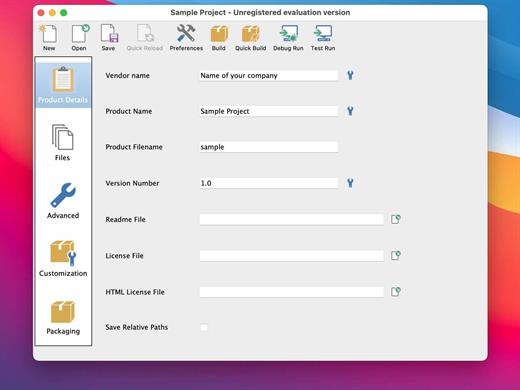
VMware InstallBuilder Enterprise 26.4

VMware InstallBuilder is a development tool for building cross-platform installers for desktop and server software. With InstallBuilder, you can quickly create dynamic, professional installers for Linux, Windows, Mac OS X, Solaris and other platforms from a single project file and build environment. In addition to installers, InstallBuilder will generate RPM and Debian packages and multiplatform CDs/DVDs. Automatic update functionality makes it easy to deliver updates directly to users once they have your software installed.

Powerful UI for Installer Development

Develop installers using the intuitive GUI or by editing XML-based installer project files.
Built-in actions automate adding commonly required functionality to installers.
Make platform-specific customizations while maintaining one project file for all platforms.

Installers for Any Desktop or Server Environment

Create installers for Linux, Windows, Mac OS X, Solaris, HP-UX, AIX, IRIX, FreeBSD and more.
Generate RPMs, Debian packages and multi-platform DVDs or CD-ROMs.
Installers run in GUI, text and unattended modes.

Developer-Friendly

Included debugger allows you test installers as you develop and pinpoint areas to troubleshoot.
Command line interface allows for integration with build and test systems.
“Human friendly” XML-based project files support source control integration and customizing installers using external scripts

Dynamic Parameter Support

Enhanced parameter support makes it possible to create dynamic pages that will be automatically reconfigured based on user’s input. This allows you to create a more customized and streamlined installation experience for users.

Enhanced Component Functionality

InstallBuilder provides support for downloadable components and component groups, including support for subcomponents. Downloadable components will be downloaded at runtime only if the user chooses to install them, reducing the size of installer downloads. The InstallBuilder component system allows you to group individual components and build feature sets that will be displayed in a tree structure (“subcomponents”.) It also allows users to add and remove specific components from existing installations.

Expanded Documentation

Over 350 pages of documentation are now available for InstallBuilder. The documentation not only explains every feature of InstallBuilder, but also provides sample code for a wide variety of installer functions, such as bundling a Java runtime, detecting pre-requisites on the system, offering basic and advanced installation modes and more.

What’s New

Version 26.4:


  • Release notes were unavailable when this listing was updated.
Compatibility

macOS 10.12 or later


Release Name: VMware InstallBuilder Enterprise 26.4
Size: 241 MB
Links: HOMEPAGE – NFO – Torrent Search

Download: RAPiDGATOR

8 Comments
Apr 9

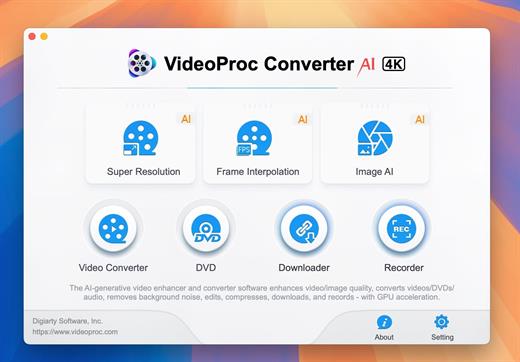
VideoProc Converter AI 8.10

Built with AI tools for video/image/audio enhancement. Remaster, upscale, restore, colorize, convert, edit, compress, download, and record with GPU acceleration. The best video converter works with videos shot with GoPro, DJI, iPhone, Android, DSLR, mirrorless, camcorders, or other 4K cameras.

VideoProc peaks Level-3 Hardware Acceleration fully powered by Intel®, AMD®, NVIDIA® GPUs, and Apple M1/M2/M3/M4 (Pro/Max/Ultra), delivering buttery smooth (4K/8K) video processing and transcoding without compromising quality.

What’s New

Version 8.10:


  • Release notes were unavailable when this listing was updated.
Compatibility

macOS 10.15 or later


Release Name: VideoProc Converter AI 8.10
Size: 256.4 MB
Links: HOMEPAGE – NFO – Torrent Search

Download: RAPiDGATOR
8 Comments