Please REGISTER or RENEW your account on RAPiDGATOR.net and support us by doing through all RAPiDGATOR working download links on main posts...
Apr 12

System Dashboard 5.1.1

System Dashboard shows the processor, memory, network and disk usages in a small and lightweight window.
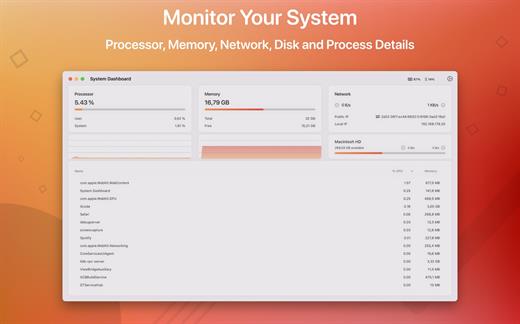
The System Dashboard shows all the important characteristics of your system on a single page.

Features:

System Overview

The main window of this app will show the most important and interesting parameters of your system on a single window.

Processor

This category shows the total, user and system CPU usage. The number of threads and tasks is also shown.

Memory

This category shows the used, wired, compressed and free memory of your system.

Network

The network category shows the current download- and upload speed but also the number of open connections and your internet IP address.

Batteries

The app also checks the battery status of connected Bluetooth devices. All Apple peripherals are supported.

What’s New

Version 5.1.1:


  • Release notes were unavailable when this listing was updated.
Compatibility

macOS 11.5 or later
Apple Silicon or Intel Core processor


Release Name: System Dashboard 5.1.1
Size: 7.5 MB
Links: HOMEPAGE – NFO – Torrent Search

Download: RAPiDGATOR

8 Comments
Apr 12

Overlay 4.34

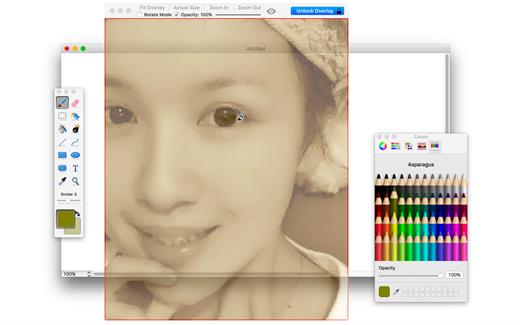
A frame that allows you to have an image or even PDF displayed semi-transparently in front of everything. It enables you to copy, trace, or compare designs, images, and documents with ease since you can lock the frame and make it undisturbed by mouse gestures.

It’s a transparent overlay of an image or document on your screen that you can click through – like a transparent sticker on your screen.

Overlay is especially useful for artists, designers, and students as it allows you to make your art or design from or reference photos and screenshots.

What’s New

Version 4.34:


  • Release notes were unavailable when this listing was updated.
Compatibility

macOS 10.15 or later
Apple Silicon or Intel Core processor


Release Name: Overlay 4.34
Size: 4.5 MB
Links: HOMEPAGE – NFO – Torrent Search

Download: RAPiDGATOR
8 Comments
Apr 12

macOS Tahoe 26.4.1 (25E253)

macOS Tahoe 26 is the next major version of the macOS operating system, unveiled by Apple on June 9, 2025 at WWDC.

Named after Lake Tahoe, located on the California-Nevada border, it continues the tradition of naming macOS after iconic California locations.

The focus of macOS Tahoe is on a new design, improved integration with other Apple devices, and enhanced Apple Intelligence capabilities.

Key features of macOS Tahoe:

Liquid Glass design:


  • A completely redesigned interface using the new Liquid Glass visual language inspired by visionOS (Apple’s Vision Pro operating system). Interface elements such as menus, toolbars, and the dock have become translucent, creating the effect of glass reflecting and refracting light.
  • Fully transparent menu bar that visually expands the workspace.
  • Updated app icons unified with iOS and iPadOS, with support for light, dark, and color options, as well as a new transparent style.
Apple Intelligence:

  • Advanced artificial intelligence features, including Live Translation to automatically translate messages and subtitles in FaceTime.
  • Genmoji and Image Playground updates: Users can create new emoji by combining existing ones, and generate images in styles such as oil painting or vector graphics.
  • Improved reminders: Apple Intelligence analyzes emails, notes, and web pages, automatically categorizing tasks.
Improved Continuity integration:

  • The Phone app is now available on Mac, allowing you to take calls, view contacts, view voicemail, and use features like Call Screening and Hold Assist.
  • Live Activities support with iPhone: notifications such as shipping or travel status are displayed in the Mac menu bar.
    iPhone Mirroring lets you launch iPhone apps directly on your Mac via Spotlight.
Updated Spotlight:

  • Significantly improved search engine that now not only searches for files and apps, but also performs actions such as creating events, starting podcasts, or sending messages.
  • Support for customizable quick commands (like “sm” to send a message or “ar” to add a reminder).
    Integration with cloud services and the ability to search PDFs and other documents.
New apps and features:

  • Games app with a catalog of installed games, support for chat, invitations, and an overlay for settings while playing.
  • The Journal app is now available on Mac.
  • Safari improvements: updated tab design and song lyrics translation in Apple Music.
  • Removal of Launchpad, replaced by an “Apps” feature integrated into Spotlight, similar to App Library in iOS.
Accessibility:

  • New features such as Magnifier (using the iPhone camera to zoom in), Braille support, and Vehicle Motion Cues to reduce motion sickness.
  • Accessibility Nutrition Labels in the App Store that display information about supported accessibility features.
New numbering:

  • Apple switched to a unified numbering system where all operating systems (iOS, iPadOS, macOS, etc.) got version 26, which corresponds to the year after the announcement (2025-2026). macOS still retains its unique name, Tahoe.
What’s New

Version 26.4.1:


  • Release notes were unavailable when this listing was updated.
Compatibility

macOS 14.0 or later


Release Name: macOS Tahoe 26.4.1 (25E253)
Size: 17 GB
Links: HOMEPAGE – NFO – Torrent Search

Download: RAPiDGATOR

2 Comments
Apr 12

AlDente Pro 1.37.2

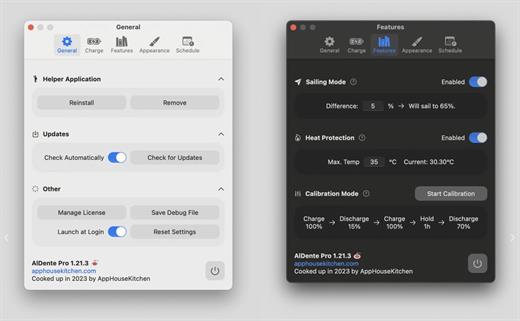
AlDente allows you to limit your MacBook from charging above a certain percentage. This will not only decrease Battery wear but also increase longevity of your Battery.

Features:


  • Charge Limiter allows you to set your maximum charging percentage between 20 and 100 percent. You can either set it by using the slide bar or by typing in the desired percentage in the field above and pressing enter afterwards.
  • Discharge – This feature allows your MacBook to run completely on Battery even if it is plugged in. Therefore, you can actively discharge your MacBook to a more healthy percentage. Unfortunately, while Discharge is activated, clamshell mode is not supported due to technical limitations.
What’s New

Version 1.37.2:


  • Fixed a bug that caused the app to prompt users to re-install the helper after every restart.
  • Fixed a bug that prevented the creation of a debug file while no helper is installed.
  • General improvements and fixes.
Compatibility

macOS 11 or later
Apple Silicon or Intel Core processor


Release Name: AlDente Pro 1.37.2
Size: 10.4 MB
Links: HOMEPAGE – NFO – Torrent Search

Download: RAPiDGATOR

8 Comments
Apr 12

Pixelmator Pro 4.2

Pixelmator Pro is now part of Apple Creator Studio, an amazing collection of Apple’s most powerful creative apps designed to help you bring your ideas to life. The suite includes Final Cut Pro, Logic Pro, Pixelmator Pro, Motion, Compressor, and MainStage — plus premium content and intelligence features in Keynote, Pages, Numbers, and Freeform*, all in one simple plan.

New Features

Pixelmator Pro for iPad


  • Enjoy a completely reimagined editing experience, with Pixelmator Pro tools for design, photography, painting, and illustration now fully optimized for touch
  • Design and paint with pixel-perfect precision using Apple Pencil, with full support for hover, squeeze, double-tap, and palm rejection
  • Insert photos to your compositions directly from your iPad camera as new layers
  • Easily roundtrip between Pixelmator Pro for iPad and Mac, syncing edits through iCloud, and pick up projects wherever you left off
Warp Tool and Mockups

  • Use the all-new Warp tool to twist and bend images, shapes, text, and even video layers by pushing and pulling individual points on a warp grid
  • Automatically warp layers into common shapes like cylinder, arc, flag, and more with 12 smart warp presets, or quickly split layers into 3×3, 4×4, or 5×5 warp grids
  • Explore 2 new collections of premium product and apparel mockups that make the most of the new warp functionality to quickly showcase your designs on t-shirts, mugs, and more
Overview
Pixelmator Pro has everything you need to create designs, edit photos, draw illustrations, paint digital art, and be creative in just about any way you can imagine.

Edit and Enhance


  • Adjust the colors in your photos and even videos in any way you want using a powerful collection of pro-grade color adjustments
  • Use machine learning-powered tools to automatically remove image background, enhance colors, increase resolution, and more
  • Quickly make good-looking shots spectacular with over 40 color adjustment presets and combine any of over 70 versatile effects to develop any artistic or special looks you can imagine
  • Enjoy full support for RAW photos from over 750 of the most popular digital cameras
Create Stunning Designs

  • Harness the full power of layer-based editing with support for vector shapes, typography features, and even video to design posters, webpages, or apps from scratch
  • Customize the look of layers using layer styles, such as Fill, Stroke, Drop Shadow, and Inner Shadow
  • Create beautiful designs in moments with a vast collection of beautiful templates and premium, fully customizable mockups
Draw and Illustrate

  • Design vector graphics using a full set of vector tools, including Pen and Freeform Pen tools
  • Speed up creating illustrations with stunning shapes including categories like arches, plants, and organic shapes
  • Add customizable Smart Shapes to quickly create your custom shapes
Sketch and Paint

  • Paint naturally with a collection of beautiful, handcrafted dual-texture brushes
  • Take advantage of full support for Apple Pencil on iPad and graphics tablets on Mac to paint with pressure and tilt sensitivity
  • Enjoy incredibly fast and responsive painting thanks to a cutting-edge painting engine powered by Metal graphics technology
Compatibility

  • Open files in popular image and video formats, including JPEG, TIFF, PNG, PSD, HEIF, SVG, AI, Illustrator EPS, PDF, GIF, BMP, TGA, WebP, JPEG-2000, AVIF, MP4, MOV, HDR images, videos, and more
  • Share your images or videos to Photos, Mail, AirDrop, and other locations
  • Premium content and features in Freeform are not currently available and are expected to be included in the Apple Creator Studio subscription later this year.
What’s New

Version 4.2:


  • Release notes were unavailable when this listing was updated.
Compatibility

macOS 26.0 or later.


Release Name: Pixelmator Pro 4.2
Size: 587.7 MB
Links: HOMEPAGE – NFO – Torrent Search

Download: RAPiDGATOR
9 Comments
Apr 10

Paste 6.4.0

Paste is a new way to copy and paste. It keeps everything you’ve ever copied, and lets you use your clipboard history anytime you need it across all your devices. It recognizes and stores text, images, links, files, and any other type of content, and generates informative previews for easy browsing.

Paste works in the background and tightly integrates into your system and your workflow. An intuitive user interface and improved user experience allows you to focus on your core tasks and not on the application itself.

Features


  • Extends your clipboard history capacity up to unlimited
  • Pinboards and favorite snippets
  • iCloud sync across all your devices running Paste
  • History management, rules and exceptions
  • Intelligent search with flexible filters
  • Select and paste multiple items simultaneously
  • Drag-and-drop multiple items to any application
  • Paste plain or rich text
  • Send clipboard history to other devices via AirDrop or share with your friends
Note:

iCloud not available, It might ask for subscription on the first launch, just ignore and close the window.

xattr -cr /Applications/Paste.app

What’s New

Version 6.4.0:


  • Release notes were unavailable when this listing was updated.
Compatibility

macOS 13.0 or later.


Release Name: Paste 6.4.0
Size: 22.6 MB
Links: HOMEPAGE – NFO – Torrent Search

Download: RAPiDGATOR
5 Comments
Apr 10

HarborDrop 1.1.8

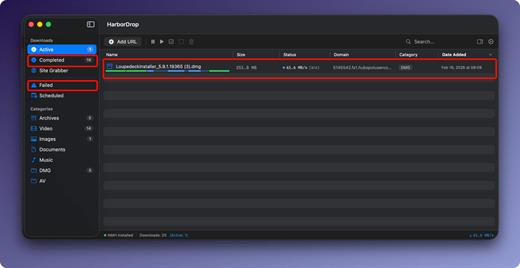
HarborDrop for Mac is a modern download manager built specifically for macOS, designed to make file downloads faster, smarter, and more organized. It helps Mac users accelerate large downloads, capture HLS and m3u8 streams, and manage files more efficiently with automatic categorization and browser integration. According to the official website, HarborDrop is positioned as a high-speed macOS download manager with support for multi-segment acceleration and streamlined file handling.

One of HarborDrop’s main advantages is its multi-segment download acceleration, which can split a file into multiple parts and download them simultaneously for better speed. The developer claims this can provide up to 6x faster downloads in supported scenarios. This makes the app especially useful for users who frequently download large files, media assets, software packages, or online video resources on Mac.

HarborDrop for Mac also supports HLS / m3u8 stream downloading, giving users a convenient way to capture compatible streaming content for offline access. In addition, its browser integration helps simplify the download process, while auto-categorization keeps downloaded files neatly organized without extra manual work. These features make it a practical choice for both everyday users and professionals who want a cleaner and faster download workflow on macOS.

What’s New

Version 1.1.8:


  • Release notes were unavailable when this listing was updated.
Compatibility

macOS 15.0 or later


Release Name: HarborDrop 1.1.8
Size: 8.7 MB
Links: HOMEPAGE – NFO – Torrent Search

Download: RAPiDGATOR

5 Comments
Apr 10

Pixelmator Pro 3.8.0

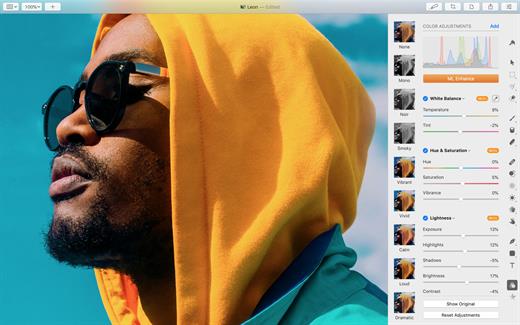
Pixelmator Pro is an incredibly powerful, beautiful, and easy to use image editor designed exclusively for Mac.

With a wide range of professional-grade, nondestructive image editing tools, Pixelmator Pro lets you bring out the best in your photos, create gorgeous compositions and designs, draw, paint, apply stunning effects, design beautiful text, and edit images in just about any way you can imagine. And thanks to its intuitive and accessible design, Pixelmator Pro is delightfully easy to use – whether you’re just starting out with image editing or you’re a seasoned pro.

The modern, single-window interface is designed exclusively for working with images on a Mac. An intuitive and accessible design makes it easy for anyone to edit images – from complete beginners to design professionals.

What’s New

Version 3.8.0:


  • Release notes were unavailable when this listing was updated.
Compatibility

macOS 11.0 or later
Apple Silicon or Intel Core processor


Release Name: Pixelmator Pro 3.8.0
Size: 615.6 MB
Links: HOMEPAGE – NFO – Torrent Search

Download: RAPiDGATOR
6 Comments
Apr 10

White Noise 7.6

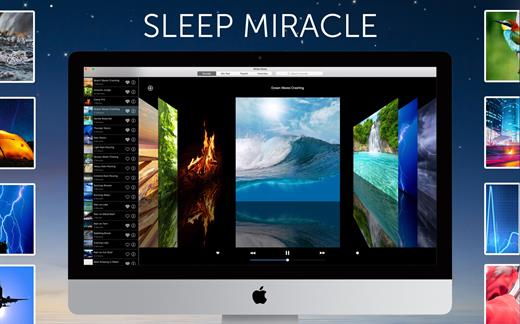
White Noise provides ambient sounds of the environment to help you relax or sleep. Are you in a hotel and miss the familiar sound of your fan or air conditioner? Flying on a plane and just want to nap? Includes high quality looping noises such as ocean waves crashing, hard rain pouring, and flowing stream water.

Features


  • Beautiful cover flow interface allows you to swipe to your favorite sound.
  • Digital Clock is the perfect bedside sleep companion. Swipe left or right to change colors. Drag up and down to adjust brightness.
  • Sound timers that slowly fade audio out so you don’t suddenly awake.
  • Multiple alarms that slowly fade in so you wake up feeling refreshed.
  • Full screen mode supported!
  • On-screen media and volume control
  • Includes beautiful images that match the high quality of each sound
  • Includes 40 ambient sounds and pictures:

    • Air, Airplane, Amazon, Beach, Blue Noise, Boat, Brown Noise, Car Rain, Cars, Cat Purring, Chimes, City, Clock, Clothes Dryer, Crickets, Crowd, Extreme Rain, Fan, Fireplace, Frogs, Hair Dryer, Heavy Rain, Heartbeat, Light Rain, Ocean, Pink Noise, Rain Storm, Shower, Sprinkler, Stream, Tibetan Singing Bowl, Thunder, Train, Vacuum, Violet Noise, Washer, Water, Water Drip, White Noise, and Wind.
What’s New

Version 7.6:


  • Release notes were unavailable when this listing was updated.
Compatibility

macOS 11.5 or later.


Release Name: White Noise 7.6
Size: 53.8 MB
Links: HOMEPAGE – NFO – Torrent Search

Download: RAPiDGATOR

4 Comments
Apr 10

2Do 2.9.77

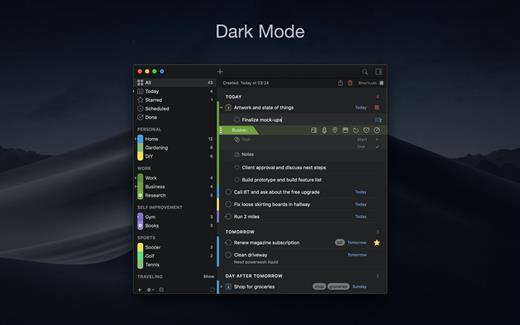
2Do lets you take a completely different approach to managing your tasks. With its extremely simple-to-use interface and a comprehensive and flexible set of powerful features, it lets you focus on what’s most important to you: your life. There is no wrong way of using 2Do, and unlike other to-do apps, it won’t force you to use a particular task management methodology. 2Do will simply amaze you, from start to finish.

Features:


  • Simple tasks, checklists, and projects
  • Lists and smart lists
  • Tags
  • Sync
  • Quick Look
  • Quick entry
  • Alarms and notifications
  • Password protection
  • Themes
  • Automatic backups
What’s New

Version 2.9.77:


  • Release notes were unavailable when this listing was updated.
Compatibility

macOS 10.12 or later.
Apple Silicon or Intel Core processor


Release Name: 2Do 2.9.77
Size: 59.8 MB
Links: HOMEPAGE – NFO – Torrent Search

Download: RAPiDGATOR

5 Comments