Please REGISTER or RENEW your account on RAPiDGATOR.net and support us by doing through all RAPiDGATOR working download links on main posts...
June 4

Folx Pro 5.34

Folx combines two functionalities – of download manager and torrent client. It makes downloading extremely easy: just open the page with the file to be downloaded, click the link in your browser, and Folx will start the download for you. Its auto-resume option comes handy when the downloading gets interrupted. You can also assign a tag or a few to the downloaded content for accurate and easy search through the downloaded files.
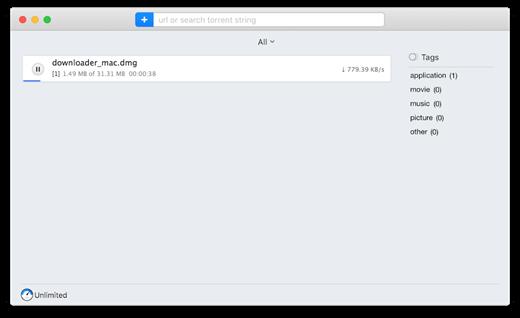
There are many basic features included in the free trial. However, the Pro version brings such handy features as splitting the downloads in up to 20 threads which speeds up the download process; scheduling the download tasks according to your convenience; smart speed adjustment option (download speed will be adjusted automatically whenever you need to use Internet traffic to run other applications), iTunes integration, searching the web for torrents directly from Folx and password manager.

What’s New

Version 5.34:


  • Improved: compatibility with macOS 11
  • Fixed: an issue with CPU load when using the Folx extension for Chrome and Firefox
  • Fixed: an issue with the Folx extension work when opening multiple windows in Chrome
  • Note: for the fixed issues to come into force, you need to update Folx extensions.
Compatibility

macOS 10.9 or later
Apple Silicon or Intel Core processor


Release Name: Folx Pro 5.34
Size: 30.1 MB
Links: HOMEPAGE – NFO – Torrent Search

Download: RAPiDGATOR

4 Comments
June 3

Structured 4.5.0

A visual daily planner to organize tasks, routines, and habits. Stay focused, reduce overwhelm, and plan your day in one clear timeline.

Finally take control of your day.
Plan with a clear visual timeline that brings your calendar, to-dos, routines, and habits together.

Join over 1.5 million active planners who feel calmer, focus faster, and get more done — every single day.

Perfect for work, study, travel, and busy ADHD minds. Plan in minutes and stay focused all day.


  • Organize your day and week in an intuitive timeline
  • Capture ideas instantly in Inbox and sort them later
  • Sync across iPhone, iPad, Apple Watch and Mac
  • Break big projects down with notes & sub-tasks
  • Stay on track with a Pomodoro focus timer, Live Activities, and interactive widgets
  • Personalize your planner with color-coding and hundreds of icons
  • Benefit from accessibility features like VoiceOver, Voice Control, a dyslexia-friendly font, and multiple languages
  • Get a complete overview by connecting your calendars and Reminders
  • Build recurring tasks & routines that actually stick
  • Powered by AI, draft your day in seconds
  • Replan, automatically reschedules missed or forgotten tasks
  • Customize notifications to match your workflow
What’s New

Version 4.5.0:


  • Release notes were unavailable when this listing was updated.
Compatibility

macOS 14.0 or later.

Release Name: Structured 4.5.0
Size: 77.1 MB
Links: HOMEPAGE – NFO – Torrent Search

Download: RAPiDGATOR

5 Comments
June 3

Typora 1.13.7

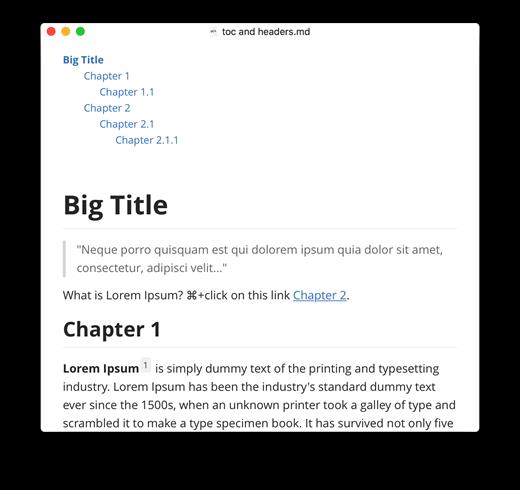
Typora gives you a seamless experience as both a reader and a writer. It removes the preview window, mode switcher, syntax symbols of markdown source code, and all other unnecessary distractions, replacing them with a real-time preview to help you concentrate on the content itself.

Features:


  • Markdown support including tables, code fences with syntax highlight, LaTeX, table of contents
  • Cross-platform
  • The real-time preview and WYSIWYG features
  • Beautiful interface and custom CSS theme support
  • Easy export
What’s New

Version 1.13.7:


  • Release notes were unavailable when this listing was updated.
Compatibility

macOS 10.13.0 or later, 64-bit processor


Release Name: Typora 1.13.7
Size: 19 MB
Links: HOMEPAGE – NFO – Torrent Search

Download: RAPiDGATOR

4 Comments
June 3

Screens 5.8.7

Streamlined and powerful VNC utility designed to provide you with all the tools you need to remotely connect to your devices from your Mac

Accessing your devices from anywhere in the world is surely great, especially if you need to perform some last minute modifications to a project or copy a certain file. This can be done from any computer that can access your device’s network using the VNC desktop sharing system.

Features

  • iCloud – Synchronize all your stored screens on all your iOS devices, including your Mac.
  • Use Screens in fullscreen mode to make it feel your remote computer is right there in front of you.
  • Easy to Use: Screens is an easy, user-friendly VNC client for Mac.
  • Secure: Screens can connect to your computer through an SSH tunnel so your session is encrypted and safe.
  • Multi-Touch: Screens supports many of the multi-touch features – such as pinch and navigation – you’re already used to on your trackpad.
  • Screens Connect: Make your computer available from anywhere with this optional helper app. Easy as flicking a switch. No messy router setup.
  • Works Anywhere: Through Wi-Fi or a 3G network.
What’s New

Version 5.8.7:


  • Release notes were unavailable when this listing was updated.
Compatibility

macOS 14.0 or later.


Release Name: Screens 5.8.7
Size: 39.6 MB
Links: HOMEPAGE – NFO – Torrent Search

Download: RAPiDGATOR
5 Comments
June 3

Zipic 1.9.8

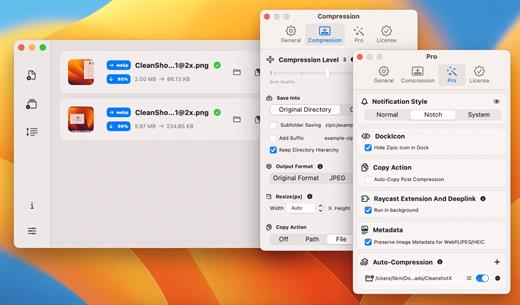
Zipic is a native macOS application designed for efficient, high-quality image compression. It lets users shrink image files locally, with no uploads or dependency on the cloud. All processing happens on your own device—so your privacy and speed stay intact.

Key Features and Highlights:


  • High Compression, Near-Lossless Quality: Zipic utilizes powerful compression algorithms to achieve a high compression ratio with minimal perceived quality loss, making the compressed image virtually indistinguishable from the original.
  • Fast & Local Processing: Being a native macOS application, all image processing occurs locally on your device. This ensures lightning-fast performance, efficient handling of massive batches, and high data privacy with no cloud uploads or network dependence.
  • Comprehensive Format Support: The tool supports a wide range of formats, including basic ones like JPEG, PNG, WebP, HEIC, and GIF, and Pro formats like AVIF, JXL, TIFF, and ICNS.
  • Effortless Workflow: It offers multiple simple compression methods, including drag-and-drop, folder monitoring, and Finder integration (right-click).
  • Custom Control: Users can create custom presets for different quality levels and scenarios, allowing for precise control over the compression outcome.
  • Pro Features for Automation: Advanced features include Clipboard auto-compress, Folder Watch for automated compression in specific directories, and integration options like Raycast Extension and Apple Shortcuts.

Zipic aims to be the seamless solution for developers, designers, bloggers, and photographers who need to optimize and compress images efficiently.

What’s New

Version 1.9.8:


  • Release notes were unavailable when this listing was updated.
Compatibility

macOS 13.0 or later


Release Name: Zipic 1.9.8
Size: 21.6 MB
Links: HOMEPAGE – NFO – Torrent Search

Download: RAPiDGATOR

4 Comments
June 3

Downie 4.12.6

A simple download manager that offers you the possibility to quickly save videos from different websites to your own disk drive.

If you are using a poor internet connection, trying to visualize videos streamlined online might not work properly since the content is loaded too slowly. Downie is a simple Mac app that can help you download those videos to your computer, and then watch them by using your default media player.

User friendly video downloader featuring support for drag and drop actions

Working with Downie is extremely straightforward: simply drop the video URL on top of the app’s main window or on the Dock icon. Downie adds the video to your downloads list, so all you have to do next is start the process by pressing the appropriate button. Of course, you can also remove items from the list.

By default, Downie downloads MP4 files and places them in your default Downloads folder, but you can easily change this via the Preferences window. The same area allows you to setup notifications, or post processing actions (convert to MP4 if necessary, or extract audio only).

Effortlessly download videos from a wide collection of hosting websites

Downie provides support for more than 400 different websites that host video content, among which there are the most popular choices, such as YouTube, Apple, LiveLeak, Vimeo, BBC, and so on. If a certain website is not included, within the app you can send a request email to the Downie developers.
Moreover, Downie also provides matching extensions for various popular web browsers, such as Firefox, Safari, Google Chrome or Chromium. The add-ons are not installed by default: open the Preferences window and install only the ones you plan to use.

Straightforward solution for downloading video content hosted online

Downie is a great tool for saving videos posted on various websites to your Mac for offline playback. The application is extremely useful especially if you have a slow internet connection.

What’s New

Downie 4.12.6:


  • New: You can now schedule start of recording for live streams.
  • New: You can now specify a custom title when using the automation URL.
  • Improved: bbc.co.uk, instagram.com, orf.at, radiofrance.fr, sbs.com.au, soundcloud.com, today.com, youtube.com.
Compatibility

macOS 10.12 or later
Apple Silicon or Intel Core processor


Release Name: Downie 4.12.6
Size: 42.5 MB
Links: HOMEPAGE – NFO – Torrent Search

Download: RAPiDGATOR
4 Comments
June 3

EdgeView 5.8.9

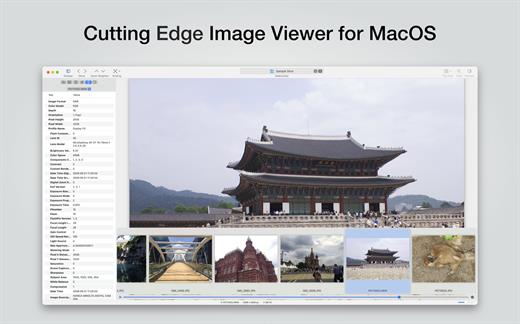
EdgeView 5 is fast image viewer has elegant user interface. EdgeView 5 is developed and designed for modern MacOS. It can open various image files such as JPEG, PNG, TIFF, BMP, and RAW file of DSLR, EPS and PDF, AI(Adobe Illustrator). Can open image files in archive directly without extraction.

User can open files, rename files, delete files from EdgeView’s file browser. Also can access to SMB/AFP/FTP network volume.

User can navigate images quickly by using keyboard shorcut, mouse wheel, trackpad gesture. EdgeVew show EXIF information, play animation GIF/PNG/WebP smoothly. Save last status to history, and restore when reopen file.

EdgeView 5 will be the best choice when viewing and managing image files.

What’s New

Version 5.8.9:


  • Release notes were unavailable when this listing was updated.
Compatibility

macOS 11.1 or later
Apple Silicon or Intel Core processor


Release Name: EdgeView 5.8.9
Size: 146.2 MB
Links: HOMEPAGE – NFO – Torrent Search

Download: RAPiDGATOR

5 Comments
June 3

Camtasia 2026.1.3

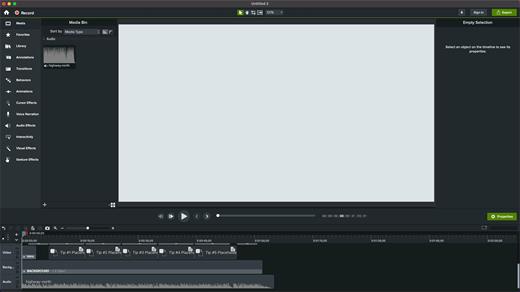
Camtasia for remarkable screencasts made easy. Create eye-catching training, presentation, and demo videos…the easy way. Camtasia screen-recording software is streamlined, intuitive, and makes you look like a pro.

Easily record onscreen activity, Keynote slides, camera video, microphone, or system audio – all with sparkling clarity. Record in front of a live audience or at your desk. Edit to perfection. Turn it into a stunning, HD-quality video at the perfect size to share on popular video sites, Apple devices, your website, blog, or anywhere you like. Make them wonder how you did it.

What’s New

Version 2026.1.3:


  • Release notes were unavailable when this listing was updated.
Compatibility

macOS 13.0 or later
Apple Silicon or Intel Core processor


Release Name: Camtasia 2026.1.3
Size: 414.1 MB
Links: HOMEPAGE – NFO – Torrent Search

Download: RAPiDGATOR
5 Comments
June 3

WhatCable Pro 0.19.2

WhatCable Pro is a deep USB-C diagnostics tool designed specifically for Apple Silicon Macs running macOS 14+. While the free version identifies basic cable capabilities, the Pro tier offers advanced, real-time troubleshooting directly from IOKit data—requiring no extra software or root access.

Key Features


  • Negotiation Diagnostics: Easily spot bottlenecks by comparing what your Mac port, cable, and connected device support side-by-side.
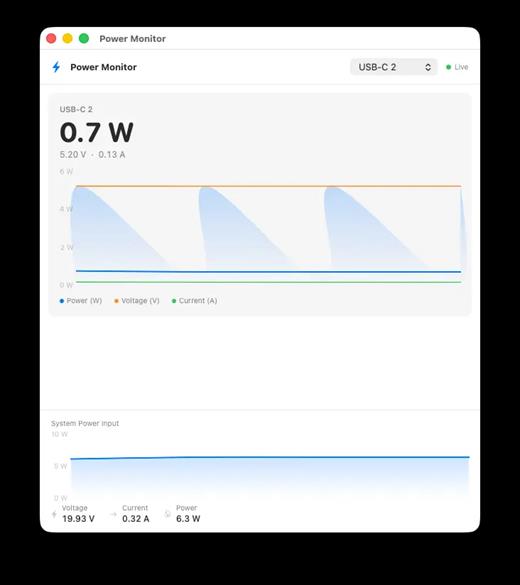
  • Live Power Metering: Displays real-time wattage, voltage, and amperage per port, updating every 2 seconds.
  • Hardware & Port Health: Tracks lifetime port errors, resets, and monitors liquid detection (LDCM) sensors.
  • Advanced Insights: Offers Power Delivery (PD) contract inspection, cable resistance estimation, and DisplayPort Alt Mode lane mapping.
  • Developer Friendly: Includes a CLI monitor mode (whatcable –monitor) and desktop widgets for quick tracking.
What’s New

Version 0.19.2:


  • Release notes were unavailable when this listing was updated.
Compatibility

macOS 14.0 or later


Release Name: WhatCable Pro 0.19.2
Size: 8.7 MB
Links: HOMEPAGE – NFO – Torrent Search

Download: RAPiDGATOR

4 Comments
June 3

ChatGPT for macOS 1.2026.119

This is the official OpenAI ChatGPT app for macOS.

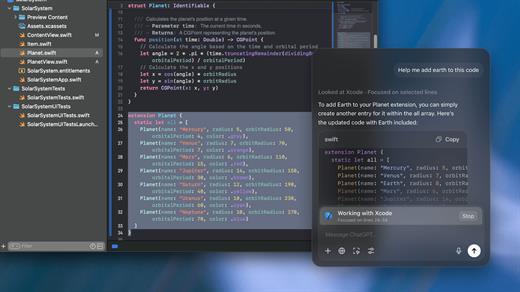
Whether you’re writing emails, exploring ideas, learning something new, or just curious about the world, ChatGPT is here to help. Designed with a clean, native experience for Mac users, the app makes it easier than ever to start a conversation with advanced AI.

Get answers. Find inspiration. Be more productive.

Free to use. Easy to try. Just ask and ChatGPT can assist with writing, learning, brainstorming, coding, and more. It’s like having an intelligent assistant, tutor, or creative partner always within reach—right from your menu bar.

Includes access to GPT-5 (for pro users), memory features, and voice input. Works seamlessly on macOS, optimized for speed and simplicity.

Key Features:

  • Instant AI-powered responses on your desktop
  • Natural language understanding and generation
  • Voice conversations with the built-in Whisper model
  • Synced across devices with your OpenAI account
  • Support for both GPT-5 (free) and GPT-5.4 (with Plus subscription)

Get started in seconds—no complex setup required. Just launch the app, l

What’s New

Version 1.2026.104:


  • Release notes were unavailable when this listing was updated.
Compatibility

macOS 14.0 and Apple Silicon (M1 or better)


Release Name: ChatGPT for macOS 1.2026.119
Size: 69.3 MB
Links: HOMEPAGE – NFO – Torrent Search

Download: RAPiDGATOR

5 Comments