Please REGISTER or RENEW your account on RAPiDGATOR.net and support us by doing through all RAPiDGATOR working download links on main posts...
Apr 2

Techtool Pro 20.1.9

TechTool Pro has long been one of the foremost utilities for keeping your Mac running smoothly and efficiently. With the release of this version, it has become more proficient than ever.
Main features:


  • TechTool Protection – TechTool Pro includes the option of installing a system preference pane to keep watch over your Mac. New features include check for I/O errors, Power On Self-Test errors, Mac notebook internal battery condition, and RAID status (if applicable). It also includes the same improvements to the SMART check in TechTool Pro. All of that, wrapped in an entirely new interface.
  • Check Computer – Check Computer is a handy way to tell TechTool Pro to run the entire suite of tests to give you the best possible snapshot of your Mac’s health. Sometimes, though, it’s nice to be able to leave tests out, or to skip certain drives. Using the new configuration panel, you have total control of the Check Computer suite. Power to the people.
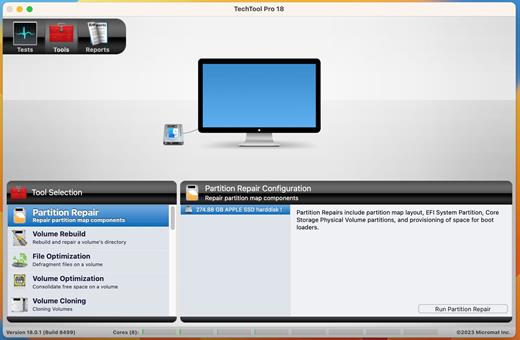
  • Partition Map – TechTool Pro has long been known for testing your Mac’s file system. It is important also to test the data structures that contain the Mac’s file system: the Partition Map. The new Partition Map test checks the partition map of a given drive for errors. Partition map errors can cause entire volumes to go missing, or prevent a Mac from booting. If errors are found, they can be repaired usin the Partition Repair tool.
  • Partition Repair – Along with Volume Rebuild, which repairs Mac file systems, the Partition Repair tool repairs the remaining portions of the drive which keeps track of the volumes on your hard drive. This includes hidden partitions which keep track of your Mac’s startup process. The Partition Repair tool does just what it says, repairing the partition maps or drives where needed.
  • SMART Check – Hard drives include a technology called SMART (Self Monitoring, Analysis and Reporting Technology) which can inform a computer about the health of its hard drives. In most utilities, just the overall results – passed or failed – are reported to the user. In the failed state, often there is little or no time to back up data before the drive fails entirely. Previous versions of TechTool Pro reported the overall status of each attribute, but some attributes don’t contribute to the failure of a drive. Now, the SMART Check has gotten smarter. TechTool Pro now knows which attributes contribute to drive failure, and will report a failing result before the drive fails completely. Giving you time to rescue your data.
  • Memory Test – TechTool Pro 7 took a revolutionary step in testing memory, making TechTool Pro’s memory testing suite the most comprehensive test available for the Mac. In TechTool Pro 10, we’ve taken some of the additional advancements used by ATOMIC, our dedicated Memory Tester, and integrated them into TechTool Pro. Now, memory is ‘cleaned’ before testing, reclaimed from macOS, maximizing the amount of RAM that can be tested.
  • Processor Benchmark – Get an objective measurement of your Mac’s processor performance. The Processor Benchmark too uses industry-standard measurement algorithms to test processor performance. Using this tool, you can get metrics that can be used to compare processor speeds apples-to-apples. Avoids the confusion of comparison using Megahertz.
  • Bluetooth – Most Macs depend on Bluetooth to connect to the tools we use to interact with our computers: the keyboard and mouse. Bluetooth problems can result in dropped connections with those devices, which can be very frustrating. Verify the proper operation of your Mac’s Bluetooth hardware. Make sure that not only your input devices, but also your audio and fitness devices can connect to your Mac by checking the Bluetooth hardware on your Mac.
  • Network Interfaces – Most Macs spend the majority of their lives connected to the internet. If the ethernet or wifi adapters in your Mac aren’t working, the valuable connection to the internet can fail. The new Network Interfaces test can test any connected network interface for errors. It not only tests ethernet and wifi, but also any other supported internet connection, ethernet over USB, VPN connections, even a FireWire network conneciton. Ensure the reilability of your internet and intranet connections by testing your Mac’s network interfaces.
What’s New

Version 20.1.9:


  • Release notes were unavailable when this listing was updated.
Compatibility

macOS 10.13 or later.
Apple Silicon or Intel Core processor


Release Name: Techtool Pro 20.1.9
Size: 315.8 MB
Links: HOMEPAGE – NFO – Torrent Search

Download: RAPiDGATOR

10 Comments
Apr 2

Unite Pro 1.2

Unite for macOS lets you turn any website into a fully native Mac app with deep customization, fast performance, and macOS integration. Instead of opening sites in a browser with many tabs, Unite creates standalone apps that live in your Dock, support native window controls, and behave like real macOS software.

With Unite you can create an app in seconds by entering a URL, choosing an icon, and tailoring appearance and behavior to your preferences. Each app runs in its own isolated, lightweight WebKit‑based environment that feels more integrated and efficient than browser web apps or Electron alternatives. 

Unite apps offer extensive customization. You can hide or show title bars, adjust colors to match site branding, control window appearance, manage multiple tabs with advanced options like pinning and locking, and choose how links open within or outside the app. Notifications and macOS Focus Modes work per app, helping reduce distractions. 

Unite also includes flexible app modes, such as standard Mac windows, sidebar views, floating windows, compact views, and menu bar utilities. A built‑in ad blocker and customizable keyboard shortcuts streamline everyday use and navigation. 

What’s New

Version 1.2:


  • Release notes were unavailable when this listing was updated.
Compatibility

macOS 15 or later


Release Name: Unite Pro 1.2
Size: 28.9 MB
Links: HOMEPAGE – NFO – Torrent Search

Download: RAPiDGATOR

8 Comments
Apr 2

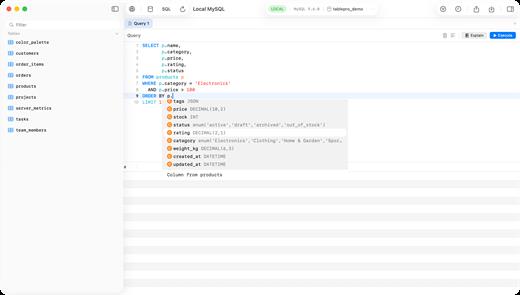
TablePro 0.27.1

TablePro is a native macOS database client built with SwiftUI and AppKit, designed to deliver a fast and seamless experience for working with databases. Unlike traditional tools built on Java or Electron, TablePro runs as a true Mac application, launching instantly and using minimal system resources. 

It supports major databases including MySQL, PostgreSQL, MariaDB, and SQLite, providing a unified interface for managing data, writing queries, and exploring schemas. 

With a focus on performance and usability, TablePro offers a powerful SQL editor, an intuitive data grid, and secure connection options, making it suitable for both everyday queries and complex database workflows.

What’s New

Version 0.27.1:


  • Release notes were unavailable when this listing was updated.
Compatibility

macOS 14.0 or later


Release Name: TablePro 0.27.1
Size: 47.3 MB
Links: HOMEPAGE – NFO – Torrent Search

Download: RAPiDGATOR

10 Comments
Apr 2

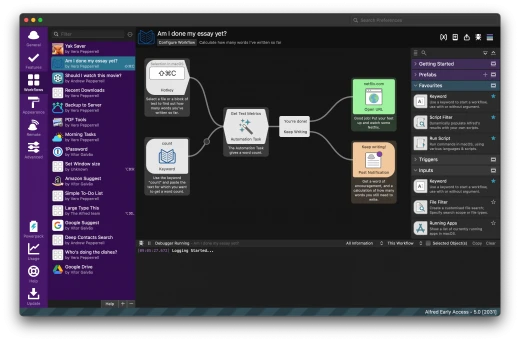
Alfred 5 Powerpack 5.7.3

Alfred is a productivity app for macOS that helps you get things done faster. It can be used to launch apps, find files, and control your Mac with hotkeys. Alfred also has a powerful workflow engine that can be used to automate tasks.

Features:


  • App Launcher: Alfred can be used to launch apps quickly and easily. You can type the name of the app you want to launch, or you can use a hotkey.
  • File Search: Alfred can be used to find files quickly and easily. You can type the name of the file you want to find, or you can use a hotkey.
  • System Control: Alfred can be used to control your Mac with hotkeys. You can use hotkeys to adjust the volume, put your Mac to sleep, and more.
  • Workflows: Alfred has a powerful workflow engine that can be used to automate tasks. You can use workflows to do things like send emails, create notes, and more.
What’s New

Version 5.7.3:


  • Release notes were unavailable when this listing was updated.
Compatibility

macOS 10.14 or later
Apple Silicon or Intel Core processor

Release Name: Alfred 5 Powerpack 5.7.3
Size: 7.3 MB
Links: HOMEPAGE – NFO – Torrent Search

Download: RAPiDGATOR
9 Comments
Apr 2

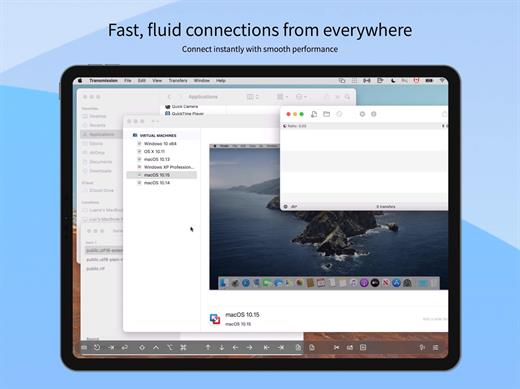
Screens 5.8.4

Streamlined and powerful VNC utility designed to provide you with all the tools you need to remotely connect to your devices from your Mac

Accessing your devices from anywhere in the world is surely great, especially if you need to perform some last minute modifications to a project or copy a certain file. This can be done from any computer that can access your device’s network using the VNC desktop sharing system.

Features


  • iCloud – Synchronize all your stored screens on all your iOS devices, including your Mac.
  • Use Screens in fullscreen mode to make it feel your remote computer is right there in front of you.
  • Easy to Use: Screens is an easy, user-friendly VNC client for Mac.
  • Secure: Screens can connect to your computer through an SSH tunnel so your session is encrypted and safe.
  • Multi-Touch: Screens supports many of the multi-touch features – such as pinch and navigation – you’re already used to on your trackpad.
  • Screens Connect: Make your computer available from anywhere with this optional helper app. Easy as flicking a switch. No messy router setup.
  • Works Anywhere: Through Wi-Fi or a 3G network.

What’s New


Version 5.8.4:

  • Release notes were unavailable when this listing was updated.

Compatibility


macOS 14.0 or later.

Release Name: Screens 5.8.4
Size: 39 MB
Links: HOMEPAGE – NFO – Torrent Search

Download: RAPiDGATOR

8 Comments
Apr 2

ForkLift 4.6.0

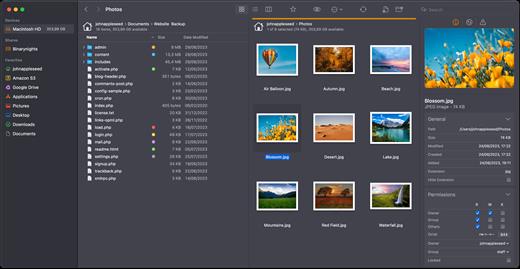
ForkLift is a powerful file manager and ferociously fast FTP client clothed in a clean and versatile UI that offers the combination of absolute simplicity and raw power expected from a well-executed Mac software.

ForkLift will connect to any remote server SFTP, FTP, WebDAV, Amazon S3, Backblaze B2, Google Drive, Rackspace CloudFiles, SMB, AFP and NFS shares on your local network,- pretty much anything you can plug into or hook up to a Mac. ForkLift also carries a complete toolbox for managing your files, including Folder Synchronization, Multi-Rename, Archive handling, Application deleter, editing files over remote connections and many more. All these power features are packaged into a Finder-like, dual-pane interface that delivers superior workflow while remaining absolutely familiar to use, along with Quick Look, Spotlight search and all.

Features


  • Completely rewritten entirely in Swift
  • ForkLift Mini
  • Two-way Sync
  • Preview
  • Quick Open
  • Multi Rename
  • Dark Mode
  • Dual Pane split vertically or horizontally
  • Favorite Sync via Dropbox
  • Dropbox Support
  • Transfer bandwidth throttling
  • Tags Support
  • Disklet
  • Sync Browsing
  • Tabs
  • Search by name, extention, kind, tags, or content
  • Quick Select
  • App Deleter
  • Remote Editing
  • Archive Management
  • Keyboard Control
  • Workspaces
  • FXP Copy
  • Tools
  • Git Support
  • Open in Terminal, iTerm, or Hyper
  • Hidden Files
  • Share
  • Possible to set as default file viewer
  • File Compare with FileMerge, Kaleidoscope, Beyond Compare, and Araxis Merge support
  • Multilingual: English, Chinese Simplified, Czech, French, German, Hungarian, Italian, Polish, Russian, Spanish and Ukrainian
What’s New

Version 4.6.0:


  • Release notes were unavailable when this listing was updated.
Compatibility

macOS 14.6 or later


Release Name: ForkLift 4.6.0
Size: 20.7 MB
Links: HOMEPAGE – NFO – Torrent Search

Download: RAPiDGATOR
7 Comments
Apr 2

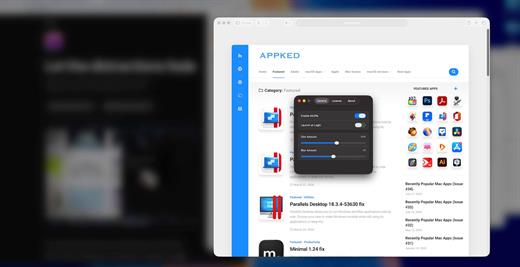
Muffle 1.2

Muffle is a lightweight macOS utility designed to enhance your productivity by reducing visual distractions. It automatically blurs and dims all background windows, keeping your active window clear and in focus.

Unlike traditional dimming tools, Muffle combines both blur and dimming effects to create a more natural and immersive focus environment, while maintaining extremely low system resource usage.

What’s New

Version 1.2:


  • Release notes were unavailable when this listing was updated.
Compatibility

macOS 114.0 or later


Release Name: Muffle 1.2
Size: 4.6 MB
Links: HOMEPAGE – NFO – Torrent Search

Download: RAPiDGATOR

8 Comments
Apr 2

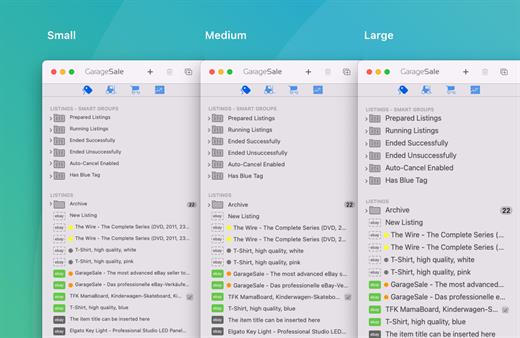
GarageSale 9.9.5

Develop professional, attractive listings. GarageSale features iPhoto integration, what-you-see-is-what-you-get (WYSIWYG) text editing, free image hosting, and over 130 free auction designs. And with these features, among many more, it’s never been easier to create professional, eye-catching eBay listings.

What’s New

Version 9.9.5:


  • Release notes were unavailable when this listing was updated.
Compatibility

macOS 10.12.0 or later
Apple Silicon or Intel Core processor


Release Name: GarageSale 9.9.5
Size: 69.7 MB
Links: HOMEPAGE – NFO – Torrent Search

Download: RAPiDGATOR
9 Comments
Apr 2

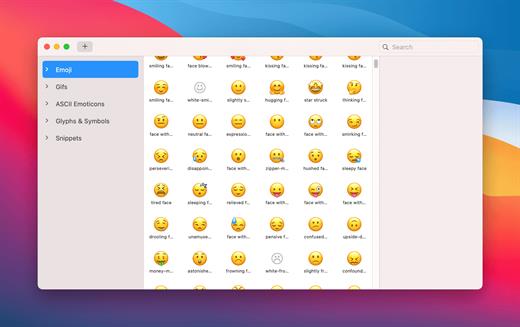
Rocket Pro 1.9.5

Rocket provides you with Slack-style emoji everywhere on your Mac.


  • The fastest, smoothest Slack-style emoji picker for your Mac
  • Access to every emoji through the shortcut window
  • Pick your favourite skin tone
  • Light and dark themes
  • Scroll and search your way through every emoji in the Search & Browse window
  • Use Rocket to send and store gifs, images, and memes
  • Set custom emoji shortcuts and add your own emoji

What’s New

Version 1.9.5:


  • Release notes were unavailable when this listing was updated.
Compatibility

macOS 10.14 or later


Release Name: Rocket Pro 1.9.5
Size: 12.1 MB
Links: HOMEPAGE – NFO – Torrent Search

Download: RAPiDGATOR

9 Comments
Apr 2

NotchFlow 1.2.1

NotchFlow is a minimalist macOS productivity app that turns your Mac’s notch into an interactive control center for focus and workflow. Instead of switching between apps, you can manage focus sessions, control music, and take breaks directly from the top of your screen.

Built around the idea of reducing distractions, NotchFlow combines a Pomodoro timer, music integration, and subtle visual cues into a single, always-available interface. It helps you stay in the zone without interrupting your workflow.

Designed to be lightweight and non-intrusive, NotchFlow runs quietly in the background while keeping essential controls within reach — right where your attention already is.

What’s New

Version 1.2.1:


  • Release notes were unavailable when this listing was updated.
Compatibility

macOS 13.0 or later


Release Name: NotchFlow 1.2.1
Size: 121.6 MB
Links: HOMEPAGE – NFO – Torrent Search

Download: RAPiDGATOR
9 Comments