Please REGISTER or RENEW your account on RAPiDGATOR.net and support us by doing through all RAPiDGATOR working download links on main posts...
Apr 3

UnlockGo 6.3.2

Supported devices & iOS versions
Remove Screen Passcode
• All iPhone, iPad, iPod touch
• iOS 7.0 and later

Bypass iCloud Activation Lock
• iPhone 5s – iPhone X
• iOS 12.0 and later

Remove Apple ID
• All iPhone, iPad, iPod touch
• iOS 11.4 and later

Turn Off FMI
• iPhone 6s – iPhone 12 Pro Max
• iOS 13.0 – 14

What’s New

Version 6.3.2:


  • Release notes were unavailable when this listing was updated.
Compatibility

macOS 10.10 or later


Release Name: UnlockGo 6.3.2
Size: 171.8 MB
Links: HOMEPAGE – NFO – Torrent Search

Download: RAPiDGATOR

8 Comments
Apr 3

Topaz Photo 1.4.0

AI-powered photo editing tool that improves photos pixel by pixel.
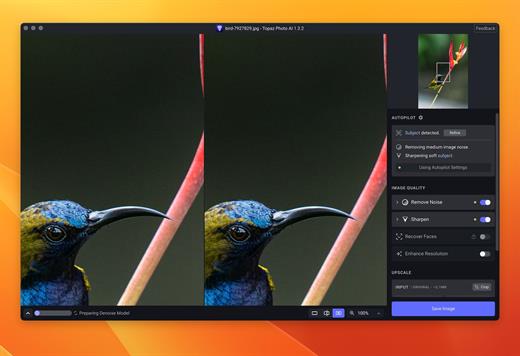
What is Topaz Photo AI? It is a new-generation photo editing tool that uses AI technology to perfect and denoise pictures pixel by pixel. Topaz Photo AI simplifies the editing process for photographers and designers. Its groundbreaking suite offers multiple tools to satisfy both amateurs and confident pros.

Topaz Photo AI allows editors to denoise, sharpen, upscale, preserve text, recover faces, remove objects, correct lighting, and balance color. Professional photo editors will be amazed at how much power Topaz Photo AI gives, and beginners will appreciate how easy and intuitive this tool is.

Topaz Photo AI helps you Sharpen, remove noise, and increase the resolution of your photos with tomorrow’s technology.

Maximize the potential of your photos.

Magically enhance image quality and resolution based on a deep understanding of the contents of your photo.

Enhance Quality

Maximize the visual quality of your images with best-in-the-world noise and blur reduction. Particularly useful in difficult settings with fast-moving subjects, low light, or atypical environments.

Crisp, clear, and noise-free.

It’s a magical feeling to see noise evaporate while sharp detail remains. Topaz Photo AI understands the contents of your image and accurately determines the difference between image detail and noise.

Tack-sharp subjects.

Unlike traditional sharpening, Topaz Photo AI’s Sharpen module naturally reverses root causes of blurriness (camera shake, motion blur, missed focus) to create more natural results. In the absence of blur, sharpness remains – crisp, clear detail that’s free of edge haloes or other artifacts.

Increase Resolution

Join hundreds of thousands of photographers and designers who use Topaz technology to generate real image detail for better printing, cropping, restoration, and more.

Magically add real detail.

Topaz Photo AI “remembers” real detail from millions of similar images, then fills in missing pixels based on that understanding. (It’s like how you can picture a friend’s face without being physically in front of them.) Add real image resolution to your photos for tighter crops or better prints.

Recover faces naturally.

Introduced in 2023, the breakthrough Face Recovery AI offers remarkable detail enhancement for low-resolution or blurry faces.

Intelligently improve lighting.

It’s a magical feeling to see noise evaporate while sharp detail remains. Topaz Photo AI understands the contents of your image and accurately determines the difference between image detail and noise.

Improve efficiency with Autopilot

Specify adjustments based on detected image attributes like subject, faces, noise, and blur levels. Autopilot allows you to mold Photo AI to your workflow and unique photographic style.

Easy workflow

Topaz Photo AI works directly on your Mac or PC. Use the standalone to batch process thousands of images in sequence, or use it as a Photoshop plugin for tight workflow integration. We’ve also partnered with major hardware manufacturers like Nvidia, AMD, and Intel to make Photo AI run as fast as possible for your computer.

What’s New


Version 1.4.0:

  • Release notes were unavailable when this listing was updated.

Compatibility


macOS 10.12 or later

Release Name: Topaz Photo 1.4.0
Size: 1.6 GB
Links: HOMEPAGE – NFO – Torrent Search

Download: RAPiDGATOR

7 Comments
Apr 3

CloudMounter 4.17

CloudMounter is a cloud manager for easy work with data stored on multiple cloud services.

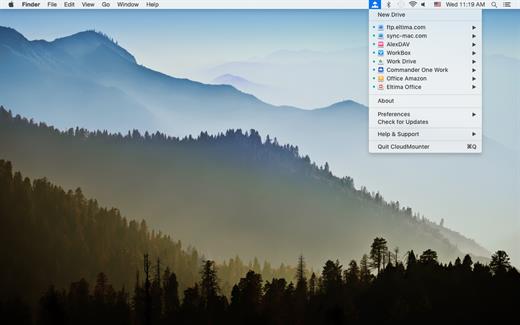
CloudMounter makes working with multiple cloud storage services easy by letting you access and manage your data through your Mac’s Finder. CloudMounter works with all popular services such as OneDrive, Google Drive, OpenStack Swift, Amazon S3 and Dropbox. Not only that – the app also allows you to connect to remote FTP, SFTP, FTPS and WebDAV servers the way you would connect to any shared location in your local network.

You can also increase cloud security with data encryption. Encrypted files cannot be read without a decryption key, so even if someone gets ahold of your data, they won’t be able to get into its contents. With CloudMounter your login data is protected as well, credentials you enter are stored in Mac OS Keychain and sent directly to the servers and storage accounts.

What’s New

Version 4.17:


  • Release notes were unavailable when this listing was updated.
Compatibility

macOS 10.14 or later


Release Name: CloudMounter 4.17
Size: 97 MB
Links: HOMEPAGE – NFO – Torrent Search

Download: RAPiDGATOR

7 Comments
Apr 2

Yate 9.0

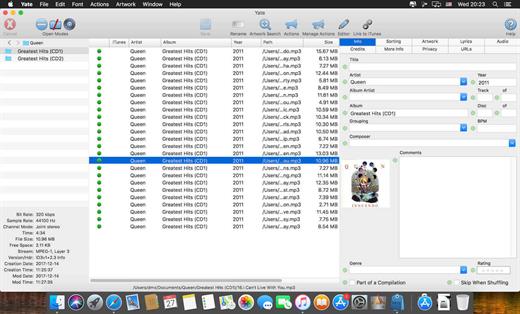
Yate was developed for people who want complete control over their tagging experience. Supports audio in AIFF, APE, DFF, DSF, FLAC, OGG OPUS, OGG VORBIS, M4A, M4B, MP3, MP2, MP4, STEM.MP4, WAV and WV files. Supports video in M4V and MP4.

Yate has a long list of features; most importantly, an innovative scripting system called actions. Actions can be used to update all of an album’s tags with a single operation. Yate also supports integration with AcouticBrainz, AcoustID, Beatport, Discogs, iTunes, MusicBrainz and TMDb. All changes can be easily reverted and individual changes can be undone in any order. Whether you want to automatically or manually tag your files, Yate can do it all!

What’s New

Version 9.0:


  • Release notes were unavailable when this listing was updated.
Compatibility

macOS 10.10 or later


Release Name: Yate 9.0
Size: 17.7 MB
Links: HOMEPAGE – NFO – Torrent Search

Download: RAPiDGATOR

10 Comments
Apr 2

ProFind 1.37

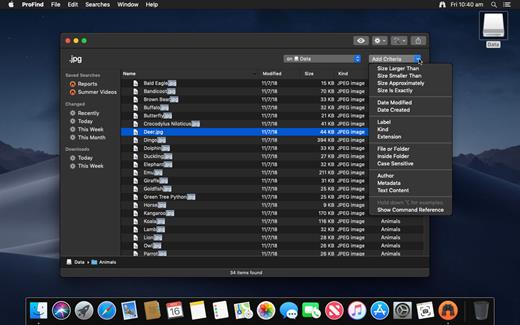
ProFind is advanced file search app for macOS.
With powerful features and great performance, ProFind delivers advanced file search for macOS. And with support for natural language queries, application launching, hidden location searches, scripting and more.
Search inside invisible folders and packages. Searches any disk type.
Uses kernel based searching (searchfs) when available. Uses metadata indexes (as used by Spotlight) when available to improve performance. Autocompletion for application names. Large icon view for one or two search results.
Under it’s elegant user interface, ProFind combines the power of macOS’s different search capabilities to make sure it finds all the files your looking for. And it’s been carefully tuned for performance and responsiveness.

What’s New

Version 1.37:


  • Release notes were unavailable when this listing was updated.
Compatibility

macOS 10.13.0 or later
Apple Silicon or Intel Core processor


Release Name: ProFind 1.37
Size: 13.2 MB
Links: HOMEPAGE – NFO – Torrent Search

Download: RAPiDGATOR

11 Comments
Apr 2

Infuse Pro 8.4.1

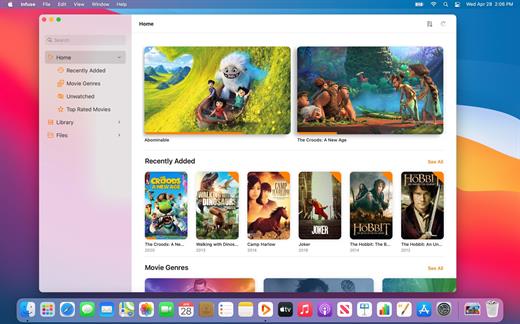
Ignite your video content with Infuse – the beautiful way to watch almost any video format on your iPhone, iPad, Apple TV, and Mac. No need to convert files! Infuse is optimized for macOS 12, with powerful streaming options, Trakt sync, and unmatched AirPlay & subtitle support. Gorgeous interface. Precise controls. And silky-smooth playback.


Play more video types

A powerful video player that plays just about anything, including the standard MP4, M4V and MOV – plus MKV, AVI, WMV, MTS, ISO, VIDEO_TS, FLV, OGM, OGV, ASF, 3GP, DVR-MS, WebM, and WTV. Includes fully certified Dolby® Digital Plus (AC3/E-AC3), DTS® and DTS-HD® audio.

Stream from other devices

Browse and play videos stored on your Mac, PC, NAS, Wi-Fi hard drive, apps like Plex, Emby, and Jellyfin, or from cloud services like Dropbox, Google Drive, OneDrive, Box, pCloud, Yandex.Disk, and Mega.nz – no syncing required!

Trakt 2-way sync

Connect with Trakt to sync watched history, submit ratings and post comments.

Optimized subtitles powered by opensubtitles
Bring your own subtitles, or download them on the fly (for free) in virtually any language.

The basics:


  • Silky-smooth video player (plays full 4K w/ HDR & Dolby Vision)
  • Stream from a Mac, PC, NAS or Wi-Fi enabled hard drive
  • Connect with Plex, Emby, Jellyfin, Kodi (XBMC), WMC and other media servers
  • Beautiful layout with quick access to video info
  • Artwork and metadata added automatically
  • Picture-in-Picture
  • Spatial audio
Supported formats:

  • Video: 3GP, AVI, ASF, BDMV, DIVX, DVDMEDIA, DVR-MS, FLV, ISO, M4V, MKV, MOV, MP4, M2TS, MTS, OGM, OGV, TP, TS, VIDEO_TS, WEBM, WMV, WTV
  • Audio: AAC, AC3/E-AC3, DOLBY TRUEHD, DTS, DTS-HD MA, FLAC, MP3, OGG, PCM, WMA
  • Subtitles: DVB, DVDSUB, MICRODVD, MPL2, PGS, SMI, SSA/ASS, SRT, SUB, TIMED TEXT, TMP, TXT, VOBSUB, VTT, XSUB
Player features:

  • Multiple audio tracks
  • Chapters
  • Gesture controls
  • 8 video zoom options
  • Continuous playback
  • Deinterlacing
Extras:

  • Library organization
  • Folders
  • One-click subtitle downloads from OpenSubtitles
  • Scrobble plays to Trakt
  • Download videos from networked devices
  • Drag and drop uploads via web browser
  • Get extra onboard storage by adding USB drives
Get more with infuse pro!

Play even more video formats
Enjoy Dolby® Digital Plus (AC3/E-AC3), DTS® and DTS-HD® mobile surround sound
Stream a wide variety of video types over AirPlay and Google Cast
Access videos stored in cloud services like Dropbox, Google Drive, Box, OneDrive, pCloud, Yandex.Disk, and Mega.nz
Sync libraries, settings, watched history, and playback progress between devices

What’s New


Version 8.4.1:

  • Release notes were unavailable when this listing was updated.

Compatibility


macOS 11.0 or later.
Apple Silicon or Intel Core processor

Release Name: Infuse Pro 8.4.1
Size: 80 MB
Links: HOMEPAGE – NFO – Torrent Search

Download: RAPiDGATOR

9 Comments
Apr 2

EditReady 26.1

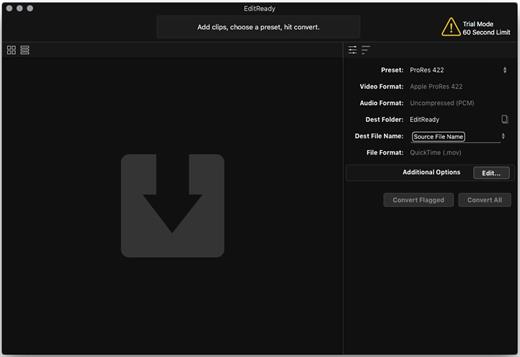
EditReady provides easy, fast and powerful transcoding for video professionals, without an overwhelming interface or outdated format choices. MOV, MP4 and MXF media can all be quickly converted to edit ready quicktime movies in ProRes or DNxHD.

Features


  • More than just transcoding – In addition to transcoding to professional formats like ProRes, DNxHD, and H.264, EditReady makes it easy to prep your footage for screening and editing. You can apply LUTs to your video during conversion to set a specific look or convert your Log footage into Linear. EditReady also allows you to override the framerate on your converted files, for pristine slow-motion with your 60p or 120p footage.
  • Smart Metadata Editing – EditReady provides a rich metadata viewer and editor. Modern cameras store GPS data, lens settings, diagnostic data, and more. Manually add location data if your camera didn’t store it, or set a reel name for all of your files. You can even use metadata to generate filenames for your transcoded files.
  • Modern, Blazing Fast, Ready for the Future – EditReady is designed to take advantage of all of the power available on modern Macs. It leverages hardware accelerated video decoding, OpenCL image processing, and every CPU cycle your system has to spare. And EditReady is designed with the future in mind – it’s ready to adopt new formats and workflows.
What’s New

Version 26.1:


  • Release notes were unavailable when this listing was updated.
Compatibility

macOS 10.15 or later
Apple Silicon or Intel Core processor


Release Name: EditReady 26.1
Size: 163.1 MB
Links: HOMEPAGE – NFO – Torrent Search

Download: RAPiDGATOR
11 Comments
Apr 2

Techtool Pro 20.1.9

TechTool Pro has long been one of the foremost utilities for keeping your Mac running smoothly and efficiently. With the release of this version, it has become more proficient than ever.

Main features:


  • TechTool Protection – TechTool Pro includes the option of installing a system preference pane to keep watch over your Mac. New features include check for I/O errors, Power On Self-Test errors, Mac notebook internal battery condition, and RAID status (if applicable). It also includes the same improvements to the SMART check in TechTool Pro. All of that, wrapped in an entirely new interface.
  • Check Computer – Check Computer is a handy way to tell TechTool Pro to run the entire suite of tests to give you the best possible snapshot of your Mac’s health. Sometimes, though, it’s nice to be able to leave tests out, or to skip certain drives. Using the new configuration panel, you have total control of the Check Computer suite. Power to the people.
  • Partition Map – TechTool Pro has long been known for testing your Mac’s file system. It is important also to test the data structures that contain the Mac’s file system: the Partition Map. The new Partition Map test checks the partition map of a given drive for errors. Partition map errors can cause entire volumes to go missing, or prevent a Mac from booting. If errors are found, they can be repaired usin the Partition Repair tool.
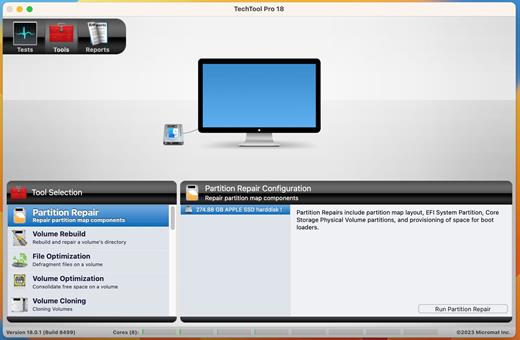
  • Partition Repair – Along with Volume Rebuild, which repairs Mac file systems, the Partition Repair tool repairs the remaining portions of the drive which keeps track of the volumes on your hard drive. This includes hidden partitions which keep track of your Mac’s startup process. The Partition Repair tool does just what it says, repairing the partition maps or drives where needed.
  • SMART Check – Hard drives include a technology called SMART (Self Monitoring, Analysis and Reporting Technology) which can inform a computer about the health of its hard drives. In most utilities, just the overall results – passed or failed – are reported to the user. In the failed state, often there is little or no time to back up data before the drive fails entirely. Previous versions of TechTool Pro reported the overall status of each attribute, but some attributes don’t contribute to the failure of a drive. Now, the SMART Check has gotten smarter. TechTool Pro now knows which attributes contribute to drive failure, and will report a failing result before the drive fails completely. Giving you time to rescue your data.
  • Memory Test – TechTool Pro 7 took a revolutionary step in testing memory, making TechTool Pro’s memory testing suite the most comprehensive test available for the Mac. In TechTool Pro 10, we’ve taken some of the additional advancements used by ATOMIC, our dedicated Memory Tester, and integrated them into TechTool Pro. Now, memory is ‘cleaned’ before testing, reclaimed from macOS, maximizing the amount of RAM that can be tested.
  • Processor Benchmark – Get an objective measurement of your Mac’s processor performance. The Processor Benchmark too uses industry-standard measurement algorithms to test processor performance. Using this tool, you can get metrics that can be used to compare processor speeds apples-to-apples. Avoids the confusion of comparison using Megahertz.
  • Bluetooth – Most Macs depend on Bluetooth to connect to the tools we use to interact with our computers: the keyboard and mouse. Bluetooth problems can result in dropped connections with those devices, which can be very frustrating. Verify the proper operation of your Mac’s Bluetooth hardware. Make sure that not only your input devices, but also your audio and fitness devices can connect to your Mac by checking the Bluetooth hardware on your Mac.
  • Network Interfaces – Most Macs spend the majority of their lives connected to the internet. If the ethernet or wifi adapters in your Mac aren’t working, the valuable connection to the internet can fail. The new Network Interfaces test can test any connected network interface for errors. It not only tests ethernet and wifi, but also any other supported internet connection, ethernet over USB, VPN connections, even a FireWire network conneciton. Ensure the reilability of your internet and intranet connections by testing your Mac’s network interfaces.
What’s New

Version 20.1.9:


  • Release notes were unavailable when this listing was updated.
Compatibility

macOS 10.13 or later.
Apple Silicon or Intel Core processor


Release Name: Techtool Pro 20.1.9
Size: 315.8 MB
Links: HOMEPAGE – NFO – Torrent Search

Download: RAPiDGATOR

10 Comments
Apr 2

Unite Pro 1.2

Unite for macOS lets you turn any website into a fully native Mac app with deep customization, fast performance, and macOS integration. Instead of opening sites in a browser with many tabs, Unite creates standalone apps that live in your Dock, support native window controls, and behave like real macOS software.

With Unite you can create an app in seconds by entering a URL, choosing an icon, and tailoring appearance and behavior to your preferences. Each app runs in its own isolated, lightweight WebKit‑based environment that feels more integrated and efficient than browser web apps or Electron alternatives. 

Unite apps offer extensive customization. You can hide or show title bars, adjust colors to match site branding, control window appearance, manage multiple tabs with advanced options like pinning and locking, and choose how links open within or outside the app. Notifications and macOS Focus Modes work per app, helping reduce distractions. 

Unite also includes flexible app modes, such as standard Mac windows, sidebar views, floating windows, compact views, and menu bar utilities. A built‑in ad blocker and customizable keyboard shortcuts streamline everyday use and navigation. 

What’s New

Version 1.2:


  • Release notes were unavailable when this listing was updated.
Compatibility

macOS 15 or later


Release Name: Unite Pro 1.2
Size: 28.9 MB
Links: HOMEPAGE – NFO – Torrent Search

Download: RAPiDGATOR
8 Comments