Please REGISTER or RENEW your account on RAPiDGATOR.net and support us by doing through all RAPiDGATOR working download links on main posts...
Mar 23

Structured 4.4.6

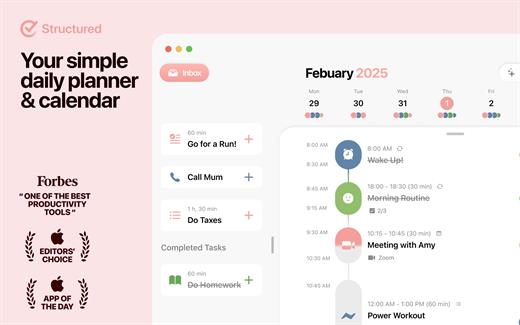
A visual daily planner to organize tasks, routines, and habits. Stay focused, reduce overwhelm, and plan your day in one clear timeline.
Finally take control of your day.
Plan with a clear visual timeline that brings your calendar, to-dos, routines, and habits together.

Join over 1.5 million active planners who feel calmer, focus faster, and get more done — every single day.

Perfect for work, study, travel, and busy ADHD minds. Plan in minutes and stay focused all day.


  • Organize your day and week in an intuitive timeline
  • Capture ideas instantly in Inbox and sort them later
  • Sync across iPhone, iPad, Apple Watch and Mac
  • Break big projects down with notes & sub-tasks
  • Stay on track with a Pomodoro focus timer, Live Activities, and interactive widgets
  • Personalize your planner with color-coding and hundreds of icons
  • Benefit from accessibility features like VoiceOver, Voice Control, a dyslexia-friendly font, and multiple languages
  • Get a complete overview by connecting your calendars and Reminders
  • Build recurring tasks & routines that actually stick
  • Powered by AI, draft your day in seconds
  • Replan, automatically reschedules missed or forgotten tasks
  • Customize notifications to match your workflow
What’s New

Version 4.4.6:


  • Release notes were unavailable when this listing was updated.
Compatibility

macOS 14.0 or later.


Release Name: Structured 4.4.6
Size: 72 MB
Links: HOMEPAGE – NFO – Torrent Search

Download: RAPiDGATOR

7 Comments
Mar 23

Manet Music 1.0.7

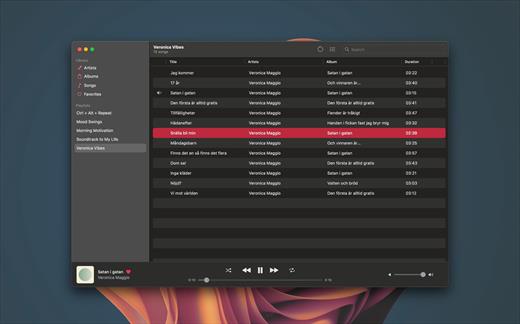
Experience seamless music streaming from Jellyfin for free with Manet, your go-to music app for iOS.

Offline Playback


  • Download your favorite music for offline listening, perfect for when you’re on the go or conserving data.
Siri Support

  • Command your music effortlessly using Siri. Simply ask Siri to play artists, playlists, albums, or tracks.
CarPlay Integration

  • Safely control playback while driving with our intuitive CarPlay interface, keeping your focus on the road.
Native iOS Experience

  • Built with native iOS technologies, Manet seamlessly integrates with your device for optimal performance.
Sleek Design

  • Purpose-built for iOS, Manet blends seamlessly with the platform’s aesthetics, offering a familiar and intuitive user experience.
Shortcuts Integration

  • Easily start playback as part of larger automations using Shortcuts.
What’s New

Version 1.0.7:


  • Release notes were unavailable when this listing was updated.
Compatibility

macOS 14.0 or later.


Release Name: Manet Music 1.0.7
Size: 10.3 MB
Links: HOMEPAGE – NFO – Torrent Search

Download: RAPiDGATOR
7 Comments
Mar 23

Minimal 1.24 fix

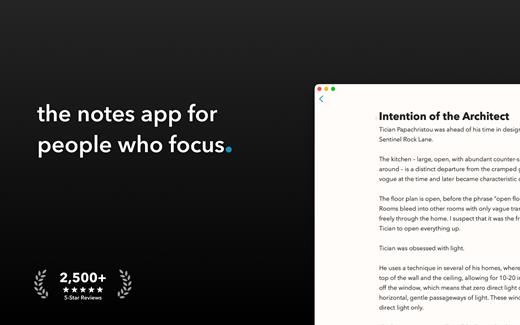
Write with focus. Open your mind with Minimal, a meditation-inspired notes and writing app.

Minimal combines thoughtful, modern design with powerful features to deliver a spacious, beautiful writing environment.


  • Note Lifetime
  • Collaborative writing
  • Publish notes as websites
  • Add Todos to the Calendar app
  • Beautiful formatting
  • Sync everywhere: Mac, iPhone, iPad, and Apple Watch
Minimal is a simple yet powerful notes app. Inspired by meditation, nature, and architectural design, Minimal provides a beautiful space to think, write, and organize projects.

NOTE LIFETIME
The Note Lifetime keeps your notebook fresh and reflective of the present moment. When a note goes unedited for a duration you choose in settings, you’ll be gently notified. This is an opportunity to review the note, act on it, or let it go.

COLLABORATIVE WRITING
Share notes with friends, family, and teammates. With a gentle design, writing remains focused and tranquil, even as thoughts merge and ideas multiply. Everyone receives changes as notes evolve, and multiple people can make edits at the same time without conflict.

FOCUSED + SPACIOUS DESIGN
Minimal is designed so only one element is ever in focus. We love the beauty of a blank page – abundant empty space allows for an ease of creative expression.

PUBLISH AS WEBSITE
Transform notes into beautifully-formatted websites in microseconds.

TODO LISTS
Todo lists are an effective way to organize projects and complete tasks. Sync with the Calendar app, get things done, and check everything off.

BEAUTIFUL FORMATTING
Minimal combines Markdown-style formatting with elegant typography. The result is simple, expressive notes that make it easy to think and write.

SYNC EVERYWHERE
Bring focus to your favorite devices. Minimal is designed for Mac, iPhone, iPad, and Apple Watch. Cloud Sync is fast, reliable, and invisible.

SHARE, EXPORT, IMPORT
You’re in control of your notes. Share directly in iMessage, export as PDF or HTML, and use the system share mechanism to take notes anywhere. Importing links + prose into Minimal is just as easy.

CUSTOMIZE EVERYTHING
The best notebook is personal. We made everything in Minimal customizable, from fonts + themes to sorting notes + note actions. You can also build custom workflows using the Shortcuts app.

A LITTLE GIFT
Wow, thanks for reading. As a little gift for tuning in, these are our favorite musicians -> Somi, Snarky Puppy, and London Grammar. They’re jazzy and introspective, just how we like it. Enjoy.

What’s New

Version 1.24:


  • Release notes were unavailable when this listing was updated.
Compatibility

macOS 14.0 or later.


Release Name: Minimal 1.24 fix
Size: 13.7 MB
Links: HOMEPAGE – NFO – Torrent Search

Download: RAPiDGATOR

8 Comments
Mar 23

Boxy SVG 4.103.1

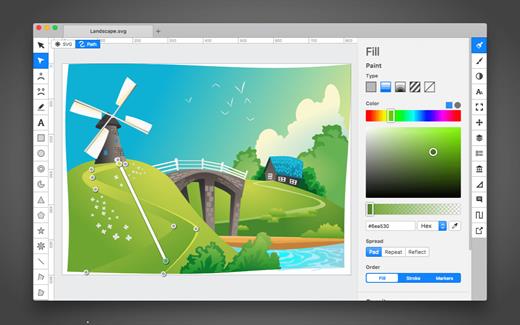
SVG is the standard format for storing vector graphics such as icons, banners, charts and illustrations.

Boxy SVG project goal is to create the best SVG editor for non-technical users as well as for professional designers and developers.

CORE FEATURES

• Clean and intuitive UI heavily inspired by Inkscape, Sketch and Adobe Illustrator
• Extensive support for on-canvas editing of object geometry, transform, paint and other properties
• Save to SVG and SVGZ formats, export to PNG, JPG, WebP, PDF and HTML5
• Open Clip Art Library integration with thousands of free stock vector arts
• Google Fonts integration with hundreds of free fonts
• Configurable keyboard shortcuts for over 100 commands
• Manual guides, smart guides and grid
• Path operations (unite, intersect, subtract, exclude, close, reverse, etc.)
• Arrangement operations (align to, rotate, flip, order, group, etc.)

FOR WEB DEVELOPERS

• Chromium-based rendering engine
• SVG and CSS code inspector similar to Chrome Dev Tools
• Clean SVG output that preserves IDs, classes, titles and other metadata
• SVG sprites editing support

What’s New

Version 4.103.1:


  • Release notes were unavailable when this listing was updated.
Compatibility

macOS 10.15 or later


Release Name: Boxy SVG 4.103.1
Size: 216.6 MB
Links: HOMEPAGE – NFO – Torrent Search

Download: RAPiDGATOR
6 Comments
Mar 23

Bartender 6.4.2

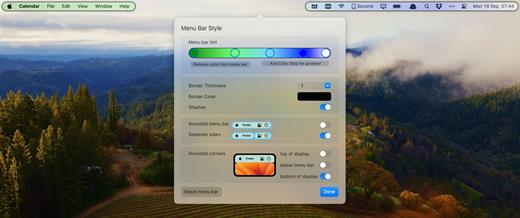
Bartender lets you organize your menu bar apps.

Features


  • Take control of your menu bar – With Bartender you can choose which apps stay in the menu bar, are displayed in the Bartender Bar or are hidden completely.
  • The Bartender Bar – The Bartender Bar can be displayed and hidden as you want, by clicking on the Bartender Icon or via a hot key.
  • Menu bar apps still work the same – Apps still work the same when they are in the Bartender Bar allowing you quick access to them when needed, but keeping them out of sight when not.
  • Show an app in the menu bar when it updates – Set up your apps to be displayed in the menu bar for a period of time when they update.
  • Order your menu bar items – With Bartender you can set the order of the menu bar items, both in the menu bar and in the Bartender Bar, simply by ⌘+dragging the items. The order you set is maintained after restarts. So your menu bar items are always in the order you want.
  • Minimalism – If you want a really clean look and privacy, Bartender can also be hidden.
  • The Bartender Bar can be placed where you want – The Bartender Bar can be moved at any time to any horizontal position immediately under the menu bar. Or it can open under the Bartender icon.
  • Keyboard Navigate your menu bar items – Keyboard navigate all menu items both in the menu bar and the Bartender Bar; simply arrow through them and press return to select.
  • Search menu bar items – You can search the Bartender Bar for menu items, allowing you quick access to a menu item without looking for it. Simply display the Bartender Bar and start typing, then press enter to select the menu item.
Bartender lets you organize your menu bar apps by hiding them, rearranging them, or moving them to Bartender’s Bar. You can display the full menu bar, set options to have menu bar items show in the menu bar when they have updated, or have them always visible in Bartender’s Bar.

What’s New

Version 6.4.2:


  • Release notes were unavailable when this listing was updated.
Compatibility

macOS 14.0 or later


Release Name: Bartender 6.4.2
Size: 29.8 MB
Links: HOMEPAGE – NFO – Torrent Search

Download: RAPiDGATOR
6 Comments
Mar 23

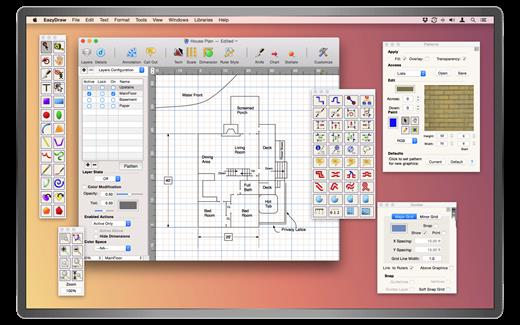
EazyDraw 12.4.6

EazyDraw is a vector drawing application. For the full journey from Jaguar to El Capitan, EazyDraw has been the trail-blazing app for the new vector-drawing paradigm on the Mac.

EazyDraw provides a balanced feature set that includes tools needed for technical drawing, Web and app graphic design, print publishing, logos, page — text layout and more. Easy enough for everyone, but with the depth your project will need.

Includes comprehensive support for bitmap and vector graphic formats. Import and ungroup for editing PDF and EPS. Import and export SVG and now DXF. Preview and publish to EPS and TIFF with RGB or CMYK process colors. Exchange scaled CAD drawings with DXF. Publish Web graphics. Create Mac, iPhone, and iPad app-development graphics and icons.

What’s New

Version 12.4.6:


  • Release notes were unavailable when this listing was updated.
Compatibility

macOS 10.13 or later
Apple Silicon or Intel Core processor


Release Name: EazyDraw 12.4.6
Size: 160.3 MB
Links: HOMEPAGE – NFO – Torrent Search

Download: RAPiDGATOR
6 Comments
Mar 23

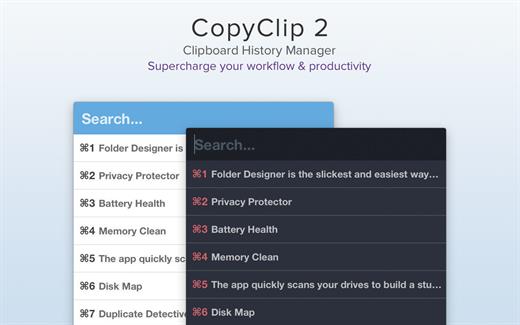
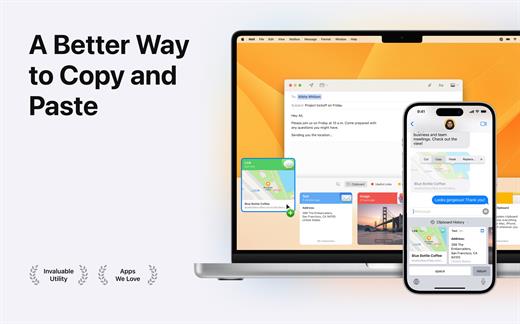
CopyClip 2 v3.989

CopyClip is the slickest and most efficient premium clipboard manager for your Mac. Running discreetly from your menu bar, the app stores all that you have copied or cut in the past, allowing you to quickly find that snippet of text you’ve been looking for.

CopyClip Features


  • Ability to store up to 230 clippings
  • Option to paste clippings with the original formatting if desired
  • Ability to search through clippings using the embedded search bar
  • Keyboard shortcuts to paste clippings
  • Right-click option to ‘pin’ chosen clippings to the top of the list
  • You can exclude apps you wish not to copy clippings from
  • Option to edit and delete individual clippings, as well as delete all clippings at once
  • Toggle between Dark/Light user interface themes
  • Works on both the menu bar and the Dock
What’s New

Version 3.989:


  • Bug fixes
Compatibility

macOS 11.5 or later.


Release Name: CopyClip 2 v3.989
Size: 9.4 MB
Links: HOMEPAGE – NFO – Torrent Search

Download: RAPiDGATOR

8 Comments
Mar 23

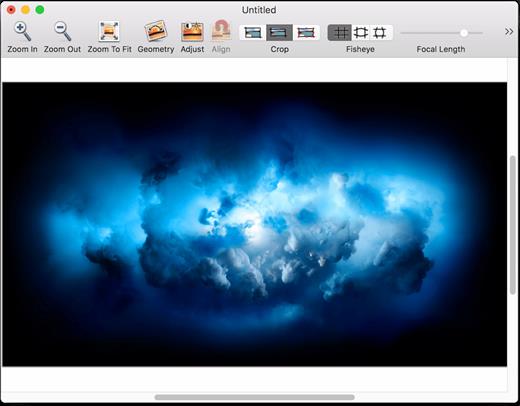
DoubleTake 2.7.9

DoubleTake is for Mac users who like compact cameras, but sometimes wish they could magically pull a wide angle lens out of their pocket, or plug in a sensor with a few extra megapixels for that large print.

DoubleTake handles this by giving you both automatic and manual control of how to stitch photos perfectly, with simple drag-and-drop.

What’s New

Version 2.7.9:


  • Release notes were unavailable when this listing was updated.
Compatibility

macOS 10.11 or later


Release Name: DoubleTake 2.7.9
Size: 8.3 MB
Links: HOMEPAGE – NFO – Torrent Search

Download: RAPiDGATOR
7 Comments
Mar 22

Minimal 1.24

Write with focus. Open your mind with Minimal, a meditation-inspired notes and writing app.

Minimal combines thoughtful, modern design with powerful features to deliver a spacious, beautiful writing environment.


  • Note Lifetime
  • Collaborative writing
  • Publish notes as websites
  • Add Todos to the Calendar app
  • Beautiful formatting
  • Sync everywhere: Mac, iPhone, iPad, and Apple Watch
Minimal is a simple yet powerful notes app. Inspired by meditation, nature, and architectural design, Minimal provides a beautiful space to think, write, and organize projects.

NOTE LIFETIME
The Note Lifetime keeps your notebook fresh and reflective of the present moment. When a note goes unedited for a duration you choose in settings, you’ll be gently notified. This is an opportunity to review the note, act on it, or let it go.

COLLABORATIVE WRITING
Share notes with friends, family, and teammates. With a gentle design, writing remains focused and tranquil, even as thoughts merge and ideas multiply. Everyone receives changes as notes evolve, and multiple people can make edits at the same time without conflict.

FOCUSED + SPACIOUS DESIGN
Minimal is designed so only one element is ever in focus. We love the beauty of a blank page – abundant empty space allows for an ease of creative expression.

PUBLISH AS WEBSITE
Transform notes into beautifully-formatted websites in microseconds.

TODO LISTS
Todo lists are an effective way to organize projects and complete tasks. Sync with the Calendar app, get things done, and check everything off.

BEAUTIFUL FORMATTING
Minimal combines Markdown-style formatting with elegant typography. The result is simple, expressive notes that make it easy to think and write.

SYNC EVERYWHERE
Bring focus to your favorite devices. Minimal is designed for Mac, iPhone, iPad, and Apple Watch. Cloud Sync is fast, reliable, and invisible.

SHARE, EXPORT, IMPORT
You’re in control of your notes. Share directly in iMessage, export as PDF or HTML, and use the system share mechanism to take notes anywhere. Importing links + prose into Minimal is just as easy.

CUSTOMIZE EVERYTHING
The best notebook is personal. We made everything in Minimal customizable, from fonts + themes to sorting notes + note actions. You can also build custom workflows using the Shortcuts app.

A LITTLE GIFT
Wow, thanks for reading. As a little gift for tuning in, these are our favorite musicians -> Somi, Snarky Puppy, and London Grammar. They’re jazzy and introspective, just how we like it. Enjoy.

What’s New

Version 1.24:


  • Release notes were unavailable when this listing was updated.
Compatibility

macOS 14.0 or later.


Release Name: Minimal 1.24
Size: 13.7 MB
Links: HOMEPAGE – NFO – Torrent Search

Download: RAPiDGATOR

11 Comments