Please REGISTER or RENEW your account on RAPiDGATOR.net and support us by doing through all RAPiDGATOR working download links on main posts...
Mar 22

Color Hound 1.9.0

Image → Colors
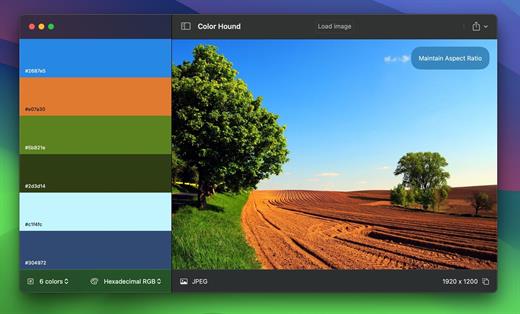
Palette generator. Detect + export color palettes
from your images – instantly!

FEATURES


  • Show me the image! Simple, practical and ultra-easy to use: Just drag’n’drop your photo you want to analyze!
  • Tons of options Lots of options (number of colors, format, etc) to get exactly the result you wish.
  • Export Want to export to CSS? Maybe LESS? Maybe export the whole palette to an image? Done! and wait for a couple of seconds. Your application disk image will be ready befre you even notice!
What’s New

Version 1.9.0:


  • Release notes were unavailable when this listing was updated.
Compatibility

macOS 12.0 or later


Release Name: Color Hound 1.9.0
Size: 5.6 MB
Links: HOMEPAGE – NFO – Torrent Search

Download: RAPiDGATOR

11 Comments
Mar 22

Watermarker+ 1.3.6

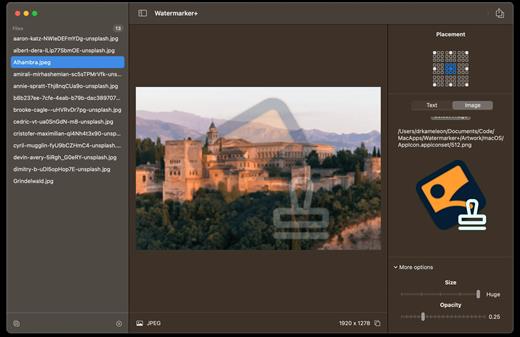
Batch photo watermarking
made ridiculously easy. The easiest way to watermark
your image & photos – in batch

FEATURES

-Bring your photos
More than ‘just a few’ photos to watermark? No problemo! Just drag’n’drop them all in the app and let’s get started!
-Adjustments
Whether it’s a simple text or an image, you can tweak the final result to your heart’s content: position, size, font, etc… We’ve got you covered!
-Let’s watermark!
All set? Right. Just click the button, take a sip of coffee (or two) and wait until all your photos are beautifully watermarked! ?

What’s New

Version 1.3.6:


  • Release notes were unavailable when this listing was updated.
Compatibility

macOS 12.0 or later


Release Name: Watermarker+ 1.3.6
Size: 5.1 MB
Links: HOMEPAGE – NFO – Torrent Search

Download: RAPiDGATOR

11 Comments
Mar 21

Screens 5.8.3

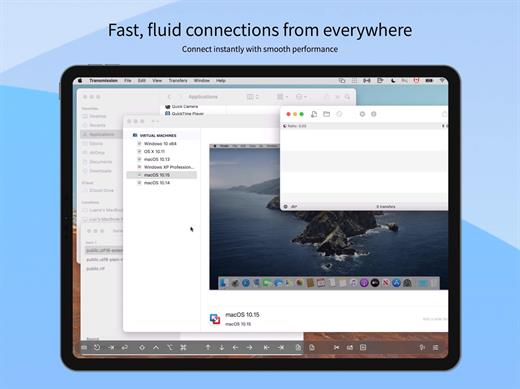
Screens is an excellent VNC client for your Mac.

Features


  • iCloud – Synchronize all your stored screens on all your iOS devices, including your Mac.
  • Use Screens in fullscreen mode to make it feel your remote computer is right there in front of you.
  • Easy to Use: Screens is an easy, user-friendly VNC client for Mac.
  • Secure: Screens can connect to your computer through an SSH tunnel so your session is encrypted and safe.
  • Multi-Touch: Screens supports many of the multi-touch features – such as pinch and navigation – you’re already used to on your trackpad.
  • Screens Connect: Make your computer available from anywhere with this optional helper app. Easy as flicking a switch. No messy router setup.
  • Works Anywhere: Through Wi-Fi or a 3G network.
What’s New

Version 5.8.1


  • Improved momentum scrolling when connected to a Mac
  • Fixed an issue that could cause disconnections when sending clipboard content to a Mac in certain situations
  • Urls now support guest and observe parameters (true or 1)
  • Improved authentication handling and reliability
  • Swipe-to-type is now supported on iPhone
  • Performance and stability improvements
Compatibility

macOS 14.0 or later.


Release Name: Screens 5.8.3
Size: 38.9 MB
Links: HOMEPAGE – NFO – Torrent Search

Download: RAPiDGATOR

12 Comments
Mar 21

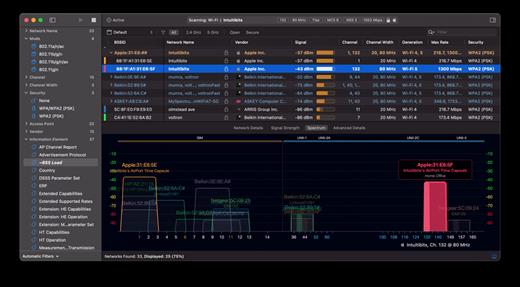
WiFi Explorer 3.6.5

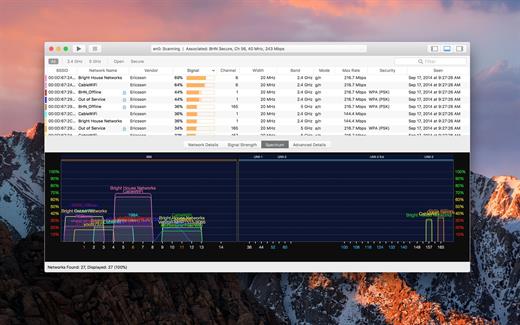
WiFi Explorer will scan, find, and troubleshoot wireless networks.

Quickly identify channel conflicts, signal overlapping, or configuration problems that may be affecting the connectivity and performance of your home or office wireless network.

Get an insight into the network details: name (SSID), MAC address (BSSID), device manufacturer, signal strength (RSSI), noise, channel, band, security configuration, supported data rates, and much more.


  • Suitable for home, small office, or enterprise networks
  • Easy-to-use, intuitive user interface
  • Graphical visualization of the Wi-Fi environment
  • Supports 2.4 GHz and 5 GHz frequency bands as well as 20, 40, 80 and 160 MHz channels
  • Works with IEEE 802.11a/b/g/n/ac networks
Also:

  • Comprehensive app’s help
  • Signal quality ratings based on signal-to-noise ratio (SNR)
  • Accurate conversion from dBm to percentage (%) for easier analysis and optimization
  • Detailed description of information elements (IE) advertised by the access point for advanced troubleshooting
  • Export metrics and network details to CSV file format
  • Save results for later review and analysis
  • Access point name discovery (if supported)
  • Editable column for labels or annotations
  • Selectable and sortable columns
  • Adjustable graph timescales
  • Quick filtering
  • Customizable colors for easily tracking particular networks
  • Full screen mode
What’s New

Version 3.6.5:


  • Release notes were unavailable when this listing was updated.
Compatibility

macOS 10.13.0 or later


Release Name: WiFi Explorer 3.6.5
Size: 11 MB
Links: HOMEPAGE – NFO – Torrent Search

Download: RAPiDGATOR

11 Comments
Mar 21

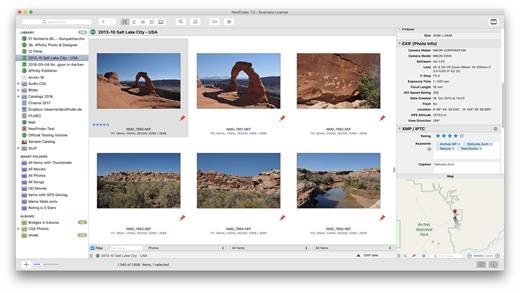
NeoFinder 9.2

NeoFinder (formerly CDFinder) rapidly organizes your data, either on external or internal disks, or any other volumes. It catalogs all your data, so you stay in control of your data archive or disk library. With extensive metadata support, you can find your files quickly.

Feature Overview


  • Catalog: any hard disk, data folder, CD-ROM, DVD-ROM, BlueRay, HD-DVD, iPod, Server Volume, Audio-CD, USB-Stick, FTP-Server, and more
  • Power: Handle really large amounts of data
  • Photo Previews: Create beautiful thumbnails for many photo and image formats, such as JPG, TIFF, EPS, RAW, PDF, PSD, BMP, GIF, PNG, TGA, IFF (Maya)
  • Audio Meta Data: MP3, AAC (iTunes), FLAC (Lossless), ALAC (Apple Lossless), and AIFF meta data: author, album, title, composer, lyrics, cover art, track number, duration, bit rate, genre, year, comment. Even catalogs whole Audio-CDs, and Apple iPhone ringtone files!
  • Photo Meta Data: XMP (used by Adobe Bridge), EXIF and IPTC meta data (including GPS geotags), and JPG, TIFF, PICT and BMP photo details
  • Movie Meta Data: get thumbnails, the dimension, duration, codec and frame rate out of movie files, supporting AVI, MOV, MP4, FLV, MPG, MKV, M4V, and others
  • Geotagging GPS support: NeoFinder catalogs and displays GPS EXIF tags of photos, and has direct links to Google Earth, Flickr, Panoramio, Google Maps and MapQuest. NeoFinder can even search for photos that were taken near any location (GeoFinder), and export GPS data to KMZ files
  • Networkable: Share your NeoFinder database in your entire workgroup (requires a Business License)
  • Cross-platform: with abeMeda (was CDWinder), you can use one database for both worlds!
  • Workflow Integration: Automatically catalog all discs burned by Roxio Toast; Drag any image directly from NeoFinder into applications like Adobe InDesign, Quark XPress, Apple Pages, Microsoft Office; integrate NeoFinder into FileMaker Pro databases, and much more
  • Find it! Best Find functions, and of course offline browsing of all your volumes – even in multiple windows, if you want to
  • Spotlight Integration: Search your local disks with Spotlight and as well as your catalogs from inside NeoFinder
  • Import Catalogs: These twelve formats are supported: Disk Recall, DiskWizard, Iomega FindIt, Portents DiskTracker (both 1.x and 2.x!), Catalogue, CatFinder, “Neometric” Catalog, DiskLibrary, Broken Cross Disk Manager (Windows), and Advanced Disk Catalog (ADC for Windows) catalog or export files, and iView MediaPro and Microsoft Expression Media XML files
  • Fast and really easy to use, see screenshots
  • Export and print catalog data
  • Insight: Look inside archive files: ZIP, TAR, .rar, StuffIt (.sit and even .sitx), and others, including Disk Image contents
  • International: English, German, French, Italian, Swedish, Spanish and Dutch user interface, all in one application
  • Unicode compatible: Use NeoFinder to catalog file names of any language
  • AppleScript: Integrate NeoFinder with FileMaker Pro or any other application, or extend the abilities of NeoFinder
  • Extend your NeoFinder catalog database by using five custom fields for any content you need
  • FileCheck: Only NeoFinder can generate an industrial strength MD5 checksum for every file being cataloged
  • AutoMount: NeoFinder automatically mounts every server volume you have cataloged or updated for you, if needed! And you can of course also ask NeoFinder to mount the volume for you at any time, using the context menu
  • QuickLook: Open a QuickLook window for any selected online file(s) right from inside NeoFinder!
  • Cross-Grade: you already bought a different disk cataloger or media asset manager application, ask us for a good offer!
  • Free email support
  • Languages: User Interface in eight languages, all in one application: English, German, Japanese, French, Italian, Swedish, Spanish and Dutch
What’s New

Version 9.2:


  • Release notes were unavailable when this listing was updated.
Compatibility

macOS 10.13.6 or later


Release Name: NeoFinder 9.2
Size: 42.8 MB
Links: HOMEPAGE – NFO – Torrent Search

Download: RAPiDGATOR

12 Comments
Mar 21

WiFi Explorer Pro 3.9.4

WiFi Explorer Pro takes the code base of WiFi Explorer, and adds a set of features that makes it the right tool for WLAN and IT professionals. You can use WiFi Explorer Pro for preliminary assessments, to help design and validate wireless networks installations, as well as to identify channel conflicts, overlapping, poor signal quality and other issues that may be affecting the connectivity or performance of your home, office or enterprise wireless network.

Features:


  • Passive and directed scan modes
  • Spectrum analysis integration
  • Custom filters
  • Support for remote sensors
  • Support for networks with hidden SSIDs
  • Additional columns with advanced information
  • Additional organization options for scan results
  • Dark and light themes
What’s New

Version 3.9.4:


  • Release notes were unavailable when this listing was updated.
Compatibility

macOS 10.13.0 or later


Release Name: WiFi Explorer Pro 3.9.4
Size: 15.9 MB
Links: HOMEPAGE – NFO – Torrent Search

Download: RAPiDGATOR

10 Comments
Mar 21

CameraBag Pro 2026.1

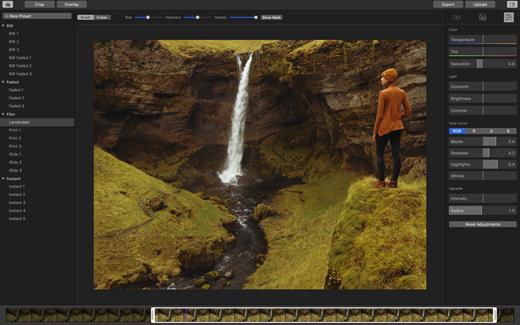
The best kept secret in photography (and videography) just got a whole lot better! CameraBag lets you instantly apply one of hundreds of beautiful presets to your photos and videos, and then dive deeper with ultra-intuitive professional adjustments and custom presets. CameraBag’s focus on intuitive tools and workflows isn’t about dumbing down image editing, it’s about making it work better.
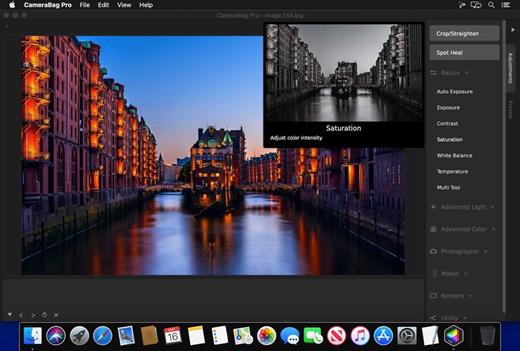
With presets specifically designed for portraits, different landscape scenarios, faithful emulation of analog film stock from the past, popular modern photo styles, and more, CameraBag has you covered, even if you don’t yet know how to use all of its powerful tools.

CameraBag Pro is particularly great for anyone who needs to apply the same style to both photos and videos – especially with batch processing for large sets of media (including watermarks/branding, resizing, and cropping).

For those with professional needs, what really sets CameraBag apart from other photo editors is just how intuitive and powerful its advanced tools are.

Unique curve tools, adjustment re-ordering and layering, and large precise controls let you do things you simply can’t do in other popular software.
Following are some ways CameraBag is perfect for specific groups of users.

Wedding Photography


  • Easy batch filtering and watermarking
  • Use the exact same adjustments and filters on videos and photos
  • Quick comparison tools for large sets of photos
  • Tons of useful presets for wedding photography
*** CameraBag Pro includes all the same great features as CameraBag Photo, but also works on videos and includes LUT file support! ***

What’s New

Version 2026.1:


  • Release notes were unavailable when this listing was updated.
Compatibility

macOS 10.10 or later.
Apple Silicon or Intel Core processor


Release Name: CameraBag Pro 2026.1
Size: 59.3 MB
Links: HOMEPAGE – NFO – Torrent Search

Download: RAPiDGATOR

12 Comments
Mar 21

CopyClip 2 v3.988

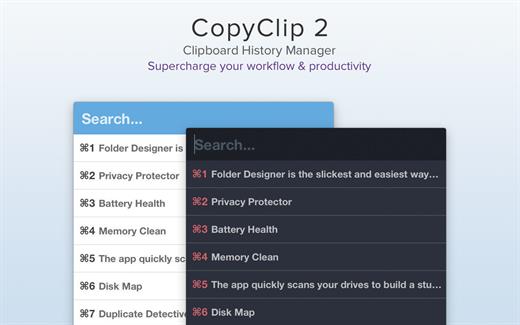
CopyClip is the slickest and most efficient premium clipboard manager for your Mac. Running discreetly from your menu bar, the app stores all that you have copied or cut in the past, allowing you to quickly find that snippet of text you’ve been looking for.

CopyClip Features


  • Ability to store up to 230 clippings
  • Option to paste clippings with the original formatting if desired
  • Ability to search through clippings using the embedded search bar
  • Keyboard shortcuts to paste clippings
  • Right-click option to ‘pin’ chosen clippings to the top of the list
  • You can exclude apps you wish not to copy clippings from
  • Option to edit and delete individual clippings, as well as delete all clippings at once
  • Toggle between Dark/Light user interface themes
  • Works on both the menu bar and the Dock
What’s New

Version 3.988:


  • Bug fixes
Compatibility

macOS 11.5 or later.


Release Name: CopyClip 2 v3.988
Size: 9.4 MB
Links: HOMEPAGE – NFO – Torrent Search

Download: RAPiDGATOR

12 Comments
Mar 21

Cinemagraph Pro 2026.11

Cinemagraph Pro is the only professional tool specifically designed for the creation of living photos. With its unique “live-masking” technology, artists can preview their living images in real time and output HD (1080) and UHD (4k) quality hybrid photographs.

An intuitive interface enables swift navigation amongst a full suite of editing modes and with just a few clicks, your living photos are shared with the world. It’s never been easier to create beautiful professional-grade Cinemagraph images.

What’s New

Version 2026.11:


  • Release notes were unavailable when this listing was updated.
Compatibility

macOS 11.7 or later.


Release Name: Cinemagraph Pro 2026.11
Size: 73.8 MB
Links: HOMEPAGE – NFO – Torrent Search

Download: RAPiDGATOR

12 Comments
Mar 21

Zipic 1.9.1

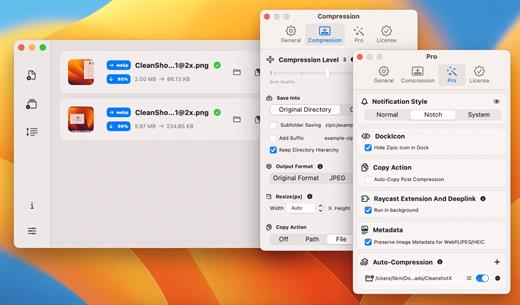
Zipic is a native macOS application designed for efficient, high-quality image compression. It lets users shrink image files locally, with no uploads or dependency on the cloud. All processing happens on your own device—so your privacy and speed stay intact.

Key Features and Highlights:


  • High Compression, Near-Lossless Quality: Zipic utilizes powerful compression algorithms to achieve a high compression ratio with minimal perceived quality loss, making the compressed image virtually indistinguishable from the original.
  • Fast & Local Processing: Being a native macOS application, all image processing occurs locally on your device. This ensures lightning-fast performance, efficient handling of massive batches, and high data privacy with no cloud uploads or network dependence.
  • Comprehensive Format Support: The tool supports a wide range of formats, including basic ones like JPEG, PNG, WebP, HEIC, and GIF, and Pro formats like AVIF, JXL, TIFF, and ICNS.
  • Effortless Workflow: It offers multiple simple compression methods, including drag-and-drop, folder monitoring, and Finder integration (right-click).
  • Custom Control: Users can create custom presets for different quality levels and scenarios, allowing for precise control over the compression outcome.
  • Pro Features for Automation: Advanced features include Clipboard auto-compress, Folder Watch for automated compression in specific directories, and integration options like Raycast Extension and Apple Shortcuts.
Zipic aims to be the seamless solution for developers, designers, bloggers, and photographers who need to optimize and compress images efficiently.

What’s New

Version 1.9.1:


  • Release notes were unavailable when this listing was updated.
Compatibility

macOS 13.0 or later


Release Name: Zipic 1.9.1
Size: 11.7 MB
Links: HOMEPAGE – NFO – Torrent Search

Download: RAPiDGATOR
12 Comments